> ## Documentation Index
> Fetch the complete documentation index at: https://docs.tensor9.com/llms.txt
> Use this file to discover all available pages before exploring further.
# How Tensor9 BYOC works
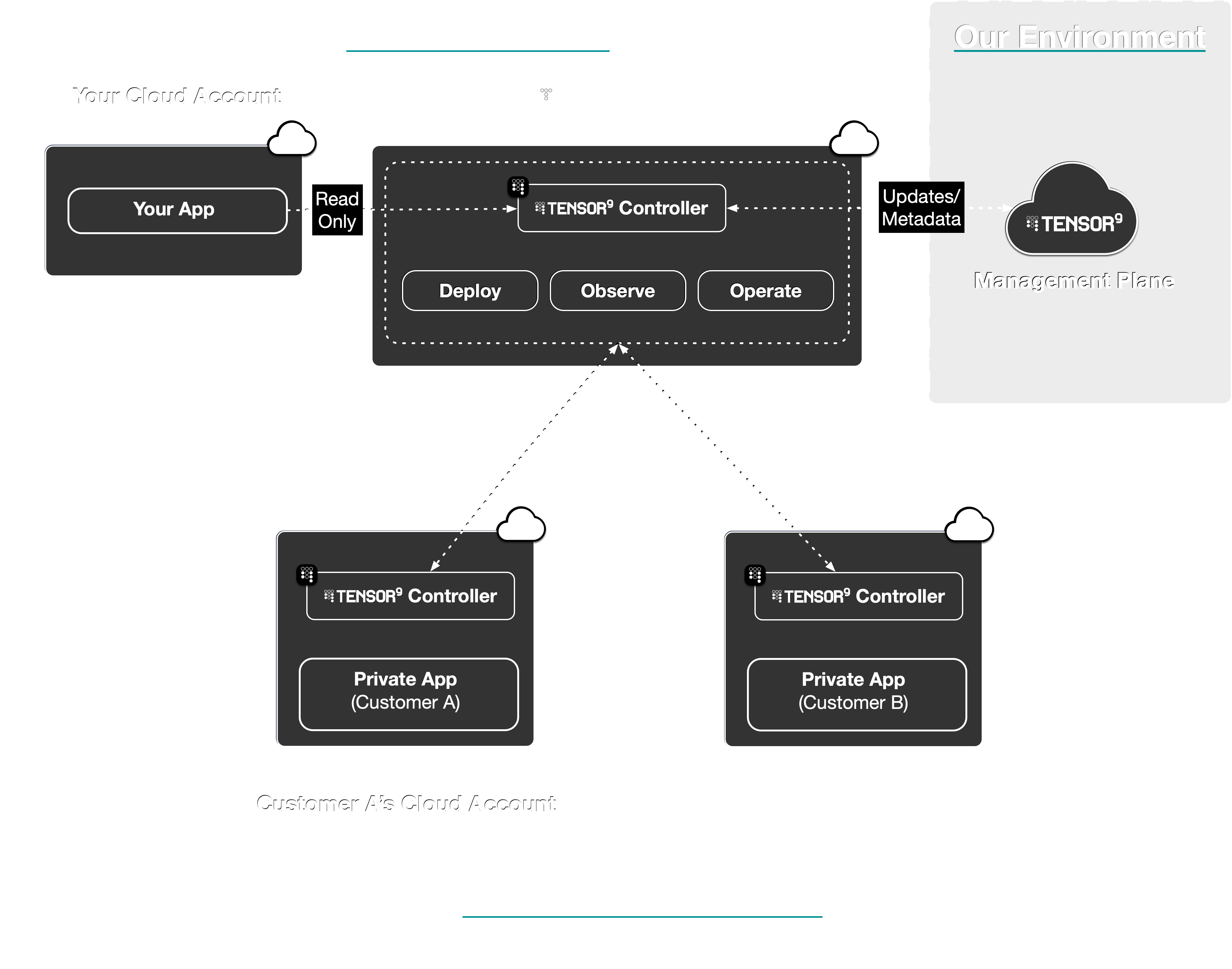
Tensor9 BYOC delivers your existing app to your customers as a private **appliance** installed directly into their environment.
A Tensor9 BYOC **controller** in your cloud account creates a control plane that orchestrates **deployments**,
and allows you to **operate** and **observe** your customers' appliances:

 Here are the steps you'll take to use Tensor9 BYOC:
Connect your app's **origin stack** to Tensor9 BYOC.
Tensor9 BYOC supports origin stacks defined in: **Terraform/OpenTofu**, **CloudFormation**,
**Kubernetes Manifests/Helm**, and **Docker Compose/Containers**.
Here are the steps you'll take to use Tensor9 BYOC:
Connect your app's **origin stack** to Tensor9 BYOC.
Tensor9 BYOC supports origin stacks defined in: **Terraform/OpenTofu**, **CloudFormation**,
**Kubernetes Manifests/Helm**, and **Docker Compose/Containers**.
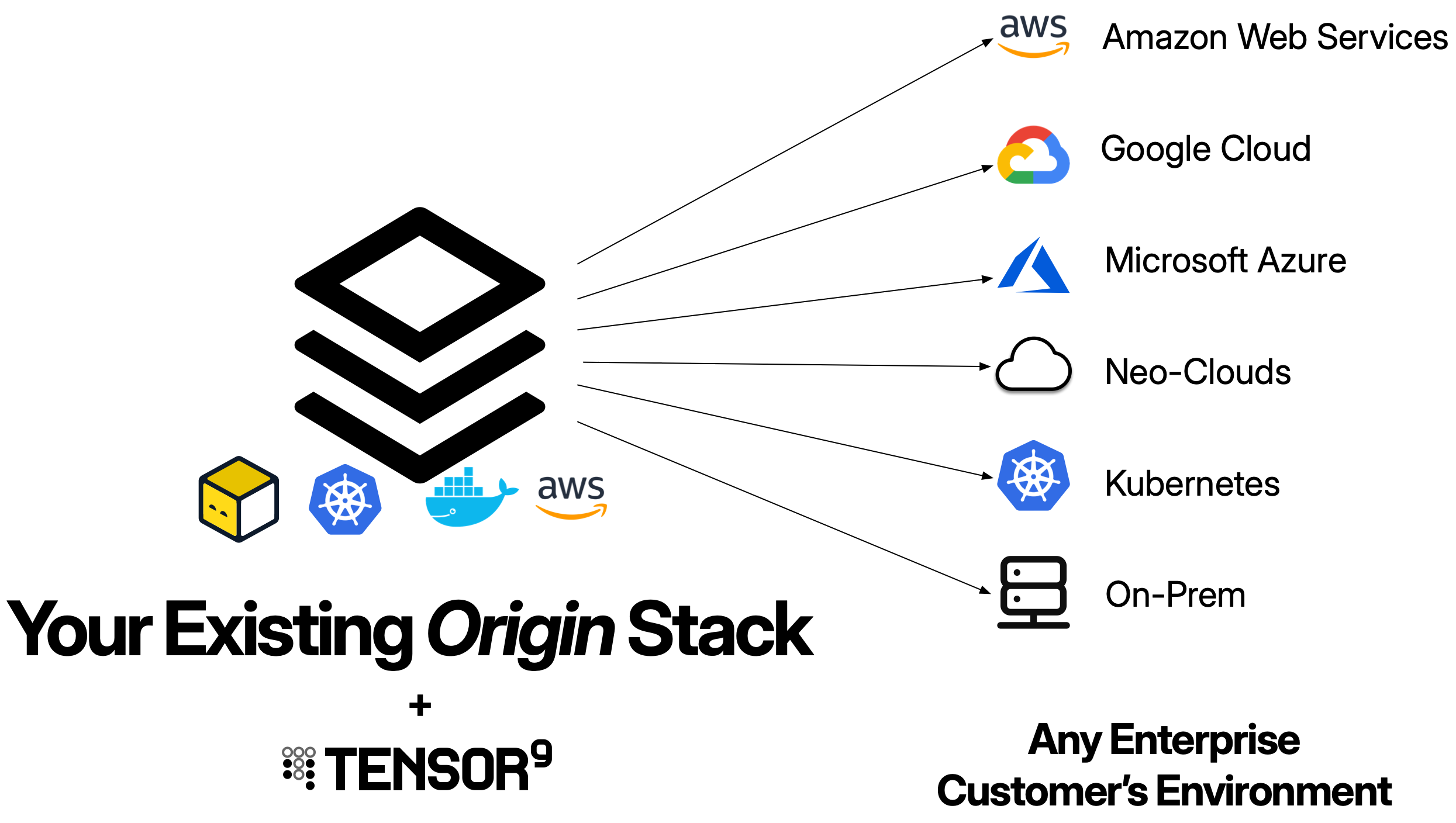
 Create an **appliance** for the customer environment you want to deploy to.
An appliance is defined by its **form factor**, which specifies the target environment like
**Amazon Web Services**, **Google Cloud**, **Microsoft Azure**, or a customer-provided **Kubernetes** cluster,
as well as which managed cloud services are required.
You create an appliance using `tensor9 CLI` or the [**Vendor Portal**](/byoc/fundamentals/key-concepts#vendor-portal).
Your customer completes setup through a guided install wizard, a white-labeled web interface branded with your logo and company name.
Use `tensor9 CLI` to **compile** your origin stack into a **deployment stack** for your new appliance.
Tensor9 BYOC compiles your stack for the **form factor** of that appliance.
For example, a Google Cloud deployment can map an AWS load balancer
to Google Cloud Load Balancing and AWS Aurora PostgreSQL to Cloud SQL
for PostgreSQL. The selected service adapters determine which features
are preserved and which require changes.
Use standard tooling to **deploy** your deployment stack to a customer appliance.
For example, if your origin stack is defined using Terraform/OpenTofu,
then invoke `terraform apply` or `tofu apply` on a deployment stack to deploy
that stack to the appliance it was compiled for.
**Observe** the state, performance, and usage of deployed
resources in customer appliances; with metrics, logs, and
traces asynchronously synchronized back to your **observability sink** of choice.
Monitor appliance health from the [**Vendor Portal**](/byoc/fundamentals/key-concepts#vendor-portal) dashboard or the CLI.
You can also **operate** deployed resources within customer appliances.
For example, execute `kubectl` commands or request temporary, scoped access to cloud resources via IAM.
Your customers review and approve operations requests through their [**Customer Portal**](/byoc/fundamentals/key-concepts#customer-portal).
## Per-customer configuration
The same origin stack compiles into different deployment stacks for different customers, driven by customer-supplied configuration. Each customer can pick their ingress posture (public, allowlisted, Tailscale, or fully private), substitute their own managed services for default-shipped ones (for example, the customer's own managed Temporal), and choose how the appliance reaches your control plane (public internet, AWS PrivateLink, or Tailscale). You ship one stack; each customer gets a build shaped to their environment. See [Auto-Customizations](/byoc/customizations/overview) for the full picture.
## How Tensor9 BYOC compares to building it yourself
| Feature | With Tensor9 BYOC | Without Tensor9 BYOC |
| ----------------------- | ------------------------------------------------------------------------------------------------------------------------------------------------------------------------------------------------------------------------------------------------------------------------------------------ | ---------------------------------------------------------------------------------------------------------------------------------------------------------------------------------------------------- |
| **Service Equivalents** | Maintain a single origin stack. Tensor9 BYOC maps cloud services to their equivalents in the target environment during compilation (e.g., RDS → Cloud SQL, S3 → GCS). | Maintain separate infrastructure code for each cloud provider. Port resources manually and keep feature parity across cloud-specific APIs. |
| **Deployments** | Tensor9 BYOC compiles your origin stack into a deployment stack for a private appliance in your customer's environment. Deploy using standard tooling locally (`terraform apply`, `tofu apply`), and Tensor9 BYOC applies changes to the corresponding appliance through a secure channel. | Manually set up a deployment pipeline unique to each customer environment. Request temporary access to customer infrastructure (VPN, IAM roles) for each deployment and execute operations manually. |
| **Observability** | Telemetry (logs, metrics, traces) flows from appliances to your observability sink. Tensor9 BYOC configures forwarding automatically based on your origin stack. | Set up monitoring agents, configure log forwarding, and manage telemetry infrastructure separately in each customer environment. |
| **Operations** | Execute operations commands remotely through your control plane with customer approval workflows and audit logging. | Request and manage temporary access credentials for each operation. Coordinate with customers for access to their infrastructure. |
| **Artifacts** | Tensor9 BYOC identifies artifacts in your origin stack and copies them to appliance-local storage during deployment (container images, S3 objects). | Build artifact replication and distribution systems. Manage credentials for artifact access across customer environments. |
| **Secrets** | Store customer-specific secrets in your control plane with access controls defining vendor vs. customer-only access. | Manage secrets across multiple systems. Coordinate with customers for secret injection and rotation. |
| **Endpoints and DNS** | Tensor9 BYOC provisions DNS records for each appliance under a domain you specify (vendor-owned or customer-owned) with delegation to customer infrastructure where appropriate. | Coordinate with customer network teams to configure DNS for each deployment. |
Create an **appliance** for the customer environment you want to deploy to.
An appliance is defined by its **form factor**, which specifies the target environment like
**Amazon Web Services**, **Google Cloud**, **Microsoft Azure**, or a customer-provided **Kubernetes** cluster,
as well as which managed cloud services are required.
You create an appliance using `tensor9 CLI` or the [**Vendor Portal**](/byoc/fundamentals/key-concepts#vendor-portal).
Your customer completes setup through a guided install wizard, a white-labeled web interface branded with your logo and company name.
Use `tensor9 CLI` to **compile** your origin stack into a **deployment stack** for your new appliance.
Tensor9 BYOC compiles your stack for the **form factor** of that appliance.
For example, a Google Cloud deployment can map an AWS load balancer
to Google Cloud Load Balancing and AWS Aurora PostgreSQL to Cloud SQL
for PostgreSQL. The selected service adapters determine which features
are preserved and which require changes.
Use standard tooling to **deploy** your deployment stack to a customer appliance.
For example, if your origin stack is defined using Terraform/OpenTofu,
then invoke `terraform apply` or `tofu apply` on a deployment stack to deploy
that stack to the appliance it was compiled for.
**Observe** the state, performance, and usage of deployed
resources in customer appliances; with metrics, logs, and
traces asynchronously synchronized back to your **observability sink** of choice.
Monitor appliance health from the [**Vendor Portal**](/byoc/fundamentals/key-concepts#vendor-portal) dashboard or the CLI.
You can also **operate** deployed resources within customer appliances.
For example, execute `kubectl` commands or request temporary, scoped access to cloud resources via IAM.
Your customers review and approve operations requests through their [**Customer Portal**](/byoc/fundamentals/key-concepts#customer-portal).
## Per-customer configuration
The same origin stack compiles into different deployment stacks for different customers, driven by customer-supplied configuration. Each customer can pick their ingress posture (public, allowlisted, Tailscale, or fully private), substitute their own managed services for default-shipped ones (for example, the customer's own managed Temporal), and choose how the appliance reaches your control plane (public internet, AWS PrivateLink, or Tailscale). You ship one stack; each customer gets a build shaped to their environment. See [Auto-Customizations](/byoc/customizations/overview) for the full picture.
## How Tensor9 BYOC compares to building it yourself
| Feature | With Tensor9 BYOC | Without Tensor9 BYOC |
| ----------------------- | ------------------------------------------------------------------------------------------------------------------------------------------------------------------------------------------------------------------------------------------------------------------------------------------ | ---------------------------------------------------------------------------------------------------------------------------------------------------------------------------------------------------- |
| **Service Equivalents** | Maintain a single origin stack. Tensor9 BYOC maps cloud services to their equivalents in the target environment during compilation (e.g., RDS → Cloud SQL, S3 → GCS). | Maintain separate infrastructure code for each cloud provider. Port resources manually and keep feature parity across cloud-specific APIs. |
| **Deployments** | Tensor9 BYOC compiles your origin stack into a deployment stack for a private appliance in your customer's environment. Deploy using standard tooling locally (`terraform apply`, `tofu apply`), and Tensor9 BYOC applies changes to the corresponding appliance through a secure channel. | Manually set up a deployment pipeline unique to each customer environment. Request temporary access to customer infrastructure (VPN, IAM roles) for each deployment and execute operations manually. |
| **Observability** | Telemetry (logs, metrics, traces) flows from appliances to your observability sink. Tensor9 BYOC configures forwarding automatically based on your origin stack. | Set up monitoring agents, configure log forwarding, and manage telemetry infrastructure separately in each customer environment. |
| **Operations** | Execute operations commands remotely through your control plane with customer approval workflows and audit logging. | Request and manage temporary access credentials for each operation. Coordinate with customers for access to their infrastructure. |
| **Artifacts** | Tensor9 BYOC identifies artifacts in your origin stack and copies them to appliance-local storage during deployment (container images, S3 objects). | Build artifact replication and distribution systems. Manage credentials for artifact access across customer environments. |
| **Secrets** | Store customer-specific secrets in your control plane with access controls defining vendor vs. customer-only access. | Manage secrets across multiple systems. Coordinate with customers for secret injection and rotation. |
| **Endpoints and DNS** | Tensor9 BYOC provisions DNS records for each appliance under a domain you specify (vendor-owned or customer-owned) with delegation to customer infrastructure where appropriate. | Coordinate with customer network teams to configure DNS for each deployment. |