> ## Documentation Index
> Fetch the complete documentation index at: https://docs.tensor9.com/llms.txt
> Use this file to discover all available pages before exploring further.
# Terraform/OpenTofu
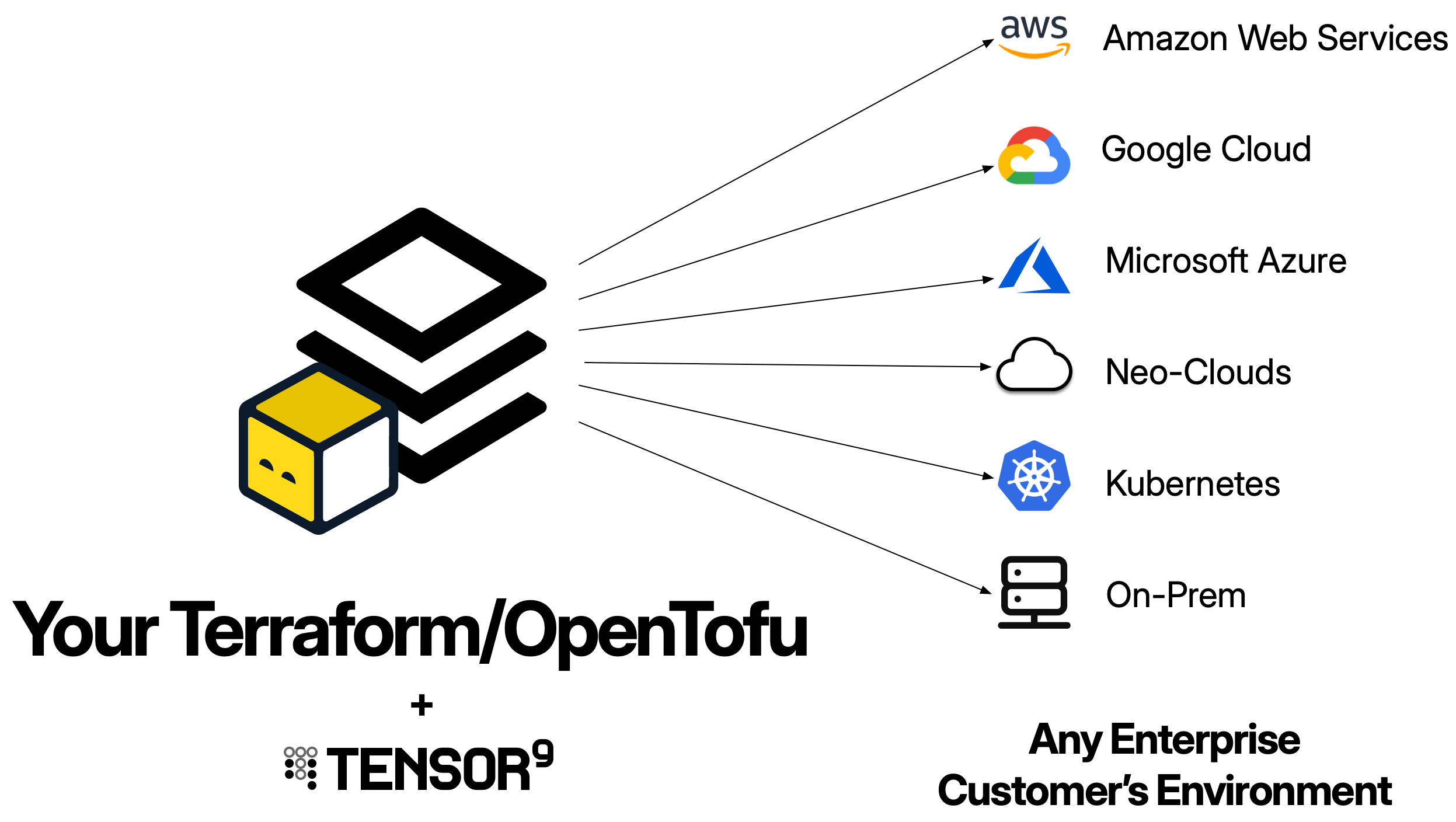
Terraform and OpenTofu are the most common infrastructure-as-code tools used with Tensor9 BYOC. A Terraform origin stack is a standard Terraform workspace that Tensor9 BYOC compiles into customer-specific deployment stacks for each appliance.
 ## What is a Terraform origin stack?
A Terraform origin stack is your existing Terraform configuration - the `.tf` files that define your application's infrastructure. Tensor9 BYOC uses this as the blueprint to generate deployment stacks tailored to each customer's environment.
When you publish a Terraform origin stack to Tensor9 BYOC, your control plane:
1. Archives your Terraform workspace into a `.tf.tgz` file
2. Uploads it to your control plane's S3 bucket
3. Uses it as the template for generating deployment stacks for each appliance
The key difference from standard Terraform usage: **you maintain one origin stack** that Tensor9 BYOC compiles into many deployment stacks - one per customer appliance.
Your origin stack should be your existing Terraform configuration. Tensor9 BYOC is designed to work with the infrastructure-as-code you already have - you don't need to write a new stack just for Tensor9 BYOC. The goal is to maintain a single stack that works for both your cloud deployment and private customer deployments.
## How Terraform origin stacks work
Using Terraform with Tensor9 BYOC follows a straightforward workflow:
You publish your Terraform workspace to your control plane using `tensor9 stack publish`. This uploads your `.tf` files as a compressed archive to your control plane's S3 bucket.
When you want to deploy to an appliance, you create a release using `tensor9 stack release create`. During release creation, your control plane **compiles** your origin stack into a **deployment stack** tailored to that specific appliance.
The compilation process:
* Translates cloud-specific resources to match the appliance's target environment (e.g., AWS RDS → Google Cloud SQL)
* Resolves the `@namespace` annotation to a per-install value, ensuring resource uniqueness
* Instruments the stack for observability (logs, metrics, traces)
* Rewrites artifact references to point to appliance-local locations
The result is a **deployment stack** - a new Terraform workspace ready to deploy to that specific appliance.
Your control plane downloads the compiled deployment stack into a directory named after your appliance. This deployment stack is itself a complete Terraform workspace.
You deploy it using standard Terraform commands:
**For a test appliance:**
```bash theme={null}
cd my-test-appliance
tofu init
tofu apply
```
**For a customer appliance:**
```bash theme={null}
cd acme-corp-production
tofu init
tofu apply
```
This creates all the infrastructure resources in the appliance environment.
You write and maintain **one origin stack**. Tensor9 BYOC compiles it into **many deployment stacks** (one per appliance), each customized for that appliance's target environment. You then deploy each deployment stack using standard `tofu apply`.
## Prerequisites
Before using Terraform as an origin stack, ensure you have:
* **Terraform or OpenTofu installed**: Version 1.0+ recommended
* **Valid Terraform configuration**: Your configuration must pass `tofu validate`
* **Tensor9 CLI installed**: For publishing your origin stack to your control plane
* **Tensor9 API key configured**: Set as `T9_API_KEY` environment variable
This guide uses the `tofu` CLI in all examples. If you're using Terraform instead of OpenTofu, simply replace `tofu` with `terraform` in all commands - they work identically.
## Structure of a Terraform origin stack
Your Terraform origin stack should follow standard Terraform conventions:
```
my-app/
├── main.tf # Main resource definitions
├── variables.tf # Variable declarations
├── outputs.tf # Output definitions
├── versions.tf # Provider version constraints
├── backend.tf # (Optional) Backend configuration
└── modules/ # (Optional) Local modules
└── networking/
├── main.tf
└── variables.tf
```
Tensor9 BYOC will archive this entire directory structure when you publish.
## Publishing your Terraform origin stack
To make your Terraform configuration available to Tensor9 BYOC, publish it to your control plane:
```bash theme={null}
tensor9 stack publish \
-stackType TerraformWorkspace \
-stackS3Key my-stack \
-dir /path/to/terraform
```
### What gets published
The `tensor9 stack publish` command:
1. Creates a `.tf.tgz` archive of all `.tf` files in the specified directory
2. Uploads the archive to your control plane's S3 bucket
3. Returns a **native stack ID** you'll use to bind the stack to your app
**Example output:**
```
Creating archive of .tf files in /path/to/your/terraform
Uploading /tmp/my-stack.tf.tgz to s3://t9-ctrl-000001/terraform-stacks/origins/my-stack.tf.tgz
Successfully uploaded stack. The native stack ID is s3://t9-ctrl-000001/terraform-stacks/origins/my-stack.tf.tgz
```
### Publishing updates
When you make changes to your Terraform configuration, publish a new version:
```bash theme={null}
# Update your .tf files
# Then publish the new version
tensor9 stack publish \
-stackType TerraformWorkspace \
-stackS3Key my-stack \
-dir /path/to/terraform
```
The new version becomes available for creating releases. Previously deployed appliances continue running their current version until you create and deploy a new release.
## Binding your origin stack to an app
After publishing for the first time, bind your origin stack to your app:
```bash theme={null}
tensor9 stack bind \
-appName my-app \
-stackType TerraformWorkspace \
-nativeStackId s3://t9-ctrl-000001/terraform-stacks/origins/my-stack.tf.tgz
```
**Important**: You only need to bind once. Future publishes of the same stack don't require re-binding.
## Parameterization
Parameterization is the process of making your origin stack capable of being deployed to multiple appliances without resource naming conflicts. This is the most critical requirement for a Terraform origin stack in Tensor9 BYOC.
### The @namespace annotation
Declare a variable and annotate it with `@namespace`. At compile time, Tensor9 BYOC replaces the variable's default with a deterministic namespace derived from your app name, the customer's name, and the appliance's ID:
```terraform theme={null}
#@namespace(max_size=32, delimiter='-')
variable "namespace" {
type = string
description = "Prefix that keeps globally-unique resource names distinct per install"
default = ""
}
```
`max_size` is required and must be `16`, `32`, or `64`. It caps the length of the generated value so that names built from it stay inside the limits of the tightest namespace you use (S3 bucket names, for example, cap at 63 characters). `delimiter` is optional and defaults to an empty string; it is appended to the generated value so you can write `"${var.namespace}myapp-data"` without a separator of your own.
The empty default keeps the stack deployable outside Tensor9 BYOC. When you run `tofu apply` against your own account, `var.namespace` stays `""` and your resource names are unchanged. Tensor9 BYOC fills the value in only during compilation, so you never set it by hand.
### Using the namespace for resource naming
Reference the variable as a prefix on every name that has to be unique across all deployments:
```terraform theme={null}
# ✓ CORRECT: Unique per install
resource "aws_s3_bucket" "data" {
bucket = "${var.namespace}myapp-data"
}
resource "aws_db_instance" "postgres" {
identifier = "${var.namespace}myapp-db"
}
resource "aws_lambda_function" "api" {
function_name = "${var.namespace}myapp-api"
}
# ✗ INCORRECT: Will cause conflicts across installs
resource "aws_s3_bucket" "data" {
bucket = "myapp-data" # Multiple installs will try to create the same bucket
}
```
### What to parameterize
Prefix with `var.namespace` every name that has to be distinct, whatever its scope:
* **Globally unique names**: S3 bucket names are unique across all of AWS
* **Resource identifiers**: RDS identifiers, Lambda function names, EKS cluster names
* **IAM resources**: Role names, policy names
* **Networking**: VPC names, subnet tags, security group names
* **Logging**: CloudWatch log group names
* **Secret paths**: Secrets Manager secret names
**Don't assume the account boundary makes a name safe.** It's tempting to reason that only globally unique names such as S3 buckets need the prefix, because account-scoped and region-scoped names can't collide when each install has its own account. Nothing guarantees that: a customer can put two installs in one account, and dev and staging environments routinely share one. Parameterize account-scoped and region-scoped names too.
This matters more than a failed `apply` would suggest. Several AWS creates are really upserts - `PutRule`, `PutDashboard`, `PutMetricAlarm`, `PutRolePolicy`, `CreateCluster`, `RegisterTaskDefinition` - so a collision doesn't error. The second install silently takes over the first one's resource, and tearing it down deletes it.
**DNS names are managed automatically**: Tensor9 BYOC automatically generates DNS names for your appliances using either your vendor vanity domain or the customer's vanity domain (if they specified one). You don't need to include the namespace in DNS records. See [Endpoints and DNS](/byoc/fundamentals/endpoints) for details.
Without proper parameterization, attempting to deploy to multiple appliances will result in resource creation failures as Terraform tries to create duplicate resources.
## Complete example origin stack
Here's a complete Terraform origin stack for a typical application:
### main.tf
```terraform theme={null}
# Lambda function for API
resource "aws_lambda_function" "api" {
function_name = "${var.namespace}myapp-api"
handler = "index.handler"
runtime = "nodejs18.x"
role = aws_iam_role.api_role.arn
image_uri = var.api_image
environment {
variables = {
DB_HOST = aws_db_instance.postgres.endpoint
DB_NAME = aws_db_instance.postgres.db_name
DB_USER = aws_db_instance.postgres.username
BUCKET_NAME = aws_s3_bucket.data.id
NAMESPACE = var.namespace
}
}
}
# PostgreSQL database
resource "aws_db_instance" "postgres" {
identifier = "${var.namespace}myapp-db"
engine = "postgres"
engine_version = "15.3"
instance_class = "db.t3.micro"
allocated_storage = 20
db_name = "myapp"
username = "admin"
password = var.db_password
}
# S3 bucket for application data
resource "aws_s3_bucket" "data" {
bucket = "${var.namespace}myapp-data"
}
# CloudWatch log group
resource "aws_cloudwatch_log_group" "api_logs" {
name = "/aws/lambda/${var.namespace}myapp-api"
retention_in_days = 7
}
# IAM role for Lambda
resource "aws_iam_role" "api_role" {
name = "${var.namespace}myapp-api-role"
assume_role_policy = jsonencode({
Version = "2012-10-17"
Statement = [{
Action = "sts:AssumeRole"
Effect = "Allow"
Principal = {
Service = "lambda.amazonaws.com"
}
}]
})
}
# IAM policy for Lambda
resource "aws_iam_role_policy" "api_policy" {
name = "${var.namespace}myapp-api-policy"
role = aws_iam_role.api_role.id
policy = jsonencode({
Version = "2012-10-17"
Statement = [
{
Effect = "Allow"
Action = [
"s3:GetObject",
"s3:PutObject"
]
Resource = "${aws_s3_bucket.data.arn}/*"
},
{
Effect = "Allow"
Action = [
"logs:CreateLogGroup",
"logs:CreateLogStream",
"logs:PutLogEvents"
]
Resource = "arn:aws:logs:*:*:*"
}
]
})
}
```
### variables.tf
```terraform theme={null}
#@namespace(max_size=32, delimiter='-')
variable "namespace" {
type = string
description = "Prefix that keeps globally-unique resource names distinct per install"
default = ""
}
variable "api_image" {
type = string
description = "Container image for the API Lambda function"
}
variable "db_password" {
type = string
description = "Database password"
sensitive = true
}
```
### outputs.tf
```terraform theme={null}
output "api_function_arn" {
description = "ARN of the API Lambda function"
value = aws_lambda_function.api.arn
}
output "database_endpoint" {
description = "Endpoint of the PostgreSQL database"
value = aws_db_instance.postgres.endpoint
}
output "data_bucket" {
description = "Name of the S3 data bucket"
value = aws_s3_bucket.data.id
}
```
### versions.tf
```terraform theme={null}
terraform {
required_version = ">= 1.0"
required_providers {
aws = {
source = "hashicorp/aws"
version = "~> 5.0"
}
}
}
provider "aws" {
region = "us-west-2"
}
```
## Tagging resources
You don't need to tag resources for Tensor9 BYOC's benefit. When Tensor9 BYOC compiles your origin stack, it stamps its own tags onto every resource whose provider schema supports them:
| Tag | Value |
| -------------------- | ---------------------------------------------- |
| `t9-app-name` | Your app's name |
| `t9-app-id` | Your app's ID |
| `t9-buyer-name` | The customer's name |
| `t9-appliance-id` | The appliance the resource belongs to |
| `t9-projection-id` | The install the resource belongs to |
| `t9-release-id` | The release that deployed the resource |
| `t9-release-version` | Your vendor version for that release, when set |
Where you already set tags of your own, Tensor9 BYOC merges its tags in rather than replacing yours.
These tags allow:
* **Steady-state permissions** to filter telemetry by appliance
* **Cost tracking** for customers to monitor spending per appliance
* **Resource discovery** by Tensor9 BYOC controllers
## Backend configuration
Tensor9 BYOC **does not modify backend configuration** in your origin stack. You have full control over Terraform state management.
### Option 1: Include backend in origin stack
```terraform theme={null}
# backend.tf
terraform {
backend "s3" {
bucket = "my-terraform-state"
key = "appliances/terraform.tfstate"
region = "us-west-2"
dynamodb_table = "terraform-locks"
}
}
```
**Backend blocks don't support variable interpolation**: Terraform backend configuration cannot use `${var.namespace}` or other variable references. If you include a backend in your origin stack, use a fixed key path. Tensor9 BYOC recommends using Option 2 or 3 below to provide instance-specific state paths at deployment time.
### Option 2: Provide backend at deployment time
Don't include `backend.tf` in your origin stack. Instead, provide backend configuration when deploying:
**For a test appliance:**
```bash theme={null}
cd my-test-appliance
tofu init \
-backend-config="bucket=my-terraform-state" \
-backend-config="key=appliances/test-aws-us-west-2/terraform.tfstate" \
-backend-config="region=us-west-2"
tofu apply
```
**For a customer appliance:**
```bash theme={null}
cd acme-corp-production
tofu init \
-backend-config="bucket=my-terraform-state" \
-backend-config="key=appliances/acme-corp-production/terraform.tfstate" \
-backend-config="region=us-west-2"
tofu apply
```
### Option 3: Add backend after compilation
Create `backend.tf` in the compiled deployment stack directory before running `tofu init`:
**For a test appliance:**
```bash theme={null}
cd my-test-appliance
cat > backend.tf < backend.tf <
data_bucket = "myapp-data-000000000000007e"
```
Outputs are also visible in `tensor9 report`:
```bash theme={null}
tensor9 report
```
**Example from tensor9 report:**
```
Customer Appliance: acme-corp-production [id: 000000000000007e]:
...
Installs:
Acme Software/my-app → Acme Corp
...
Outputs:
api_endpoint: https://api.acme-corp-production.my-app.customer.com
data_bucket: myapp-data-000000000000007e
```
## Service equivalents
When you create a release for an appliance, Tensor9 BYOC compiles your origin stack by replacing AWS-specific resources with their equivalents in the target environment.
**Example: AWS to Google Cloud**
Origin stack (AWS):
```terraform theme={null}
resource "aws_db_instance" "postgres" {
identifier = "${var.namespace}myapp-db"
engine = "postgres"
instance_class = "db.t3.micro"
}
resource "aws_s3_bucket" "data" {
bucket = "${var.namespace}myapp-data"
}
```
Deployment stack (compiled for Google Cloud):
```terraform theme={null}
resource "google_sql_database_instance" "postgres" {
name = "${var.namespace}myapp-db"
database_version = "POSTGRES_15"
tier = "db-f1-micro"
}
resource "google_storage_bucket" "data" {
name = "${var.namespace}myapp-data"
location = "US"
}
```
See [Service Equivalents](/byoc/service-adapters/overview) for details on which services are supported and how they're mapped.
## Best practices
Every resource that has a name, identifier, or globally unique value should be prefixed with `${var.namespace}`:
```terraform theme={null}
# ✓ CORRECT
resource "aws_s3_bucket" "data" {
bucket = "${var.namespace}myapp-data"
}
resource "aws_iam_role" "api" {
name = "${var.namespace}myapp-api"
}
# ✗ INCORRECT - Will cause collisions
resource "aws_s3_bucket" "data" {
bucket = "myapp-data"
}
```
Without the namespace prefix, deploying to multiple appliances will fail due to resource naming conflicts.
You don't need to add appliance-identifying tags yourself. Tensor9 BYOC stamps `t9-appliance-id`, `t9-buyer-name`, `t9-app-name`, and related tags onto every resource whose provider schema supports tags, merging them with your own.
This enables:
* Observability permissions scoping
* Cost tracking per appliance
* Resource discovery
Define outputs for values that operators or other systems need to access:
```terraform theme={null}
output "api_endpoint" {
value = aws_lambda_function_url.api.function_url
}
```
These appear in `tensor9 report` and `tofu output`.
Always validate your Terraform configuration before publishing:
```bash theme={null}
cd /path/to/terraform
tofu init
tofu validate
```
This catches syntax errors and missing variables early.
Never deploy directly to customer appliances without testing:
1. Publish your origin stack
2. Create a release for a test appliance
3. Deploy and validate
4. Then create releases for customer appliances
See [Testing](/byoc/fundamentals/testing) for details.
Pin provider versions to avoid unexpected changes:
```terraform theme={null}
terraform {
required_providers {
aws = {
source = "hashicorp/aws"
version = "~> 5.0"
}
}
}
```
This ensures consistent behavior across deployments.
For large applications, use modules to organize resources:
```
my-app/
├── main.tf
├── variables.tf
├── outputs.tf
└── modules/
├── api/
├── database/
└── networking/
```
This improves maintainability and reusability.
## Troubleshooting
**Symptom**: `tensor9 stack publish` fails with validation errors.
**Solutions**:
* Run `tofu validate` locally to identify syntax errors
* Ensure all required variables are declared
* Check that all referenced resources exist
* Verify provider versions are compatible
**Symptom**: Release creation fails because a resource type isn't in the service adapter registry.
**Solutions**:
* Check if the resource is supported in your target form factor
* Use a more generic resource type if available
* Contact Tensor9 support to request support for the resource type
**Symptom**: `tofu apply` fails with "resource already exists" errors.
**Solutions**:
* Ensure all resource names are prefixed with `${var.namespace}`
* Check that you're not hard-coding any globally unique identifiers
* Verify the `@namespace` annotated variable is declared in `variables.tf`
**Symptom**: `tofu init` fails with backend errors or state is not found.
**Solutions**:
* Verify backend configuration is correct
* Ensure state bucket exists and is accessible
* Check that each appliance is given its own backend state path at deployment time
* See [Backend Configuration](/byoc/fundamentals/deployments#backend-configuration)
## Next steps
Now that you understand Terraform origin stacks, explore these topics:
* [**Quick Start: Terraform**](/byoc/getting-started/quick-start-terraform): Step-by-step guide to your first deployment
* [**Deployments**](/byoc/fundamentals/deployments): How to create releases and deploy
* [**Service adapters**](/byoc/service-adapters/overview): How Terraform resources are mapped across clouds
* [**Testing**](/byoc/fundamentals/testing): Validate your origin stack in test appliances
## What is a Terraform origin stack?
A Terraform origin stack is your existing Terraform configuration - the `.tf` files that define your application's infrastructure. Tensor9 BYOC uses this as the blueprint to generate deployment stacks tailored to each customer's environment.
When you publish a Terraform origin stack to Tensor9 BYOC, your control plane:
1. Archives your Terraform workspace into a `.tf.tgz` file
2. Uploads it to your control plane's S3 bucket
3. Uses it as the template for generating deployment stacks for each appliance
The key difference from standard Terraform usage: **you maintain one origin stack** that Tensor9 BYOC compiles into many deployment stacks - one per customer appliance.
Your origin stack should be your existing Terraform configuration. Tensor9 BYOC is designed to work with the infrastructure-as-code you already have - you don't need to write a new stack just for Tensor9 BYOC. The goal is to maintain a single stack that works for both your cloud deployment and private customer deployments.
## How Terraform origin stacks work
Using Terraform with Tensor9 BYOC follows a straightforward workflow:
You publish your Terraform workspace to your control plane using `tensor9 stack publish`. This uploads your `.tf` files as a compressed archive to your control plane's S3 bucket.
When you want to deploy to an appliance, you create a release using `tensor9 stack release create`. During release creation, your control plane **compiles** your origin stack into a **deployment stack** tailored to that specific appliance.
The compilation process:
* Translates cloud-specific resources to match the appliance's target environment (e.g., AWS RDS → Google Cloud SQL)
* Resolves the `@namespace` annotation to a per-install value, ensuring resource uniqueness
* Instruments the stack for observability (logs, metrics, traces)
* Rewrites artifact references to point to appliance-local locations
The result is a **deployment stack** - a new Terraform workspace ready to deploy to that specific appliance.
Your control plane downloads the compiled deployment stack into a directory named after your appliance. This deployment stack is itself a complete Terraform workspace.
You deploy it using standard Terraform commands:
**For a test appliance:**
```bash theme={null}
cd my-test-appliance
tofu init
tofu apply
```
**For a customer appliance:**
```bash theme={null}
cd acme-corp-production
tofu init
tofu apply
```
This creates all the infrastructure resources in the appliance environment.
You write and maintain **one origin stack**. Tensor9 BYOC compiles it into **many deployment stacks** (one per appliance), each customized for that appliance's target environment. You then deploy each deployment stack using standard `tofu apply`.
## Prerequisites
Before using Terraform as an origin stack, ensure you have:
* **Terraform or OpenTofu installed**: Version 1.0+ recommended
* **Valid Terraform configuration**: Your configuration must pass `tofu validate`
* **Tensor9 CLI installed**: For publishing your origin stack to your control plane
* **Tensor9 API key configured**: Set as `T9_API_KEY` environment variable
This guide uses the `tofu` CLI in all examples. If you're using Terraform instead of OpenTofu, simply replace `tofu` with `terraform` in all commands - they work identically.
## Structure of a Terraform origin stack
Your Terraform origin stack should follow standard Terraform conventions:
```
my-app/
├── main.tf # Main resource definitions
├── variables.tf # Variable declarations
├── outputs.tf # Output definitions
├── versions.tf # Provider version constraints
├── backend.tf # (Optional) Backend configuration
└── modules/ # (Optional) Local modules
└── networking/
├── main.tf
└── variables.tf
```
Tensor9 BYOC will archive this entire directory structure when you publish.
## Publishing your Terraform origin stack
To make your Terraform configuration available to Tensor9 BYOC, publish it to your control plane:
```bash theme={null}
tensor9 stack publish \
-stackType TerraformWorkspace \
-stackS3Key my-stack \
-dir /path/to/terraform
```
### What gets published
The `tensor9 stack publish` command:
1. Creates a `.tf.tgz` archive of all `.tf` files in the specified directory
2. Uploads the archive to your control plane's S3 bucket
3. Returns a **native stack ID** you'll use to bind the stack to your app
**Example output:**
```
Creating archive of .tf files in /path/to/your/terraform
Uploading /tmp/my-stack.tf.tgz to s3://t9-ctrl-000001/terraform-stacks/origins/my-stack.tf.tgz
Successfully uploaded stack. The native stack ID is s3://t9-ctrl-000001/terraform-stacks/origins/my-stack.tf.tgz
```
### Publishing updates
When you make changes to your Terraform configuration, publish a new version:
```bash theme={null}
# Update your .tf files
# Then publish the new version
tensor9 stack publish \
-stackType TerraformWorkspace \
-stackS3Key my-stack \
-dir /path/to/terraform
```
The new version becomes available for creating releases. Previously deployed appliances continue running their current version until you create and deploy a new release.
## Binding your origin stack to an app
After publishing for the first time, bind your origin stack to your app:
```bash theme={null}
tensor9 stack bind \
-appName my-app \
-stackType TerraformWorkspace \
-nativeStackId s3://t9-ctrl-000001/terraform-stacks/origins/my-stack.tf.tgz
```
**Important**: You only need to bind once. Future publishes of the same stack don't require re-binding.
## Parameterization
Parameterization is the process of making your origin stack capable of being deployed to multiple appliances without resource naming conflicts. This is the most critical requirement for a Terraform origin stack in Tensor9 BYOC.
### The @namespace annotation
Declare a variable and annotate it with `@namespace`. At compile time, Tensor9 BYOC replaces the variable's default with a deterministic namespace derived from your app name, the customer's name, and the appliance's ID:
```terraform theme={null}
#@namespace(max_size=32, delimiter='-')
variable "namespace" {
type = string
description = "Prefix that keeps globally-unique resource names distinct per install"
default = ""
}
```
`max_size` is required and must be `16`, `32`, or `64`. It caps the length of the generated value so that names built from it stay inside the limits of the tightest namespace you use (S3 bucket names, for example, cap at 63 characters). `delimiter` is optional and defaults to an empty string; it is appended to the generated value so you can write `"${var.namespace}myapp-data"` without a separator of your own.
The empty default keeps the stack deployable outside Tensor9 BYOC. When you run `tofu apply` against your own account, `var.namespace` stays `""` and your resource names are unchanged. Tensor9 BYOC fills the value in only during compilation, so you never set it by hand.
### Using the namespace for resource naming
Reference the variable as a prefix on every name that has to be unique across all deployments:
```terraform theme={null}
# ✓ CORRECT: Unique per install
resource "aws_s3_bucket" "data" {
bucket = "${var.namespace}myapp-data"
}
resource "aws_db_instance" "postgres" {
identifier = "${var.namespace}myapp-db"
}
resource "aws_lambda_function" "api" {
function_name = "${var.namespace}myapp-api"
}
# ✗ INCORRECT: Will cause conflicts across installs
resource "aws_s3_bucket" "data" {
bucket = "myapp-data" # Multiple installs will try to create the same bucket
}
```
### What to parameterize
Prefix with `var.namespace` every name that has to be distinct, whatever its scope:
* **Globally unique names**: S3 bucket names are unique across all of AWS
* **Resource identifiers**: RDS identifiers, Lambda function names, EKS cluster names
* **IAM resources**: Role names, policy names
* **Networking**: VPC names, subnet tags, security group names
* **Logging**: CloudWatch log group names
* **Secret paths**: Secrets Manager secret names
**Don't assume the account boundary makes a name safe.** It's tempting to reason that only globally unique names such as S3 buckets need the prefix, because account-scoped and region-scoped names can't collide when each install has its own account. Nothing guarantees that: a customer can put two installs in one account, and dev and staging environments routinely share one. Parameterize account-scoped and region-scoped names too.
This matters more than a failed `apply` would suggest. Several AWS creates are really upserts - `PutRule`, `PutDashboard`, `PutMetricAlarm`, `PutRolePolicy`, `CreateCluster`, `RegisterTaskDefinition` - so a collision doesn't error. The second install silently takes over the first one's resource, and tearing it down deletes it.
**DNS names are managed automatically**: Tensor9 BYOC automatically generates DNS names for your appliances using either your vendor vanity domain or the customer's vanity domain (if they specified one). You don't need to include the namespace in DNS records. See [Endpoints and DNS](/byoc/fundamentals/endpoints) for details.
Without proper parameterization, attempting to deploy to multiple appliances will result in resource creation failures as Terraform tries to create duplicate resources.
## Complete example origin stack
Here's a complete Terraform origin stack for a typical application:
### main.tf
```terraform theme={null}
# Lambda function for API
resource "aws_lambda_function" "api" {
function_name = "${var.namespace}myapp-api"
handler = "index.handler"
runtime = "nodejs18.x"
role = aws_iam_role.api_role.arn
image_uri = var.api_image
environment {
variables = {
DB_HOST = aws_db_instance.postgres.endpoint
DB_NAME = aws_db_instance.postgres.db_name
DB_USER = aws_db_instance.postgres.username
BUCKET_NAME = aws_s3_bucket.data.id
NAMESPACE = var.namespace
}
}
}
# PostgreSQL database
resource "aws_db_instance" "postgres" {
identifier = "${var.namespace}myapp-db"
engine = "postgres"
engine_version = "15.3"
instance_class = "db.t3.micro"
allocated_storage = 20
db_name = "myapp"
username = "admin"
password = var.db_password
}
# S3 bucket for application data
resource "aws_s3_bucket" "data" {
bucket = "${var.namespace}myapp-data"
}
# CloudWatch log group
resource "aws_cloudwatch_log_group" "api_logs" {
name = "/aws/lambda/${var.namespace}myapp-api"
retention_in_days = 7
}
# IAM role for Lambda
resource "aws_iam_role" "api_role" {
name = "${var.namespace}myapp-api-role"
assume_role_policy = jsonencode({
Version = "2012-10-17"
Statement = [{
Action = "sts:AssumeRole"
Effect = "Allow"
Principal = {
Service = "lambda.amazonaws.com"
}
}]
})
}
# IAM policy for Lambda
resource "aws_iam_role_policy" "api_policy" {
name = "${var.namespace}myapp-api-policy"
role = aws_iam_role.api_role.id
policy = jsonencode({
Version = "2012-10-17"
Statement = [
{
Effect = "Allow"
Action = [
"s3:GetObject",
"s3:PutObject"
]
Resource = "${aws_s3_bucket.data.arn}/*"
},
{
Effect = "Allow"
Action = [
"logs:CreateLogGroup",
"logs:CreateLogStream",
"logs:PutLogEvents"
]
Resource = "arn:aws:logs:*:*:*"
}
]
})
}
```
### variables.tf
```terraform theme={null}
#@namespace(max_size=32, delimiter='-')
variable "namespace" {
type = string
description = "Prefix that keeps globally-unique resource names distinct per install"
default = ""
}
variable "api_image" {
type = string
description = "Container image for the API Lambda function"
}
variable "db_password" {
type = string
description = "Database password"
sensitive = true
}
```
### outputs.tf
```terraform theme={null}
output "api_function_arn" {
description = "ARN of the API Lambda function"
value = aws_lambda_function.api.arn
}
output "database_endpoint" {
description = "Endpoint of the PostgreSQL database"
value = aws_db_instance.postgres.endpoint
}
output "data_bucket" {
description = "Name of the S3 data bucket"
value = aws_s3_bucket.data.id
}
```
### versions.tf
```terraform theme={null}
terraform {
required_version = ">= 1.0"
required_providers {
aws = {
source = "hashicorp/aws"
version = "~> 5.0"
}
}
}
provider "aws" {
region = "us-west-2"
}
```
## Tagging resources
You don't need to tag resources for Tensor9 BYOC's benefit. When Tensor9 BYOC compiles your origin stack, it stamps its own tags onto every resource whose provider schema supports them:
| Tag | Value |
| -------------------- | ---------------------------------------------- |
| `t9-app-name` | Your app's name |
| `t9-app-id` | Your app's ID |
| `t9-buyer-name` | The customer's name |
| `t9-appliance-id` | The appliance the resource belongs to |
| `t9-projection-id` | The install the resource belongs to |
| `t9-release-id` | The release that deployed the resource |
| `t9-release-version` | Your vendor version for that release, when set |
Where you already set tags of your own, Tensor9 BYOC merges its tags in rather than replacing yours.
These tags allow:
* **Steady-state permissions** to filter telemetry by appliance
* **Cost tracking** for customers to monitor spending per appliance
* **Resource discovery** by Tensor9 BYOC controllers
## Backend configuration
Tensor9 BYOC **does not modify backend configuration** in your origin stack. You have full control over Terraform state management.
### Option 1: Include backend in origin stack
```terraform theme={null}
# backend.tf
terraform {
backend "s3" {
bucket = "my-terraform-state"
key = "appliances/terraform.tfstate"
region = "us-west-2"
dynamodb_table = "terraform-locks"
}
}
```
**Backend blocks don't support variable interpolation**: Terraform backend configuration cannot use `${var.namespace}` or other variable references. If you include a backend in your origin stack, use a fixed key path. Tensor9 BYOC recommends using Option 2 or 3 below to provide instance-specific state paths at deployment time.
### Option 2: Provide backend at deployment time
Don't include `backend.tf` in your origin stack. Instead, provide backend configuration when deploying:
**For a test appliance:**
```bash theme={null}
cd my-test-appliance
tofu init \
-backend-config="bucket=my-terraform-state" \
-backend-config="key=appliances/test-aws-us-west-2/terraform.tfstate" \
-backend-config="region=us-west-2"
tofu apply
```
**For a customer appliance:**
```bash theme={null}
cd acme-corp-production
tofu init \
-backend-config="bucket=my-terraform-state" \
-backend-config="key=appliances/acme-corp-production/terraform.tfstate" \
-backend-config="region=us-west-2"
tofu apply
```
### Option 3: Add backend after compilation
Create `backend.tf` in the compiled deployment stack directory before running `tofu init`:
**For a test appliance:**
```bash theme={null}
cd my-test-appliance
cat > backend.tf < backend.tf <
data_bucket = "myapp-data-000000000000007e"
```
Outputs are also visible in `tensor9 report`:
```bash theme={null}
tensor9 report
```
**Example from tensor9 report:**
```
Customer Appliance: acme-corp-production [id: 000000000000007e]:
...
Installs:
Acme Software/my-app → Acme Corp
...
Outputs:
api_endpoint: https://api.acme-corp-production.my-app.customer.com
data_bucket: myapp-data-000000000000007e
```
## Service equivalents
When you create a release for an appliance, Tensor9 BYOC compiles your origin stack by replacing AWS-specific resources with their equivalents in the target environment.
**Example: AWS to Google Cloud**
Origin stack (AWS):
```terraform theme={null}
resource "aws_db_instance" "postgres" {
identifier = "${var.namespace}myapp-db"
engine = "postgres"
instance_class = "db.t3.micro"
}
resource "aws_s3_bucket" "data" {
bucket = "${var.namespace}myapp-data"
}
```
Deployment stack (compiled for Google Cloud):
```terraform theme={null}
resource "google_sql_database_instance" "postgres" {
name = "${var.namespace}myapp-db"
database_version = "POSTGRES_15"
tier = "db-f1-micro"
}
resource "google_storage_bucket" "data" {
name = "${var.namespace}myapp-data"
location = "US"
}
```
See [Service Equivalents](/byoc/service-adapters/overview) for details on which services are supported and how they're mapped.
## Best practices
Every resource that has a name, identifier, or globally unique value should be prefixed with `${var.namespace}`:
```terraform theme={null}
# ✓ CORRECT
resource "aws_s3_bucket" "data" {
bucket = "${var.namespace}myapp-data"
}
resource "aws_iam_role" "api" {
name = "${var.namespace}myapp-api"
}
# ✗ INCORRECT - Will cause collisions
resource "aws_s3_bucket" "data" {
bucket = "myapp-data"
}
```
Without the namespace prefix, deploying to multiple appliances will fail due to resource naming conflicts.
You don't need to add appliance-identifying tags yourself. Tensor9 BYOC stamps `t9-appliance-id`, `t9-buyer-name`, `t9-app-name`, and related tags onto every resource whose provider schema supports tags, merging them with your own.
This enables:
* Observability permissions scoping
* Cost tracking per appliance
* Resource discovery
Define outputs for values that operators or other systems need to access:
```terraform theme={null}
output "api_endpoint" {
value = aws_lambda_function_url.api.function_url
}
```
These appear in `tensor9 report` and `tofu output`.
Always validate your Terraform configuration before publishing:
```bash theme={null}
cd /path/to/terraform
tofu init
tofu validate
```
This catches syntax errors and missing variables early.
Never deploy directly to customer appliances without testing:
1. Publish your origin stack
2. Create a release for a test appliance
3. Deploy and validate
4. Then create releases for customer appliances
See [Testing](/byoc/fundamentals/testing) for details.
Pin provider versions to avoid unexpected changes:
```terraform theme={null}
terraform {
required_providers {
aws = {
source = "hashicorp/aws"
version = "~> 5.0"
}
}
}
```
This ensures consistent behavior across deployments.
For large applications, use modules to organize resources:
```
my-app/
├── main.tf
├── variables.tf
├── outputs.tf
└── modules/
├── api/
├── database/
└── networking/
```
This improves maintainability and reusability.
## Troubleshooting
**Symptom**: `tensor9 stack publish` fails with validation errors.
**Solutions**:
* Run `tofu validate` locally to identify syntax errors
* Ensure all required variables are declared
* Check that all referenced resources exist
* Verify provider versions are compatible
**Symptom**: Release creation fails because a resource type isn't in the service adapter registry.
**Solutions**:
* Check if the resource is supported in your target form factor
* Use a more generic resource type if available
* Contact Tensor9 support to request support for the resource type
**Symptom**: `tofu apply` fails with "resource already exists" errors.
**Solutions**:
* Ensure all resource names are prefixed with `${var.namespace}`
* Check that you're not hard-coding any globally unique identifiers
* Verify the `@namespace` annotated variable is declared in `variables.tf`
**Symptom**: `tofu init` fails with backend errors or state is not found.
**Solutions**:
* Verify backend configuration is correct
* Ensure state bucket exists and is accessible
* Check that each appliance is given its own backend state path at deployment time
* See [Backend Configuration](/byoc/fundamentals/deployments#backend-configuration)
## Next steps
Now that you understand Terraform origin stacks, explore these topics:
* [**Quick Start: Terraform**](/byoc/getting-started/quick-start-terraform): Step-by-step guide to your first deployment
* [**Deployments**](/byoc/fundamentals/deployments): How to create releases and deploy
* [**Service adapters**](/byoc/service-adapters/overview): How Terraform resources are mapped across clouds
* [**Testing**](/byoc/fundamentals/testing): Validate your origin stack in test appliances