> ## Documentation Index
> Fetch the complete documentation index at: https://docs.tensor9.com/llms.txt
> Use this file to discover all available pages before exploring further.
# Cloud Adapter Overview
> Use familiar cloud APIs with services in another cloud.
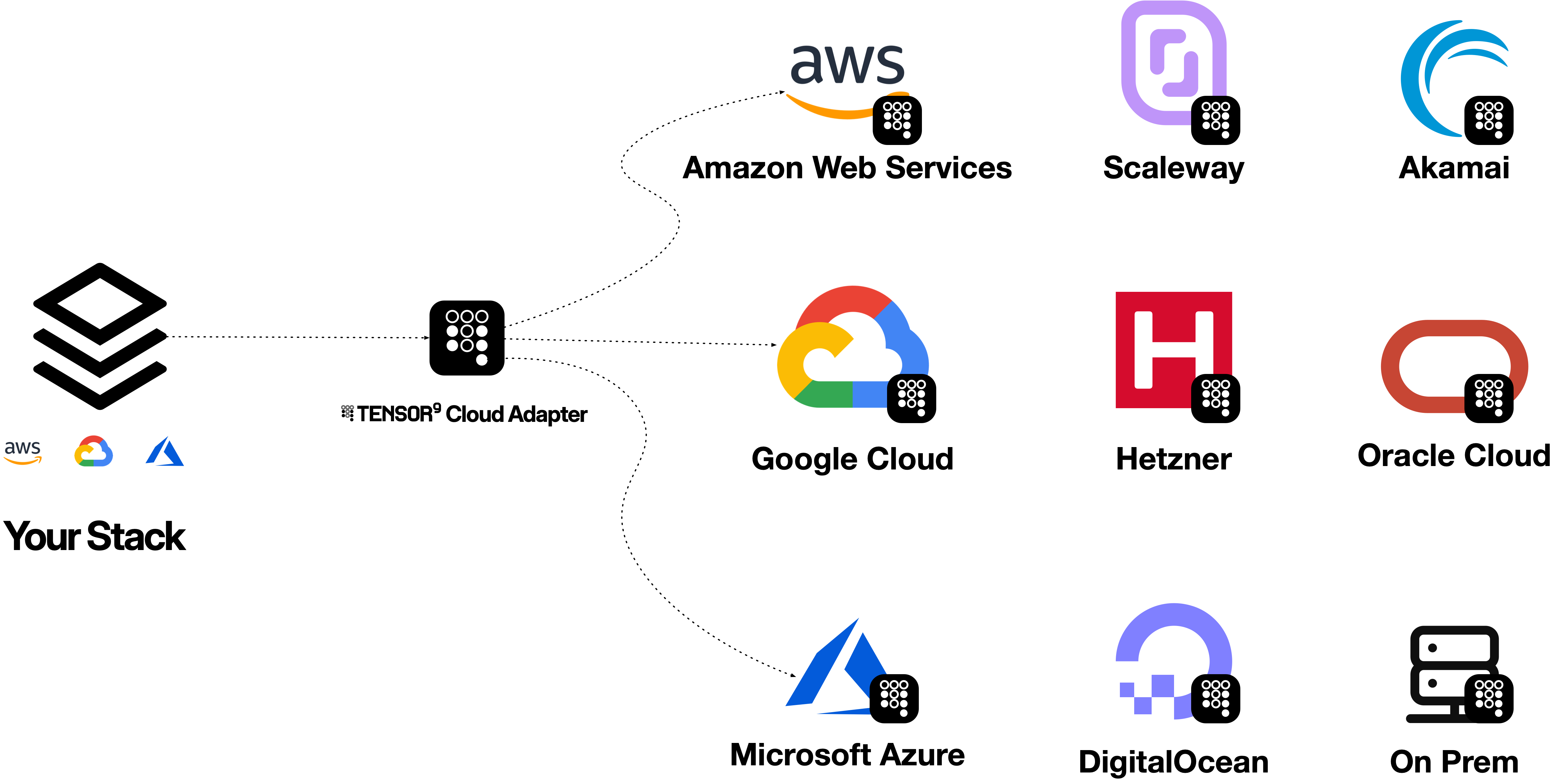
**Cloud Adapter gives you an endpoint that speaks your origin cloud's API.** Point your existing cloud CLI or SDK at that endpoint and keep using its familiar commands and request formats. For supported operations, Cloud Adapter calls the selected target service and returns an origin-cloud response. You do not switch your application to the target cloud's API.
Cloud Adapter requires a Tensor9 customer account. Before using `tensor9` to inspect, acquire or run an adapter, [install the CLI and configure `T9_API_KEY`](/cloud-adapter/getting-started/install-and-authenticate).
For example, the AWS CLI can send an S3 `PutObject` request to Cloud Adapter. The adapter serves the **S3 API**, calls the **Google Cloud Storage API**, and stores the object in Cloud Storage. The CLI receives an S3-shaped response. The same model works for a supported DynamoDB `GetItem`: the AWS CLI speaks the **DynamoDB API** to Cloud Adapter while the adapter reads an item from Azure Cosmos DB.

 ## Try it with the AWS CLI
Once the adapter is running, its endpoint, origin-side credentials and the named target resources are configured, change the CLI's destination. The command remains an AWS command:
```bash theme={null}
aws s3api put-object --bucket media --key report.pdf --body ./report.pdf \
--endpoint-url "$T9_CLOUD_ADAPTER_ENDPOINT"
```
With S3 mapped to Google Cloud Storage, the object lands in the configured Cloud Storage bucket; the AWS CLI still sends an S3 request and reads an S3 response. [Check the S3-to-Cloud Storage profile](/cloud-adapter/service-catalog/aws/databases-storage/s3#on-google-cloud) for the operations and behavior this mapping supports.
For a DynamoDB table mapped to provisioned Azure Cosmos DB, the same endpoint principle applies:
```bash theme={null}
aws dynamodb get-item --table-name orders \
--key '{"customerId":{"S":"C-42"},"orderId":{"S":"O-1042"}}' \
--endpoint-url "$T9_CLOUD_ADAPTER_ENDPOINT"
```
The CLI sends a DynamoDB `GetItem`; the adapter reads the mapped Cosmos DB item and returns DynamoDB-typed attributes. The table and key names are illustrative; provision or configure the corresponding resources before trying the command. [Check the DynamoDB-to-Cosmos DB profile](/cloud-adapter/service-catalog/aws/databases-storage/dynamodb-table#on-azure) before relying on a request shape.
To route every command for just one service in a process, set `AWS_ENDPOINT_URL_S3` or `AWS_ENDPOINT_URL_DYNAMODB` to the adapter endpoint instead of repeating `--endpoint-url`. Do not use a global AWS endpoint override unless every AWS service that process calls is intentionally routed through the adapter. The [AWS CLI guide](/cloud-adapter/guides/aws-cli) covers credentials, safe verification and both endpoint methods.
The diagram shows the request path, not a promise of complete AWS compatibility. Support is directional and specific to each origin service, target service and operation. One service adapter serves one origin-to-target service pair; a cloud adapter groups service adapters for an origin-to-target cloud direction.
## Choose a workflow
AWS CLI, SDKs, Terraform/OpenTofu, Pulumi and other API clients can use the origin endpoint.
Install the CLI, verify your customer account and understand adapter entitlements.
Prepare configuration, identities and a bounded verification before expanding the workload.
The [Guides](/cloud-adapter/guides/index) section starts with the AWS CLI because it makes the request boundary visible. The [Getting Started](/cloud-adapter/getting-started/overview) section describes the complete installation journey.
## Choose a topic
Follow a request from its origin API to its backend.
Check coverage and prepare configuration, identity and networking.
Understand tuning tags, supported target fields and how to measure a change.
Capture response evidence and build a safe reproduction.
Use tensor9 explain or x-t9-explain to inspect a service profile or covered request.
Follow request evidence from the origin API through the adapter to the target service.
Use [High Fidelity Cloud Emulators](/cloud-adapter/local-testing/overview) to exercise supported behavior before testing against the real backend. For software delivery into another organization's infrastructure, see [Tensor9 BYOC](/byoc/index).
This documentation is built and hosted on [Mintlify](https://mintlify.com), a developer documentation platform.
## Try it with the AWS CLI
Once the adapter is running, its endpoint, origin-side credentials and the named target resources are configured, change the CLI's destination. The command remains an AWS command:
```bash theme={null}
aws s3api put-object --bucket media --key report.pdf --body ./report.pdf \
--endpoint-url "$T9_CLOUD_ADAPTER_ENDPOINT"
```
With S3 mapped to Google Cloud Storage, the object lands in the configured Cloud Storage bucket; the AWS CLI still sends an S3 request and reads an S3 response. [Check the S3-to-Cloud Storage profile](/cloud-adapter/service-catalog/aws/databases-storage/s3#on-google-cloud) for the operations and behavior this mapping supports.
For a DynamoDB table mapped to provisioned Azure Cosmos DB, the same endpoint principle applies:
```bash theme={null}
aws dynamodb get-item --table-name orders \
--key '{"customerId":{"S":"C-42"},"orderId":{"S":"O-1042"}}' \
--endpoint-url "$T9_CLOUD_ADAPTER_ENDPOINT"
```
The CLI sends a DynamoDB `GetItem`; the adapter reads the mapped Cosmos DB item and returns DynamoDB-typed attributes. The table and key names are illustrative; provision or configure the corresponding resources before trying the command. [Check the DynamoDB-to-Cosmos DB profile](/cloud-adapter/service-catalog/aws/databases-storage/dynamodb-table#on-azure) before relying on a request shape.
To route every command for just one service in a process, set `AWS_ENDPOINT_URL_S3` or `AWS_ENDPOINT_URL_DYNAMODB` to the adapter endpoint instead of repeating `--endpoint-url`. Do not use a global AWS endpoint override unless every AWS service that process calls is intentionally routed through the adapter. The [AWS CLI guide](/cloud-adapter/guides/aws-cli) covers credentials, safe verification and both endpoint methods.
The diagram shows the request path, not a promise of complete AWS compatibility. Support is directional and specific to each origin service, target service and operation. One service adapter serves one origin-to-target service pair; a cloud adapter groups service adapters for an origin-to-target cloud direction.
## Choose a workflow
AWS CLI, SDKs, Terraform/OpenTofu, Pulumi and other API clients can use the origin endpoint.
Install the CLI, verify your customer account and understand adapter entitlements.
Prepare configuration, identities and a bounded verification before expanding the workload.
The [Guides](/cloud-adapter/guides/index) section starts with the AWS CLI because it makes the request boundary visible. The [Getting Started](/cloud-adapter/getting-started/overview) section describes the complete installation journey.
## Choose a topic
Follow a request from its origin API to its backend.
Check coverage and prepare configuration, identity and networking.
Understand tuning tags, supported target fields and how to measure a change.
Capture response evidence and build a safe reproduction.
Use tensor9 explain or x-t9-explain to inspect a service profile or covered request.
Follow request evidence from the origin API through the adapter to the target service.
Use [High Fidelity Cloud Emulators](/cloud-adapter/local-testing/overview) to exercise supported behavior before testing against the real backend. For software delivery into another organization's infrastructure, see [Tensor9 BYOC](/byoc/index).
This documentation is built and hosted on [Mintlify](https://mintlify.com), a developer documentation platform.