> ## Documentation Index
> Fetch the complete documentation index at: https://docs.tensor9.com/llms.txt
> Use this file to discover all available pages before exploring further.
# On-Prem & Bare Metal
**On-premises and bare metal** deployments allow your customers to run your application on physical servers in their own data centers or co-location facilities. These environments provide maximum control over hardware, networking, and security, making them ideal for customers with strict data residency, compliance, or performance requirements.
 ## Overview
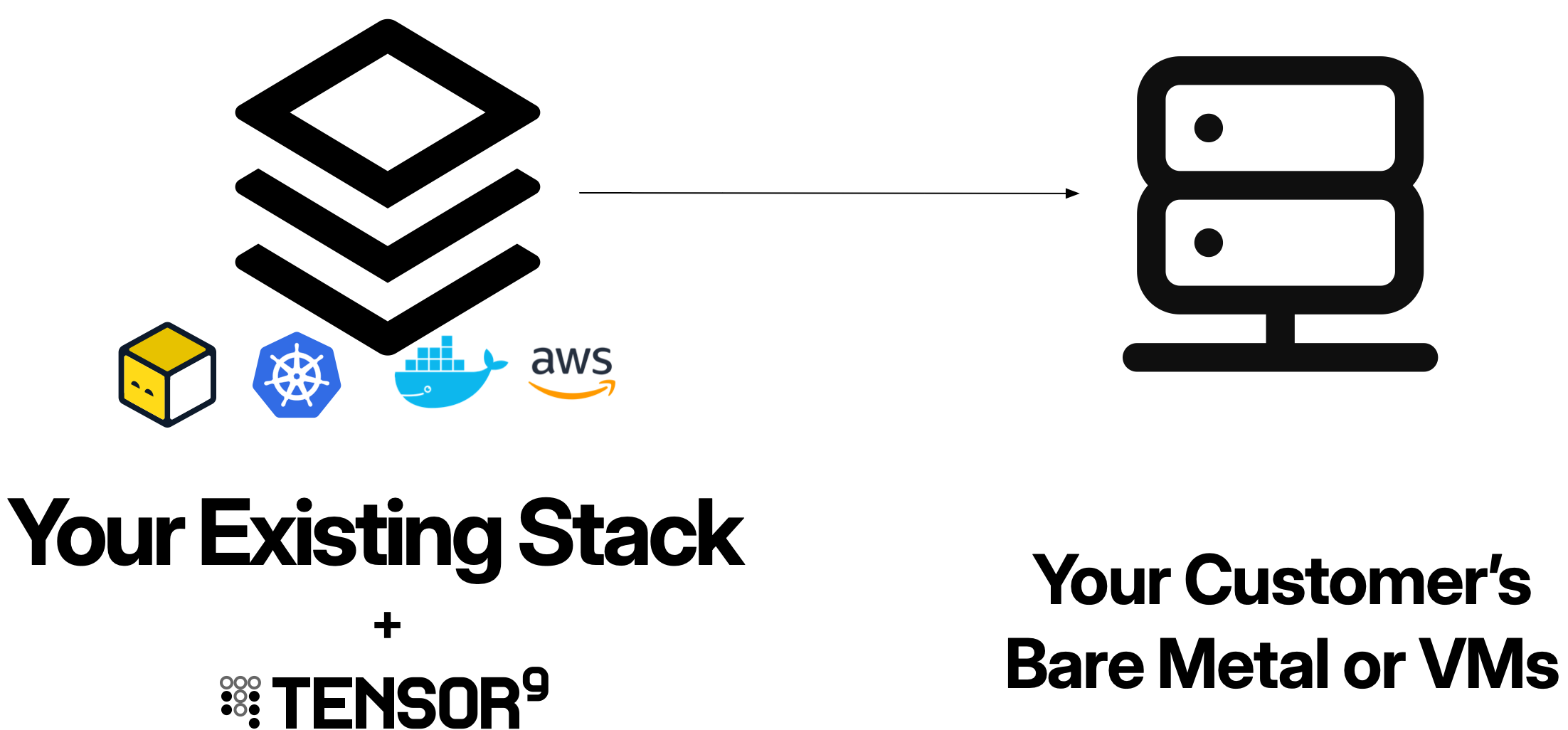
On-premises and bare metal deployments use Kubernetes as the underlying orchestration platform. Your customer installs and manages their own Kubernetes cluster on their infrastructure, and then Tensor9 deploys your application into that cluster following the same pattern as [Private Kubernetes](/form-factor/kubernetes) deployments.
This approach gives customers full control over:
* **Hardware**: Physical servers, storage, and networking equipment
* **Infrastructure**: Data center location, network topology, and security perimeter
* **Kubernetes distribution**: Choice of Kubernetes implementation and version
* **Operational practices**: Backup, disaster recovery, and maintenance schedules
## Prerequisites
Before deploying to on-premises or bare metal environments, your customer must:
### Customer's infrastructure
* **Kubernetes cluster**: A working Kubernetes cluster installed and configured on their infrastructure (see [Kubernetes distributions](#kubernetes-distributions) below)
* **Two namespaces**: One for the Tensor9 controller, one for your application
* **Network connectivity**: Outbound HTTPS access for the Tensor9 controller to communicate with your control plane
* **Container registry**: Access to a container registry (public or private) for pulling container images
* **Storage**: Persistent storage solution compatible with Kubernetes (local storage, NFS, SAN, etc.)
### Your development environment
* **kubectl** installed and configured
* **Helm** installed (required for customer controller installation)
* **Terraform or OpenTofu** (if using Terraform origin stacks with Kubernetes provider)
## Kubernetes distributions
Customers can choose from various Kubernetes distributions for their on-premises or bare metal infrastructure:
| Distribution | Best For | Notes |
| ------------------------- | ------------------------------------------------- | --------------------------------------------------- |
| **Vanilla Kubernetes** | Maximum flexibility and control | Requires manual setup and management |
| **K3s** | Edge computing, resource-constrained environments | Lightweight, single binary, simplified architecture |
| **MicroK8s** | Developer workstations, small clusters | Ubuntu-optimized, snap-based installation |
| **RKE/RKE2** | Rancher users, enterprise environments | Integrated with Rancher management platform |
| **OpenShift** | Red Hat environments, enterprise support | Enterprise Kubernetes with additional tooling |
| **Tanzu Kubernetes Grid** | VMware environments | VMware's enterprise Kubernetes platform |
The customer is responsible for installing, configuring, and maintaining their chosen Kubernetes distribution.
## Service equivalents
When you deploy an origin stack to on-premises environments, Tensor9 automatically compiles resources from your AWS origin stack to their Kubernetes equivalents. Since on-premises deployments use Kubernetes as the underlying platform, the service equivalents are identical to Private Kubernetes environments.
### Common service equivalents
| Service Category | AWS | On-Prem / Bare Metal Equivalent |
| ---------------------------------- | ------------------------------------- | ----------------------------------------- |
| **Containers** | EKS, ECS | Kubernetes |
| **Functions** | Lambda | Knative (unmanaged) |
| **Networking** | VPC | - |
| **Load balancing** | Load Balancer | Cloudflare (optional) |
| **DNS** | Route 53 | Cloudflare (optional) |
| **Identity and access management** | IAM | - |
| **Object storage** | S3 | Backblaze B2, MinIO (unmanaged) |
| **Databases (PostgreSQL)** | RDS Aurora PostgreSQL, RDS PostgreSQL | Neon, CloudNative PostgreSQL (unmanaged) |
| **Databases (MySQL)** | RDS Aurora MySQL, RDS MySQL | PlanetScale, MySQL (unmanaged) |
| **Databases (MongoDB)** | DocumentDB | MongoDB Atlas, MongoDB (unmanaged) |
| **Caching** | ElastiCache | Redis Enterprise Cloud, Redis (unmanaged) |
| **Message streaming** | MSK (Managed Streaming for Kafka) | Confluent Cloud, Kafka (unmanaged) |
| **Search** | OpenSearch Service | OpenSearch (unmanaged) |
| **Workflow** | MWAA (Managed Airflow) | Astronomer, Airflow (unmanaged) |
| **Analytics** | Amazon Athena | Presto (unmanaged) |
Third-party managed equivalents (Backblaze B2, Neon, PlanetScale, MongoDB Atlas, Redis Enterprise Cloud, Confluent Cloud, Astronomer) require your customers to bring their own credentials and accounts with these services.
Some popular AWS services (EC2, DynamoDB, EFS) are not currently supported. See [**Unsupported AWS services**](/fundamentals/service-equivalents#unsupported-aws-services) for the full list and recommended alternatives.
For detailed service equivalent mappings and examples, see [**Service Equivalents**](/fundamentals/service-equivalents) or the [**Private Kubernetes service equivalents section**](/form-factor/kubernetes#service-equivalents).
## How it works
Once your customer has a Kubernetes cluster running on their infrastructure, the deployment process follows the same workflow as Private Kubernetes environments:
Your customer provisions physical servers and installs their chosen Kubernetes distribution following the vendor's installation guide. This includes:
* Setting up control plane nodes
* Joining worker nodes to the cluster
* Configuring networking (CNI plugin)
* Setting up storage classes for persistent volumes
* Configuring ingress for external traffic
After the Kubernetes cluster is running, your customer follows the standard Private Kubernetes setup:
* Creates two namespaces (one for controller, one for application)
* Installs the Tensor9 controller via Helm chart
* Creates ServiceAccounts with appropriate RBAC permissions
* Configures network access for the controller to reach your control plane
You create releases and deploy your application following the standard deployment workflow, identical to Private Kubernetes deployments.
## Deployment workflow
After the Kubernetes cluster is set up, **all deployment steps are identical to Private Kubernetes environments**. See the [**Private Kubernetes**](/form-factor/kubernetes) documentation for complete details on:
* [How appliances work](/form-factor/kubernetes#how-private-kubernetes-appliances-work)
* [Service equivalents](/form-factor/kubernetes#service-equivalents)
* [Permissions model](/form-factor/kubernetes#permissions-model)
* [Networking](/form-factor/kubernetes#networking)
* [Observability](/form-factor/kubernetes#observability)
* [Secrets management](/form-factor/kubernetes#secrets-management)
* [Operations](/form-factor/kubernetes#operations)
* [Complete deployment example](/form-factor/kubernetes#example-complete-private-kubernetes-appliance)
## Considerations for on-prem deployments
While the Tensor9 deployment process is identical to Private Kubernetes, on-premises environments have unique infrastructure considerations:
### Hardware and capacity planning
Customers need to provision sufficient hardware resources:
* **Compute**: CPU and memory for application workloads
* **Storage**: Persistent volumes for databases and stateful services
* **Network**: Bandwidth for application traffic and data transfer
* **High availability**: Multiple nodes for redundancy and fault tolerance
### Networking
On-premises networking often requires additional configuration:
* **Load balancing**: External load balancer or MetalLB for Kubernetes Services
* **DNS**: Internal DNS records or external DNS management
* **Firewall rules**: Outbound HTTPS access for Tensor9 controller
* **TLS certificates**: SSL/TLS certificates for ingress endpoints
### Storage
Persistent storage options for on-premises Kubernetes:
* **Local storage**: Direct-attached storage on worker nodes (fast but not highly available)
* **NFS**: Network File System for shared storage across nodes
* **SAN**: Storage Area Network for enterprise environments
* **Ceph/Rook**: Software-defined storage for cloud-native storage management
* **Longhorn**: Cloud-native distributed block storage
### Maintenance and operations
Customers are responsible for:
* **Kubernetes upgrades**: Planning and executing cluster upgrades
* **Node maintenance**: Patching OS, replacing failed hardware
* **Backup and disaster recovery**: Protecting cluster state and application data
* **Monitoring**: Infrastructure monitoring (server health, disk space, network)
* **Security**: Physical security, network security, access control
## Best practices
If possible, create a test appliance using the same Kubernetes distribution your customer will use in production. Different distributions may have subtle differences in behavior or available features.
Provide clear hardware requirements and capacity planning guidance for your application. Include minimum and recommended specifications for CPU, memory, storage, and network bandwidth.
Some on-premises environments have restricted internet access. Ensure your deployment process accounts for:
* Air-gapped container image distribution
* Limited or scheduled connectivity windows
* On-premises artifact mirrors
Create detailed operational documentation for customers managing their own infrastructure:
* Troubleshooting common issues
* Performance tuning guidelines
* Backup and restore procedures
* Scaling recommendations
## Troubleshooting
If you're experiencing issues or need assistance with on-premises and bare metal deployments, we're here to help:
* **Slack**: Join our community Slack workspace for real-time support
* **Email**: Contact us at [support@tensor9.com](mailto:support@tensor9.com)
Our team can help with deployment troubleshooting, configuration, and best practices for on-premises and bare metal environments.
## Overview
On-premises and bare metal deployments use Kubernetes as the underlying orchestration platform. Your customer installs and manages their own Kubernetes cluster on their infrastructure, and then Tensor9 deploys your application into that cluster following the same pattern as [Private Kubernetes](/form-factor/kubernetes) deployments.
This approach gives customers full control over:
* **Hardware**: Physical servers, storage, and networking equipment
* **Infrastructure**: Data center location, network topology, and security perimeter
* **Kubernetes distribution**: Choice of Kubernetes implementation and version
* **Operational practices**: Backup, disaster recovery, and maintenance schedules
## Prerequisites
Before deploying to on-premises or bare metal environments, your customer must:
### Customer's infrastructure
* **Kubernetes cluster**: A working Kubernetes cluster installed and configured on their infrastructure (see [Kubernetes distributions](#kubernetes-distributions) below)
* **Two namespaces**: One for the Tensor9 controller, one for your application
* **Network connectivity**: Outbound HTTPS access for the Tensor9 controller to communicate with your control plane
* **Container registry**: Access to a container registry (public or private) for pulling container images
* **Storage**: Persistent storage solution compatible with Kubernetes (local storage, NFS, SAN, etc.)
### Your development environment
* **kubectl** installed and configured
* **Helm** installed (required for customer controller installation)
* **Terraform or OpenTofu** (if using Terraform origin stacks with Kubernetes provider)
## Kubernetes distributions
Customers can choose from various Kubernetes distributions for their on-premises or bare metal infrastructure:
| Distribution | Best For | Notes |
| ------------------------- | ------------------------------------------------- | --------------------------------------------------- |
| **Vanilla Kubernetes** | Maximum flexibility and control | Requires manual setup and management |
| **K3s** | Edge computing, resource-constrained environments | Lightweight, single binary, simplified architecture |
| **MicroK8s** | Developer workstations, small clusters | Ubuntu-optimized, snap-based installation |
| **RKE/RKE2** | Rancher users, enterprise environments | Integrated with Rancher management platform |
| **OpenShift** | Red Hat environments, enterprise support | Enterprise Kubernetes with additional tooling |
| **Tanzu Kubernetes Grid** | VMware environments | VMware's enterprise Kubernetes platform |
The customer is responsible for installing, configuring, and maintaining their chosen Kubernetes distribution.
## Service equivalents
When you deploy an origin stack to on-premises environments, Tensor9 automatically compiles resources from your AWS origin stack to their Kubernetes equivalents. Since on-premises deployments use Kubernetes as the underlying platform, the service equivalents are identical to Private Kubernetes environments.
### Common service equivalents
| Service Category | AWS | On-Prem / Bare Metal Equivalent |
| ---------------------------------- | ------------------------------------- | ----------------------------------------- |
| **Containers** | EKS, ECS | Kubernetes |
| **Functions** | Lambda | Knative (unmanaged) |
| **Networking** | VPC | - |
| **Load balancing** | Load Balancer | Cloudflare (optional) |
| **DNS** | Route 53 | Cloudflare (optional) |
| **Identity and access management** | IAM | - |
| **Object storage** | S3 | Backblaze B2, MinIO (unmanaged) |
| **Databases (PostgreSQL)** | RDS Aurora PostgreSQL, RDS PostgreSQL | Neon, CloudNative PostgreSQL (unmanaged) |
| **Databases (MySQL)** | RDS Aurora MySQL, RDS MySQL | PlanetScale, MySQL (unmanaged) |
| **Databases (MongoDB)** | DocumentDB | MongoDB Atlas, MongoDB (unmanaged) |
| **Caching** | ElastiCache | Redis Enterprise Cloud, Redis (unmanaged) |
| **Message streaming** | MSK (Managed Streaming for Kafka) | Confluent Cloud, Kafka (unmanaged) |
| **Search** | OpenSearch Service | OpenSearch (unmanaged) |
| **Workflow** | MWAA (Managed Airflow) | Astronomer, Airflow (unmanaged) |
| **Analytics** | Amazon Athena | Presto (unmanaged) |
Third-party managed equivalents (Backblaze B2, Neon, PlanetScale, MongoDB Atlas, Redis Enterprise Cloud, Confluent Cloud, Astronomer) require your customers to bring their own credentials and accounts with these services.
Some popular AWS services (EC2, DynamoDB, EFS) are not currently supported. See [**Unsupported AWS services**](/fundamentals/service-equivalents#unsupported-aws-services) for the full list and recommended alternatives.
For detailed service equivalent mappings and examples, see [**Service Equivalents**](/fundamentals/service-equivalents) or the [**Private Kubernetes service equivalents section**](/form-factor/kubernetes#service-equivalents).
## How it works
Once your customer has a Kubernetes cluster running on their infrastructure, the deployment process follows the same workflow as Private Kubernetes environments:
Your customer provisions physical servers and installs their chosen Kubernetes distribution following the vendor's installation guide. This includes:
* Setting up control plane nodes
* Joining worker nodes to the cluster
* Configuring networking (CNI plugin)
* Setting up storage classes for persistent volumes
* Configuring ingress for external traffic
After the Kubernetes cluster is running, your customer follows the standard Private Kubernetes setup:
* Creates two namespaces (one for controller, one for application)
* Installs the Tensor9 controller via Helm chart
* Creates ServiceAccounts with appropriate RBAC permissions
* Configures network access for the controller to reach your control plane
You create releases and deploy your application following the standard deployment workflow, identical to Private Kubernetes deployments.
## Deployment workflow
After the Kubernetes cluster is set up, **all deployment steps are identical to Private Kubernetes environments**. See the [**Private Kubernetes**](/form-factor/kubernetes) documentation for complete details on:
* [How appliances work](/form-factor/kubernetes#how-private-kubernetes-appliances-work)
* [Service equivalents](/form-factor/kubernetes#service-equivalents)
* [Permissions model](/form-factor/kubernetes#permissions-model)
* [Networking](/form-factor/kubernetes#networking)
* [Observability](/form-factor/kubernetes#observability)
* [Secrets management](/form-factor/kubernetes#secrets-management)
* [Operations](/form-factor/kubernetes#operations)
* [Complete deployment example](/form-factor/kubernetes#example-complete-private-kubernetes-appliance)
## Considerations for on-prem deployments
While the Tensor9 deployment process is identical to Private Kubernetes, on-premises environments have unique infrastructure considerations:
### Hardware and capacity planning
Customers need to provision sufficient hardware resources:
* **Compute**: CPU and memory for application workloads
* **Storage**: Persistent volumes for databases and stateful services
* **Network**: Bandwidth for application traffic and data transfer
* **High availability**: Multiple nodes for redundancy and fault tolerance
### Networking
On-premises networking often requires additional configuration:
* **Load balancing**: External load balancer or MetalLB for Kubernetes Services
* **DNS**: Internal DNS records or external DNS management
* **Firewall rules**: Outbound HTTPS access for Tensor9 controller
* **TLS certificates**: SSL/TLS certificates for ingress endpoints
### Storage
Persistent storage options for on-premises Kubernetes:
* **Local storage**: Direct-attached storage on worker nodes (fast but not highly available)
* **NFS**: Network File System for shared storage across nodes
* **SAN**: Storage Area Network for enterprise environments
* **Ceph/Rook**: Software-defined storage for cloud-native storage management
* **Longhorn**: Cloud-native distributed block storage
### Maintenance and operations
Customers are responsible for:
* **Kubernetes upgrades**: Planning and executing cluster upgrades
* **Node maintenance**: Patching OS, replacing failed hardware
* **Backup and disaster recovery**: Protecting cluster state and application data
* **Monitoring**: Infrastructure monitoring (server health, disk space, network)
* **Security**: Physical security, network security, access control
## Best practices
If possible, create a test appliance using the same Kubernetes distribution your customer will use in production. Different distributions may have subtle differences in behavior or available features.
Provide clear hardware requirements and capacity planning guidance for your application. Include minimum and recommended specifications for CPU, memory, storage, and network bandwidth.
Some on-premises environments have restricted internet access. Ensure your deployment process accounts for:
* Air-gapped container image distribution
* Limited or scheduled connectivity windows
* On-premises artifact mirrors
Create detailed operational documentation for customers managing their own infrastructure:
* Troubleshooting common issues
* Performance tuning guidelines
* Backup and restore procedures
* Scaling recommendations
## Troubleshooting
If you're experiencing issues or need assistance with on-premises and bare metal deployments, we're here to help:
* **Slack**: Join our community Slack workspace for real-time support
* **Email**: Contact us at [support@tensor9.com](mailto:support@tensor9.com)
Our team can help with deployment troubleshooting, configuration, and best practices for on-premises and bare metal environments.