> ## Documentation Index
> Fetch the complete documentation index at: https://docs.tensor9.com/llms.txt
> Use this file to discover all available pages before exploring further.
# How Tensor9 works
Tensor9 delivers your existing app to your customers as a private **appliance** installed directly into their environment.
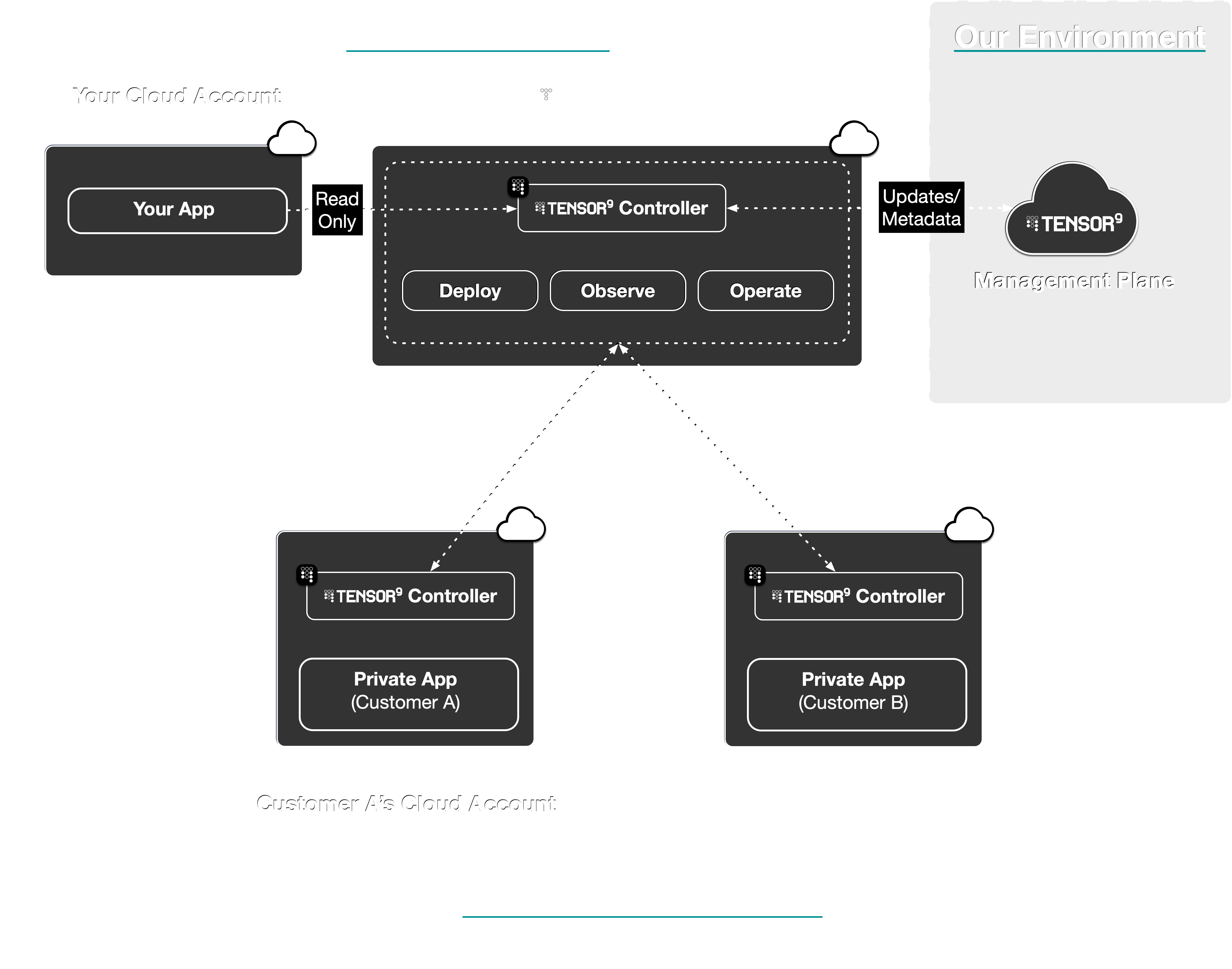
A Tensor9 **controller** in your cloud account creates a control plane that orchestrates **deployments**,
and allows you to **operate** and **observe** your customers' appliances:

 Here are the steps you'll take to use Tensor9:
Connect your app's **origin stack** to Tensor9.
Tensor9 supports origin stacks defined in: **Terraform/OpenTofu**, **CloudFormation**,
**Kubernetes Manifests/Helm**, and **Docker Compose/Containers**.
Here are the steps you'll take to use Tensor9:
Connect your app's **origin stack** to Tensor9.
Tensor9 supports origin stacks defined in: **Terraform/OpenTofu**, **CloudFormation**,
**Kubernetes Manifests/Helm**, and **Docker Compose/Containers**.
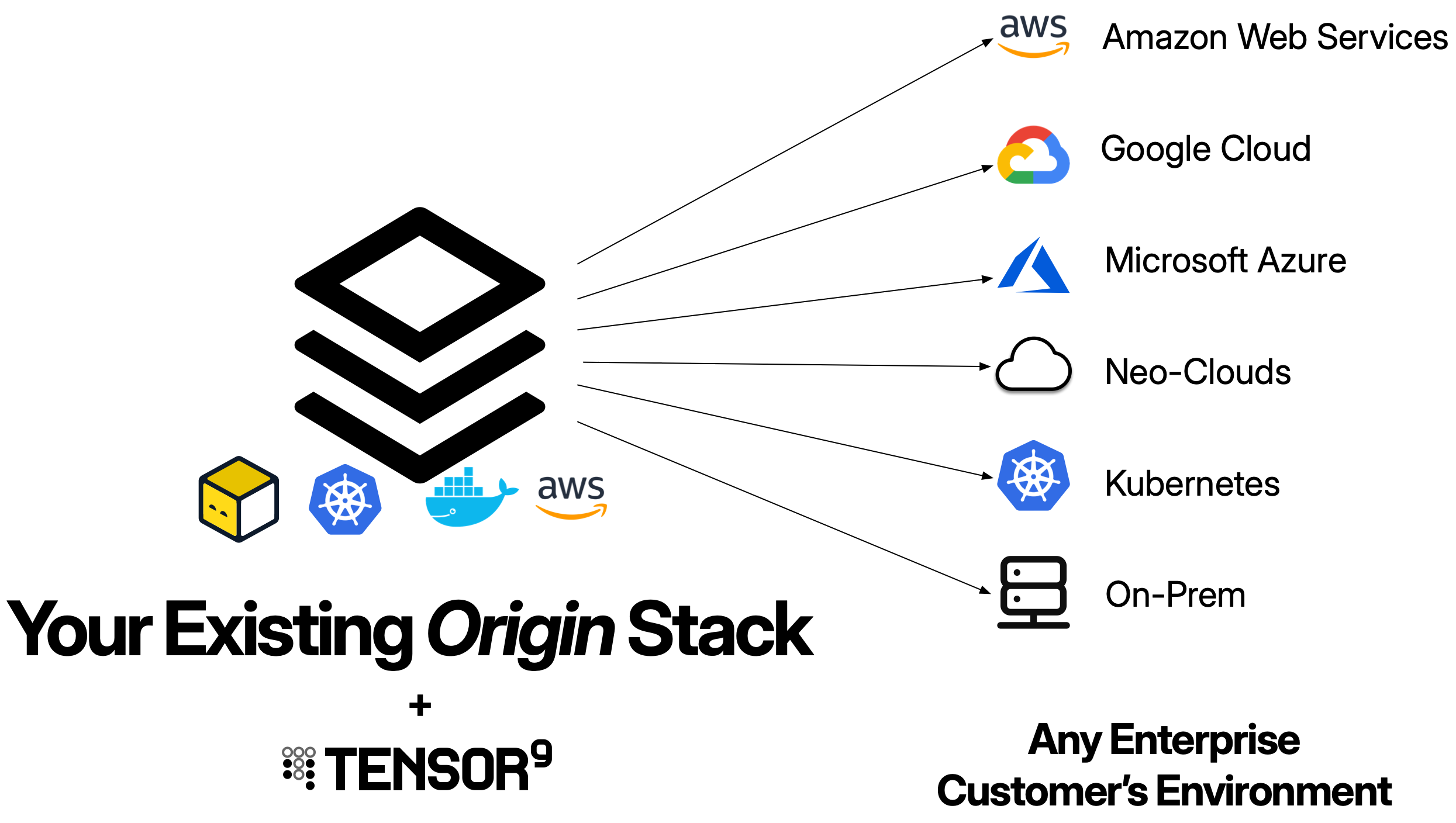
 Create an **appliance** for the customer environment you want to deploy to.
An appliance is defined by its **form factor**, which specifies the target environment like
**Amazon Web Services**, **Google Cloud**, **Microsoft Azure**, **Digital Ocean**, or a customer-provided **Kubernetes** cluster,
as well as which managed cloud services are required.
You create an appliance using `tensor9 CLI` or the [**Vendor Portal**](/fundamentals/key-concepts#vendor-portal).
Your customer completes setup through a guided install wizard, a white-labeled web interface branded with your logo and company name.
Use `tensor9 CLI` to **compile** your origin stack into a **deployment stack** for your new appliance.
Tensor9 compiles your stack for the **form factor** of that appliance.
For example, if your appliance is running in **DigitalOcean** on **Kubernetes**,
then the compilation process will automatically replace an AWS load balancer
in your origin stack with a Kubernetes ingress exposed via a DigitalOcean load balancer,
and similarly replace AWS Aurora Postgres in your origin stack with a DigitalOcean
managed Postgres instance.
Use standard tooling to **deploy** your deployment stack to a customer appliance.
For example, if your origin stack is defined using Terraform/OpenTofu,
then invoke `terraform apply` or `tofu apply` on a deployment stack to deploy
that stack to the appliance it was compiled for.
**Observe** the state, performance, and usage of deployed
resources in customer appliances; with metrics, logs, and
traces asynchronously synchronized back to your **observability sink** of choice.
Monitor appliance health from the [**Vendor Portal**](/fundamentals/key-concepts#vendor-portal) dashboard or the CLI.
You can also **operate** deployed resources within customer appliances.
For example, execute `kubectl` commands or request temporary, scoped access to cloud resources via IAM.
Your customers review and approve operations requests through their [**Customer Portal**](/fundamentals/key-concepts#customer-portal).
## Per-customer configuration
The same origin stack compiles into different deployment stacks for different customers, driven by customer-supplied configuration. Each customer can pick their ingress posture (public, allowlisted, Tailscale, or fully private), substitute their own managed services for default-shipped ones (for example, the customer's own managed Temporal), and choose how the appliance reaches your control plane (public internet, AWS PrivateLink, or Tailscale). You ship one stack; each customer gets a build shaped to their environment. See [Auto-Customizations](/customizations/overview) for the full picture.
## How Tensor9 compares to building it yourself
| Feature | With Tensor9 | Without Tensor9 |
| ----------------------- | -------------------------------------------------------------------------------------------------------------------------------------------------------------------------------------------------------------------------------------------------------------------------------- | ---------------------------------------------------------------------------------------------------------------------------------------------------------------------------------------------------- |
| **Service Equivalents** | Maintain a single origin stack. Tensor9 maps cloud services to their equivalents in the target environment during compilation (e.g., RDS → Cloud SQL, S3 → GCS). | Maintain separate infrastructure code for each cloud provider. Port resources manually and keep feature parity across cloud-specific APIs. |
| **Deployments** | Tensor9 compiles your origin stack into a deployment stack for a private appliance in your customer's environment. Deploy using standard tooling locally (`terraform apply`, `tofu apply`), and Tensor9 applies changes to the corresponding appliance through a secure channel. | Manually set up a deployment pipeline unique to each customer environment. Request temporary access to customer infrastructure (VPN, IAM roles) for each deployment and execute operations manually. |
| **Observability** | Telemetry (logs, metrics, traces) flows from appliances to your observability sink. Tensor9 configures forwarding automatically based on your origin stack. | Set up monitoring agents, configure log forwarding, and manage telemetry infrastructure separately in each customer environment. |
| **Operations** | Execute operations commands remotely through your control plane with customer approval workflows and audit logging. | Request and manage temporary access credentials for each operation. Coordinate with customers for access to their infrastructure. |
| **Artifacts** | Tensor9 identifies artifacts in your origin stack and copies them to appliance-local storage during deployment (container images, S3 objects). | Build artifact replication and distribution systems. Manage credentials for artifact access across customer environments. |
| **Secrets** | Store customer-specific secrets in your control plane with access controls defining vendor vs. customer-only access. | Manage secrets across multiple systems. Coordinate with customers for secret injection and rotation. |
| **Endpoints and DNS** | Tensor9 provisions DNS records for each appliance under a domain you specify (vendor-owned or customer-owned) with delegation to customer infrastructure where appropriate. | Coordinate with customer network teams to configure DNS for each deployment. |
Create an **appliance** for the customer environment you want to deploy to.
An appliance is defined by its **form factor**, which specifies the target environment like
**Amazon Web Services**, **Google Cloud**, **Microsoft Azure**, **Digital Ocean**, or a customer-provided **Kubernetes** cluster,
as well as which managed cloud services are required.
You create an appliance using `tensor9 CLI` or the [**Vendor Portal**](/fundamentals/key-concepts#vendor-portal).
Your customer completes setup through a guided install wizard, a white-labeled web interface branded with your logo and company name.
Use `tensor9 CLI` to **compile** your origin stack into a **deployment stack** for your new appliance.
Tensor9 compiles your stack for the **form factor** of that appliance.
For example, if your appliance is running in **DigitalOcean** on **Kubernetes**,
then the compilation process will automatically replace an AWS load balancer
in your origin stack with a Kubernetes ingress exposed via a DigitalOcean load balancer,
and similarly replace AWS Aurora Postgres in your origin stack with a DigitalOcean
managed Postgres instance.
Use standard tooling to **deploy** your deployment stack to a customer appliance.
For example, if your origin stack is defined using Terraform/OpenTofu,
then invoke `terraform apply` or `tofu apply` on a deployment stack to deploy
that stack to the appliance it was compiled for.
**Observe** the state, performance, and usage of deployed
resources in customer appliances; with metrics, logs, and
traces asynchronously synchronized back to your **observability sink** of choice.
Monitor appliance health from the [**Vendor Portal**](/fundamentals/key-concepts#vendor-portal) dashboard or the CLI.
You can also **operate** deployed resources within customer appliances.
For example, execute `kubectl` commands or request temporary, scoped access to cloud resources via IAM.
Your customers review and approve operations requests through their [**Customer Portal**](/fundamentals/key-concepts#customer-portal).
## Per-customer configuration
The same origin stack compiles into different deployment stacks for different customers, driven by customer-supplied configuration. Each customer can pick their ingress posture (public, allowlisted, Tailscale, or fully private), substitute their own managed services for default-shipped ones (for example, the customer's own managed Temporal), and choose how the appliance reaches your control plane (public internet, AWS PrivateLink, or Tailscale). You ship one stack; each customer gets a build shaped to their environment. See [Auto-Customizations](/customizations/overview) for the full picture.
## How Tensor9 compares to building it yourself
| Feature | With Tensor9 | Without Tensor9 |
| ----------------------- | -------------------------------------------------------------------------------------------------------------------------------------------------------------------------------------------------------------------------------------------------------------------------------- | ---------------------------------------------------------------------------------------------------------------------------------------------------------------------------------------------------- |
| **Service Equivalents** | Maintain a single origin stack. Tensor9 maps cloud services to their equivalents in the target environment during compilation (e.g., RDS → Cloud SQL, S3 → GCS). | Maintain separate infrastructure code for each cloud provider. Port resources manually and keep feature parity across cloud-specific APIs. |
| **Deployments** | Tensor9 compiles your origin stack into a deployment stack for a private appliance in your customer's environment. Deploy using standard tooling locally (`terraform apply`, `tofu apply`), and Tensor9 applies changes to the corresponding appliance through a secure channel. | Manually set up a deployment pipeline unique to each customer environment. Request temporary access to customer infrastructure (VPN, IAM roles) for each deployment and execute operations manually. |
| **Observability** | Telemetry (logs, metrics, traces) flows from appliances to your observability sink. Tensor9 configures forwarding automatically based on your origin stack. | Set up monitoring agents, configure log forwarding, and manage telemetry infrastructure separately in each customer environment. |
| **Operations** | Execute operations commands remotely through your control plane with customer approval workflows and audit logging. | Request and manage temporary access credentials for each operation. Coordinate with customers for access to their infrastructure. |
| **Artifacts** | Tensor9 identifies artifacts in your origin stack and copies them to appliance-local storage during deployment (container images, S3 objects). | Build artifact replication and distribution systems. Manage credentials for artifact access across customer environments. |
| **Secrets** | Store customer-specific secrets in your control plane with access controls defining vendor vs. customer-only access. | Manage secrets across multiple systems. Coordinate with customers for secret injection and rotation. |
| **Endpoints and DNS** | Tensor9 provisions DNS records for each appliance under a domain you specify (vendor-owned or customer-owned) with delegation to customer infrastructure where appropriate. | Coordinate with customer network teams to configure DNS for each deployment. |