

Supported environments
- Azure
- DigitalOcean
- Google Cloud
- OCI
- Private Kubernetes
- Scaleway
How the backends compare
Each row compares a capability of Aurora PostgreSQL with its adaptation on each backend. A dash means this profile does not state the capability for that backend.Cloud Adapter
Runtime surface
Management surface
Limits
On Azure
PostgreSQL Flexible Server
How it works
Your application’s PostgreSQL driver connects directly to Azure Database for PostgreSQL Flexible Server. These database requests are the data plane. The driver and the PostgreSQL wire protocol stay the same, and Tensor9 adds no proxy, translation or latency to your queries. Management requests, such as snapshots, restores, replicas, failover and configuration changes, are the control plane. Tensor9 runs the RDS API in the customer’s Cloud Adapter deployment and translates each of these requests to the backend’s management API. The sections below list which operations work and which return an error.

Queries reach the database directly; only the management calls are translated.
Database connections
Aurora stores data in an AWS-specific storage layer, but your application reaches it over the standard PostgreSQL wire protocol, which Azure Database for PostgreSQL Flexible Server also supports. Your SQL, drivers, object-relational mappers (ORMs), prepared statements, data types and transaction behavior stay the same; only the storage underneath changes. AWS and Aurora add SQL functions for moving data through S3, invoking Lambda and machine learning. These functions do not exist on the backend, so a query that calls them returns an error.Database management
At runtime your application and tools keep making the same RDS calls: describe the cluster, take a snapshot, restore to a point in time, add a reader, trigger a failover, stop and start, change the instance class or a parameter. For each supported operation, the adapter accepts the RDS request, returns the RDS response format, and performs the operation on the Flexible Server: on-demand backups and restores, point-in-time restore, read replicas, manual failover, stop / start, and compute, storage and server-parameter updates. The adapter also runs the Aurora Data API (SQL over HTTPS, transactions included), executing each statement over a native connection to the backend database. The adapter also handles Aurora’s global database. The Flexible Server has no global-cluster object, so Tensor9 keeps the global cluster itself and maps its members and role changes onto cross-region read replicas. The backend’s managed replica promotion operation handles planned switchover and unplanned failover. With Max, your tools callCreateDBCluster and CreateDBInstance through the RDS adapter to create a logical Aurora cluster and its members on Azure PostgreSQL Flexible Server. Tensor9 keeps a durable record of the logical cluster and its members and reconciles the Azure resources with it: it records each accepted request, then creates or removes the Azure resources in the background. DescribeDBClusters and DescribeDBInstances report status and endpoints. DeleteDBInstance removes members; DeleteDBCluster removes the cluster once its members are gone. Your application’s SQL connection still goes directly to the database. With the Infrastructure-only option, Tensor9 compiles the declared cluster into Azure PostgreSQL Flexible Server resources, which you manage with Microsoft’s own tools; runtime RDS API calls require Max.


Tensor9 translates RDS management requests to the backend API and returns RDS responses.
Limitations
Where Aurora and PostgreSQL Flexible Server differ- Aurora-specific settings are not supported. Failover priority / promotion tiers, Serverless v2 autoscaling, global write forwarding and I/O-Optimized storage have no Flexible Server equivalent.
- Event subscriptions are not supported. RDS event notifications publish to SNS. Azure Monitor works differently and has no direct equivalent.
- Parameter groups behave differently: Tensor9 keeps the group and applies its settings as server parameters. Tensor9 keeps named parameter groups and their overrides. Supported explicit PostgreSQL parameters become Azure server parameters; the group object itself stays with Tensor9 and is not created on the Flexible Server. The group family must match the PostgreSQL version, and Azure’s limits on allowed values and restarts still apply. RDS-specific parameters and settings outside the backend’s settable list are rejected.
Other considerations
Migration. Moving the data is a one-time step, covered by this page’s migration note: a logical dump and restore, or logical replication for a short cutover. This page describes how things work after cutover. Operations. The customer owns the Flexible Server in their Azure subscription. Maintenance windows, quotas and pricing are Microsoft’s. Features and capacity. The comparison table on this page lists feature and high-availability differences. Check the backend’s pricing and capacity limits when you size the deployment.Example monthly charges
This Tensor9 Cloud Adapter scenario estimates service charges for the named origin and target services. Adapter hosting and commercial Tensor9 fees need separate allocations. How Tensor9 estimates costs explains the method and what the estimates include.Aurora PostgreSQL · Primary allocated compute
Feature: Aurora PostgreSQL. Estimated monthly service charges by Primary allocated compute. Adapter hosting and Tensor9 fees are excluded. Source: us-east-1; target: eastus; currency: USD.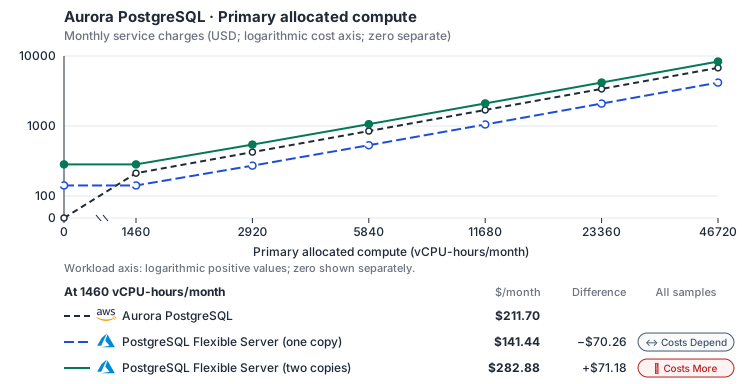
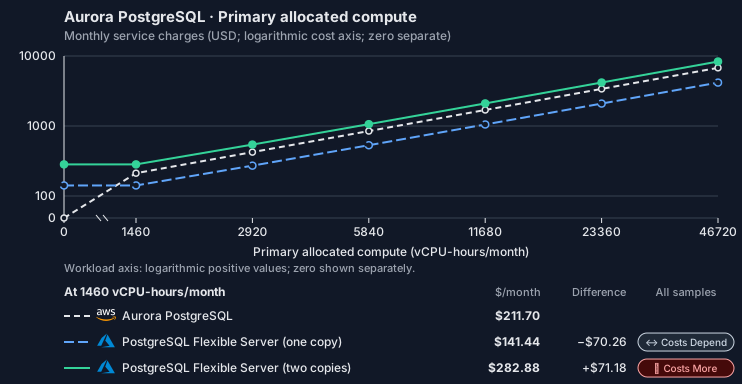
- CPU allocation does not imply an achieved transaction rate. Other native meters and workload assumptions retain their explicitly displayed default quantities. Workload translation and capacity assumptions are not benchmark measurements.
- Native monthly usage priced at the cited provider list prices; listed target allowances apply where present, excluding invoice credits, taxes and negotiated discounts. Rates as of 2026-10-22: us-east-1 → eastus, USD/month.
- Source prices are reference charges, not an invoice. Target lines cover selected service usage/configuration only; adapter hosting and Tensor9 fees are excluded.
- Samples of explicit prices are not performance measurements or capacity qualification. No interpolation or break-even guarantee is implied.
- Variant assumptions show the first axis sample; any axis-dependent configuration is described by this curve’s workload note.
- Rates are cited provider list prices, editable for discounts, commitments or another region. Workload translation and capacity coefficients remain editable planning assumptions, not benchmark measurements or a commercial quote.
- Default-zero rates are explicit assumptions, not evidence that the deployed service or resource is free.
- Provisioned-unit minimums use an editable approximate allocation floor. Modeled target service cost is max(usage/allocation, minimum), with billable network, durable staging and dependent sinks added separately; actual RU/TU sizing, scaling increments and throughput remain unqualified.
- Durable staging is priced once: provisioned targets include adapter state in their selected allocation; native targets add a separate staging allocation when required. Adapter hosting is a separate allocation and must exclude resources already priced as staging, workers or target capacity.
- A declared adapter mapping and cost model do not establish implementation availability or service equivalence.
- This is a declared directed mapping; a planning estimate does not establish deployment or request-serving support.
- Authored planning assumptions, not measured adapter capacity. Origin rates are cited first-tier list prices, before free allowances and discounts.
- A cost scenario does not establish backend availability, protocol fidelity or production readiness. Registry serving status remains independent.
- Provisioned compute and RAM are priced by resource-hour; operations are independently authored. Database size cannot be inferred from dollars alone.
- Aurora/AlloyDB, MySQL/PostgreSQL and proxied targets retain their distinct backend contracts. HA, replicas and proxy allocations must be selected explicitly.
- Aurora Standard also bills storage I/O at USD 0.20 per 1M I/Os (buffer-cache misses, not logical operations); no meter prices it, so the origin cost excludes it. I/O-Optimized clusters bill no I/O but 30% more per instance and 0.225 per GB-month storage.
- Azure Database for PostgreSQL Flexible Server bills vCores with a fixed memory ratio per series; the vCPU and memory rates decompose the General Purpose and Memory Optimized v5 prices. High availability bills the standby’s compute and storage as a second copy. The minimum is the smallest Burstable server, which does not support high availability; the smallest General Purpose server (2 vCores) costs USD 133.62 per month. Additional IOPS, backup storage and reserved capacity are not selected.
- Row-store throughput (capacityOpsPerVcpuSecond, default 1500) is measured-by-tensor9 as a lower bound: the DynamoDB adapter on Cloud SQL db-custom-2-7680 (2 vCPU, PostgreSQL 16, us-west1) served 2,974 ops/s of YCSB-A at 16 threads without recorded saturation (src/main/kotlin/t9/prime/equiv/generated/eval/CloudsqlPostgresqlYcsbAT16GoYcsbV1_0_0.kt). Published CPU-bound pgbench reaches 3,101 read-write transactions and 20,289 point reads per vCPU-second (AWS z1d.2xlarge, PostgreSQL 14.5), so actual capacity is likely higher. Reads and writes share one coefficient: at the same adapter version, read-only YCSB-C was not faster than 50%-update YCSB-A.
- Log-broker throughput (capacityStreamMiBPerVcpuSecond 20 at 0.5 utilization, 4 GiB RAM per vCPU) is provider-documented by Google Managed Service for Apache Kafka sizing (https://docs.cloud.google.com/managed-service-for-apache-kafka/docs/plan-cluster-size): write-equivalent bytes are replicated writes plus a quarter of reads. Producer batches below 10 KB lower per-CPU throughput; that penalty is not modeled.
- Disk utilization 0.8 is provider-documented headroom below Cloud SQL automatic storage increase, which triggers near 91-95% full (https://docs.cloud.google.com/sql/docs/postgres/instance-settings). The 20 GiB reserve exceeds PostgreSQL’s 1 GB default max_wal_size; the remainder of that reserve is unmeasured.
- CPU tiers double from 2 vCPUs to the target’s largest node at 4 GiB per vCPU; each target’s documented largest node bounds CPU, RAM, RAM per vCPU and disk, and the durable staging database uses Cloud SQL Enterprise (96 vCPU, 6.5 GiB per vCPU, 624 GiB, 64 TiB). Targets billed per capacity unit or throughput unit are sized by their backend instead.
- No public evidence: peak/mean work (2) and the RAM working-set fraction (0.1). Proposed measurements: the p99 one-minute rate over the monthly mean from customer CloudWatch metrics; the buffer hit ratio while stepping RAM under a fixed YCSB-B load.
- Node bounds: E96ds_v5 has 96 vCores and 672 GiB (https://learn.microsoft.com/en-us/azure/postgresql/compute-storage/concepts-compute); Premium SSD storage holds up to 32,767 GiB (https://learn.microsoft.com/en-us/azure/postgresql/compute-storage/concepts-storage).
- Stored GiB already includes the origin family’s physical footprint assumptions; no second storage amplification is applied.
- The workload family already selected resource-hours; the throughput coefficient is not applied again.
- Copies and allocation fractions change cost only; they do not increase modeled primary capacity.
- AWS Price List API, AmazonRDS offer: https://pricing.us-east-1.amazonaws.com/offers/v1.0/aws/AmazonRDS/current/us-east-1/index.json
- Azure Retail Prices API: https://prices.azure.com/api/retail/prices
- Additional network transfer, backups, KMS, one-time migration and operational labor unless an explicit meter includes them.
- Destination application execution and separately billed downstream services; supply those allocations separately.
- Aurora per-IO, serverless-capacity, backup and proxy charges; reserved/committed-use purchase options.
- Taxes, discounts, credits and free-tier allowances not explicitly listed by this model.
- Unmodeled dependent services, task execution and operations outside the selected workload family.
plan-872daf3fc345e314056ab6183e28b95413202233 / 2026-10-22.planning.2. Curve: workload-1.
Sources: AWS Price List API, AmazonRDS offer, Azure Retail Prices API.
Aurora PostgreSQL · Stored data
Feature: Aurora PostgreSQL. Estimated monthly service charges by Stored data. Adapter hosting and Tensor9 fees are excluded. Source: us-east-1; target: eastus; currency: USD.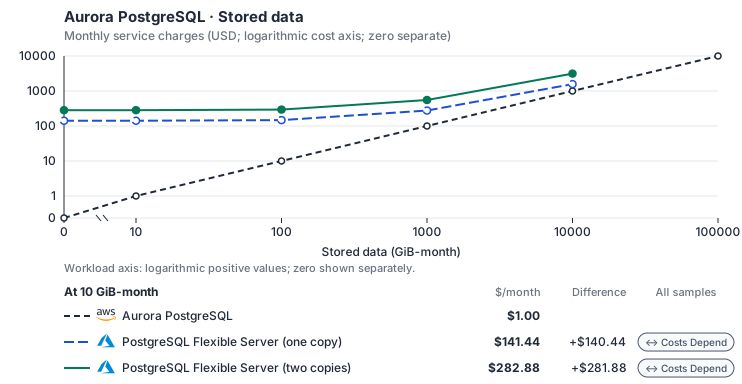
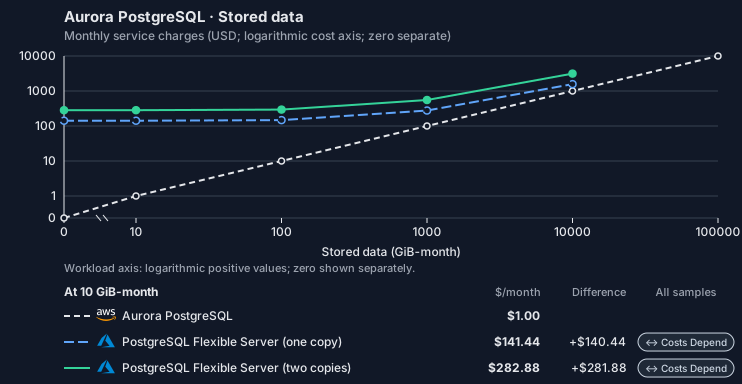
- Request meters remain at their independently authored defaults. Other native meters and workload assumptions retain their explicitly displayed default quantities. Workload translation and capacity assumptions are not benchmark measurements.
- Native monthly usage priced at the cited provider list prices; listed target allowances apply where present, excluding invoice credits, taxes and negotiated discounts. Rates as of 2026-10-22: us-east-1 → eastus, USD/month.
- Source prices are reference charges, not an invoice. Target lines cover selected service usage/configuration only; adapter hosting and Tensor9 fees are excluded.
- Samples of explicit prices are not performance measurements or capacity qualification. No interpolation or break-even guarantee is implied.
- Variant assumptions show the first axis sample; any axis-dependent configuration is described by this curve’s workload note.
- Rates are cited provider list prices, editable for discounts, commitments or another region. Workload translation and capacity coefficients remain editable planning assumptions, not benchmark measurements or a commercial quote.
- Default-zero rates are explicit assumptions, not evidence that the deployed service or resource is free.
- Provisioned-unit minimums use an editable approximate allocation floor. Modeled target service cost is max(usage/allocation, minimum), with billable network, durable staging and dependent sinks added separately; actual RU/TU sizing, scaling increments and throughput remain unqualified.
- Durable staging is priced once: provisioned targets include adapter state in their selected allocation; native targets add a separate staging allocation when required. Adapter hosting is a separate allocation and must exclude resources already priced as staging, workers or target capacity.
- A declared adapter mapping and cost model do not establish implementation availability or service equivalence.
- This is a declared directed mapping; a planning estimate does not establish deployment or request-serving support.
- Authored planning assumptions, not measured adapter capacity. Origin rates are cited first-tier list prices, before free allowances and discounts.
- A cost scenario does not establish backend availability, protocol fidelity or production readiness. Registry serving status remains independent.
- Provisioned compute and RAM are priced by resource-hour; operations are independently authored. Database size cannot be inferred from dollars alone.
- Aurora/AlloyDB, MySQL/PostgreSQL and proxied targets retain their distinct backend contracts. HA, replicas and proxy allocations must be selected explicitly.
- Aurora Standard also bills storage I/O at USD 0.20 per 1M I/Os (buffer-cache misses, not logical operations); no meter prices it, so the origin cost excludes it. I/O-Optimized clusters bill no I/O but 30% more per instance and 0.225 per GB-month storage.
- Azure Database for PostgreSQL Flexible Server bills vCores with a fixed memory ratio per series; the vCPU and memory rates decompose the General Purpose and Memory Optimized v5 prices. High availability bills the standby’s compute and storage as a second copy. The minimum is the smallest Burstable server, which does not support high availability; the smallest General Purpose server (2 vCores) costs USD 133.62 per month. Additional IOPS, backup storage and reserved capacity are not selected.
- Row-store throughput (capacityOpsPerVcpuSecond, default 1500) is measured-by-tensor9 as a lower bound: the DynamoDB adapter on Cloud SQL db-custom-2-7680 (2 vCPU, PostgreSQL 16, us-west1) served 2,974 ops/s of YCSB-A at 16 threads without recorded saturation (src/main/kotlin/t9/prime/equiv/generated/eval/CloudsqlPostgresqlYcsbAT16GoYcsbV1_0_0.kt). Published CPU-bound pgbench reaches 3,101 read-write transactions and 20,289 point reads per vCPU-second (AWS z1d.2xlarge, PostgreSQL 14.5), so actual capacity is likely higher. Reads and writes share one coefficient: at the same adapter version, read-only YCSB-C was not faster than 50%-update YCSB-A.
- Log-broker throughput (capacityStreamMiBPerVcpuSecond 20 at 0.5 utilization, 4 GiB RAM per vCPU) is provider-documented by Google Managed Service for Apache Kafka sizing (https://docs.cloud.google.com/managed-service-for-apache-kafka/docs/plan-cluster-size): write-equivalent bytes are replicated writes plus a quarter of reads. Producer batches below 10 KB lower per-CPU throughput; that penalty is not modeled.
- Disk utilization 0.8 is provider-documented headroom below Cloud SQL automatic storage increase, which triggers near 91-95% full (https://docs.cloud.google.com/sql/docs/postgres/instance-settings). The 20 GiB reserve exceeds PostgreSQL’s 1 GB default max_wal_size; the remainder of that reserve is unmeasured.
- CPU tiers double from 2 vCPUs to the target’s largest node at 4 GiB per vCPU; each target’s documented largest node bounds CPU, RAM, RAM per vCPU and disk, and the durable staging database uses Cloud SQL Enterprise (96 vCPU, 6.5 GiB per vCPU, 624 GiB, 64 TiB). Targets billed per capacity unit or throughput unit are sized by their backend instead.
- No public evidence: peak/mean work (2) and the RAM working-set fraction (0.1). Proposed measurements: the p99 one-minute rate over the monthly mean from customer CloudWatch metrics; the buffer hit ratio while stepping RAM under a fixed YCSB-B load.
- Node bounds: E96ds_v5 has 96 vCores and 672 GiB (https://learn.microsoft.com/en-us/azure/postgresql/compute-storage/concepts-compute); Premium SSD storage holds up to 32,767 GiB (https://learn.microsoft.com/en-us/azure/postgresql/compute-storage/concepts-storage).
- Stored GiB already includes the origin family’s physical footprint assumptions; no second storage amplification is applied.
- The workload family already selected resource-hours; the throughput coefficient is not applied again.
- Copies and allocation fractions change cost only; they do not increase modeled primary capacity.
- AWS Price List API, AmazonRDS offer: https://pricing.us-east-1.amazonaws.com/offers/v1.0/aws/AmazonRDS/current/us-east-1/index.json
- Azure Retail Prices API: https://prices.azure.com/api/retail/prices
- Additional network transfer, backups, KMS, one-time migration and operational labor unless an explicit meter includes them.
- Destination application execution and separately billed downstream services; supply those allocations separately.
- Aurora per-IO, serverless-capacity, backup and proxy charges; reserved/committed-use purchase options.
- Taxes, discounts, credits and free-tier allowances not explicitly listed by this model.
- Unmodeled dependent services, task execution and operations outside the selected workload family.
plan-872daf3fc345e314056ab6183e28b95413202233 / 2026-10-22.planning.2. Curve: workload-2.
Sources: AWS Price List API, AmazonRDS offer, Azure Retail Prices API.
Aurora PostgreSQL · Database writes
Feature: Aurora PostgreSQL. Estimated monthly service charges by Database writes. Adapter hosting and Tensor9 fees are excluded. Source: us-east-1; target: eastus; currency: USD.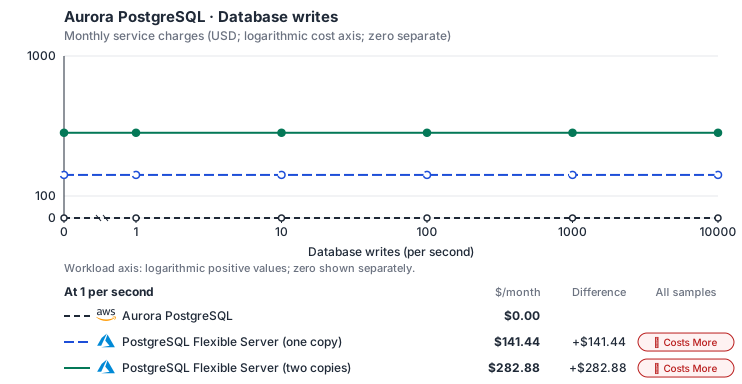
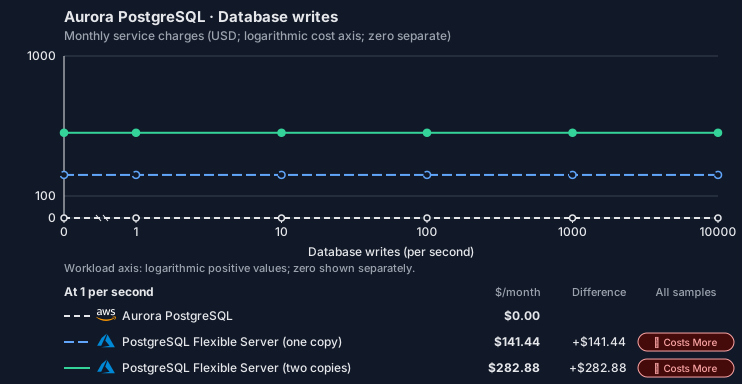
- Source compute and stored data remain independent; a throughput view needs explicit workload inputs. Other native meters and workload assumptions retain their explicitly displayed default quantities. Workload translation and capacity assumptions are not benchmark measurements.
- Native monthly usage priced at the cited provider list prices; listed target allowances apply where present, excluding invoice credits, taxes and negotiated discounts. Rates as of 2026-10-22: us-east-1 → eastus, USD/month.
- Source prices are reference charges, not an invoice. Target lines cover selected service usage/configuration only; adapter hosting and Tensor9 fees are excluded.
- Samples of explicit prices are not performance measurements or capacity qualification. No interpolation or break-even guarantee is implied.
- Variant assumptions show the first axis sample; any axis-dependent configuration is described by this curve’s workload note.
- Rates are cited provider list prices, editable for discounts, commitments or another region. Workload translation and capacity coefficients remain editable planning assumptions, not benchmark measurements or a commercial quote.
- Default-zero rates are explicit assumptions, not evidence that the deployed service or resource is free.
- Provisioned-unit minimums use an editable approximate allocation floor. Modeled target service cost is max(usage/allocation, minimum), with billable network, durable staging and dependent sinks added separately; actual RU/TU sizing, scaling increments and throughput remain unqualified.
- Durable staging is priced once: provisioned targets include adapter state in their selected allocation; native targets add a separate staging allocation when required. Adapter hosting is a separate allocation and must exclude resources already priced as staging, workers or target capacity.
- A declared adapter mapping and cost model do not establish implementation availability or service equivalence.
- This is a declared directed mapping; a planning estimate does not establish deployment or request-serving support.
- Authored planning assumptions, not measured adapter capacity. Origin rates are cited first-tier list prices, before free allowances and discounts.
- A cost scenario does not establish backend availability, protocol fidelity or production readiness. Registry serving status remains independent.
- Provisioned compute and RAM are priced by resource-hour; operations are independently authored. Database size cannot be inferred from dollars alone.
- Aurora/AlloyDB, MySQL/PostgreSQL and proxied targets retain their distinct backend contracts. HA, replicas and proxy allocations must be selected explicitly.
- Aurora Standard also bills storage I/O at USD 0.20 per 1M I/Os (buffer-cache misses, not logical operations); no meter prices it, so the origin cost excludes it. I/O-Optimized clusters bill no I/O but 30% more per instance and 0.225 per GB-month storage.
- Azure Database for PostgreSQL Flexible Server bills vCores with a fixed memory ratio per series; the vCPU and memory rates decompose the General Purpose and Memory Optimized v5 prices. High availability bills the standby’s compute and storage as a second copy. The minimum is the smallest Burstable server, which does not support high availability; the smallest General Purpose server (2 vCores) costs USD 133.62 per month. Additional IOPS, backup storage and reserved capacity are not selected.
- Row-store throughput (capacityOpsPerVcpuSecond, default 1500) is measured-by-tensor9 as a lower bound: the DynamoDB adapter on Cloud SQL db-custom-2-7680 (2 vCPU, PostgreSQL 16, us-west1) served 2,974 ops/s of YCSB-A at 16 threads without recorded saturation (src/main/kotlin/t9/prime/equiv/generated/eval/CloudsqlPostgresqlYcsbAT16GoYcsbV1_0_0.kt). Published CPU-bound pgbench reaches 3,101 read-write transactions and 20,289 point reads per vCPU-second (AWS z1d.2xlarge, PostgreSQL 14.5), so actual capacity is likely higher. Reads and writes share one coefficient: at the same adapter version, read-only YCSB-C was not faster than 50%-update YCSB-A.
- Log-broker throughput (capacityStreamMiBPerVcpuSecond 20 at 0.5 utilization, 4 GiB RAM per vCPU) is provider-documented by Google Managed Service for Apache Kafka sizing (https://docs.cloud.google.com/managed-service-for-apache-kafka/docs/plan-cluster-size): write-equivalent bytes are replicated writes plus a quarter of reads. Producer batches below 10 KB lower per-CPU throughput; that penalty is not modeled.
- Disk utilization 0.8 is provider-documented headroom below Cloud SQL automatic storage increase, which triggers near 91-95% full (https://docs.cloud.google.com/sql/docs/postgres/instance-settings). The 20 GiB reserve exceeds PostgreSQL’s 1 GB default max_wal_size; the remainder of that reserve is unmeasured.
- CPU tiers double from 2 vCPUs to the target’s largest node at 4 GiB per vCPU; each target’s documented largest node bounds CPU, RAM, RAM per vCPU and disk, and the durable staging database uses Cloud SQL Enterprise (96 vCPU, 6.5 GiB per vCPU, 624 GiB, 64 TiB). Targets billed per capacity unit or throughput unit are sized by their backend instead.
- No public evidence: peak/mean work (2) and the RAM working-set fraction (0.1). Proposed measurements: the p99 one-minute rate over the monthly mean from customer CloudWatch metrics; the buffer hit ratio while stepping RAM under a fixed YCSB-B load.
- Node bounds: E96ds_v5 has 96 vCores and 672 GiB (https://learn.microsoft.com/en-us/azure/postgresql/compute-storage/concepts-compute); Premium SSD storage holds up to 32,767 GiB (https://learn.microsoft.com/en-us/azure/postgresql/compute-storage/concepts-storage).
- Stored GiB already includes the origin family’s physical footprint assumptions; no second storage amplification is applied.
- The workload family already selected resource-hours; the throughput coefficient is not applied again.
- Copies and allocation fractions change cost only; they do not increase modeled primary capacity.
- AWS Price List API, AmazonRDS offer: https://pricing.us-east-1.amazonaws.com/offers/v1.0/aws/AmazonRDS/current/us-east-1/index.json
- Azure Retail Prices API: https://prices.azure.com/api/retail/prices
- Additional network transfer, backups, KMS, one-time migration and operational labor unless an explicit meter includes them.
- Destination application execution and separately billed downstream services; supply those allocations separately.
- Aurora per-IO, serverless-capacity, backup and proxy charges; reserved/committed-use purchase options.
- Taxes, discounts, credits and free-tier allowances not explicitly listed by this model.
- Unmodeled dependent services, task execution and operations outside the selected workload family.
plan-872daf3fc345e314056ab6183e28b95413202233 / 2026-10-22.planning.2. Curve: workload-3.
Sources: AWS Price List API, AmazonRDS offer, Azure Retail Prices API.
Aurora PostgreSQL → PostgreSQL Flexible Server: Authored native-usage planning example. Native monthly usage priced at the cited provider list prices; listed target allowances apply where present, excluding invoice credits, taxes and negotiated discounts.
Scenario source region: us-east-1. Scenario target region: eastus. Currency: USD.
- Additional network transfer, backups, KMS, one-time migration and operational labor unless an explicit meter includes them.
- Destination application execution and separately billed downstream services; supply those allocations separately.
- Aurora per-IO, serverless-capacity, backup and proxy charges; reserved/committed-use purchase options.
- Taxes, discounts, credits and free-tier allowances not explicitly listed by this model.
- Unmodeled dependent services, task execution and operations outside the selected workload family.
- Translated reads: 0 operations.
- Translated writes: 0 operations.
- Translated resident physical data: 0 GiB-month.
- Native provider operations: 0 operations.
- Published payload: 0 GiB.
- Delivered payload: 0 GiB.
- Allocated execution CPU: 0 vCPU-hour.
- Allocated execution RAM: 0 GiB-hour.
- Independent resource allocation: 0 resource-hour.
- Independent inventory: 0 resource-month.
- Input tokens: 0 tokens.
- Output tokens: 0 tokens.
- Billable network: 0 GiB.
- Dependent object sink retained data: 0 GiB-month.
- Dependent object sink writes: 0 writes.
- Rates are cited provider list prices, editable for discounts, commitments or another region. Workload translation and capacity coefficients remain editable planning assumptions, not benchmark measurements or a commercial quote.
- Default-zero rates are explicit assumptions, not evidence that the deployed service or resource is free.
- Provisioned-unit minimums use an editable approximate allocation floor. Modeled target service cost is max(usage/allocation, minimum), with billable network, durable staging and dependent sinks added separately; actual RU/TU sizing, scaling increments and throughput remain unqualified.
- Durable staging is priced once: provisioned targets include adapter state in their selected allocation; native targets add a separate staging allocation when required. Adapter hosting is a separate allocation and must exclude resources already priced as staging, workers or target capacity.
- A declared adapter mapping and cost model do not establish implementation availability or service equivalence.
- This is a declared directed mapping; a planning estimate does not establish deployment or request-serving support.
- Authored planning assumptions, not measured adapter capacity. Origin rates are cited first-tier list prices, before free allowances and discounts.
- A cost scenario does not establish backend availability, protocol fidelity or production readiness. Registry serving status remains independent.
- Provisioned compute and RAM are priced by resource-hour; operations are independently authored. Database size cannot be inferred from dollars alone.
- Aurora/AlloyDB, MySQL/PostgreSQL and proxied targets retain their distinct backend contracts. HA, replicas and proxy allocations must be selected explicitly.
- Aurora Standard also bills storage I/O at USD 0.20 per 1M I/Os (buffer-cache misses, not logical operations); no meter prices it, so the origin cost excludes it. I/O-Optimized clusters bill no I/O but 30% more per instance and 0.225 per GB-month storage.
- Azure Database for PostgreSQL Flexible Server bills vCores with a fixed memory ratio per series; the vCPU and memory rates decompose the General Purpose and Memory Optimized v5 prices. High availability bills the standby’s compute and storage as a second copy. The minimum is the smallest Burstable server, which does not support high availability; the smallest General Purpose server (2 vCores) costs USD 133.62 per month. Additional IOPS, backup storage and reserved capacity are not selected.
- Row-store throughput (capacityOpsPerVcpuSecond, default 1500) is measured-by-tensor9 as a lower bound: the DynamoDB adapter on Cloud SQL db-custom-2-7680 (2 vCPU, PostgreSQL 16, us-west1) served 2,974 ops/s of YCSB-A at 16 threads without recorded saturation (src/main/kotlin/t9/prime/equiv/generated/eval/CloudsqlPostgresqlYcsbAT16GoYcsbV1_0_0.kt). Published CPU-bound pgbench reaches 3,101 read-write transactions and 20,289 point reads per vCPU-second (AWS z1d.2xlarge, PostgreSQL 14.5), so actual capacity is likely higher. Reads and writes share one coefficient: at the same adapter version, read-only YCSB-C was not faster than 50%-update YCSB-A.
- Log-broker throughput (capacityStreamMiBPerVcpuSecond 20 at 0.5 utilization, 4 GiB RAM per vCPU) is provider-documented by Google Managed Service for Apache Kafka sizing (https://docs.cloud.google.com/managed-service-for-apache-kafka/docs/plan-cluster-size): write-equivalent bytes are replicated writes plus a quarter of reads. Producer batches below 10 KB lower per-CPU throughput; that penalty is not modeled.
- Disk utilization 0.8 is provider-documented headroom below Cloud SQL automatic storage increase, which triggers near 91-95% full (https://docs.cloud.google.com/sql/docs/postgres/instance-settings). The 20 GiB reserve exceeds PostgreSQL’s 1 GB default max_wal_size; the remainder of that reserve is unmeasured.
- CPU tiers double from 2 vCPUs to the target’s largest node at 4 GiB per vCPU; each target’s documented largest node bounds CPU, RAM, RAM per vCPU and disk, and the durable staging database uses Cloud SQL Enterprise (96 vCPU, 6.5 GiB per vCPU, 624 GiB, 64 TiB). Targets billed per capacity unit or throughput unit are sized by their backend instead.
- No public evidence: peak/mean work (2) and the RAM working-set fraction (0.1). Proposed measurements: the p99 one-minute rate over the monthly mean from customer CloudWatch metrics; the buffer hit ratio while stepping RAM under a fixed YCSB-B load.
- Node bounds: E96ds_v5 has 96 vCores and 672 GiB (https://learn.microsoft.com/en-us/azure/postgresql/compute-storage/concepts-compute); Premium SSD storage holds up to 32,767 GiB (https://learn.microsoft.com/en-us/azure/postgresql/compute-storage/concepts-storage).
- Stored GiB already includes the origin family’s physical footprint assumptions; no second storage amplification is applied.
- The workload family already selected resource-hours; the throughput coefficient is not applied again.
- Copies and allocation fractions change cost only; they do not increase modeled primary capacity.
plan-872daf3fc345e314056ab6183e28b95413202233 / 2026-10-22.planning.2. Scenario: planning-example.
Sources: AWS Price List API, AmazonRDS offer, Azure Retail Prices API.
On DigitalOcean
PostgreSQL
How it works
Your application connects to DigitalOcean Managed PostgreSQL with its usual PostgreSQL driver, and its queries go directly to the database. Tensor9 creates the DigitalOcean database from your AWS database declaration and supplies its connection settings. RDS management calls go through the adapter in the customer’s Cloud Adapter deployment. The adapter keeps the AWS database identity, translates supported operations to DigitalOcean’s API, and reports the backend’s status and endpoints. The adapter maps the Aurora cluster to a primary database and separate read-only nodes. Applications that use the Aurora Data API send those requests through the adapter, which runs them as SQL over a PostgreSQL connection; direct PostgreSQL clients connect to the database.

Queries reach the database directly; only the management calls are translated.
Backups and recovery
DigitalOcean takes daily backups and offers point-in-time recovery for the last seven days. A restore creates a new primary, and you must add standby and read-only nodes again. Verify the recovered data before you switch applications to the new endpoint. If the workload needs backups kept longer than DigitalOcean’s window, keep a separate export.Standby nodes and read replicas
Standby nodes recover the database automatically within its region. Read-only nodes are separate resources with their own endpoints, and you can place them in another region. Promoting a read-only node creates an independent primary cluster and ends its replication from the original. Allow for replication lag before you move writes to it.Settings, access, and pooling
The plan you choose sets the available database version, capacity and standby options. Supported engine settings map to DigitalOcean’s database configuration. Check the supported PostgreSQL version and extensions. DigitalOcean offers PgBouncer connection pools; check their transaction and session behavior against how your application uses RDS Proxy. Connections use DigitalOcean database users, TLS and trusted-source rules.Limitations
Where RDS and DigitalOcean Managed PostgreSQL differ- RDS snapshots behave differently: restores come from DigitalOcean’s backup timeline. Restores use DigitalOcean’s seven-day backup timeline and create a new primary. Independently retained RDS snapshots and a custom AWS backup schedule are not reproduced.
- Promotion behaves differently: a promoted read-only node becomes a separate primary. Promotion ends replication from the original. It is not the same as forcing failover to a standby or performing an Aurora Global Database switchover.
- Stopping and starting the database is not supported. This mapping does not provide an RDS-style paused database.
- Parameter groups behave differently: settings apply to the database itself. Supported engine settings map to DigitalOcean’s database configuration. The reusable RDS parameter-group object has no equivalent, and DigitalOcean fixes some engine variables.
- AWS IAM database tokens and customer KMS keys are not supported. An AWS role token or customer KMS key cannot stand in for DigitalOcean database credentials or DigitalOcean-managed encryption keys.
- Event subscriptions and Performance Insights are not supported. They do not become the same AWS services on DigitalOcean; backend monitoring works differently.
- Aurora shared storage, Serverless v2 scaling, fast clones and reader-promotion ranking are not supported. DigitalOcean runs a primary database with separate read-only nodes, so these Aurora features have no direct equivalent.
Other considerations
Moving data. Copy existing data with the engine’s dump and restore tools or a supported online migration workflow. Check the schema, users, required extensions or plugins, and application queries before you switch connection settings. Who operates what. DigitalOcean operates the database service. The customer controls the plan, access rules, application cutover and permissions for backend monitoring.Example monthly charges
This Tensor9 Cloud Adapter scenario estimates service charges for the named origin and target services. Adapter hosting and commercial Tensor9 fees need separate allocations. How Tensor9 estimates costs explains the method and what the estimates include.Aurora PostgreSQL · Primary allocated compute
Feature: Aurora PostgreSQL. Estimated monthly service charges by Primary allocated compute. Adapter hosting and Tensor9 fees are excluded. Source: us-east-1; target: nyc; currency: USD.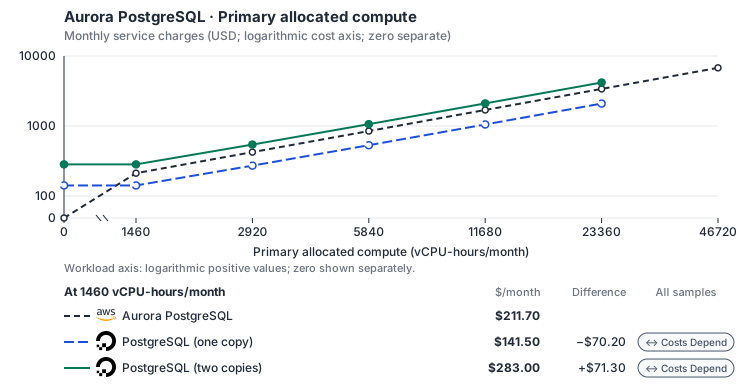
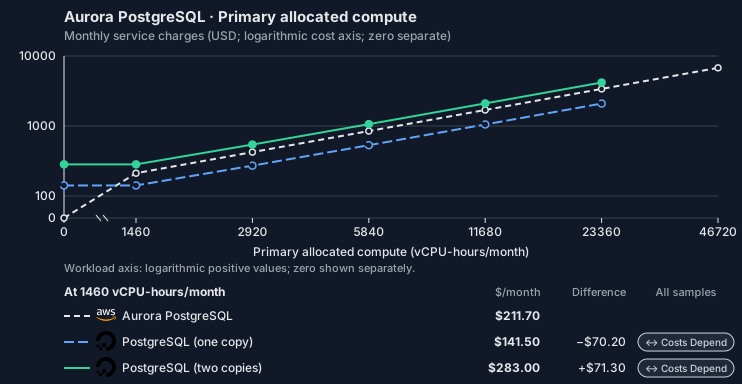
- CPU allocation does not imply an achieved transaction rate. Other native meters and workload assumptions retain their explicitly displayed default quantities. Workload translation and capacity assumptions are not benchmark measurements.
- Native monthly usage priced at the cited provider list prices; listed target allowances apply where present, excluding invoice credits, taxes and negotiated discounts. Rates as of 2026-10-22: us-east-1 → nyc, USD/month.
- Source prices are reference charges, not an invoice. Target lines cover selected service usage/configuration only; adapter hosting and Tensor9 fees are excluded.
- Samples of explicit prices are not performance measurements or capacity qualification. No interpolation or break-even guarantee is implied.
- Variant assumptions show the first axis sample; any axis-dependent configuration is described by this curve’s workload note.
- Rates are cited provider list prices, editable for discounts, commitments or another region. Workload translation and capacity coefficients remain editable planning assumptions, not benchmark measurements or a commercial quote.
- Default-zero rates are explicit assumptions, not evidence that the deployed service or resource is free.
- Provisioned-unit minimums use an editable approximate allocation floor. Modeled target service cost is max(usage/allocation, minimum), with billable network, durable staging and dependent sinks added separately; actual RU/TU sizing, scaling increments and throughput remain unqualified.
- Durable staging is priced once: provisioned targets include adapter state in their selected allocation; native targets add a separate staging allocation when required. Adapter hosting is a separate allocation and must exclude resources already priced as staging, workers or target capacity.
- A declared adapter mapping and cost model do not establish implementation availability or service equivalence.
- This is a declared directed mapping; a planning estimate does not establish deployment or request-serving support.
- Authored planning assumptions, not measured adapter capacity. Origin rates are cited first-tier list prices, before free allowances and discounts.
- A cost scenario does not establish backend availability, protocol fidelity or production readiness. Registry serving status remains independent.
- Provisioned compute and RAM are priced by resource-hour; operations are independently authored. Database size cannot be inferred from dollars alone.
- Aurora/AlloyDB, MySQL/PostgreSQL and proxied targets retain their distinct backend contracts. HA, replicas and proxy allocations must be selected explicitly.
- Aurora Standard also bills storage I/O at USD 0.20 per 1M I/Os (buffer-cache misses, not logical operations); no meter prices it, so the origin cost excludes it. I/O-Optimized clusters bill no I/O but 30% more per instance and 0.225 per GB-month storage.
- DigitalOcean Managed PostgreSQL priced at Advanced Edition rates, the edition that keeps standby nodes and plans above 4 GiB: from 2026-10-15 for new accounts and 2026-11-30 for all accounts, new Standard Edition clusters cannot exceed 4 GiB or add standby or read-only nodes (https://docs.digitalocean.com/products/databases/postgresql/details/pricing/). The vCPU and memory rates decompose the General Purpose (1:4) and Storage Optimized (1:8) node prices, which fit every plan up to 32 vCPUs exactly; each standby node bills at its primary’s price. Traffic to and from managed databases does not count against DigitalOcean bandwidth billing, so selected network is not charged. Standard Edition (a 1 GiB single node is USD 13 plus 10 GiB at 0.215, 15.15/month) is not selected. Whether standby nodes also bill storage is not stated.
- Row-store throughput (capacityOpsPerVcpuSecond, default 1500) is measured-by-tensor9 as a lower bound: the DynamoDB adapter on Cloud SQL db-custom-2-7680 (2 vCPU, PostgreSQL 16, us-west1) served 2,974 ops/s of YCSB-A at 16 threads without recorded saturation (src/main/kotlin/t9/prime/equiv/generated/eval/CloudsqlPostgresqlYcsbAT16GoYcsbV1_0_0.kt). Published CPU-bound pgbench reaches 3,101 read-write transactions and 20,289 point reads per vCPU-second (AWS z1d.2xlarge, PostgreSQL 14.5), so actual capacity is likely higher. Reads and writes share one coefficient: at the same adapter version, read-only YCSB-C was not faster than 50%-update YCSB-A.
- Log-broker throughput (capacityStreamMiBPerVcpuSecond 20 at 0.5 utilization, 4 GiB RAM per vCPU) is provider-documented by Google Managed Service for Apache Kafka sizing (https://docs.cloud.google.com/managed-service-for-apache-kafka/docs/plan-cluster-size): write-equivalent bytes are replicated writes plus a quarter of reads. Producer batches below 10 KB lower per-CPU throughput; that penalty is not modeled.
- Disk utilization 0.8 is provider-documented headroom below Cloud SQL automatic storage increase, which triggers near 91-95% full (https://docs.cloud.google.com/sql/docs/postgres/instance-settings). The 20 GiB reserve exceeds PostgreSQL’s 1 GB default max_wal_size; the remainder of that reserve is unmeasured.
- CPU tiers double from 2 vCPUs to the target’s largest node at 4 GiB per vCPU; each target’s documented largest node bounds CPU, RAM, RAM per vCPU and disk, and the durable staging database uses Cloud SQL Enterprise (96 vCPU, 6.5 GiB per vCPU, 624 GiB, 64 TiB). Targets billed per capacity unit or throughput unit are sized by their backend instead.
- No public evidence: peak/mean work (2) and the RAM working-set fraction (0.1). Proposed measurements: the p99 one-minute rate over the monthly mean from customer CloudWatch metrics; the buffer hit ratio while stepping RAM under a fixed YCSB-B load.
- Node bounds: The largest plan has 256 GiB (https://docs.digitalocean.com/products/databases/postgresql/details/limits/) and storage reaches 30 TB (https://www.digitalocean.com/blog/larger-plan-sizes-for-mysql-and-postgresql); this model’s rates fit plans up to 32 vCPUs.
- Stored GiB already includes the origin family’s physical footprint assumptions; no second storage amplification is applied.
- The workload family already selected resource-hours; the throughput coefficient is not applied again.
- Copies and allocation fractions change cost only; they do not increase modeled primary capacity.
- AWS Price List API, AmazonRDS offer: https://pricing.us-east-1.amazonaws.com/offers/v1.0/aws/AmazonRDS/current/us-east-1/index.json
- DigitalOcean Managed Databases pricing: https://www.digitalocean.com/pricing/managed-databases
- DigitalOcean Managed Databases pricing: https://docs.digitalocean.com/products/databases/postgresql/details/pricing/
- Additional network transfer, backups, KMS, one-time migration and operational labor unless an explicit meter includes them.
- Destination application execution and separately billed downstream services; supply those allocations separately.
- Aurora per-IO, serverless-capacity, backup and proxy charges; reserved/committed-use purchase options.
- Taxes, discounts, credits and free-tier allowances not explicitly listed by this model.
- Unmodeled dependent services, task execution and operations outside the selected workload family.
plan-ba4d39626bdb793bf67a00ea7cdd52f6cc0b7013 / 2026-10-22.planning.2. Curve: workload-1.
Sources: AWS Price List API, AmazonRDS offer, DigitalOcean Managed Databases pricing, DigitalOcean Managed Databases pricing.
Aurora PostgreSQL · Stored data
Feature: Aurora PostgreSQL. Estimated monthly service charges by Stored data. Adapter hosting and Tensor9 fees are excluded. Source: us-east-1; target: nyc; currency: USD.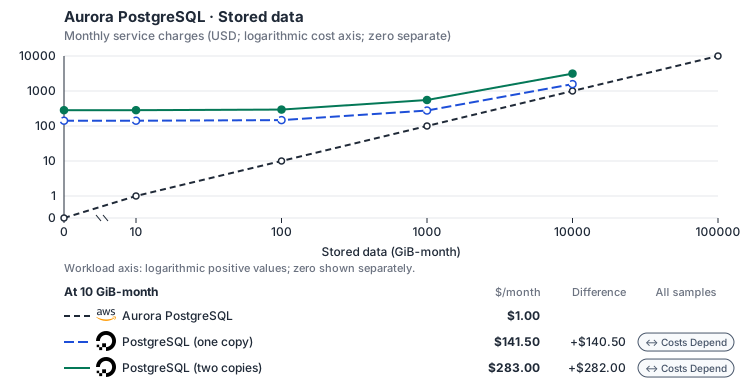
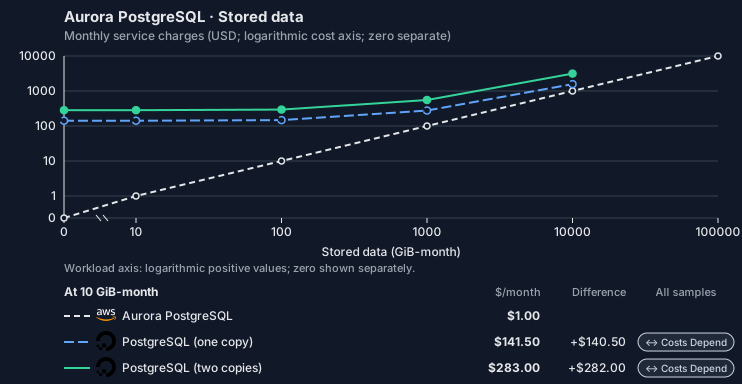
- Request meters remain at their independently authored defaults. Other native meters and workload assumptions retain their explicitly displayed default quantities. Workload translation and capacity assumptions are not benchmark measurements.
- Native monthly usage priced at the cited provider list prices; listed target allowances apply where present, excluding invoice credits, taxes and negotiated discounts. Rates as of 2026-10-22: us-east-1 → nyc, USD/month.
- Source prices are reference charges, not an invoice. Target lines cover selected service usage/configuration only; adapter hosting and Tensor9 fees are excluded.
- Samples of explicit prices are not performance measurements or capacity qualification. No interpolation or break-even guarantee is implied.
- Variant assumptions show the first axis sample; any axis-dependent configuration is described by this curve’s workload note.
- Rates are cited provider list prices, editable for discounts, commitments or another region. Workload translation and capacity coefficients remain editable planning assumptions, not benchmark measurements or a commercial quote.
- Default-zero rates are explicit assumptions, not evidence that the deployed service or resource is free.
- Provisioned-unit minimums use an editable approximate allocation floor. Modeled target service cost is max(usage/allocation, minimum), with billable network, durable staging and dependent sinks added separately; actual RU/TU sizing, scaling increments and throughput remain unqualified.
- Durable staging is priced once: provisioned targets include adapter state in their selected allocation; native targets add a separate staging allocation when required. Adapter hosting is a separate allocation and must exclude resources already priced as staging, workers or target capacity.
- A declared adapter mapping and cost model do not establish implementation availability or service equivalence.
- This is a declared directed mapping; a planning estimate does not establish deployment or request-serving support.
- Authored planning assumptions, not measured adapter capacity. Origin rates are cited first-tier list prices, before free allowances and discounts.
- A cost scenario does not establish backend availability, protocol fidelity or production readiness. Registry serving status remains independent.
- Provisioned compute and RAM are priced by resource-hour; operations are independently authored. Database size cannot be inferred from dollars alone.
- Aurora/AlloyDB, MySQL/PostgreSQL and proxied targets retain their distinct backend contracts. HA, replicas and proxy allocations must be selected explicitly.
- Aurora Standard also bills storage I/O at USD 0.20 per 1M I/Os (buffer-cache misses, not logical operations); no meter prices it, so the origin cost excludes it. I/O-Optimized clusters bill no I/O but 30% more per instance and 0.225 per GB-month storage.
- DigitalOcean Managed PostgreSQL priced at Advanced Edition rates, the edition that keeps standby nodes and plans above 4 GiB: from 2026-10-15 for new accounts and 2026-11-30 for all accounts, new Standard Edition clusters cannot exceed 4 GiB or add standby or read-only nodes (https://docs.digitalocean.com/products/databases/postgresql/details/pricing/). The vCPU and memory rates decompose the General Purpose (1:4) and Storage Optimized (1:8) node prices, which fit every plan up to 32 vCPUs exactly; each standby node bills at its primary’s price. Traffic to and from managed databases does not count against DigitalOcean bandwidth billing, so selected network is not charged. Standard Edition (a 1 GiB single node is USD 13 plus 10 GiB at 0.215, 15.15/month) is not selected. Whether standby nodes also bill storage is not stated.
- Row-store throughput (capacityOpsPerVcpuSecond, default 1500) is measured-by-tensor9 as a lower bound: the DynamoDB adapter on Cloud SQL db-custom-2-7680 (2 vCPU, PostgreSQL 16, us-west1) served 2,974 ops/s of YCSB-A at 16 threads without recorded saturation (src/main/kotlin/t9/prime/equiv/generated/eval/CloudsqlPostgresqlYcsbAT16GoYcsbV1_0_0.kt). Published CPU-bound pgbench reaches 3,101 read-write transactions and 20,289 point reads per vCPU-second (AWS z1d.2xlarge, PostgreSQL 14.5), so actual capacity is likely higher. Reads and writes share one coefficient: at the same adapter version, read-only YCSB-C was not faster than 50%-update YCSB-A.
- Log-broker throughput (capacityStreamMiBPerVcpuSecond 20 at 0.5 utilization, 4 GiB RAM per vCPU) is provider-documented by Google Managed Service for Apache Kafka sizing (https://docs.cloud.google.com/managed-service-for-apache-kafka/docs/plan-cluster-size): write-equivalent bytes are replicated writes plus a quarter of reads. Producer batches below 10 KB lower per-CPU throughput; that penalty is not modeled.
- Disk utilization 0.8 is provider-documented headroom below Cloud SQL automatic storage increase, which triggers near 91-95% full (https://docs.cloud.google.com/sql/docs/postgres/instance-settings). The 20 GiB reserve exceeds PostgreSQL’s 1 GB default max_wal_size; the remainder of that reserve is unmeasured.
- CPU tiers double from 2 vCPUs to the target’s largest node at 4 GiB per vCPU; each target’s documented largest node bounds CPU, RAM, RAM per vCPU and disk, and the durable staging database uses Cloud SQL Enterprise (96 vCPU, 6.5 GiB per vCPU, 624 GiB, 64 TiB). Targets billed per capacity unit or throughput unit are sized by their backend instead.
- No public evidence: peak/mean work (2) and the RAM working-set fraction (0.1). Proposed measurements: the p99 one-minute rate over the monthly mean from customer CloudWatch metrics; the buffer hit ratio while stepping RAM under a fixed YCSB-B load.
- Node bounds: The largest plan has 256 GiB (https://docs.digitalocean.com/products/databases/postgresql/details/limits/) and storage reaches 30 TB (https://www.digitalocean.com/blog/larger-plan-sizes-for-mysql-and-postgresql); this model’s rates fit plans up to 32 vCPUs.
- Stored GiB already includes the origin family’s physical footprint assumptions; no second storage amplification is applied.
- The workload family already selected resource-hours; the throughput coefficient is not applied again.
- Copies and allocation fractions change cost only; they do not increase modeled primary capacity.
- AWS Price List API, AmazonRDS offer: https://pricing.us-east-1.amazonaws.com/offers/v1.0/aws/AmazonRDS/current/us-east-1/index.json
- DigitalOcean Managed Databases pricing: https://www.digitalocean.com/pricing/managed-databases
- DigitalOcean Managed Databases pricing: https://docs.digitalocean.com/products/databases/postgresql/details/pricing/
- Additional network transfer, backups, KMS, one-time migration and operational labor unless an explicit meter includes them.
- Destination application execution and separately billed downstream services; supply those allocations separately.
- Aurora per-IO, serverless-capacity, backup and proxy charges; reserved/committed-use purchase options.
- Taxes, discounts, credits and free-tier allowances not explicitly listed by this model.
- Unmodeled dependent services, task execution and operations outside the selected workload family.
plan-ba4d39626bdb793bf67a00ea7cdd52f6cc0b7013 / 2026-10-22.planning.2. Curve: workload-2.
Sources: AWS Price List API, AmazonRDS offer, DigitalOcean Managed Databases pricing, DigitalOcean Managed Databases pricing.
Aurora PostgreSQL · Database writes
Feature: Aurora PostgreSQL. Estimated monthly service charges by Database writes. Adapter hosting and Tensor9 fees are excluded. Source: us-east-1; target: nyc; currency: USD.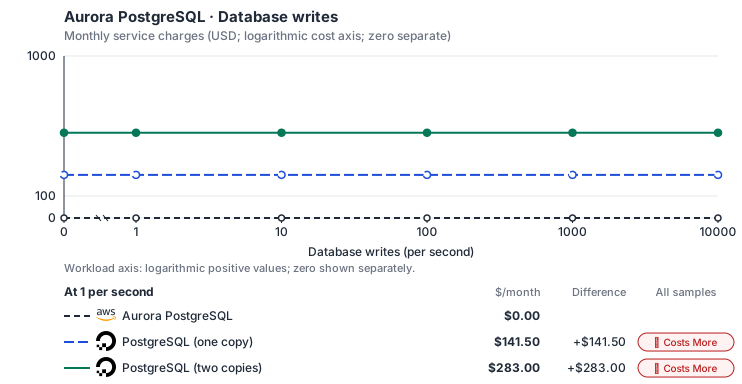
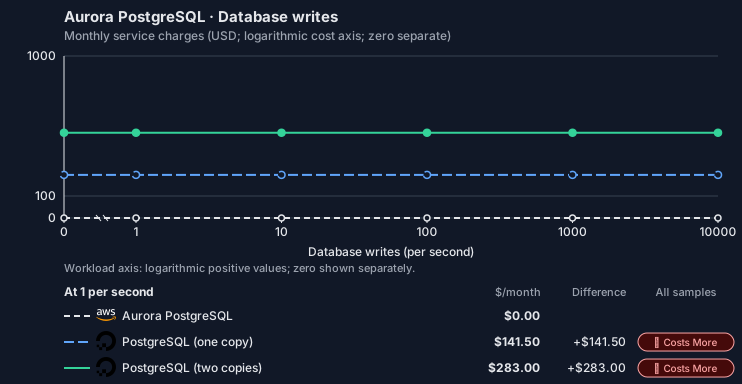
- Source compute and stored data remain independent; a throughput view needs explicit workload inputs. Other native meters and workload assumptions retain their explicitly displayed default quantities. Workload translation and capacity assumptions are not benchmark measurements.
- Native monthly usage priced at the cited provider list prices; listed target allowances apply where present, excluding invoice credits, taxes and negotiated discounts. Rates as of 2026-10-22: us-east-1 → nyc, USD/month.
- Source prices are reference charges, not an invoice. Target lines cover selected service usage/configuration only; adapter hosting and Tensor9 fees are excluded.
- Samples of explicit prices are not performance measurements or capacity qualification. No interpolation or break-even guarantee is implied.
- Variant assumptions show the first axis sample; any axis-dependent configuration is described by this curve’s workload note.
- Rates are cited provider list prices, editable for discounts, commitments or another region. Workload translation and capacity coefficients remain editable planning assumptions, not benchmark measurements or a commercial quote.
- Default-zero rates are explicit assumptions, not evidence that the deployed service or resource is free.
- Provisioned-unit minimums use an editable approximate allocation floor. Modeled target service cost is max(usage/allocation, minimum), with billable network, durable staging and dependent sinks added separately; actual RU/TU sizing, scaling increments and throughput remain unqualified.
- Durable staging is priced once: provisioned targets include adapter state in their selected allocation; native targets add a separate staging allocation when required. Adapter hosting is a separate allocation and must exclude resources already priced as staging, workers or target capacity.
- A declared adapter mapping and cost model do not establish implementation availability or service equivalence.
- This is a declared directed mapping; a planning estimate does not establish deployment or request-serving support.
- Authored planning assumptions, not measured adapter capacity. Origin rates are cited first-tier list prices, before free allowances and discounts.
- A cost scenario does not establish backend availability, protocol fidelity or production readiness. Registry serving status remains independent.
- Provisioned compute and RAM are priced by resource-hour; operations are independently authored. Database size cannot be inferred from dollars alone.
- Aurora/AlloyDB, MySQL/PostgreSQL and proxied targets retain their distinct backend contracts. HA, replicas and proxy allocations must be selected explicitly.
- Aurora Standard also bills storage I/O at USD 0.20 per 1M I/Os (buffer-cache misses, not logical operations); no meter prices it, so the origin cost excludes it. I/O-Optimized clusters bill no I/O but 30% more per instance and 0.225 per GB-month storage.
- DigitalOcean Managed PostgreSQL priced at Advanced Edition rates, the edition that keeps standby nodes and plans above 4 GiB: from 2026-10-15 for new accounts and 2026-11-30 for all accounts, new Standard Edition clusters cannot exceed 4 GiB or add standby or read-only nodes (https://docs.digitalocean.com/products/databases/postgresql/details/pricing/). The vCPU and memory rates decompose the General Purpose (1:4) and Storage Optimized (1:8) node prices, which fit every plan up to 32 vCPUs exactly; each standby node bills at its primary’s price. Traffic to and from managed databases does not count against DigitalOcean bandwidth billing, so selected network is not charged. Standard Edition (a 1 GiB single node is USD 13 plus 10 GiB at 0.215, 15.15/month) is not selected. Whether standby nodes also bill storage is not stated.
- Row-store throughput (capacityOpsPerVcpuSecond, default 1500) is measured-by-tensor9 as a lower bound: the DynamoDB adapter on Cloud SQL db-custom-2-7680 (2 vCPU, PostgreSQL 16, us-west1) served 2,974 ops/s of YCSB-A at 16 threads without recorded saturation (src/main/kotlin/t9/prime/equiv/generated/eval/CloudsqlPostgresqlYcsbAT16GoYcsbV1_0_0.kt). Published CPU-bound pgbench reaches 3,101 read-write transactions and 20,289 point reads per vCPU-second (AWS z1d.2xlarge, PostgreSQL 14.5), so actual capacity is likely higher. Reads and writes share one coefficient: at the same adapter version, read-only YCSB-C was not faster than 50%-update YCSB-A.
- Log-broker throughput (capacityStreamMiBPerVcpuSecond 20 at 0.5 utilization, 4 GiB RAM per vCPU) is provider-documented by Google Managed Service for Apache Kafka sizing (https://docs.cloud.google.com/managed-service-for-apache-kafka/docs/plan-cluster-size): write-equivalent bytes are replicated writes plus a quarter of reads. Producer batches below 10 KB lower per-CPU throughput; that penalty is not modeled.
- Disk utilization 0.8 is provider-documented headroom below Cloud SQL automatic storage increase, which triggers near 91-95% full (https://docs.cloud.google.com/sql/docs/postgres/instance-settings). The 20 GiB reserve exceeds PostgreSQL’s 1 GB default max_wal_size; the remainder of that reserve is unmeasured.
- CPU tiers double from 2 vCPUs to the target’s largest node at 4 GiB per vCPU; each target’s documented largest node bounds CPU, RAM, RAM per vCPU and disk, and the durable staging database uses Cloud SQL Enterprise (96 vCPU, 6.5 GiB per vCPU, 624 GiB, 64 TiB). Targets billed per capacity unit or throughput unit are sized by their backend instead.
- No public evidence: peak/mean work (2) and the RAM working-set fraction (0.1). Proposed measurements: the p99 one-minute rate over the monthly mean from customer CloudWatch metrics; the buffer hit ratio while stepping RAM under a fixed YCSB-B load.
- Node bounds: The largest plan has 256 GiB (https://docs.digitalocean.com/products/databases/postgresql/details/limits/) and storage reaches 30 TB (https://www.digitalocean.com/blog/larger-plan-sizes-for-mysql-and-postgresql); this model’s rates fit plans up to 32 vCPUs.
- Stored GiB already includes the origin family’s physical footprint assumptions; no second storage amplification is applied.
- The workload family already selected resource-hours; the throughput coefficient is not applied again.
- Copies and allocation fractions change cost only; they do not increase modeled primary capacity.
- AWS Price List API, AmazonRDS offer: https://pricing.us-east-1.amazonaws.com/offers/v1.0/aws/AmazonRDS/current/us-east-1/index.json
- DigitalOcean Managed Databases pricing: https://www.digitalocean.com/pricing/managed-databases
- DigitalOcean Managed Databases pricing: https://docs.digitalocean.com/products/databases/postgresql/details/pricing/
- Additional network transfer, backups, KMS, one-time migration and operational labor unless an explicit meter includes them.
- Destination application execution and separately billed downstream services; supply those allocations separately.
- Aurora per-IO, serverless-capacity, backup and proxy charges; reserved/committed-use purchase options.
- Taxes, discounts, credits and free-tier allowances not explicitly listed by this model.
- Unmodeled dependent services, task execution and operations outside the selected workload family.
plan-ba4d39626bdb793bf67a00ea7cdd52f6cc0b7013 / 2026-10-22.planning.2. Curve: workload-3.
Sources: AWS Price List API, AmazonRDS offer, DigitalOcean Managed Databases pricing, DigitalOcean Managed Databases pricing.
Aurora PostgreSQL → PostgreSQL: Authored native-usage planning example. Native monthly usage priced at the cited provider list prices; listed target allowances apply where present, excluding invoice credits, taxes and negotiated discounts.
Scenario source region: us-east-1. Scenario target region: nyc. Currency: USD.
- Additional network transfer, backups, KMS, one-time migration and operational labor unless an explicit meter includes them.
- Destination application execution and separately billed downstream services; supply those allocations separately.
- Aurora per-IO, serverless-capacity, backup and proxy charges; reserved/committed-use purchase options.
- Taxes, discounts, credits and free-tier allowances not explicitly listed by this model.
- Unmodeled dependent services, task execution and operations outside the selected workload family.
- Translated reads: 0 operations.
- Translated writes: 0 operations.
- Translated resident physical data: 0 GiB-month.
- Native provider operations: 0 operations.
- Published payload: 0 GiB.
- Delivered payload: 0 GiB.
- Allocated execution CPU: 0 vCPU-hour.
- Allocated execution RAM: 0 GiB-hour.
- Independent resource allocation: 0 resource-hour.
- Independent inventory: 0 resource-month.
- Input tokens: 0 tokens.
- Output tokens: 0 tokens.
- Billable network: 0 GiB.
- Dependent object sink retained data: 0 GiB-month.
- Dependent object sink writes: 0 writes.
- Rates are cited provider list prices, editable for discounts, commitments or another region. Workload translation and capacity coefficients remain editable planning assumptions, not benchmark measurements or a commercial quote.
- Default-zero rates are explicit assumptions, not evidence that the deployed service or resource is free.
- Provisioned-unit minimums use an editable approximate allocation floor. Modeled target service cost is max(usage/allocation, minimum), with billable network, durable staging and dependent sinks added separately; actual RU/TU sizing, scaling increments and throughput remain unqualified.
- Durable staging is priced once: provisioned targets include adapter state in their selected allocation; native targets add a separate staging allocation when required. Adapter hosting is a separate allocation and must exclude resources already priced as staging, workers or target capacity.
- A declared adapter mapping and cost model do not establish implementation availability or service equivalence.
- This is a declared directed mapping; a planning estimate does not establish deployment or request-serving support.
- Authored planning assumptions, not measured adapter capacity. Origin rates are cited first-tier list prices, before free allowances and discounts.
- A cost scenario does not establish backend availability, protocol fidelity or production readiness. Registry serving status remains independent.
- Provisioned compute and RAM are priced by resource-hour; operations are independently authored. Database size cannot be inferred from dollars alone.
- Aurora/AlloyDB, MySQL/PostgreSQL and proxied targets retain their distinct backend contracts. HA, replicas and proxy allocations must be selected explicitly.
- Aurora Standard also bills storage I/O at USD 0.20 per 1M I/Os (buffer-cache misses, not logical operations); no meter prices it, so the origin cost excludes it. I/O-Optimized clusters bill no I/O but 30% more per instance and 0.225 per GB-month storage.
- DigitalOcean Managed PostgreSQL priced at Advanced Edition rates, the edition that keeps standby nodes and plans above 4 GiB: from 2026-10-15 for new accounts and 2026-11-30 for all accounts, new Standard Edition clusters cannot exceed 4 GiB or add standby or read-only nodes (https://docs.digitalocean.com/products/databases/postgresql/details/pricing/). The vCPU and memory rates decompose the General Purpose (1:4) and Storage Optimized (1:8) node prices, which fit every plan up to 32 vCPUs exactly; each standby node bills at its primary’s price. Traffic to and from managed databases does not count against DigitalOcean bandwidth billing, so selected network is not charged. Standard Edition (a 1 GiB single node is USD 13 plus 10 GiB at 0.215, 15.15/month) is not selected. Whether standby nodes also bill storage is not stated.
- Row-store throughput (capacityOpsPerVcpuSecond, default 1500) is measured-by-tensor9 as a lower bound: the DynamoDB adapter on Cloud SQL db-custom-2-7680 (2 vCPU, PostgreSQL 16, us-west1) served 2,974 ops/s of YCSB-A at 16 threads without recorded saturation (src/main/kotlin/t9/prime/equiv/generated/eval/CloudsqlPostgresqlYcsbAT16GoYcsbV1_0_0.kt). Published CPU-bound pgbench reaches 3,101 read-write transactions and 20,289 point reads per vCPU-second (AWS z1d.2xlarge, PostgreSQL 14.5), so actual capacity is likely higher. Reads and writes share one coefficient: at the same adapter version, read-only YCSB-C was not faster than 50%-update YCSB-A.
- Log-broker throughput (capacityStreamMiBPerVcpuSecond 20 at 0.5 utilization, 4 GiB RAM per vCPU) is provider-documented by Google Managed Service for Apache Kafka sizing (https://docs.cloud.google.com/managed-service-for-apache-kafka/docs/plan-cluster-size): write-equivalent bytes are replicated writes plus a quarter of reads. Producer batches below 10 KB lower per-CPU throughput; that penalty is not modeled.
- Disk utilization 0.8 is provider-documented headroom below Cloud SQL automatic storage increase, which triggers near 91-95% full (https://docs.cloud.google.com/sql/docs/postgres/instance-settings). The 20 GiB reserve exceeds PostgreSQL’s 1 GB default max_wal_size; the remainder of that reserve is unmeasured.
- CPU tiers double from 2 vCPUs to the target’s largest node at 4 GiB per vCPU; each target’s documented largest node bounds CPU, RAM, RAM per vCPU and disk, and the durable staging database uses Cloud SQL Enterprise (96 vCPU, 6.5 GiB per vCPU, 624 GiB, 64 TiB). Targets billed per capacity unit or throughput unit are sized by their backend instead.
- No public evidence: peak/mean work (2) and the RAM working-set fraction (0.1). Proposed measurements: the p99 one-minute rate over the monthly mean from customer CloudWatch metrics; the buffer hit ratio while stepping RAM under a fixed YCSB-B load.
- Node bounds: The largest plan has 256 GiB (https://docs.digitalocean.com/products/databases/postgresql/details/limits/) and storage reaches 30 TB (https://www.digitalocean.com/blog/larger-plan-sizes-for-mysql-and-postgresql); this model’s rates fit plans up to 32 vCPUs.
- Stored GiB already includes the origin family’s physical footprint assumptions; no second storage amplification is applied.
- The workload family already selected resource-hours; the throughput coefficient is not applied again.
- Copies and allocation fractions change cost only; they do not increase modeled primary capacity.
plan-ba4d39626bdb793bf67a00ea7cdd52f6cc0b7013 / 2026-10-22.planning.2. Scenario: planning-example.
Sources: AWS Price List API, AmazonRDS offer, DigitalOcean Managed Databases pricing, DigitalOcean Managed Databases pricing.
On Google Cloud
Cloud SQL for PostgreSQL
How it works
Your application’s PostgreSQL driver connects directly to Cloud SQL for PostgreSQL. These database requests are the data plane. The driver and the PostgreSQL wire protocol stay the same, and Tensor9 adds no proxy, translation or latency to your queries. Management requests, such as snapshots, restores, replicas, failover and configuration changes, are the control plane. Tensor9 runs the RDS API in the customer’s Cloud Adapter deployment and translates each of these requests to the backend’s management API. The sections below list which operations work and which return an error.

Queries reach the database directly; only the management calls are translated.
Database connections
Aurora stores data in an AWS-specific storage layer, but your application reaches it over the standard PostgreSQL wire protocol, which Cloud SQL for PostgreSQL also supports. Your SQL, drivers, object-relational mappers (ORMs), prepared statements, data types and transaction behavior stay the same; only the storage underneath changes. AWS and Aurora add SQL functions for moving data through S3, invoking Lambda and machine learning. These functions do not exist on the backend, so a query that calls them returns an error.Database management
At runtime your application and tools keep making the same RDS calls: describe the cluster, take a snapshot, restore to a point in time, add a reader, trigger a failover, stop and start, change the instance class or a parameter. For each supported operation, the adapter accepts the RDS request, returns the RDS response format, and performs the operation on Cloud SQL: on-demand backups and restores, point-in-time restore, read replicas, manual failover, stop / start, and machine-type, storage and database-flag updates. The adapter also runs the Aurora Data API (SQL over HTTPS, transactions included), executing each statement over a native connection to the backend database. The adapter also handles Aurora’s global database. Cloud SQL has no global-cluster object, so Tensor9 keeps the global cluster itself and maps its members and role changes onto Cloud SQL’s cross-region read replicas. The backend’s managed promote handles planned switchover and unplanned failover. With Max, your tools callCreateDBCluster and CreateDBInstance through the RDS adapter to create a logical Aurora cluster and its members on Cloud SQL. Tensor9 keeps a durable record of the logical cluster and its members and reconciles the Cloud SQL resources with it: it records each accepted request, then creates or removes the Cloud SQL resources in the background. DescribeDBClusters and DescribeDBInstances report status and endpoints. DeleteDBInstance removes members; DeleteDBCluster removes the cluster once its members are gone. Your application’s SQL connection still goes directly to the database. With the Infrastructure-only option, Tensor9 compiles the declared cluster into Cloud SQL resources, which you manage with Google’s own tools; runtime RDS API calls require Max.


Tensor9 translates RDS management requests to the backend API and returns RDS responses.
Limitations
Where Aurora and Cloud SQL differ- Aurora-specific settings are not supported. Failover priority / promotion tiers, Serverless v2 autoscaling, global write forwarding and I/O-Optimized storage have no Cloud SQL equivalent.
- Event subscriptions are not supported. RDS event notifications publish to SNS. Cloud Monitoring works differently and has no direct equivalent.
- Parameter groups behave differently: Tensor9 keeps the group and applies its settings as flags. Tensor9 keeps named parameter groups and their overrides. Supported explicit PostgreSQL parameters become Cloud SQL database flags; the group object itself stays with Tensor9 and is not created on Cloud SQL. The group family must match the PostgreSQL version, and Cloud SQL’s limits on allowed values and restarts still apply. RDS-specific parameters and settings outside the backend’s settable list are rejected.
Other considerations
Migration. Moving the data is a one-time step, covered by this page’s migration note: a logical dump and restore, or logical replication for a short cutover. This page describes how things work after cutover. Operations. The customer owns the Cloud SQL service in their Google Cloud project. Maintenance windows, quotas and pricing are Google’s. Features and capacity. The comparison table on this page lists feature and high-availability differences. Check the backend’s pricing and capacity limits when you size the deployment.Example monthly charges
This Tensor9 Cloud Adapter scenario estimates service charges for the named origin and target services. Adapter hosting and commercial Tensor9 fees need separate allocations. How Tensor9 estimates costs explains the method and what the estimates include.Aurora PostgreSQL · Primary allocated compute
Feature: Aurora PostgreSQL. Estimated monthly service charges by Primary allocated compute. Adapter hosting and Tensor9 fees are excluded. Source: us-east-1; target: us-central1; currency: USD.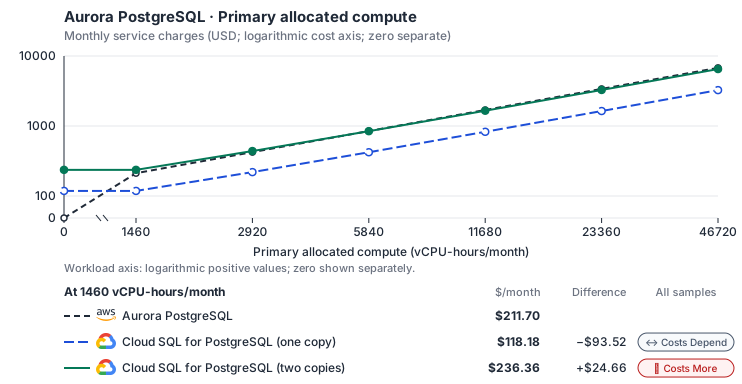
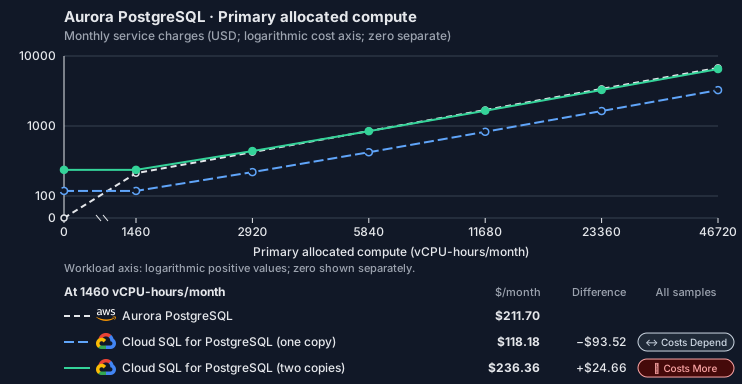
- CPU allocation does not imply an achieved transaction rate. Other native meters and workload assumptions retain their explicitly displayed default quantities. Workload translation and capacity assumptions are not benchmark measurements.
- Native monthly usage priced at the cited provider list prices; listed target allowances apply where present, excluding invoice credits, taxes and negotiated discounts. Rates as of 2026-10-22: us-east-1 → us-central1, USD/month.
- Source prices are reference charges, not an invoice. Target lines cover selected service usage/configuration only; adapter hosting and Tensor9 fees are excluded.
- Samples of explicit prices are not performance measurements or capacity qualification. No interpolation or break-even guarantee is implied.
- Variant assumptions show the first axis sample; any axis-dependent configuration is described by this curve’s workload note.
- Rates are cited provider list prices, editable for discounts, commitments or another region. Workload translation and capacity coefficients remain editable planning assumptions, not benchmark measurements or a commercial quote.
- Default-zero rates are explicit assumptions, not evidence that the deployed service or resource is free.
- Provisioned-unit minimums use an editable approximate allocation floor. Modeled target service cost is max(usage/allocation, minimum), with billable network, durable staging and dependent sinks added separately; actual RU/TU sizing, scaling increments and throughput remain unqualified.
- Durable staging is priced once: provisioned targets include adapter state in their selected allocation; native targets add a separate staging allocation when required. Adapter hosting is a separate allocation and must exclude resources already priced as staging, workers or target capacity.
- A declared adapter mapping and cost model do not establish implementation availability or service equivalence.
- This is a declared directed mapping; a planning estimate does not establish deployment or request-serving support.
- Authored planning assumptions, not measured adapter capacity. Origin rates are cited first-tier list prices, before free allowances and discounts.
- A cost scenario does not establish backend availability, protocol fidelity or production readiness. Registry serving status remains independent.
- Provisioned compute and RAM are priced by resource-hour; operations are independently authored. Database size cannot be inferred from dollars alone.
- Aurora/AlloyDB, MySQL/PostgreSQL and proxied targets retain their distinct backend contracts. HA, replicas and proxy allocations must be selected explicitly.
- Aurora Standard also bills storage I/O at USD 0.20 per 1M I/Os (buffer-cache misses, not logical operations); no meter prices it, so the origin cost excludes it. I/O-Optimized clusters bill no I/O but 30% more per instance and 0.225 per GB-month storage.
- Cloud SQL Enterprise edition (PostgreSQL) publishes separate vCPU, memory and SSD prices for zonal instances; a high-availability (regional) instance bills exactly twice each, which the standby copy reproduces. Enterprise Plus, committed-use discounts, backups (USD 0.08 per GiB-month) and idle IPv4 addresses (0.01 per hour) are not selected.
- Row-store throughput (capacityOpsPerVcpuSecond, default 1500) is measured-by-tensor9 as a lower bound: the DynamoDB adapter on Cloud SQL db-custom-2-7680 (2 vCPU, PostgreSQL 16, us-west1) served 2,974 ops/s of YCSB-A at 16 threads without recorded saturation (src/main/kotlin/t9/prime/equiv/generated/eval/CloudsqlPostgresqlYcsbAT16GoYcsbV1_0_0.kt). Published CPU-bound pgbench reaches 3,101 read-write transactions and 20,289 point reads per vCPU-second (AWS z1d.2xlarge, PostgreSQL 14.5), so actual capacity is likely higher. Reads and writes share one coefficient: at the same adapter version, read-only YCSB-C was not faster than 50%-update YCSB-A.
- Log-broker throughput (capacityStreamMiBPerVcpuSecond 20 at 0.5 utilization, 4 GiB RAM per vCPU) is provider-documented by Google Managed Service for Apache Kafka sizing (https://docs.cloud.google.com/managed-service-for-apache-kafka/docs/plan-cluster-size): write-equivalent bytes are replicated writes plus a quarter of reads. Producer batches below 10 KB lower per-CPU throughput; that penalty is not modeled.
- Disk utilization 0.8 is provider-documented headroom below Cloud SQL automatic storage increase, which triggers near 91-95% full (https://docs.cloud.google.com/sql/docs/postgres/instance-settings). The 20 GiB reserve exceeds PostgreSQL’s 1 GB default max_wal_size; the remainder of that reserve is unmeasured.
- CPU tiers double from 2 vCPUs to the target’s largest node at 4 GiB per vCPU; each target’s documented largest node bounds CPU, RAM, RAM per vCPU and disk, and the durable staging database uses Cloud SQL Enterprise (96 vCPU, 6.5 GiB per vCPU, 624 GiB, 64 TiB). Targets billed per capacity unit or throughput unit are sized by their backend instead.
- No public evidence: peak/mean work (2) and the RAM working-set fraction (0.1). Proposed measurements: the p99 one-minute rate over the monthly mean from customer CloudWatch metrics; the buffer hit ratio while stepping RAM under a fixed YCSB-B load.
- Node bounds: Cloud SQL Enterprise allows 1-96 vCPUs at 0.9-6.5 GB per vCPU and up to 64 TB with a dedicated vCPU (https://docs.cloud.google.com/sql/docs/postgres/instance-settings).
- Stored GiB already includes the origin family’s physical footprint assumptions; no second storage amplification is applied.
- The workload family already selected resource-hours; the throughput coefficient is not applied again.
- Copies and allocation fractions change cost only; they do not increase modeled primary capacity.
- AWS Price List API, AmazonRDS offer: https://pricing.us-east-1.amazonaws.com/offers/v1.0/aws/AmazonRDS/current/us-east-1/index.json
- Cloud SQL pricing: https://cloud.google.com/sql/pricing
- Additional network transfer, backups, KMS, one-time migration and operational labor unless an explicit meter includes them.
- Destination application execution and separately billed downstream services; supply those allocations separately.
- Aurora per-IO, serverless-capacity, backup and proxy charges; reserved/committed-use purchase options.
- Taxes, discounts, credits and free-tier allowances not explicitly listed by this model.
- Unmodeled dependent services, task execution and operations outside the selected workload family.
plan-42ce840602ccc44a14430c68c1039d2af3889c41 / 2026-10-22.planning.2. Curve: workload-1.
Sources: AWS Price List API, AmazonRDS offer, Cloud SQL pricing.
Aurora PostgreSQL · Stored data
Feature: Aurora PostgreSQL. Estimated monthly service charges by Stored data. Adapter hosting and Tensor9 fees are excluded. Source: us-east-1; target: us-central1; currency: USD.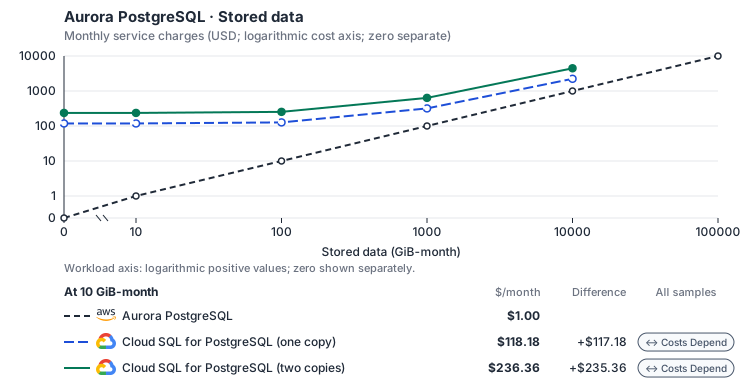
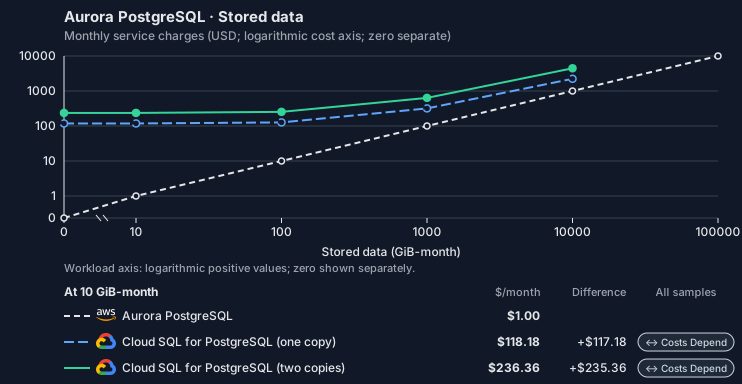
- Request meters remain at their independently authored defaults. Other native meters and workload assumptions retain their explicitly displayed default quantities. Workload translation and capacity assumptions are not benchmark measurements.
- Native monthly usage priced at the cited provider list prices; listed target allowances apply where present, excluding invoice credits, taxes and negotiated discounts. Rates as of 2026-10-22: us-east-1 → us-central1, USD/month.
- Source prices are reference charges, not an invoice. Target lines cover selected service usage/configuration only; adapter hosting and Tensor9 fees are excluded.
- Samples of explicit prices are not performance measurements or capacity qualification. No interpolation or break-even guarantee is implied.
- Variant assumptions show the first axis sample; any axis-dependent configuration is described by this curve’s workload note.
- Rates are cited provider list prices, editable for discounts, commitments or another region. Workload translation and capacity coefficients remain editable planning assumptions, not benchmark measurements or a commercial quote.
- Default-zero rates are explicit assumptions, not evidence that the deployed service or resource is free.
- Provisioned-unit minimums use an editable approximate allocation floor. Modeled target service cost is max(usage/allocation, minimum), with billable network, durable staging and dependent sinks added separately; actual RU/TU sizing, scaling increments and throughput remain unqualified.
- Durable staging is priced once: provisioned targets include adapter state in their selected allocation; native targets add a separate staging allocation when required. Adapter hosting is a separate allocation and must exclude resources already priced as staging, workers or target capacity.
- A declared adapter mapping and cost model do not establish implementation availability or service equivalence.
- This is a declared directed mapping; a planning estimate does not establish deployment or request-serving support.
- Authored planning assumptions, not measured adapter capacity. Origin rates are cited first-tier list prices, before free allowances and discounts.
- A cost scenario does not establish backend availability, protocol fidelity or production readiness. Registry serving status remains independent.
- Provisioned compute and RAM are priced by resource-hour; operations are independently authored. Database size cannot be inferred from dollars alone.
- Aurora/AlloyDB, MySQL/PostgreSQL and proxied targets retain their distinct backend contracts. HA, replicas and proxy allocations must be selected explicitly.
- Aurora Standard also bills storage I/O at USD 0.20 per 1M I/Os (buffer-cache misses, not logical operations); no meter prices it, so the origin cost excludes it. I/O-Optimized clusters bill no I/O but 30% more per instance and 0.225 per GB-month storage.
- Cloud SQL Enterprise edition (PostgreSQL) publishes separate vCPU, memory and SSD prices for zonal instances; a high-availability (regional) instance bills exactly twice each, which the standby copy reproduces. Enterprise Plus, committed-use discounts, backups (USD 0.08 per GiB-month) and idle IPv4 addresses (0.01 per hour) are not selected.
- Row-store throughput (capacityOpsPerVcpuSecond, default 1500) is measured-by-tensor9 as a lower bound: the DynamoDB adapter on Cloud SQL db-custom-2-7680 (2 vCPU, PostgreSQL 16, us-west1) served 2,974 ops/s of YCSB-A at 16 threads without recorded saturation (src/main/kotlin/t9/prime/equiv/generated/eval/CloudsqlPostgresqlYcsbAT16GoYcsbV1_0_0.kt). Published CPU-bound pgbench reaches 3,101 read-write transactions and 20,289 point reads per vCPU-second (AWS z1d.2xlarge, PostgreSQL 14.5), so actual capacity is likely higher. Reads and writes share one coefficient: at the same adapter version, read-only YCSB-C was not faster than 50%-update YCSB-A.
- Log-broker throughput (capacityStreamMiBPerVcpuSecond 20 at 0.5 utilization, 4 GiB RAM per vCPU) is provider-documented by Google Managed Service for Apache Kafka sizing (https://docs.cloud.google.com/managed-service-for-apache-kafka/docs/plan-cluster-size): write-equivalent bytes are replicated writes plus a quarter of reads. Producer batches below 10 KB lower per-CPU throughput; that penalty is not modeled.
- Disk utilization 0.8 is provider-documented headroom below Cloud SQL automatic storage increase, which triggers near 91-95% full (https://docs.cloud.google.com/sql/docs/postgres/instance-settings). The 20 GiB reserve exceeds PostgreSQL’s 1 GB default max_wal_size; the remainder of that reserve is unmeasured.
- CPU tiers double from 2 vCPUs to the target’s largest node at 4 GiB per vCPU; each target’s documented largest node bounds CPU, RAM, RAM per vCPU and disk, and the durable staging database uses Cloud SQL Enterprise (96 vCPU, 6.5 GiB per vCPU, 624 GiB, 64 TiB). Targets billed per capacity unit or throughput unit are sized by their backend instead.
- No public evidence: peak/mean work (2) and the RAM working-set fraction (0.1). Proposed measurements: the p99 one-minute rate over the monthly mean from customer CloudWatch metrics; the buffer hit ratio while stepping RAM under a fixed YCSB-B load.
- Node bounds: Cloud SQL Enterprise allows 1-96 vCPUs at 0.9-6.5 GB per vCPU and up to 64 TB with a dedicated vCPU (https://docs.cloud.google.com/sql/docs/postgres/instance-settings).
- Stored GiB already includes the origin family’s physical footprint assumptions; no second storage amplification is applied.
- The workload family already selected resource-hours; the throughput coefficient is not applied again.
- Copies and allocation fractions change cost only; they do not increase modeled primary capacity.
- AWS Price List API, AmazonRDS offer: https://pricing.us-east-1.amazonaws.com/offers/v1.0/aws/AmazonRDS/current/us-east-1/index.json
- Cloud SQL pricing: https://cloud.google.com/sql/pricing
- Additional network transfer, backups, KMS, one-time migration and operational labor unless an explicit meter includes them.
- Destination application execution and separately billed downstream services; supply those allocations separately.
- Aurora per-IO, serverless-capacity, backup and proxy charges; reserved/committed-use purchase options.
- Taxes, discounts, credits and free-tier allowances not explicitly listed by this model.
- Unmodeled dependent services, task execution and operations outside the selected workload family.
plan-42ce840602ccc44a14430c68c1039d2af3889c41 / 2026-10-22.planning.2. Curve: workload-2.
Sources: AWS Price List API, AmazonRDS offer, Cloud SQL pricing.
Aurora PostgreSQL · Database writes
Feature: Aurora PostgreSQL. Estimated monthly service charges by Database writes. Adapter hosting and Tensor9 fees are excluded. Source: us-east-1; target: us-central1; currency: USD.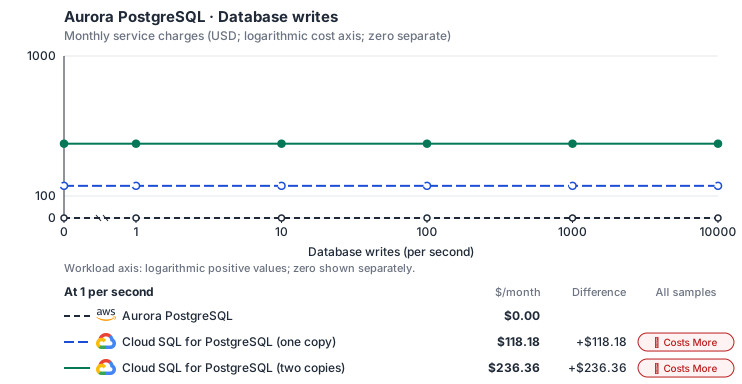
- Source compute and stored data remain independent; a throughput view needs explicit workload inputs. Other native meters and workload assumptions retain their explicitly displayed default quantities. Workload translation and capacity assumptions are not benchmark measurements.
- Native monthly usage priced at the cited provider list prices; listed target allowances apply where present, excluding invoice credits, taxes and negotiated discounts. Rates as of 2026-10-22: us-east-1 → us-central1, USD/month.
- Source prices are reference charges, not an invoice. Target lines cover selected service usage/configuration only; adapter hosting and Tensor9 fees are excluded.
- Samples of explicit prices are not performance measurements or capacity qualification. No interpolation or break-even guarantee is implied.
- Variant assumptions show the first axis sample; any axis-dependent configuration is described by this curve’s workload note.
- Rates are cited provider list prices, editable for discounts, commitments or another region. Workload translation and capacity coefficients remain editable planning assumptions, not benchmark measurements or a commercial quote.
- Default-zero rates are explicit assumptions, not evidence that the deployed service or resource is free.
- Provisioned-unit minimums use an editable approximate allocation floor. Modeled target service cost is max(usage/allocation, minimum), with billable network, durable staging and dependent sinks added separately; actual RU/TU sizing, scaling increments and throughput remain unqualified.
- Durable staging is priced once: provisioned targets include adapter state in their selected allocation; native targets add a separate staging allocation when required. Adapter hosting is a separate allocation and must exclude resources already priced as staging, workers or target capacity.
- A declared adapter mapping and cost model do not establish implementation availability or service equivalence.
- This is a declared directed mapping; a planning estimate does not establish deployment or request-serving support.
- Authored planning assumptions, not measured adapter capacity. Origin rates are cited first-tier list prices, before free allowances and discounts.
- A cost scenario does not establish backend availability, protocol fidelity or production readiness. Registry serving status remains independent.
- Provisioned compute and RAM are priced by resource-hour; operations are independently authored. Database size cannot be inferred from dollars alone.
- Aurora/AlloyDB, MySQL/PostgreSQL and proxied targets retain their distinct backend contracts. HA, replicas and proxy allocations must be selected explicitly.
- Aurora Standard also bills storage I/O at USD 0.20 per 1M I/Os (buffer-cache misses, not logical operations); no meter prices it, so the origin cost excludes it. I/O-Optimized clusters bill no I/O but 30% more per instance and 0.225 per GB-month storage.
- Cloud SQL Enterprise edition (PostgreSQL) publishes separate vCPU, memory and SSD prices for zonal instances; a high-availability (regional) instance bills exactly twice each, which the standby copy reproduces. Enterprise Plus, committed-use discounts, backups (USD 0.08 per GiB-month) and idle IPv4 addresses (0.01 per hour) are not selected.
- Row-store throughput (capacityOpsPerVcpuSecond, default 1500) is measured-by-tensor9 as a lower bound: the DynamoDB adapter on Cloud SQL db-custom-2-7680 (2 vCPU, PostgreSQL 16, us-west1) served 2,974 ops/s of YCSB-A at 16 threads without recorded saturation (src/main/kotlin/t9/prime/equiv/generated/eval/CloudsqlPostgresqlYcsbAT16GoYcsbV1_0_0.kt). Published CPU-bound pgbench reaches 3,101 read-write transactions and 20,289 point reads per vCPU-second (AWS z1d.2xlarge, PostgreSQL 14.5), so actual capacity is likely higher. Reads and writes share one coefficient: at the same adapter version, read-only YCSB-C was not faster than 50%-update YCSB-A.
- Log-broker throughput (capacityStreamMiBPerVcpuSecond 20 at 0.5 utilization, 4 GiB RAM per vCPU) is provider-documented by Google Managed Service for Apache Kafka sizing (https://docs.cloud.google.com/managed-service-for-apache-kafka/docs/plan-cluster-size): write-equivalent bytes are replicated writes plus a quarter of reads. Producer batches below 10 KB lower per-CPU throughput; that penalty is not modeled.
- Disk utilization 0.8 is provider-documented headroom below Cloud SQL automatic storage increase, which triggers near 91-95% full (https://docs.cloud.google.com/sql/docs/postgres/instance-settings). The 20 GiB reserve exceeds PostgreSQL’s 1 GB default max_wal_size; the remainder of that reserve is unmeasured.
- CPU tiers double from 2 vCPUs to the target’s largest node at 4 GiB per vCPU; each target’s documented largest node bounds CPU, RAM, RAM per vCPU and disk, and the durable staging database uses Cloud SQL Enterprise (96 vCPU, 6.5 GiB per vCPU, 624 GiB, 64 TiB). Targets billed per capacity unit or throughput unit are sized by their backend instead.
- No public evidence: peak/mean work (2) and the RAM working-set fraction (0.1). Proposed measurements: the p99 one-minute rate over the monthly mean from customer CloudWatch metrics; the buffer hit ratio while stepping RAM under a fixed YCSB-B load.
- Node bounds: Cloud SQL Enterprise allows 1-96 vCPUs at 0.9-6.5 GB per vCPU and up to 64 TB with a dedicated vCPU (https://docs.cloud.google.com/sql/docs/postgres/instance-settings).
- Stored GiB already includes the origin family’s physical footprint assumptions; no second storage amplification is applied.
- The workload family already selected resource-hours; the throughput coefficient is not applied again.
- Copies and allocation fractions change cost only; they do not increase modeled primary capacity.
- AWS Price List API, AmazonRDS offer: https://pricing.us-east-1.amazonaws.com/offers/v1.0/aws/AmazonRDS/current/us-east-1/index.json
- Cloud SQL pricing: https://cloud.google.com/sql/pricing
- Additional network transfer, backups, KMS, one-time migration and operational labor unless an explicit meter includes them.
- Destination application execution and separately billed downstream services; supply those allocations separately.
- Aurora per-IO, serverless-capacity, backup and proxy charges; reserved/committed-use purchase options.
- Taxes, discounts, credits and free-tier allowances not explicitly listed by this model.
- Unmodeled dependent services, task execution and operations outside the selected workload family.
plan-42ce840602ccc44a14430c68c1039d2af3889c41 / 2026-10-22.planning.2. Curve: workload-3.
Sources: AWS Price List API, AmazonRDS offer, Cloud SQL pricing.
Aurora PostgreSQL → Cloud SQL for PostgreSQL: Authored native-usage planning example. Native monthly usage priced at the cited provider list prices; listed target allowances apply where present, excluding invoice credits, taxes and negotiated discounts.
Scenario source region: us-east-1. Scenario target region: us-central1. Currency: USD.
- Additional network transfer, backups, KMS, one-time migration and operational labor unless an explicit meter includes them.
- Destination application execution and separately billed downstream services; supply those allocations separately.
- Aurora per-IO, serverless-capacity, backup and proxy charges; reserved/committed-use purchase options.
- Taxes, discounts, credits and free-tier allowances not explicitly listed by this model.
- Unmodeled dependent services, task execution and operations outside the selected workload family.
- Translated reads: 0 operations.
- Translated writes: 0 operations.
- Translated resident physical data: 0 GiB-month.
- Native provider operations: 0 operations.
- Published payload: 0 GiB.
- Delivered payload: 0 GiB.
- Allocated execution CPU: 0 vCPU-hour.
- Allocated execution RAM: 0 GiB-hour.
- Independent resource allocation: 0 resource-hour.
- Independent inventory: 0 resource-month.
- Input tokens: 0 tokens.
- Output tokens: 0 tokens.
- Billable network: 0 GiB.
- Dependent object sink retained data: 0 GiB-month.
- Dependent object sink writes: 0 writes.
- Rates are cited provider list prices, editable for discounts, commitments or another region. Workload translation and capacity coefficients remain editable planning assumptions, not benchmark measurements or a commercial quote.
- Default-zero rates are explicit assumptions, not evidence that the deployed service or resource is free.
- Provisioned-unit minimums use an editable approximate allocation floor. Modeled target service cost is max(usage/allocation, minimum), with billable network, durable staging and dependent sinks added separately; actual RU/TU sizing, scaling increments and throughput remain unqualified.
- Durable staging is priced once: provisioned targets include adapter state in their selected allocation; native targets add a separate staging allocation when required. Adapter hosting is a separate allocation and must exclude resources already priced as staging, workers or target capacity.
- A declared adapter mapping and cost model do not establish implementation availability or service equivalence.
- This is a declared directed mapping; a planning estimate does not establish deployment or request-serving support.
- Authored planning assumptions, not measured adapter capacity. Origin rates are cited first-tier list prices, before free allowances and discounts.
- A cost scenario does not establish backend availability, protocol fidelity or production readiness. Registry serving status remains independent.
- Provisioned compute and RAM are priced by resource-hour; operations are independently authored. Database size cannot be inferred from dollars alone.
- Aurora/AlloyDB, MySQL/PostgreSQL and proxied targets retain their distinct backend contracts. HA, replicas and proxy allocations must be selected explicitly.
- Aurora Standard also bills storage I/O at USD 0.20 per 1M I/Os (buffer-cache misses, not logical operations); no meter prices it, so the origin cost excludes it. I/O-Optimized clusters bill no I/O but 30% more per instance and 0.225 per GB-month storage.
- Cloud SQL Enterprise edition (PostgreSQL) publishes separate vCPU, memory and SSD prices for zonal instances; a high-availability (regional) instance bills exactly twice each, which the standby copy reproduces. Enterprise Plus, committed-use discounts, backups (USD 0.08 per GiB-month) and idle IPv4 addresses (0.01 per hour) are not selected.
- Row-store throughput (capacityOpsPerVcpuSecond, default 1500) is measured-by-tensor9 as a lower bound: the DynamoDB adapter on Cloud SQL db-custom-2-7680 (2 vCPU, PostgreSQL 16, us-west1) served 2,974 ops/s of YCSB-A at 16 threads without recorded saturation (src/main/kotlin/t9/prime/equiv/generated/eval/CloudsqlPostgresqlYcsbAT16GoYcsbV1_0_0.kt). Published CPU-bound pgbench reaches 3,101 read-write transactions and 20,289 point reads per vCPU-second (AWS z1d.2xlarge, PostgreSQL 14.5), so actual capacity is likely higher. Reads and writes share one coefficient: at the same adapter version, read-only YCSB-C was not faster than 50%-update YCSB-A.
- Log-broker throughput (capacityStreamMiBPerVcpuSecond 20 at 0.5 utilization, 4 GiB RAM per vCPU) is provider-documented by Google Managed Service for Apache Kafka sizing (https://docs.cloud.google.com/managed-service-for-apache-kafka/docs/plan-cluster-size): write-equivalent bytes are replicated writes plus a quarter of reads. Producer batches below 10 KB lower per-CPU throughput; that penalty is not modeled.
- Disk utilization 0.8 is provider-documented headroom below Cloud SQL automatic storage increase, which triggers near 91-95% full (https://docs.cloud.google.com/sql/docs/postgres/instance-settings). The 20 GiB reserve exceeds PostgreSQL’s 1 GB default max_wal_size; the remainder of that reserve is unmeasured.
- CPU tiers double from 2 vCPUs to the target’s largest node at 4 GiB per vCPU; each target’s documented largest node bounds CPU, RAM, RAM per vCPU and disk, and the durable staging database uses Cloud SQL Enterprise (96 vCPU, 6.5 GiB per vCPU, 624 GiB, 64 TiB). Targets billed per capacity unit or throughput unit are sized by their backend instead.
- No public evidence: peak/mean work (2) and the RAM working-set fraction (0.1). Proposed measurements: the p99 one-minute rate over the monthly mean from customer CloudWatch metrics; the buffer hit ratio while stepping RAM under a fixed YCSB-B load.
- Node bounds: Cloud SQL Enterprise allows 1-96 vCPUs at 0.9-6.5 GB per vCPU and up to 64 TB with a dedicated vCPU (https://docs.cloud.google.com/sql/docs/postgres/instance-settings).
- Stored GiB already includes the origin family’s physical footprint assumptions; no second storage amplification is applied.
- The workload family already selected resource-hours; the throughput coefficient is not applied again.
- Copies and allocation fractions change cost only; they do not increase modeled primary capacity.
plan-42ce840602ccc44a14430c68c1039d2af3889c41 / 2026-10-22.planning.2. Scenario: planning-example.
Sources: AWS Price List API, AmazonRDS offer, Cloud SQL pricing.
AlloyDB for PostgreSQL
How it works
Your application’s PostgreSQL driver connects directly to AlloyDB for PostgreSQL. These database requests are the data plane. The driver and the PostgreSQL wire protocol stay the same, and Tensor9 adds no proxy, translation or latency to your queries. Management requests, such as snapshots, restores, replicas, failover and configuration changes, are the control plane. Tensor9 runs the RDS API in the customer’s Cloud Adapter deployment and translates each of these requests to the backend’s management API. The sections below list which operations work and which return an error.

Queries reach the database directly; only the management calls are translated.
Database connections
Aurora stores data in an AWS-specific storage layer, but your application reaches it over the standard PostgreSQL wire protocol, which AlloyDB for PostgreSQL also supports. Your SQL, drivers, object-relational mappers (ORMs), prepared statements, data types and transaction behavior stay the same; only the storage underneath changes. AWS and Aurora add SQL functions for moving data through S3, invoking Lambda and machine learning. These functions do not exist on the backend, so a query that calls them returns an error.Database management
At runtime your application and tools keep making the same RDS calls for the cluster and its members. For each supported operation, the adapter accepts the RDS request, returns the RDS response format, and maps it to AlloyDB. A cluster becomes an AlloyDB cluster, the writer becomes a highly available primary instance, and each reader becomes its own read pool. Parameter groups become database flags, and a reboot becomes an instance restart. Snapshot, restore, point-in-time restore, failover, stop / start and global-cluster requests return an error; the limitations below describe what AlloyDB does on its own instead. With Max, your tools callCreateDBCluster and CreateDBInstance through the RDS adapter to create a logical Aurora cluster and its members on AlloyDB. The first member becomes the cluster’s primary instance, placed across two zones; later members become read pool instances. Tensor9 keeps a durable record of the logical cluster and its members, with AWS-style identifiers, and reconciles the AlloyDB resources with it: it records each accepted request, then creates or removes the AlloyDB resources in the background. DescribeDBClusters and DescribeDBInstances report the status and endpoints that AlloyDB shows. DeleteDBInstance removes readers before the writer; DeleteDBCluster removes the cluster once its members are gone. Your application’s SQL connection goes directly to AlloyDB.


Tensor9 translates RDS management requests to the backend API and returns RDS responses.
Limitations
Where Aurora and AlloyDB differ- RDS snapshots and restores are not supported. AlloyDB runs automated and continuous backups, kept for the cluster’s backup retention period, and Google supports point-in-time recovery from them. The adapter does not translate RDS snapshot, restore-from-snapshot or point-in-time restore requests, and deleting a cluster requires skipping the final snapshot.
- RDS-driven failover is not supported. AlloyDB fails the primary over to its standby in another zone on its own. The adapter does not translate
FailoverDBCluster, readers are not promotion candidates, and promotion tiers must stay at the default. - Readers behave differently: each one is an AlloyDB read pool. Each reader becomes its own read pool instance, with at most 20 read nodes per cluster. With more than one reader there is no shared cluster reader endpoint.
- Instance classes behave differently: they map to fixed AlloyDB shapes. Members use AlloyDB’s N2 shapes from 2 to 96 vCPU with 8 GiB of memory per vCPU. Burstable classes have no equivalent, and a member’s class cannot change after creation.
- Parameter groups behave differently: Tensor9 keeps the group and applies its settings as flags. Tensor9 keeps named parameter groups and their overrides. Supported explicit PostgreSQL parameters become AlloyDB database flags; the group object itself stays with Tensor9. RDS-specific parameters and settings outside AlloyDB’s flag list are rejected.
- Several Aurora features are not supported. The Data API, global databases, stop / start, event subscriptions, RDS Proxy APIs, Serverless v2, I/O-Optimized storage, global write forwarding and customer-managed encryption keys are not available on this backend.
Other considerations
Migration. Moving the data is a one-time step, covered by this page’s migration note: a logical dump and restore, or logical replication for a short cutover. This page describes how things work after cutover. Operations. The customer owns the AlloyDB cluster in their Google Cloud project. Maintenance windows, quotas and pricing are Google’s. Features and capacity. The comparison table on this page lists feature and high-availability differences. Check the backend’s pricing and capacity limits when you size the deployment.Example monthly charges
This Tensor9 Cloud Adapter scenario estimates service charges for the named origin and target services. Adapter hosting and commercial Tensor9 fees need separate allocations. How Tensor9 estimates costs explains the method and what the estimates include.Aurora PostgreSQL · Primary allocated compute
Feature: Aurora PostgreSQL. Estimated monthly service charges by Primary allocated compute. Adapter hosting and Tensor9 fees are excluded. Source: us-east-1; target: us-central1; currency: USD.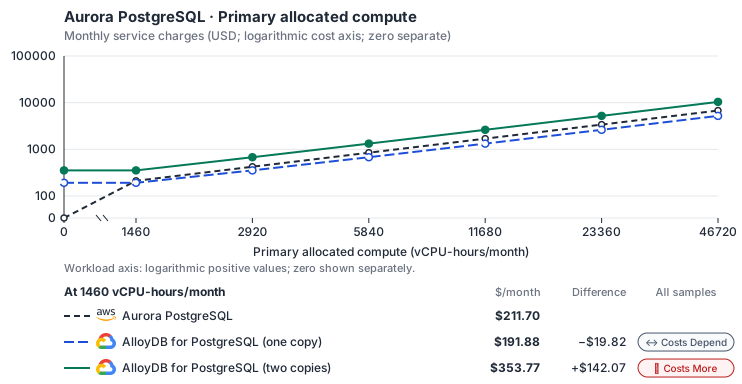
- CPU allocation does not imply an achieved transaction rate. Other native meters and workload assumptions retain their explicitly displayed default quantities. Workload translation and capacity assumptions are not benchmark measurements.
- Native monthly usage priced at the cited provider list prices; listed target allowances apply where present, excluding invoice credits, taxes and negotiated discounts. Rates as of 2026-10-22: us-east-1 → us-central1, USD/month.
- Source prices are reference charges, not an invoice. Target lines cover selected service usage/configuration only; adapter hosting and Tensor9 fees are excluded.
- Samples of explicit prices are not performance measurements or capacity qualification. No interpolation or break-even guarantee is implied.
- Variant assumptions show the first axis sample; any axis-dependent configuration is described by this curve’s workload note.
- Rates are cited provider list prices, editable for discounts, commitments or another region. Workload translation and capacity coefficients remain editable planning assumptions, not benchmark measurements or a commercial quote.
- Default-zero rates are explicit assumptions, not evidence that the deployed service or resource is free.
- Provisioned-unit minimums use an editable approximate allocation floor. Modeled target service cost is max(usage/allocation, minimum), with billable network, durable staging and dependent sinks added separately; actual RU/TU sizing, scaling increments and throughput remain unqualified.
- Durable staging is priced once: provisioned targets include adapter state in their selected allocation; native targets add a separate staging allocation when required. Adapter hosting is a separate allocation and must exclude resources already priced as staging, workers or target capacity.
- A declared adapter mapping and cost model do not establish implementation availability or service equivalence.
- This is a declared directed mapping; a planning estimate does not establish deployment or request-serving support.
- Authored planning assumptions, not measured adapter capacity. Origin rates are cited first-tier list prices, before free allowances and discounts.
- A cost scenario does not establish backend availability, protocol fidelity or production readiness. Registry serving status remains independent.
- Provisioned compute and RAM are priced by resource-hour; operations are independently authored. Database size cannot be inferred from dollars alone.
- Aurora/AlloyDB, MySQL/PostgreSQL and proxied targets retain their distinct backend contracts. HA, replicas and proxy allocations must be selected explicitly.
- Aurora Standard also bills storage I/O at USD 0.20 per 1M I/Os (buffer-cache misses, not logical operations); no meter prices it, so the origin cost excludes it. I/O-Optimized clusters bill no I/O but 30% more per instance and 0.225 per GB-month storage.
- AlloyDB bills each node’s vCPU and memory (a high-availability primary is two nodes) and one regional storage pool by used GiB that every instance in the cluster shares, so storage is billed once however many copies run. The smallest machine is c4a-highmem-1 (1 vCPU, 8 GB; https://docs.cloud.google.com/alloydb/docs/choose-machine-type). C4 and Z3 machine series, backups and committed-use discounts are not selected.
- Row-store throughput (capacityOpsPerVcpuSecond, default 1500) is measured-by-tensor9 as a lower bound: the DynamoDB adapter on Cloud SQL db-custom-2-7680 (2 vCPU, PostgreSQL 16, us-west1) served 2,974 ops/s of YCSB-A at 16 threads without recorded saturation (src/main/kotlin/t9/prime/equiv/generated/eval/CloudsqlPostgresqlYcsbAT16GoYcsbV1_0_0.kt). Published CPU-bound pgbench reaches 3,101 read-write transactions and 20,289 point reads per vCPU-second (AWS z1d.2xlarge, PostgreSQL 14.5), so actual capacity is likely higher. Reads and writes share one coefficient: at the same adapter version, read-only YCSB-C was not faster than 50%-update YCSB-A.
- Log-broker throughput (capacityStreamMiBPerVcpuSecond 20 at 0.5 utilization, 4 GiB RAM per vCPU) is provider-documented by Google Managed Service for Apache Kafka sizing (https://docs.cloud.google.com/managed-service-for-apache-kafka/docs/plan-cluster-size): write-equivalent bytes are replicated writes plus a quarter of reads. Producer batches below 10 KB lower per-CPU throughput; that penalty is not modeled.
- Disk utilization 0.8 is provider-documented headroom below Cloud SQL automatic storage increase, which triggers near 91-95% full (https://docs.cloud.google.com/sql/docs/postgres/instance-settings). The 20 GiB reserve exceeds PostgreSQL’s 1 GB default max_wal_size; the remainder of that reserve is unmeasured.
- CPU tiers double from 2 vCPUs to the target’s largest node at 4 GiB per vCPU; each target’s documented largest node bounds CPU, RAM, RAM per vCPU and disk, and the durable staging database uses Cloud SQL Enterprise (96 vCPU, 6.5 GiB per vCPU, 624 GiB, 64 TiB). Targets billed per capacity unit or throughput unit are sized by their backend instead.
- No public evidence: peak/mean work (2) and the RAM working-set fraction (0.1). Proposed measurements: the p99 one-minute rate over the monthly mean from customer CloudWatch metrics; the buffer hit ratio while stepping RAM under a fixed YCSB-B load.
- Node bounds: AlloyDB n2-highmem-128 has 128 vCPUs and 864 GB (https://docs.cloud.google.com/alloydb/docs/choose-machine-type); a cluster stores up to 128 TiB (https://docs.cloud.google.com/alloydb/quotas).
- Stored GiB already includes the origin family’s physical footprint assumptions; no second storage amplification is applied.
- The workload family already selected resource-hours; the throughput coefficient is not applied again.
- Copies and allocation fractions change cost only; they do not increase modeled primary capacity.
- AWS Price List API, AmazonRDS offer: https://pricing.us-east-1.amazonaws.com/offers/v1.0/aws/AmazonRDS/current/us-east-1/index.json
- AlloyDB for PostgreSQL pricing: https://cloud.google.com/alloydb/pricing
- Additional network transfer, backups, KMS, one-time migration and operational labor unless an explicit meter includes them.
- Destination application execution and separately billed downstream services; supply those allocations separately.
- Aurora per-IO, serverless-capacity, backup and proxy charges; reserved/committed-use purchase options.
- Taxes, discounts, credits and free-tier allowances not explicitly listed by this model.
- Unmodeled dependent services, task execution and operations outside the selected workload family.
plan-b2d817a7f080d81019ebee2767d317c382dabcef / 2026-10-22.planning.2. Curve: workload-1.
Sources: AWS Price List API, AmazonRDS offer, AlloyDB for PostgreSQL pricing.
Aurora PostgreSQL · Stored data
Feature: Aurora PostgreSQL. Estimated monthly service charges by Stored data. Adapter hosting and Tensor9 fees are excluded. Source: us-east-1; target: us-central1; currency: USD.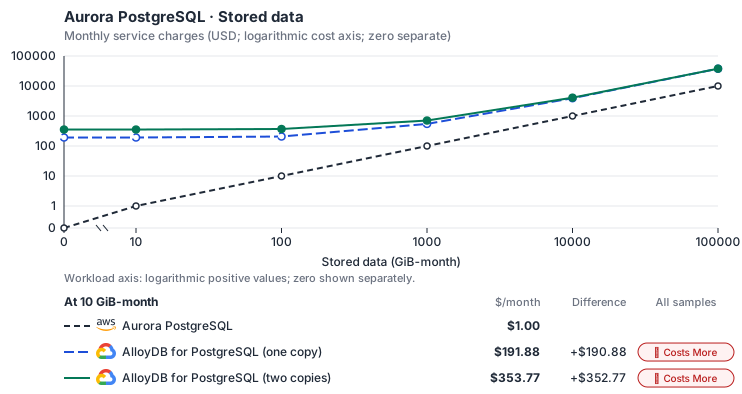
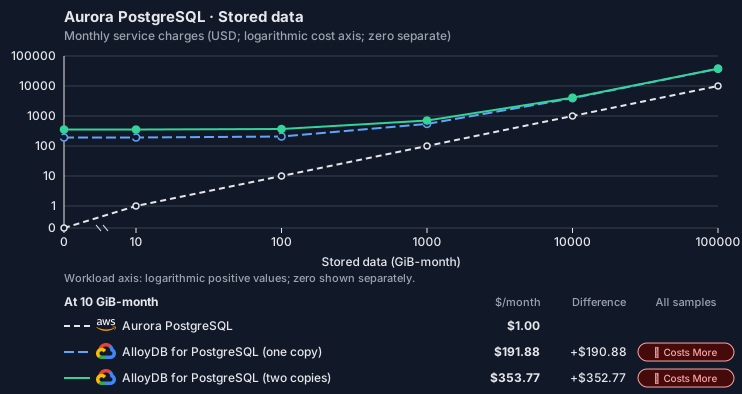
- Request meters remain at their independently authored defaults. Other native meters and workload assumptions retain their explicitly displayed default quantities. Workload translation and capacity assumptions are not benchmark measurements.
- Native monthly usage priced at the cited provider list prices; listed target allowances apply where present, excluding invoice credits, taxes and negotiated discounts. Rates as of 2026-10-22: us-east-1 → us-central1, USD/month.
- Source prices are reference charges, not an invoice. Target lines cover selected service usage/configuration only; adapter hosting and Tensor9 fees are excluded.
- Samples of explicit prices are not performance measurements or capacity qualification. No interpolation or break-even guarantee is implied.
- Variant assumptions show the first axis sample; any axis-dependent configuration is described by this curve’s workload note.
- Rates are cited provider list prices, editable for discounts, commitments or another region. Workload translation and capacity coefficients remain editable planning assumptions, not benchmark measurements or a commercial quote.
- Default-zero rates are explicit assumptions, not evidence that the deployed service or resource is free.
- Provisioned-unit minimums use an editable approximate allocation floor. Modeled target service cost is max(usage/allocation, minimum), with billable network, durable staging and dependent sinks added separately; actual RU/TU sizing, scaling increments and throughput remain unqualified.
- Durable staging is priced once: provisioned targets include adapter state in their selected allocation; native targets add a separate staging allocation when required. Adapter hosting is a separate allocation and must exclude resources already priced as staging, workers or target capacity.
- A declared adapter mapping and cost model do not establish implementation availability or service equivalence.
- This is a declared directed mapping; a planning estimate does not establish deployment or request-serving support.
- Authored planning assumptions, not measured adapter capacity. Origin rates are cited first-tier list prices, before free allowances and discounts.
- A cost scenario does not establish backend availability, protocol fidelity or production readiness. Registry serving status remains independent.
- Provisioned compute and RAM are priced by resource-hour; operations are independently authored. Database size cannot be inferred from dollars alone.
- Aurora/AlloyDB, MySQL/PostgreSQL and proxied targets retain their distinct backend contracts. HA, replicas and proxy allocations must be selected explicitly.
- Aurora Standard also bills storage I/O at USD 0.20 per 1M I/Os (buffer-cache misses, not logical operations); no meter prices it, so the origin cost excludes it. I/O-Optimized clusters bill no I/O but 30% more per instance and 0.225 per GB-month storage.
- AlloyDB bills each node’s vCPU and memory (a high-availability primary is two nodes) and one regional storage pool by used GiB that every instance in the cluster shares, so storage is billed once however many copies run. The smallest machine is c4a-highmem-1 (1 vCPU, 8 GB; https://docs.cloud.google.com/alloydb/docs/choose-machine-type). C4 and Z3 machine series, backups and committed-use discounts are not selected.
- Row-store throughput (capacityOpsPerVcpuSecond, default 1500) is measured-by-tensor9 as a lower bound: the DynamoDB adapter on Cloud SQL db-custom-2-7680 (2 vCPU, PostgreSQL 16, us-west1) served 2,974 ops/s of YCSB-A at 16 threads without recorded saturation (src/main/kotlin/t9/prime/equiv/generated/eval/CloudsqlPostgresqlYcsbAT16GoYcsbV1_0_0.kt). Published CPU-bound pgbench reaches 3,101 read-write transactions and 20,289 point reads per vCPU-second (AWS z1d.2xlarge, PostgreSQL 14.5), so actual capacity is likely higher. Reads and writes share one coefficient: at the same adapter version, read-only YCSB-C was not faster than 50%-update YCSB-A.
- Log-broker throughput (capacityStreamMiBPerVcpuSecond 20 at 0.5 utilization, 4 GiB RAM per vCPU) is provider-documented by Google Managed Service for Apache Kafka sizing (https://docs.cloud.google.com/managed-service-for-apache-kafka/docs/plan-cluster-size): write-equivalent bytes are replicated writes plus a quarter of reads. Producer batches below 10 KB lower per-CPU throughput; that penalty is not modeled.
- Disk utilization 0.8 is provider-documented headroom below Cloud SQL automatic storage increase, which triggers near 91-95% full (https://docs.cloud.google.com/sql/docs/postgres/instance-settings). The 20 GiB reserve exceeds PostgreSQL’s 1 GB default max_wal_size; the remainder of that reserve is unmeasured.
- CPU tiers double from 2 vCPUs to the target’s largest node at 4 GiB per vCPU; each target’s documented largest node bounds CPU, RAM, RAM per vCPU and disk, and the durable staging database uses Cloud SQL Enterprise (96 vCPU, 6.5 GiB per vCPU, 624 GiB, 64 TiB). Targets billed per capacity unit or throughput unit are sized by their backend instead.
- No public evidence: peak/mean work (2) and the RAM working-set fraction (0.1). Proposed measurements: the p99 one-minute rate over the monthly mean from customer CloudWatch metrics; the buffer hit ratio while stepping RAM under a fixed YCSB-B load.
- Node bounds: AlloyDB n2-highmem-128 has 128 vCPUs and 864 GB (https://docs.cloud.google.com/alloydb/docs/choose-machine-type); a cluster stores up to 128 TiB (https://docs.cloud.google.com/alloydb/quotas).
- Stored GiB already includes the origin family’s physical footprint assumptions; no second storage amplification is applied.
- The workload family already selected resource-hours; the throughput coefficient is not applied again.
- Copies and allocation fractions change cost only; they do not increase modeled primary capacity.
- AWS Price List API, AmazonRDS offer: https://pricing.us-east-1.amazonaws.com/offers/v1.0/aws/AmazonRDS/current/us-east-1/index.json
- AlloyDB for PostgreSQL pricing: https://cloud.google.com/alloydb/pricing
- Additional network transfer, backups, KMS, one-time migration and operational labor unless an explicit meter includes them.
- Destination application execution and separately billed downstream services; supply those allocations separately.
- Aurora per-IO, serverless-capacity, backup and proxy charges; reserved/committed-use purchase options.
- Taxes, discounts, credits and free-tier allowances not explicitly listed by this model.
- Unmodeled dependent services, task execution and operations outside the selected workload family.
plan-b2d817a7f080d81019ebee2767d317c382dabcef / 2026-10-22.planning.2. Curve: workload-2.
Sources: AWS Price List API, AmazonRDS offer, AlloyDB for PostgreSQL pricing.
Aurora PostgreSQL · Database writes
Feature: Aurora PostgreSQL. Estimated monthly service charges by Database writes. Adapter hosting and Tensor9 fees are excluded. Source: us-east-1; target: us-central1; currency: USD.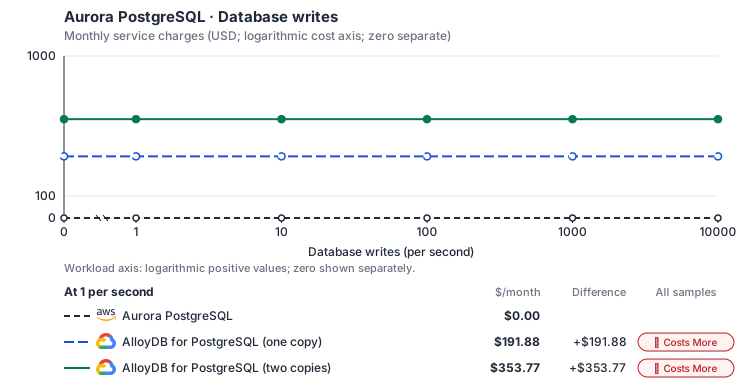
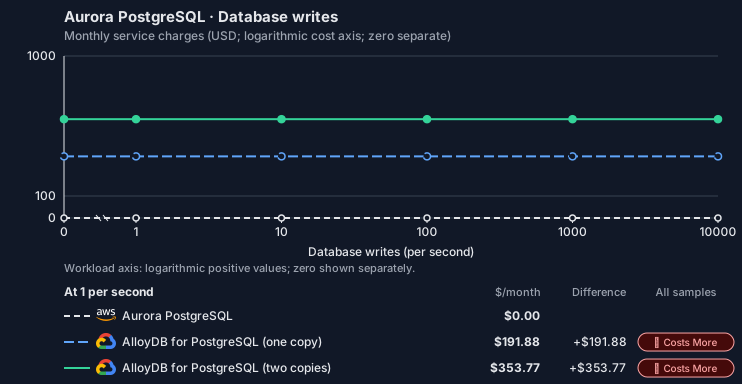
- Source compute and stored data remain independent; a throughput view needs explicit workload inputs. Other native meters and workload assumptions retain their explicitly displayed default quantities. Workload translation and capacity assumptions are not benchmark measurements.
- Native monthly usage priced at the cited provider list prices; listed target allowances apply where present, excluding invoice credits, taxes and negotiated discounts. Rates as of 2026-10-22: us-east-1 → us-central1, USD/month.
- Source prices are reference charges, not an invoice. Target lines cover selected service usage/configuration only; adapter hosting and Tensor9 fees are excluded.
- Samples of explicit prices are not performance measurements or capacity qualification. No interpolation or break-even guarantee is implied.
- Variant assumptions show the first axis sample; any axis-dependent configuration is described by this curve’s workload note.
- Rates are cited provider list prices, editable for discounts, commitments or another region. Workload translation and capacity coefficients remain editable planning assumptions, not benchmark measurements or a commercial quote.
- Default-zero rates are explicit assumptions, not evidence that the deployed service or resource is free.
- Provisioned-unit minimums use an editable approximate allocation floor. Modeled target service cost is max(usage/allocation, minimum), with billable network, durable staging and dependent sinks added separately; actual RU/TU sizing, scaling increments and throughput remain unqualified.
- Durable staging is priced once: provisioned targets include adapter state in their selected allocation; native targets add a separate staging allocation when required. Adapter hosting is a separate allocation and must exclude resources already priced as staging, workers or target capacity.
- A declared adapter mapping and cost model do not establish implementation availability or service equivalence.
- This is a declared directed mapping; a planning estimate does not establish deployment or request-serving support.
- Authored planning assumptions, not measured adapter capacity. Origin rates are cited first-tier list prices, before free allowances and discounts.
- A cost scenario does not establish backend availability, protocol fidelity or production readiness. Registry serving status remains independent.
- Provisioned compute and RAM are priced by resource-hour; operations are independently authored. Database size cannot be inferred from dollars alone.
- Aurora/AlloyDB, MySQL/PostgreSQL and proxied targets retain their distinct backend contracts. HA, replicas and proxy allocations must be selected explicitly.
- Aurora Standard also bills storage I/O at USD 0.20 per 1M I/Os (buffer-cache misses, not logical operations); no meter prices it, so the origin cost excludes it. I/O-Optimized clusters bill no I/O but 30% more per instance and 0.225 per GB-month storage.
- AlloyDB bills each node’s vCPU and memory (a high-availability primary is two nodes) and one regional storage pool by used GiB that every instance in the cluster shares, so storage is billed once however many copies run. The smallest machine is c4a-highmem-1 (1 vCPU, 8 GB; https://docs.cloud.google.com/alloydb/docs/choose-machine-type). C4 and Z3 machine series, backups and committed-use discounts are not selected.
- Row-store throughput (capacityOpsPerVcpuSecond, default 1500) is measured-by-tensor9 as a lower bound: the DynamoDB adapter on Cloud SQL db-custom-2-7680 (2 vCPU, PostgreSQL 16, us-west1) served 2,974 ops/s of YCSB-A at 16 threads without recorded saturation (src/main/kotlin/t9/prime/equiv/generated/eval/CloudsqlPostgresqlYcsbAT16GoYcsbV1_0_0.kt). Published CPU-bound pgbench reaches 3,101 read-write transactions and 20,289 point reads per vCPU-second (AWS z1d.2xlarge, PostgreSQL 14.5), so actual capacity is likely higher. Reads and writes share one coefficient: at the same adapter version, read-only YCSB-C was not faster than 50%-update YCSB-A.
- Log-broker throughput (capacityStreamMiBPerVcpuSecond 20 at 0.5 utilization, 4 GiB RAM per vCPU) is provider-documented by Google Managed Service for Apache Kafka sizing (https://docs.cloud.google.com/managed-service-for-apache-kafka/docs/plan-cluster-size): write-equivalent bytes are replicated writes plus a quarter of reads. Producer batches below 10 KB lower per-CPU throughput; that penalty is not modeled.
- Disk utilization 0.8 is provider-documented headroom below Cloud SQL automatic storage increase, which triggers near 91-95% full (https://docs.cloud.google.com/sql/docs/postgres/instance-settings). The 20 GiB reserve exceeds PostgreSQL’s 1 GB default max_wal_size; the remainder of that reserve is unmeasured.
- CPU tiers double from 2 vCPUs to the target’s largest node at 4 GiB per vCPU; each target’s documented largest node bounds CPU, RAM, RAM per vCPU and disk, and the durable staging database uses Cloud SQL Enterprise (96 vCPU, 6.5 GiB per vCPU, 624 GiB, 64 TiB). Targets billed per capacity unit or throughput unit are sized by their backend instead.
- No public evidence: peak/mean work (2) and the RAM working-set fraction (0.1). Proposed measurements: the p99 one-minute rate over the monthly mean from customer CloudWatch metrics; the buffer hit ratio while stepping RAM under a fixed YCSB-B load.
- Node bounds: AlloyDB n2-highmem-128 has 128 vCPUs and 864 GB (https://docs.cloud.google.com/alloydb/docs/choose-machine-type); a cluster stores up to 128 TiB (https://docs.cloud.google.com/alloydb/quotas).
- Stored GiB already includes the origin family’s physical footprint assumptions; no second storage amplification is applied.
- The workload family already selected resource-hours; the throughput coefficient is not applied again.
- Copies and allocation fractions change cost only; they do not increase modeled primary capacity.
- AWS Price List API, AmazonRDS offer: https://pricing.us-east-1.amazonaws.com/offers/v1.0/aws/AmazonRDS/current/us-east-1/index.json
- AlloyDB for PostgreSQL pricing: https://cloud.google.com/alloydb/pricing
- Additional network transfer, backups, KMS, one-time migration and operational labor unless an explicit meter includes them.
- Destination application execution and separately billed downstream services; supply those allocations separately.
- Aurora per-IO, serverless-capacity, backup and proxy charges; reserved/committed-use purchase options.
- Taxes, discounts, credits and free-tier allowances not explicitly listed by this model.
- Unmodeled dependent services, task execution and operations outside the selected workload family.
plan-b2d817a7f080d81019ebee2767d317c382dabcef / 2026-10-22.planning.2. Curve: workload-3.
Sources: AWS Price List API, AmazonRDS offer, AlloyDB for PostgreSQL pricing.
Aurora PostgreSQL → AlloyDB for PostgreSQL: Authored native-usage planning example. Native monthly usage priced at the cited provider list prices; listed target allowances apply where present, excluding invoice credits, taxes and negotiated discounts.
Scenario source region: us-east-1. Scenario target region: us-central1. Currency: USD.
- Additional network transfer, backups, KMS, one-time migration and operational labor unless an explicit meter includes them.
- Destination application execution and separately billed downstream services; supply those allocations separately.
- Aurora per-IO, serverless-capacity, backup and proxy charges; reserved/committed-use purchase options.
- Taxes, discounts, credits and free-tier allowances not explicitly listed by this model.
- Unmodeled dependent services, task execution and operations outside the selected workload family.
- Translated reads: 0 operations.
- Translated writes: 0 operations.
- Translated resident physical data: 0 GiB-month.
- Native provider operations: 0 operations.
- Published payload: 0 GiB.
- Delivered payload: 0 GiB.
- Allocated execution CPU: 0 vCPU-hour.
- Allocated execution RAM: 0 GiB-hour.
- Independent resource allocation: 0 resource-hour.
- Independent inventory: 0 resource-month.
- Input tokens: 0 tokens.
- Output tokens: 0 tokens.
- Billable network: 0 GiB.
- Dependent object sink retained data: 0 GiB-month.
- Dependent object sink writes: 0 writes.
- Rates are cited provider list prices, editable for discounts, commitments or another region. Workload translation and capacity coefficients remain editable planning assumptions, not benchmark measurements or a commercial quote.
- Default-zero rates are explicit assumptions, not evidence that the deployed service or resource is free.
- Provisioned-unit minimums use an editable approximate allocation floor. Modeled target service cost is max(usage/allocation, minimum), with billable network, durable staging and dependent sinks added separately; actual RU/TU sizing, scaling increments and throughput remain unqualified.
- Durable staging is priced once: provisioned targets include adapter state in their selected allocation; native targets add a separate staging allocation when required. Adapter hosting is a separate allocation and must exclude resources already priced as staging, workers or target capacity.
- A declared adapter mapping and cost model do not establish implementation availability or service equivalence.
- This is a declared directed mapping; a planning estimate does not establish deployment or request-serving support.
- Authored planning assumptions, not measured adapter capacity. Origin rates are cited first-tier list prices, before free allowances and discounts.
- A cost scenario does not establish backend availability, protocol fidelity or production readiness. Registry serving status remains independent.
- Provisioned compute and RAM are priced by resource-hour; operations are independently authored. Database size cannot be inferred from dollars alone.
- Aurora/AlloyDB, MySQL/PostgreSQL and proxied targets retain their distinct backend contracts. HA, replicas and proxy allocations must be selected explicitly.
- Aurora Standard also bills storage I/O at USD 0.20 per 1M I/Os (buffer-cache misses, not logical operations); no meter prices it, so the origin cost excludes it. I/O-Optimized clusters bill no I/O but 30% more per instance and 0.225 per GB-month storage.
- AlloyDB bills each node’s vCPU and memory (a high-availability primary is two nodes) and one regional storage pool by used GiB that every instance in the cluster shares, so storage is billed once however many copies run. The smallest machine is c4a-highmem-1 (1 vCPU, 8 GB; https://docs.cloud.google.com/alloydb/docs/choose-machine-type). C4 and Z3 machine series, backups and committed-use discounts are not selected.
- Row-store throughput (capacityOpsPerVcpuSecond, default 1500) is measured-by-tensor9 as a lower bound: the DynamoDB adapter on Cloud SQL db-custom-2-7680 (2 vCPU, PostgreSQL 16, us-west1) served 2,974 ops/s of YCSB-A at 16 threads without recorded saturation (src/main/kotlin/t9/prime/equiv/generated/eval/CloudsqlPostgresqlYcsbAT16GoYcsbV1_0_0.kt). Published CPU-bound pgbench reaches 3,101 read-write transactions and 20,289 point reads per vCPU-second (AWS z1d.2xlarge, PostgreSQL 14.5), so actual capacity is likely higher. Reads and writes share one coefficient: at the same adapter version, read-only YCSB-C was not faster than 50%-update YCSB-A.
- Log-broker throughput (capacityStreamMiBPerVcpuSecond 20 at 0.5 utilization, 4 GiB RAM per vCPU) is provider-documented by Google Managed Service for Apache Kafka sizing (https://docs.cloud.google.com/managed-service-for-apache-kafka/docs/plan-cluster-size): write-equivalent bytes are replicated writes plus a quarter of reads. Producer batches below 10 KB lower per-CPU throughput; that penalty is not modeled.
- Disk utilization 0.8 is provider-documented headroom below Cloud SQL automatic storage increase, which triggers near 91-95% full (https://docs.cloud.google.com/sql/docs/postgres/instance-settings). The 20 GiB reserve exceeds PostgreSQL’s 1 GB default max_wal_size; the remainder of that reserve is unmeasured.
- CPU tiers double from 2 vCPUs to the target’s largest node at 4 GiB per vCPU; each target’s documented largest node bounds CPU, RAM, RAM per vCPU and disk, and the durable staging database uses Cloud SQL Enterprise (96 vCPU, 6.5 GiB per vCPU, 624 GiB, 64 TiB). Targets billed per capacity unit or throughput unit are sized by their backend instead.
- No public evidence: peak/mean work (2) and the RAM working-set fraction (0.1). Proposed measurements: the p99 one-minute rate over the monthly mean from customer CloudWatch metrics; the buffer hit ratio while stepping RAM under a fixed YCSB-B load.
- Node bounds: AlloyDB n2-highmem-128 has 128 vCPUs and 864 GB (https://docs.cloud.google.com/alloydb/docs/choose-machine-type); a cluster stores up to 128 TiB (https://docs.cloud.google.com/alloydb/quotas).
- Stored GiB already includes the origin family’s physical footprint assumptions; no second storage amplification is applied.
- The workload family already selected resource-hours; the throughput coefficient is not applied again.
- Copies and allocation fractions change cost only; they do not increase modeled primary capacity.
plan-b2d817a7f080d81019ebee2767d317c382dabcef / 2026-10-22.planning.2. Scenario: planning-example.
Sources: AWS Price List API, AmazonRDS offer, AlloyDB for PostgreSQL pricing.
AlloyDB for PostgreSQL (RDS proxy)
How it works
Your application’s PostgreSQL driver connects to Tensor9’s PostgreSQL proxy at the endpoint RDS reports. The proxy checks the login, picks the backend the endpoint names, and opens its own connection to AlloyDB for PostgreSQL as the same SQL user. It passes the session through unchanged: it does not pool connections, rewrite SQL or cache results. These database requests are the data plane, and on this backend they pass through Tensor9. Management requests, such as creating and describing databases, parameter changes and reboots, are the control plane. Tensor9 runs the RDS API in the customer’s Cloud Adapter deployment and translates these requests to AlloyDB for PostgreSQL’s management API, exactly as for the backend without the proxy. Creating the cluster on this backend, rather than on plain AlloyDB, gives you what the proxy adds: IAM database authentication with RDS tokens; a reader endpoint that spreads connections across every read pool and falls back to the writer when no reader is available, as Aurora’s does; a certificate authority thatverify-full clients can pin; and, on Kubernetes installations, the cluster’s security groups checked against each client’s own address.


Queries pass through the Tensor9 proxy, which authenticates and routes them; management calls are translated.
Database connections
Each cluster gets a writer endpoint and a reader endpoint, named the way Aurora names them. The writer endpoint always reaches the primary instance. The reader endpoint sends each new session to an available read pool, or to the writer while no read pool is available. On a Kubernetes installation these two are the cluster’s endpoints. They are published through Private Service Connect and named in a private DNS zone attached to the cluster’s VPC, so they resolve only inside that VPC. A member’s own instance name resolves too, but it routes by role, so a reader member’s name reaches any reader. A Docker composition also publishes instance and custom endpoints. When membership changes, existing sessions keep their backend and new sessions use the new membership. IAM database authentication works the way it does on Aurora. Grantrds_iam to a SQL user, then connect with an RDS authentication token signed for the exact endpoint, port, region and user name. The proxy checks the signature and the rds-db:connect permission on dbuser:<cluster resource ID>/<user>, then logs in to AlloyDB as that same role, so SQL grants and row-level security are unchanged. Password logins for other users pass through; a user granted rds_iam cannot log in with a password.
Applications trust the proxy’s certificate, not AlloyDB’s. Members of a proxied cluster report the proxy’s certificate authority as their CA certificate, and the endpoint offers the matching trust bundle at the path where AWS publishes its RDS bundles. The proxy encrypts its own connection to AlloyDB. Three Aurora discovery functions work for drivers that use them: aurora_db_instance_identifier(), aurora_list_builtins() and aurora_replica_status(), the last with replica lag left empty. Other aurora_* functions and AWS’s S3, Lambda and machine-learning SQL functions return an error.
Aurora PostgreSQL’s SQL, drivers, object-relational mappers (ORMs), prepared statements, COPY and cancellation work unchanged through the proxy, because AlloyDB for PostgreSQL runs PostgreSQL.
Database management
At runtime your tools make the same RDS calls for the cluster and its members. For each supported operation, the adapter accepts the RDS request, returns the RDS response format, and maps it to AlloyDB. A cluster becomes an AlloyDB cluster, the writer a highly available primary instance, and each reader its own read pool. Parameter groups become database flags, and a reboot becomes an instance restart. On this backend the adapter also keeps the proxy up to date: every member, endpoint and IAM change reaches the proxy before Describe reports the endpoint. Snapshot, restore, point-in-time restore, failover, stop / start, global-cluster and RDS Proxy requests return an error.CreateDBCluster with the backend tag t9:backend=google::1.0.0::alloydb::proxied places a cluster here; members and custom endpoints follow their cluster. The first member becomes the primary instance and later members become read pools. Tensor9 records each request, creates the AlloyDB resources and the proxy in the background, and reports creating until both are ready. Describe returns only proxy addresses, never AlloyDB’s own, and only once the running proxy has confirmed the exact configuration.
Tensor9 translates RDS management requests to the backend API and returns RDS responses.
Limitations
Where Aurora PostgreSQL and AlloyDB behind the proxy differ- Connection pooling is not supported. Each client session keeps its own AlloyDB connection as the same SQL user, and the RDS Proxy APIs are not supported. Use AlloyDB’s managed connection pooling, or a pooler in the application, if you need multiplexing.
- Interrupted sessions are not replayed. When a backend is lost its sessions disconnect; clients reconnect to the same endpoint and reach a surviving backend. Open transactions are not recovered.
- RDS-driven failover is not supported. AlloyDB fails the primary over to its standby by itself.
FailoverDBClusteris rejected, readers are not promotion candidates, and promotion tiers must stay at the default. - RDS snapshots and restores are not supported. AlloyDB’s automated and continuous backups follow the cluster’s backup retention; RDS snapshot, restore and point-in-time restore requests return an error.
- Public endpoints are not supported. Proxied endpoints resolve only inside the cluster’s VPC. Public members, and clusters without a DB subnet group, are rejected.
- You must rotate the proxy’s root certificate yourself. Rotating the proxy’s root certificate authority is not automated. Clusters report a warning two years before it expires.
- Several Aurora features are not supported. The Data API, global databases, stop / start, event subscriptions, Serverless v2, I/O-Optimized storage and customer-managed encryption keys are not available on this backend.
Other considerations
Hosting the proxy. On a Kubernetes installation each proxied cluster gets its own proxy deployment. It scales automatically, loses at most one pod at a time to evictions, and spreads across nodes, and across zones on a regional cluster. Each pod accepts connections using its own copy of the cluster’s settings, so a brief outage of Tensor9’s control services does not stop new logins. Only the first IAM login of a newly granted user needs those services, and that login is rejected while they are unavailable. A Docker composition runs one fixed proxy container per cluster on the host that runs Tensor9, published on that host’s loopback addresses. Migration. Moving the data is a one-time step: a logical dump and restore, or logical replication for a short cutover. Grantrds_iam to the users that log in with IAM tokens before you switch clients over.
Operations. The customer owns the AlloyDB cluster in their Google Cloud project. Maintenance windows, quotas and pricing are Google’s. Tensor9 runs the proxy alongside its other services.
Features and capacity. The comparison table on this page lists feature and high-availability differences.
Example monthly charges
This Tensor9 Cloud Adapter scenario estimates service charges for the named origin and target services. Adapter hosting and commercial Tensor9 fees need separate allocations. How Tensor9 estimates costs explains the method and what the estimates include.Aurora PostgreSQL · Primary allocated compute
Feature: Aurora PostgreSQL. Estimated monthly service charges by Primary allocated compute. Adapter hosting and Tensor9 fees are excluded. Source: us-east-1; target: us-central1; currency: USD.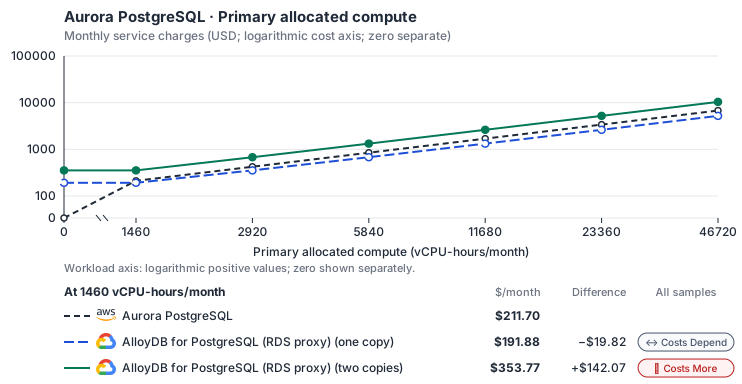
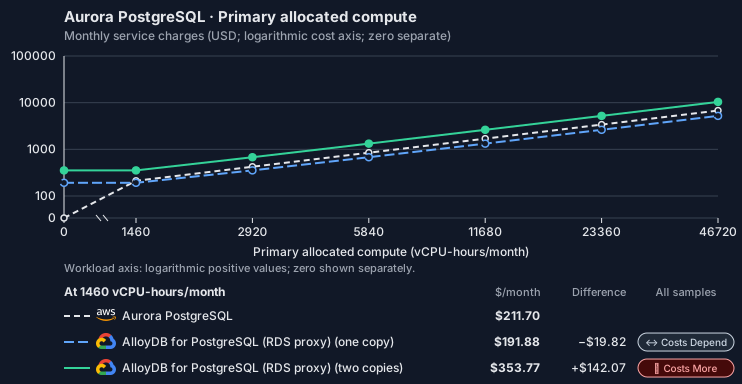
- CPU allocation does not imply an achieved transaction rate. Other native meters and workload assumptions retain their explicitly displayed default quantities. Workload translation and capacity assumptions are not benchmark measurements.
- Native monthly usage priced at the cited provider list prices; listed target allowances apply where present, excluding invoice credits, taxes and negotiated discounts. Rates as of 2026-10-22: us-east-1 → us-central1, USD/month.
- Source prices are reference charges, not an invoice. Target lines cover selected service usage/configuration only; adapter hosting and Tensor9 fees are excluded.
- Samples of explicit prices are not performance measurements or capacity qualification. No interpolation or break-even guarantee is implied.
- Variant assumptions show the first axis sample; any axis-dependent configuration is described by this curve’s workload note.
- Rates are cited provider list prices, editable for discounts, commitments or another region. Workload translation and capacity coefficients remain editable planning assumptions, not benchmark measurements or a commercial quote.
- Default-zero rates are explicit assumptions, not evidence that the deployed service or resource is free.
- Provisioned-unit minimums use an editable approximate allocation floor. Modeled target service cost is max(usage/allocation, minimum), with billable network, durable staging and dependent sinks added separately; actual RU/TU sizing, scaling increments and throughput remain unqualified.
- Durable staging is priced once: provisioned targets include adapter state in their selected allocation; native targets add a separate staging allocation when required. Adapter hosting is a separate allocation and must exclude resources already priced as staging, workers or target capacity.
- A declared adapter mapping and cost model do not establish implementation availability or service equivalence.
- This is a declared directed mapping; a planning estimate does not establish deployment or request-serving support.
- Authored planning assumptions, not measured adapter capacity. Origin rates are cited first-tier list prices, before free allowances and discounts.
- A cost scenario does not establish backend availability, protocol fidelity or production readiness. Registry serving status remains independent.
- Provisioned compute and RAM are priced by resource-hour; operations are independently authored. Database size cannot be inferred from dollars alone.
- Aurora/AlloyDB, MySQL/PostgreSQL and proxied targets retain their distinct backend contracts. HA, replicas and proxy allocations must be selected explicitly.
- Aurora Standard also bills storage I/O at USD 0.20 per 1M I/Os (buffer-cache misses, not logical operations); no meter prices it, so the origin cost excludes it. I/O-Optimized clusters bill no I/O but 30% more per instance and 0.225 per GB-month storage.
- AlloyDB bills each node’s vCPU and memory (a high-availability primary is two nodes) and one regional storage pool by used GiB that every instance in the cluster shares, so storage is billed once however many copies run. The smallest machine is c4a-highmem-1 (1 vCPU, 8 GB; https://docs.cloud.google.com/alloydb/docs/choose-machine-type). C4 and Z3 machine series, backups and committed-use discounts are not selected.
- Row-store throughput (capacityOpsPerVcpuSecond, default 1500) is measured-by-tensor9 as a lower bound: the DynamoDB adapter on Cloud SQL db-custom-2-7680 (2 vCPU, PostgreSQL 16, us-west1) served 2,974 ops/s of YCSB-A at 16 threads without recorded saturation (src/main/kotlin/t9/prime/equiv/generated/eval/CloudsqlPostgresqlYcsbAT16GoYcsbV1_0_0.kt). Published CPU-bound pgbench reaches 3,101 read-write transactions and 20,289 point reads per vCPU-second (AWS z1d.2xlarge, PostgreSQL 14.5), so actual capacity is likely higher. Reads and writes share one coefficient: at the same adapter version, read-only YCSB-C was not faster than 50%-update YCSB-A.
- Log-broker throughput (capacityStreamMiBPerVcpuSecond 20 at 0.5 utilization, 4 GiB RAM per vCPU) is provider-documented by Google Managed Service for Apache Kafka sizing (https://docs.cloud.google.com/managed-service-for-apache-kafka/docs/plan-cluster-size): write-equivalent bytes are replicated writes plus a quarter of reads. Producer batches below 10 KB lower per-CPU throughput; that penalty is not modeled.
- Disk utilization 0.8 is provider-documented headroom below Cloud SQL automatic storage increase, which triggers near 91-95% full (https://docs.cloud.google.com/sql/docs/postgres/instance-settings). The 20 GiB reserve exceeds PostgreSQL’s 1 GB default max_wal_size; the remainder of that reserve is unmeasured.
- CPU tiers double from 2 vCPUs to the target’s largest node at 4 GiB per vCPU; each target’s documented largest node bounds CPU, RAM, RAM per vCPU and disk, and the durable staging database uses Cloud SQL Enterprise (96 vCPU, 6.5 GiB per vCPU, 624 GiB, 64 TiB). Targets billed per capacity unit or throughput unit are sized by their backend instead.
- No public evidence: peak/mean work (2) and the RAM working-set fraction (0.1). Proposed measurements: the p99 one-minute rate over the monthly mean from customer CloudWatch metrics; the buffer hit ratio while stepping RAM under a fixed YCSB-B load.
- Node bounds: AlloyDB n2-highmem-128 has 128 vCPUs and 864 GB (https://docs.cloud.google.com/alloydb/docs/choose-machine-type); a cluster stores up to 128 TiB (https://docs.cloud.google.com/alloydb/quotas).
- Stored GiB already includes the origin family’s physical footprint assumptions; no second storage amplification is applied.
- The workload family already selected resource-hours; the throughput coefficient is not applied again.
- Copies and allocation fractions change cost only; they do not increase modeled primary capacity.
- AWS Price List API, AmazonRDS offer: https://pricing.us-east-1.amazonaws.com/offers/v1.0/aws/AmazonRDS/current/us-east-1/index.json
- AlloyDB for PostgreSQL pricing: https://cloud.google.com/alloydb/pricing
- Additional network transfer, backups, KMS, one-time migration and operational labor unless an explicit meter includes them.
- Destination application execution and separately billed downstream services; supply those allocations separately.
- Aurora per-IO, serverless-capacity, backup and proxy charges; reserved/committed-use purchase options.
- Taxes, discounts, credits and free-tier allowances not explicitly listed by this model.
- Unmodeled dependent services, task execution and operations outside the selected workload family.
plan-839cb7ac853b15c56ae293dab2a4c10446879765 / 2026-10-22.planning.2. Curve: workload-1.
Sources: AWS Price List API, AmazonRDS offer, AlloyDB for PostgreSQL pricing.
Aurora PostgreSQL · Stored data
Feature: Aurora PostgreSQL. Estimated monthly service charges by Stored data. Adapter hosting and Tensor9 fees are excluded. Source: us-east-1; target: us-central1; currency: USD.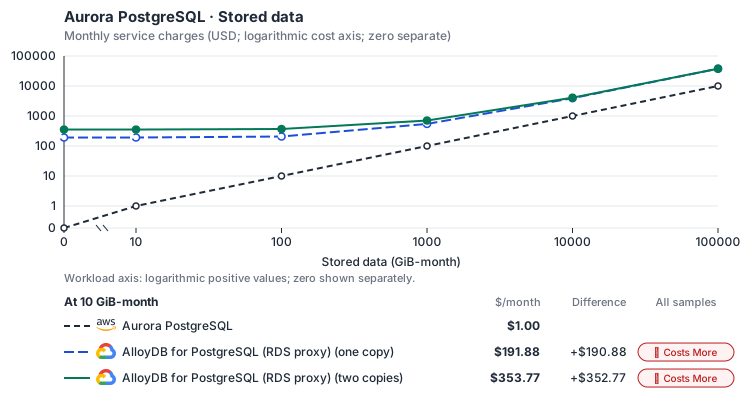
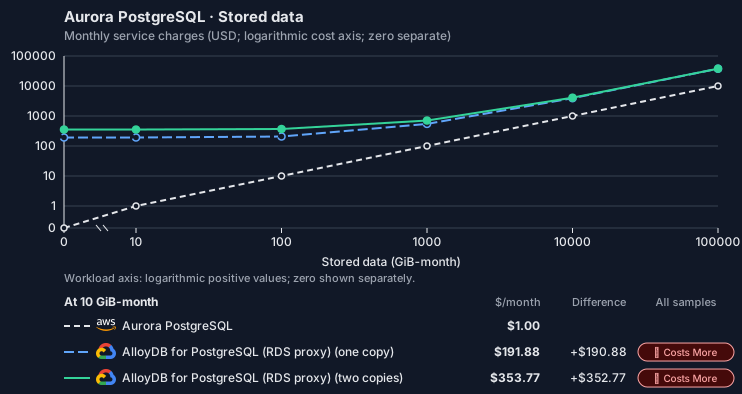
- Request meters remain at their independently authored defaults. Other native meters and workload assumptions retain their explicitly displayed default quantities. Workload translation and capacity assumptions are not benchmark measurements.
- Native monthly usage priced at the cited provider list prices; listed target allowances apply where present, excluding invoice credits, taxes and negotiated discounts. Rates as of 2026-10-22: us-east-1 → us-central1, USD/month.
- Source prices are reference charges, not an invoice. Target lines cover selected service usage/configuration only; adapter hosting and Tensor9 fees are excluded.
- Samples of explicit prices are not performance measurements or capacity qualification. No interpolation or break-even guarantee is implied.
- Variant assumptions show the first axis sample; any axis-dependent configuration is described by this curve’s workload note.
- Rates are cited provider list prices, editable for discounts, commitments or another region. Workload translation and capacity coefficients remain editable planning assumptions, not benchmark measurements or a commercial quote.
- Default-zero rates are explicit assumptions, not evidence that the deployed service or resource is free.
- Provisioned-unit minimums use an editable approximate allocation floor. Modeled target service cost is max(usage/allocation, minimum), with billable network, durable staging and dependent sinks added separately; actual RU/TU sizing, scaling increments and throughput remain unqualified.
- Durable staging is priced once: provisioned targets include adapter state in their selected allocation; native targets add a separate staging allocation when required. Adapter hosting is a separate allocation and must exclude resources already priced as staging, workers or target capacity.
- A declared adapter mapping and cost model do not establish implementation availability or service equivalence.
- This is a declared directed mapping; a planning estimate does not establish deployment or request-serving support.
- Authored planning assumptions, not measured adapter capacity. Origin rates are cited first-tier list prices, before free allowances and discounts.
- A cost scenario does not establish backend availability, protocol fidelity or production readiness. Registry serving status remains independent.
- Provisioned compute and RAM are priced by resource-hour; operations are independently authored. Database size cannot be inferred from dollars alone.
- Aurora/AlloyDB, MySQL/PostgreSQL and proxied targets retain their distinct backend contracts. HA, replicas and proxy allocations must be selected explicitly.
- Aurora Standard also bills storage I/O at USD 0.20 per 1M I/Os (buffer-cache misses, not logical operations); no meter prices it, so the origin cost excludes it. I/O-Optimized clusters bill no I/O but 30% more per instance and 0.225 per GB-month storage.
- AlloyDB bills each node’s vCPU and memory (a high-availability primary is two nodes) and one regional storage pool by used GiB that every instance in the cluster shares, so storage is billed once however many copies run. The smallest machine is c4a-highmem-1 (1 vCPU, 8 GB; https://docs.cloud.google.com/alloydb/docs/choose-machine-type). C4 and Z3 machine series, backups and committed-use discounts are not selected.
- Row-store throughput (capacityOpsPerVcpuSecond, default 1500) is measured-by-tensor9 as a lower bound: the DynamoDB adapter on Cloud SQL db-custom-2-7680 (2 vCPU, PostgreSQL 16, us-west1) served 2,974 ops/s of YCSB-A at 16 threads without recorded saturation (src/main/kotlin/t9/prime/equiv/generated/eval/CloudsqlPostgresqlYcsbAT16GoYcsbV1_0_0.kt). Published CPU-bound pgbench reaches 3,101 read-write transactions and 20,289 point reads per vCPU-second (AWS z1d.2xlarge, PostgreSQL 14.5), so actual capacity is likely higher. Reads and writes share one coefficient: at the same adapter version, read-only YCSB-C was not faster than 50%-update YCSB-A.
- Log-broker throughput (capacityStreamMiBPerVcpuSecond 20 at 0.5 utilization, 4 GiB RAM per vCPU) is provider-documented by Google Managed Service for Apache Kafka sizing (https://docs.cloud.google.com/managed-service-for-apache-kafka/docs/plan-cluster-size): write-equivalent bytes are replicated writes plus a quarter of reads. Producer batches below 10 KB lower per-CPU throughput; that penalty is not modeled.
- Disk utilization 0.8 is provider-documented headroom below Cloud SQL automatic storage increase, which triggers near 91-95% full (https://docs.cloud.google.com/sql/docs/postgres/instance-settings). The 20 GiB reserve exceeds PostgreSQL’s 1 GB default max_wal_size; the remainder of that reserve is unmeasured.
- CPU tiers double from 2 vCPUs to the target’s largest node at 4 GiB per vCPU; each target’s documented largest node bounds CPU, RAM, RAM per vCPU and disk, and the durable staging database uses Cloud SQL Enterprise (96 vCPU, 6.5 GiB per vCPU, 624 GiB, 64 TiB). Targets billed per capacity unit or throughput unit are sized by their backend instead.
- No public evidence: peak/mean work (2) and the RAM working-set fraction (0.1). Proposed measurements: the p99 one-minute rate over the monthly mean from customer CloudWatch metrics; the buffer hit ratio while stepping RAM under a fixed YCSB-B load.
- Node bounds: AlloyDB n2-highmem-128 has 128 vCPUs and 864 GB (https://docs.cloud.google.com/alloydb/docs/choose-machine-type); a cluster stores up to 128 TiB (https://docs.cloud.google.com/alloydb/quotas).
- Stored GiB already includes the origin family’s physical footprint assumptions; no second storage amplification is applied.
- The workload family already selected resource-hours; the throughput coefficient is not applied again.
- Copies and allocation fractions change cost only; they do not increase modeled primary capacity.
- AWS Price List API, AmazonRDS offer: https://pricing.us-east-1.amazonaws.com/offers/v1.0/aws/AmazonRDS/current/us-east-1/index.json
- AlloyDB for PostgreSQL pricing: https://cloud.google.com/alloydb/pricing
- Additional network transfer, backups, KMS, one-time migration and operational labor unless an explicit meter includes them.
- Destination application execution and separately billed downstream services; supply those allocations separately.
- Aurora per-IO, serverless-capacity, backup and proxy charges; reserved/committed-use purchase options.
- Taxes, discounts, credits and free-tier allowances not explicitly listed by this model.
- Unmodeled dependent services, task execution and operations outside the selected workload family.
plan-839cb7ac853b15c56ae293dab2a4c10446879765 / 2026-10-22.planning.2. Curve: workload-2.
Sources: AWS Price List API, AmazonRDS offer, AlloyDB for PostgreSQL pricing.
Aurora PostgreSQL · Database writes
Feature: Aurora PostgreSQL. Estimated monthly service charges by Database writes. Adapter hosting and Tensor9 fees are excluded. Source: us-east-1; target: us-central1; currency: USD.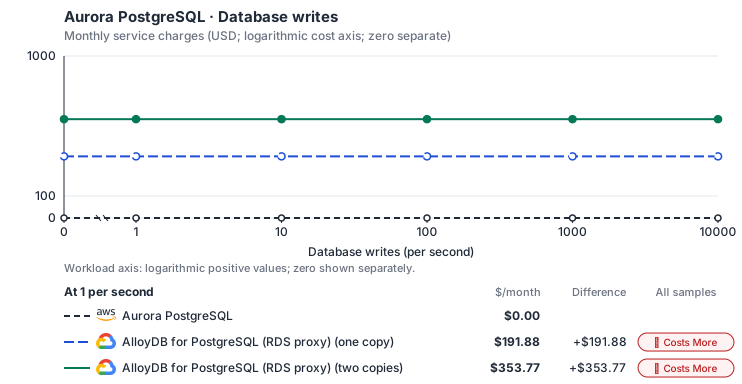
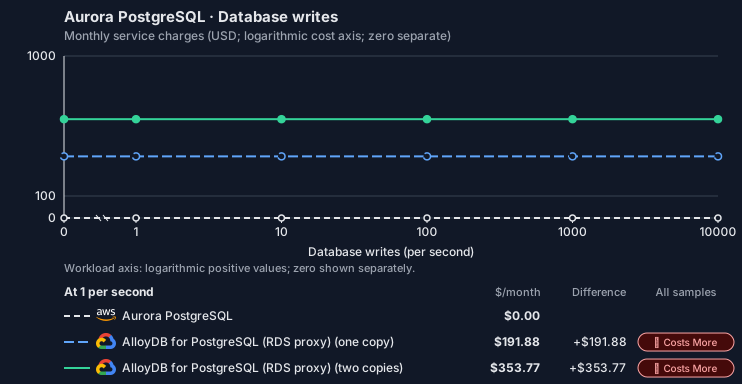
- Source compute and stored data remain independent; a throughput view needs explicit workload inputs. Other native meters and workload assumptions retain their explicitly displayed default quantities. Workload translation and capacity assumptions are not benchmark measurements.
- Native monthly usage priced at the cited provider list prices; listed target allowances apply where present, excluding invoice credits, taxes and negotiated discounts. Rates as of 2026-10-22: us-east-1 → us-central1, USD/month.
- Source prices are reference charges, not an invoice. Target lines cover selected service usage/configuration only; adapter hosting and Tensor9 fees are excluded.
- Samples of explicit prices are not performance measurements or capacity qualification. No interpolation or break-even guarantee is implied.
- Variant assumptions show the first axis sample; any axis-dependent configuration is described by this curve’s workload note.
- Rates are cited provider list prices, editable for discounts, commitments or another region. Workload translation and capacity coefficients remain editable planning assumptions, not benchmark measurements or a commercial quote.
- Default-zero rates are explicit assumptions, not evidence that the deployed service or resource is free.
- Provisioned-unit minimums use an editable approximate allocation floor. Modeled target service cost is max(usage/allocation, minimum), with billable network, durable staging and dependent sinks added separately; actual RU/TU sizing, scaling increments and throughput remain unqualified.
- Durable staging is priced once: provisioned targets include adapter state in their selected allocation; native targets add a separate staging allocation when required. Adapter hosting is a separate allocation and must exclude resources already priced as staging, workers or target capacity.
- A declared adapter mapping and cost model do not establish implementation availability or service equivalence.
- This is a declared directed mapping; a planning estimate does not establish deployment or request-serving support.
- Authored planning assumptions, not measured adapter capacity. Origin rates are cited first-tier list prices, before free allowances and discounts.
- A cost scenario does not establish backend availability, protocol fidelity or production readiness. Registry serving status remains independent.
- Provisioned compute and RAM are priced by resource-hour; operations are independently authored. Database size cannot be inferred from dollars alone.
- Aurora/AlloyDB, MySQL/PostgreSQL and proxied targets retain their distinct backend contracts. HA, replicas and proxy allocations must be selected explicitly.
- Aurora Standard also bills storage I/O at USD 0.20 per 1M I/Os (buffer-cache misses, not logical operations); no meter prices it, so the origin cost excludes it. I/O-Optimized clusters bill no I/O but 30% more per instance and 0.225 per GB-month storage.
- AlloyDB bills each node’s vCPU and memory (a high-availability primary is two nodes) and one regional storage pool by used GiB that every instance in the cluster shares, so storage is billed once however many copies run. The smallest machine is c4a-highmem-1 (1 vCPU, 8 GB; https://docs.cloud.google.com/alloydb/docs/choose-machine-type). C4 and Z3 machine series, backups and committed-use discounts are not selected.
- Row-store throughput (capacityOpsPerVcpuSecond, default 1500) is measured-by-tensor9 as a lower bound: the DynamoDB adapter on Cloud SQL db-custom-2-7680 (2 vCPU, PostgreSQL 16, us-west1) served 2,974 ops/s of YCSB-A at 16 threads without recorded saturation (src/main/kotlin/t9/prime/equiv/generated/eval/CloudsqlPostgresqlYcsbAT16GoYcsbV1_0_0.kt). Published CPU-bound pgbench reaches 3,101 read-write transactions and 20,289 point reads per vCPU-second (AWS z1d.2xlarge, PostgreSQL 14.5), so actual capacity is likely higher. Reads and writes share one coefficient: at the same adapter version, read-only YCSB-C was not faster than 50%-update YCSB-A.
- Log-broker throughput (capacityStreamMiBPerVcpuSecond 20 at 0.5 utilization, 4 GiB RAM per vCPU) is provider-documented by Google Managed Service for Apache Kafka sizing (https://docs.cloud.google.com/managed-service-for-apache-kafka/docs/plan-cluster-size): write-equivalent bytes are replicated writes plus a quarter of reads. Producer batches below 10 KB lower per-CPU throughput; that penalty is not modeled.
- Disk utilization 0.8 is provider-documented headroom below Cloud SQL automatic storage increase, which triggers near 91-95% full (https://docs.cloud.google.com/sql/docs/postgres/instance-settings). The 20 GiB reserve exceeds PostgreSQL’s 1 GB default max_wal_size; the remainder of that reserve is unmeasured.
- CPU tiers double from 2 vCPUs to the target’s largest node at 4 GiB per vCPU; each target’s documented largest node bounds CPU, RAM, RAM per vCPU and disk, and the durable staging database uses Cloud SQL Enterprise (96 vCPU, 6.5 GiB per vCPU, 624 GiB, 64 TiB). Targets billed per capacity unit or throughput unit are sized by their backend instead.
- No public evidence: peak/mean work (2) and the RAM working-set fraction (0.1). Proposed measurements: the p99 one-minute rate over the monthly mean from customer CloudWatch metrics; the buffer hit ratio while stepping RAM under a fixed YCSB-B load.
- Node bounds: AlloyDB n2-highmem-128 has 128 vCPUs and 864 GB (https://docs.cloud.google.com/alloydb/docs/choose-machine-type); a cluster stores up to 128 TiB (https://docs.cloud.google.com/alloydb/quotas).
- Stored GiB already includes the origin family’s physical footprint assumptions; no second storage amplification is applied.
- The workload family already selected resource-hours; the throughput coefficient is not applied again.
- Copies and allocation fractions change cost only; they do not increase modeled primary capacity.
- AWS Price List API, AmazonRDS offer: https://pricing.us-east-1.amazonaws.com/offers/v1.0/aws/AmazonRDS/current/us-east-1/index.json
- AlloyDB for PostgreSQL pricing: https://cloud.google.com/alloydb/pricing
- Additional network transfer, backups, KMS, one-time migration and operational labor unless an explicit meter includes them.
- Destination application execution and separately billed downstream services; supply those allocations separately.
- Aurora per-IO, serverless-capacity, backup and proxy charges; reserved/committed-use purchase options.
- Taxes, discounts, credits and free-tier allowances not explicitly listed by this model.
- Unmodeled dependent services, task execution and operations outside the selected workload family.
plan-839cb7ac853b15c56ae293dab2a4c10446879765 / 2026-10-22.planning.2. Curve: workload-3.
Sources: AWS Price List API, AmazonRDS offer, AlloyDB for PostgreSQL pricing.
Aurora PostgreSQL → AlloyDB for PostgreSQL (RDS proxy): Authored native-usage planning example. Native monthly usage priced at the cited provider list prices; listed target allowances apply where present, excluding invoice credits, taxes and negotiated discounts.
Scenario source region: us-east-1. Scenario target region: us-central1. Currency: USD.
- Additional network transfer, backups, KMS, one-time migration and operational labor unless an explicit meter includes them.
- Destination application execution and separately billed downstream services; supply those allocations separately.
- Aurora per-IO, serverless-capacity, backup and proxy charges; reserved/committed-use purchase options.
- Taxes, discounts, credits and free-tier allowances not explicitly listed by this model.
- Unmodeled dependent services, task execution and operations outside the selected workload family.
- Translated reads: 0 operations.
- Translated writes: 0 operations.
- Translated resident physical data: 0 GiB-month.
- Native provider operations: 0 operations.
- Published payload: 0 GiB.
- Delivered payload: 0 GiB.
- Allocated execution CPU: 0 vCPU-hour.
- Allocated execution RAM: 0 GiB-hour.
- Independent resource allocation: 0 resource-hour.
- Independent inventory: 0 resource-month.
- Input tokens: 0 tokens.
- Output tokens: 0 tokens.
- Billable network: 0 GiB.
- Dependent object sink retained data: 0 GiB-month.
- Dependent object sink writes: 0 writes.
- Rates are cited provider list prices, editable for discounts, commitments or another region. Workload translation and capacity coefficients remain editable planning assumptions, not benchmark measurements or a commercial quote.
- Default-zero rates are explicit assumptions, not evidence that the deployed service or resource is free.
- Provisioned-unit minimums use an editable approximate allocation floor. Modeled target service cost is max(usage/allocation, minimum), with billable network, durable staging and dependent sinks added separately; actual RU/TU sizing, scaling increments and throughput remain unqualified.
- Durable staging is priced once: provisioned targets include adapter state in their selected allocation; native targets add a separate staging allocation when required. Adapter hosting is a separate allocation and must exclude resources already priced as staging, workers or target capacity.
- A declared adapter mapping and cost model do not establish implementation availability or service equivalence.
- This is a declared directed mapping; a planning estimate does not establish deployment or request-serving support.
- Authored planning assumptions, not measured adapter capacity. Origin rates are cited first-tier list prices, before free allowances and discounts.
- A cost scenario does not establish backend availability, protocol fidelity or production readiness. Registry serving status remains independent.
- Provisioned compute and RAM are priced by resource-hour; operations are independently authored. Database size cannot be inferred from dollars alone.
- Aurora/AlloyDB, MySQL/PostgreSQL and proxied targets retain their distinct backend contracts. HA, replicas and proxy allocations must be selected explicitly.
- Aurora Standard also bills storage I/O at USD 0.20 per 1M I/Os (buffer-cache misses, not logical operations); no meter prices it, so the origin cost excludes it. I/O-Optimized clusters bill no I/O but 30% more per instance and 0.225 per GB-month storage.
- AlloyDB bills each node’s vCPU and memory (a high-availability primary is two nodes) and one regional storage pool by used GiB that every instance in the cluster shares, so storage is billed once however many copies run. The smallest machine is c4a-highmem-1 (1 vCPU, 8 GB; https://docs.cloud.google.com/alloydb/docs/choose-machine-type). C4 and Z3 machine series, backups and committed-use discounts are not selected.
- Row-store throughput (capacityOpsPerVcpuSecond, default 1500) is measured-by-tensor9 as a lower bound: the DynamoDB adapter on Cloud SQL db-custom-2-7680 (2 vCPU, PostgreSQL 16, us-west1) served 2,974 ops/s of YCSB-A at 16 threads without recorded saturation (src/main/kotlin/t9/prime/equiv/generated/eval/CloudsqlPostgresqlYcsbAT16GoYcsbV1_0_0.kt). Published CPU-bound pgbench reaches 3,101 read-write transactions and 20,289 point reads per vCPU-second (AWS z1d.2xlarge, PostgreSQL 14.5), so actual capacity is likely higher. Reads and writes share one coefficient: at the same adapter version, read-only YCSB-C was not faster than 50%-update YCSB-A.
- Log-broker throughput (capacityStreamMiBPerVcpuSecond 20 at 0.5 utilization, 4 GiB RAM per vCPU) is provider-documented by Google Managed Service for Apache Kafka sizing (https://docs.cloud.google.com/managed-service-for-apache-kafka/docs/plan-cluster-size): write-equivalent bytes are replicated writes plus a quarter of reads. Producer batches below 10 KB lower per-CPU throughput; that penalty is not modeled.
- Disk utilization 0.8 is provider-documented headroom below Cloud SQL automatic storage increase, which triggers near 91-95% full (https://docs.cloud.google.com/sql/docs/postgres/instance-settings). The 20 GiB reserve exceeds PostgreSQL’s 1 GB default max_wal_size; the remainder of that reserve is unmeasured.
- CPU tiers double from 2 vCPUs to the target’s largest node at 4 GiB per vCPU; each target’s documented largest node bounds CPU, RAM, RAM per vCPU and disk, and the durable staging database uses Cloud SQL Enterprise (96 vCPU, 6.5 GiB per vCPU, 624 GiB, 64 TiB). Targets billed per capacity unit or throughput unit are sized by their backend instead.
- No public evidence: peak/mean work (2) and the RAM working-set fraction (0.1). Proposed measurements: the p99 one-minute rate over the monthly mean from customer CloudWatch metrics; the buffer hit ratio while stepping RAM under a fixed YCSB-B load.
- Node bounds: AlloyDB n2-highmem-128 has 128 vCPUs and 864 GB (https://docs.cloud.google.com/alloydb/docs/choose-machine-type); a cluster stores up to 128 TiB (https://docs.cloud.google.com/alloydb/quotas).
- Stored GiB already includes the origin family’s physical footprint assumptions; no second storage amplification is applied.
- The workload family already selected resource-hours; the throughput coefficient is not applied again.
- Copies and allocation fractions change cost only; they do not increase modeled primary capacity.
plan-839cb7ac853b15c56ae293dab2a4c10446879765 / 2026-10-22.planning.2. Scenario: planning-example.
Sources: AWS Price List API, AmazonRDS offer, AlloyDB for PostgreSQL pricing.
On OCI
OCI Database with PostgreSQL
How it works
Your application’s PostgreSQL driver connects directly to OCI Database with PostgreSQL. These database requests are the data plane. The driver and the PostgreSQL wire protocol stay the same, and Tensor9 adds no proxy, translation or latency to your queries. Management requests, such as snapshots, restores, replicas, failover and configuration changes, are the control plane. Tensor9 runs the RDS API in the customer’s Cloud Adapter deployment and translates each of these requests to the backend’s management API. The sections below list which operations work and which return an error.

Queries reach the database directly; only the management calls are translated.
Database connections
Aurora stores data in an AWS-specific storage layer, but your application reaches it over the standard PostgreSQL wire protocol, which OCI Database with PostgreSQL also supports. Your SQL, drivers, object-relational mappers (ORMs), prepared statements, data types and transaction behavior stay the same; only the storage underneath changes. AWS and Aurora add SQL functions for moving data through S3, invoking Lambda and machine learning. These functions do not exist on the backend, so a query that calls them returns an error.Database management
At runtime your application and tools keep making the same RDS calls. Where OCI has an equivalent, the adapter accepts the RDS request, returns the RDS response format, and performs the operation on OCI: on-demand backups and restore from backup, in-region readers, stop / start, and compute, storage and configuration updates. The adapter does not translate every native OCI feature into Aurora behavior; the limitations below list the differences. An unsupported operation returns an error. The adapter also runs the Aurora Data API (SQL over HTTPS, transactions included), executing each statement over a native connection to the backend database. With Max, your tools callCreateDBCluster and CreateDBInstance through the RDS adapter to create a logical Aurora cluster and its members on OCI PostgreSQL. Tensor9 keeps a durable record of the logical cluster and its members and reconciles the OCI resources with it: it records each accepted request, then creates or removes the OCI resources in the background. DescribeDBClusters and DescribeDBInstances report status and endpoints. DeleteDBInstance removes members; DeleteDBCluster removes the cluster once its members are gone. Your application’s SQL connection still goes directly to the database. With the Infrastructure-only option, Tensor9 compiles the declared cluster into OCI PostgreSQL resources, which you manage with Oracle’s own tools; runtime RDS API calls require Max.


Tensor9 translates RDS management requests to the backend API and returns RDS responses.
Limitations
Where Aurora and OCI PostgreSQL differ- Parameter groups behave differently: Tensor9 keeps the group and applies its settings on OCI. Tensor9 keeps named parameter groups and their overrides. Supported explicit PostgreSQL parameters become OCI PostgreSQL settings; the group object itself stays with Tensor9 and is not created on OCI PostgreSQL. The group family must match the PostgreSQL version, and OCI’s limits on allowed values and restarts still apply. RDS-specific parameters and settings outside the backend’s settable list are rejected.
- RDS point-in-time restore is not supported. OCI has its own point-in-time recovery: it keeps write-ahead logs (WAL) and periodic backups under a point-in-time recovery policy that must be configured, and recovery creates a new database system at a timestamp within the active recovery window. The documented adapter mapping does not promise AWS point-in-time restore translation.
- RDS failover is not supported. OCI has
FailoverDbSystemfor user-initiated failover to an existing local replica. The documented adapter mapping does not promise translation of the AWS failover operation. - Aurora global databases are not supported. OCI supports readable warm standby systems in up to three disaster recovery regions. Replication is asynchronous and can lag; promotion and switchover are manual, with no automatic cross-region failover. Restore is not supported for either the primary or warm standby while configured for this replication. The documented adapter mapping does not promise Aurora global-cluster operations, global-reader routing, or automated promotion.
- In-place major-version upgrades are not supported. To move to a new PostgreSQL major version on OCI, you create a new database system and migrate to it.
- Aurora-specific settings and event subscriptions are not supported. Failover priority tiers, Serverless v2, global write forwarding, I/O-Optimized storage and event subscriptions have no equivalent, as on the other backends.
Other considerations
Migration. Moving the data is a one-time step, covered by this page’s migration note: a logical dump and restore, or logical replication for a short cutover. This page describes how things work after cutover. Operations. The customer owns the database service in their OCI tenancy. Maintenance windows, quotas and pricing are Oracle’s. Features and capacity. The comparison table on this page lists feature and high-availability differences. Check the backend’s pricing and capacity limits when you size the deployment.Example monthly charges
This Tensor9 Cloud Adapter scenario estimates service charges for the named origin and target services. Adapter hosting and commercial Tensor9 fees need separate allocations. How Tensor9 estimates costs explains the method and what the estimates include.Aurora PostgreSQL · Primary allocated compute
Feature: Aurora PostgreSQL. Estimated monthly service charges by Primary allocated compute. Adapter hosting and Tensor9 fees are excluded. Source: us-east-1; target: us-ashburn-1 (global list); currency: USD.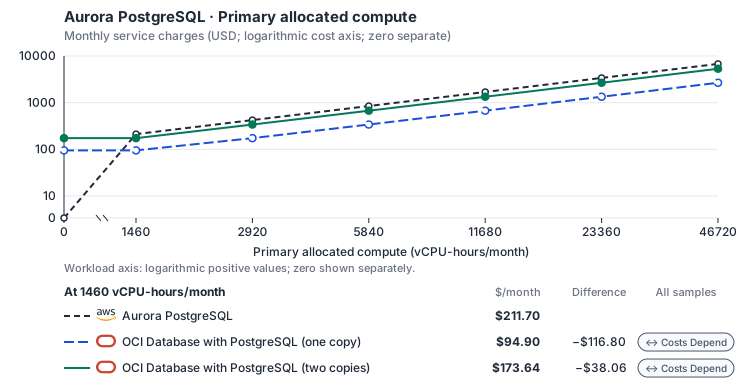
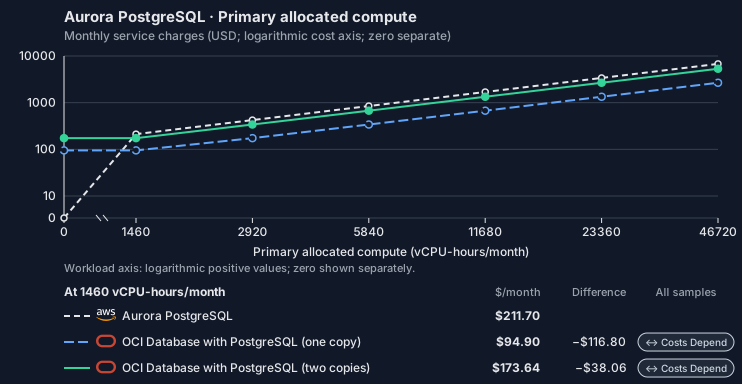
- CPU allocation does not imply an achieved transaction rate. Other native meters and workload assumptions retain their explicitly displayed default quantities. Workload translation and capacity assumptions are not benchmark measurements.
- Native monthly usage priced at the cited provider list prices; listed target allowances apply where present, excluding invoice credits, taxes and negotiated discounts. Rates as of 2026-10-22: us-east-1 → us-ashburn-1 (global list), USD/month.
- Source prices are reference charges, not an invoice. Target lines cover selected service usage/configuration only; adapter hosting and Tensor9 fees are excluded.
- Samples of explicit prices are not performance measurements or capacity qualification. No interpolation or break-even guarantee is implied.
- Variant assumptions show the first axis sample; any axis-dependent configuration is described by this curve’s workload note.
- Rates are cited provider list prices, editable for discounts, commitments or another region. Workload translation and capacity coefficients remain editable planning assumptions, not benchmark measurements or a commercial quote.
- Default-zero rates are explicit assumptions, not evidence that the deployed service or resource is free.
- Provisioned-unit minimums use an editable approximate allocation floor. Modeled target service cost is max(usage/allocation, minimum), with billable network, durable staging and dependent sinks added separately; actual RU/TU sizing, scaling increments and throughput remain unqualified.
- Durable staging is priced once: provisioned targets include adapter state in their selected allocation; native targets add a separate staging allocation when required. Adapter hosting is a separate allocation and must exclude resources already priced as staging, workers or target capacity.
- A declared adapter mapping and cost model do not establish implementation availability or service equivalence.
- This is a declared directed mapping; a planning estimate does not establish deployment or request-serving support.
- Authored planning assumptions, not measured adapter capacity. Origin rates are cited first-tier list prices, before free allowances and discounts.
- A cost scenario does not establish backend availability, protocol fidelity or production readiness. Registry serving status remains independent.
- Provisioned compute and RAM are priced by resource-hour; operations are independently authored. Database size cannot be inferred from dollars alone.
- Aurora/AlloyDB, MySQL/PostgreSQL and proxied targets retain their distinct backend contracts. HA, replicas and proxy allocations must be selected explicitly.
- Aurora Standard also bills storage I/O at USD 0.20 per 1M I/Os (buffer-cache misses, not logical operations); no meter prices it, so the origin cost excludes it. I/O-Optimized clusters bill no I/O but 30% more per instance and 0.225 per GB-month storage.
- OCI Database with PostgreSQL bills provisioned OCPUs (one x86 OCPU is two vCPUs), a memory fee and Database Optimized Storage by used GB. The storage is one pool replicated across availability domains and shared by every node, so it is billed once however many copies run. The memory rate is an assumption (see its source). The smallest shape is PostgreSQL.VM.Standard.E5.Flex with 1 OCPU and 16 GB (https://docs.oracle.com/en-us/iaas/Content/postgresql/supported-shapes.htm). Backups bill as Object Storage and are not selected.
- Row-store throughput (capacityOpsPerVcpuSecond, default 1500) is measured-by-tensor9 as a lower bound: the DynamoDB adapter on Cloud SQL db-custom-2-7680 (2 vCPU, PostgreSQL 16, us-west1) served 2,974 ops/s of YCSB-A at 16 threads without recorded saturation (src/main/kotlin/t9/prime/equiv/generated/eval/CloudsqlPostgresqlYcsbAT16GoYcsbV1_0_0.kt). Published CPU-bound pgbench reaches 3,101 read-write transactions and 20,289 point reads per vCPU-second (AWS z1d.2xlarge, PostgreSQL 14.5), so actual capacity is likely higher. Reads and writes share one coefficient: at the same adapter version, read-only YCSB-C was not faster than 50%-update YCSB-A.
- Log-broker throughput (capacityStreamMiBPerVcpuSecond 20 at 0.5 utilization, 4 GiB RAM per vCPU) is provider-documented by Google Managed Service for Apache Kafka sizing (https://docs.cloud.google.com/managed-service-for-apache-kafka/docs/plan-cluster-size): write-equivalent bytes are replicated writes plus a quarter of reads. Producer batches below 10 KB lower per-CPU throughput; that penalty is not modeled.
- Disk utilization 0.8 is provider-documented headroom below Cloud SQL automatic storage increase, which triggers near 91-95% full (https://docs.cloud.google.com/sql/docs/postgres/instance-settings). The 20 GiB reserve exceeds PostgreSQL’s 1 GB default max_wal_size; the remainder of that reserve is unmeasured.
- CPU tiers double from 2 vCPUs to the target’s largest node at 4 GiB per vCPU; each target’s documented largest node bounds CPU, RAM, RAM per vCPU and disk, and the durable staging database uses Cloud SQL Enterprise (96 vCPU, 6.5 GiB per vCPU, 624 GiB, 64 TiB). Targets billed per capacity unit or throughput unit are sized by their backend instead.
- No public evidence: peak/mean work (2) and the RAM working-set fraction (0.1). Proposed measurements: the p99 one-minute rate over the monthly mean from customer CloudWatch metrics; the buffer hit ratio while stepping RAM under a fixed YCSB-B load.
- Node bounds: PostgreSQL.VM.Standard.E5.Flex reaches 64 OCPUs (128 vCPUs) and 1,024 GB (https://docs.oracle.com/en-us/iaas/Content/postgresql/supported-shapes.htm); a database system stores up to 32 TB (https://docs.oracle.com/en-us/iaas/Content/postgresql/manage-databases.htm).
- Stored GiB already includes the origin family’s physical footprint assumptions; no second storage amplification is applied.
- The workload family already selected resource-hours; the throughput coefficient is not applied again.
- Copies and allocation fractions change cost only; they do not increase modeled primary capacity.
- AWS Price List API, AmazonRDS offer: https://pricing.us-east-1.amazonaws.com/offers/v1.0/aws/AmazonRDS/current/us-east-1/index.json
- OCI price list API: https://apexapps.oracle.com/pls/apex/cetools/api/v1/products/
- Oracle Cloud price list: https://www.oracle.com/cloud/price-list/
- Additional network transfer, backups, KMS, one-time migration and operational labor unless an explicit meter includes them.
- Destination application execution and separately billed downstream services; supply those allocations separately.
- Aurora per-IO, serverless-capacity, backup and proxy charges; reserved/committed-use purchase options.
- Taxes, discounts, credits and free-tier allowances not explicitly listed by this model.
- Unmodeled dependent services, task execution and operations outside the selected workload family.
plan-9631e4e7ad853051d4ac9c6ec36873c05803b586 / 2026-10-22.planning.2. Curve: workload-1.
Sources: AWS Price List API, AmazonRDS offer, OCI price list API, Oracle Cloud price list.
Aurora PostgreSQL · Stored data
Feature: Aurora PostgreSQL. Estimated monthly service charges by Stored data. Adapter hosting and Tensor9 fees are excluded. Source: us-east-1; target: us-ashburn-1 (global list); currency: USD.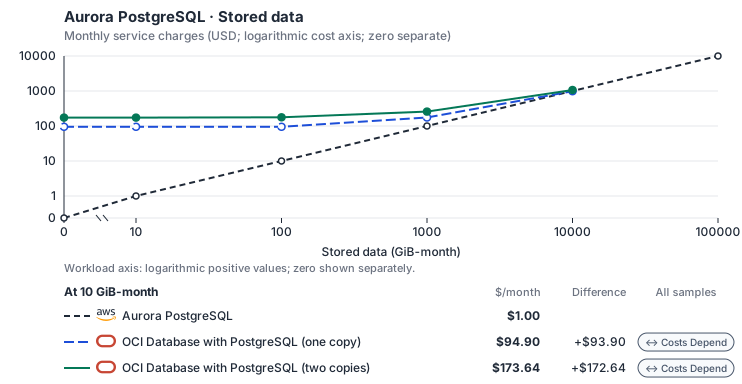
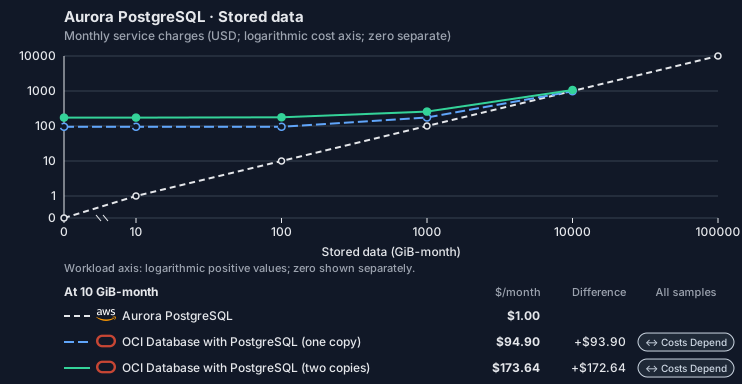
- Request meters remain at their independently authored defaults. Other native meters and workload assumptions retain their explicitly displayed default quantities. Workload translation and capacity assumptions are not benchmark measurements.
- Native monthly usage priced at the cited provider list prices; listed target allowances apply where present, excluding invoice credits, taxes and negotiated discounts. Rates as of 2026-10-22: us-east-1 → us-ashburn-1 (global list), USD/month.
- Source prices are reference charges, not an invoice. Target lines cover selected service usage/configuration only; adapter hosting and Tensor9 fees are excluded.
- Samples of explicit prices are not performance measurements or capacity qualification. No interpolation or break-even guarantee is implied.
- Variant assumptions show the first axis sample; any axis-dependent configuration is described by this curve’s workload note.
- Rates are cited provider list prices, editable for discounts, commitments or another region. Workload translation and capacity coefficients remain editable planning assumptions, not benchmark measurements or a commercial quote.
- Default-zero rates are explicit assumptions, not evidence that the deployed service or resource is free.
- Provisioned-unit minimums use an editable approximate allocation floor. Modeled target service cost is max(usage/allocation, minimum), with billable network, durable staging and dependent sinks added separately; actual RU/TU sizing, scaling increments and throughput remain unqualified.
- Durable staging is priced once: provisioned targets include adapter state in their selected allocation; native targets add a separate staging allocation when required. Adapter hosting is a separate allocation and must exclude resources already priced as staging, workers or target capacity.
- A declared adapter mapping and cost model do not establish implementation availability or service equivalence.
- This is a declared directed mapping; a planning estimate does not establish deployment or request-serving support.
- Authored planning assumptions, not measured adapter capacity. Origin rates are cited first-tier list prices, before free allowances and discounts.
- A cost scenario does not establish backend availability, protocol fidelity or production readiness. Registry serving status remains independent.
- Provisioned compute and RAM are priced by resource-hour; operations are independently authored. Database size cannot be inferred from dollars alone.
- Aurora/AlloyDB, MySQL/PostgreSQL and proxied targets retain their distinct backend contracts. HA, replicas and proxy allocations must be selected explicitly.
- Aurora Standard also bills storage I/O at USD 0.20 per 1M I/Os (buffer-cache misses, not logical operations); no meter prices it, so the origin cost excludes it. I/O-Optimized clusters bill no I/O but 30% more per instance and 0.225 per GB-month storage.
- OCI Database with PostgreSQL bills provisioned OCPUs (one x86 OCPU is two vCPUs), a memory fee and Database Optimized Storage by used GB. The storage is one pool replicated across availability domains and shared by every node, so it is billed once however many copies run. The memory rate is an assumption (see its source). The smallest shape is PostgreSQL.VM.Standard.E5.Flex with 1 OCPU and 16 GB (https://docs.oracle.com/en-us/iaas/Content/postgresql/supported-shapes.htm). Backups bill as Object Storage and are not selected.
- Row-store throughput (capacityOpsPerVcpuSecond, default 1500) is measured-by-tensor9 as a lower bound: the DynamoDB adapter on Cloud SQL db-custom-2-7680 (2 vCPU, PostgreSQL 16, us-west1) served 2,974 ops/s of YCSB-A at 16 threads without recorded saturation (src/main/kotlin/t9/prime/equiv/generated/eval/CloudsqlPostgresqlYcsbAT16GoYcsbV1_0_0.kt). Published CPU-bound pgbench reaches 3,101 read-write transactions and 20,289 point reads per vCPU-second (AWS z1d.2xlarge, PostgreSQL 14.5), so actual capacity is likely higher. Reads and writes share one coefficient: at the same adapter version, read-only YCSB-C was not faster than 50%-update YCSB-A.
- Log-broker throughput (capacityStreamMiBPerVcpuSecond 20 at 0.5 utilization, 4 GiB RAM per vCPU) is provider-documented by Google Managed Service for Apache Kafka sizing (https://docs.cloud.google.com/managed-service-for-apache-kafka/docs/plan-cluster-size): write-equivalent bytes are replicated writes plus a quarter of reads. Producer batches below 10 KB lower per-CPU throughput; that penalty is not modeled.
- Disk utilization 0.8 is provider-documented headroom below Cloud SQL automatic storage increase, which triggers near 91-95% full (https://docs.cloud.google.com/sql/docs/postgres/instance-settings). The 20 GiB reserve exceeds PostgreSQL’s 1 GB default max_wal_size; the remainder of that reserve is unmeasured.
- CPU tiers double from 2 vCPUs to the target’s largest node at 4 GiB per vCPU; each target’s documented largest node bounds CPU, RAM, RAM per vCPU and disk, and the durable staging database uses Cloud SQL Enterprise (96 vCPU, 6.5 GiB per vCPU, 624 GiB, 64 TiB). Targets billed per capacity unit or throughput unit are sized by their backend instead.
- No public evidence: peak/mean work (2) and the RAM working-set fraction (0.1). Proposed measurements: the p99 one-minute rate over the monthly mean from customer CloudWatch metrics; the buffer hit ratio while stepping RAM under a fixed YCSB-B load.
- Node bounds: PostgreSQL.VM.Standard.E5.Flex reaches 64 OCPUs (128 vCPUs) and 1,024 GB (https://docs.oracle.com/en-us/iaas/Content/postgresql/supported-shapes.htm); a database system stores up to 32 TB (https://docs.oracle.com/en-us/iaas/Content/postgresql/manage-databases.htm).
- Stored GiB already includes the origin family’s physical footprint assumptions; no second storage amplification is applied.
- The workload family already selected resource-hours; the throughput coefficient is not applied again.
- Copies and allocation fractions change cost only; they do not increase modeled primary capacity.
- AWS Price List API, AmazonRDS offer: https://pricing.us-east-1.amazonaws.com/offers/v1.0/aws/AmazonRDS/current/us-east-1/index.json
- OCI price list API: https://apexapps.oracle.com/pls/apex/cetools/api/v1/products/
- Oracle Cloud price list: https://www.oracle.com/cloud/price-list/
- Additional network transfer, backups, KMS, one-time migration and operational labor unless an explicit meter includes them.
- Destination application execution and separately billed downstream services; supply those allocations separately.
- Aurora per-IO, serverless-capacity, backup and proxy charges; reserved/committed-use purchase options.
- Taxes, discounts, credits and free-tier allowances not explicitly listed by this model.
- Unmodeled dependent services, task execution and operations outside the selected workload family.
plan-9631e4e7ad853051d4ac9c6ec36873c05803b586 / 2026-10-22.planning.2. Curve: workload-2.
Sources: AWS Price List API, AmazonRDS offer, OCI price list API, Oracle Cloud price list.
Aurora PostgreSQL · Database writes
Feature: Aurora PostgreSQL. Estimated monthly service charges by Database writes. Adapter hosting and Tensor9 fees are excluded. Source: us-east-1; target: us-ashburn-1 (global list); currency: USD.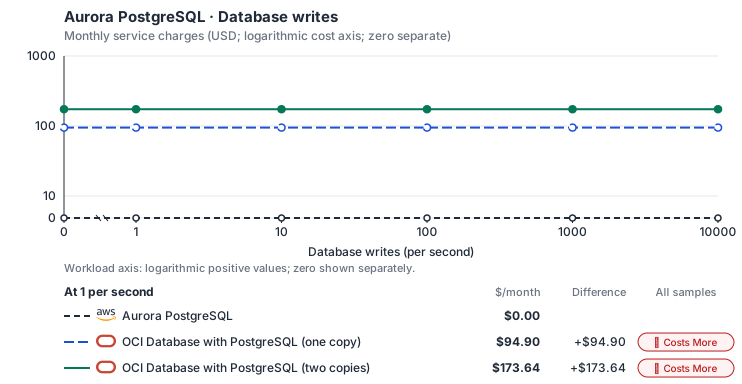
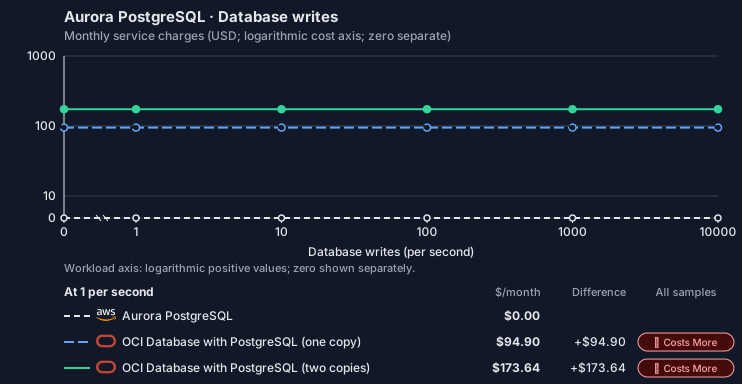
- Source compute and stored data remain independent; a throughput view needs explicit workload inputs. Other native meters and workload assumptions retain their explicitly displayed default quantities. Workload translation and capacity assumptions are not benchmark measurements.
- Native monthly usage priced at the cited provider list prices; listed target allowances apply where present, excluding invoice credits, taxes and negotiated discounts. Rates as of 2026-10-22: us-east-1 → us-ashburn-1 (global list), USD/month.
- Source prices are reference charges, not an invoice. Target lines cover selected service usage/configuration only; adapter hosting and Tensor9 fees are excluded.
- Samples of explicit prices are not performance measurements or capacity qualification. No interpolation or break-even guarantee is implied.
- Variant assumptions show the first axis sample; any axis-dependent configuration is described by this curve’s workload note.
- Rates are cited provider list prices, editable for discounts, commitments or another region. Workload translation and capacity coefficients remain editable planning assumptions, not benchmark measurements or a commercial quote.
- Default-zero rates are explicit assumptions, not evidence that the deployed service or resource is free.
- Provisioned-unit minimums use an editable approximate allocation floor. Modeled target service cost is max(usage/allocation, minimum), with billable network, durable staging and dependent sinks added separately; actual RU/TU sizing, scaling increments and throughput remain unqualified.
- Durable staging is priced once: provisioned targets include adapter state in their selected allocation; native targets add a separate staging allocation when required. Adapter hosting is a separate allocation and must exclude resources already priced as staging, workers or target capacity.
- A declared adapter mapping and cost model do not establish implementation availability or service equivalence.
- This is a declared directed mapping; a planning estimate does not establish deployment or request-serving support.
- Authored planning assumptions, not measured adapter capacity. Origin rates are cited first-tier list prices, before free allowances and discounts.
- A cost scenario does not establish backend availability, protocol fidelity or production readiness. Registry serving status remains independent.
- Provisioned compute and RAM are priced by resource-hour; operations are independently authored. Database size cannot be inferred from dollars alone.
- Aurora/AlloyDB, MySQL/PostgreSQL and proxied targets retain their distinct backend contracts. HA, replicas and proxy allocations must be selected explicitly.
- Aurora Standard also bills storage I/O at USD 0.20 per 1M I/Os (buffer-cache misses, not logical operations); no meter prices it, so the origin cost excludes it. I/O-Optimized clusters bill no I/O but 30% more per instance and 0.225 per GB-month storage.
- OCI Database with PostgreSQL bills provisioned OCPUs (one x86 OCPU is two vCPUs), a memory fee and Database Optimized Storage by used GB. The storage is one pool replicated across availability domains and shared by every node, so it is billed once however many copies run. The memory rate is an assumption (see its source). The smallest shape is PostgreSQL.VM.Standard.E5.Flex with 1 OCPU and 16 GB (https://docs.oracle.com/en-us/iaas/Content/postgresql/supported-shapes.htm). Backups bill as Object Storage and are not selected.
- Row-store throughput (capacityOpsPerVcpuSecond, default 1500) is measured-by-tensor9 as a lower bound: the DynamoDB adapter on Cloud SQL db-custom-2-7680 (2 vCPU, PostgreSQL 16, us-west1) served 2,974 ops/s of YCSB-A at 16 threads without recorded saturation (src/main/kotlin/t9/prime/equiv/generated/eval/CloudsqlPostgresqlYcsbAT16GoYcsbV1_0_0.kt). Published CPU-bound pgbench reaches 3,101 read-write transactions and 20,289 point reads per vCPU-second (AWS z1d.2xlarge, PostgreSQL 14.5), so actual capacity is likely higher. Reads and writes share one coefficient: at the same adapter version, read-only YCSB-C was not faster than 50%-update YCSB-A.
- Log-broker throughput (capacityStreamMiBPerVcpuSecond 20 at 0.5 utilization, 4 GiB RAM per vCPU) is provider-documented by Google Managed Service for Apache Kafka sizing (https://docs.cloud.google.com/managed-service-for-apache-kafka/docs/plan-cluster-size): write-equivalent bytes are replicated writes plus a quarter of reads. Producer batches below 10 KB lower per-CPU throughput; that penalty is not modeled.
- Disk utilization 0.8 is provider-documented headroom below Cloud SQL automatic storage increase, which triggers near 91-95% full (https://docs.cloud.google.com/sql/docs/postgres/instance-settings). The 20 GiB reserve exceeds PostgreSQL’s 1 GB default max_wal_size; the remainder of that reserve is unmeasured.
- CPU tiers double from 2 vCPUs to the target’s largest node at 4 GiB per vCPU; each target’s documented largest node bounds CPU, RAM, RAM per vCPU and disk, and the durable staging database uses Cloud SQL Enterprise (96 vCPU, 6.5 GiB per vCPU, 624 GiB, 64 TiB). Targets billed per capacity unit or throughput unit are sized by their backend instead.
- No public evidence: peak/mean work (2) and the RAM working-set fraction (0.1). Proposed measurements: the p99 one-minute rate over the monthly mean from customer CloudWatch metrics; the buffer hit ratio while stepping RAM under a fixed YCSB-B load.
- Node bounds: PostgreSQL.VM.Standard.E5.Flex reaches 64 OCPUs (128 vCPUs) and 1,024 GB (https://docs.oracle.com/en-us/iaas/Content/postgresql/supported-shapes.htm); a database system stores up to 32 TB (https://docs.oracle.com/en-us/iaas/Content/postgresql/manage-databases.htm).
- Stored GiB already includes the origin family’s physical footprint assumptions; no second storage amplification is applied.
- The workload family already selected resource-hours; the throughput coefficient is not applied again.
- Copies and allocation fractions change cost only; they do not increase modeled primary capacity.
- AWS Price List API, AmazonRDS offer: https://pricing.us-east-1.amazonaws.com/offers/v1.0/aws/AmazonRDS/current/us-east-1/index.json
- OCI price list API: https://apexapps.oracle.com/pls/apex/cetools/api/v1/products/
- Oracle Cloud price list: https://www.oracle.com/cloud/price-list/
- Additional network transfer, backups, KMS, one-time migration and operational labor unless an explicit meter includes them.
- Destination application execution and separately billed downstream services; supply those allocations separately.
- Aurora per-IO, serverless-capacity, backup and proxy charges; reserved/committed-use purchase options.
- Taxes, discounts, credits and free-tier allowances not explicitly listed by this model.
- Unmodeled dependent services, task execution and operations outside the selected workload family.
plan-9631e4e7ad853051d4ac9c6ec36873c05803b586 / 2026-10-22.planning.2. Curve: workload-3.
Sources: AWS Price List API, AmazonRDS offer, OCI price list API, Oracle Cloud price list.
Aurora PostgreSQL → OCI Database with PostgreSQL: Authored native-usage planning example. Native monthly usage priced at the cited provider list prices; listed target allowances apply where present, excluding invoice credits, taxes and negotiated discounts.
Scenario source region: us-east-1. Scenario target region: us-ashburn-1 (global list). Currency: USD.
- Additional network transfer, backups, KMS, one-time migration and operational labor unless an explicit meter includes them.
- Destination application execution and separately billed downstream services; supply those allocations separately.
- Aurora per-IO, serverless-capacity, backup and proxy charges; reserved/committed-use purchase options.
- Taxes, discounts, credits and free-tier allowances not explicitly listed by this model.
- Unmodeled dependent services, task execution and operations outside the selected workload family.
- Translated reads: 0 operations.
- Translated writes: 0 operations.
- Translated resident physical data: 0 GiB-month.
- Native provider operations: 0 operations.
- Published payload: 0 GiB.
- Delivered payload: 0 GiB.
- Allocated execution CPU: 0 vCPU-hour.
- Allocated execution RAM: 0 GiB-hour.
- Independent resource allocation: 0 resource-hour.
- Independent inventory: 0 resource-month.
- Input tokens: 0 tokens.
- Output tokens: 0 tokens.
- Billable network: 0 GiB.
- Dependent object sink retained data: 0 GiB-month.
- Dependent object sink writes: 0 writes.
- Rates are cited provider list prices, editable for discounts, commitments or another region. Workload translation and capacity coefficients remain editable planning assumptions, not benchmark measurements or a commercial quote.
- Default-zero rates are explicit assumptions, not evidence that the deployed service or resource is free.
- Provisioned-unit minimums use an editable approximate allocation floor. Modeled target service cost is max(usage/allocation, minimum), with billable network, durable staging and dependent sinks added separately; actual RU/TU sizing, scaling increments and throughput remain unqualified.
- Durable staging is priced once: provisioned targets include adapter state in their selected allocation; native targets add a separate staging allocation when required. Adapter hosting is a separate allocation and must exclude resources already priced as staging, workers or target capacity.
- A declared adapter mapping and cost model do not establish implementation availability or service equivalence.
- This is a declared directed mapping; a planning estimate does not establish deployment or request-serving support.
- Authored planning assumptions, not measured adapter capacity. Origin rates are cited first-tier list prices, before free allowances and discounts.
- A cost scenario does not establish backend availability, protocol fidelity or production readiness. Registry serving status remains independent.
- Provisioned compute and RAM are priced by resource-hour; operations are independently authored. Database size cannot be inferred from dollars alone.
- Aurora/AlloyDB, MySQL/PostgreSQL and proxied targets retain their distinct backend contracts. HA, replicas and proxy allocations must be selected explicitly.
- Aurora Standard also bills storage I/O at USD 0.20 per 1M I/Os (buffer-cache misses, not logical operations); no meter prices it, so the origin cost excludes it. I/O-Optimized clusters bill no I/O but 30% more per instance and 0.225 per GB-month storage.
- OCI Database with PostgreSQL bills provisioned OCPUs (one x86 OCPU is two vCPUs), a memory fee and Database Optimized Storage by used GB. The storage is one pool replicated across availability domains and shared by every node, so it is billed once however many copies run. The memory rate is an assumption (see its source). The smallest shape is PostgreSQL.VM.Standard.E5.Flex with 1 OCPU and 16 GB (https://docs.oracle.com/en-us/iaas/Content/postgresql/supported-shapes.htm). Backups bill as Object Storage and are not selected.
- Row-store throughput (capacityOpsPerVcpuSecond, default 1500) is measured-by-tensor9 as a lower bound: the DynamoDB adapter on Cloud SQL db-custom-2-7680 (2 vCPU, PostgreSQL 16, us-west1) served 2,974 ops/s of YCSB-A at 16 threads without recorded saturation (src/main/kotlin/t9/prime/equiv/generated/eval/CloudsqlPostgresqlYcsbAT16GoYcsbV1_0_0.kt). Published CPU-bound pgbench reaches 3,101 read-write transactions and 20,289 point reads per vCPU-second (AWS z1d.2xlarge, PostgreSQL 14.5), so actual capacity is likely higher. Reads and writes share one coefficient: at the same adapter version, read-only YCSB-C was not faster than 50%-update YCSB-A.
- Log-broker throughput (capacityStreamMiBPerVcpuSecond 20 at 0.5 utilization, 4 GiB RAM per vCPU) is provider-documented by Google Managed Service for Apache Kafka sizing (https://docs.cloud.google.com/managed-service-for-apache-kafka/docs/plan-cluster-size): write-equivalent bytes are replicated writes plus a quarter of reads. Producer batches below 10 KB lower per-CPU throughput; that penalty is not modeled.
- Disk utilization 0.8 is provider-documented headroom below Cloud SQL automatic storage increase, which triggers near 91-95% full (https://docs.cloud.google.com/sql/docs/postgres/instance-settings). The 20 GiB reserve exceeds PostgreSQL’s 1 GB default max_wal_size; the remainder of that reserve is unmeasured.
- CPU tiers double from 2 vCPUs to the target’s largest node at 4 GiB per vCPU; each target’s documented largest node bounds CPU, RAM, RAM per vCPU and disk, and the durable staging database uses Cloud SQL Enterprise (96 vCPU, 6.5 GiB per vCPU, 624 GiB, 64 TiB). Targets billed per capacity unit or throughput unit are sized by their backend instead.
- No public evidence: peak/mean work (2) and the RAM working-set fraction (0.1). Proposed measurements: the p99 one-minute rate over the monthly mean from customer CloudWatch metrics; the buffer hit ratio while stepping RAM under a fixed YCSB-B load.
- Node bounds: PostgreSQL.VM.Standard.E5.Flex reaches 64 OCPUs (128 vCPUs) and 1,024 GB (https://docs.oracle.com/en-us/iaas/Content/postgresql/supported-shapes.htm); a database system stores up to 32 TB (https://docs.oracle.com/en-us/iaas/Content/postgresql/manage-databases.htm).
- Stored GiB already includes the origin family’s physical footprint assumptions; no second storage amplification is applied.
- The workload family already selected resource-hours; the throughput coefficient is not applied again.
- Copies and allocation fractions change cost only; they do not increase modeled primary capacity.
plan-9631e4e7ad853051d4ac9c6ec36873c05803b586 / 2026-10-22.planning.2. Scenario: planning-example.
Sources: AWS Price List API, AmazonRDS offer, OCI price list API, Oracle Cloud price list.
On Private Kubernetes and Scaleway
PostgreSQL (CloudNativePG)
How it works
Your application’s PostgreSQL driver connects directly to CloudNativePG. These database requests are the data plane. The driver and the PostgreSQL wire protocol stay the same, and Tensor9 adds no proxy, translation or latency to your queries. Management requests, such as snapshots, restores, replicas, failover and configuration changes, are the control plane. Tensor9 runs the RDS API in the customer’s Cloud Adapter deployment and translates each of these requests to the backend’s management API. The sections below list which operations work and which return an error.

Queries reach the database directly; only the management calls are translated.
Database connections
Aurora stores data in an AWS-specific storage layer, but your application reaches it over the standard PostgreSQL wire protocol, which CloudNativePG also supports. Your SQL, drivers, object-relational mappers (ORMs), prepared statements, data types and transaction behavior stay the same; only the storage underneath changes. AWS and Aurora add SQL functions for moving data through S3, invoking Lambda and machine learning. These functions do not exist on the backend, so a query that calls them returns an error.Database management
At runtime your application and tools keep making the same RDS calls. For each supported operation, the adapter accepts the RDS request, returns the RDS response format, and performs it through CloudNativePG’s Kubernetes resources. Backups and restores use its backup and recovery objects, and point-in-time restore uses its own point-in-time recovery. Readers change the cluster’s instance count, and manual failover promotes a replica. Stop / start scales the cluster down and back up. Parameter changes update the cluster’s PostgreSQL configuration. CloudNativePG’s built-in pooler takes the place of RDS Proxy for managed connection pooling. The adapter also runs the Aurora Data API (SQL over HTTPS, transactions included), executing each statement over a native connection to the backend database. When your product is deployed into the target environment, Tensor9 compiles the cluster your stack already declares into the matching CloudNativePG resources and puts the endpoint and credentials in your application’s configuration. The adapter then handles the management calls your running system makes.

Tensor9 translates RDS management requests to the backend API and returns RDS responses.
Limitations
Where Aurora and CloudNativePG differ- Global databases are not supported. The Cloud Adapter deployment runs a single CloudNativePG cluster; cross-region readers or a standby region would need a second Cloud Adapter deployment.
- Aurora-specific settings are not supported. Failover priority / promotion tiers, Serverless v2 autoscaling, global write forwarding and I/O-Optimized storage have no CloudNativePG equivalent.
- RDS event subscriptions are not supported. RDS event notifications publish to SNS. Here the closest equivalents are Kubernetes events and Prometheus alerts, which work differently.
- Parameter groups behave differently: each parameter becomes a cluster setting. Each PostgreSQL parameter goes into the cluster’s configuration; the group object itself is not created.
Other considerations
Migration. Moving the data is a one-time step, covered by this page’s migration note: a logical dump and restore, or logical replication for a short cutover. This page describes how things work after cutover. Operations. CloudNativePG is self-operated: after cutover the customer’s team runs the cluster (backups, upgrades, failover drills), with no cloud database vendor behind it. Features and capacity. The comparison table on this page lists feature and high-availability differences. Check the backend’s pricing and capacity limits when you size the deployment.Example monthly charges
This Tensor9 Cloud Adapter scenario estimates service charges for the named origin and target services. Adapter hosting and commercial Tensor9 fees need separate allocations. How Tensor9 estimates costs explains the method and what the estimates include.Aurora PostgreSQL · Primary allocated compute
Feature: Aurora PostgreSQL. Estimated monthly service charges by Primary allocated compute. Adapter hosting and Tensor9 fees are excluded. Source: us-east-1; target: us-central1; currency: USD.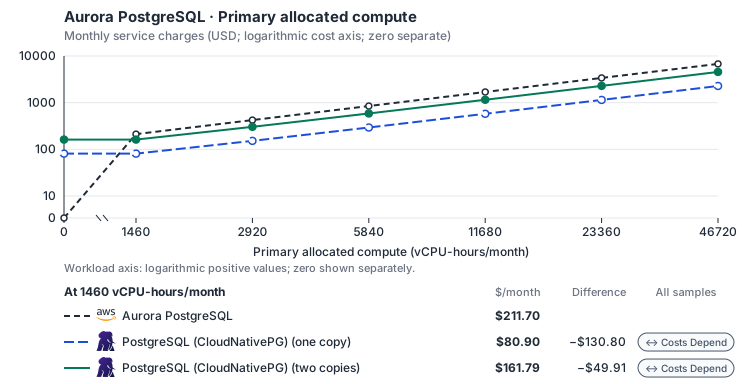
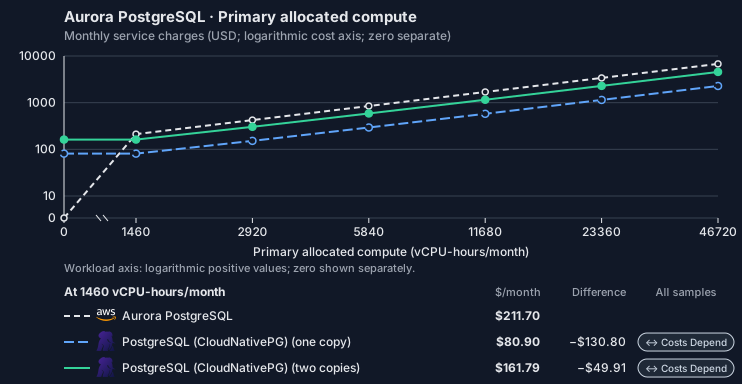
- CPU allocation does not imply an achieved transaction rate. Other native meters and workload assumptions retain their explicitly displayed default quantities. Workload translation and capacity assumptions are not benchmark measurements.
- Native monthly usage priced at the cited provider list prices; listed target allowances apply where present, excluding invoice credits, taxes and negotiated discounts. Rates as of 2026-10-22: us-east-1 → us-central1, USD/month.
- Source prices are reference charges, not an invoice. Target lines cover selected service usage/configuration only; adapter hosting and Tensor9 fees are excluded.
- Samples of explicit prices are not performance measurements or capacity qualification. No interpolation or break-even guarantee is implied.
- Variant assumptions show the first axis sample; any axis-dependent configuration is described by this curve’s workload note.
- Rates are cited provider list prices, editable for discounts, commitments or another region. Workload translation and capacity coefficients remain editable planning assumptions, not benchmark measurements or a commercial quote.
- Default-zero rates are explicit assumptions, not evidence that the deployed service or resource is free.
- Provisioned-unit minimums use an editable approximate allocation floor. Modeled target service cost is max(usage/allocation, minimum), with billable network, durable staging and dependent sinks added separately; actual RU/TU sizing, scaling increments and throughput remain unqualified.
- Durable staging is priced once: provisioned targets include adapter state in their selected allocation; native targets add a separate staging allocation when required. Adapter hosting is a separate allocation and must exclude resources already priced as staging, workers or target capacity.
- A declared adapter mapping and cost model do not establish implementation availability or service equivalence.
- This is a declared directed mapping; a planning estimate does not establish deployment or request-serving support.
- Authored planning assumptions, not measured adapter capacity. Origin rates are cited first-tier list prices, before free allowances and discounts.
- A cost scenario does not establish backend availability, protocol fidelity or production readiness. Registry serving status remains independent.
- Provisioned compute and RAM are priced by resource-hour; operations are independently authored. Database size cannot be inferred from dollars alone.
- Aurora/AlloyDB, MySQL/PostgreSQL and proxied targets retain their distinct backend contracts. HA, replicas and proxy allocations must be selected explicitly.
- Aurora Standard also bills storage I/O at USD 0.20 per 1M I/Os (buffer-cache misses, not logical operations); no meter prices it, so the origin cost excludes it. I/O-Optimized clusters bill no I/O but 30% more per instance and 0.225 per GB-month storage.
- Self-hosted target: CloudNativePG (Apache-2.0, https://github.com/cloudnative-pg/cloudnative-pg/blob/main/LICENSE) with PostgreSQL. Selected CPU, RAM and physical disk allocation grow with workload; no per-operation price is assumed. No vendor charge: the target runs on the customer’s Kubernetes nodes, so CPU, RAM and disk bill at the Kubernetes node reference rates, Compute Engine N2 in us-central1 (USD 0.031611/vCPU-hour, 0.004237/GiB-hour) with pd-balanced disk (0.10/GiB-month) and Premium Tier egress. The cost-optimized E2 series lists 0.02181159/vCPU-hour and 0.00292353/GiB-hour; AWS m6i/r6i and Azure D2s v5/E2s v5 both decompose to 0.033/vCPU-hour and 0.00375/GiB-hour. Requested CPU and RAM are billed; node bin-packing waste, system reservations and the cluster control-plane fee are not.
- Row-store throughput (capacityOpsPerVcpuSecond, default 1500) is measured-by-tensor9 as a lower bound: the DynamoDB adapter on Cloud SQL db-custom-2-7680 (2 vCPU, PostgreSQL 16, us-west1) served 2,974 ops/s of YCSB-A at 16 threads without recorded saturation (src/main/kotlin/t9/prime/equiv/generated/eval/CloudsqlPostgresqlYcsbAT16GoYcsbV1_0_0.kt). Published CPU-bound pgbench reaches 3,101 read-write transactions and 20,289 point reads per vCPU-second (AWS z1d.2xlarge, PostgreSQL 14.5), so actual capacity is likely higher. Reads and writes share one coefficient: at the same adapter version, read-only YCSB-C was not faster than 50%-update YCSB-A.
- Log-broker throughput (capacityStreamMiBPerVcpuSecond 20 at 0.5 utilization, 4 GiB RAM per vCPU) is provider-documented by Google Managed Service for Apache Kafka sizing (https://docs.cloud.google.com/managed-service-for-apache-kafka/docs/plan-cluster-size): write-equivalent bytes are replicated writes plus a quarter of reads. Producer batches below 10 KB lower per-CPU throughput; that penalty is not modeled.
- Disk utilization 0.8 is provider-documented headroom below Cloud SQL automatic storage increase, which triggers near 91-95% full (https://docs.cloud.google.com/sql/docs/postgres/instance-settings). The 20 GiB reserve exceeds PostgreSQL’s 1 GB default max_wal_size; the remainder of that reserve is unmeasured.
- CPU tiers double from 2 vCPUs to the target’s largest node at 4 GiB per vCPU; each target’s documented largest node bounds CPU, RAM, RAM per vCPU and disk, and the durable staging database uses Cloud SQL Enterprise (96 vCPU, 6.5 GiB per vCPU, 624 GiB, 64 TiB). Targets billed per capacity unit or throughput unit are sized by their backend instead.
- No public evidence: peak/mean work (2) and the RAM working-set fraction (0.1). Proposed measurements: the p99 one-minute rate over the monthly mean from customer CloudWatch metrics; the buffer hit ratio while stepping RAM under a fixed YCSB-B load.
- Node bounds: Compute Engine n2-highmem-128 has 128 vCPUs and 864 GB (https://docs.cloud.google.com/compute/docs/general-purpose-machines); a Persistent Disk volume holds up to 64 TiB (https://docs.cloud.google.com/compute/docs/disks/persistent-disks).
- Stored GiB already includes the origin family’s physical footprint assumptions; no second storage amplification is applied.
- The workload family already selected resource-hours; the throughput coefficient is not applied again.
- Copies and allocation fractions change cost only; they do not increase modeled primary capacity.
- AWS Price List API, AmazonRDS offer: https://pricing.us-east-1.amazonaws.com/offers/v1.0/aws/AmazonRDS/current/us-east-1/index.json
- Compute Engine general-purpose machine pricing: https://cloud.google.com/products/compute/pricing/general-purpose
- Disk and image pricing: https://cloud.google.com/compute/disks-image-pricing
- Network pricing: https://cloud.google.com/vpc/network-pricing
- Additional network transfer, backups, KMS, one-time migration and operational labor unless an explicit meter includes them.
- Destination application execution and separately billed downstream services; supply those allocations separately.
- Aurora per-IO, serverless-capacity, backup and proxy charges; reserved/committed-use purchase options.
- Taxes, discounts, credits and free-tier allowances not explicitly listed by this model.
- Unmodeled dependent services, task execution and operations outside the selected workload family.
plan-dd3a8615165abfe7fa17fb70889dc6979bc55d1a / 2026-10-22.planning.2. Curve: workload-1.
Sources: AWS Price List API, AmazonRDS offer, Compute Engine general-purpose machine pricing, Disk and image pricing, Network pricing.
Aurora PostgreSQL · Stored data
Feature: Aurora PostgreSQL. Estimated monthly service charges by Stored data. Adapter hosting and Tensor9 fees are excluded. Source: us-east-1; target: us-central1; currency: USD.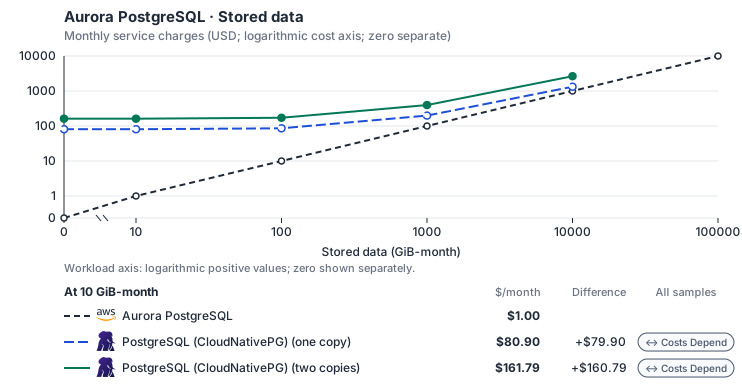
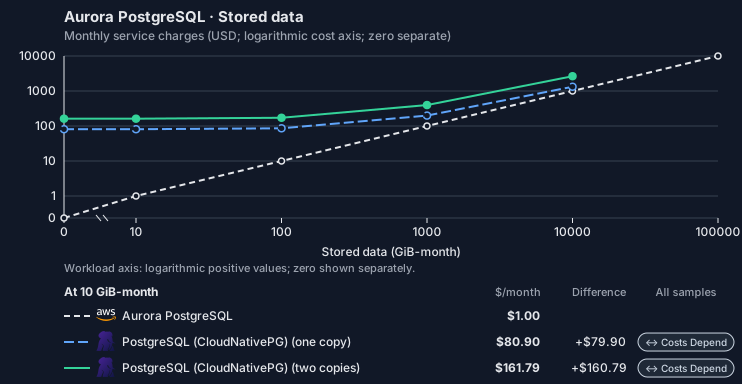
- Request meters remain at their independently authored defaults. Other native meters and workload assumptions retain their explicitly displayed default quantities. Workload translation and capacity assumptions are not benchmark measurements.
- Native monthly usage priced at the cited provider list prices; listed target allowances apply where present, excluding invoice credits, taxes and negotiated discounts. Rates as of 2026-10-22: us-east-1 → us-central1, USD/month.
- Source prices are reference charges, not an invoice. Target lines cover selected service usage/configuration only; adapter hosting and Tensor9 fees are excluded.
- Samples of explicit prices are not performance measurements or capacity qualification. No interpolation or break-even guarantee is implied.
- Variant assumptions show the first axis sample; any axis-dependent configuration is described by this curve’s workload note.
- Rates are cited provider list prices, editable for discounts, commitments or another region. Workload translation and capacity coefficients remain editable planning assumptions, not benchmark measurements or a commercial quote.
- Default-zero rates are explicit assumptions, not evidence that the deployed service or resource is free.
- Provisioned-unit minimums use an editable approximate allocation floor. Modeled target service cost is max(usage/allocation, minimum), with billable network, durable staging and dependent sinks added separately; actual RU/TU sizing, scaling increments and throughput remain unqualified.
- Durable staging is priced once: provisioned targets include adapter state in their selected allocation; native targets add a separate staging allocation when required. Adapter hosting is a separate allocation and must exclude resources already priced as staging, workers or target capacity.
- A declared adapter mapping and cost model do not establish implementation availability or service equivalence.
- This is a declared directed mapping; a planning estimate does not establish deployment or request-serving support.
- Authored planning assumptions, not measured adapter capacity. Origin rates are cited first-tier list prices, before free allowances and discounts.
- A cost scenario does not establish backend availability, protocol fidelity or production readiness. Registry serving status remains independent.
- Provisioned compute and RAM are priced by resource-hour; operations are independently authored. Database size cannot be inferred from dollars alone.
- Aurora/AlloyDB, MySQL/PostgreSQL and proxied targets retain their distinct backend contracts. HA, replicas and proxy allocations must be selected explicitly.
- Aurora Standard also bills storage I/O at USD 0.20 per 1M I/Os (buffer-cache misses, not logical operations); no meter prices it, so the origin cost excludes it. I/O-Optimized clusters bill no I/O but 30% more per instance and 0.225 per GB-month storage.
- Self-hosted target: CloudNativePG (Apache-2.0, https://github.com/cloudnative-pg/cloudnative-pg/blob/main/LICENSE) with PostgreSQL. Selected CPU, RAM and physical disk allocation grow with workload; no per-operation price is assumed. No vendor charge: the target runs on the customer’s Kubernetes nodes, so CPU, RAM and disk bill at the Kubernetes node reference rates, Compute Engine N2 in us-central1 (USD 0.031611/vCPU-hour, 0.004237/GiB-hour) with pd-balanced disk (0.10/GiB-month) and Premium Tier egress. The cost-optimized E2 series lists 0.02181159/vCPU-hour and 0.00292353/GiB-hour; AWS m6i/r6i and Azure D2s v5/E2s v5 both decompose to 0.033/vCPU-hour and 0.00375/GiB-hour. Requested CPU and RAM are billed; node bin-packing waste, system reservations and the cluster control-plane fee are not.
- Row-store throughput (capacityOpsPerVcpuSecond, default 1500) is measured-by-tensor9 as a lower bound: the DynamoDB adapter on Cloud SQL db-custom-2-7680 (2 vCPU, PostgreSQL 16, us-west1) served 2,974 ops/s of YCSB-A at 16 threads without recorded saturation (src/main/kotlin/t9/prime/equiv/generated/eval/CloudsqlPostgresqlYcsbAT16GoYcsbV1_0_0.kt). Published CPU-bound pgbench reaches 3,101 read-write transactions and 20,289 point reads per vCPU-second (AWS z1d.2xlarge, PostgreSQL 14.5), so actual capacity is likely higher. Reads and writes share one coefficient: at the same adapter version, read-only YCSB-C was not faster than 50%-update YCSB-A.
- Log-broker throughput (capacityStreamMiBPerVcpuSecond 20 at 0.5 utilization, 4 GiB RAM per vCPU) is provider-documented by Google Managed Service for Apache Kafka sizing (https://docs.cloud.google.com/managed-service-for-apache-kafka/docs/plan-cluster-size): write-equivalent bytes are replicated writes plus a quarter of reads. Producer batches below 10 KB lower per-CPU throughput; that penalty is not modeled.
- Disk utilization 0.8 is provider-documented headroom below Cloud SQL automatic storage increase, which triggers near 91-95% full (https://docs.cloud.google.com/sql/docs/postgres/instance-settings). The 20 GiB reserve exceeds PostgreSQL’s 1 GB default max_wal_size; the remainder of that reserve is unmeasured.
- CPU tiers double from 2 vCPUs to the target’s largest node at 4 GiB per vCPU; each target’s documented largest node bounds CPU, RAM, RAM per vCPU and disk, and the durable staging database uses Cloud SQL Enterprise (96 vCPU, 6.5 GiB per vCPU, 624 GiB, 64 TiB). Targets billed per capacity unit or throughput unit are sized by their backend instead.
- No public evidence: peak/mean work (2) and the RAM working-set fraction (0.1). Proposed measurements: the p99 one-minute rate over the monthly mean from customer CloudWatch metrics; the buffer hit ratio while stepping RAM under a fixed YCSB-B load.
- Node bounds: Compute Engine n2-highmem-128 has 128 vCPUs and 864 GB (https://docs.cloud.google.com/compute/docs/general-purpose-machines); a Persistent Disk volume holds up to 64 TiB (https://docs.cloud.google.com/compute/docs/disks/persistent-disks).
- Stored GiB already includes the origin family’s physical footprint assumptions; no second storage amplification is applied.
- The workload family already selected resource-hours; the throughput coefficient is not applied again.
- Copies and allocation fractions change cost only; they do not increase modeled primary capacity.
- AWS Price List API, AmazonRDS offer: https://pricing.us-east-1.amazonaws.com/offers/v1.0/aws/AmazonRDS/current/us-east-1/index.json
- Compute Engine general-purpose machine pricing: https://cloud.google.com/products/compute/pricing/general-purpose
- Disk and image pricing: https://cloud.google.com/compute/disks-image-pricing
- Network pricing: https://cloud.google.com/vpc/network-pricing
- Additional network transfer, backups, KMS, one-time migration and operational labor unless an explicit meter includes them.
- Destination application execution and separately billed downstream services; supply those allocations separately.
- Aurora per-IO, serverless-capacity, backup and proxy charges; reserved/committed-use purchase options.
- Taxes, discounts, credits and free-tier allowances not explicitly listed by this model.
- Unmodeled dependent services, task execution and operations outside the selected workload family.
plan-dd3a8615165abfe7fa17fb70889dc6979bc55d1a / 2026-10-22.planning.2. Curve: workload-2.
Sources: AWS Price List API, AmazonRDS offer, Compute Engine general-purpose machine pricing, Disk and image pricing, Network pricing.
Aurora PostgreSQL · Database writes
Feature: Aurora PostgreSQL. Estimated monthly service charges by Database writes. Adapter hosting and Tensor9 fees are excluded. Source: us-east-1; target: us-central1; currency: USD.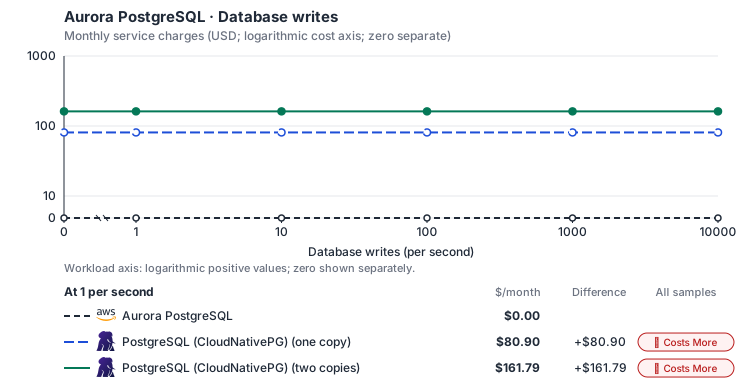
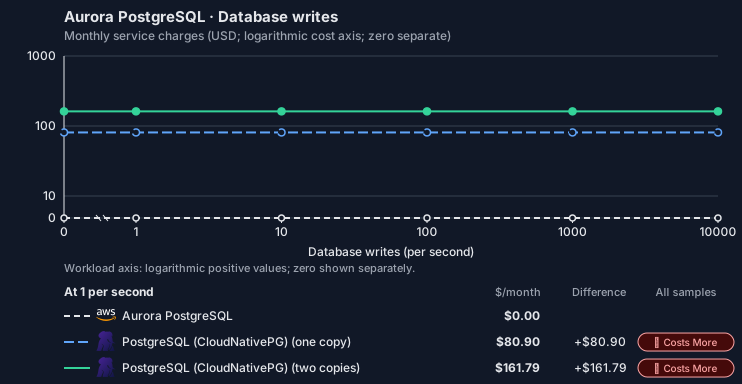
- Source compute and stored data remain independent; a throughput view needs explicit workload inputs. Other native meters and workload assumptions retain their explicitly displayed default quantities. Workload translation and capacity assumptions are not benchmark measurements.
- Native monthly usage priced at the cited provider list prices; listed target allowances apply where present, excluding invoice credits, taxes and negotiated discounts. Rates as of 2026-10-22: us-east-1 → us-central1, USD/month.
- Source prices are reference charges, not an invoice. Target lines cover selected service usage/configuration only; adapter hosting and Tensor9 fees are excluded.
- Samples of explicit prices are not performance measurements or capacity qualification. No interpolation or break-even guarantee is implied.
- Variant assumptions show the first axis sample; any axis-dependent configuration is described by this curve’s workload note.
- Rates are cited provider list prices, editable for discounts, commitments or another region. Workload translation and capacity coefficients remain editable planning assumptions, not benchmark measurements or a commercial quote.
- Default-zero rates are explicit assumptions, not evidence that the deployed service or resource is free.
- Provisioned-unit minimums use an editable approximate allocation floor. Modeled target service cost is max(usage/allocation, minimum), with billable network, durable staging and dependent sinks added separately; actual RU/TU sizing, scaling increments and throughput remain unqualified.
- Durable staging is priced once: provisioned targets include adapter state in their selected allocation; native targets add a separate staging allocation when required. Adapter hosting is a separate allocation and must exclude resources already priced as staging, workers or target capacity.
- A declared adapter mapping and cost model do not establish implementation availability or service equivalence.
- This is a declared directed mapping; a planning estimate does not establish deployment or request-serving support.
- Authored planning assumptions, not measured adapter capacity. Origin rates are cited first-tier list prices, before free allowances and discounts.
- A cost scenario does not establish backend availability, protocol fidelity or production readiness. Registry serving status remains independent.
- Provisioned compute and RAM are priced by resource-hour; operations are independently authored. Database size cannot be inferred from dollars alone.
- Aurora/AlloyDB, MySQL/PostgreSQL and proxied targets retain their distinct backend contracts. HA, replicas and proxy allocations must be selected explicitly.
- Aurora Standard also bills storage I/O at USD 0.20 per 1M I/Os (buffer-cache misses, not logical operations); no meter prices it, so the origin cost excludes it. I/O-Optimized clusters bill no I/O but 30% more per instance and 0.225 per GB-month storage.
- Self-hosted target: CloudNativePG (Apache-2.0, https://github.com/cloudnative-pg/cloudnative-pg/blob/main/LICENSE) with PostgreSQL. Selected CPU, RAM and physical disk allocation grow with workload; no per-operation price is assumed. No vendor charge: the target runs on the customer’s Kubernetes nodes, so CPU, RAM and disk bill at the Kubernetes node reference rates, Compute Engine N2 in us-central1 (USD 0.031611/vCPU-hour, 0.004237/GiB-hour) with pd-balanced disk (0.10/GiB-month) and Premium Tier egress. The cost-optimized E2 series lists 0.02181159/vCPU-hour and 0.00292353/GiB-hour; AWS m6i/r6i and Azure D2s v5/E2s v5 both decompose to 0.033/vCPU-hour and 0.00375/GiB-hour. Requested CPU and RAM are billed; node bin-packing waste, system reservations and the cluster control-plane fee are not.
- Row-store throughput (capacityOpsPerVcpuSecond, default 1500) is measured-by-tensor9 as a lower bound: the DynamoDB adapter on Cloud SQL db-custom-2-7680 (2 vCPU, PostgreSQL 16, us-west1) served 2,974 ops/s of YCSB-A at 16 threads without recorded saturation (src/main/kotlin/t9/prime/equiv/generated/eval/CloudsqlPostgresqlYcsbAT16GoYcsbV1_0_0.kt). Published CPU-bound pgbench reaches 3,101 read-write transactions and 20,289 point reads per vCPU-second (AWS z1d.2xlarge, PostgreSQL 14.5), so actual capacity is likely higher. Reads and writes share one coefficient: at the same adapter version, read-only YCSB-C was not faster than 50%-update YCSB-A.
- Log-broker throughput (capacityStreamMiBPerVcpuSecond 20 at 0.5 utilization, 4 GiB RAM per vCPU) is provider-documented by Google Managed Service for Apache Kafka sizing (https://docs.cloud.google.com/managed-service-for-apache-kafka/docs/plan-cluster-size): write-equivalent bytes are replicated writes plus a quarter of reads. Producer batches below 10 KB lower per-CPU throughput; that penalty is not modeled.
- Disk utilization 0.8 is provider-documented headroom below Cloud SQL automatic storage increase, which triggers near 91-95% full (https://docs.cloud.google.com/sql/docs/postgres/instance-settings). The 20 GiB reserve exceeds PostgreSQL’s 1 GB default max_wal_size; the remainder of that reserve is unmeasured.
- CPU tiers double from 2 vCPUs to the target’s largest node at 4 GiB per vCPU; each target’s documented largest node bounds CPU, RAM, RAM per vCPU and disk, and the durable staging database uses Cloud SQL Enterprise (96 vCPU, 6.5 GiB per vCPU, 624 GiB, 64 TiB). Targets billed per capacity unit or throughput unit are sized by their backend instead.
- No public evidence: peak/mean work (2) and the RAM working-set fraction (0.1). Proposed measurements: the p99 one-minute rate over the monthly mean from customer CloudWatch metrics; the buffer hit ratio while stepping RAM under a fixed YCSB-B load.
- Node bounds: Compute Engine n2-highmem-128 has 128 vCPUs and 864 GB (https://docs.cloud.google.com/compute/docs/general-purpose-machines); a Persistent Disk volume holds up to 64 TiB (https://docs.cloud.google.com/compute/docs/disks/persistent-disks).
- Stored GiB already includes the origin family’s physical footprint assumptions; no second storage amplification is applied.
- The workload family already selected resource-hours; the throughput coefficient is not applied again.
- Copies and allocation fractions change cost only; they do not increase modeled primary capacity.
- AWS Price List API, AmazonRDS offer: https://pricing.us-east-1.amazonaws.com/offers/v1.0/aws/AmazonRDS/current/us-east-1/index.json
- Compute Engine general-purpose machine pricing: https://cloud.google.com/products/compute/pricing/general-purpose
- Disk and image pricing: https://cloud.google.com/compute/disks-image-pricing
- Network pricing: https://cloud.google.com/vpc/network-pricing
- Additional network transfer, backups, KMS, one-time migration and operational labor unless an explicit meter includes them.
- Destination application execution and separately billed downstream services; supply those allocations separately.
- Aurora per-IO, serverless-capacity, backup and proxy charges; reserved/committed-use purchase options.
- Taxes, discounts, credits and free-tier allowances not explicitly listed by this model.
- Unmodeled dependent services, task execution and operations outside the selected workload family.
plan-dd3a8615165abfe7fa17fb70889dc6979bc55d1a / 2026-10-22.planning.2. Curve: workload-3.
Sources: AWS Price List API, AmazonRDS offer, Compute Engine general-purpose machine pricing, Disk and image pricing, Network pricing.
Aurora PostgreSQL → PostgreSQL (CloudNativePG): Authored native-usage planning example. Native monthly usage priced at the cited provider list prices; listed target allowances apply where present, excluding invoice credits, taxes and negotiated discounts.
Scenario source region: us-east-1. Scenario target region: us-central1. Currency: USD.
- Additional network transfer, backups, KMS, one-time migration and operational labor unless an explicit meter includes them.
- Destination application execution and separately billed downstream services; supply those allocations separately.
- Aurora per-IO, serverless-capacity, backup and proxy charges; reserved/committed-use purchase options.
- Taxes, discounts, credits and free-tier allowances not explicitly listed by this model.
- Unmodeled dependent services, task execution and operations outside the selected workload family.
- Translated reads: 0 operations.
- Translated writes: 0 operations.
- Translated resident physical data: 0 GiB-month.
- Native provider operations: 0 operations.
- Published payload: 0 GiB.
- Delivered payload: 0 GiB.
- Allocated execution CPU: 0 vCPU-hour.
- Allocated execution RAM: 0 GiB-hour.
- Independent resource allocation: 0 resource-hour.
- Independent inventory: 0 resource-month.
- Input tokens: 0 tokens.
- Output tokens: 0 tokens.
- Billable network: 0 GiB.
- Dependent object sink retained data: 0 GiB-month.
- Dependent object sink writes: 0 writes.
- Rates are cited provider list prices, editable for discounts, commitments or another region. Workload translation and capacity coefficients remain editable planning assumptions, not benchmark measurements or a commercial quote.
- Default-zero rates are explicit assumptions, not evidence that the deployed service or resource is free.
- Provisioned-unit minimums use an editable approximate allocation floor. Modeled target service cost is max(usage/allocation, minimum), with billable network, durable staging and dependent sinks added separately; actual RU/TU sizing, scaling increments and throughput remain unqualified.
- Durable staging is priced once: provisioned targets include adapter state in their selected allocation; native targets add a separate staging allocation when required. Adapter hosting is a separate allocation and must exclude resources already priced as staging, workers or target capacity.
- A declared adapter mapping and cost model do not establish implementation availability or service equivalence.
- This is a declared directed mapping; a planning estimate does not establish deployment or request-serving support.
- Authored planning assumptions, not measured adapter capacity. Origin rates are cited first-tier list prices, before free allowances and discounts.
- A cost scenario does not establish backend availability, protocol fidelity or production readiness. Registry serving status remains independent.
- Provisioned compute and RAM are priced by resource-hour; operations are independently authored. Database size cannot be inferred from dollars alone.
- Aurora/AlloyDB, MySQL/PostgreSQL and proxied targets retain their distinct backend contracts. HA, replicas and proxy allocations must be selected explicitly.
- Aurora Standard also bills storage I/O at USD 0.20 per 1M I/Os (buffer-cache misses, not logical operations); no meter prices it, so the origin cost excludes it. I/O-Optimized clusters bill no I/O but 30% more per instance and 0.225 per GB-month storage.
- Self-hosted target: CloudNativePG (Apache-2.0, https://github.com/cloudnative-pg/cloudnative-pg/blob/main/LICENSE) with PostgreSQL. Selected CPU, RAM and physical disk allocation grow with workload; no per-operation price is assumed. No vendor charge: the target runs on the customer’s Kubernetes nodes, so CPU, RAM and disk bill at the Kubernetes node reference rates, Compute Engine N2 in us-central1 (USD 0.031611/vCPU-hour, 0.004237/GiB-hour) with pd-balanced disk (0.10/GiB-month) and Premium Tier egress. The cost-optimized E2 series lists 0.02181159/vCPU-hour and 0.00292353/GiB-hour; AWS m6i/r6i and Azure D2s v5/E2s v5 both decompose to 0.033/vCPU-hour and 0.00375/GiB-hour. Requested CPU and RAM are billed; node bin-packing waste, system reservations and the cluster control-plane fee are not.
- Row-store throughput (capacityOpsPerVcpuSecond, default 1500) is measured-by-tensor9 as a lower bound: the DynamoDB adapter on Cloud SQL db-custom-2-7680 (2 vCPU, PostgreSQL 16, us-west1) served 2,974 ops/s of YCSB-A at 16 threads without recorded saturation (src/main/kotlin/t9/prime/equiv/generated/eval/CloudsqlPostgresqlYcsbAT16GoYcsbV1_0_0.kt). Published CPU-bound pgbench reaches 3,101 read-write transactions and 20,289 point reads per vCPU-second (AWS z1d.2xlarge, PostgreSQL 14.5), so actual capacity is likely higher. Reads and writes share one coefficient: at the same adapter version, read-only YCSB-C was not faster than 50%-update YCSB-A.
- Log-broker throughput (capacityStreamMiBPerVcpuSecond 20 at 0.5 utilization, 4 GiB RAM per vCPU) is provider-documented by Google Managed Service for Apache Kafka sizing (https://docs.cloud.google.com/managed-service-for-apache-kafka/docs/plan-cluster-size): write-equivalent bytes are replicated writes plus a quarter of reads. Producer batches below 10 KB lower per-CPU throughput; that penalty is not modeled.
- Disk utilization 0.8 is provider-documented headroom below Cloud SQL automatic storage increase, which triggers near 91-95% full (https://docs.cloud.google.com/sql/docs/postgres/instance-settings). The 20 GiB reserve exceeds PostgreSQL’s 1 GB default max_wal_size; the remainder of that reserve is unmeasured.
- CPU tiers double from 2 vCPUs to the target’s largest node at 4 GiB per vCPU; each target’s documented largest node bounds CPU, RAM, RAM per vCPU and disk, and the durable staging database uses Cloud SQL Enterprise (96 vCPU, 6.5 GiB per vCPU, 624 GiB, 64 TiB). Targets billed per capacity unit or throughput unit are sized by their backend instead.
- No public evidence: peak/mean work (2) and the RAM working-set fraction (0.1). Proposed measurements: the p99 one-minute rate over the monthly mean from customer CloudWatch metrics; the buffer hit ratio while stepping RAM under a fixed YCSB-B load.
- Node bounds: Compute Engine n2-highmem-128 has 128 vCPUs and 864 GB (https://docs.cloud.google.com/compute/docs/general-purpose-machines); a Persistent Disk volume holds up to 64 TiB (https://docs.cloud.google.com/compute/docs/disks/persistent-disks).
- Stored GiB already includes the origin family’s physical footprint assumptions; no second storage amplification is applied.
- The workload family already selected resource-hours; the throughput coefficient is not applied again.
- Copies and allocation fractions change cost only; they do not increase modeled primary capacity.
plan-dd3a8615165abfe7fa17fb70889dc6979bc55d1a / 2026-10-22.planning.2. Scenario: planning-example.
Sources: AWS Price List API, AmazonRDS offer, Compute Engine general-purpose machine pricing, Disk and image pricing, Network pricing.
On Scaleway
Scaleway Managed Database for PostgreSQL
How it works
When your product is deployed into the customer’s Scaleway environment, Tensor9 compiles the Aurora PostgreSQL cluster your stack declares into a Scaleway Managed Database for PostgreSQL instance. The instance class selects a Scaleway node type, the allocated storage becomes a block storage volume, and the PostgreSQL major version is preserved where Scaleway still supports it. Capacity comes from the cluster’s primary instance, and a cluster with two or more instances becomes a high-availability instance with a hot standby. Your application’s PostgreSQL driver connects directly to the Scaleway instance. Tensor9 adds no proxy, translation or latency to your queries. Scaleway operates the database, including patching, backups and failover to the standby. This mapping covers the infrastructure only. Runtime RDS management calls, such as snapshots, restores, replicas, failover and parameter changes, are not supported on Scaleway. Manage the running database through Scaleway’s console, CLI or API.

Queries reach the database directly; Tensor9 acts only when the product is deployed.
Database connections
Scaleway runs standard PostgreSQL, so your SQL, drivers, object-relational mappers (ORMs), prepared statements, data types and transaction semantics remain unchanged. Connection strings change: Scaleway assigns the endpoint and its port, and Tensor9 puts them in your application’s configuration. Credentials change as well. The instance gets its own admin user, and its password arrives through a sensitive deployment variable; no plaintext password is written into the infrastructure code the customer applies. Anything that reads the master username from an output receives the provisioned user instead. IAM database authentication is not supported on this backend. An application that requests short-lived tokens from AWS IAM cannot obtain a credential on Scaleway and fails to connect, even though the database itself is healthy. Switch such clients to a password-based database user before cutover.Database management
Tensor9 reads the cluster your stack declares and writes the matching Scaleway resources once, when the product is deployed. Settings with a direct equivalent are kept. Settings that Scaleway handles differently are translated and called out. Settings with no equivalent are removed, and the deployment reports each one instead of dropping it silently. After deployment there is no RDS management API on this backend. Day-to-day operations, such as resizing the node or volume, adding read replicas, changing backup frequency and retention, restoring a backup and editing engine settings, use Scaleway’s console, CLI or API against the customer’s own Scaleway project.

Tensor9 applies this translation once, when the product is deployed.
Limitations
Where Aurora PostgreSQL and Scaleway differ- Aurora-specific features are not supported. Serverless v2 scaling, global databases, fast clones, promotion tiers and I/O-Optimized storage have no equivalent on this backend. Aurora SQL functions for S3, Lambda and machine learning return an error.
- Readers behave differently: there is no reader endpoint. Reader traffic goes to the instance endpoint. Scaleway read replicas are separate, asynchronously replicated resources that you add deliberately; they are not created from the cluster’s reader instances.
- Instance sizes behave differently: they stop at 8 vCPU. Instance classes map to Scaleway’s general-purpose node types from 2 vCPU / 3 GB to 8 vCPU / 29 GB. A larger class maps to the largest of these, with less memory than the origin; size the workload before migrating.
- Availability SLAs behave differently: these node types have none. Scaleway’s SLA (99.95% for high availability, 99.5% standalone) covers only its POP2 node types, which this mapping does not select.
- High availability behaves differently: the standby shares a data center. Scaleway replicates synchronously to a hot standby in a separate rack of the same data center. It protects against a node or rack failure, not the loss of a whole availability zone.
- Backups behave differently: they follow Scaleway’s own schedule. Backup retention and the preferred backup window are not preserved; set Scaleway’s backup frequency and retention after deployment.
- Customer-managed KMS keys are not supported. Encryption at rest is on, with Scaleway-managed keys.
- Parameter and option groups are not supported. Engine settings are configured on the Scaleway instance itself; option groups have no equivalent.
- The runtime RDS API is not supported. Snapshots, restores, failover, replicas, the Data API and event subscriptions are not available through RDS calls on this backend.
Other considerations
Migration. Moving the data is a one-time step: a logical dump and restore, or replication for a short cutover. Check IAM database authentication and the instance size first. Operations. The customer owns the database in their Scaleway project: maintenance windows, quotas and pricing are Scaleway’s. Scaleway’s availability SLA covers only its POP2 node types, so the general-purpose node types this mapping selects have no Scaleway availability commitment. Features and capacity. The comparison table on this page lists feature and high-availability differences.Example monthly charges
This Tensor9 Cloud Adapter scenario estimates service charges for the named origin and target services. Adapter hosting and commercial Tensor9 fees need separate allocations. How Tensor9 estimates costs explains the method and what the estimates include. Native or deployment mapping. This mapping provisions a native database. SQL clients connect directly to it; this directed mapping does not expose an RDS management adapter endpoint. Database availability and query latency are covered by the database provider, not a Tensor9 request-processing SLA. Cost estimates describe the selected service resources; operation coverage remains separate.Aurora PostgreSQL · Primary allocated compute
Feature: Aurora PostgreSQL. Estimated monthly service charges by Primary allocated compute. Adapter hosting and Tensor9 fees are excluded. Source: us-east-1; target: fr-par; currency: USD.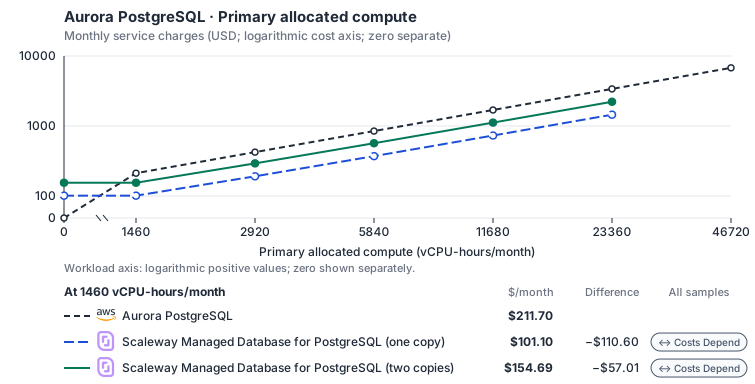
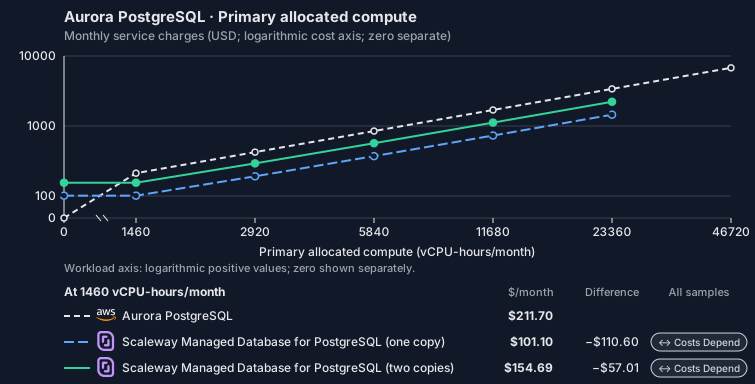
- CPU allocation does not imply an achieved transaction rate. Other native meters and workload assumptions retain their explicitly displayed default quantities. Workload translation and capacity assumptions are not benchmark measurements.
- Native monthly usage priced at the cited provider list prices; listed target allowances apply where present, excluding invoice credits, taxes and negotiated discounts. Rates as of 2026-10-22: us-east-1 → fr-par, USD/month.
- Source prices are reference charges, not an invoice. Target lines cover selected service usage/configuration only; adapter hosting and Tensor9 fees are excluded.
- Samples of explicit prices are not performance measurements or capacity qualification. No interpolation or break-even guarantee is implied.
- Variant assumptions show the first axis sample; any axis-dependent configuration is described by this curve’s workload note.
- Rates are cited provider list prices, editable for discounts, commitments or another region. Workload translation and capacity coefficients remain editable planning assumptions, not benchmark measurements or a commercial quote.
- Default-zero rates are explicit assumptions, not evidence that the deployed service or resource is free.
- Provisioned-unit minimums use an editable approximate allocation floor. Modeled target service cost is max(usage/allocation, minimum), with billable network, durable staging and dependent sinks added separately; actual RU/TU sizing, scaling increments and throughput remain unqualified.
- Durable staging is priced once: provisioned targets include adapter state in their selected allocation; native targets add a separate staging allocation when required. Adapter hosting is a separate allocation and must exclude resources already priced as staging, workers or target capacity.
- A declared adapter mapping and cost model do not establish implementation availability or service equivalence.
- This is a declared directed mapping; a planning estimate does not establish deployment or request-serving support.
- Native/deployment comparison scope: This mapping provisions a native database. SQL clients connect directly to it; this directed mapping does not expose an RDS management adapter endpoint. Database availability and query latency are covered by the database provider, not a Tensor9 request-processing SLA.
- Authored planning assumptions, not measured adapter capacity. Origin rates are cited first-tier list prices, before free allowances and discounts.
- A cost scenario does not establish backend availability, protocol fidelity or production readiness. Registry serving status remains independent.
- Provisioned compute and RAM are priced by resource-hour; operations are independently authored. Database size cannot be inferred from dollars alone.
- Aurora/AlloyDB, MySQL/PostgreSQL and proxied targets retain their distinct backend contracts. HA, replicas and proxy allocations must be selected explicitly.
- Aurora Standard also bills storage I/O at USD 0.20 per 1M I/Os (buffer-cache misses, not logical operations); no meter prices it, so the origin cost excludes it. I/O-Optimized clusters bill no I/O but 30% more per instance and 0.225 per GB-month storage.
- Scaleway Managed Database for PostgreSQL at Production Optimized (PRO2) prices in EUR converted at the ECB reference rate. A high-availability or replica node bills Scaleway’s ‘Additional nodes’ price, EUR 0.0583 per hour for PRO2-XXS, 53% of the main node. Scaleway lists no egress charge for Managed Databases, so selected network is not charged. Cost Optimized ranges (DB-DEV-S from EUR 0.0156 per hour), Block Storage 15K and backups (EUR 0.03 per GB-month) are not selected.
- Row-store throughput (capacityOpsPerVcpuSecond, default 1500) is measured-by-tensor9 as a lower bound: the DynamoDB adapter on Cloud SQL db-custom-2-7680 (2 vCPU, PostgreSQL 16, us-west1) served 2,974 ops/s of YCSB-A at 16 threads without recorded saturation (src/main/kotlin/t9/prime/equiv/generated/eval/CloudsqlPostgresqlYcsbAT16GoYcsbV1_0_0.kt). Published CPU-bound pgbench reaches 3,101 read-write transactions and 20,289 point reads per vCPU-second (AWS z1d.2xlarge, PostgreSQL 14.5), so actual capacity is likely higher. Reads and writes share one coefficient: at the same adapter version, read-only YCSB-C was not faster than 50%-update YCSB-A.
- Log-broker throughput (capacityStreamMiBPerVcpuSecond 20 at 0.5 utilization, 4 GiB RAM per vCPU) is provider-documented by Google Managed Service for Apache Kafka sizing (https://docs.cloud.google.com/managed-service-for-apache-kafka/docs/plan-cluster-size): write-equivalent bytes are replicated writes plus a quarter of reads. Producer batches below 10 KB lower per-CPU throughput; that penalty is not modeled.
- Disk utilization 0.8 is provider-documented headroom below Cloud SQL automatic storage increase, which triggers near 91-95% full (https://docs.cloud.google.com/sql/docs/postgres/instance-settings). The 20 GiB reserve exceeds PostgreSQL’s 1 GB default max_wal_size; the remainder of that reserve is unmeasured.
- CPU tiers double from 2 vCPUs to the target’s largest node at 4 GiB per vCPU; each target’s documented largest node bounds CPU, RAM, RAM per vCPU and disk, and the durable staging database uses Cloud SQL Enterprise (96 vCPU, 6.5 GiB per vCPU, 624 GiB, 64 TiB). Targets billed per capacity unit or throughput unit are sized by their backend instead.
- No public evidence: peak/mean work (2) and the RAM working-set fraction (0.1). Proposed measurements: the p99 one-minute rate over the monthly mean from customer CloudWatch metrics; the buffer hit ratio while stepping RAM under a fixed YCSB-B load.
- Node bounds: DB-PRO2-L has 32 vCPUs and 128 GB (https://www.scaleway.com/en/pricing/managed-databases/); a volume grows up to 15 TB (https://www.scaleway.com/en/docs/managed-databases-for-postgresql-and-mysql/concepts/).
- Stored GiB already includes the origin family’s physical footprint assumptions; no second storage amplification is applied.
- The workload family already selected resource-hours; the throughput coefficient is not applied again.
- Copies and allocation fractions change cost only; they do not increase modeled primary capacity.
- AWS Price List API, AmazonRDS offer: https://pricing.us-east-1.amazonaws.com/offers/v1.0/aws/AmazonRDS/current/us-east-1/index.json
- Scaleway Managed Databases pricing: https://www.scaleway.com/en/pricing/managed-databases/
- Additional network transfer, backups, KMS, one-time migration and operational labor unless an explicit meter includes them.
- Destination application execution and separately billed downstream services; supply those allocations separately.
- Aurora per-IO, serverless-capacity, backup and proxy charges; reserved/committed-use purchase options.
- Taxes, discounts, credits and free-tier allowances not explicitly listed by this model.
- Unmodeled dependent services, task execution and operations outside the selected workload family.
plan-9818fc9ac977d4349d19fe5ce8eb48812af182c2 / 2026-10-22.planning.2. Curve: workload-1.
Sources: AWS Price List API, AmazonRDS offer, Scaleway Managed Databases pricing.
Aurora PostgreSQL · Stored data
Feature: Aurora PostgreSQL. Estimated monthly service charges by Stored data. Adapter hosting and Tensor9 fees are excluded. Source: us-east-1; target: fr-par; currency: USD.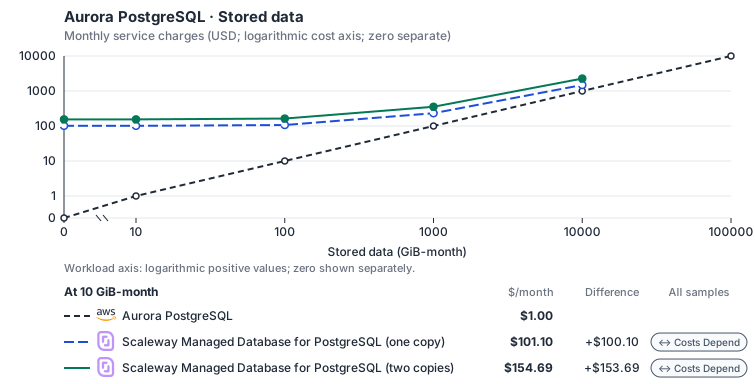
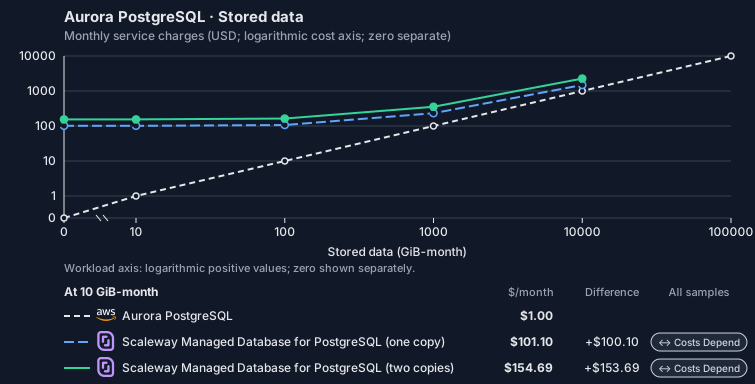
- Request meters remain at their independently authored defaults. Other native meters and workload assumptions retain their explicitly displayed default quantities. Workload translation and capacity assumptions are not benchmark measurements.
- Native monthly usage priced at the cited provider list prices; listed target allowances apply where present, excluding invoice credits, taxes and negotiated discounts. Rates as of 2026-10-22: us-east-1 → fr-par, USD/month.
- Source prices are reference charges, not an invoice. Target lines cover selected service usage/configuration only; adapter hosting and Tensor9 fees are excluded.
- Samples of explicit prices are not performance measurements or capacity qualification. No interpolation or break-even guarantee is implied.
- Variant assumptions show the first axis sample; any axis-dependent configuration is described by this curve’s workload note.
- Rates are cited provider list prices, editable for discounts, commitments or another region. Workload translation and capacity coefficients remain editable planning assumptions, not benchmark measurements or a commercial quote.
- Default-zero rates are explicit assumptions, not evidence that the deployed service or resource is free.
- Provisioned-unit minimums use an editable approximate allocation floor. Modeled target service cost is max(usage/allocation, minimum), with billable network, durable staging and dependent sinks added separately; actual RU/TU sizing, scaling increments and throughput remain unqualified.
- Durable staging is priced once: provisioned targets include adapter state in their selected allocation; native targets add a separate staging allocation when required. Adapter hosting is a separate allocation and must exclude resources already priced as staging, workers or target capacity.
- A declared adapter mapping and cost model do not establish implementation availability or service equivalence.
- This is a declared directed mapping; a planning estimate does not establish deployment or request-serving support.
- Native/deployment comparison scope: This mapping provisions a native database. SQL clients connect directly to it; this directed mapping does not expose an RDS management adapter endpoint. Database availability and query latency are covered by the database provider, not a Tensor9 request-processing SLA.
- Authored planning assumptions, not measured adapter capacity. Origin rates are cited first-tier list prices, before free allowances and discounts.
- A cost scenario does not establish backend availability, protocol fidelity or production readiness. Registry serving status remains independent.
- Provisioned compute and RAM are priced by resource-hour; operations are independently authored. Database size cannot be inferred from dollars alone.
- Aurora/AlloyDB, MySQL/PostgreSQL and proxied targets retain their distinct backend contracts. HA, replicas and proxy allocations must be selected explicitly.
- Aurora Standard also bills storage I/O at USD 0.20 per 1M I/Os (buffer-cache misses, not logical operations); no meter prices it, so the origin cost excludes it. I/O-Optimized clusters bill no I/O but 30% more per instance and 0.225 per GB-month storage.
- Scaleway Managed Database for PostgreSQL at Production Optimized (PRO2) prices in EUR converted at the ECB reference rate. A high-availability or replica node bills Scaleway’s ‘Additional nodes’ price, EUR 0.0583 per hour for PRO2-XXS, 53% of the main node. Scaleway lists no egress charge for Managed Databases, so selected network is not charged. Cost Optimized ranges (DB-DEV-S from EUR 0.0156 per hour), Block Storage 15K and backups (EUR 0.03 per GB-month) are not selected.
- Row-store throughput (capacityOpsPerVcpuSecond, default 1500) is measured-by-tensor9 as a lower bound: the DynamoDB adapter on Cloud SQL db-custom-2-7680 (2 vCPU, PostgreSQL 16, us-west1) served 2,974 ops/s of YCSB-A at 16 threads without recorded saturation (src/main/kotlin/t9/prime/equiv/generated/eval/CloudsqlPostgresqlYcsbAT16GoYcsbV1_0_0.kt). Published CPU-bound pgbench reaches 3,101 read-write transactions and 20,289 point reads per vCPU-second (AWS z1d.2xlarge, PostgreSQL 14.5), so actual capacity is likely higher. Reads and writes share one coefficient: at the same adapter version, read-only YCSB-C was not faster than 50%-update YCSB-A.
- Log-broker throughput (capacityStreamMiBPerVcpuSecond 20 at 0.5 utilization, 4 GiB RAM per vCPU) is provider-documented by Google Managed Service for Apache Kafka sizing (https://docs.cloud.google.com/managed-service-for-apache-kafka/docs/plan-cluster-size): write-equivalent bytes are replicated writes plus a quarter of reads. Producer batches below 10 KB lower per-CPU throughput; that penalty is not modeled.
- Disk utilization 0.8 is provider-documented headroom below Cloud SQL automatic storage increase, which triggers near 91-95% full (https://docs.cloud.google.com/sql/docs/postgres/instance-settings). The 20 GiB reserve exceeds PostgreSQL’s 1 GB default max_wal_size; the remainder of that reserve is unmeasured.
- CPU tiers double from 2 vCPUs to the target’s largest node at 4 GiB per vCPU; each target’s documented largest node bounds CPU, RAM, RAM per vCPU and disk, and the durable staging database uses Cloud SQL Enterprise (96 vCPU, 6.5 GiB per vCPU, 624 GiB, 64 TiB). Targets billed per capacity unit or throughput unit are sized by their backend instead.
- No public evidence: peak/mean work (2) and the RAM working-set fraction (0.1). Proposed measurements: the p99 one-minute rate over the monthly mean from customer CloudWatch metrics; the buffer hit ratio while stepping RAM under a fixed YCSB-B load.
- Node bounds: DB-PRO2-L has 32 vCPUs and 128 GB (https://www.scaleway.com/en/pricing/managed-databases/); a volume grows up to 15 TB (https://www.scaleway.com/en/docs/managed-databases-for-postgresql-and-mysql/concepts/).
- Stored GiB already includes the origin family’s physical footprint assumptions; no second storage amplification is applied.
- The workload family already selected resource-hours; the throughput coefficient is not applied again.
- Copies and allocation fractions change cost only; they do not increase modeled primary capacity.
- AWS Price List API, AmazonRDS offer: https://pricing.us-east-1.amazonaws.com/offers/v1.0/aws/AmazonRDS/current/us-east-1/index.json
- Scaleway Managed Databases pricing: https://www.scaleway.com/en/pricing/managed-databases/
- Additional network transfer, backups, KMS, one-time migration and operational labor unless an explicit meter includes them.
- Destination application execution and separately billed downstream services; supply those allocations separately.
- Aurora per-IO, serverless-capacity, backup and proxy charges; reserved/committed-use purchase options.
- Taxes, discounts, credits and free-tier allowances not explicitly listed by this model.
- Unmodeled dependent services, task execution and operations outside the selected workload family.
plan-9818fc9ac977d4349d19fe5ce8eb48812af182c2 / 2026-10-22.planning.2. Curve: workload-2.
Sources: AWS Price List API, AmazonRDS offer, Scaleway Managed Databases pricing.
Aurora PostgreSQL · Database writes
Feature: Aurora PostgreSQL. Estimated monthly service charges by Database writes. Adapter hosting and Tensor9 fees are excluded. Source: us-east-1; target: fr-par; currency: USD.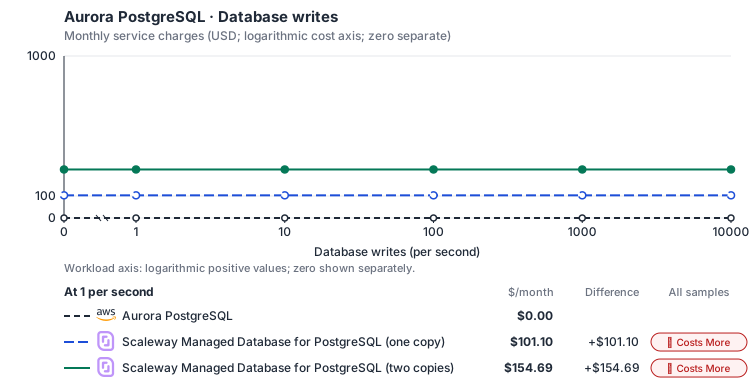
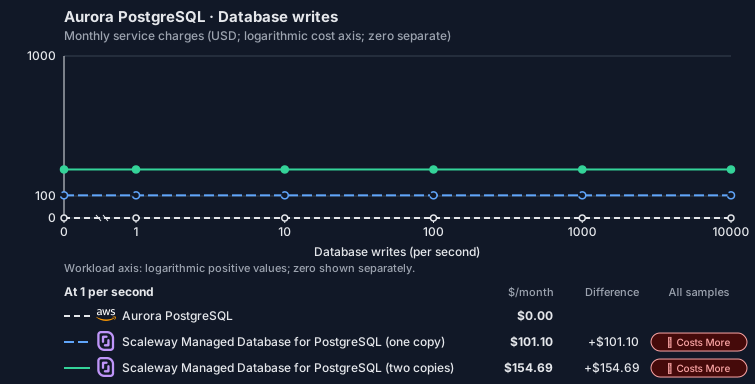
- Source compute and stored data remain independent; a throughput view needs explicit workload inputs. Other native meters and workload assumptions retain their explicitly displayed default quantities. Workload translation and capacity assumptions are not benchmark measurements.
- Native monthly usage priced at the cited provider list prices; listed target allowances apply where present, excluding invoice credits, taxes and negotiated discounts. Rates as of 2026-10-22: us-east-1 → fr-par, USD/month.
- Source prices are reference charges, not an invoice. Target lines cover selected service usage/configuration only; adapter hosting and Tensor9 fees are excluded.
- Samples of explicit prices are not performance measurements or capacity qualification. No interpolation or break-even guarantee is implied.
- Variant assumptions show the first axis sample; any axis-dependent configuration is described by this curve’s workload note.
- Rates are cited provider list prices, editable for discounts, commitments or another region. Workload translation and capacity coefficients remain editable planning assumptions, not benchmark measurements or a commercial quote.
- Default-zero rates are explicit assumptions, not evidence that the deployed service or resource is free.
- Provisioned-unit minimums use an editable approximate allocation floor. Modeled target service cost is max(usage/allocation, minimum), with billable network, durable staging and dependent sinks added separately; actual RU/TU sizing, scaling increments and throughput remain unqualified.
- Durable staging is priced once: provisioned targets include adapter state in their selected allocation; native targets add a separate staging allocation when required. Adapter hosting is a separate allocation and must exclude resources already priced as staging, workers or target capacity.
- A declared adapter mapping and cost model do not establish implementation availability or service equivalence.
- This is a declared directed mapping; a planning estimate does not establish deployment or request-serving support.
- Native/deployment comparison scope: This mapping provisions a native database. SQL clients connect directly to it; this directed mapping does not expose an RDS management adapter endpoint. Database availability and query latency are covered by the database provider, not a Tensor9 request-processing SLA.
- Authored planning assumptions, not measured adapter capacity. Origin rates are cited first-tier list prices, before free allowances and discounts.
- A cost scenario does not establish backend availability, protocol fidelity or production readiness. Registry serving status remains independent.
- Provisioned compute and RAM are priced by resource-hour; operations are independently authored. Database size cannot be inferred from dollars alone.
- Aurora/AlloyDB, MySQL/PostgreSQL and proxied targets retain their distinct backend contracts. HA, replicas and proxy allocations must be selected explicitly.
- Aurora Standard also bills storage I/O at USD 0.20 per 1M I/Os (buffer-cache misses, not logical operations); no meter prices it, so the origin cost excludes it. I/O-Optimized clusters bill no I/O but 30% more per instance and 0.225 per GB-month storage.
- Scaleway Managed Database for PostgreSQL at Production Optimized (PRO2) prices in EUR converted at the ECB reference rate. A high-availability or replica node bills Scaleway’s ‘Additional nodes’ price, EUR 0.0583 per hour for PRO2-XXS, 53% of the main node. Scaleway lists no egress charge for Managed Databases, so selected network is not charged. Cost Optimized ranges (DB-DEV-S from EUR 0.0156 per hour), Block Storage 15K and backups (EUR 0.03 per GB-month) are not selected.
- Row-store throughput (capacityOpsPerVcpuSecond, default 1500) is measured-by-tensor9 as a lower bound: the DynamoDB adapter on Cloud SQL db-custom-2-7680 (2 vCPU, PostgreSQL 16, us-west1) served 2,974 ops/s of YCSB-A at 16 threads without recorded saturation (src/main/kotlin/t9/prime/equiv/generated/eval/CloudsqlPostgresqlYcsbAT16GoYcsbV1_0_0.kt). Published CPU-bound pgbench reaches 3,101 read-write transactions and 20,289 point reads per vCPU-second (AWS z1d.2xlarge, PostgreSQL 14.5), so actual capacity is likely higher. Reads and writes share one coefficient: at the same adapter version, read-only YCSB-C was not faster than 50%-update YCSB-A.
- Log-broker throughput (capacityStreamMiBPerVcpuSecond 20 at 0.5 utilization, 4 GiB RAM per vCPU) is provider-documented by Google Managed Service for Apache Kafka sizing (https://docs.cloud.google.com/managed-service-for-apache-kafka/docs/plan-cluster-size): write-equivalent bytes are replicated writes plus a quarter of reads. Producer batches below 10 KB lower per-CPU throughput; that penalty is not modeled.
- Disk utilization 0.8 is provider-documented headroom below Cloud SQL automatic storage increase, which triggers near 91-95% full (https://docs.cloud.google.com/sql/docs/postgres/instance-settings). The 20 GiB reserve exceeds PostgreSQL’s 1 GB default max_wal_size; the remainder of that reserve is unmeasured.
- CPU tiers double from 2 vCPUs to the target’s largest node at 4 GiB per vCPU; each target’s documented largest node bounds CPU, RAM, RAM per vCPU and disk, and the durable staging database uses Cloud SQL Enterprise (96 vCPU, 6.5 GiB per vCPU, 624 GiB, 64 TiB). Targets billed per capacity unit or throughput unit are sized by their backend instead.
- No public evidence: peak/mean work (2) and the RAM working-set fraction (0.1). Proposed measurements: the p99 one-minute rate over the monthly mean from customer CloudWatch metrics; the buffer hit ratio while stepping RAM under a fixed YCSB-B load.
- Node bounds: DB-PRO2-L has 32 vCPUs and 128 GB (https://www.scaleway.com/en/pricing/managed-databases/); a volume grows up to 15 TB (https://www.scaleway.com/en/docs/managed-databases-for-postgresql-and-mysql/concepts/).
- Stored GiB already includes the origin family’s physical footprint assumptions; no second storage amplification is applied.
- The workload family already selected resource-hours; the throughput coefficient is not applied again.
- Copies and allocation fractions change cost only; they do not increase modeled primary capacity.
- AWS Price List API, AmazonRDS offer: https://pricing.us-east-1.amazonaws.com/offers/v1.0/aws/AmazonRDS/current/us-east-1/index.json
- Scaleway Managed Databases pricing: https://www.scaleway.com/en/pricing/managed-databases/
- Additional network transfer, backups, KMS, one-time migration and operational labor unless an explicit meter includes them.
- Destination application execution and separately billed downstream services; supply those allocations separately.
- Aurora per-IO, serverless-capacity, backup and proxy charges; reserved/committed-use purchase options.
- Taxes, discounts, credits and free-tier allowances not explicitly listed by this model.
- Unmodeled dependent services, task execution and operations outside the selected workload family.
plan-9818fc9ac977d4349d19fe5ce8eb48812af182c2 / 2026-10-22.planning.2. Curve: workload-3.
Sources: AWS Price List API, AmazonRDS offer, Scaleway Managed Databases pricing.
Aurora PostgreSQL → Scaleway Managed Database for PostgreSQL: Authored native-usage planning example. Native monthly usage priced at the cited provider list prices; listed target allowances apply where present, excluding invoice credits, taxes and negotiated discounts.
Scenario source region: us-east-1. Scenario target region: fr-par. Currency: USD.
- Additional network transfer, backups, KMS, one-time migration and operational labor unless an explicit meter includes them.
- Destination application execution and separately billed downstream services; supply those allocations separately.
- Aurora per-IO, serverless-capacity, backup and proxy charges; reserved/committed-use purchase options.
- Taxes, discounts, credits and free-tier allowances not explicitly listed by this model.
- Unmodeled dependent services, task execution and operations outside the selected workload family.
- Translated reads: 0 operations.
- Translated writes: 0 operations.
- Translated resident physical data: 0 GiB-month.
- Native provider operations: 0 operations.
- Published payload: 0 GiB.
- Delivered payload: 0 GiB.
- Allocated execution CPU: 0 vCPU-hour.
- Allocated execution RAM: 0 GiB-hour.
- Independent resource allocation: 0 resource-hour.
- Independent inventory: 0 resource-month.
- Input tokens: 0 tokens.
- Output tokens: 0 tokens.
- Billable network: 0 GiB.
- Dependent object sink retained data: 0 GiB-month.
- Dependent object sink writes: 0 writes.
- Rates are cited provider list prices, editable for discounts, commitments or another region. Workload translation and capacity coefficients remain editable planning assumptions, not benchmark measurements or a commercial quote.
- Default-zero rates are explicit assumptions, not evidence that the deployed service or resource is free.
- Provisioned-unit minimums use an editable approximate allocation floor. Modeled target service cost is max(usage/allocation, minimum), with billable network, durable staging and dependent sinks added separately; actual RU/TU sizing, scaling increments and throughput remain unqualified.
- Durable staging is priced once: provisioned targets include adapter state in their selected allocation; native targets add a separate staging allocation when required. Adapter hosting is a separate allocation and must exclude resources already priced as staging, workers or target capacity.
- A declared adapter mapping and cost model do not establish implementation availability or service equivalence.
- This is a declared directed mapping; a planning estimate does not establish deployment or request-serving support.
- Native/deployment comparison scope: This mapping provisions a native database. SQL clients connect directly to it; this directed mapping does not expose an RDS management adapter endpoint. Database availability and query latency are covered by the database provider, not a Tensor9 request-processing SLA.
- Authored planning assumptions, not measured adapter capacity. Origin rates are cited first-tier list prices, before free allowances and discounts.
- A cost scenario does not establish backend availability, protocol fidelity or production readiness. Registry serving status remains independent.
- Provisioned compute and RAM are priced by resource-hour; operations are independently authored. Database size cannot be inferred from dollars alone.
- Aurora/AlloyDB, MySQL/PostgreSQL and proxied targets retain their distinct backend contracts. HA, replicas and proxy allocations must be selected explicitly.
- Aurora Standard also bills storage I/O at USD 0.20 per 1M I/Os (buffer-cache misses, not logical operations); no meter prices it, so the origin cost excludes it. I/O-Optimized clusters bill no I/O but 30% more per instance and 0.225 per GB-month storage.
- Scaleway Managed Database for PostgreSQL at Production Optimized (PRO2) prices in EUR converted at the ECB reference rate. A high-availability or replica node bills Scaleway’s ‘Additional nodes’ price, EUR 0.0583 per hour for PRO2-XXS, 53% of the main node. Scaleway lists no egress charge for Managed Databases, so selected network is not charged. Cost Optimized ranges (DB-DEV-S from EUR 0.0156 per hour), Block Storage 15K and backups (EUR 0.03 per GB-month) are not selected.
- Row-store throughput (capacityOpsPerVcpuSecond, default 1500) is measured-by-tensor9 as a lower bound: the DynamoDB adapter on Cloud SQL db-custom-2-7680 (2 vCPU, PostgreSQL 16, us-west1) served 2,974 ops/s of YCSB-A at 16 threads without recorded saturation (src/main/kotlin/t9/prime/equiv/generated/eval/CloudsqlPostgresqlYcsbAT16GoYcsbV1_0_0.kt). Published CPU-bound pgbench reaches 3,101 read-write transactions and 20,289 point reads per vCPU-second (AWS z1d.2xlarge, PostgreSQL 14.5), so actual capacity is likely higher. Reads and writes share one coefficient: at the same adapter version, read-only YCSB-C was not faster than 50%-update YCSB-A.
- Log-broker throughput (capacityStreamMiBPerVcpuSecond 20 at 0.5 utilization, 4 GiB RAM per vCPU) is provider-documented by Google Managed Service for Apache Kafka sizing (https://docs.cloud.google.com/managed-service-for-apache-kafka/docs/plan-cluster-size): write-equivalent bytes are replicated writes plus a quarter of reads. Producer batches below 10 KB lower per-CPU throughput; that penalty is not modeled.
- Disk utilization 0.8 is provider-documented headroom below Cloud SQL automatic storage increase, which triggers near 91-95% full (https://docs.cloud.google.com/sql/docs/postgres/instance-settings). The 20 GiB reserve exceeds PostgreSQL’s 1 GB default max_wal_size; the remainder of that reserve is unmeasured.
- CPU tiers double from 2 vCPUs to the target’s largest node at 4 GiB per vCPU; each target’s documented largest node bounds CPU, RAM, RAM per vCPU and disk, and the durable staging database uses Cloud SQL Enterprise (96 vCPU, 6.5 GiB per vCPU, 624 GiB, 64 TiB). Targets billed per capacity unit or throughput unit are sized by their backend instead.
- No public evidence: peak/mean work (2) and the RAM working-set fraction (0.1). Proposed measurements: the p99 one-minute rate over the monthly mean from customer CloudWatch metrics; the buffer hit ratio while stepping RAM under a fixed YCSB-B load.
- Node bounds: DB-PRO2-L has 32 vCPUs and 128 GB (https://www.scaleway.com/en/pricing/managed-databases/); a volume grows up to 15 TB (https://www.scaleway.com/en/docs/managed-databases-for-postgresql-and-mysql/concepts/).
- Stored GiB already includes the origin family’s physical footprint assumptions; no second storage amplification is applied.
- The workload family already selected resource-hours; the throughput coefficient is not applied again.
- Copies and allocation fractions change cost only; they do not increase modeled primary capacity.
plan-9818fc9ac977d4349d19fe5ce8eb48812af182c2 / 2026-10-22.planning.2. Scenario: planning-example.
Sources: AWS Price List API, AmazonRDS offer, Scaleway Managed Databases pricing.
Costs
Estimated monthly service charges for each backend with a published cost model, at one sampled workload from that model’s cost curve. Adapter hosting and Tensor9 fees are excluded. How Tensor9 estimates costs explains the method, what the estimates include and how to read their qualifications.Service level agreements
Listed terms cover requests sent through this service adapter. They do not cover direct connections to the target service or replace the cloud provider’s own SLA. Each origin-to-target pair has its own terms or an explicit pending status. See the SLA tables, measurement rules, and scaling conditions.Aurora PostgreSQL to PostgreSQL Flexible Server
What this adapter does
Forazure::1.0.0::postgresql::flexible, these rows apply to the RDS/Aurora API adapter, not to native PostgreSQL or MySQL connections. Application SQL commonly goes directly to the target database and therefore has no adapter translation latency to guarantee. The RDS control runtime retains logical intent, exposes status and reconciles target resources. The selected profile defines which directed operations and request options are covered.
How the latency targets were chosen
Bounded database status responses: +20 ms monthly p99 (adapter-added).DescribeDBClusterSnapshots, DescribeDBClusters. The control adapter reads its durable database records and checks native status; reading the adapter’s stored request history and current resource records counts as fabric work.
Database lifecycle request acceptance: +30 ms monthly p99 (adapter-added). CreateDBClusterSnapshot, CreateDBInstance, CreateGlobalCluster, DescribeDBClusters, FailoverDBCluster, FailoverGlobalCluster, ModifyDBCluster, ModifyDBInstance, RestoreDBClusterFromSnapshot, RestoreDBClusterToPointInTime, StartDBCluster, StopDBCluster, SwitchoverGlobalCluster. The RDS adapter durably records the requested change before its background workers update target resources. Waiting for those adapter records and coordination still counts as fabric time, not database query time.
Bounded database parameter requests: +20 ms monthly p99 (adapter-added). DescribeDBParameters, ModifyDBClusterParameterGroup, ModifyDBParameterGroup. Parameter validation and logical-group persistence precede mapping to target flags; provider restart timing is distinct from adapter request handling.
Bounded Data API translation: +5 ms monthly p99 (adapter-added). BatchExecuteStatement, BeginTransaction, CommitTransaction, ExecuteStatement, RollbackTransaction. Data API requests require JSON/parameter decoding, native SQL dispatch and result conversion; they are distinct from application connections that speak SQL directly.
Your signed agreement sets the terms for your deployment. A target does not add an operation or option that the compatibility tables mark unavailable.
What counts toward latency
For a request-response row, measure from the agreed ingress boundary to dispatch of the complete response. A row that explicitly names a first response chunk ends at that chunk; its number does not cover the rest of the stream. A long-poll row names the intentional wait and when adapter delay starts. Include parsing, authorization, admission, translation, serialization, adapter-owned storage and coordination, retries and response handling. Subtract only separately measured target-workload waits and external network segments allowed by the measurement rules. The adapter’s own response handling and dispatch remain covered. A database used for adapter metadata is still adapter work, even if a cloud provider hosts it. For concurrent calls, exclude the union of permitted wait intervals, not the sum of overlapping spans. Calculate each request’s adapter duration first, then the monthly p99. Do not subtract one service’s p99 from another’s. Known adapter timeouts are over-budget samples; failed or incomplete requests cannot disappear to improve the percentile. Missing measurements do not become zero latency. An SDK call span alone does not prove how much of its duration can be excluded.Endpoint reachability and request failures
The endpoint-reachability target measures adapter health checks. Correctly forwarding a target quota or permission error is different from producing that error because the adapter sent the wrong request. Adapter-caused failures remain Tensor9’s responsibility even when the target is healthy. Correctness and data-integrity requirements apply to every supported request. Endpoint reachability does not measure request correctness or grant an allowance for incorrect results.Scaling and target-service capacity
Control-plane load is measured in logical resources, status polling and concurrent changes, not application SQL QPS. Aggressive Describe loops can exhaust adapter/log capacity even when database query load is small. Tensor9 scales the API and reconciliation workers within agreed resource and polling limits; the customer selects database compute, storage, connections and HA. Native database provisioning or failover speed cannot be improved merely by scaling control-plane replicas. Tell Tensor9 the expected steady rate, bursts, concurrency, payload sizes and operation mix. Tensor9 sizes and scales the adapter for the agreed load; you choose and monitor the target service’s capacity with Tensor9’s help. A latency budget is not a requests-per-second rating. Larger requests and higher rates need explicit terms, not silent inheritance of a small-request SLA.Data and behavior guarantees
A successful lifecycle response must accurately identify accepted work and logical state, not falsely claim that the target is already ready. Reconciliation must not apply one logical database’s configuration to another. Unsupported engine flags, cross-region semantics and AWS-specific SQL remain explicitly limited by the profile. Backup retention, database data durability, query consistency and target failover recovery are not implicitly replaced by this control-plane SLA.Example and diagnosis
Modifyorders-db to change an allowed parameter and poll its status at an agreed interval. The request-acceptance row covers adapter validation and durable intent; a database restart can take longer without breaching that row. Separately measure an application’s SELECT directly against the target endpoint: that SQL latency is not the RDS adapter’s 20 or 30 ms control budget.
Use tensor9 explain and the documented explain headers to understand the selected adapter and its behavior. Correlate available request diagnostics with the target provider’s latency, throttling and capacity metrics. An explain report helps diagnose a request; it is not by itself a qualified SLA timing measurement. Share the operation, request shape, timestamps and request identifiers with support, with credentials and customer payloads removed.
Aurora PostgreSQL to PostgreSQL (CloudNativePG)
What this adapter does
Forcloudnative::1.0.0::postgresql, these rows apply to the RDS/Aurora API adapter, not to native PostgreSQL or MySQL connections. Application SQL commonly goes directly to the target database and therefore has no adapter translation latency to guarantee. The RDS control runtime retains logical intent, exposes status and reconciles target resources. The selected profile defines which directed operations and request options are covered.
How the latency targets were chosen
Bounded database status responses: +20 ms monthly p99 (adapter-added).DescribeDBClusterSnapshots, DescribeDBClusters. The control adapter reads its durable database records and checks native status; reading the adapter’s stored request history and current resource records counts as fabric work.
Database lifecycle request acceptance: +30 ms monthly p99 (adapter-added). CreateDBClusterSnapshot, CreateDBInstance, DescribeDBClusters, FailoverDBCluster, ModifyDBCluster, ModifyDBInstance, RestoreDBClusterFromSnapshot, RestoreDBClusterToPointInTime, StartDBCluster, StopDBCluster. The RDS adapter durably records the requested change before its background workers update target resources. Waiting for those adapter records and coordination still counts as fabric time, not database query time.
Bounded database parameter requests: +20 ms monthly p99 (adapter-added). DescribeDBParameters, ModifyDBClusterParameterGroup, ModifyDBParameterGroup. Parameter validation and logical-group persistence precede mapping to target flags; provider restart timing is distinct from adapter request handling.
Bounded Data API translation: +5 ms monthly p99 (adapter-added). BatchExecuteStatement, BeginTransaction, CommitTransaction, ExecuteStatement, RollbackTransaction. Data API requests require JSON/parameter decoding, native SQL dispatch and result conversion; they are distinct from application connections that speak SQL directly.
Your signed agreement sets the terms for your deployment. A target does not add an operation or option that the compatibility tables mark unavailable.
What counts toward latency
For a request-response row, measure from the agreed ingress boundary to dispatch of the complete response. A row that explicitly names a first response chunk ends at that chunk; its number does not cover the rest of the stream. A long-poll row names the intentional wait and when adapter delay starts. Include parsing, authorization, admission, translation, serialization, adapter-owned storage and coordination, retries and response handling. Subtract only separately measured target-workload waits and external network segments allowed by the measurement rules. The adapter’s own response handling and dispatch remain covered. A database used for adapter metadata is still adapter work, even if a cloud provider hosts it. For concurrent calls, exclude the union of permitted wait intervals, not the sum of overlapping spans. Calculate each request’s adapter duration first, then the monthly p99. Do not subtract one service’s p99 from another’s. Known adapter timeouts are over-budget samples; failed or incomplete requests cannot disappear to improve the percentile. Missing measurements do not become zero latency. An SDK call span alone does not prove how much of its duration can be excluded.Endpoint reachability and request failures
The endpoint-reachability target measures adapter health checks. Correctly forwarding a target quota or permission error is different from producing that error because the adapter sent the wrong request. Adapter-caused failures remain Tensor9’s responsibility even when the target is healthy. Correctness and data-integrity requirements apply to every supported request. Endpoint reachability does not measure request correctness or grant an allowance for incorrect results.Scaling and target-service capacity
Control-plane load is measured in logical resources, status polling and concurrent changes, not application SQL QPS. Aggressive Describe loops can exhaust adapter/log capacity even when database query load is small. Tensor9 scales the API and reconciliation workers within agreed resource and polling limits; the customer selects database compute, storage, connections and HA. Native database provisioning or failover speed cannot be improved merely by scaling control-plane replicas. Tell Tensor9 the expected steady rate, bursts, concurrency, payload sizes and operation mix. Tensor9 sizes and scales the adapter for the agreed load; you choose and monitor the target service’s capacity with Tensor9’s help. A latency budget is not a requests-per-second rating. Larger requests and higher rates need explicit terms, not silent inheritance of a small-request SLA.Data and behavior guarantees
A successful lifecycle response must accurately identify accepted work and logical state, not falsely claim that the target is already ready. Reconciliation must not apply one logical database’s configuration to another. Unsupported engine flags, cross-region semantics and AWS-specific SQL remain explicitly limited by the profile. Backup retention, database data durability, query consistency and target failover recovery are not implicitly replaced by this control-plane SLA.Example and diagnosis
Modifyorders-db to change an allowed parameter and poll its status at an agreed interval. The request-acceptance row covers adapter validation and durable intent; a database restart can take longer without breaching that row. Separately measure an application’s SELECT directly against the target endpoint: that SQL latency is not the RDS adapter’s 20 or 30 ms control budget.
Use tensor9 explain and the documented explain headers to understand the selected adapter and its behavior. Correlate available request diagnostics with the target provider’s latency, throttling and capacity metrics. An explain report helps diagnose a request; it is not by itself a qualified SLA timing measurement. Share the operation, request shape, timestamps and request identifiers with support, with credentials and customer payloads removed.
Aurora PostgreSQL to PostgreSQL
What this adapter does
Fordigitalocean::1.0.0::database::postgresql, these rows apply to the RDS/Aurora API adapter, not to native PostgreSQL or MySQL connections. Application SQL commonly goes directly to the target database and therefore has no adapter translation latency to guarantee. The RDS control runtime retains logical intent, exposes status and reconciles target resources. The selected profile defines which directed operations and request options are covered.
How the latency targets were chosen
Bounded database status responses: +20 ms monthly p99 (adapter-added).DescribeDBClusters. The control adapter reads its durable database records and checks native status; reading the adapter’s stored request history and current resource records counts as fabric work.
Database lifecycle request acceptance: +30 ms monthly p99 (adapter-added). CreateDBCluster, CreateDBClusterSnapshot, CreateDBInstance, CreateGlobalCluster, DeleteDBCluster, DescribeDBClusters, FailoverDBCluster, FailoverGlobalCluster, ModifyDBCluster, RestoreDBClusterFromSnapshot, RestoreDBClusterToPointInTime, SwitchoverGlobalCluster. The RDS adapter durably records the requested change before its background workers update target resources. Waiting for those adapter records and coordination still counts as fabric time, not database query time.
Bounded database parameter requests: +20 ms monthly p99 (adapter-added). DescribeDBParameters, ModifyDBClusterParameterGroup, ModifyDBParameterGroup. Parameter validation and logical-group persistence precede mapping to target flags; provider restart timing is distinct from adapter request handling.
Bounded Data API translation: +5 ms monthly p99 (adapter-added). BatchExecuteStatement, BeginTransaction, CommitTransaction, ExecuteStatement, RollbackTransaction. Data API requests require JSON/parameter decoding, native SQL dispatch and result conversion; they are distinct from application connections that speak SQL directly.
Your signed agreement sets the terms for your deployment. A target does not add an operation or option that the compatibility tables mark unavailable.
What counts toward latency
For a request-response row, measure from the agreed ingress boundary to dispatch of the complete response. A row that explicitly names a first response chunk ends at that chunk; its number does not cover the rest of the stream. A long-poll row names the intentional wait and when adapter delay starts. Include parsing, authorization, admission, translation, serialization, adapter-owned storage and coordination, retries and response handling. Subtract only separately measured target-workload waits and external network segments allowed by the measurement rules. The adapter’s own response handling and dispatch remain covered. A database used for adapter metadata is still adapter work, even if a cloud provider hosts it. For concurrent calls, exclude the union of permitted wait intervals, not the sum of overlapping spans. Calculate each request’s adapter duration first, then the monthly p99. Do not subtract one service’s p99 from another’s. Known adapter timeouts are over-budget samples; failed or incomplete requests cannot disappear to improve the percentile. Missing measurements do not become zero latency. An SDK call span alone does not prove how much of its duration can be excluded.Endpoint reachability and request failures
The endpoint-reachability target measures adapter health checks. Correctly forwarding a target quota or permission error is different from producing that error because the adapter sent the wrong request. Adapter-caused failures remain Tensor9’s responsibility even when the target is healthy. Correctness and data-integrity requirements apply to every supported request. Endpoint reachability does not measure request correctness or grant an allowance for incorrect results.Scaling and target-service capacity
Control-plane load is measured in logical resources, status polling and concurrent changes, not application SQL QPS. Aggressive Describe loops can exhaust adapter/log capacity even when database query load is small. Tensor9 scales the API and reconciliation workers within agreed resource and polling limits; the customer selects database compute, storage, connections and HA. Native database provisioning or failover speed cannot be improved merely by scaling control-plane replicas. Tell Tensor9 the expected steady rate, bursts, concurrency, payload sizes and operation mix. Tensor9 sizes and scales the adapter for the agreed load; you choose and monitor the target service’s capacity with Tensor9’s help. A latency budget is not a requests-per-second rating. Larger requests and higher rates need explicit terms, not silent inheritance of a small-request SLA.Data and behavior guarantees
A successful lifecycle response must accurately identify accepted work and logical state, not falsely claim that the target is already ready. Reconciliation must not apply one logical database’s configuration to another. Unsupported engine flags, cross-region semantics and AWS-specific SQL remain explicitly limited by the profile. Backup retention, database data durability, query consistency and target failover recovery are not implicitly replaced by this control-plane SLA.Example and diagnosis
Modifyorders-db to change an allowed parameter and poll its status at an agreed interval. The request-acceptance row covers adapter validation and durable intent; a database restart can take longer without breaching that row. Separately measure an application’s SELECT directly against the target endpoint: that SQL latency is not the RDS adapter’s 20 or 30 ms control budget.
Use tensor9 explain and the documented explain headers to understand the selected adapter and its behavior. Correlate available request diagnostics with the target provider’s latency, throttling and capacity metrics. An explain report helps diagnose a request; it is not by itself a qualified SLA timing measurement. Share the operation, request shape, timestamps and request identifiers with support, with credentials and customer payloads removed.
Aurora PostgreSQL to AlloyDB for PostgreSQL
What this adapter does
The Aurora PostgreSQL management adapter validates cluster and member requests, retains AWS-shaped identities and reconciles AlloyDB resources. These estimates describe adapter handling once the declared exact target is deployed. Applications speak PostgreSQL directly to AlloyDB; SQL execution, backup work and native readiness are not hidden within a 20 or 30 ms management-request budget.How the latency targets were chosen
Bounded cluster and member status: +20 ms monthly p99 (adapter-added).DescribeDBClusters, DescribeDBInstances. Includes durable control-state read, native-status lookup and AWS response mapping.
Cluster and member lifecycle admission: +30 ms monthly p99 (adapter-added). CreateDBCluster, CreateDBInstance, DeleteDBCluster, DeleteDBInstance, ModifyDBCluster, ModifyDBInstance. Includes bounded Aurora request validation, logical identity allocation, durable commit and reconciliation scheduling.
Your signed agreement sets the terms for your deployment. A target does not add an operation or option that the compatibility tables mark unavailable.
What counts toward latency
For a request-response row, measure from the agreed ingress boundary to dispatch of the complete response. A row that explicitly names a first response chunk ends at that chunk; its number does not cover the rest of the stream. A long-poll row names the intentional wait and when adapter delay starts. Include parsing, authorization, admission, translation, serialization, adapter-owned storage and coordination, retries and response handling. Subtract only separately measured target-workload waits and external network segments allowed by the measurement rules. The adapter’s own response handling and dispatch remain covered. A database used for adapter metadata is still adapter work, even if a cloud provider hosts it. For concurrent calls, exclude the union of permitted wait intervals, not the sum of overlapping spans. Calculate each request’s adapter duration first, then the monthly p99. Do not subtract one service’s p99 from another’s. Known adapter timeouts are over-budget samples; failed or incomplete requests cannot disappear to improve the percentile. Missing measurements do not become zero latency. An SDK call span alone does not prove how much of its duration can be excluded.Endpoint reachability and request failures
The endpoint-reachability target measures adapter health checks. Correctly forwarding a target quota or permission error is different from producing that error because the adapter sent the wrong request. Adapter-caused failures remain Tensor9’s responsibility even when the target is healthy. Correctness and data-integrity requirements apply to every supported request. Endpoint reachability does not measure request correctness or grant an allowance for incorrect results.Scaling and target-service capacity
Independent clusters reconcile concurrently while writes to one cluster and its members follow generation order. Qualification fixes clusters, members per cluster, returned status records, settings bytes, polling rate and concurrent changes. Native AlloyDB quota and compute capacity are separate from adapter handler capacity. Tell Tensor9 the expected steady rate, bursts, concurrency, payload sizes and operation mix. Tensor9 sizes and scales the adapter for the agreed load; you choose and monitor the target service’s capacity with Tensor9’s help. A latency budget is not a requests-per-second rating. Larger requests and higher rates need explicit terms, not silent inheritance of a small-request SLA.Data and behavior guarantees
A successful lifecycle call means complete desired state is durable, not that AlloyDB is ready. The adapter preserves the Aurora cluster/member relationship and writer-versus-reader identities, refuses unsupported Aurora settings, and never reports a foreign database as adapter-managed. Status reflects observed target readiness rather than an optimistic synthetic success.Example and diagnosis
After this adapter is deployed, CreateDBCluster for one bounded PostgreSQL cluster records an AWS-shaped cluster identity within the 30 ms p99 target. AlloyDB provisioning continues separately. DescribeDBClusters reads the same identity and honest observed status within the 20 ms target; an application’s SELECT uses its direct PostgreSQL connection and neither number applies to it. Usetensor9 explain and the documented explain headers to understand the selected adapter and its behavior. Correlate available request diagnostics with the target provider’s latency, throttling and capacity metrics. An explain report helps diagnose a request; it is not by itself a qualified SLA timing measurement. Share the operation, request shape, timestamps and request identifiers with support, with credentials and customer payloads removed.
Aurora PostgreSQL to AlloyDB for PostgreSQL (RDS proxy)
What this adapter does
The Aurora PostgreSQL management adapter validates cluster and member requests, retains AWS-shaped identities and reconciles AlloyDB resources and the cluster’s proxy. These estimates describe adapter handling once the declared exact target is deployed. Applications connect to the Tensor9 PostgreSQL proxy, which authenticates each session and relays it over its own connection to the database; it does not pool or translate SQL. The proxy’s SQL path has no latency target, and SQL execution, backup work and native readiness are not hidden within a management-request budget.How the latency targets were chosen
Bounded cluster and member status: +20 ms monthly p99 (adapter-added).DescribeDBClusters, DescribeDBInstances. Includes durable control-state read, native-status lookup and AWS response mapping.
Cluster and member lifecycle admission: +30 ms monthly p99 (adapter-added). CreateDBCluster, CreateDBInstance, DeleteDBCluster, DeleteDBInstance, ModifyDBCluster, ModifyDBInstance. Includes bounded Aurora request validation, logical identity allocation, durable commit and reconciliation scheduling.
Your signed agreement sets the terms for your deployment. A target does not add an operation or option that the compatibility tables mark unavailable.
What counts toward latency
For a request-response row, measure from the agreed ingress boundary to dispatch of the complete response. A row that explicitly names a first response chunk ends at that chunk; its number does not cover the rest of the stream. A long-poll row names the intentional wait and when adapter delay starts. Include parsing, authorization, admission, translation, serialization, adapter-owned storage and coordination, retries and response handling. Subtract only separately measured target-workload waits and external network segments allowed by the measurement rules. The adapter’s own response handling and dispatch remain covered. A database used for adapter metadata is still adapter work, even if a cloud provider hosts it. For concurrent calls, exclude the union of permitted wait intervals, not the sum of overlapping spans. Calculate each request’s adapter duration first, then the monthly p99. Do not subtract one service’s p99 from another’s. Known adapter timeouts are over-budget samples; failed or incomplete requests cannot disappear to improve the percentile. Missing measurements do not become zero latency. An SDK call span alone does not prove how much of its duration can be excluded.Endpoint reachability and request failures
The endpoint-reachability target measures adapter health checks. Correctly forwarding a target quota or permission error is different from producing that error because the adapter sent the wrong request. Adapter-caused failures remain Tensor9’s responsibility even when the target is healthy. Correctness and data-integrity requirements apply to every supported request. Endpoint reachability does not measure request correctness or grant an allowance for incorrect results.Scaling and target-service capacity
Independent clusters reconcile concurrently while writes to one cluster and its members follow generation order. Qualification fixes clusters, members per cluster, returned status records, settings bytes, polling rate and concurrent changes. Native AlloyDB quota and compute capacity are separate from adapter handler capacity. Tell Tensor9 the expected steady rate, bursts, concurrency, payload sizes and operation mix. Tensor9 sizes and scales the adapter for the agreed load; you choose and monitor the target service’s capacity with Tensor9’s help. A latency budget is not a requests-per-second rating. Larger requests and higher rates need explicit terms, not silent inheritance of a small-request SLA.Data and behavior guarantees
A successful lifecycle call means complete desired state is durable, not that AlloyDB is ready. The adapter preserves the Aurora cluster/member relationship and writer-versus-reader identities, refuses unsupported Aurora settings, and never reports a foreign database as adapter-managed. Status reflects observed target readiness rather than an optimistic synthetic success.Example and diagnosis
After this adapter is deployed, CreateDBCluster for one bounded PostgreSQL cluster records an AWS-shaped cluster identity within the 30 ms p99 target. AlloyDB provisioning continues separately. DescribeDBClusters reads the same identity and honest observed status within the 20 ms target; an application’s SELECT uses its proxied PostgreSQL connection and neither number applies to it. Usetensor9 explain and the documented explain headers to understand the selected adapter and its behavior. Correlate available request diagnostics with the target provider’s latency, throttling and capacity metrics. An explain report helps diagnose a request; it is not by itself a qualified SLA timing measurement. Share the operation, request shape, timestamps and request identifiers with support, with credentials and customer payloads removed.
Aurora PostgreSQL to Cloud SQL for PostgreSQL
What this adapter does
Forgoogle::1.0.0::cloudsql::postgresql, these rows apply to the RDS/Aurora API adapter, not to native PostgreSQL or MySQL connections. Application SQL commonly goes directly to the target database and therefore has no adapter translation latency to guarantee. The RDS control runtime retains logical intent, exposes status and reconciles target resources. The selected profile defines which directed operations and request options are covered.
How the latency targets were chosen
Bounded database status responses: +20 ms monthly p99 (adapter-added).DescribeDBClusterSnapshots, DescribeDBClusters. The control adapter reads its durable database records and checks native status; reading the adapter’s stored request history and current resource records counts as fabric work.
Database lifecycle request acceptance: +30 ms monthly p99 (adapter-added). CreateDBClusterSnapshot, CreateDBInstance, CreateGlobalCluster, DescribeDBClusters, FailoverDBCluster, FailoverGlobalCluster, ModifyDBCluster, ModifyDBInstance, RestoreDBClusterFromSnapshot, RestoreDBClusterToPointInTime, StartDBCluster, StopDBCluster, SwitchoverGlobalCluster. The RDS adapter durably records the requested change before its background workers update target resources. Waiting for those adapter records and coordination still counts as fabric time, not database query time.
Bounded database parameter requests: +20 ms monthly p99 (adapter-added). DescribeDBParameters, ModifyDBClusterParameterGroup, ModifyDBParameterGroup. Parameter validation and logical-group persistence precede mapping to target flags; provider restart timing is distinct from adapter request handling.
Bounded Data API translation: +5 ms monthly p99 (adapter-added). BatchExecuteStatement, BeginTransaction, CommitTransaction, ExecuteStatement, RollbackTransaction. Data API requests require JSON/parameter decoding, native SQL dispatch and result conversion; they are distinct from application connections that speak SQL directly.
Your signed agreement sets the terms for your deployment. A target does not add an operation or option that the compatibility tables mark unavailable.
What counts toward latency
For a request-response row, measure from the agreed ingress boundary to dispatch of the complete response. A row that explicitly names a first response chunk ends at that chunk; its number does not cover the rest of the stream. A long-poll row names the intentional wait and when adapter delay starts. Include parsing, authorization, admission, translation, serialization, adapter-owned storage and coordination, retries and response handling. Subtract only separately measured target-workload waits and external network segments allowed by the measurement rules. The adapter’s own response handling and dispatch remain covered. A database used for adapter metadata is still adapter work, even if a cloud provider hosts it. For concurrent calls, exclude the union of permitted wait intervals, not the sum of overlapping spans. Calculate each request’s adapter duration first, then the monthly p99. Do not subtract one service’s p99 from another’s. Known adapter timeouts are over-budget samples; failed or incomplete requests cannot disappear to improve the percentile. Missing measurements do not become zero latency. An SDK call span alone does not prove how much of its duration can be excluded.Endpoint reachability and request failures
The endpoint-reachability target measures adapter health checks. Correctly forwarding a target quota or permission error is different from producing that error because the adapter sent the wrong request. Adapter-caused failures remain Tensor9’s responsibility even when the target is healthy. Correctness and data-integrity requirements apply to every supported request. Endpoint reachability does not measure request correctness or grant an allowance for incorrect results.Scaling and target-service capacity
Control-plane load is measured in logical resources, status polling and concurrent changes, not application SQL QPS. Aggressive Describe loops can exhaust adapter/log capacity even when database query load is small. Tensor9 scales the API and reconciliation workers within agreed resource and polling limits; the customer selects database compute, storage, connections and HA. Native database provisioning or failover speed cannot be improved merely by scaling control-plane replicas. Tell Tensor9 the expected steady rate, bursts, concurrency, payload sizes and operation mix. Tensor9 sizes and scales the adapter for the agreed load; you choose and monitor the target service’s capacity with Tensor9’s help. A latency budget is not a requests-per-second rating. Larger requests and higher rates need explicit terms, not silent inheritance of a small-request SLA.Data and behavior guarantees
A successful lifecycle response must accurately identify accepted work and logical state, not falsely claim that the target is already ready. Reconciliation must not apply one logical database’s configuration to another. Unsupported engine flags, cross-region semantics and AWS-specific SQL remain explicitly limited by the profile. Backup retention, database data durability, query consistency and target failover recovery are not implicitly replaced by this control-plane SLA.Example and diagnosis
Modifyorders-db to change an allowed parameter and poll its status at an agreed interval. The request-acceptance row covers adapter validation and durable intent; a database restart can take longer without breaching that row. Separately measure an application’s SELECT directly against the target endpoint: that SQL latency is not the RDS adapter’s 20 or 30 ms control budget.
Use tensor9 explain and the documented explain headers to understand the selected adapter and its behavior. Correlate available request diagnostics with the target provider’s latency, throttling and capacity metrics. An explain report helps diagnose a request; it is not by itself a qualified SLA timing measurement. Share the operation, request shape, timestamps and request identifiers with support, with credentials and customer payloads removed.
Aurora PostgreSQL to OCI Database with PostgreSQL
What this adapter does
Foroci::1.0.0::psql, these rows apply to the RDS/Aurora API adapter, not to native PostgreSQL or MySQL connections. Application SQL commonly goes directly to the target database and therefore has no adapter translation latency to guarantee. The RDS control runtime retains logical intent, exposes status and reconciles target resources. The selected profile defines which directed operations and request options are covered.
How the latency targets were chosen
Bounded database status responses: +20 ms monthly p99 (adapter-added).DescribeDBClusterSnapshots, DescribeDBClusters. The control adapter reads its durable database records and checks native status; reading the adapter’s stored request history and current resource records counts as fabric work.
Database lifecycle request acceptance: +30 ms monthly p99 (adapter-added). CreateDBClusterSnapshot, CreateDBInstance, DescribeDBClusters, ModifyDBCluster, ModifyDBInstance, RestoreDBClusterFromSnapshot, StartDBCluster, StopDBCluster. The RDS adapter durably records the requested change before its background workers update target resources. Waiting for those adapter records and coordination still counts as fabric time, not database query time.
Bounded database parameter requests: +20 ms monthly p99 (adapter-added). DescribeDBParameters, ModifyDBClusterParameterGroup, ModifyDBParameterGroup. Parameter validation and logical-group persistence precede mapping to target flags; provider restart timing is distinct from adapter request handling.
Bounded Data API translation: +5 ms monthly p99 (adapter-added). BatchExecuteStatement, BeginTransaction, CommitTransaction, ExecuteStatement, RollbackTransaction. Data API requests require JSON/parameter decoding, native SQL dispatch and result conversion; they are distinct from application connections that speak SQL directly.
Your signed agreement sets the terms for your deployment. A target does not add an operation or option that the compatibility tables mark unavailable.
What counts toward latency
For a request-response row, measure from the agreed ingress boundary to dispatch of the complete response. A row that explicitly names a first response chunk ends at that chunk; its number does not cover the rest of the stream. A long-poll row names the intentional wait and when adapter delay starts. Include parsing, authorization, admission, translation, serialization, adapter-owned storage and coordination, retries and response handling. Subtract only separately measured target-workload waits and external network segments allowed by the measurement rules. The adapter’s own response handling and dispatch remain covered. A database used for adapter metadata is still adapter work, even if a cloud provider hosts it. For concurrent calls, exclude the union of permitted wait intervals, not the sum of overlapping spans. Calculate each request’s adapter duration first, then the monthly p99. Do not subtract one service’s p99 from another’s. Known adapter timeouts are over-budget samples; failed or incomplete requests cannot disappear to improve the percentile. Missing measurements do not become zero latency. An SDK call span alone does not prove how much of its duration can be excluded.Endpoint reachability and request failures
The endpoint-reachability target measures adapter health checks. Correctly forwarding a target quota or permission error is different from producing that error because the adapter sent the wrong request. Adapter-caused failures remain Tensor9’s responsibility even when the target is healthy. Correctness and data-integrity requirements apply to every supported request. Endpoint reachability does not measure request correctness or grant an allowance for incorrect results.Scaling and target-service capacity
Control-plane load is measured in logical resources, status polling and concurrent changes, not application SQL QPS. Aggressive Describe loops can exhaust adapter/log capacity even when database query load is small. Tensor9 scales the API and reconciliation workers within agreed resource and polling limits; the customer selects database compute, storage, connections and HA. Native database provisioning or failover speed cannot be improved merely by scaling control-plane replicas. Tell Tensor9 the expected steady rate, bursts, concurrency, payload sizes and operation mix. Tensor9 sizes and scales the adapter for the agreed load; you choose and monitor the target service’s capacity with Tensor9’s help. A latency budget is not a requests-per-second rating. Larger requests and higher rates need explicit terms, not silent inheritance of a small-request SLA.Data and behavior guarantees
A successful lifecycle response must accurately identify accepted work and logical state, not falsely claim that the target is already ready. Reconciliation must not apply one logical database’s configuration to another. Unsupported engine flags, cross-region semantics and AWS-specific SQL remain explicitly limited by the profile. Backup retention, database data durability, query consistency and target failover recovery are not implicitly replaced by this control-plane SLA.Example and diagnosis
Modifyorders-db to change an allowed parameter and poll its status at an agreed interval. The request-acceptance row covers adapter validation and durable intent; a database restart can take longer without breaching that row. Separately measure an application’s SELECT directly against the target endpoint: that SQL latency is not the RDS adapter’s 20 or 30 ms control budget.
Use tensor9 explain and the documented explain headers to understand the selected adapter and its behavior. Correlate available request diagnostics with the target provider’s latency, throttling and capacity metrics. An explain report helps diagnose a request; it is not by itself a qualified SLA timing measurement. Share the operation, request shape, timestamps and request identifiers with support, with credentials and customer payloads removed.
Aurora PostgreSQL to Scaleway Managed Database for PostgreSQL
SLA status: Not applicable This mapping provisions a native database. SQL clients connect directly to it; this directed mapping does not expose an RDS management adapter endpoint. Database availability and query latency are covered by the database provider, not a Tensor9 request-processing SLA.Install and run
The documentation and SLAs are public. Downloading and running the Cloud Adapter binary requires an entitled customer account. SetT9_API_KEY as described in Install and Authenticate, then list the adapters your account may use with this origin: