

- Coverage by target cloud
- How the backends compare
- On Google Cloud
- On Azure
- On OCI
- Costs
- Service level agreements
- Debug this service
Coverage by target cloud
How the backends compare
Each row compares a capability of Network Load Balancer with its adaptation on each backend. A dash means this row is not stated for that backend.Max adaptation
Infrastructure-only adaptation
On Google Cloud
How it works
When a deployment provides the runtime AWS load-balancing API, your application and Terraform keep using that API. The Tensor9 adapter answers those calls (CreateLoadBalancer, CreateListener, RegisterTargets and the rest), keeps the AWS load balancer, listener and target group identities, saves each change and applies it to Google’s passthrough Network Load Balancer. A target group is the set of backends a listener forwards traffic to.
That runtime design is separate from translating a stack to native load-balancer resources. A designed runtime model does not establish that the deployment can serve it, and a missing native mapping does not silently select a runtime fallback. Confirm the selected deployment supports the required path.
Client traffic does not pass through the adapter. Clients connect to the cloud load balancer, which forwards requests to your backends. A management call can return success before the cloud change has finished; the adapter keeps the requested configuration and finishes applying it in the background. Wait until the load balancer is available and check the cloud resources before sending production traffic.


Management calls go through the adapter; client traffic goes straight to the cloud load balancer.
Forwarding rules and addresses
The following applies to a deployment serving the runtime API. The load balancer uses a reserved address, forwarding rules, a regional backend service and regional health checks. Each TCP listener becomes a forwarding rule with the same port. A public frontend uses a regional external address; an internal frontend uses an address on your subnet. The backend service can hold backends in all of the region’s zones. AWS Availability Zone names do not carry over, so confirm placement and connectivity. Traffic is passed straight through, so the backend sees the client’s source IP withoutX-Forwarded-For or a proxy-protocol header. Connections are spread by source and destination address, source and destination port, and protocol.
The runtime API path supports TCP and HTTP health checks, retaining their supported port, path, interval, timeout and thresholds. HTTPS, SSL and gRPC checks are not offered by this adapter mapping. Allow both application traffic and health-check traffic in your firewall rules.
Targets in a translated stack
Direct instance attachments join the native instance group, and supported Auto Scaling groups join the backend service through their managed instance groups. Google passthrough preserves the destination port: each listener must use the effective registered target port, including any attachment override. All referenced target groups must register identical members; distinct membership is refused. The health check uses the registered traffic port unless you supply an explicit literal port. Fleet membership does not add application autohealing or establish that the application is ready. TLS listeners pass through over TCP with a build warning; the backend must terminate TLS. UDP listeners use passthrough forwarding, while a combined TCP_UDP listener uses an all-protocol forwarding rule on all ports, so review its exposure. Native HTTP and HTTPS health-check settings become HTTP probes; other check protocols become TCP probes. A supported target is a direct reference to the ID of an instance translated in this stack. IP and Lambda targets, conditional or computed target selection, unmapped instances and unsupported fleet attachments are reported and left unwired; those targets receive no traffic or health checks. A computed or invalid attachment or health-check port is refused rather than replaced with a default. Check every warning and send a complete application request before switching traffic. Scaleway load balancers and Akamai NodeBalancers do not receive translated instance targets through this mapping. Their missing attachments are reported; configure the native backends before expecting them to serve traffic.Targets and health checks
For a deployment that serves the runtime API,RegisterTargets and DeregisterTargets add and remove backends from a target group. An instance ID is resolved from the EC2 instances the adapter knows about; an IP registration names the backend’s address and port. The target group, the load balancer and the backend must be on networks that can reach each other. The adapter applies a listener only after its target group and network are ready.
The cloud load balancer’s own health checks decide which backends receive traffic. A registered target is not proof that its application is ready: check the cloud provider’s health status and send a real application request first.
DescribeTargetHealth reports the cloud load balancer’s probe results, read once per health-check interval, in AWS’s states and reason codes: initial while checks start, then healthy or unhealthy. If the adapter has not been able to read health for three intervals, it reports unavailable.
Drain connections before you deregister backends or delete a load balancer. Removing configuration does not move active connections to a replacement.
Limitations
These limits describe the runtime adapter. The translated-stack path above has its own listener and health-check behavior; it does not gain a TLS proxy or runtime management API from this description.- TLS listeners behave differently: they move the load balancer onto Google’s global proxy. Google’s global TLS proxy ends TLS with the listener’s Certificate Manager certificate. The whole load balancer moves with it, so backends see the proxy’s address, not the client’s, and a reserved regional address cannot be used.
- UDP listeners are not supported. The adapter rejects UDP and TCP_UDP listeners on Google Cloud. Use TCP, or carry UDP traffic another way.
- Security groups on the load balancer are not enforced. Google firewall rules cannot express both the load balancer’s and the backends’ groups for passthrough traffic. A request that attaches security groups is rejected unless you tag the load balancer
t9:ack:degradation=load-balancer.firewall-policy-attachment. - A backend rule that names the load balancer’s security group is rejected. On AWS such a rule admits what the load balancer forwards. Here that traffic arrives from the clients’ own addresses, so the rule would match none of it.
- Request-level logs are not supported. Flow logs and backend-service logs describe network connections. They do not reproduce AWS TLS access logs or application request logs; collect those in your backend.
Other considerations
Before going live. Deploy the adapter with permission to manage load balancers and their network resources in the customer’s cloud account. Your AWS credentials authorize the management calls; the adapter uses the target cloud’s credentials to apply them. Set public or private exposure, client access rules, backend access and health-check access together. Moving from AWS. Prepare DNS records and firewall allowlists for the new address. In an infrastructure-only deployment, references inside the translated stack are updated during the build, but external DNS and clients still need to be switched. At the Max tier the adapter also keeps the AWS identities your management calls use. Check certificates, routing, health checks and a complete client request before changing DNS, and keep the old load balancer running while existing connections drain. Application sessions and active connections are not copied.Example monthly charges
This Tensor9 BYOC scenario estimates service charges for the named origin and target services. Adapter hosting and commercial Tensor9 fees need separate allocations. How Tensor9 estimates costs explains the method and what the estimates include.Load balancer data plane (NLB) · Processed load-balancer GiB per month
Feature: Load balancer data plane (NLB). Estimated monthly service charges by Processed load-balancer GiB per month. Adapter hosting and Tensor9 fees are excluded. Source: us-east-1; target: us-central1; currency: USD.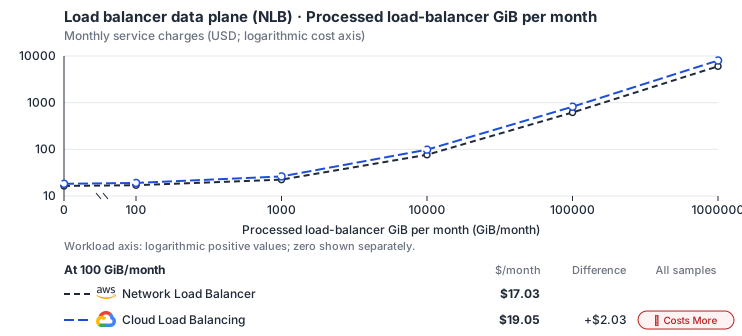
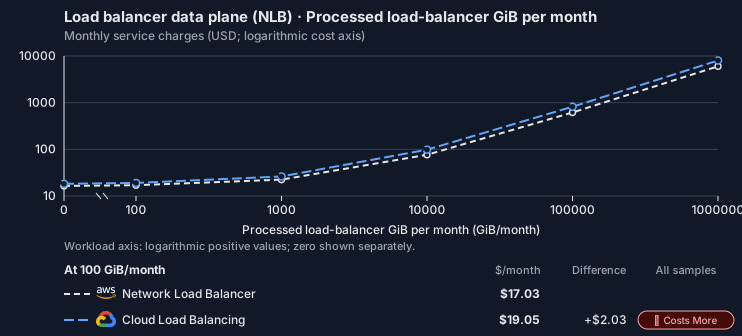
Curve assumptions
- Only this native meter varies; all other source usage and translation assumptions retain the displayed defaults. Other native meters and workload assumptions retain their explicitly displayed default quantities. Workload translation and capacity assumptions are not benchmark measurements.
- Native monthly usage priced at the cited provider list prices; listed target allowances apply where present, excluding invoice credits, taxes and negotiated discounts. Rates as of 2026-10-22: us-east-1 → us-central1, USD/month.
- Source prices are reference charges, not an invoice. Target lines cover selected service usage/configuration only; adapter hosting and Tensor9 fees are excluded.
- Samples of explicit prices are not performance measurements or capacity qualification. No interpolation or break-even guarantee is implied.
- Variant assumptions show the first axis sample; any axis-dependent configuration is described by this curve’s workload note.
- Rates are cited provider list prices, editable for discounts, commitments or another region. Workload translation and capacity coefficients remain editable planning assumptions, not benchmark measurements or a commercial quote.
- Default-zero rates are explicit assumptions, not evidence that the deployed service or resource is free.
- Provisioned-unit minimums use an editable approximate allocation floor. Modeled target service cost is max(usage/allocation, minimum), with billable network, durable staging and dependent sinks added separately; actual RU/TU sizing, scaling increments and throughput remain unqualified.
- Durable staging is priced once: provisioned targets include adapter state in their selected allocation; native targets add a separate staging allocation when required. Adapter hosting is a separate allocation and must exclude resources already priced as staging, workers or target capacity.
- A declared adapter mapping and cost model do not establish implementation availability or service equivalence.
- This is a declared directed mapping; a planning estimate does not establish deployment or request-serving support.
- Origin unit prices are cited provider list prices; capacity coefficients and translation assumptions are editable authored planning guesses, not measured capacity or a provider quote.
- This is an explicit data-plane workload comparison; the ELB management adapter alone cannot measure traffic.
- The selected per-GiB rate is a traffic-dominated ALB/NLB capacity assumption and does not reproduce multi-dimensional AWS LCU/NLCU billing.
- Load-balancer hours and processed GiB are billed as listed; connection, rule and capacity-unit dimensions beyond the base allocation need separate qualification. The base hour covers the first 5 forwarding rules (0.01/hour each after); Google bills processed GiB both inbound and outbound, so count both directions. Regional Application Load Balancers add 0.025/hour per proxy instance.
- AWS Price List API, AWSELB offer: https://pricing.us-east-1.amazonaws.com/offers/v1.0/aws/AWSELB/current/us-east-1/index.json
- Cloud Load Balancing pricing: https://cloud.google.com/load-balancing/pricing
- Connection/rule-driven capacity premiums, certificates, DNS, WAF, backend compute and separate internet egress.
- Taxes, discounts, credits and free-tier allowances not explicitly listed by this model.
- Unmodeled dependent services, task execution and operations outside the selected workload family.
plan-aeadb280a6ff17d4b64eb541aed9fddde748c762 / 2026-10-22.planning.2. Curve: workload-1.
Sources: AWS Price List API, AWSELB offer, Cloud Load Balancing pricing.
Load balancer data plane (NLB) → Cloud Load Balancing: Authored native-usage planning example. Native monthly usage priced at the cited provider list prices; listed target allowances apply where present, excluding invoice credits, taxes and negotiated discounts.
Scenario source region: us-east-1. Scenario target region: us-central1. Currency: USD.
Unestimated components: Adapter hosting, Tensor9 fees. A modeled adapted total and savings require these costs.
Cost scope: Modeled target native service and explicitly modeled state allocation; hosting and Tensor9 fees only when supplied.
Excluded costs and workload features:
- Connection/rule-driven capacity premiums, certificates, DNS, WAF, backend compute and separate internet egress.
- Taxes, discounts, credits and free-tier allowances not explicitly listed by this model.
- Unmodeled dependent services, task execution and operations outside the selected workload family.
- Translated reads: 0 operations.
- Translated writes: 0 operations.
- Translated resident physical data: 0 GiB-month.
- Native provider operations: 0 operations.
- Published payload: 0 GiB.
- Delivered payload: 0 GiB.
- Allocated execution CPU: 0 vCPU-hour.
- Allocated execution RAM: 0 GiB-hour.
- Independent resource allocation: 730 resource-hour.
- Independent inventory: 0 resource-month.
- Input tokens: 0 tokens.
- Output tokens: 0 tokens.
- Billable network: 1,000 GiB.
- Dependent object sink retained data: 0 GiB-month.
- Dependent object sink writes: 0 writes.
- Rates are cited provider list prices, editable for discounts, commitments or another region. Workload translation and capacity coefficients remain editable planning assumptions, not benchmark measurements or a commercial quote.
- Default-zero rates are explicit assumptions, not evidence that the deployed service or resource is free.
- Provisioned-unit minimums use an editable approximate allocation floor. Modeled target service cost is max(usage/allocation, minimum), with billable network, durable staging and dependent sinks added separately; actual RU/TU sizing, scaling increments and throughput remain unqualified.
- Durable staging is priced once: provisioned targets include adapter state in their selected allocation; native targets add a separate staging allocation when required. Adapter hosting is a separate allocation and must exclude resources already priced as staging, workers or target capacity.
- A declared adapter mapping and cost model do not establish implementation availability or service equivalence.
- This is a declared directed mapping; a planning estimate does not establish deployment or request-serving support.
- Origin unit prices are cited provider list prices; capacity coefficients and translation assumptions are editable authored planning guesses, not measured capacity or a provider quote.
- This is an explicit data-plane workload comparison; the ELB management adapter alone cannot measure traffic.
- The selected per-GiB rate is a traffic-dominated ALB/NLB capacity assumption and does not reproduce multi-dimensional AWS LCU/NLCU billing.
- Load-balancer hours and processed GiB are billed as listed; connection, rule and capacity-unit dimensions beyond the base allocation need separate qualification. The base hour covers the first 5 forwarding rules (0.01/hour each after); Google bills processed GiB both inbound and outbound, so count both directions. Regional Application Load Balancers add 0.025/hour per proxy instance.
plan-aeadb280a6ff17d4b64eb541aed9fddde748c762 / 2026-10-22.planning.2. Scenario: planning-example.
Sources: AWS Price List API, AWSELB offer, Cloud Load Balancing pricing.
On Azure
How it works
When a deployment provides the runtime AWS load-balancing API, your application and Terraform keep using that API. The Tensor9 adapter answers those calls (CreateLoadBalancer, CreateListener, RegisterTargets and the rest), keeps the AWS load balancer, listener and target group identities, saves each change and applies it to Azure Standard Load Balancer. A target group is the set of backends a listener forwards traffic to.
That runtime design is separate from translating a stack to native load-balancer resources. A designed runtime model does not establish that the deployment can serve it, and a missing native mapping does not silently select a runtime fallback. Confirm the selected deployment supports the required path.
Client traffic does not pass through the adapter. Clients connect to the cloud load balancer, which forwards requests to your backends. A management call can return success before the cloud change has finished; the adapter keeps the requested configuration and finishes applying it in the background. Wait until the load balancer is available and check the cloud resources before sending production traffic.
Management calls go through the adapter; client traffic goes straight to the cloud load balancer.
Frontend, rules and backend pool
The Standard Load Balancer has a frontend address, one load-balancing rule per listener, a backend address pool and health probes. TCP and UDP listeners keep their protocol and port. A public frontend uses a static Standard public IP; an internal frontend uses a private address in your subnet. A zone-redundant deployment can reach backends in all of the region’s zones; check the frontend and backend placement for your network. Azure keeps the client’s source IP, so your backend can use the original address for access control and logging. Connections are spread by source and destination address, source and destination port, and protocol. TCP, HTTP or HTTPS probes are attached to the load-balancing rules and keep the interval, port, path and failure threshold. Allow AzureLoadBalancer health traffic, as well as client traffic, in the backends’ network security rules. Azure Monitor provides load balancer metrics and health-event logs.Deployment availability
This runtime design does not establish a working native stack translation or an available runtime deployment. A stack combining this load balancer, EC2 instances and a VPC is not currently available on this target. A missing native mapping does not automatically enable the runtime API. Use a supported configuration or author the native load-balancer resources separately.Targets and health checks
For a deployment that serves the runtime API,RegisterTargets and DeregisterTargets add and remove backends from a target group. An instance ID is resolved from the EC2 instances the adapter knows about; an IP registration names the backend’s address and port. The target group, the load balancer and the backend must be on networks that can reach each other. The adapter applies a listener only after its target group and network are ready.
The cloud load balancer’s own health checks decide which backends receive traffic. A registered target is not proof that its application is ready: check the cloud provider’s health status and send a real application request first.
DescribeTargetHealth reports the cloud load balancer’s probe results, read once per health-check interval, in AWS’s states and reason codes: initial while checks start, then healthy or unhealthy. If the adapter has not been able to read health for three intervals, it reports unavailable.
Drain connections before you deregister backends or delete a load balancer. Removing configuration does not move active connections to a replacement.
Limitations
- TLS listeners behave differently: they move the load balancer onto Application Gateway. Standard Load Balancer does not end TLS, so a TLS listener puts every listener of that load balancer on an Application Gateway TLS proxy, which ends TLS with the certificate from Key Vault. Backends then see the gateway’s address, not the client’s.
- UDP listeners beside a TLS listener are not supported. The Application Gateway TLS proxy carries only TCP and TLS, so a UDP or TCP_UDP listener on a load balancer that also has a TLS listener is rejected.
- Combined TCP+UDP listeners behave differently: they need two rules. A TCP_UDP listener on one port becomes separate TCP and UDP rules. Azure’s All-protocol rule is an HA-ports rule for internal load balancers that covers every port, not a public listener on one port.
- Security groups on the load balancer are not enforced. Standard Load Balancer has no firewall of its own and passes each client’s own address to the backend. A request that attaches security groups is rejected unless you tag the load balancer
t9:ack:degradation=load-balancer.firewall-policy-attachment. - A backend rule that names the load balancer’s security group is rejected. On AWS such a rule admits what the load balancer forwards. Here that traffic arrives from the clients’ addresses, so the rule would match none of it.
- Per-request access logs are not supported. Azure Monitor gives metrics and health events only. Collect request details at your backend.
Other considerations
Before going live. Deploy the adapter with permission to manage load balancers and their network resources in the customer’s cloud account. Your AWS credentials authorize the management calls; the adapter uses the target cloud’s credentials to apply them. Set public or private exposure, client access rules, backend access and health-check access together. Moving from AWS. Prepare DNS records and firewall allowlists for the new address. In an infrastructure-only deployment, references inside the translated stack are updated during the build, but external DNS and clients still need to be switched. At the Max tier the adapter also keeps the AWS identities your management calls use. Check certificates, routing, health checks and a complete client request before changing DNS, and keep the old load balancer running while existing connections drain. Application sessions and active connections are not copied.Example monthly charges
This Tensor9 BYOC scenario estimates service charges for the named origin and target services. Adapter hosting and commercial Tensor9 fees need separate allocations. How Tensor9 estimates costs explains the method and what the estimates include.Load balancer data plane (NLB) · Processed load-balancer GiB per month
Feature: Load balancer data plane (NLB). Estimated monthly service charges by Processed load-balancer GiB per month. Adapter hosting and Tensor9 fees are excluded. Source: us-east-1; target: Global; currency: USD.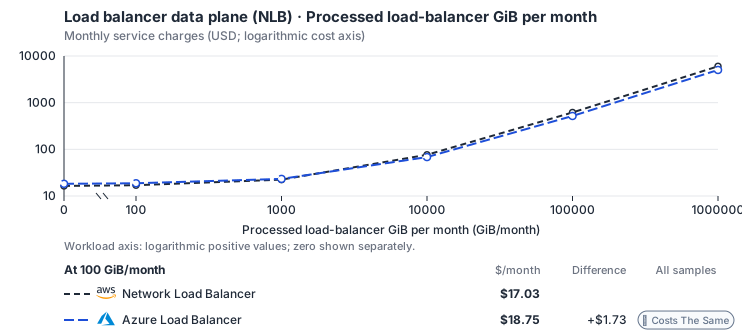
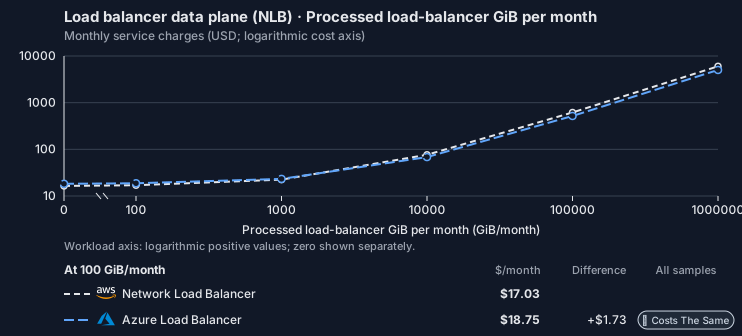
Curve assumptions
- Only this native meter varies; all other source usage and translation assumptions retain the displayed defaults. Other native meters and workload assumptions retain their explicitly displayed default quantities. Workload translation and capacity assumptions are not benchmark measurements.
- Native monthly usage priced at the cited provider list prices; listed target allowances apply where present, excluding invoice credits, taxes and negotiated discounts. Rates as of 2026-10-22: us-east-1 → Global, USD/month.
- Source prices are reference charges, not an invoice. Target lines cover selected service usage/configuration only; adapter hosting and Tensor9 fees are excluded.
- Samples of explicit prices are not performance measurements or capacity qualification. No interpolation or break-even guarantee is implied.
- Variant assumptions show the first axis sample; any axis-dependent configuration is described by this curve’s workload note.
- Rates are cited provider list prices, editable for discounts, commitments or another region. Workload translation and capacity coefficients remain editable planning assumptions, not benchmark measurements or a commercial quote.
- Default-zero rates are explicit assumptions, not evidence that the deployed service or resource is free.
- Provisioned-unit minimums use an editable approximate allocation floor. Modeled target service cost is max(usage/allocation, minimum), with billable network, durable staging and dependent sinks added separately; actual RU/TU sizing, scaling increments and throughput remain unqualified.
- Durable staging is priced once: provisioned targets include adapter state in their selected allocation; native targets add a separate staging allocation when required. Adapter hosting is a separate allocation and must exclude resources already priced as staging, workers or target capacity.
- A declared adapter mapping and cost model do not establish implementation availability or service equivalence.
- This is a declared directed mapping; a planning estimate does not establish deployment or request-serving support.
- Origin unit prices are cited provider list prices; capacity coefficients and translation assumptions are editable authored planning guesses, not measured capacity or a provider quote.
- This is an explicit data-plane workload comparison; the ELB management adapter alone cannot measure traffic.
- The selected per-GiB rate is a traffic-dominated ALB/NLB capacity assumption and does not reproduce multi-dimensional AWS LCU/NLCU billing.
- Load-balancer hours and processed GiB are billed as listed; connection, rule and capacity-unit dimensions beyond the base allocation need separate qualification. The base hour includes 5 rules; each additional rule lists USD 0.01/hour.
- AWS Price List API, AWSELB offer: https://pricing.us-east-1.amazonaws.com/offers/v1.0/aws/AWSELB/current/us-east-1/index.json
- Azure Retail Prices API: https://prices.azure.com/api/retail/prices
- Connection/rule-driven capacity premiums, certificates, DNS, WAF, backend compute and separate internet egress.
- Taxes, discounts, credits and free-tier allowances not explicitly listed by this model.
- Unmodeled dependent services, task execution and operations outside the selected workload family.
plan-5bc3717e8cc96c99c769a6310d429e8864680a20 / 2026-10-22.planning.2. Curve: workload-1.
Sources: AWS Price List API, AWSELB offer, Azure Retail Prices API.
Load balancer data plane (NLB) → Azure Load Balancer: Authored native-usage planning example. Native monthly usage priced at the cited provider list prices; listed target allowances apply where present, excluding invoice credits, taxes and negotiated discounts.
Scenario source region: us-east-1. Scenario target region: Global. Currency: USD.
Unestimated components: Adapter hosting, Tensor9 fees. A modeled adapted total and savings require these costs.
Cost scope: Modeled target native service and explicitly modeled state allocation; hosting and Tensor9 fees only when supplied.
Excluded costs and workload features:
- Connection/rule-driven capacity premiums, certificates, DNS, WAF, backend compute and separate internet egress.
- Taxes, discounts, credits and free-tier allowances not explicitly listed by this model.
- Unmodeled dependent services, task execution and operations outside the selected workload family.
- Translated reads: 0 operations.
- Translated writes: 0 operations.
- Translated resident physical data: 0 GiB-month.
- Native provider operations: 0 operations.
- Published payload: 0 GiB.
- Delivered payload: 0 GiB.
- Allocated execution CPU: 0 vCPU-hour.
- Allocated execution RAM: 0 GiB-hour.
- Independent resource allocation: 730 resource-hour.
- Independent inventory: 0 resource-month.
- Input tokens: 0 tokens.
- Output tokens: 0 tokens.
- Billable network: 1,000 GiB.
- Dependent object sink retained data: 0 GiB-month.
- Dependent object sink writes: 0 writes.
- Rates are cited provider list prices, editable for discounts, commitments or another region. Workload translation and capacity coefficients remain editable planning assumptions, not benchmark measurements or a commercial quote.
- Default-zero rates are explicit assumptions, not evidence that the deployed service or resource is free.
- Provisioned-unit minimums use an editable approximate allocation floor. Modeled target service cost is max(usage/allocation, minimum), with billable network, durable staging and dependent sinks added separately; actual RU/TU sizing, scaling increments and throughput remain unqualified.
- Durable staging is priced once: provisioned targets include adapter state in their selected allocation; native targets add a separate staging allocation when required. Adapter hosting is a separate allocation and must exclude resources already priced as staging, workers or target capacity.
- A declared adapter mapping and cost model do not establish implementation availability or service equivalence.
- This is a declared directed mapping; a planning estimate does not establish deployment or request-serving support.
- Origin unit prices are cited provider list prices; capacity coefficients and translation assumptions are editable authored planning guesses, not measured capacity or a provider quote.
- This is an explicit data-plane workload comparison; the ELB management adapter alone cannot measure traffic.
- The selected per-GiB rate is a traffic-dominated ALB/NLB capacity assumption and does not reproduce multi-dimensional AWS LCU/NLCU billing.
- Load-balancer hours and processed GiB are billed as listed; connection, rule and capacity-unit dimensions beyond the base allocation need separate qualification. The base hour includes 5 rules; each additional rule lists USD 0.01/hour.
plan-5bc3717e8cc96c99c769a6310d429e8864680a20 / 2026-10-22.planning.2. Scenario: planning-example.
Sources: AWS Price List API, AWSELB offer, Azure Retail Prices API.
On OCI
How it works
When a deployment provides the runtime AWS load-balancing API, your application and Terraform keep using that API. The Tensor9 adapter answers those calls (CreateLoadBalancer, CreateListener, RegisterTargets and the rest), keeps the AWS load balancer, listener and target group identities, saves each change and applies it to OCI Network Load Balancer. A target group is the set of backends a listener forwards traffic to.
That runtime design is separate from translating a stack to native load-balancer resources. A designed runtime model does not establish that the deployment can serve it, and a missing native mapping does not silently select a runtime fallback. Confirm the selected deployment supports the required path.
Client traffic does not pass through the adapter. Clients connect to the cloud load balancer, which forwards requests to your backends. A management call can return success before the cloud change has finished; the adapter keeps the requested configuration and finishes applying it in the background. Wait until the load balancer is available and check the cloud resources before sending production traffic.
Management calls go through the adapter; client traffic goes straight to the cloud load balancer.
Listeners, addresses and health checks
TCP, UDP and combined TCP+UDP listeners become OCI listeners and backend sets. A reserved IP address gives a stable frontend, and the backend sees the client’s source address. The network load balancer is regional. Its public or private subnet replaces the AWS multi-subnet layout; check the network, frontend exposure, backend rules and health-check access. Health checks keep the path, expected status, timeout, interval and failure threshold. Test them and a client connection before relying on a newly registered backend.Targets in a translated stack
Supported instance attachments become native OCI backends using each migrated instance’s private address and effective registered port. The load balancer uses the compiled subnet where that network mapping is available; otherwise review the supplied native subnet and reachability. A health check set to follow traffic uses each registered backend’s traffic port, while an explicit literal health port is kept. Auto Scaling replicas are not attached by this mapping. A supported target is a direct reference to the ID of an instance translated in this stack. IP and Lambda targets, conditional or computed target selection, unmapped instances and unsupported fleet attachments are reported and left unwired; those targets receive no traffic or health checks. A computed or invalid attachment or health-check port is refused rather than replaced with a default. Check every warning and send a complete application request before switching traffic. Scaleway load balancers and Akamai NodeBalancers do not receive translated instance targets through this mapping. Their missing attachments are reported; configure the native backends before expecting them to serve traffic.Targets and health checks
For a deployment that serves the runtime API,RegisterTargets and DeregisterTargets add and remove backends from a target group. An instance ID is resolved from the EC2 instances the adapter knows about; an IP registration names the backend’s address and port. The target group, the load balancer and the backend must be on networks that can reach each other. The adapter applies a listener only after its target group and network are ready.
The cloud load balancer’s own health checks decide which backends receive traffic. A registered target is not proof that its application is ready: check the cloud provider’s health status and send a real application request first.
DescribeTargetHealth answers from the adapter’s saved records of registration and zone eligibility. A healthy result does not mean the cloud load balancer’s probe succeeded, so check the backend health in the cloud provider’s console or API as well.
Drain connections before you deregister backends or delete a load balancer. Removing configuration does not move active connections to a replacement.
Limitations
- TLS termination is not supported. OCI Network Load Balancer does not end TLS. An AWS TLS listener becomes TCP passthrough, and your backend must terminate the encrypted connection.
- The AWS hostname is not kept. Clients use the OCI address, so update external DNS and allowlists. When your stack is translated, an AWS-specific reference with no OCI equivalent stops the build with an error.
Other considerations
Before going live. Deploy the adapter with permission to manage load balancers and their network resources in the customer’s cloud account. Your AWS credentials authorize the management calls; the adapter uses the target cloud’s credentials to apply them. Set public or private exposure, client access rules, backend access and health-check access together. Moving from AWS. Prepare DNS records and firewall allowlists for the new address. In an infrastructure-only deployment, references inside the translated stack are updated during the build, but external DNS and clients still need to be switched. At the Max tier the adapter also keeps the AWS identities your management calls use. Check certificates, routing, health checks and a complete client request before changing DNS, and keep the old load balancer running while existing connections drain. Application sessions and active connections are not copied.Example monthly charges
This Tensor9 BYOC scenario estimates service charges for the named origin and target services. Adapter hosting and commercial Tensor9 fees need separate allocations. How Tensor9 estimates costs explains the method and what the estimates include.Load balancer data plane (NLB) · Processed load-balancer GiB per month
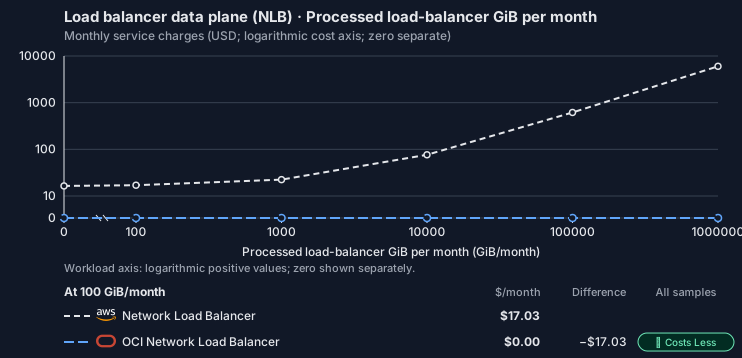
Feature: Load balancer data plane (NLB). Estimated monthly service charges by Processed load-balancer GiB per month. Adapter hosting and Tensor9 fees are excluded. Source: us-east-1; target: us-ashburn-1; currency: USD.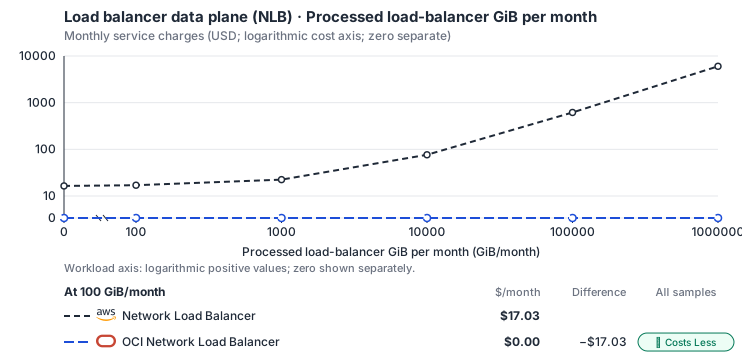
Curve assumptions
- Only this native meter varies; all other source usage and translation assumptions retain the displayed defaults. Other native meters and workload assumptions retain their explicitly displayed default quantities. Workload translation and capacity assumptions are not benchmark measurements.
- Native monthly usage priced at the cited provider list prices; listed target allowances apply where present, excluding invoice credits, taxes and negotiated discounts. Rates as of 2026-10-22: us-east-1 → us-ashburn-1, USD/month.
- Source prices are reference charges, not an invoice. Target lines cover selected service usage/configuration only; adapter hosting and Tensor9 fees are excluded.
- Samples of explicit prices are not performance measurements or capacity qualification. No interpolation or break-even guarantee is implied.
- Variant assumptions show the first axis sample; any axis-dependent configuration is described by this curve’s workload note.
- Rates are cited provider list prices, editable for discounts, commitments or another region. Workload translation and capacity coefficients remain editable planning assumptions, not benchmark measurements or a commercial quote.
- Default-zero rates are explicit assumptions, not evidence that the deployed service or resource is free.
- Provisioned-unit minimums use an editable approximate allocation floor. Modeled target service cost is max(usage/allocation, minimum), with billable network, durable staging and dependent sinks added separately; actual RU/TU sizing, scaling increments and throughput remain unqualified.
- Durable staging is priced once: provisioned targets include adapter state in their selected allocation; native targets add a separate staging allocation when required. Adapter hosting is a separate allocation and must exclude resources already priced as staging, workers or target capacity.
- A declared adapter mapping and cost model do not establish implementation availability or service equivalence.
- This is a declared directed mapping; a planning estimate does not establish deployment or request-serving support.
- Origin unit prices are cited provider list prices; capacity coefficients and translation assumptions are editable authored planning guesses, not measured capacity or a provider quote.
- This is an explicit data-plane workload comparison; the ELB management adapter alone cannot measure traffic.
- The selected per-GiB rate is a traffic-dominated ALB/NLB capacity assumption and does not reproduce multi-dimensional AWS LCU/NLCU billing.
- Load-balancer hours and processed GiB are billed as listed; connection, rule and capacity-unit dimensions beyond the base allocation need separate qualification. OCI’s Flexible Network Load Balancer is free.
- AWS Price List API, AWSELB offer: https://pricing.us-east-1.amazonaws.com/offers/v1.0/aws/AWSELB/current/us-east-1/index.json
- OCI price list: https://www.oracle.com/cloud/price-list/
- Connection/rule-driven capacity premiums, certificates, DNS, WAF, backend compute and separate internet egress.
- Taxes, discounts, credits and free-tier allowances not explicitly listed by this model.
- Unmodeled dependent services, task execution and operations outside the selected workload family.
plan-72d022a04625c2e640d1ba0a2deb0da1503af3e2 / 2026-10-22.planning.2. Curve: workload-1.
Sources: AWS Price List API, AWSELB offer, OCI price list.
Load balancer data plane (NLB) → OCI Network Load Balancer: Authored native-usage planning example. Native monthly usage priced at the cited provider list prices; listed target allowances apply where present, excluding invoice credits, taxes and negotiated discounts.
Scenario source region: us-east-1. Scenario target region: us-ashburn-1. Currency: USD.
Unestimated components: Adapter hosting, Tensor9 fees. A modeled adapted total and savings require these costs.
Cost scope: Modeled target native service and explicitly modeled state allocation; hosting and Tensor9 fees only when supplied.
Excluded costs and workload features:
- Connection/rule-driven capacity premiums, certificates, DNS, WAF, backend compute and separate internet egress.
- Taxes, discounts, credits and free-tier allowances not explicitly listed by this model.
- Unmodeled dependent services, task execution and operations outside the selected workload family.
- Translated reads: 0 operations.
- Translated writes: 0 operations.
- Translated resident physical data: 0 GiB-month.
- Native provider operations: 0 operations.
- Published payload: 0 GiB.
- Delivered payload: 0 GiB.
- Allocated execution CPU: 0 vCPU-hour.
- Allocated execution RAM: 0 GiB-hour.
- Independent resource allocation: 730 resource-hour.
- Independent inventory: 0 resource-month.
- Input tokens: 0 tokens.
- Output tokens: 0 tokens.
- Billable network: 1,000 GiB.
- Dependent object sink retained data: 0 GiB-month.
- Dependent object sink writes: 0 writes.
- Rates are cited provider list prices, editable for discounts, commitments or another region. Workload translation and capacity coefficients remain editable planning assumptions, not benchmark measurements or a commercial quote.
- Default-zero rates are explicit assumptions, not evidence that the deployed service or resource is free.
- Provisioned-unit minimums use an editable approximate allocation floor. Modeled target service cost is max(usage/allocation, minimum), with billable network, durable staging and dependent sinks added separately; actual RU/TU sizing, scaling increments and throughput remain unqualified.
- Durable staging is priced once: provisioned targets include adapter state in their selected allocation; native targets add a separate staging allocation when required. Adapter hosting is a separate allocation and must exclude resources already priced as staging, workers or target capacity.
- A declared adapter mapping and cost model do not establish implementation availability or service equivalence.
- This is a declared directed mapping; a planning estimate does not establish deployment or request-serving support.
- Origin unit prices are cited provider list prices; capacity coefficients and translation assumptions are editable authored planning guesses, not measured capacity or a provider quote.
- This is an explicit data-plane workload comparison; the ELB management adapter alone cannot measure traffic.
- The selected per-GiB rate is a traffic-dominated ALB/NLB capacity assumption and does not reproduce multi-dimensional AWS LCU/NLCU billing.
- Load-balancer hours and processed GiB are billed as listed; connection, rule and capacity-unit dimensions beyond the base allocation need separate qualification. OCI’s Flexible Network Load Balancer is free.
plan-72d022a04625c2e640d1ba0a2deb0da1503af3e2 / 2026-10-22.planning.2. Scenario: planning-example.
Sources: AWS Price List API, AWSELB offer, OCI price list.
Costs
Estimated monthly service charges for each backend with a published cost model, at one sampled workload from that model’s cost curve. Adapter hosting and Tensor9 fees are excluded. How Tensor9 estimates costs explains the method, what the estimates include and how to read their qualifications.
Difference means backend minus origin; a positive difference means the backend costs more. Workloads and target configurations differ by model, so compare each row’s difference at its stated workload rather than charges across rows.
Cost curves across workload sizes, with every assumption and exclusion: Network Load Balancer costs.
Service level agreements
Listed terms cover requests sent through this service adapter. They do not cover direct connections to the target service or replace the cloud provider’s own SLA. Each origin-to-target pair has its own terms or an explicit pending status. See the SLA tables, measurement rules, and scaling conditions.Network Load Balancer to Azure Load Balancer
Adapter-added latency. A + prefix marks time added by the adapter, not the total time your application waits. Total request time includes adapter processing, backend service time and network time. The backend provider’s SLA applies independently. Only separately measured target-service wait may be subtracted, and only when your agreement permits it; internal metadata, coordination and retry processing still count. For one request, 12 ms of adapter processing plus 90 ms waiting for the backend means at least 102 ms total. This example does not add monthly p99 values.
What Tensor9 covers. These service levels cover the adapter between the origin API and target API. They do not replace the target provider’s SLA.
How latency is counted. Adapter work, including metadata and coordination, counts. Only separately measured permitted target waits are excluded.
Which terms apply. Your signed agreement names the covered operations, workload limits, remedies, and final service levels for your deployment.
What this adapter does
Network control calls validate AWS-shaped topology, record desired state and reconcile native networking on azure::1.0.0::lb. Application packets, load-balancer forwarding and health-probe network time are not adapter request latency. Local graph validation, rule translation, admission, status lookup and response encoding remain covered.How the latency targets were chosen
Network and load-balancer state reads: +8 ms monthly p99 (adapter-added).DescribeLoadBalancers, DescribeTargetHealth. Bounded desired and observed status lookup.
Listener, target and topology mutation: +18 ms monthly p99 (adapter-added). CreateListener, CreateLoadBalancer, ModifyListener, ModifyTargetGroup. Validation and durable desired-state mutation.
Your signed agreement sets the terms for your deployment. A target does not add an operation or option that the compatibility tables mark unavailable.
What counts toward latency
For a request-response row, measure from the agreed ingress boundary to dispatch of the complete response. A row that explicitly names a first response chunk ends at that chunk; its number does not cover the rest of the stream. A long-poll row names the intentional wait and when adapter delay starts. Include parsing, authorization, admission, translation, serialization, adapter-owned storage and coordination, retries and response handling. Subtract only separately measured target-workload waits and external network segments allowed by the measurement rules. The adapter’s own response handling and dispatch remain covered. A database used for adapter metadata is still adapter work, even if a cloud provider hosts it. For concurrent calls, exclude the union of permitted wait intervals, not the sum of overlapping spans. Calculate each request’s adapter duration first, then the monthly p99. Do not subtract one service’s p99 from another’s. Known adapter timeouts are over-budget samples; failed or incomplete requests cannot disappear to improve the percentile. Missing measurements do not become zero latency. An SDK call span alone does not prove how much of its duration can be excluded.Endpoint reachability and request failures
The endpoint-reachability target measures adapter health checks. Correctly forwarding a target quota or permission error is different from producing that error because the adapter sent the wrong request. Adapter-caused failures remain Tensor9’s responsibility even when the target is healthy. Correctness and data-integrity requirements apply to every supported request. Endpoint reachability does not measure request correctness or grant an allowance for incorrect results.Scaling and target-service capacity
Independent load balancers, networks and flow-log records reconcile concurrently; changes to one object serialize by generation. Qualification fixes listeners, rules, target groups, routes, security rules, tags and returned page size. Large rule trees receive their own bounded group rather than inheriting a point-write estimate. Tell Tensor9 the expected steady rate, bursts, concurrency, payload sizes and operation mix. Tensor9 sizes and scales the adapter for the agreed load; you choose and monitor the target service’s capacity with Tensor9’s help. A latency budget is not a requests-per-second rating. Larger requests and higher rates need explicit terms, not silent inheritance of a small-request SLA.Data and behavior guarantees
The adapter preserves exposure, protocol, address family, listener/rule priority, target membership and fail-closed security intent. A successful change is durable before acknowledgement, stale generations cannot re-open removed access, and readiness reflects observed native state.Example and diagnosis
Adding one HTTPS listener with ten routing rules is a bounded policy mutation. The adapter target covers validation, durable recording and native-plan construction; provider provisioning and certificate readiness are separate. The response cannot claim ACTIVE until the native listener is observed. Usetensor9 explain and the documented explain headers to understand the selected adapter and its behavior. Correlate available request diagnostics with the target provider’s latency, throttling and capacity metrics. An explain report helps diagnose a request; it is not by itself a qualified SLA timing measurement. Share the operation, request shape, timestamps and request identifiers with support, with credentials and customer payloads removed.
Network Load Balancer to Cloud Load Balancing
SLA status: Pending Operation-specific service levels for this adapter have not yet been defined. This adapter does not inherit another target service’s latency budget. Your signed agreement sets the applicable terms.Network Load Balancer to OCI Network Load Balancer
Adapter-added latency. A + prefix marks time added by the adapter, not the total time your application waits. Total request time includes adapter processing, backend service time and network time. The backend provider’s SLA applies independently. Only separately measured target-service wait may be subtracted, and only when your agreement permits it; internal metadata, coordination and retry processing still count. For one request, 12 ms of adapter processing plus 90 ms waiting for the backend means at least 102 ms total. This example does not add monthly p99 values.
What Tensor9 covers. These service levels cover the adapter between the origin API and target API. They do not replace the target provider’s SLA.
How latency is counted. Adapter work, including metadata and coordination, counts. Only separately measured permitted target waits are excluded.
Which terms apply. Your signed agreement names the covered operations, workload limits, remedies, and final service levels for your deployment.
What this adapter does
Network control calls validate AWS-shaped topology, record desired state and reconcile native networking on oci::1.0.0::nlb. Application packets, load-balancer forwarding and health-probe network time are not adapter request latency. Local graph validation, rule translation, admission, status lookup and response encoding remain covered.How the latency targets were chosen
Network and load-balancer state reads: +8 ms monthly p99 (adapter-added).DescribeLoadBalancers, DescribeTargetHealth. Bounded desired and observed status lookup.
Listener, target and topology mutation: +18 ms monthly p99 (adapter-added). CreateListener, CreateLoadBalancer, DeregisterTargets, ModifyListener, ModifyLoadBalancerAttributes, ModifyTargetGroup, RegisterTargets. Validation and durable desired-state mutation.
Your signed agreement sets the terms for your deployment. A target does not add an operation or option that the compatibility tables mark unavailable.
What counts toward latency
For a request-response row, measure from the agreed ingress boundary to dispatch of the complete response. A row that explicitly names a first response chunk ends at that chunk; its number does not cover the rest of the stream. A long-poll row names the intentional wait and when adapter delay starts. Include parsing, authorization, admission, translation, serialization, adapter-owned storage and coordination, retries and response handling. Subtract only separately measured target-workload waits and external network segments allowed by the measurement rules. The adapter’s own response handling and dispatch remain covered. A database used for adapter metadata is still adapter work, even if a cloud provider hosts it. For concurrent calls, exclude the union of permitted wait intervals, not the sum of overlapping spans. Calculate each request’s adapter duration first, then the monthly p99. Do not subtract one service’s p99 from another’s. Known adapter timeouts are over-budget samples; failed or incomplete requests cannot disappear to improve the percentile. Missing measurements do not become zero latency. An SDK call span alone does not prove how much of its duration can be excluded.Endpoint reachability and request failures
The endpoint-reachability target measures adapter health checks. Correctly forwarding a target quota or permission error is different from producing that error because the adapter sent the wrong request. Adapter-caused failures remain Tensor9’s responsibility even when the target is healthy. Correctness and data-integrity requirements apply to every supported request. Endpoint reachability does not measure request correctness or grant an allowance for incorrect results.Scaling and target-service capacity
Independent load balancers, networks and flow-log records reconcile concurrently; changes to one object serialize by generation. Qualification fixes listeners, rules, target groups, routes, security rules, tags and returned page size. Large rule trees receive their own bounded group rather than inheriting a point-write estimate. Tell Tensor9 the expected steady rate, bursts, concurrency, payload sizes and operation mix. Tensor9 sizes and scales the adapter for the agreed load; you choose and monitor the target service’s capacity with Tensor9’s help. A latency budget is not a requests-per-second rating. Larger requests and higher rates need explicit terms, not silent inheritance of a small-request SLA.Data and behavior guarantees
The adapter preserves exposure, protocol, address family, listener/rule priority, target membership and fail-closed security intent. A successful change is durable before acknowledgement, stale generations cannot re-open removed access, and readiness reflects observed native state.Example and diagnosis
Adding one HTTPS listener with ten routing rules is a bounded policy mutation. The adapter target covers validation, durable recording and native-plan construction; provider provisioning and certificate readiness are separate. The response cannot claim ACTIVE until the native listener is observed. Usetensor9 explain and the documented explain headers to understand the selected adapter and its behavior. Correlate available request diagnostics with the target provider’s latency, throttling and capacity metrics. An explain report helps diagnose a request; it is not by itself a qualified SLA timing measurement. Share the operation, request shape, timestamps and request identifiers with support, with credentials and customer payloads removed.