

- Coverage by target cloud
- How the backends compare
- On Google Cloud
- On Azure
- On OCI
- On Private Kubernetes
- Costs
- Service level agreements
- Debug this service
Coverage by target cloud
How the backends compare
Each row compares a capability of S3 with its adaptation on each backend. A dash means this row is not stated for that backend.Max adaptation
Infrastructure-only adaptation
On Google Cloud
S3 requests in the customer environment
The application continues using the S3 API. The Tensor9 adapter runs in the customer environment and sends object requests to Google Cloud Storage. It also serves bucket creation, deletion, listing, and configuration through a persistent bucket store. Google Cloud Storage stores the objects; Tensor9 operates the adapter and its bucket-management service.Request flow
Object requests use the backend storage service. Bucket settings persist separately and are applied to the backend resource.

Object requests
Core GetObject, HeadObject, PutObject, CopyObject, DeleteObject, and listing requests use GCS’s S3-interoperable XML endpoint with backend credentials. Batch deletion sends per-object deletes and returns S3 Deleted/Error entries. Object tags are encoded in reserved GCS object metadata and reconstructed as S3 tagging documents. The object data stays in GCS; the bucket store does not hold object bodies.Bucket creation and configuration
Each S3 bucket has a durable record containing its name, owner, requested configuration, and backend reference. For a bucket namedbucket-name, the S3-facing identifier is arn:aws:s3:::bucket-name; the backend resource is a GCS bucket. ListBuckets returns the caller’s buckets, and configuration reads use the stored request state.
A configuration worker applies the stored settings to the backend. CreateBucket waits for the backend bucket to be ready before returning success, so an immediate object write does not race bucket creation. DeleteBucket waits for removal and returns BucketNotEmpty if objects prevent deletion. A lifecycle update also waits for the backend to apply it. For other configuration changes, a successful read of the new setting describes stored configuration; it does not imply every backend-side change has already completed.
Versions and multipart uploads
GCS multipart uploads use temporary objects for individual parts. Completion calls the GCS JSON compose API to form the final object. At Max, the adapter retains part checksums to supply S3’s composite multipart ETag and maintains the S3 version history and delete markers that differ from native GCS generations. A deployment that only forwards object requests instead exposes the native generation model and compose ETag. ListMultipartUploads and UploadPartCopy remain outside the listed mapping.Backend configuration
Bucket versioning, tagging, lifecycle and encryption settings are managed through runtime S3 calls. Lifecycle translation supports the rules listed in the feature comparison: prefix-scoped, relative-age expiration and transitions to STANDARD_IA or ONEZONE_IA, both mapped to Nearline. Unsupported date, filter, noncurrent-version and archival-transition forms return an error rather than a different retention or cost policy. Encryption uses Google-managed keys, Cloud KMS customer-managed keys or customer-supplied keys as applicable; DSSE-KMS and S3 Bucket Keys have no direct equivalent.Placement and operation
GCS provides strong read-after-write consistency and designs for 99.999999999% annual durability. Region, dual-region or multi-region placement controls where the provider stores the data. Cross-bucket replication uses Storage Transfer Service rather than the S3 replication-rule engine. Object notifications go to Pub/Sub; routing to other destination types requires downstream integration. Tensor9 operates the bucket-management adapter, while Google operates object storage.Compatibility limits
Bucket policy is unsupported at every adaptation tier. Object ACL, retention/legal-hold, S3 Select and RestoreObject APIs remain outside the listed S3 endpoint. Native GCS features such as Bucket Lock, Requester Pays and Autoclass must be assessed with their own configuration and semantics; native availability does not turn them into unrestricted S3 API equivalents.Migration and leaving the adapter
A newly provisioned backend bucket starts empty. Copy existing objects and required versions with a migration tool or a coordinated dual-write, then verify object data and application reads before switching. Preserve version history through the S3 API when the application depends on S3 version identifiers or delete markers. Leaving the Max adapter requires moving bucket configuration as well as object data. Apply the retained settings to native backend resources, resolve any S3-specific version metadata, and move clients to the backend’s own API. Keep the adapter and its persistent state until the application no longer depends on those S3 behaviors.Example monthly charges
This Tensor9 BYOC scenario estimates service charges for the named origin and target services. Adapter hosting and commercial Tensor9 fees need separate allocations. How Tensor9 estimates costs explains the method and what the estimates include.Monthly cost by retained S3 Standard data
Feature: Retained S3 Standard objects. Reference monthly service charges by Retained source data. Adapter hosting and Tensor9 fees are excluded. Source: us-east-1; target: us-central1; currency: USD.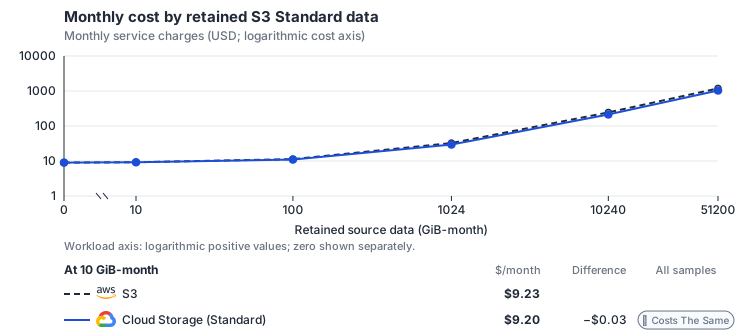
Curve assumptions
- Ordinary requests stay at 1 million PUTs and 10 million GETs/month. Equal source/target billed bytes and no extra target operations are an idealized simple-operation baseline; S3 Standard first 50 TiB only.
- Monthly AWS source usage in us-east-1, priced at the 2026-10-18 reference list rates before free allowances, discounts, credits and tax; not the uploaded invoice total. Rates as of 2026-10-18: us-east-1 → us-central1, USD/month.
- Source prices are reference charges, not an invoice. Target lines cover selected service usage/configuration only; adapter hosting and Tensor9 fees are excluded.
- Samples of explicit prices are not performance measurements or capacity qualification. No interpolation or break-even guarantee is implied.
- Variant assumptions show the first axis sample; any axis-dependent configuration is described by this curve’s workload note.
- S3 Standard first 50 TiB; GCS Standard regional bucket with flat namespace. Ordinary GET/PUT scenario only.
- Zero additional operations is an idealized baseline. Conditional requests, multipart staging and compose/list/HEAD paths require explicit extra operations and retained-byte assumptions.
- Source usage is priced at reference rates; source lines are not actual invoice charges. Free or discounted usage still consumes target resources.
- S3 Standard pricing: https://aws.amazon.com/s3/pricing/
- Regional GCS Standard pricing: https://cloud.google.com/storage/pricing/
- Free allowances, negotiated discounts, credits, tax and one-time migration charges.
- Charges not listed in the breakdown, including additional network transfer, backups and encryption/KMS.
- Application compute changes, operational labor and portfolio-wide sharing or deduplication of infrastructure.
- Other storage classes, multipart lifecycle, LIST/DELETE requests, replication and retrieval charges not explicitly supplied.
s3-gcs / 2026-10-18.4. Curve: retained-data.
Sources: S3 Standard pricing, Regional GCS Standard pricing.
Monthly cost by ordinary S3 request rate
Feature: Ordinary S3 GET and PUT requests. Reference monthly service charges by GET operations/s. Adapter hosting and Tensor9 fees are excluded. Source: us-east-1; target: us-central1; currency: USD.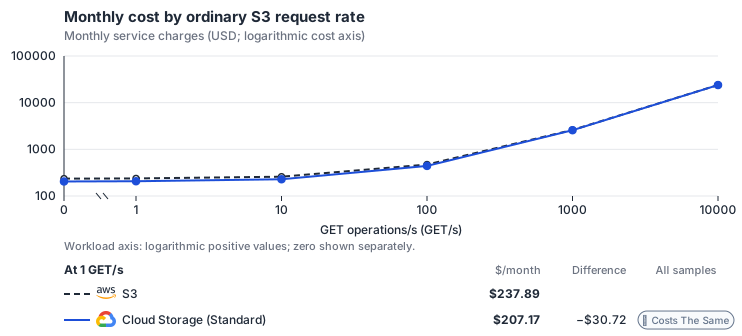
Curve assumptions
- One ordinary PUT per ten GETs; 730 hours/month. Source retained data stays at 10 TiB. Equal source/target billed bytes and no extra GCS operations are an idealized baseline; multipart, LIST, conditional and metadata paths need additional assumptions.
- Monthly AWS source usage in us-east-1, priced at the 2026-10-18 reference list rates before free allowances, discounts, credits and tax; not the uploaded invoice total. Rates as of 2026-10-18: us-east-1 → us-central1, USD/month.
- Source prices are reference charges, not an invoice. Target lines cover selected service usage/configuration only; adapter hosting and Tensor9 fees are excluded.
- Samples of explicit prices are not performance measurements or capacity qualification. No interpolation or break-even guarantee is implied.
- Variant assumptions show the first axis sample; any axis-dependent configuration is described by this curve’s workload note.
- S3 Standard first 50 TiB; GCS Standard regional bucket with flat namespace. Ordinary GET/PUT scenario only.
- Zero additional operations is an idealized baseline. Conditional requests, multipart staging and compose/list/HEAD paths require explicit extra operations and retained-byte assumptions.
- Source usage is priced at reference rates; source lines are not actual invoice charges. Free or discounted usage still consumes target resources.
- S3 Standard pricing: https://aws.amazon.com/s3/pricing/
- Regional GCS Standard pricing: https://cloud.google.com/storage/pricing/
- Free allowances, negotiated discounts, credits, tax and one-time migration charges.
- Charges not listed in the breakdown, including additional network transfer, backups and encryption/KMS.
- Application compute changes, operational labor and portfolio-wide sharing or deduplication of infrastructure.
- Other storage classes, multipart lifecycle, LIST/DELETE requests, replication and retrieval charges not explicitly supplied.
s3-gcs / 2026-10-18.4. Curve: get-rate.
Sources: S3 Standard pricing, Regional GCS Standard pricing.
S3 → Google Cloud Storage: Reference monthly workload. Monthly AWS usage charges at the 2026-10-18 reference list rates in us-east-1, before free allowances, discounts, credits and tax.
Scenario source region: us-east-1. Scenario target region: us-central1. Currency: USD.
Unestimated components: Allocated adapter hosting, Allocated Tensor9 fees. A modeled adapted total and savings require these costs.
Cost scope: Modeled monthly service usage and selected database allocation; adapter hosting and Tensor9 fees only when explicitly supplied.
Excluded costs and workload features:
- Free allowances, negotiated discounts, credits, tax and one-time migration charges.
- Charges not listed in the breakdown, including additional network transfer, backups and encryption/KMS.
- Application compute changes, operational labor and portfolio-wide sharing or deduplication of infrastructure.
- Other storage classes, multipart lifecycle, LIST/DELETE requests, replication and retrieval charges not explicitly supplied.
- Origin retained data: 10,240 GiB-month.
- Inferred ordinary PUTs: 1,000,000 requests/month.
- Inferred ordinary GETs: 10,000,000 requests/month.
- S3 Standard first 50 TiB; GCS Standard regional bucket with flat namespace. Ordinary GET/PUT scenario only.
- Zero additional operations is an idealized baseline. Conditional requests, multipart staging and compose/list/HEAD paths require explicit extra operations and retained-byte assumptions.
s3-gcs / 2026-10-18.4. Scenario: s3-gcs-reference.
Sources: S3 Standard pricing, Regional GCS Standard pricing.
On Azure
S3 requests in the customer environment
The application continues using the S3 API. The Tensor9 adapter runs in the customer environment and sends object requests to Azure Blob Storage. It also serves bucket creation, deletion, listing, and configuration through a persistent bucket store. Azure Blob Storage stores the objects; Tensor9 operates the adapter and its bucket-management service.Request flow
Object requests use the backend storage service. Bucket settings persist separately and are applied to the backend resource.

Object requests
Azure Blob uses its own API, so the adapter translates S3 requests, headers, XML results and errors into Blob operations. It streams reads and writes, maps object tags to Blob Index Tags, and handles batch deletion as individual blob deletes. CopyObject downloads and uploads the object rather than using a server-side copy. Listing supports prefixes and pagination, and the adapter groups keys into CommonPrefixes itself when a request includes a delimiter.Bucket creation and configuration
Each S3 bucket has a durable record containing its name, owner, requested configuration, and backend reference. For a bucket namedbucket-name, the S3-facing identifier is arn:aws:s3:::bucket-name; the backend resource is a Blob container in a selected storage account. ListBuckets returns the caller’s buckets, and configuration reads use the stored request state.
A configuration worker applies the stored settings to the backend. CreateBucket waits for the backend bucket to be ready before returning success, so an immediate object write does not race bucket creation. DeleteBucket waits for removal and returns BucketNotEmpty if objects prevent deletion. A lifecycle update also waits for the backend to apply it. For other configuration changes, a successful read of the new setting describes stored configuration; it does not imply every backend-side change has already completed.
Versions and multipart uploads
A multipart upload stores each part as its own hidden blob. CompleteMultipartUpload checks each named part’s ETag, then joins the parts into the object with one Put Block List. Max retains the part checksums and S3 version metadata needed for composite multipart ETags, S3 version IDs and delete markers. The simpler request-translation path uses Azure’s native version and completion-ETag behavior instead. Single-part writes compute the content MD5 and persist it as Blob Content-MD5. Azure tag-character restrictions still apply, including rejection of @ and non-ASCII characters.Backend configuration
The adapter stores per-bucket configuration and reconciles each bucket to a container. Several Azure settings belong to the storage account, including region, redundancy, native versioning and default encryption; a container cannot independently choose them. Shared-account configuration must be planned for all buckets using that account. S3 lifecycle settings use the supported backend mappings, and unsupported conditions must not change retention behavior silently. Max supplies S3 metadata where native account-level behavior alone is insufficient.Placement and operation
Azure provides strong consistency. Its documented durability depends on redundancy: 11 nines for LRS, 12 for ZRS, and 16 for GRS or GZRS. Choose the account region and redundancy to meet the customer’s placement and recovery needs. A bucket’s S3 location field does not relocate the storage account. Tensor9 operates the adapter and persistent bucket state; Microsoft operates Blob Storage.Compatibility limits
Bucket policy remains unsupported. Date-based copy-source conditions, copying a named source version, ListObjectVersions with a delimiter and ListMultipartUploads are not supported, and a request naming several byte ranges returns the whole object. A conditional PutObject (If-Match or If-None-Match) above 5000 MiB is rejected, and an unconditional PutObject is held in memory while it is written. Azure has no S3 Requester Pays or direct One Zone storage-class equivalent. Object retention and legal-hold capabilities must be evaluated separately from the runtime APIs this mapping serves.Migration and leaving the adapter
A newly provisioned backend bucket starts empty. Copy existing objects and required versions with a migration tool or a coordinated dual-write, then verify object data and application reads before switching. Preserve version history through the S3 API when the application depends on S3 version identifiers or delete markers. Leaving the Max adapter requires moving bucket configuration as well as object data. Apply the retained settings to native backend resources, resolve any S3-specific version metadata, and move clients to the backend’s own API. Keep the adapter and its persistent state until the application no longer depends on those S3 behaviors.Example monthly charges
This Tensor9 BYOC scenario estimates service charges for the named origin and target services. Adapter hosting and commercial Tensor9 fees need separate allocations. How Tensor9 estimates costs explains the method and what the estimates include.S3 Standard · Stored data
Feature: S3 Standard. Estimated monthly service charges by Stored data. Adapter hosting and Tensor9 fees are excluded. Source: us-east-1; target: eastus; currency: USD.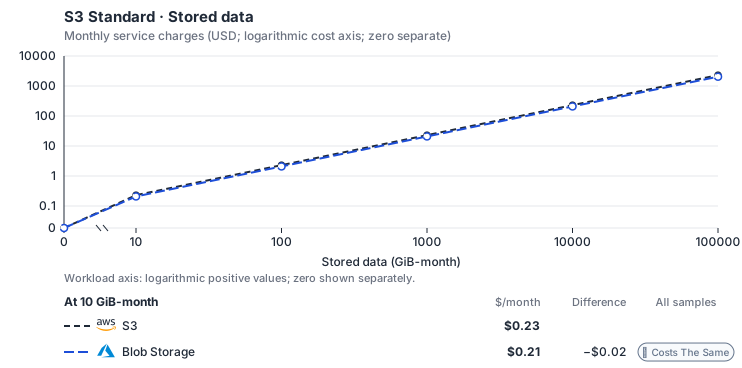
Curve assumptions
- Request meters remain at their independently authored defaults. Other native meters and workload assumptions retain their explicitly displayed default quantities. Workload translation and capacity assumptions are not benchmark measurements.
- Native monthly usage priced at the cited provider list prices; listed target allowances apply where present, excluding invoice credits, taxes and negotiated discounts. Rates as of 2026-10-22: us-east-1 → eastus, USD/month.
- Source prices are reference charges, not an invoice. Target lines cover selected service usage/configuration only; adapter hosting and Tensor9 fees are excluded.
- Samples of explicit prices are not performance measurements or capacity qualification. No interpolation or break-even guarantee is implied.
- Variant assumptions show the first axis sample; any axis-dependent configuration is described by this curve’s workload note.
- Rates are cited provider list prices, editable for discounts, commitments or another region. Workload translation and capacity coefficients remain editable planning assumptions, not benchmark measurements or a commercial quote.
- Default-zero rates are explicit assumptions, not evidence that the deployed service or resource is free.
- Provisioned-unit minimums use an editable approximate allocation floor. Modeled target service cost is max(usage/allocation, minimum), with billable network, durable staging and dependent sinks added separately; actual RU/TU sizing, scaling increments and throughput remain unqualified.
- Durable staging is priced once: provisioned targets include adapter state in their selected allocation; native targets add a separate staging allocation when required. Adapter hosting is a separate allocation and must exclude resources already priced as staging, workers or target capacity.
- A declared adapter mapping and cost model do not establish implementation availability or service equivalence.
- This is a declared directed mapping; a planning estimate does not establish deployment or request-serving support.
- Authored planning assumptions, not measured adapter capacity. Origin rates are cited first-tier list prices, before free allowances and discounts.
- A cost scenario does not establish backend availability, protocol fidelity or production readiness. Registry serving status remains independent.
- Storage, request throughput and network are independent dimensions; a storage-only curve does not estimate a request mix.
- Object storage bills stored GiB-months, read and write requests and internet egress. Hot LRS block blobs in East US; storage and egress use Azure’s graduated tiers, and the first 100 GB of monthly egress is free. Cool, Cold and Archive tiers are not selected: a Glacier origin is billed at Hot rates.
- AWS Price List API, AmazonS3 offer: https://pricing.us-east-1.amazonaws.com/offers/v1.0/aws/AmazonS3/current/us-east-1/index.json
- AWS Price List API, AWSDataTransfer offer: https://pricing.us-east-1.amazonaws.com/offers/v1.0/aws/AWSDataTransfer/current/us-east-1/index.json
- Azure Retail Prices API: https://prices.azure.com/api/retail/prices
- Additional network transfer, backups, KMS, one-time migration and operational labor unless an explicit meter includes them.
- Destination application execution and separately billed downstream services; supply those allocations separately.
- Replication beyond the selected target policy; archive classes and their minimum-duration/retrieval charges need a separate profile.
- Taxes, discounts, credits and free-tier allowances not explicitly listed by this model.
- Unmodeled dependent services, task execution and operations outside the selected workload family.
plan-44731a93a6adc52a5b2db23ce41fd580a9d12f15 / 2026-10-22.planning.2. Curve: workload-1.
Sources: AWS Price List API, AmazonS3 offer, AWS Price List API, AWSDataTransfer offer, Azure Retail Prices API.
S3 Standard · Object writes
Feature: S3 Standard. Estimated monthly service charges by Object writes. Adapter hosting and Tensor9 fees are excluded. Source: us-east-1; target: eastus; currency: USD.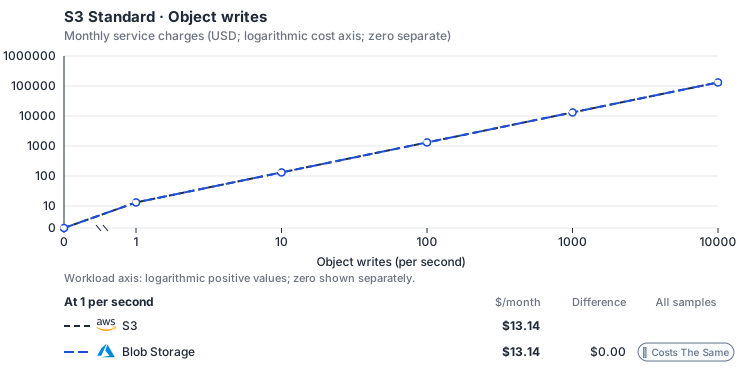
Curve assumptions
- Stored GiB and reads stay at independent defaults. Other native meters and workload assumptions retain their explicitly displayed default quantities. Workload translation and capacity assumptions are not benchmark measurements.
- Native monthly usage priced at the cited provider list prices; listed target allowances apply where present, excluding invoice credits, taxes and negotiated discounts. Rates as of 2026-10-22: us-east-1 → eastus, USD/month.
- Source prices are reference charges, not an invoice. Target lines cover selected service usage/configuration only; adapter hosting and Tensor9 fees are excluded.
- Samples of explicit prices are not performance measurements or capacity qualification. No interpolation or break-even guarantee is implied.
- Variant assumptions show the first axis sample; any axis-dependent configuration is described by this curve’s workload note.
- Rates are cited provider list prices, editable for discounts, commitments or another region. Workload translation and capacity coefficients remain editable planning assumptions, not benchmark measurements or a commercial quote.
- Default-zero rates are explicit assumptions, not evidence that the deployed service or resource is free.
- Provisioned-unit minimums use an editable approximate allocation floor. Modeled target service cost is max(usage/allocation, minimum), with billable network, durable staging and dependent sinks added separately; actual RU/TU sizing, scaling increments and throughput remain unqualified.
- Durable staging is priced once: provisioned targets include adapter state in their selected allocation; native targets add a separate staging allocation when required. Adapter hosting is a separate allocation and must exclude resources already priced as staging, workers or target capacity.
- A declared adapter mapping and cost model do not establish implementation availability or service equivalence.
- This is a declared directed mapping; a planning estimate does not establish deployment or request-serving support.
- Authored planning assumptions, not measured adapter capacity. Origin rates are cited first-tier list prices, before free allowances and discounts.
- A cost scenario does not establish backend availability, protocol fidelity or production readiness. Registry serving status remains independent.
- Storage, request throughput and network are independent dimensions; a storage-only curve does not estimate a request mix.
- Object storage bills stored GiB-months, read and write requests and internet egress. Hot LRS block blobs in East US; storage and egress use Azure’s graduated tiers, and the first 100 GB of monthly egress is free. Cool, Cold and Archive tiers are not selected: a Glacier origin is billed at Hot rates.
- AWS Price List API, AmazonS3 offer: https://pricing.us-east-1.amazonaws.com/offers/v1.0/aws/AmazonS3/current/us-east-1/index.json
- AWS Price List API, AWSDataTransfer offer: https://pricing.us-east-1.amazonaws.com/offers/v1.0/aws/AWSDataTransfer/current/us-east-1/index.json
- Azure Retail Prices API: https://prices.azure.com/api/retail/prices
- Additional network transfer, backups, KMS, one-time migration and operational labor unless an explicit meter includes them.
- Destination application execution and separately billed downstream services; supply those allocations separately.
- Replication beyond the selected target policy; archive classes and their minimum-duration/retrieval charges need a separate profile.
- Taxes, discounts, credits and free-tier allowances not explicitly listed by this model.
- Unmodeled dependent services, task execution and operations outside the selected workload family.
plan-44731a93a6adc52a5b2db23ce41fd580a9d12f15 / 2026-10-22.planning.2. Curve: workload-2.
Sources: AWS Price List API, AmazonS3 offer, AWS Price List API, AWSDataTransfer offer, Azure Retail Prices API.
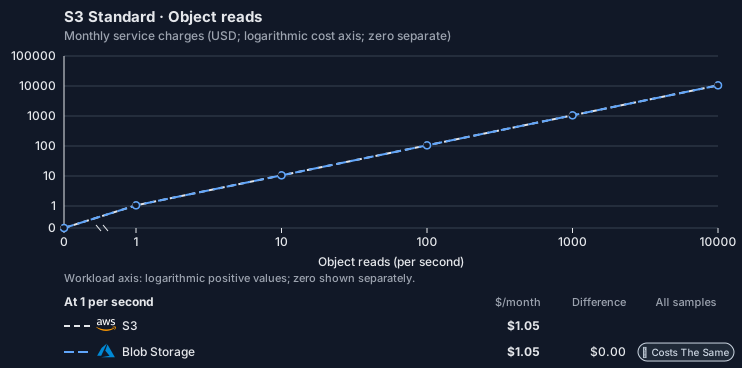
S3 Standard · Object reads
Feature: S3 Standard. Estimated monthly service charges by Object reads. Adapter hosting and Tensor9 fees are excluded. Source: us-east-1; target: eastus; currency: USD.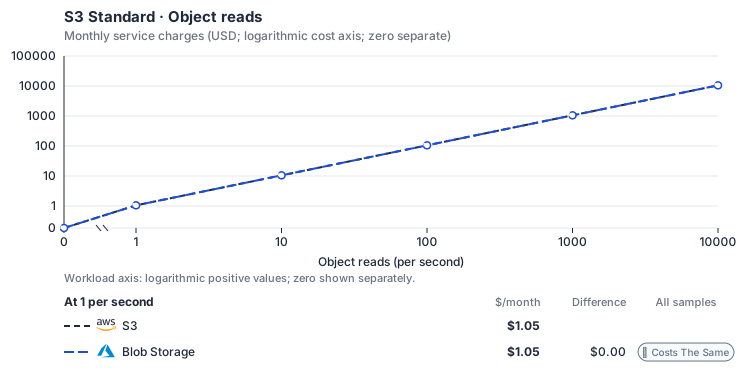
Curve assumptions
- Stored GiB and writes stay at independent defaults. Other native meters and workload assumptions retain their explicitly displayed default quantities. Workload translation and capacity assumptions are not benchmark measurements.
- Native monthly usage priced at the cited provider list prices; listed target allowances apply where present, excluding invoice credits, taxes and negotiated discounts. Rates as of 2026-10-22: us-east-1 → eastus, USD/month.
- Source prices are reference charges, not an invoice. Target lines cover selected service usage/configuration only; adapter hosting and Tensor9 fees are excluded.
- Samples of explicit prices are not performance measurements or capacity qualification. No interpolation or break-even guarantee is implied.
- Variant assumptions show the first axis sample; any axis-dependent configuration is described by this curve’s workload note.
- Rates are cited provider list prices, editable for discounts, commitments or another region. Workload translation and capacity coefficients remain editable planning assumptions, not benchmark measurements or a commercial quote.
- Default-zero rates are explicit assumptions, not evidence that the deployed service or resource is free.
- Provisioned-unit minimums use an editable approximate allocation floor. Modeled target service cost is max(usage/allocation, minimum), with billable network, durable staging and dependent sinks added separately; actual RU/TU sizing, scaling increments and throughput remain unqualified.
- Durable staging is priced once: provisioned targets include adapter state in their selected allocation; native targets add a separate staging allocation when required. Adapter hosting is a separate allocation and must exclude resources already priced as staging, workers or target capacity.
- A declared adapter mapping and cost model do not establish implementation availability or service equivalence.
- This is a declared directed mapping; a planning estimate does not establish deployment or request-serving support.
- Authored planning assumptions, not measured adapter capacity. Origin rates are cited first-tier list prices, before free allowances and discounts.
- A cost scenario does not establish backend availability, protocol fidelity or production readiness. Registry serving status remains independent.
- Storage, request throughput and network are independent dimensions; a storage-only curve does not estimate a request mix.
- Object storage bills stored GiB-months, read and write requests and internet egress. Hot LRS block blobs in East US; storage and egress use Azure’s graduated tiers, and the first 100 GB of monthly egress is free. Cool, Cold and Archive tiers are not selected: a Glacier origin is billed at Hot rates.
- AWS Price List API, AmazonS3 offer: https://pricing.us-east-1.amazonaws.com/offers/v1.0/aws/AmazonS3/current/us-east-1/index.json
- AWS Price List API, AWSDataTransfer offer: https://pricing.us-east-1.amazonaws.com/offers/v1.0/aws/AWSDataTransfer/current/us-east-1/index.json
- Azure Retail Prices API: https://prices.azure.com/api/retail/prices
- Additional network transfer, backups, KMS, one-time migration and operational labor unless an explicit meter includes them.
- Destination application execution and separately billed downstream services; supply those allocations separately.
- Replication beyond the selected target policy; archive classes and their minimum-duration/retrieval charges need a separate profile.
- Taxes, discounts, credits and free-tier allowances not explicitly listed by this model.
- Unmodeled dependent services, task execution and operations outside the selected workload family.
plan-44731a93a6adc52a5b2db23ce41fd580a9d12f15 / 2026-10-22.planning.2. Curve: workload-3.
Sources: AWS Price List API, AmazonS3 offer, AWS Price List API, AWSDataTransfer offer, Azure Retail Prices API.
S3 Standard → Blob Storage: Authored native-usage planning example. Native monthly usage priced at the cited provider list prices; listed target allowances apply where present, excluding invoice credits, taxes and negotiated discounts.
Scenario source region: us-east-1. Scenario target region: eastus. Currency: USD.
Unestimated components: Adapter hosting, Tensor9 fees. A modeled adapted total and savings require these costs.
Cost scope: Modeled target native service and explicitly modeled state allocation; hosting and Tensor9 fees only when supplied.
Excluded costs and workload features:
- Additional network transfer, backups, KMS, one-time migration and operational labor unless an explicit meter includes them.
- Destination application execution and separately billed downstream services; supply those allocations separately.
- Replication beyond the selected target policy; archive classes and their minimum-duration/retrieval charges need a separate profile.
- Taxes, discounts, credits and free-tier allowances not explicitly listed by this model.
- Unmodeled dependent services, task execution and operations outside the selected workload family.
- Translated reads: 0 operations.
- Translated writes: 0 operations.
- Translated resident physical data: 0 GiB-month.
- Native provider operations: 0 operations.
- Published payload: 0 GiB.
- Delivered payload: 0 GiB.
- Allocated execution CPU: 0 vCPU-hour.
- Allocated execution RAM: 0 GiB-hour.
- Independent resource allocation: 0 resource-hour.
- Independent inventory: 0 resource-month.
- Input tokens: 0 tokens.
- Output tokens: 0 tokens.
- Billable network: 0 GiB.
- Dependent object sink retained data: 0 GiB-month.
- Dependent object sink writes: 0 writes.
- Rates are cited provider list prices, editable for discounts, commitments or another region. Workload translation and capacity coefficients remain editable planning assumptions, not benchmark measurements or a commercial quote.
- Default-zero rates are explicit assumptions, not evidence that the deployed service or resource is free.
- Provisioned-unit minimums use an editable approximate allocation floor. Modeled target service cost is max(usage/allocation, minimum), with billable network, durable staging and dependent sinks added separately; actual RU/TU sizing, scaling increments and throughput remain unqualified.
- Durable staging is priced once: provisioned targets include adapter state in their selected allocation; native targets add a separate staging allocation when required. Adapter hosting is a separate allocation and must exclude resources already priced as staging, workers or target capacity.
- A declared adapter mapping and cost model do not establish implementation availability or service equivalence.
- This is a declared directed mapping; a planning estimate does not establish deployment or request-serving support.
- Authored planning assumptions, not measured adapter capacity. Origin rates are cited first-tier list prices, before free allowances and discounts.
- A cost scenario does not establish backend availability, protocol fidelity or production readiness. Registry serving status remains independent.
- Storage, request throughput and network are independent dimensions; a storage-only curve does not estimate a request mix.
- Object storage bills stored GiB-months, read and write requests and internet egress. Hot LRS block blobs in East US; storage and egress use Azure’s graduated tiers, and the first 100 GB of monthly egress is free. Cool, Cold and Archive tiers are not selected: a Glacier origin is billed at Hot rates.
plan-44731a93a6adc52a5b2db23ce41fd580a9d12f15 / 2026-10-22.planning.2. Scenario: planning-example.
Sources: AWS Price List API, AmazonS3 offer, AWS Price List API, AWSDataTransfer offer, Azure Retail Prices API.
On OCI
S3 requests in the customer environment
The application continues using the S3 API. The Tensor9 adapter runs in the customer environment and sends object requests to OCI Object Storage. It also serves bucket creation, deletion, listing, and configuration through a persistent bucket store. OCI Object Storage stores the objects; Tensor9 operates the adapter and its bucket-management service.Request flow
Object requests use the backend storage service. Bucket settings persist separately and are applied to the backend resource.

Object requests
Object requests use OCI’s Amazon S3 Compatibility endpoint. The adapter changes the endpoint and signs with the customer’s OCI S3-compatible access and secret keys. Core reads, writes, copies, deletes and multipart uploads use the provider API. Object bodies remain in OCI Object Storage, while the adapter stores bucket configuration separately.Bucket creation and configuration
Each S3 bucket has a durable record containing its name, owner, requested configuration, and backend reference. For a bucket namedbucket-name, the S3-facing identifier is arn:aws:s3:::bucket-name; the backend resource is an OCI Object Storage bucket. ListBuckets returns the caller’s buckets, and configuration reads use the stored request state.
A configuration worker applies the stored settings to the backend. CreateBucket waits for the backend bucket to be ready before returning success, so an immediate object write does not race bucket creation. DeleteBucket waits for removal and returns BucketNotEmpty if objects prevent deletion. A lifecycle update also waits for the backend to apply it. For other configuration changes, a successful read of the new setting describes stored configuration; it does not imply every backend-side change has already completed.
Versions and multipart uploads
OCI provides native multipart uploads and accepts a versionId on object reads, metadata reads and deletion. Its compatibility endpoint does not provide the S3 version-listing behavior used by the application. At Max, the adapter retains the version and deletion metadata needed by S3-addressed object operations. ListObjectVersions remains outside this mapping; maintaining version metadata does not add that API. Native multipart operations retain the provider’s behavior.Backend configuration
Runtime bucket configuration is stored by the adapter and applied through the backend bucket-management design. Native OCI bucket settings provide lifecycle, encryption, replication and retention. Encryption can use provider-managed, Vault-managed or customer-supplied keys; DSSE-KMS and S3 Bucket Keys have no direct equivalent. OCI tags apply to buckets; object tagging is outside the listed mapping. Retention rules combine time-based retention with optional locking and do not provide an independent S3 legal-hold object.Placement and operation
OCI provides strong read-after-write consistency and designs for eleven-nines durability. It replicates across three availability domains, or three fault domains in a single-domain region. Cross-region replication targets a preexisting destination bucket. Object events use OCI Events. Tensor9 operates the bucket-management adapter, and Oracle operates the object store.Compatibility limits
Bucket policy is unsupported at every tier. OCI’s compatibility endpoint has no configurable CORS; its fixed response is not an S3 CORS rule set. Website hosting and Requester Pays have no direct OCI Object Storage equivalent. Presigned access uses OCI Pre-Authenticated Requests outside this S3 adapter path. The API table identifies operations that remain unavailable despite native storage features.Migration and leaving the adapter
A newly provisioned backend bucket starts empty. Copy existing objects and required versions with a migration tool or a coordinated dual-write, then verify object data and application reads before switching. Preserve version history through the S3 API when the application depends on S3 version identifiers or delete markers. Leaving the Max adapter requires moving bucket configuration as well as object data. Apply the retained settings to native backend resources, resolve any S3-specific version metadata, and move clients to the backend’s own API. Keep the adapter and its persistent state until the application no longer depends on those S3 behaviors.Example monthly charges
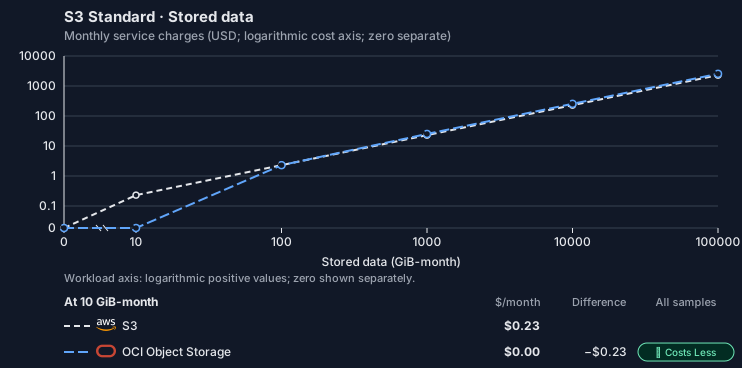
This Tensor9 BYOC scenario estimates service charges for the named origin and target services. Adapter hosting and commercial Tensor9 fees need separate allocations. How Tensor9 estimates costs explains the method and what the estimates include.S3 Standard · Stored data
Feature: S3 Standard. Estimated monthly service charges by Stored data. Adapter hosting and Tensor9 fees are excluded. Source: us-east-1; target: us-ashburn-1; currency: USD.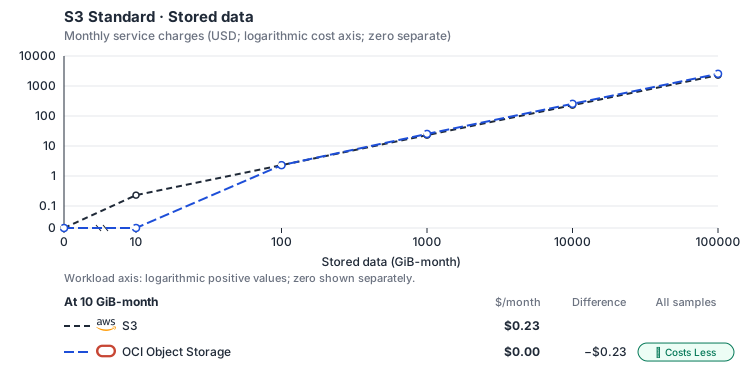
Curve assumptions
- Request meters remain at their independently authored defaults. Other native meters and workload assumptions retain their explicitly displayed default quantities. Workload translation and capacity assumptions are not benchmark measurements.
- Native monthly usage priced at the cited provider list prices; listed target allowances apply where present, excluding invoice credits, taxes and negotiated discounts. Rates as of 2026-10-22: us-east-1 → us-ashburn-1, USD/month.
- Source prices are reference charges, not an invoice. Target lines cover selected service usage/configuration only; adapter hosting and Tensor9 fees are excluded.
- Samples of explicit prices are not performance measurements or capacity qualification. No interpolation or break-even guarantee is implied.
- Variant assumptions show the first axis sample; any axis-dependent configuration is described by this curve’s workload note.
- Rates are cited provider list prices, editable for discounts, commitments or another region. Workload translation and capacity coefficients remain editable planning assumptions, not benchmark measurements or a commercial quote.
- Default-zero rates are explicit assumptions, not evidence that the deployed service or resource is free.
- Provisioned-unit minimums use an editable approximate allocation floor. Modeled target service cost is max(usage/allocation, minimum), with billable network, durable staging and dependent sinks added separately; actual RU/TU sizing, scaling increments and throughput remain unqualified.
- Durable staging is priced once: provisioned targets include adapter state in their selected allocation; native targets add a separate staging allocation when required. Adapter hosting is a separate allocation and must exclude resources already priced as staging, workers or target capacity.
- A declared adapter mapping and cost model do not establish implementation availability or service equivalence.
- This is a declared directed mapping; a planning estimate does not establish deployment or request-serving support.
- Authored planning assumptions, not measured adapter capacity. Origin rates are cited first-tier list prices, before free allowances and discounts.
- A cost scenario does not establish backend availability, protocol fidelity or production readiness. Registry serving status remains independent.
- Storage, request throughput and network are independent dimensions; a storage-only curve does not estimate a request mix.
- Object storage bills stored GiB-months, read and write requests and internet egress. OCI Object Storage Standard tier: the first 10 GB stored, 50,000 requests and 10 TB of egress each month are free, and reads and writes share one request rate (its allowance is applied to reads). Infrequent Access (USD 0.01 per GB-month) and Archive (0.0026, where the S3 mapping places GLACIER data, with a 90-day minimum retention) are not selected.
- AWS Price List API, AmazonS3 offer: https://pricing.us-east-1.amazonaws.com/offers/v1.0/aws/AmazonS3/current/us-east-1/index.json
- AWS Price List API, AWSDataTransfer offer: https://pricing.us-east-1.amazonaws.com/offers/v1.0/aws/AWSDataTransfer/current/us-east-1/index.json
- OCI price list API: https://apexapps.oracle.com/pls/apex/cetools/api/v1/products/?currencyCode=USD
- Additional network transfer, backups, KMS, one-time migration and operational labor unless an explicit meter includes them.
- Destination application execution and separately billed downstream services; supply those allocations separately.
- Replication beyond the selected target policy; archive classes and their minimum-duration/retrieval charges need a separate profile.
- Taxes, discounts, credits and free-tier allowances not explicitly listed by this model.
- Unmodeled dependent services, task execution and operations outside the selected workload family.
plan-5de6ed33269cd5af6c0a009d579d867d2f37ab5f / 2026-10-22.planning.2. Curve: workload-1.
Sources: AWS Price List API, AmazonS3 offer, AWS Price List API, AWSDataTransfer offer, OCI price list API.
S3 Standard · Object writes
Feature: S3 Standard. Estimated monthly service charges by Object writes. Adapter hosting and Tensor9 fees are excluded. Source: us-east-1; target: us-ashburn-1; currency: USD.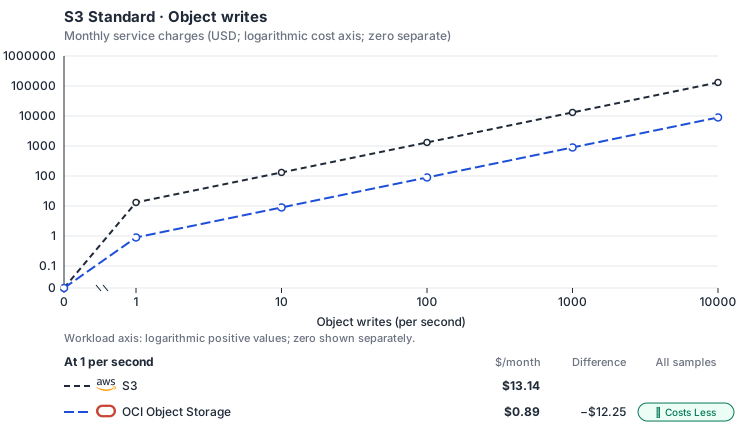
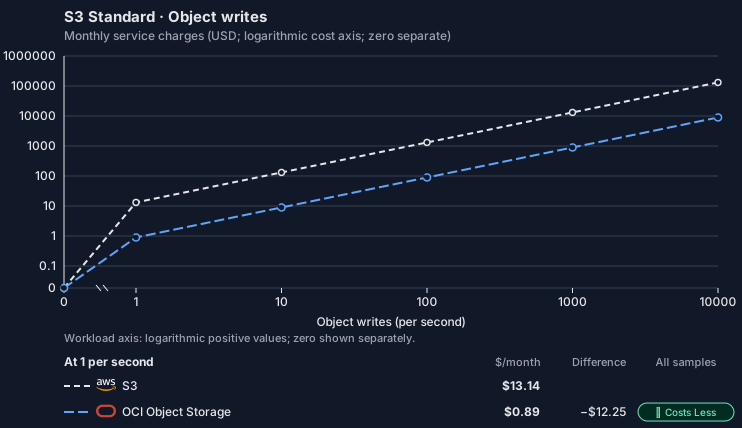
Curve assumptions
- Stored GiB and reads stay at independent defaults. Other native meters and workload assumptions retain their explicitly displayed default quantities. Workload translation and capacity assumptions are not benchmark measurements.
- Native monthly usage priced at the cited provider list prices; listed target allowances apply where present, excluding invoice credits, taxes and negotiated discounts. Rates as of 2026-10-22: us-east-1 → us-ashburn-1, USD/month.
- Source prices are reference charges, not an invoice. Target lines cover selected service usage/configuration only; adapter hosting and Tensor9 fees are excluded.
- Samples of explicit prices are not performance measurements or capacity qualification. No interpolation or break-even guarantee is implied.
- Variant assumptions show the first axis sample; any axis-dependent configuration is described by this curve’s workload note.
- Rates are cited provider list prices, editable for discounts, commitments or another region. Workload translation and capacity coefficients remain editable planning assumptions, not benchmark measurements or a commercial quote.
- Default-zero rates are explicit assumptions, not evidence that the deployed service or resource is free.
- Provisioned-unit minimums use an editable approximate allocation floor. Modeled target service cost is max(usage/allocation, minimum), with billable network, durable staging and dependent sinks added separately; actual RU/TU sizing, scaling increments and throughput remain unqualified.
- Durable staging is priced once: provisioned targets include adapter state in their selected allocation; native targets add a separate staging allocation when required. Adapter hosting is a separate allocation and must exclude resources already priced as staging, workers or target capacity.
- A declared adapter mapping and cost model do not establish implementation availability or service equivalence.
- This is a declared directed mapping; a planning estimate does not establish deployment or request-serving support.
- Authored planning assumptions, not measured adapter capacity. Origin rates are cited first-tier list prices, before free allowances and discounts.
- A cost scenario does not establish backend availability, protocol fidelity or production readiness. Registry serving status remains independent.
- Storage, request throughput and network are independent dimensions; a storage-only curve does not estimate a request mix.
- Object storage bills stored GiB-months, read and write requests and internet egress. OCI Object Storage Standard tier: the first 10 GB stored, 50,000 requests and 10 TB of egress each month are free, and reads and writes share one request rate (its allowance is applied to reads). Infrequent Access (USD 0.01 per GB-month) and Archive (0.0026, where the S3 mapping places GLACIER data, with a 90-day minimum retention) are not selected.
- AWS Price List API, AmazonS3 offer: https://pricing.us-east-1.amazonaws.com/offers/v1.0/aws/AmazonS3/current/us-east-1/index.json
- AWS Price List API, AWSDataTransfer offer: https://pricing.us-east-1.amazonaws.com/offers/v1.0/aws/AWSDataTransfer/current/us-east-1/index.json
- OCI price list API: https://apexapps.oracle.com/pls/apex/cetools/api/v1/products/?currencyCode=USD
- Additional network transfer, backups, KMS, one-time migration and operational labor unless an explicit meter includes them.
- Destination application execution and separately billed downstream services; supply those allocations separately.
- Replication beyond the selected target policy; archive classes and their minimum-duration/retrieval charges need a separate profile.
- Taxes, discounts, credits and free-tier allowances not explicitly listed by this model.
- Unmodeled dependent services, task execution and operations outside the selected workload family.
plan-5de6ed33269cd5af6c0a009d579d867d2f37ab5f / 2026-10-22.planning.2. Curve: workload-2.
Sources: AWS Price List API, AmazonS3 offer, AWS Price List API, AWSDataTransfer offer, OCI price list API.
S3 Standard · Object reads
Feature: S3 Standard. Estimated monthly service charges by Object reads. Adapter hosting and Tensor9 fees are excluded. Source: us-east-1; target: us-ashburn-1; currency: USD.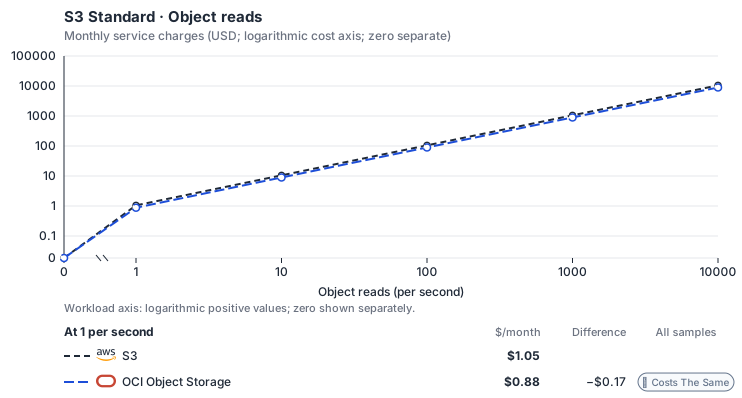
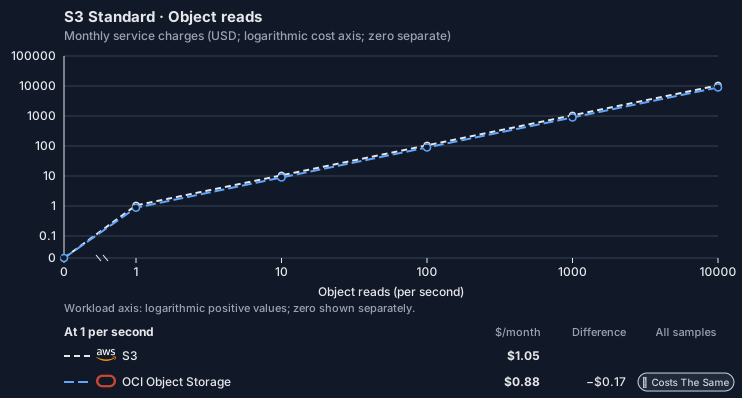
Curve assumptions
- Stored GiB and writes stay at independent defaults. Other native meters and workload assumptions retain their explicitly displayed default quantities. Workload translation and capacity assumptions are not benchmark measurements.
- Native monthly usage priced at the cited provider list prices; listed target allowances apply where present, excluding invoice credits, taxes and negotiated discounts. Rates as of 2026-10-22: us-east-1 → us-ashburn-1, USD/month.
- Source prices are reference charges, not an invoice. Target lines cover selected service usage/configuration only; adapter hosting and Tensor9 fees are excluded.
- Samples of explicit prices are not performance measurements or capacity qualification. No interpolation or break-even guarantee is implied.
- Variant assumptions show the first axis sample; any axis-dependent configuration is described by this curve’s workload note.
- Rates are cited provider list prices, editable for discounts, commitments or another region. Workload translation and capacity coefficients remain editable planning assumptions, not benchmark measurements or a commercial quote.
- Default-zero rates are explicit assumptions, not evidence that the deployed service or resource is free.
- Provisioned-unit minimums use an editable approximate allocation floor. Modeled target service cost is max(usage/allocation, minimum), with billable network, durable staging and dependent sinks added separately; actual RU/TU sizing, scaling increments and throughput remain unqualified.
- Durable staging is priced once: provisioned targets include adapter state in their selected allocation; native targets add a separate staging allocation when required. Adapter hosting is a separate allocation and must exclude resources already priced as staging, workers or target capacity.
- A declared adapter mapping and cost model do not establish implementation availability or service equivalence.
- This is a declared directed mapping; a planning estimate does not establish deployment or request-serving support.
- Authored planning assumptions, not measured adapter capacity. Origin rates are cited first-tier list prices, before free allowances and discounts.
- A cost scenario does not establish backend availability, protocol fidelity or production readiness. Registry serving status remains independent.
- Storage, request throughput and network are independent dimensions; a storage-only curve does not estimate a request mix.
- Object storage bills stored GiB-months, read and write requests and internet egress. OCI Object Storage Standard tier: the first 10 GB stored, 50,000 requests and 10 TB of egress each month are free, and reads and writes share one request rate (its allowance is applied to reads). Infrequent Access (USD 0.01 per GB-month) and Archive (0.0026, where the S3 mapping places GLACIER data, with a 90-day minimum retention) are not selected.
- AWS Price List API, AmazonS3 offer: https://pricing.us-east-1.amazonaws.com/offers/v1.0/aws/AmazonS3/current/us-east-1/index.json
- AWS Price List API, AWSDataTransfer offer: https://pricing.us-east-1.amazonaws.com/offers/v1.0/aws/AWSDataTransfer/current/us-east-1/index.json
- OCI price list API: https://apexapps.oracle.com/pls/apex/cetools/api/v1/products/?currencyCode=USD
- Additional network transfer, backups, KMS, one-time migration and operational labor unless an explicit meter includes them.
- Destination application execution and separately billed downstream services; supply those allocations separately.
- Replication beyond the selected target policy; archive classes and their minimum-duration/retrieval charges need a separate profile.
- Taxes, discounts, credits and free-tier allowances not explicitly listed by this model.
- Unmodeled dependent services, task execution and operations outside the selected workload family.
plan-5de6ed33269cd5af6c0a009d579d867d2f37ab5f / 2026-10-22.planning.2. Curve: workload-3.
Sources: AWS Price List API, AmazonS3 offer, AWS Price List API, AWSDataTransfer offer, OCI price list API.
S3 Standard → OCI Object Storage: Authored native-usage planning example. Native monthly usage priced at the cited provider list prices; listed target allowances apply where present, excluding invoice credits, taxes and negotiated discounts.
Scenario source region: us-east-1. Scenario target region: us-ashburn-1. Currency: USD.
Unestimated components: Adapter hosting, Tensor9 fees. A modeled adapted total and savings require these costs.
Cost scope: Modeled target native service and explicitly modeled state allocation; hosting and Tensor9 fees only when supplied.
Excluded costs and workload features:
- Additional network transfer, backups, KMS, one-time migration and operational labor unless an explicit meter includes them.
- Destination application execution and separately billed downstream services; supply those allocations separately.
- Replication beyond the selected target policy; archive classes and their minimum-duration/retrieval charges need a separate profile.
- Taxes, discounts, credits and free-tier allowances not explicitly listed by this model.
- Unmodeled dependent services, task execution and operations outside the selected workload family.
- Translated reads: 0 operations.
- Translated writes: 0 operations.
- Translated resident physical data: 0 GiB-month.
- Native provider operations: 0 operations.
- Published payload: 0 GiB.
- Delivered payload: 0 GiB.
- Allocated execution CPU: 0 vCPU-hour.
- Allocated execution RAM: 0 GiB-hour.
- Independent resource allocation: 0 resource-hour.
- Independent inventory: 0 resource-month.
- Input tokens: 0 tokens.
- Output tokens: 0 tokens.
- Billable network: 0 GiB.
- Dependent object sink retained data: 0 GiB-month.
- Dependent object sink writes: 0 writes.
- Rates are cited provider list prices, editable for discounts, commitments or another region. Workload translation and capacity coefficients remain editable planning assumptions, not benchmark measurements or a commercial quote.
- Default-zero rates are explicit assumptions, not evidence that the deployed service or resource is free.
- Provisioned-unit minimums use an editable approximate allocation floor. Modeled target service cost is max(usage/allocation, minimum), with billable network, durable staging and dependent sinks added separately; actual RU/TU sizing, scaling increments and throughput remain unqualified.
- Durable staging is priced once: provisioned targets include adapter state in their selected allocation; native targets add a separate staging allocation when required. Adapter hosting is a separate allocation and must exclude resources already priced as staging, workers or target capacity.
- A declared adapter mapping and cost model do not establish implementation availability or service equivalence.
- This is a declared directed mapping; a planning estimate does not establish deployment or request-serving support.
- Authored planning assumptions, not measured adapter capacity. Origin rates are cited first-tier list prices, before free allowances and discounts.
- A cost scenario does not establish backend availability, protocol fidelity or production readiness. Registry serving status remains independent.
- Storage, request throughput and network are independent dimensions; a storage-only curve does not estimate a request mix.
- Object storage bills stored GiB-months, read and write requests and internet egress. OCI Object Storage Standard tier: the first 10 GB stored, 50,000 requests and 10 TB of egress each month are free, and reads and writes share one request rate (its allowance is applied to reads). Infrequent Access (USD 0.01 per GB-month) and Archive (0.0026, where the S3 mapping places GLACIER data, with a 90-day minimum retention) are not selected.
plan-5de6ed33269cd5af6c0a009d579d867d2f37ab5f / 2026-10-22.planning.2. Scenario: planning-example.
Sources: AWS Price List API, AmazonS3 offer, AWS Price List API, AWSDataTransfer offer, OCI price list API.
On Private Kubernetes
How it works
Your application keeps its S3 client and sends its requests to the Tensor9 adapter. The adapter signs each supported request with the customer’s MinIO credentials and sends it to MinIO’s S3 endpoint. Tensor9 deploys and operates MinIO inside the appliance, including in disconnected environments. Objects stay on the customer’s disks.

Object operations
The adapter passes through reads, writes, listings, deletes, server-side copies and multipart uploads. Versioned buckets also support version listing. Object tags are stored as MinIO object tags, so MinIO can use them in its lifecycle and access-policy conditions. MinIO supports more of the S3 API than this endpoint accepts. The adapter rejects object ACL requests, bucket-policy requests, S3 Select, Glacier restore and runtime retention or legal-hold calls. MinIO does implement Object Lock, including GOVERNANCE and COMPLIANCE retention and independent legal holds; configure those directly on MinIO.Consistency and recovery
MinIO provides strict read-after-write and list-after-write consistency. A completed write is visible to the next read and listing. MinIO splits each object into data and parity pieces (shards) spread across drives. Parity lets it rebuild missing or damaged shards while enough drives remain available. How many failures it tolerates depends on the configured parity and on how drives are placed across nodes. Reads and writes need different numbers of drives online, so being able to recover data after an outage does not mean writes keep working during it. MinIO checks reads with HighwayHash and can repair corruption it detects from the surviving shards. Tensor9 operates recovery and monitors the deployment; durability depends on its hardware and layout. MinIO publishes no durability percentage or availability SLA to stand in for that design. See MinIO’s erasure-coding documentation for parity and quorum requirements.

Bucket configuration
Configure bucket features at deployment or directly on MinIO; the adapter does not pass runtime S3 bucket-configuration requests through. MinIO supports versioning, expiration of current and noncurrent objects, and cleanup of incomplete multipart uploads. Encryption supports SSE-S3, SSE-C and SSE-KMS through the KES key server. Bucket replication copies objects between configured buckets. Site replication also replicates buckets and identity configuration, including users, groups and policies, across MinIO deployments. Choose the replication mode and recovery destinations your application needs. MinIO can send object events to webhooks, Kafka, AMQP, NATS, Redis and several databases. Configure these destinations on MinIO.Limitations
- Runtime bucket configuration is not supported. Bucket-configuration requests, including
PutBucketNotificationConfiguration, are rejected. Set bucket features at deployment or on MinIO. - DSSE-KMS and S3 Bucket Keys are not supported. MinIO has no equivalent for either in this mapping.
- Storage classes behave differently: they choose parity, not price. MinIO’s
STANDARDandREDUCED_REDUNDANCYclasses select erasure-coding parity, not cost tiers. Lifecycle rules can move data to an external object store, but there is no on-cluster Glacier-style class. - Requester Pays is not supported. This mapping has no requester billing mode.
- Configurable CORS is not supported on the Community server. Check support in the MinIO edition you deploy.
- S3 static website hosting is not supported. MinIO has no index or error-document website mode. A web server or reverse proxy can serve static content from the bucket.
- Analytics, inventory, Intelligent-Tiering and metrics configurations are not supported. They are outside this mapping.
- The adapter does not check S3 presigned URLs. It does not enforce their signatures or expiry. Use MinIO’s own presigning or
mc sharefor time-limited direct access.
Other considerations
- Before going live. The customer supplies the disks and nodes, and Tensor9 operates the store as part of the appliance. Size usable capacity after parity and replication, and plan expansion and recovery around the actual drive and node layout.
- Moving from AWS. New buckets start empty. Copy existing S3 objects and the versions you need before switching clients, then check reads and any version-dependent behaviour. MinIO site replication can seed another MinIO deployment, including its identity configuration.
- Moving off the adapter. Change client endpoints and credentials, and keep the bucket settings your application uses.
Example monthly charges
This Tensor9 BYOC scenario estimates service charges for the named origin and target services. Adapter hosting and commercial Tensor9 fees need separate allocations. How Tensor9 estimates costs explains the method and what the estimates include.S3 Standard · Stored data
Feature: S3 Standard. Estimated monthly service charges by Stored data. Adapter hosting and Tensor9 fees are excluded. Source: us-east-1; target: us-central1; currency: USD.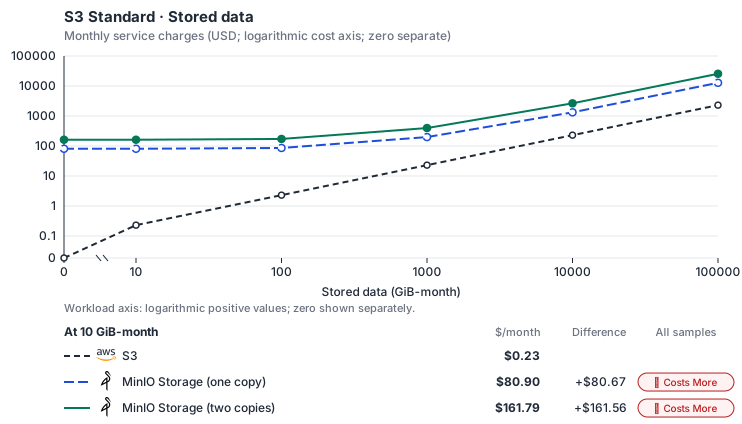
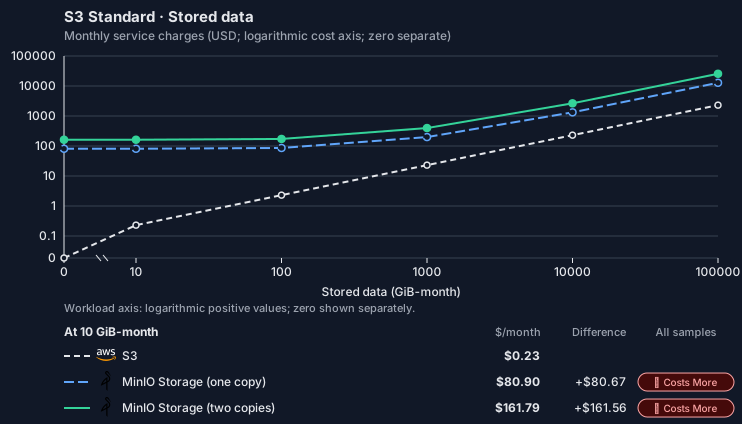
Estimated allocation, not benchmark calibrated: sized from 2 vCPU, 8 GiB memory and 100 GiB SSD at 0 GiB-month to 4 nodes of 2 vCPU, 8 GiB memory and 31,257 GiB SSD each at 100,000 GiB-month.
Curve assumptions
- Request meters remain at their independently authored defaults. Other native meters and workload assumptions retain their explicitly displayed default quantities. Workload translation and capacity assumptions are not benchmark measurements.
- Native monthly usage priced at the cited provider list prices; listed target allowances apply where present, excluding invoice credits, taxes and negotiated discounts. Rates as of 2026-10-22: us-east-1 → us-central1, USD/month.
- Source prices are reference charges, not an invoice. Target lines cover selected service usage/configuration only; adapter hosting and Tensor9 fees are excluded.
- Samples of explicit prices are not performance measurements or capacity qualification. No interpolation or break-even guarantee is implied.
- Variant assumptions show the first axis sample; any axis-dependent configuration is described by this curve’s workload note.
- Rates are cited provider list prices, editable for discounts, commitments or another region. Workload translation and capacity coefficients remain editable planning assumptions, not benchmark measurements or a commercial quote.
- Default-zero rates are explicit assumptions, not evidence that the deployed service or resource is free.
- Provisioned-unit minimums use an editable approximate allocation floor. Modeled target service cost is max(usage/allocation, minimum), with billable network, durable staging and dependent sinks added separately; actual RU/TU sizing, scaling increments and throughput remain unqualified.
- Durable staging is priced once: provisioned targets include adapter state in their selected allocation; native targets add a separate staging allocation when required. Adapter hosting is a separate allocation and must exclude resources already priced as staging, workers or target capacity.
- A declared adapter mapping and cost model do not establish implementation availability or service equivalence.
- This is a declared directed mapping; a planning estimate does not establish deployment or request-serving support.
- Authored planning assumptions, not measured adapter capacity. Origin rates are cited first-tier list prices, before free allowances and discounts.
- A cost scenario does not establish backend availability, protocol fidelity or production readiness. Registry serving status remains independent.
- Storage, request throughput and network are independent dimensions; a storage-only curve does not estimate a request mix.
- Self-hosted target: MinIO community server (GNU AGPL v3, https://github.com/minio/minio/blob/master/LICENSE); erasure-coding overhead belongs in the family’s physical-work translation. Selected CPU, RAM and physical disk allocation grow with workload; no per-operation price is assumed. No vendor charge: the target runs on the customer’s Kubernetes nodes, so CPU, RAM and disk bill at the Kubernetes node reference rates, Compute Engine N2 in us-central1 (USD 0.031611/vCPU-hour, 0.004237/GiB-hour) with pd-balanced disk (0.10/GiB-month) and Premium Tier egress. The cost-optimized E2 series lists 0.02181159/vCPU-hour and 0.00292353/GiB-hour; AWS m6i/r6i and Azure D2s v5/E2s v5 both decompose to 0.033/vCPU-hour and 0.00375/GiB-hour. Requested CPU and RAM are billed; node bin-packing waste, system reservations and the cluster control-plane fee are not.
- Row-store throughput (capacityOpsPerVcpuSecond, default 1500) is measured-by-tensor9 as a lower bound: the DynamoDB adapter on Cloud SQL db-custom-2-7680 (2 vCPU, PostgreSQL 16, us-west1) served 2,974 ops/s of YCSB-A at 16 threads without recorded saturation (src/main/kotlin/t9/prime/equiv/generated/eval/CloudsqlPostgresqlYcsbAT16GoYcsbV1_0_0.kt). Published CPU-bound pgbench reaches 3,101 read-write transactions and 20,289 point reads per vCPU-second (AWS z1d.2xlarge, PostgreSQL 14.5), so actual capacity is likely higher. Reads and writes share one coefficient: at the same adapter version, read-only YCSB-C was not faster than 50%-update YCSB-A.
- Log-broker throughput (capacityStreamMiBPerVcpuSecond 20 at 0.5 utilization, 4 GiB RAM per vCPU) is provider-documented by Google Managed Service for Apache Kafka sizing (https://docs.cloud.google.com/managed-service-for-apache-kafka/docs/plan-cluster-size): write-equivalent bytes are replicated writes plus a quarter of reads. Producer batches below 10 KB lower per-CPU throughput; that penalty is not modeled.
- Disk utilization 0.8 is provider-documented headroom below Cloud SQL automatic storage increase, which triggers near 91-95% full (https://docs.cloud.google.com/sql/docs/postgres/instance-settings). The 20 GiB reserve exceeds PostgreSQL’s 1 GB default max_wal_size; the remainder of that reserve is unmeasured.
- CPU tiers double from 2 vCPUs to the target’s largest node at 4 GiB per vCPU; each target’s documented largest node bounds CPU, RAM, RAM per vCPU and disk, and the durable staging database uses Cloud SQL Enterprise (96 vCPU, 6.5 GiB per vCPU, 624 GiB, 64 TiB). Targets billed per capacity unit or throughput unit are sized by their backend instead.
- No public evidence: peak/mean work (2) and the RAM working-set fraction (0.1). Proposed measurements: the p99 one-minute rate over the monthly mean from customer CloudWatch metrics; the buffer hit ratio while stepping RAM under a fixed YCSB-B load.
- Node bounds: Planning MinIO node of 32 vCPUs, 128 GiB and one 64 TiB Persistent Disk; a distributed deployment runs at least 4 nodes. Objects are served from disk, so no stored data is reserved in RAM; nodes scale to a 1,000-node planning bound.
- Stored GiB already includes the origin family’s physical footprint assumptions; no second storage amplification is applied.
- The operations/vCPU coefficient supplies the compute requirement alongside explicit resource-hour minima.
- Copies and allocation fractions change cost only; they do not increase modeled primary capacity.
- AWS Price List API, AmazonS3 offer: https://pricing.us-east-1.amazonaws.com/offers/v1.0/aws/AmazonS3/current/us-east-1/index.json
- AWS Price List API, AWSDataTransfer offer: https://pricing.us-east-1.amazonaws.com/offers/v1.0/aws/AWSDataTransfer/current/us-east-1/index.json
- Compute Engine general-purpose machine pricing: https://cloud.google.com/products/compute/pricing/general-purpose
- Disk and image pricing: https://cloud.google.com/compute/disks-image-pricing
- Network pricing: https://cloud.google.com/vpc/network-pricing
- Additional network transfer, backups, KMS, one-time migration and operational labor unless an explicit meter includes them.
- Destination application execution and separately billed downstream services; supply those allocations separately.
- Replication beyond the selected target policy; archive classes and their minimum-duration/retrieval charges need a separate profile.
- Taxes, discounts, credits and free-tier allowances not explicitly listed by this model.
- Unmodeled dependent services, task execution and operations outside the selected workload family.
plan-01e62f79eb4fdd8f6e4171e0e49ff6906876cbd4 / 2026-10-22.planning.2. Curve: workload-1.
Sources: AWS Price List API, AmazonS3 offer, AWS Price List API, AWSDataTransfer offer, Compute Engine general-purpose machine pricing, Disk and image pricing, Network pricing.
S3 Standard · Object writes
Feature: S3 Standard. Estimated monthly service charges by Object writes. Adapter hosting and Tensor9 fees are excluded. Source: us-east-1; target: us-central1; currency: USD.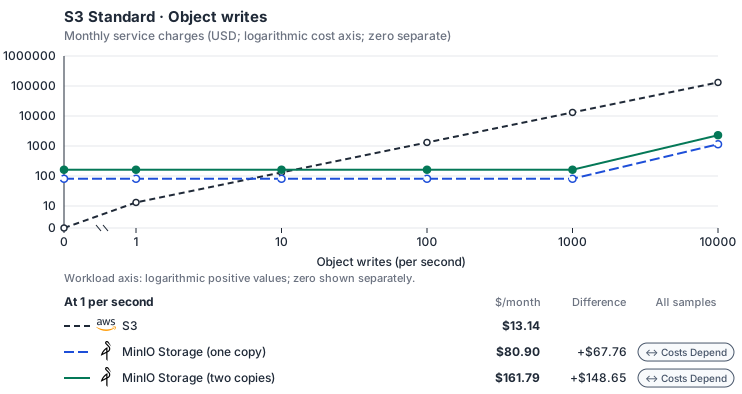
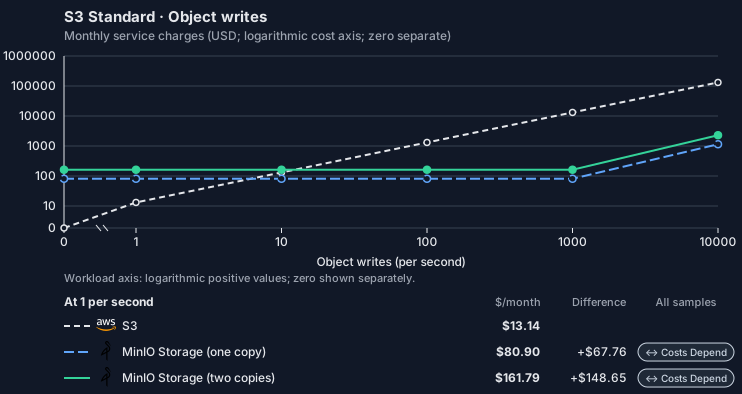
Estimated allocation, not benchmark calibrated: sized from 2 vCPU, 8 GiB memory and 100 GiB SSD at 0 per second to 32 vCPU, 128 GiB memory and 100 GiB SSD at 10,000 per second.
Curve assumptions
- Stored GiB and reads stay at independent defaults. Other native meters and workload assumptions retain their explicitly displayed default quantities. Workload translation and capacity assumptions are not benchmark measurements.
- Native monthly usage priced at the cited provider list prices; listed target allowances apply where present, excluding invoice credits, taxes and negotiated discounts. Rates as of 2026-10-22: us-east-1 → us-central1, USD/month.
- Source prices are reference charges, not an invoice. Target lines cover selected service usage/configuration only; adapter hosting and Tensor9 fees are excluded.
- Samples of explicit prices are not performance measurements or capacity qualification. No interpolation or break-even guarantee is implied.
- Variant assumptions show the first axis sample; any axis-dependent configuration is described by this curve’s workload note.
- Rates are cited provider list prices, editable for discounts, commitments or another region. Workload translation and capacity coefficients remain editable planning assumptions, not benchmark measurements or a commercial quote.
- Default-zero rates are explicit assumptions, not evidence that the deployed service or resource is free.
- Provisioned-unit minimums use an editable approximate allocation floor. Modeled target service cost is max(usage/allocation, minimum), with billable network, durable staging and dependent sinks added separately; actual RU/TU sizing, scaling increments and throughput remain unqualified.
- Durable staging is priced once: provisioned targets include adapter state in their selected allocation; native targets add a separate staging allocation when required. Adapter hosting is a separate allocation and must exclude resources already priced as staging, workers or target capacity.
- A declared adapter mapping and cost model do not establish implementation availability or service equivalence.
- This is a declared directed mapping; a planning estimate does not establish deployment or request-serving support.
- Authored planning assumptions, not measured adapter capacity. Origin rates are cited first-tier list prices, before free allowances and discounts.
- A cost scenario does not establish backend availability, protocol fidelity or production readiness. Registry serving status remains independent.
- Storage, request throughput and network are independent dimensions; a storage-only curve does not estimate a request mix.
- Self-hosted target: MinIO community server (GNU AGPL v3, https://github.com/minio/minio/blob/master/LICENSE); erasure-coding overhead belongs in the family’s physical-work translation. Selected CPU, RAM and physical disk allocation grow with workload; no per-operation price is assumed. No vendor charge: the target runs on the customer’s Kubernetes nodes, so CPU, RAM and disk bill at the Kubernetes node reference rates, Compute Engine N2 in us-central1 (USD 0.031611/vCPU-hour, 0.004237/GiB-hour) with pd-balanced disk (0.10/GiB-month) and Premium Tier egress. The cost-optimized E2 series lists 0.02181159/vCPU-hour and 0.00292353/GiB-hour; AWS m6i/r6i and Azure D2s v5/E2s v5 both decompose to 0.033/vCPU-hour and 0.00375/GiB-hour. Requested CPU and RAM are billed; node bin-packing waste, system reservations and the cluster control-plane fee are not.
- Row-store throughput (capacityOpsPerVcpuSecond, default 1500) is measured-by-tensor9 as a lower bound: the DynamoDB adapter on Cloud SQL db-custom-2-7680 (2 vCPU, PostgreSQL 16, us-west1) served 2,974 ops/s of YCSB-A at 16 threads without recorded saturation (src/main/kotlin/t9/prime/equiv/generated/eval/CloudsqlPostgresqlYcsbAT16GoYcsbV1_0_0.kt). Published CPU-bound pgbench reaches 3,101 read-write transactions and 20,289 point reads per vCPU-second (AWS z1d.2xlarge, PostgreSQL 14.5), so actual capacity is likely higher. Reads and writes share one coefficient: at the same adapter version, read-only YCSB-C was not faster than 50%-update YCSB-A.
- Log-broker throughput (capacityStreamMiBPerVcpuSecond 20 at 0.5 utilization, 4 GiB RAM per vCPU) is provider-documented by Google Managed Service for Apache Kafka sizing (https://docs.cloud.google.com/managed-service-for-apache-kafka/docs/plan-cluster-size): write-equivalent bytes are replicated writes plus a quarter of reads. Producer batches below 10 KB lower per-CPU throughput; that penalty is not modeled.
- Disk utilization 0.8 is provider-documented headroom below Cloud SQL automatic storage increase, which triggers near 91-95% full (https://docs.cloud.google.com/sql/docs/postgres/instance-settings). The 20 GiB reserve exceeds PostgreSQL’s 1 GB default max_wal_size; the remainder of that reserve is unmeasured.
- CPU tiers double from 2 vCPUs to the target’s largest node at 4 GiB per vCPU; each target’s documented largest node bounds CPU, RAM, RAM per vCPU and disk, and the durable staging database uses Cloud SQL Enterprise (96 vCPU, 6.5 GiB per vCPU, 624 GiB, 64 TiB). Targets billed per capacity unit or throughput unit are sized by their backend instead.
- No public evidence: peak/mean work (2) and the RAM working-set fraction (0.1). Proposed measurements: the p99 one-minute rate over the monthly mean from customer CloudWatch metrics; the buffer hit ratio while stepping RAM under a fixed YCSB-B load.
- Node bounds: Planning MinIO node of 32 vCPUs, 128 GiB and one 64 TiB Persistent Disk; a distributed deployment runs at least 4 nodes. Objects are served from disk, so no stored data is reserved in RAM; nodes scale to a 1,000-node planning bound.
- Stored GiB already includes the origin family’s physical footprint assumptions; no second storage amplification is applied.
- The operations/vCPU coefficient supplies the compute requirement alongside explicit resource-hour minima.
- Copies and allocation fractions change cost only; they do not increase modeled primary capacity.
- AWS Price List API, AmazonS3 offer: https://pricing.us-east-1.amazonaws.com/offers/v1.0/aws/AmazonS3/current/us-east-1/index.json
- AWS Price List API, AWSDataTransfer offer: https://pricing.us-east-1.amazonaws.com/offers/v1.0/aws/AWSDataTransfer/current/us-east-1/index.json
- Compute Engine general-purpose machine pricing: https://cloud.google.com/products/compute/pricing/general-purpose
- Disk and image pricing: https://cloud.google.com/compute/disks-image-pricing
- Network pricing: https://cloud.google.com/vpc/network-pricing
- Additional network transfer, backups, KMS, one-time migration and operational labor unless an explicit meter includes them.
- Destination application execution and separately billed downstream services; supply those allocations separately.
- Replication beyond the selected target policy; archive classes and their minimum-duration/retrieval charges need a separate profile.
- Taxes, discounts, credits and free-tier allowances not explicitly listed by this model.
- Unmodeled dependent services, task execution and operations outside the selected workload family.
plan-01e62f79eb4fdd8f6e4171e0e49ff6906876cbd4 / 2026-10-22.planning.2. Curve: workload-2.
Sources: AWS Price List API, AmazonS3 offer, AWS Price List API, AWSDataTransfer offer, Compute Engine general-purpose machine pricing, Disk and image pricing, Network pricing.
S3 Standard · Object reads
Feature: S3 Standard. Estimated monthly service charges by Object reads. Adapter hosting and Tensor9 fees are excluded. Source: us-east-1; target: us-central1; currency: USD.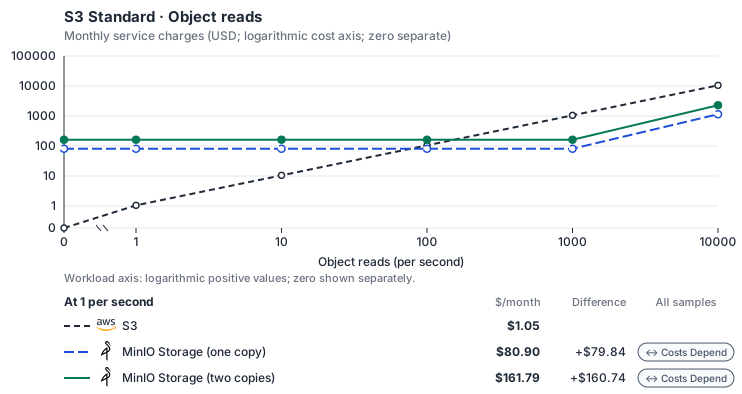
Estimated allocation, not benchmark calibrated: sized from 2 vCPU, 8 GiB memory and 100 GiB SSD at 0 per second to 32 vCPU, 128 GiB memory and 100 GiB SSD at 10,000 per second.
Curve assumptions
- Stored GiB and writes stay at independent defaults. Other native meters and workload assumptions retain their explicitly displayed default quantities. Workload translation and capacity assumptions are not benchmark measurements.
- Native monthly usage priced at the cited provider list prices; listed target allowances apply where present, excluding invoice credits, taxes and negotiated discounts. Rates as of 2026-10-22: us-east-1 → us-central1, USD/month.
- Source prices are reference charges, not an invoice. Target lines cover selected service usage/configuration only; adapter hosting and Tensor9 fees are excluded.
- Samples of explicit prices are not performance measurements or capacity qualification. No interpolation or break-even guarantee is implied.
- Variant assumptions show the first axis sample; any axis-dependent configuration is described by this curve’s workload note.
- Rates are cited provider list prices, editable for discounts, commitments or another region. Workload translation and capacity coefficients remain editable planning assumptions, not benchmark measurements or a commercial quote.
- Default-zero rates are explicit assumptions, not evidence that the deployed service or resource is free.
- Provisioned-unit minimums use an editable approximate allocation floor. Modeled target service cost is max(usage/allocation, minimum), with billable network, durable staging and dependent sinks added separately; actual RU/TU sizing, scaling increments and throughput remain unqualified.
- Durable staging is priced once: provisioned targets include adapter state in their selected allocation; native targets add a separate staging allocation when required. Adapter hosting is a separate allocation and must exclude resources already priced as staging, workers or target capacity.
- A declared adapter mapping and cost model do not establish implementation availability or service equivalence.
- This is a declared directed mapping; a planning estimate does not establish deployment or request-serving support.
- Authored planning assumptions, not measured adapter capacity. Origin rates are cited first-tier list prices, before free allowances and discounts.
- A cost scenario does not establish backend availability, protocol fidelity or production readiness. Registry serving status remains independent.
- Storage, request throughput and network are independent dimensions; a storage-only curve does not estimate a request mix.
- Self-hosted target: MinIO community server (GNU AGPL v3, https://github.com/minio/minio/blob/master/LICENSE); erasure-coding overhead belongs in the family’s physical-work translation. Selected CPU, RAM and physical disk allocation grow with workload; no per-operation price is assumed. No vendor charge: the target runs on the customer’s Kubernetes nodes, so CPU, RAM and disk bill at the Kubernetes node reference rates, Compute Engine N2 in us-central1 (USD 0.031611/vCPU-hour, 0.004237/GiB-hour) with pd-balanced disk (0.10/GiB-month) and Premium Tier egress. The cost-optimized E2 series lists 0.02181159/vCPU-hour and 0.00292353/GiB-hour; AWS m6i/r6i and Azure D2s v5/E2s v5 both decompose to 0.033/vCPU-hour and 0.00375/GiB-hour. Requested CPU and RAM are billed; node bin-packing waste, system reservations and the cluster control-plane fee are not.
- Row-store throughput (capacityOpsPerVcpuSecond, default 1500) is measured-by-tensor9 as a lower bound: the DynamoDB adapter on Cloud SQL db-custom-2-7680 (2 vCPU, PostgreSQL 16, us-west1) served 2,974 ops/s of YCSB-A at 16 threads without recorded saturation (src/main/kotlin/t9/prime/equiv/generated/eval/CloudsqlPostgresqlYcsbAT16GoYcsbV1_0_0.kt). Published CPU-bound pgbench reaches 3,101 read-write transactions and 20,289 point reads per vCPU-second (AWS z1d.2xlarge, PostgreSQL 14.5), so actual capacity is likely higher. Reads and writes share one coefficient: at the same adapter version, read-only YCSB-C was not faster than 50%-update YCSB-A.
- Log-broker throughput (capacityStreamMiBPerVcpuSecond 20 at 0.5 utilization, 4 GiB RAM per vCPU) is provider-documented by Google Managed Service for Apache Kafka sizing (https://docs.cloud.google.com/managed-service-for-apache-kafka/docs/plan-cluster-size): write-equivalent bytes are replicated writes plus a quarter of reads. Producer batches below 10 KB lower per-CPU throughput; that penalty is not modeled.
- Disk utilization 0.8 is provider-documented headroom below Cloud SQL automatic storage increase, which triggers near 91-95% full (https://docs.cloud.google.com/sql/docs/postgres/instance-settings). The 20 GiB reserve exceeds PostgreSQL’s 1 GB default max_wal_size; the remainder of that reserve is unmeasured.
- CPU tiers double from 2 vCPUs to the target’s largest node at 4 GiB per vCPU; each target’s documented largest node bounds CPU, RAM, RAM per vCPU and disk, and the durable staging database uses Cloud SQL Enterprise (96 vCPU, 6.5 GiB per vCPU, 624 GiB, 64 TiB). Targets billed per capacity unit or throughput unit are sized by their backend instead.
- No public evidence: peak/mean work (2) and the RAM working-set fraction (0.1). Proposed measurements: the p99 one-minute rate over the monthly mean from customer CloudWatch metrics; the buffer hit ratio while stepping RAM under a fixed YCSB-B load.
- Node bounds: Planning MinIO node of 32 vCPUs, 128 GiB and one 64 TiB Persistent Disk; a distributed deployment runs at least 4 nodes. Objects are served from disk, so no stored data is reserved in RAM; nodes scale to a 1,000-node planning bound.
- Stored GiB already includes the origin family’s physical footprint assumptions; no second storage amplification is applied.
- The operations/vCPU coefficient supplies the compute requirement alongside explicit resource-hour minima.
- Copies and allocation fractions change cost only; they do not increase modeled primary capacity.
- AWS Price List API, AmazonS3 offer: https://pricing.us-east-1.amazonaws.com/offers/v1.0/aws/AmazonS3/current/us-east-1/index.json
- AWS Price List API, AWSDataTransfer offer: https://pricing.us-east-1.amazonaws.com/offers/v1.0/aws/AWSDataTransfer/current/us-east-1/index.json
- Compute Engine general-purpose machine pricing: https://cloud.google.com/products/compute/pricing/general-purpose
- Disk and image pricing: https://cloud.google.com/compute/disks-image-pricing
- Network pricing: https://cloud.google.com/vpc/network-pricing
- Additional network transfer, backups, KMS, one-time migration and operational labor unless an explicit meter includes them.
- Destination application execution and separately billed downstream services; supply those allocations separately.
- Replication beyond the selected target policy; archive classes and their minimum-duration/retrieval charges need a separate profile.
- Taxes, discounts, credits and free-tier allowances not explicitly listed by this model.
- Unmodeled dependent services, task execution and operations outside the selected workload family.
plan-01e62f79eb4fdd8f6e4171e0e49ff6906876cbd4 / 2026-10-22.planning.2. Curve: workload-3.
Sources: AWS Price List API, AmazonS3 offer, AWS Price List API, AWSDataTransfer offer, Compute Engine general-purpose machine pricing, Disk and image pricing, Network pricing.
S3 Standard → MinIO Storage: Authored native-usage planning example. Native monthly usage priced at the cited provider list prices; listed target allowances apply where present, excluding invoice credits, taxes and negotiated discounts.
Scenario source region: us-east-1. Scenario target region: us-central1. Currency: USD.
Estimated allocation, not benchmark calibrated: sized at 2 vCPU, 8 GiB memory and 100 GiB SSD for this scenario.
Unestimated components: Adapter hosting, Tensor9 fees. A modeled adapted total and savings require these costs.
Cost scope: Modeled target native service and explicitly modeled state allocation; hosting and Tensor9 fees only when supplied.
Excluded costs and workload features:
- Additional network transfer, backups, KMS, one-time migration and operational labor unless an explicit meter includes them.
- Destination application execution and separately billed downstream services; supply those allocations separately.
- Replication beyond the selected target policy; archive classes and their minimum-duration/retrieval charges need a separate profile.
- Taxes, discounts, credits and free-tier allowances not explicitly listed by this model.
- Unmodeled dependent services, task execution and operations outside the selected workload family.
- Translated reads: 0 operations.
- Translated writes: 0 operations.
- Translated resident physical data: 0 GiB-month.
- Native provider operations: 0 operations.
- Published payload: 0 GiB.
- Delivered payload: 0 GiB.
- Allocated execution CPU: 0 vCPU-hour.
- Allocated execution RAM: 0 GiB-hour.
- Independent resource allocation: 0 resource-hour.
- Independent inventory: 0 resource-month.
- Input tokens: 0 tokens.
- Output tokens: 0 tokens.
- Billable network: 0 GiB.
- Dependent object sink retained data: 0 GiB-month.
- Dependent object sink writes: 0 writes.
- Rates are cited provider list prices, editable for discounts, commitments or another region. Workload translation and capacity coefficients remain editable planning assumptions, not benchmark measurements or a commercial quote.
- Default-zero rates are explicit assumptions, not evidence that the deployed service or resource is free.
- Provisioned-unit minimums use an editable approximate allocation floor. Modeled target service cost is max(usage/allocation, minimum), with billable network, durable staging and dependent sinks added separately; actual RU/TU sizing, scaling increments and throughput remain unqualified.
- Durable staging is priced once: provisioned targets include adapter state in their selected allocation; native targets add a separate staging allocation when required. Adapter hosting is a separate allocation and must exclude resources already priced as staging, workers or target capacity.
- A declared adapter mapping and cost model do not establish implementation availability or service equivalence.
- This is a declared directed mapping; a planning estimate does not establish deployment or request-serving support.
- Authored planning assumptions, not measured adapter capacity. Origin rates are cited first-tier list prices, before free allowances and discounts.
- A cost scenario does not establish backend availability, protocol fidelity or production readiness. Registry serving status remains independent.
- Storage, request throughput and network are independent dimensions; a storage-only curve does not estimate a request mix.
- Self-hosted target: MinIO community server (GNU AGPL v3, https://github.com/minio/minio/blob/master/LICENSE); erasure-coding overhead belongs in the family’s physical-work translation. Selected CPU, RAM and physical disk allocation grow with workload; no per-operation price is assumed. No vendor charge: the target runs on the customer’s Kubernetes nodes, so CPU, RAM and disk bill at the Kubernetes node reference rates, Compute Engine N2 in us-central1 (USD 0.031611/vCPU-hour, 0.004237/GiB-hour) with pd-balanced disk (0.10/GiB-month) and Premium Tier egress. The cost-optimized E2 series lists 0.02181159/vCPU-hour and 0.00292353/GiB-hour; AWS m6i/r6i and Azure D2s v5/E2s v5 both decompose to 0.033/vCPU-hour and 0.00375/GiB-hour. Requested CPU and RAM are billed; node bin-packing waste, system reservations and the cluster control-plane fee are not.
- Row-store throughput (capacityOpsPerVcpuSecond, default 1500) is measured-by-tensor9 as a lower bound: the DynamoDB adapter on Cloud SQL db-custom-2-7680 (2 vCPU, PostgreSQL 16, us-west1) served 2,974 ops/s of YCSB-A at 16 threads without recorded saturation (src/main/kotlin/t9/prime/equiv/generated/eval/CloudsqlPostgresqlYcsbAT16GoYcsbV1_0_0.kt). Published CPU-bound pgbench reaches 3,101 read-write transactions and 20,289 point reads per vCPU-second (AWS z1d.2xlarge, PostgreSQL 14.5), so actual capacity is likely higher. Reads and writes share one coefficient: at the same adapter version, read-only YCSB-C was not faster than 50%-update YCSB-A.
- Log-broker throughput (capacityStreamMiBPerVcpuSecond 20 at 0.5 utilization, 4 GiB RAM per vCPU) is provider-documented by Google Managed Service for Apache Kafka sizing (https://docs.cloud.google.com/managed-service-for-apache-kafka/docs/plan-cluster-size): write-equivalent bytes are replicated writes plus a quarter of reads. Producer batches below 10 KB lower per-CPU throughput; that penalty is not modeled.
- Disk utilization 0.8 is provider-documented headroom below Cloud SQL automatic storage increase, which triggers near 91-95% full (https://docs.cloud.google.com/sql/docs/postgres/instance-settings). The 20 GiB reserve exceeds PostgreSQL’s 1 GB default max_wal_size; the remainder of that reserve is unmeasured.
- CPU tiers double from 2 vCPUs to the target’s largest node at 4 GiB per vCPU; each target’s documented largest node bounds CPU, RAM, RAM per vCPU and disk, and the durable staging database uses Cloud SQL Enterprise (96 vCPU, 6.5 GiB per vCPU, 624 GiB, 64 TiB). Targets billed per capacity unit or throughput unit are sized by their backend instead.
- No public evidence: peak/mean work (2) and the RAM working-set fraction (0.1). Proposed measurements: the p99 one-minute rate over the monthly mean from customer CloudWatch metrics; the buffer hit ratio while stepping RAM under a fixed YCSB-B load.
- Node bounds: Planning MinIO node of 32 vCPUs, 128 GiB and one 64 TiB Persistent Disk; a distributed deployment runs at least 4 nodes. Objects are served from disk, so no stored data is reserved in RAM; nodes scale to a 1,000-node planning bound.
- Stored GiB already includes the origin family’s physical footprint assumptions; no second storage amplification is applied.
- The operations/vCPU coefficient supplies the compute requirement alongside explicit resource-hour minima.
- Copies and allocation fractions change cost only; they do not increase modeled primary capacity.
plan-01e62f79eb4fdd8f6e4171e0e49ff6906876cbd4 / 2026-10-22.planning.2. Scenario: planning-example.
Sources: AWS Price List API, AmazonS3 offer, AWS Price List API, AWSDataTransfer offer, Compute Engine general-purpose machine pricing, Disk and image pricing, Network pricing.
Costs
Estimated monthly service charges for each backend with a published cost model, at one sampled workload from that model’s cost curve. Adapter hosting and Tensor9 fees are excluded. How Tensor9 estimates costs explains the method, what the estimates include and how to read their qualifications.
Difference means backend minus origin; a positive difference means the backend costs more. Workloads and target configurations differ by model, so compare each row’s difference at its stated workload rather than charges across rows.
Cost curves across workload sizes, with every assumption and exclusion: Amazon S3 costs.
Service level agreements
Listed terms cover requests sent through this service adapter. They do not cover direct connections to the target service or replace the cloud provider’s own SLA. Each origin-to-target pair has its own terms or an explicit pending status. See the SLA tables, measurement rules, and scaling conditions.S3 to Azure Blob Storage
Adapter-added latency. A + prefix marks time added by the adapter, not the total time your application waits. Total request time includes adapter processing, backend service time and network time. The backend provider’s SLA applies independently. Only separately measured target-service wait may be subtracted, and only when your agreement permits it; internal metadata, coordination and retry processing still count. For one request, 12 ms of adapter processing plus 90 ms waiting for the backend means at least 102 ms total. This example does not add monthly p99 values.
What Tensor9 covers. Latency targets measure the time Tensor9’s adapter adds to backend processing, not the application’s total elapsed time. They do not replace the backend provider’s SLA. Adapter time covers permission checks, deciding whether to accept a request, time waiting inside the adapter, request handling, coordination, retries, internal storage and response handling. Waiting for the backend service is excluded only when that wait is measured separately and the agreement allows the exclusion. Your agreement must name the covered deployment, operations, request limits and traffic limits. Unlisted operations are not automatically covered. Correct data and authorization behavior is required for every supported request; endpoint reachability does not excuse incorrect results.
S3 operations without latency targets. These supported operations have no latency target here:
UploadPart, CopyObject, CreateMultipartUpload, AbortMultipartUpload, GetObjectTagging, PutObjectTagging, DeleteObjectTagging, CreateBucket, DeleteBucket and HeadBucket. ListMultipartUploads and UploadPartCopy are not covered. Azure’s documented listing and version limits still apply; delimiter/CommonPrefixes requests are unsupported. A small range read must also fit the byte limit for all data the adapter reads or transfers.
Scaling limits. Tensor9 automatically adds adapter capacity within the traffic growth, burst size and infrastructure limits in your agreement. The standard service level does not promise a fixed request rate or unlimited scaling. Capacity depends on request sizes and types, how traffic is distributed across keys or message groups, backend configuration and spare capacity for failures. More adapter processes cannot speed up every shared or sequential step. You remain responsible for backend-service capacity; failures caused independently by the provider are outside this SLA.
Read the details. Each linked service page lists the covered operations, request limits, measurement rules, data guarantees, scaling limits and examples. This summary does not add coverage beyond those terms. Your signed agreement determines the service levels that apply to your deployment.
Adapter and scope
These standard terms cover supported S3 operations implemented against Azure Blob Storage. They use the same small-request latency classes as the Google Cloud Storage adapter, but those equal targets do not mean the implementations have identical performance or request shapes.
Why these latency targets differ
The 1 ms small-object and metadata targets budget bounded parsing, header translation, checksum work and response handling. They apply to the listed unversioned request shapes; writes or deletes that maintain version records need a separate class. A large object does not qualify merely because its first response byte arrives quickly. A listing has a 5 ms target because up to 1,000 entries and 1 MiB of XML must be parsed or rendered. The 20 ms multi-delete target allows for constructing and scheduling up to 1,000 individual deletes and assembling their outcomes. The 20 ms multipart-completion target allows for validation, ordering and bookkeeping for up to 1,000 parts. These are distinct budgets, not a claim that every operation costs the same amount. Backend object-store waits are excluded only when measured separately as the agreement requires. Work between backend calls still counts, including local retries and adapter-owned metadata storage. In particular, a multipart compose or block-commit request does not make all completion time external. Production qualification must verify the complete measured path under the agreed traffic mix.Operation terms
The size and count limits in these tables do not override stricter API or adapter limits. A supported request that exceeds a row’s limits has no latency guarantee from that row. The adapter must still return the complete result. ForGetObject, measure bytes returned and bytes the adapter loads or transfers. A small range response does not qualify for the small-object class if serving it requires a larger full-object transfer through the adapter. PutObject uses uploaded object bytes. For HeadObject and DeleteObject, measure metadata size; these operations do not read the object body.
Operations without a latency target
These supported operations have no numerical request-latency target in these standard terms:UploadPart, CopyObject, CreateMultipartUpload, AbortMultipartUpload, GetObjectTagging, PutObjectTagging, DeleteObjectTagging, CreateBucket, DeleteBucket, HeadBucket.
The adapter must preserve documented behavior for these operations and supported large-object requests that exceed the small-object latency limits. No request-correctness percentage is offered. The adapter’s documented limits still apply, including limits on partially supported operations.
Other supported operations are not covered just because they use the same S3 endpoint. In particular, these standard terms do not include ListMultipartUploads or UploadPartCopy. An operation can be supported without having a numerical SLA.
Multipart, listing and batch accounting
An SDK paginator making ten list calls produces ten separate API calls. It is not a single one-page operation. Multipart completion can make several native calls; all adapter work between those calls still counts toward adapter latency. If backend calls overlap, count the shared waiting time only once when excluding backend wait. ForDeleteObjects, retain the overall response and every per-key outcome. A valid partial result does not mean every key was deleted. Track origin calls, submitted keys, completed keys and native calls separately when measuring throughput or investigating failures.
Which request options are covered
Read the Azure adapter’s documentation alongside the operation table.ListObjectVersions and ListParts keep their documented partial-support limits. The ListObjectsV2 latency service level does not include the profile’s unsupported delimiter/CommonPrefixes form.
Tagging, version-addressed requests and copy behavior retain their backend-specific limits. CopyObject has no small-object or bulk-throughput latency promise under these standard terms. Copy can involve downloading and uploading data through the adapter, so its cost cannot be inferred from the size of the request headers.
Acknowledgment and object integrity
Return successful writes only after the required native commit and adapter metadata work completes. Multipart completion must preserve the submitted part order and object bytes through Azure block commit. Unsupported metadata or copy behavior must not be silently accepted as if it were implemented. If a write or replacement fails, preserve the distinction between the previous committed object, unfinished work and a successfully committed replacement. A backend commit followed by an adapter response failure is a write whose outcome the caller cannot know yet. The adapter must not invent a success response or repeat the write without checking whether it is safe. Backend storage durability is a separate provider obligation. The adapter remains responsible for premature acknowledgment, corrupt bytes or metadata, and incorrect cleanup under its supported behavior. These obligations apply to every supported request.Scaling considerations
Measure object size and in-flight bytes as well as request rate. One request’s memory use can limit request size and the number of requests the adapter can handle at once; additional replicas do not reduce the memory required by that one request. Large copies also consume transfer bandwidth. Batch deletion needs separate measurement of keys and native calls. More workers can serve independent batches, but that alone does not speed up the sequence of per-key work inside one batch. Multipart commits and metadata operations have their own coordination costs. The standard terms contain no numerical maximum request rate or bulk-transfer guarantee. To set a supported limit, test the exact operation mix, all bytes transferred or loaded by the adapter, simultaneous requests, spare capacity for failures, and the part of the system that limits throughput. A native Azure quota and a Tensor9 adapter limit are distinct constraints.Example: completing an upload
An application uploads parts formedia/training-recording.mp4, then submits CompleteMultipartUpload with 200 parts. The finalization class covers at most 1,000 parts, using request options supported by the adapter.
Separate local validation and part/metadata coordination from Azure’s block-commit execution. Return the S3 completion response only after the required commit. The multipart-completion service level concerns p99 local adapter processing, not a promise that Azure will commit the object or the entire multipart upload will finish within that adapter latency target.
Example: memory pressure before Azure sees the request
A workload switches from small objects to large concurrent uploads. Azure metrics show spare capacity, but local memory pressure increases and requests wait or fail before native execution starts. This is not evidence that Azure is slow. Inspect the adapter’s request queueing, per-request memory, concurrent transfers and scaling state. Within the agreement’s traffic and request-size limits, Tensor9 remains responsible for adapter processing and delays in adding capacity. If the workload exceeds those limits, work with Tensor9 to adjust the deployment and transfer pattern. More adapter instances cannot reduce the memory needed by a single request.Example: a mixed delete result
DeleteObjects submits 500 keys. Some deletions succeed while others return errors. Preserve each key’s result and correlate native request IDs. The whole batch is not 500 successful deletions merely because an S3 response was returned. Retrying every key can obscure the original outcome and repeat work unnecessarily.
Evidence for support
Record object and metadata sizes, copy source/destination, part or key counts, concurrent transfers, local memory/queue pressure, response and per-entry results. Keep Azure request IDs and metrics alongside adapter request IDs and available Explain evidence. Redact credentials and sensitive object names before sharing.S3 to Google Cloud Storage
Adapter-added latency. A + prefix marks time added by the adapter, not the total time your application waits. Total request time includes adapter processing, backend service time and network time. The backend provider’s SLA applies independently. Only separately measured target-service wait may be subtracted, and only when your agreement permits it; internal metadata, coordination and retry processing still count. For one request, 12 ms of adapter processing plus 90 ms waiting for the backend means at least 102 ms total. This example does not add monthly p99 values.
What Tensor9 covers. Latency targets measure the time Tensor9’s adapter adds to backend processing, not the application’s total elapsed time. They do not replace the backend provider’s SLA. Adapter time covers permission checks, deciding whether to accept a request, time waiting inside the adapter, request handling, coordination, retries, internal storage and response handling. Waiting for the backend service is excluded only when that wait is measured separately and the agreement allows the exclusion. Your agreement must name the covered deployment, operations, request limits and traffic limits. Unlisted operations are not automatically covered. Correct data and authorization behavior is required for every supported request; endpoint reachability does not excuse incorrect results.
S3 operations without latency targets. These supported operations have no latency target here:
UploadPart, CopyObject, CreateMultipartUpload, AbortMultipartUpload, GetObjectTagging, PutObjectTagging, DeleteObjectTagging, CreateBucket, DeleteBucket and HeadBucket. ListMultipartUploads and UploadPartCopy are not covered. Azure’s documented listing and version limits still apply; delimiter/CommonPrefixes requests are unsupported. A small range read must also fit the byte limit for all data the adapter reads or transfers.
Scaling limits. Tensor9 automatically adds adapter capacity within the traffic growth, burst size and infrastructure limits in your agreement. The standard service level does not promise a fixed request rate or unlimited scaling. Capacity depends on request sizes and types, how traffic is distributed across keys or message groups, backend configuration and spare capacity for failures. More adapter processes cannot speed up every shared or sequential step. You remain responsible for backend-service capacity; failures caused independently by the provider are outside this SLA.
Read the details. Each linked service page lists the covered operations, request limits, measurement rules, data guarantees, scaling limits and examples. This summary does not add coverage beyond those terms. Your signed agreement determines the service levels that apply to your deployment.
Adapter and scope
Your application uses S3 operations while object bytes live in Google Cloud Storage. Tensor9 handles the supported S3 request and response semantics, including the work needed around native object operations. Google remains responsible for running and storing data in Cloud Storage. Tensor9 is responsible for the adapter’s work.
Why these latency targets differ
The 1 ms small-object and metadata targets budget bounded parsing, header translation, checksum work and response handling. They apply to the listed unversioned request shapes; writes or deletes that maintain version records need a separate class. A large object does not qualify merely because its first response byte arrives quickly. A listing has a 5 ms target because up to 1,000 entries and 1 MiB of XML must be parsed or rendered. The 20 ms multi-delete target allows for constructing and scheduling up to 1,000 individual deletes and assembling their outcomes. The 20 ms multipart-completion target allows for validation, ordering and bookkeeping for up to 1,000 parts. These are distinct budgets, not a claim that every operation costs the same amount. Backend object-store waits are excluded only when measured separately as the agreement requires. Work between backend calls still counts, including local retries and adapter-owned metadata storage. In particular, a multipart compose or block-commit request does not make all completion time external. Production qualification must verify the complete measured path under the agreed traffic mix.Operation terms
The size and count limits in these tables do not override stricter API or adapter limits. A supported request that exceeds a row’s limits has no latency guarantee from that row. The adapter must still return the complete result. ForGetObject, measure bytes returned and bytes the adapter loads or transfers. A small range response does not qualify for the small-object class if serving it requires a larger full-object transfer through the adapter. PutObject uses uploaded object bytes. For HeadObject and DeleteObject, measure metadata size; these operations do not read the object body.
Operations without a latency target
These supported operations have no numerical request-latency target in these standard terms:UploadPart, CopyObject, CreateMultipartUpload, AbortMultipartUpload, GetObjectTagging, PutObjectTagging, DeleteObjectTagging, CreateBucket, DeleteBucket, HeadBucket.
The adapter must preserve documented behavior for these operations and supported large-object requests that exceed the small-object latency limits. No request-correctness percentage is offered. The adapter’s documented limits still apply, including limits on partially supported operations.
Other supported operations are not covered just because they use the same S3 endpoint. In particular, these standard terms do not include ListMultipartUploads or UploadPartCopy. An operation can be supported without having a numerical SLA.
Multipart, listing and batch accounting
An SDK paginator making ten list calls produces ten separate API calls. It is not a single one-page operation. Multipart completion can make several native calls; all adapter work between those calls still counts toward adapter latency. If backend calls overlap, count the shared waiting time only once when excluding backend wait. ForDeleteObjects, retain the overall response and every per-key outcome. A valid partial result does not mean every key was deleted. Track origin calls, submitted keys, completed keys and native calls separately when measuring throughput or investigating failures.
Acknowledgment and object integrity
Before returning success, the adapter must verify that the upload is complete, the object is available, and the required object and adapter metadata have been saved. A cancelled or invalid upload must not replace an existing object with incomplete data. For multipart completion, preserve part order and bytes when Cloud Storage combines the parts. Cleanup of unfinished staging data must not remove the previous committed object. Preserve supported version and delete-marker behavior, and translate ETags according to the service profile rather than treating every Google Cloud Storage validator as an equivalent S3 ETag. Bucket configuration has its own operation-specific behavior. Object integrity does not imply that every bucket feature or version-addressed request behaves identically to native S3. Check the adapter’s documentation for the request options your application uses. The standard adapter SLA does not restate Google’s storage-durability percentage as a Tensor9 guarantee. Tensor9 is responsible if the adapter returns success too early, corrupts data during translation, or deletes data incorrectly during cleanup. Data loss caused independently by the backend service is not covered by the standard adapter SLA.Scaling considerations
The adapter can process independent requests and streams in parallel. Their byte volume, concurrent buffers, integrity work, network bandwidth and metadata coordination still impose limits. A thousand tiny object reads and a thousand large uploads are different workloads even though both are counted as a thousand API calls.CompleteMultipartUpload adds coordination and composition work. DeleteObjects adds per-key work. Test those workloads separately; multiplying a small-object benchmark by the number of adapter instances does not establish their capacity.
The standard terms do not set a numerical maximum request rate, transfer rate or reserved throughput. The agreed limit must state the workload, operation mix, data sizes, spare capacity for failures, and the first part of the system that limits throughput. A local single-binary test does not establish how much traffic a production deployment can handle.
Example: uploading a report
1
Identify the operation and payload
The application uploads a 32 KiB
report.pdf to the media bucket with PutObject. Its request metadata is 2 KiB, so it fits the small-object class, provided its request options and deployment meet the agreement’s requirements.2
Separate the observed work
Measure request handling and permission checks, object processing, the Cloud Storage upload, making the object available, saving metadata, and preparing the S3 response. Time spent maintaining the adapter’s own metadata counts toward adapter latency, even when that metadata is in a cloud-managed database.
3
Check both the response and the committed object
A successful response must correspond to the required committed bytes and metadata. Keep the returned identifiers and check the stored object. An Explain report alone does not prove that the bytes were saved correctly.
Example: the object commits but the response is lost
Google Cloud Storage accepts the upload, then the adapter fails before returning the S3 response. The original request still failed to receive a response. The adapter’s response handling is covered by the SLA, even though the application cannot yet tell whether the write succeeded. Preserve the request IDs and investigate the backend object/version before retrying. Do not blindly replay a write just to obtain an explanation. Use the existing report if available; if it is unavailable, support still investigates with the response, timestamps and backend evidence. If Google Cloud Storage itself is slow, its measured execution is separately accounted for. Excessive local buffering, adapter queueing or extra work caused by retries remains Tensor9’s responsibility; involving a backend call does not exclude all of that work.Evidence for support
Include the operation, bucket and redacted key, object and metadata sizes, range or multipart shape, timestamps, origin and backend request IDs, adapter version, response, backend state and available Explain report. For performance, include completed bytes and operations, concurrent transfers, adapter timings and corresponding Google Cloud metrics over the same window.S3 to MinIO Storage
Adapter-added latency. A + prefix marks time added by the adapter, not the total time your application waits. Total request time includes adapter processing, backend service time and network time. The backend provider’s SLA applies independently. Only separately measured target-service wait may be subtracted, and only when your agreement permits it; internal metadata, coordination and retry processing still count. For one request, 12 ms of adapter processing plus 90 ms waiting for the backend means at least 102 ms total. This example does not add monthly p99 values.
What Tensor9 covers. These service levels cover the adapter between the origin API and target API. They do not replace the target provider’s SLA.
How latency is counted. Adapter work, including metadata and coordination, counts. Only separately measured permitted target waits are excluded.
Which terms apply. Your signed agreement names the covered operations, workload limits, remedies, and final service levels for your deployment.
What this adapter does
Forminio::1.0.0::storage, The S3-compatible target stores and serves object bytes. The adapter still authenticates, selects the bucket binding, handles permitted headers and errors, and applies the profile’s versioning and multipart rules. Native API similarity does not waive these responsibilities. The small-object SLA is not a promise to transfer an arbitrarily large object in 1 ms. The body-size condition bounds checksum, encoding and buffering work on both directions.
How the latency targets were chosen
Small object and metadata requests: +1 ms monthly p99 (adapter-added).DeleteObject, GetObject, HeadBucket, HeadObject, PutObject. Bounded header translation, identity lookup, and checksum/body handling; target object-store waits are separate. A 1 ms target is an engineering objective, not a measured percentile.
Object tagging: +3 ms monthly p99 (adapter-added). DeleteObjectTagging, GetObjectTagging, PutObjectTagging. GCS stores tags in reserved metadata; Azure translates to native tags. Read/modify/write and adapter metadata work remain on the fabric clock.
Bounded object copy: +3 ms monthly p99 (adapter-added). CopyObject. A copy may require source metadata and result translation in addition to the copy request.
Bounded object and multipart listing: +3 ms monthly p99 (adapter-added). ListMultipartUploads, ListObjectVersions, ListObjects, ListObjectsV2, ListParts. Listing work grows with parsed entries and encoded XML; Azure must reconstruct the S3 listing from Blob XML.
Bounded multi-object deletion: +10 ms monthly p99 (adapter-added). DeleteObjects. GCS and Azure can fan out into per-key requests; request construction, scheduling, result aggregation and retries count as adapter work.
Multipart setup, parts and completion: +5 ms monthly p99 (adapter-added). AbortMultipartUpload, CompleteMultipartUpload, CreateMultipartUpload, UploadPart. Multipart identity, part-list validation and target block/part list translation add bounded work.
Bucket configuration requests: +20 ms monthly p99 (adapter-added). CreateBucket, DeleteBucket. Configuration validation and logical bucket/policy state can require adapter-owned storage. Those waits remain fabric time.
Your signed agreement sets the terms for your deployment. A target does not add an operation or option that the compatibility tables mark unavailable.
What counts toward latency
For a request-response row, measure from the agreed ingress boundary to dispatch of the complete response. A row that explicitly names a first response chunk ends at that chunk; its number does not cover the rest of the stream. A long-poll row names the intentional wait and when adapter delay starts. Include parsing, authorization, admission, translation, serialization, adapter-owned storage and coordination, retries and response handling. Subtract only separately measured target-workload waits and external network segments allowed by the measurement rules. The adapter’s own response handling and dispatch remain covered. A database used for adapter metadata is still adapter work, even if a cloud provider hosts it. For concurrent calls, exclude the union of permitted wait intervals, not the sum of overlapping spans. Calculate each request’s adapter duration first, then the monthly p99. Do not subtract one service’s p99 from another’s. Known adapter timeouts are over-budget samples; failed or incomplete requests cannot disappear to improve the percentile. Missing measurements do not become zero latency. An SDK call span alone does not prove how much of its duration can be excluded.Endpoint reachability and request failures
The endpoint-reachability target measures adapter health checks. Correctly forwarding a target quota or permission error is different from producing that error because the adapter sent the wrong request. Adapter-caused failures remain Tensor9’s responsibility even when the target is healthy. Correctness and data-integrity requirements apply to every supported request. Endpoint reachability does not measure request correctness or grant an allowance for incorrect results.Scaling and target-service capacity
Scale on bytes per second, active streams and metadata requests separately. A few large uploads can exhaust memory or egress while request count stays low; listing and multi-delete amplify work per request. Tensor9 scales the adapter within the agreed concurrency, byte-rate, page-size and fan-out limits. The customer sizes the object-store account and checks provider throttling. Multipart completion needs enough headroom for its composition and cleanup work. Tell Tensor9 the expected steady rate, bursts, concurrency, payload sizes and operation mix. Tensor9 sizes and scales the adapter for the agreed load; you choose and monitor the target service’s capacity with Tensor9’s help. A latency budget is not a requests-per-second rating. Larger requests and higher rates need explicit terms, not silent inheritance of a small-request SLA.Data and behavior guarantees
A successful write must preserve the accepted bytes and supported metadata; a failed replacement must not be reported as successful. Version IDs, delete markers, conditional requests, ACLs and retention follow this directed profile, not an assumed universal S3 contract. Target storage durability remains the provider’s responsibility; Tensor9 is responsible for corrupting, misrouting or prematurely acknowledging a request in its own code.Example and diagnosis
ForGetObject of reports/invoice.json, a 32 KiB body and 2 KiB metadata use the small-object row. A 500 MiB download does not. For a multi-delete of 80 keys, use the multi-delete row and retain every per-key error. If the native object-store wait grows while adapter time remains within target, investigate the target account or network; if XML translation or checksum work grows, investigate the adapter.
Use tensor9 explain and the documented explain headers to understand the selected adapter and its behavior. Correlate available request diagnostics with the target provider’s latency, throttling and capacity metrics. An explain report helps diagnose a request; it is not by itself a qualified SLA timing measurement. Share the operation, request shape, timestamps and request identifiers with support, with credentials and customer payloads removed.
S3 to OCI Object Storage
Adapter-added latency. A + prefix marks time added by the adapter, not the total time your application waits. Total request time includes adapter processing, backend service time and network time. The backend provider’s SLA applies independently. Only separately measured target-service wait may be subtracted, and only when your agreement permits it; internal metadata, coordination and retry processing still count. For one request, 12 ms of adapter processing plus 90 ms waiting for the backend means at least 102 ms total. This example does not add monthly p99 values.
What Tensor9 covers. These service levels cover the adapter between the origin API and target API. They do not replace the target provider’s SLA.
How latency is counted. Adapter work, including metadata and coordination, counts. Only separately measured permitted target waits are excluded.
Which terms apply. Your signed agreement names the covered operations, workload limits, remedies, and final service levels for your deployment.
What this adapter does
Foroci::1.0.0::objectstorage, The S3-compatible target stores and serves object bytes. The adapter still authenticates, selects the bucket binding, handles permitted headers and errors, and applies the profile’s versioning and multipart rules. Native API similarity does not waive these responsibilities. The small-object SLA is not a promise to transfer an arbitrarily large object in 1 ms. The body-size condition bounds checksum, encoding and buffering work on both directions.
How the latency targets were chosen
Small object and metadata requests: +1 ms monthly p99 (adapter-added).DeleteObject, GetObject, HeadBucket, HeadObject, PutObject. Bounded header translation, identity lookup, and checksum/body handling; target object-store waits are separate. A 1 ms target is an engineering objective, not a measured percentile.
Bounded object copy: +3 ms monthly p99 (adapter-added). CopyObject. A copy may require source metadata and result translation in addition to the copy request.
Bounded object and multipart listing: +3 ms monthly p99 (adapter-added). ListMultipartUploads, ListObjects, ListObjectsV2, ListParts. Listing work grows with parsed entries and encoded XML; Azure must reconstruct the S3 listing from Blob XML.
Bounded multi-object deletion: +10 ms monthly p99 (adapter-added). DeleteObjects. GCS and Azure can fan out into per-key requests; request construction, scheduling, result aggregation and retries count as adapter work.
Multipart setup, parts and completion: +5 ms monthly p99 (adapter-added). AbortMultipartUpload, CompleteMultipartUpload, CreateMultipartUpload, UploadPart. Multipart identity, part-list validation and target block/part list translation add bounded work.
Bucket configuration requests: +20 ms monthly p99 (adapter-added). CreateBucket, DeleteBucket. Configuration validation and logical bucket/policy state can require adapter-owned storage. Those waits remain fabric time.
Your signed agreement sets the terms for your deployment. A target does not add an operation or option that the compatibility tables mark unavailable.
What counts toward latency
For a request-response row, measure from the agreed ingress boundary to dispatch of the complete response. A row that explicitly names a first response chunk ends at that chunk; its number does not cover the rest of the stream. A long-poll row names the intentional wait and when adapter delay starts. Include parsing, authorization, admission, translation, serialization, adapter-owned storage and coordination, retries and response handling. Subtract only separately measured target-workload waits and external network segments allowed by the measurement rules. The adapter’s own response handling and dispatch remain covered. A database used for adapter metadata is still adapter work, even if a cloud provider hosts it. For concurrent calls, exclude the union of permitted wait intervals, not the sum of overlapping spans. Calculate each request’s adapter duration first, then the monthly p99. Do not subtract one service’s p99 from another’s. Known adapter timeouts are over-budget samples; failed or incomplete requests cannot disappear to improve the percentile. Missing measurements do not become zero latency. An SDK call span alone does not prove how much of its duration can be excluded.Endpoint reachability and request failures
The endpoint-reachability target measures adapter health checks. Correctly forwarding a target quota or permission error is different from producing that error because the adapter sent the wrong request. Adapter-caused failures remain Tensor9’s responsibility even when the target is healthy. Correctness and data-integrity requirements apply to every supported request. Endpoint reachability does not measure request correctness or grant an allowance for incorrect results.Scaling and target-service capacity
Scale on bytes per second, active streams and metadata requests separately. A few large uploads can exhaust memory or egress while request count stays low; listing and multi-delete amplify work per request. Tensor9 scales the adapter within the agreed concurrency, byte-rate, page-size and fan-out limits. The customer sizes the object-store account and checks provider throttling. Multipart completion needs enough headroom for its composition and cleanup work. Tell Tensor9 the expected steady rate, bursts, concurrency, payload sizes and operation mix. Tensor9 sizes and scales the adapter for the agreed load; you choose and monitor the target service’s capacity with Tensor9’s help. A latency budget is not a requests-per-second rating. Larger requests and higher rates need explicit terms, not silent inheritance of a small-request SLA.Data and behavior guarantees
A successful write must preserve the accepted bytes and supported metadata; a failed replacement must not be reported as successful. Version IDs, delete markers, conditional requests, ACLs and retention follow this directed profile, not an assumed universal S3 contract. Target storage durability remains the provider’s responsibility; Tensor9 is responsible for corrupting, misrouting or prematurely acknowledging a request in its own code.Example and diagnosis
ForGetObject of reports/invoice.json, a 32 KiB body and 2 KiB metadata use the small-object row. A 500 MiB download does not. For a multi-delete of 80 keys, use the multi-delete row and retain every per-key error. If the native object-store wait grows while adapter time remains within target, investigate the target account or network; if XML translation or checksum work grows, investigate the adapter.
Use tensor9 explain and the documented explain headers to understand the selected adapter and its behavior. Correlate available request diagnostics with the target provider’s latency, throttling and capacity metrics. An explain report helps diagnose a request; it is not by itself a qualified SLA timing measurement. Share the operation, request shape, timestamps and request identifiers with support, with credentials and customer payloads removed.
S3 to Scaleway Object Storage
Adapter-added latency. A + prefix marks time added by the adapter, not the total time your application waits. Total request time includes adapter processing, backend service time and network time. The backend provider’s SLA applies independently. Only separately measured target-service wait may be subtracted, and only when your agreement permits it; internal metadata, coordination and retry processing still count. For one request, 12 ms of adapter processing plus 90 ms waiting for the backend means at least 102 ms total. This example does not add monthly p99 values.
What Tensor9 covers. These service levels cover the adapter between the origin API and target API. They do not replace the target provider’s SLA.
How latency is counted. Adapter work, including metadata and coordination, counts. Only separately measured permitted target waits are excluded.
Which terms apply. Your signed agreement names the covered operations, workload limits, remedies, and final service levels for your deployment.
What this adapter does
Forscaleway::1.0.0::object-storage, The S3-compatible target stores and serves object bytes. The adapter still authenticates, selects the bucket binding, handles permitted headers and errors, and applies the profile’s versioning and multipart rules. Native API similarity does not waive these responsibilities. The small-object SLA is not a promise to transfer an arbitrarily large object in 1 ms. The body-size condition bounds checksum, encoding and buffering work on both directions.
How the latency targets were chosen
Small object and metadata requests: +1 ms monthly p99 (adapter-added).GetBucketLocation, GetObject, HeadBucket, HeadObject, PutObject. Bounded header translation, identity lookup, and checksum/body handling; target object-store waits are separate. A 1 ms target is an engineering objective, not a measured percentile.
Bounded object copy: +3 ms monthly p99 (adapter-added). CopyObject, UploadPartCopy. A copy may require source metadata and result translation in addition to the copy request.
Bounded object and multipart listing: +3 ms monthly p99 (adapter-added). ListObjectVersions, ListObjectsV2, ListParts. Listing work grows with parsed entries and encoded XML; Azure must reconstruct the S3 listing from Blob XML.
Bounded multi-object deletion: +10 ms monthly p99 (adapter-added). DeleteObjects. GCS and Azure can fan out into per-key requests; request construction, scheduling, result aggregation and retries count as adapter work.
Multipart setup, parts and completion: +5 ms monthly p99 (adapter-added). AbortMultipartUpload, CompleteMultipartUpload, CreateMultipartUpload, UploadPart. Multipart identity, part-list validation and target block/part list translation add bounded work.
Bucket configuration requests: +20 ms monthly p99 (adapter-added). CreateBucket, DeleteBucket. Configuration validation and logical bucket/policy state can require adapter-owned storage. Those waits remain fabric time.
Your signed agreement sets the terms for your deployment. A target does not add an operation or option that the compatibility tables mark unavailable.
What counts toward latency
For a request-response row, measure from the agreed ingress boundary to dispatch of the complete response. A row that explicitly names a first response chunk ends at that chunk; its number does not cover the rest of the stream. A long-poll row names the intentional wait and when adapter delay starts. Include parsing, authorization, admission, translation, serialization, adapter-owned storage and coordination, retries and response handling. Subtract only separately measured target-workload waits and external network segments allowed by the measurement rules. The adapter’s own response handling and dispatch remain covered. A database used for adapter metadata is still adapter work, even if a cloud provider hosts it. For concurrent calls, exclude the union of permitted wait intervals, not the sum of overlapping spans. Calculate each request’s adapter duration first, then the monthly p99. Do not subtract one service’s p99 from another’s. Known adapter timeouts are over-budget samples; failed or incomplete requests cannot disappear to improve the percentile. Missing measurements do not become zero latency. An SDK call span alone does not prove how much of its duration can be excluded.Endpoint reachability and request failures
The endpoint-reachability target measures adapter health checks. Correctly forwarding a target quota or permission error is different from producing that error because the adapter sent the wrong request. Adapter-caused failures remain Tensor9’s responsibility even when the target is healthy. Correctness and data-integrity requirements apply to every supported request. Endpoint reachability does not measure request correctness or grant an allowance for incorrect results.Scaling and target-service capacity
Scale on bytes per second, active streams and metadata requests separately. A few large uploads can exhaust memory or egress while request count stays low; listing and multi-delete amplify work per request. Tensor9 scales the adapter within the agreed concurrency, byte-rate, page-size and fan-out limits. The customer sizes the object-store account and checks provider throttling. Multipart completion needs enough headroom for its composition and cleanup work. Tell Tensor9 the expected steady rate, bursts, concurrency, payload sizes and operation mix. Tensor9 sizes and scales the adapter for the agreed load; you choose and monitor the target service’s capacity with Tensor9’s help. A latency budget is not a requests-per-second rating. Larger requests and higher rates need explicit terms, not silent inheritance of a small-request SLA.Data and behavior guarantees
A successful write must preserve the accepted bytes and supported metadata; a failed replacement must not be reported as successful. Version IDs, delete markers, conditional requests, ACLs and retention follow this directed profile, not an assumed universal S3 contract. Target storage durability remains the provider’s responsibility; Tensor9 is responsible for corrupting, misrouting or prematurely acknowledging a request in its own code.Example and diagnosis
ForGetObject of reports/invoice.json, a 32 KiB body and 2 KiB metadata use the small-object row. A 500 MiB download does not. For a multi-delete of 80 keys, use the multi-delete row and retain every per-key error. If the native object-store wait grows while adapter time remains within target, investigate the target account or network; if XML translation or checksum work grows, investigate the adapter.
Use tensor9 explain and the documented explain headers to understand the selected adapter and its behavior. Correlate available request diagnostics with the target provider’s latency, throttling and capacity metrics. An explain report helps diagnose a request; it is not by itself a qualified SLA timing measurement. Share the operation, request shape, timestamps and request identifiers with support, with credentials and customer payloads removed.