

- Coverage by target cloud
- How the backends compare
- On Google Cloud
- On Azure, OCI, and Private Kubernetes
- On Azure
- Costs
- Service level agreements
- SQS to Cosmos DB
- SQS (Simple Queue Service, FIFO queues) to PostgreSQL Flexible Server
- SQS (Simple Queue Service, FIFO queues) to Azure Service Bus
- SQS (Simple Queue Service, FIFO queues) to Cloud SQL for PostgreSQL
- SQS (Simple Queue Service, FIFO queues) to PostgreSQL
- SQS (Simple Queue Service, FIFO queues) to Scaleway Managed Database for PostgreSQL
- Debug this service
Coverage by target cloud
How the backends compare
Each row compares a capability of SQS (FIFO) with its adaptation on each backend. A dash means this row is not stated for that backend.Max adaptation
On Google Cloud
PostgreSQL hosting
Google operates Cloud SQL for PostgreSQL, including database backups and HA. The adapter uses short-lived Cloud SQL IAM tokens as database passwords, without an Auth Proxy or static password. Queue data stays outside the customer’s Kubernetes cluster and survives its rebuild. Tensor9 operates the queue schema and adapter. Queues start empty; existing SQS messages are not migrated. Drain each message group before cutover to preserve order.PostgreSQL queue behavior
Tensor9 adds an adapter, a proxy process, to your application pod and setsAWS_ENDPOINT_URL_SQS to its local address. Your application keeps its SQS SDK and its SendMessage and ReceiveMessage calls. The adapter performs them in PostgreSQL and returns SQS responses, error codes and MD5 checksums.
Each queue is a PostgreSQL table with one row per message. Sending, receiving, deleting, delays, visibility, dead-letter delivery and message counts all work on those rows. FIFO queues add ordering by message group, per-group sequence numbers and duplicate detection. Consumers can still receive a message more than once.


The application keeps its SQS SDK. The adapter stores each queue in a PostgreSQL table.
Architecture
The adapter keeps all queue state in PostgreSQL, including messages and receipt handles, so adapter instances can restart or scale out without losing track of in-flight messages. On Cloud SQL and Azure Flexible Server it signs in with short-lived Cloud SQL IAM or Microsoft Entra tokens used as database passwords, so no static secret is stored. When the stack is deployed, Tensor9 creates one database per appliance and one table per declared queue. Each row holds the message body and attributes, its message group, its visibility time, its receipt handle, its receive count and the time it was sent. A FIFO queue orders messages within each message group; each row’s arrival position gives its sequence number. A dead-letter queue is another queue table, and a background task deletes messages older than the queue’s retention period. CloudNativePG, Cloud SQL for PostgreSQL, Azure Flexible Server and Scaleway use the same adapter code and tables. They differ in where the data lives: the managed servers run outside your Kubernetes cluster, while CloudNativePG runs inside it. See the rebuild limitation below.

Each queue, including each dead-letter queue, is a PostgreSQL table. The same adapter runs on every supported PostgreSQL host.
Receiving messages
One database step selects messages whose visibility timeout has passed, oldest first, up to the requested batch size. In the same step it gives each a new receipt handle, hides it for the visibility timeout, adds one to its receive count and returns it. Messages another receiver is taking at that moment are skipped. FIFO queues return the next eligible message in each group, keeping one in flight per group. When the visibility timeout passes, the message can be delivered again; that does not stop a worker still processing the earlier copy.ApproximateReceiveCount is the actual number of receives, not an estimate. The MD5 checksums of the body and attributes are recomputed, so your SDK’s checks pass. DelaySeconds sets when a message first becomes visible. Long polling waits up to WaitTimeSeconds (at most 20 seconds) and returns as soon as a message is available. SendMessageBatch inserts all entries at once and reports a result for each entry. Message bodies are stored in the queue table.


Two receivers never get the same message at the same time. ApproximateReceiveCount is the actual receive count.
Receipt handles & visibility
Each receive saves a new receipt handle with the message.DeleteMessage and ChangeMessageVisibility find the message by that handle, including after an adapter restart or through another adapter instance.
A delete or visibility change whose handle matches no message returns ReceiptHandleIsInvalid. That includes a message already deleted, or received again under a newer handle. The visibility timeout defaults to 30 seconds. ChangeMessageVisibility can extend it with no lock-duration maximum, and zero makes the message available again immediately. Retention can delete a message while it is in flight.


Receipt handles are saved with messages, so they still work after an adapter restart. Visibility has no lock-duration limit.
Dead-letter & retention
During a receive, one database transaction moves messages that have reachedmaxReceiveCount to the dead-letter queue and hands out the rest. Both happen or neither does, so an interrupted receive cannot remove a message from the source without its copy in the DLQ. The DLQ supports the same operations and retention cleanup. A FIFO move creates a new message in the DLQ, with a new MessageId, a receive count of zero and a new send time.
A background task deletes messages sent longer ago than the queue’s retention period, including messages in flight; receiving does not reset that time. The retention period defaults to four days and is kept between 60 seconds and 14 days, so a missing or too-short value cannot delete new messages straight away. One worker per database removes expired messages in batches, pauses during database maintenance, and continues if one queue fails. Limits on rows per pass and time per batch cap the load.


One transaction moves failed messages to the DLQ and hands out the rest. A background task removes messages older than their retention period, kept between 60 seconds and 14 days.
FIFO ordering & dedup
A FIFO queue stores each message’sMessageGroupId and orders delivery within each group. A receive returns only the oldest message of each group that has nothing in flight (no message in that group is currently received and still hidden). Because arrival positions only increase, that is always the group’s next message, and exactly one message is in flight per group at a time. Groups are independent, so different receivers can process different groups at once, coordinated only by PostgreSQL. When a message’s visibility timeout passes, it is first in its group again, so a redelivery stays in sequence.
Each FIFO send requires MessageGroupId and returns a SequenceNumber: the message’s arrival position as a 20-digit, zero-padded number.
Deduplication markers live in a separate PostgreSQL table keyed by queue and deduplication ID. An explicit MessageDeduplicationId takes precedence; otherwise, on a queue with content-based deduplication, the key is the SHA-256 of the body, excluding attributes. The message insert and deduplication marker are part of one transaction. A duplicate within 5 minutes saves no new message and returns the original MessageId and SequenceNumber. Marker retention is independent of message retention, so receiving or deleting the original does not shorten the deduplication window.
While a message is in flight, no other message from its group is delivered until it is deleted or its visibility timeout passes. That does not stop a timed-out worker from finishing a message it already received, so consumers must make repeated processing safe.


FIFO receives deliver one message per group at a time. Sends return a SequenceNumber, and repeated sends within 5 minutes are suppressed, matched by an explicit ID or, with content-based deduplication, a body hash.
Limitations
Where SQS and the PostgreSQL adapter differ- Throughput behaves differently: one PostgreSQL server serves every queue. All of an appliance’s queues share one server, so its capacity bounds peak throughput and a heavy queue can affect the others. In Tensor9’s round-trip test of a moderate-rate Standard queue, the adapter matched SQS throughput (about 300 vs 286 ops/s) with a lower p99 (140 ms vs 172 ms) but a slower median (p50 24 ms vs 15 ms). That is not a measured ceiling, and it does not cover FIFO queues or every host.
- Queue data on CloudNativePG does not survive a cluster rebuild. CloudNativePG keeps queue data inside the appliance cluster, so a full rebuild loses it. The managed hosts keep it on a provider-operated server outside the cluster, where it survives a rebuild. All hosts use the same queue implementation.
- Messages are limited to 256 KiB by default. The adapter’s default limit is 262144 bytes, while native SQS now accepts up to 1 MiB. Sends are checked against the queue’s declared limit.
- FIFO send deduplication lasts 5 minutes. A duplicate send within that window returns the original IDs. Reusing an ID after the window can create a new message. Consumer redelivery remains possible even within the window.
- Stale receipt handles behave differently: they return an error.
DeleteMessageandChangeMessageVisibilityreturnReceiptHandleIsInvalidwhen no message matches the handle. - Retention behaves differently: expired messages are removed periodically. An expired message can remain until the next cleanup pass. Retention is kept between 60 seconds and 14 days; a too-short value is raised to 60 seconds so that new messages are not deleted.
- Approximate counts behave differently: they are exact at query time.
ApproximateNumberOfMessagesandApproximateNumberOfMessagesNotVisiblecount the visible and hidden messages in the queue’s table, though they can still change under concurrent traffic.ApproximateNumberOfMessagesDelayedis always zero. - Queue creation behaves differently: queues are created when the stack is deployed. Tensor9 creates the database and each queue’s table, and its dead-letter table, at deploy time.
CreateQueue,DeleteQueueandSetQueueAttributesact on those tables. Switching a queue between Standard and FIFO is rejected, because it would replace the queue.
Other considerations
- Moving from AWS. The database and queue tables start empty, and existing SQS messages are not migrated. Drain each group before switching it, to preserve order.
- Removing queues. Each queue is created in one step, so a crash never leaves a half-created queue. When a queue is removed from the stack, Tensor9 deletes only queues it created; any other queue is detached and left in place. A queue that still holds messages is not deleted unless deletion is forced.
- Who operates what. On the managed hosts, the provider operates the database’s durability, backups and high availability, and Tensor9 operates the adapter. On CloudNativePG, Tensor9 operates the database inside your cluster.
Example monthly charges
This Tensor9 BYOC scenario estimates service charges for the named origin and target services. Adapter hosting and commercial Tensor9 fees need separate allocations. How Tensor9 estimates costs explains the method and what the estimates include. Native or deployment mapping. FIFO request-processing service levels have not been qualified for this mapping. Standard-queue measurements do not establish FIFO latency, throughput or availability. Cost estimates describe the selected service resources; operation coverage remains separate.SQS FIFO · SQS request billing units
Feature: SQS FIFO. Estimated monthly service charges by SQS request billing units. Adapter hosting and Tensor9 fees are excluded. Source: us-east-1; target: us-central1; currency: USD.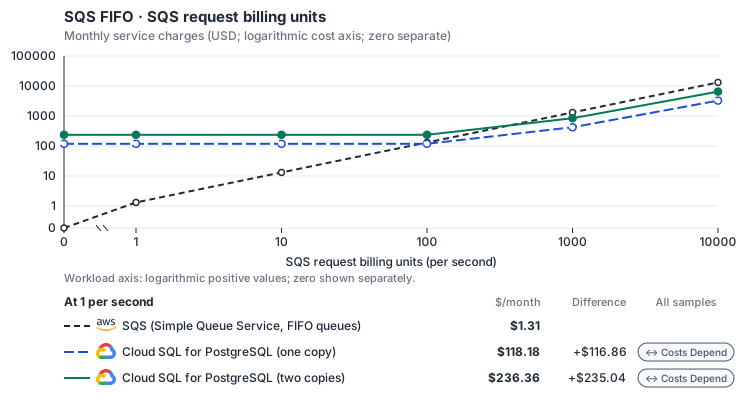
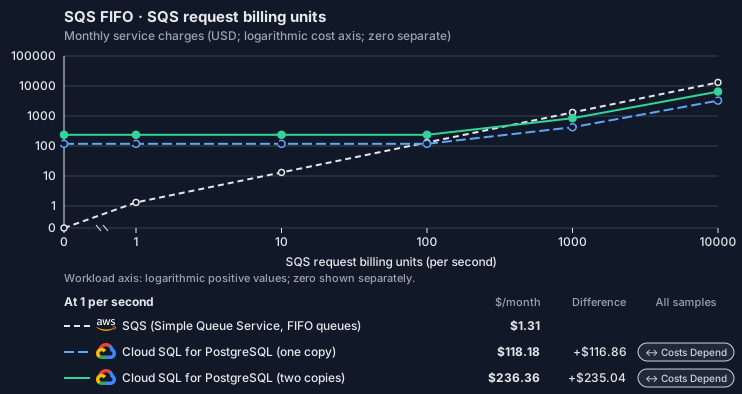
- 1-KiB messages, unbatched send/receive/delete; actual batch and delivery assumptions stay visible. Other native meters and workload assumptions retain their explicitly displayed default quantities. Workload translation and capacity assumptions are not benchmark measurements.
- Native monthly usage priced at the cited provider list prices; listed target allowances apply where present, excluding invoice credits, taxes and negotiated discounts. Rates as of 2026-10-22: us-east-1 → us-central1, USD/month.
- Source prices are reference charges, not an invoice. Target lines cover selected service usage/configuration only; adapter hosting and Tensor9 fees are excluded.
- Samples of explicit prices are not performance measurements or capacity qualification. No interpolation or break-even guarantee is implied.
- Variant assumptions show the first axis sample; any axis-dependent configuration is described by this curve’s workload note.
- Rates are cited provider list prices, editable for discounts, commitments or another region. Workload translation and capacity coefficients remain editable planning assumptions, not benchmark measurements or a commercial quote.
- Default-zero rates are explicit assumptions, not evidence that the deployed service or resource is free.
- Provisioned-unit minimums use an editable approximate allocation floor. Modeled target service cost is max(usage/allocation, minimum), with billable network, durable staging and dependent sinks added separately; actual RU/TU sizing, scaling increments and throughput remain unqualified.
- Durable staging is priced once: provisioned targets include adapter state in their selected allocation; native targets add a separate staging allocation when required. Adapter hosting is a separate allocation and must exclude resources already priced as staging, workers or target capacity.
- A declared adapter mapping and cost model do not establish implementation availability or service equivalence.
- This is a declared directed mapping; a planning estimate does not establish deployment or request-serving support.
- Native/deployment comparison scope: FIFO request-processing service levels have not been qualified for this mapping. Standard-queue measurements do not establish FIFO latency, throughput or availability.
- Authored planning assumptions, not measured adapter capacity. Origin rates are cited first-tier list prices, before free allowances and discounts.
- A cost scenario does not establish backend availability, protocol fidelity or production readiness. Registry serving status remains independent.
- Storage follows resident original messages, not every monthly message. Broker delivery bytes include redeliveries.
- FIFO estimates do not qualify dedup support, group throughput or single-group latency; backend limitations remain applicable.
- Cloud SQL Enterprise edition (PostgreSQL) publishes separate vCPU, memory and SSD prices for zonal instances; a high-availability (regional) instance bills exactly twice each, which the standby copy reproduces. Enterprise Plus, committed-use discounts, backups (USD 0.08 per GiB-month) and idle IPv4 addresses (0.01 per hour) are not selected.
- Row-store throughput (capacityOpsPerVcpuSecond, default 1500) is measured-by-tensor9 as a lower bound: the DynamoDB adapter on Cloud SQL db-custom-2-7680 (2 vCPU, PostgreSQL 16, us-west1) served 2,974 ops/s of YCSB-A at 16 threads without recorded saturation (src/main/kotlin/t9/prime/equiv/generated/eval/CloudsqlPostgresqlYcsbAT16GoYcsbV1_0_0.kt). Published CPU-bound pgbench reaches 3,101 read-write transactions and 20,289 point reads per vCPU-second (AWS z1d.2xlarge, PostgreSQL 14.5), so actual capacity is likely higher. Reads and writes share one coefficient: at the same adapter version, read-only YCSB-C was not faster than 50%-update YCSB-A.
- Log-broker throughput (capacityStreamMiBPerVcpuSecond 20 at 0.5 utilization, 4 GiB RAM per vCPU) is provider-documented by Google Managed Service for Apache Kafka sizing (https://docs.cloud.google.com/managed-service-for-apache-kafka/docs/plan-cluster-size): write-equivalent bytes are replicated writes plus a quarter of reads. Producer batches below 10 KB lower per-CPU throughput; that penalty is not modeled.
- Disk utilization 0.8 is provider-documented headroom below Cloud SQL automatic storage increase, which triggers near 91-95% full (https://docs.cloud.google.com/sql/docs/postgres/instance-settings). The 20 GiB reserve exceeds PostgreSQL’s 1 GB default max_wal_size; the remainder of that reserve is unmeasured.
- CPU tiers double from 2 vCPUs to the target’s largest node at 4 GiB per vCPU; each target’s documented largest node bounds CPU, RAM, RAM per vCPU and disk, and the durable staging database uses Cloud SQL Enterprise (96 vCPU, 6.5 GiB per vCPU, 624 GiB, 64 TiB). Targets billed per capacity unit or throughput unit are sized by their backend instead.
- No public evidence: peak/mean work (2) and the RAM working-set fraction (0.1). Proposed measurements: the p99 one-minute rate over the monthly mean from customer CloudWatch metrics; the buffer hit ratio while stepping RAM under a fixed YCSB-B load.
- Node bounds: Cloud SQL Enterprise allows 1-96 vCPUs at 0.9-6.5 GB per vCPU and up to 64 TB with a dedicated vCPU (https://docs.cloud.google.com/sql/docs/postgres/instance-settings).
- Stored GiB already includes the origin family’s physical footprint assumptions; no second storage amplification is applied.
- The operations/vCPU coefficient supplies the compute requirement alongside explicit resource-hour minima.
- Copies and allocation fractions change cost only; they do not increase modeled primary capacity.
- AWS Price List API, AWSQueueService offer: https://pricing.us-east-1.amazonaws.com/offers/v1.0/aws/AWSQueueService/current/us-east-1/index.json
- Cloud SQL pricing: https://cloud.google.com/sql/pricing
- Additional network transfer, backups, KMS, one-time migration and operational labor unless an explicit meter includes them.
- Destination application execution and separately billed downstream services; supply those allocations separately.
- Taxes, discounts, credits and free-tier allowances not explicitly listed by this model.
- Unmodeled dependent services, task execution and operations outside the selected workload family.
plan-c35b94f39c83dfc6e65b2063cdc3c7857cb28524 / 2026-10-22.planning.2. Curve: workload-1.
Sources: AWS Price List API, AWSQueueService offer, Cloud SQL pricing.
SQS FIFO → Cloud SQL for PostgreSQL: Authored native-usage planning example. Native monthly usage priced at the cited provider list prices; listed target allowances apply where present, excluding invoice credits, taxes and negotiated discounts.
Scenario source region: us-east-1. Scenario target region: us-central1. Currency: USD.
- Additional network transfer, backups, KMS, one-time migration and operational labor unless an explicit meter includes them.
- Destination application execution and separately billed downstream services; supply those allocations separately.
- Taxes, discounts, credits and free-tier allowances not explicitly listed by this model.
- Unmodeled dependent services, task execution and operations outside the selected workload family.
- Translated reads: 0 operations.
- Translated writes: 0 operations.
- Translated resident physical data: 0 GiB-month.
- Native provider operations: 0 operations.
- Published payload: 0 GiB.
- Delivered payload: 0 GiB.
- Allocated execution CPU: 0 vCPU-hour.
- Allocated execution RAM: 0 GiB-hour.
- Independent resource allocation: 0 resource-hour.
- Independent inventory: 0 resource-month.
- Input tokens: 0 tokens.
- Output tokens: 0 tokens.
- Billable network: 0 GiB.
- Dependent object sink retained data: 0 GiB-month.
- Dependent object sink writes: 0 writes.
- Rates are cited provider list prices, editable for discounts, commitments or another region. Workload translation and capacity coefficients remain editable planning assumptions, not benchmark measurements or a commercial quote.
- Default-zero rates are explicit assumptions, not evidence that the deployed service or resource is free.
- Provisioned-unit minimums use an editable approximate allocation floor. Modeled target service cost is max(usage/allocation, minimum), with billable network, durable staging and dependent sinks added separately; actual RU/TU sizing, scaling increments and throughput remain unqualified.
- Durable staging is priced once: provisioned targets include adapter state in their selected allocation; native targets add a separate staging allocation when required. Adapter hosting is a separate allocation and must exclude resources already priced as staging, workers or target capacity.
- A declared adapter mapping and cost model do not establish implementation availability or service equivalence.
- This is a declared directed mapping; a planning estimate does not establish deployment or request-serving support.
- Native/deployment comparison scope: FIFO request-processing service levels have not been qualified for this mapping. Standard-queue measurements do not establish FIFO latency, throughput or availability.
- Authored planning assumptions, not measured adapter capacity. Origin rates are cited first-tier list prices, before free allowances and discounts.
- A cost scenario does not establish backend availability, protocol fidelity or production readiness. Registry serving status remains independent.
- Storage follows resident original messages, not every monthly message. Broker delivery bytes include redeliveries.
- FIFO estimates do not qualify dedup support, group throughput or single-group latency; backend limitations remain applicable.
- Cloud SQL Enterprise edition (PostgreSQL) publishes separate vCPU, memory and SSD prices for zonal instances; a high-availability (regional) instance bills exactly twice each, which the standby copy reproduces. Enterprise Plus, committed-use discounts, backups (USD 0.08 per GiB-month) and idle IPv4 addresses (0.01 per hour) are not selected.
- Row-store throughput (capacityOpsPerVcpuSecond, default 1500) is measured-by-tensor9 as a lower bound: the DynamoDB adapter on Cloud SQL db-custom-2-7680 (2 vCPU, PostgreSQL 16, us-west1) served 2,974 ops/s of YCSB-A at 16 threads without recorded saturation (src/main/kotlin/t9/prime/equiv/generated/eval/CloudsqlPostgresqlYcsbAT16GoYcsbV1_0_0.kt). Published CPU-bound pgbench reaches 3,101 read-write transactions and 20,289 point reads per vCPU-second (AWS z1d.2xlarge, PostgreSQL 14.5), so actual capacity is likely higher. Reads and writes share one coefficient: at the same adapter version, read-only YCSB-C was not faster than 50%-update YCSB-A.
- Log-broker throughput (capacityStreamMiBPerVcpuSecond 20 at 0.5 utilization, 4 GiB RAM per vCPU) is provider-documented by Google Managed Service for Apache Kafka sizing (https://docs.cloud.google.com/managed-service-for-apache-kafka/docs/plan-cluster-size): write-equivalent bytes are replicated writes plus a quarter of reads. Producer batches below 10 KB lower per-CPU throughput; that penalty is not modeled.
- Disk utilization 0.8 is provider-documented headroom below Cloud SQL automatic storage increase, which triggers near 91-95% full (https://docs.cloud.google.com/sql/docs/postgres/instance-settings). The 20 GiB reserve exceeds PostgreSQL’s 1 GB default max_wal_size; the remainder of that reserve is unmeasured.
- CPU tiers double from 2 vCPUs to the target’s largest node at 4 GiB per vCPU; each target’s documented largest node bounds CPU, RAM, RAM per vCPU and disk, and the durable staging database uses Cloud SQL Enterprise (96 vCPU, 6.5 GiB per vCPU, 624 GiB, 64 TiB). Targets billed per capacity unit or throughput unit are sized by their backend instead.
- No public evidence: peak/mean work (2) and the RAM working-set fraction (0.1). Proposed measurements: the p99 one-minute rate over the monthly mean from customer CloudWatch metrics; the buffer hit ratio while stepping RAM under a fixed YCSB-B load.
- Node bounds: Cloud SQL Enterprise allows 1-96 vCPUs at 0.9-6.5 GB per vCPU and up to 64 TB with a dedicated vCPU (https://docs.cloud.google.com/sql/docs/postgres/instance-settings).
- Stored GiB already includes the origin family’s physical footprint assumptions; no second storage amplification is applied.
- The operations/vCPU coefficient supplies the compute requirement alongside explicit resource-hour minima.
- Copies and allocation fractions change cost only; they do not increase modeled primary capacity.
plan-c35b94f39c83dfc6e65b2063cdc3c7857cb28524 / 2026-10-22.planning.2. Scenario: planning-example.
Sources: AWS Price List API, AWSQueueService offer, Cloud SQL pricing.
On Azure, OCI, and Private Kubernetes
Via PostgreSQL
PostgreSQL hosting
Tensor9 operates CloudNativePG inside the customer’s Kubernetes cluster. Queue data is stored on that cluster’s volumes and does not survive a full cluster rebuild. Plan recovery and message cutover before replacing the cluster. Tensor9 operates the queue schema and adapter. Queues start empty; existing SQS messages are not migrated. Drain each message group before cutover to preserve order.Queue behavior
Queues use the same PostgreSQL tables, receive steps, stored receipt handles and single-transaction dead-letter moves described in PostgreSQL queue behavior. Receipt handles survive adapter restarts; stale receipt handles return an error. Retention still removes messages in flight. All queues share database capacity, so a busy queue can affect others. The documented Standard-queue benchmark does not establish this host’s capacity or FIFO throughput. Duplicate sends are suppressed for five minutes; consumers must still handle redelivery.Example monthly charges
This Tensor9 BYOC scenario estimates service charges for the named origin and target services. Adapter hosting and commercial Tensor9 fees need separate allocations. How Tensor9 estimates costs explains the method and what the estimates include. Native or deployment mapping. FIFO request-processing service levels have not been qualified for this mapping. Standard-queue measurements do not establish FIFO latency, throughput or availability. Cost estimates describe the selected service resources; operation coverage remains separate.SQS FIFO · SQS request billing units
Feature: SQS FIFO. Estimated monthly service charges by SQS request billing units. Adapter hosting and Tensor9 fees are excluded. Source: us-east-1; target: us-central1; currency: USD.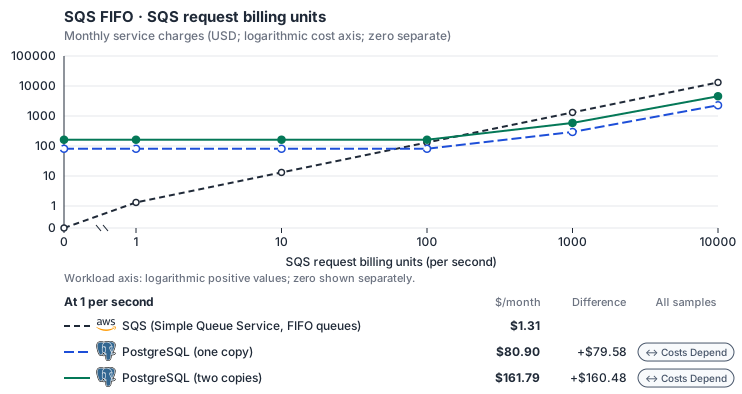
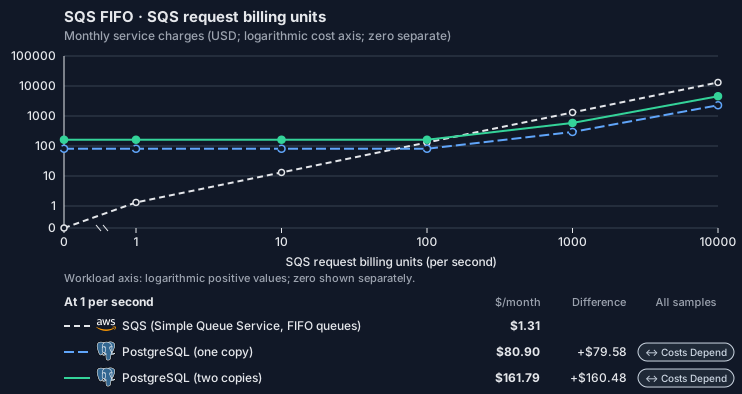
- 1-KiB messages, unbatched send/receive/delete; actual batch and delivery assumptions stay visible. Other native meters and workload assumptions retain their explicitly displayed default quantities. Workload translation and capacity assumptions are not benchmark measurements.
- Native monthly usage priced at the cited provider list prices; listed target allowances apply where present, excluding invoice credits, taxes and negotiated discounts. Rates as of 2026-10-22: us-east-1 → us-central1, USD/month.
- Source prices are reference charges, not an invoice. Target lines cover selected service usage/configuration only; adapter hosting and Tensor9 fees are excluded.
- Samples of explicit prices are not performance measurements or capacity qualification. No interpolation or break-even guarantee is implied.
- Variant assumptions show the first axis sample; any axis-dependent configuration is described by this curve’s workload note.
- Rates are cited provider list prices, editable for discounts, commitments or another region. Workload translation and capacity coefficients remain editable planning assumptions, not benchmark measurements or a commercial quote.
- Default-zero rates are explicit assumptions, not evidence that the deployed service or resource is free.
- Provisioned-unit minimums use an editable approximate allocation floor. Modeled target service cost is max(usage/allocation, minimum), with billable network, durable staging and dependent sinks added separately; actual RU/TU sizing, scaling increments and throughput remain unqualified.
- Durable staging is priced once: provisioned targets include adapter state in their selected allocation; native targets add a separate staging allocation when required. Adapter hosting is a separate allocation and must exclude resources already priced as staging, workers or target capacity.
- A declared adapter mapping and cost model do not establish implementation availability or service equivalence.
- This is a declared directed mapping; a planning estimate does not establish deployment or request-serving support.
- Native/deployment comparison scope: FIFO request-processing service levels have not been qualified for this mapping. Standard-queue measurements do not establish FIFO latency, throughput or availability.
- Authored planning assumptions, not measured adapter capacity. Origin rates are cited first-tier list prices, before free allowances and discounts.
- A cost scenario does not establish backend availability, protocol fidelity or production readiness. Registry serving status remains independent.
- Storage follows resident original messages, not every monthly message. Broker delivery bytes include redeliveries.
- FIFO estimates do not qualify dedup support, group throughput or single-group latency; backend limitations remain applicable.
- Self-hosted target: PostgreSQL (PostgreSQL License, https://www.postgresql.org/about/licence/). Selected CPU, RAM and physical disk allocation grow with workload; no per-operation price is assumed. No vendor charge: the target runs on the customer’s Kubernetes nodes, so CPU, RAM and disk bill at the Kubernetes node reference rates, Compute Engine N2 in us-central1 (USD 0.031611/vCPU-hour, 0.004237/GiB-hour) with pd-balanced disk (0.10/GiB-month) and Premium Tier egress. The cost-optimized E2 series lists 0.02181159/vCPU-hour and 0.00292353/GiB-hour; AWS m6i/r6i and Azure D2s v5/E2s v5 both decompose to 0.033/vCPU-hour and 0.00375/GiB-hour. Requested CPU and RAM are billed; node bin-packing waste, system reservations and the cluster control-plane fee are not.
- Row-store throughput (capacityOpsPerVcpuSecond, default 1500) is measured-by-tensor9 as a lower bound: the DynamoDB adapter on Cloud SQL db-custom-2-7680 (2 vCPU, PostgreSQL 16, us-west1) served 2,974 ops/s of YCSB-A at 16 threads without recorded saturation (src/main/kotlin/t9/prime/equiv/generated/eval/CloudsqlPostgresqlYcsbAT16GoYcsbV1_0_0.kt). Published CPU-bound pgbench reaches 3,101 read-write transactions and 20,289 point reads per vCPU-second (AWS z1d.2xlarge, PostgreSQL 14.5), so actual capacity is likely higher. Reads and writes share one coefficient: at the same adapter version, read-only YCSB-C was not faster than 50%-update YCSB-A.
- Log-broker throughput (capacityStreamMiBPerVcpuSecond 20 at 0.5 utilization, 4 GiB RAM per vCPU) is provider-documented by Google Managed Service for Apache Kafka sizing (https://docs.cloud.google.com/managed-service-for-apache-kafka/docs/plan-cluster-size): write-equivalent bytes are replicated writes plus a quarter of reads. Producer batches below 10 KB lower per-CPU throughput; that penalty is not modeled.
- Disk utilization 0.8 is provider-documented headroom below Cloud SQL automatic storage increase, which triggers near 91-95% full (https://docs.cloud.google.com/sql/docs/postgres/instance-settings). The 20 GiB reserve exceeds PostgreSQL’s 1 GB default max_wal_size; the remainder of that reserve is unmeasured.
- CPU tiers double from 2 vCPUs to the target’s largest node at 4 GiB per vCPU; each target’s documented largest node bounds CPU, RAM, RAM per vCPU and disk, and the durable staging database uses Cloud SQL Enterprise (96 vCPU, 6.5 GiB per vCPU, 624 GiB, 64 TiB). Targets billed per capacity unit or throughput unit are sized by their backend instead.
- No public evidence: peak/mean work (2) and the RAM working-set fraction (0.1). Proposed measurements: the p99 one-minute rate over the monthly mean from customer CloudWatch metrics; the buffer hit ratio while stepping RAM under a fixed YCSB-B load.
- Node bounds: Compute Engine n2-highmem-128 has 128 vCPUs and 864 GB (https://docs.cloud.google.com/compute/docs/general-purpose-machines); a Persistent Disk volume holds up to 64 TiB (https://docs.cloud.google.com/compute/docs/disks/persistent-disks).
- Stored GiB already includes the origin family’s physical footprint assumptions; no second storage amplification is applied.
- The operations/vCPU coefficient supplies the compute requirement alongside explicit resource-hour minima.
- Copies and allocation fractions change cost only; they do not increase modeled primary capacity.
- AWS Price List API, AWSQueueService offer: https://pricing.us-east-1.amazonaws.com/offers/v1.0/aws/AWSQueueService/current/us-east-1/index.json
- Compute Engine general-purpose machine pricing: https://cloud.google.com/products/compute/pricing/general-purpose
- Disk and image pricing: https://cloud.google.com/compute/disks-image-pricing
- Network pricing: https://cloud.google.com/vpc/network-pricing
- Additional network transfer, backups, KMS, one-time migration and operational labor unless an explicit meter includes them.
- Destination application execution and separately billed downstream services; supply those allocations separately.
- Taxes, discounts, credits and free-tier allowances not explicitly listed by this model.
- Unmodeled dependent services, task execution and operations outside the selected workload family.
plan-2205b0bb4fecd035329ea8f524e1a885b9bdcdab / 2026-10-22.planning.2. Curve: workload-1.
Sources: AWS Price List API, AWSQueueService offer, Compute Engine general-purpose machine pricing, Disk and image pricing, Network pricing.
SQS FIFO → PostgreSQL: Authored native-usage planning example. Native monthly usage priced at the cited provider list prices; listed target allowances apply where present, excluding invoice credits, taxes and negotiated discounts.
Scenario source region: us-east-1. Scenario target region: us-central1. Currency: USD.
- Additional network transfer, backups, KMS, one-time migration and operational labor unless an explicit meter includes them.
- Destination application execution and separately billed downstream services; supply those allocations separately.
- Taxes, discounts, credits and free-tier allowances not explicitly listed by this model.
- Unmodeled dependent services, task execution and operations outside the selected workload family.
- Translated reads: 0 operations.
- Translated writes: 0 operations.
- Translated resident physical data: 0 GiB-month.
- Native provider operations: 0 operations.
- Published payload: 0 GiB.
- Delivered payload: 0 GiB.
- Allocated execution CPU: 0 vCPU-hour.
- Allocated execution RAM: 0 GiB-hour.
- Independent resource allocation: 0 resource-hour.
- Independent inventory: 0 resource-month.
- Input tokens: 0 tokens.
- Output tokens: 0 tokens.
- Billable network: 0 GiB.
- Dependent object sink retained data: 0 GiB-month.
- Dependent object sink writes: 0 writes.
- Rates are cited provider list prices, editable for discounts, commitments or another region. Workload translation and capacity coefficients remain editable planning assumptions, not benchmark measurements or a commercial quote.
- Default-zero rates are explicit assumptions, not evidence that the deployed service or resource is free.
- Provisioned-unit minimums use an editable approximate allocation floor. Modeled target service cost is max(usage/allocation, minimum), with billable network, durable staging and dependent sinks added separately; actual RU/TU sizing, scaling increments and throughput remain unqualified.
- Durable staging is priced once: provisioned targets include adapter state in their selected allocation; native targets add a separate staging allocation when required. Adapter hosting is a separate allocation and must exclude resources already priced as staging, workers or target capacity.
- A declared adapter mapping and cost model do not establish implementation availability or service equivalence.
- This is a declared directed mapping; a planning estimate does not establish deployment or request-serving support.
- Native/deployment comparison scope: FIFO request-processing service levels have not been qualified for this mapping. Standard-queue measurements do not establish FIFO latency, throughput or availability.
- Authored planning assumptions, not measured adapter capacity. Origin rates are cited first-tier list prices, before free allowances and discounts.
- A cost scenario does not establish backend availability, protocol fidelity or production readiness. Registry serving status remains independent.
- Storage follows resident original messages, not every monthly message. Broker delivery bytes include redeliveries.
- FIFO estimates do not qualify dedup support, group throughput or single-group latency; backend limitations remain applicable.
- Self-hosted target: PostgreSQL (PostgreSQL License, https://www.postgresql.org/about/licence/). Selected CPU, RAM and physical disk allocation grow with workload; no per-operation price is assumed. No vendor charge: the target runs on the customer’s Kubernetes nodes, so CPU, RAM and disk bill at the Kubernetes node reference rates, Compute Engine N2 in us-central1 (USD 0.031611/vCPU-hour, 0.004237/GiB-hour) with pd-balanced disk (0.10/GiB-month) and Premium Tier egress. The cost-optimized E2 series lists 0.02181159/vCPU-hour and 0.00292353/GiB-hour; AWS m6i/r6i and Azure D2s v5/E2s v5 both decompose to 0.033/vCPU-hour and 0.00375/GiB-hour. Requested CPU and RAM are billed; node bin-packing waste, system reservations and the cluster control-plane fee are not.
- Row-store throughput (capacityOpsPerVcpuSecond, default 1500) is measured-by-tensor9 as a lower bound: the DynamoDB adapter on Cloud SQL db-custom-2-7680 (2 vCPU, PostgreSQL 16, us-west1) served 2,974 ops/s of YCSB-A at 16 threads without recorded saturation (src/main/kotlin/t9/prime/equiv/generated/eval/CloudsqlPostgresqlYcsbAT16GoYcsbV1_0_0.kt). Published CPU-bound pgbench reaches 3,101 read-write transactions and 20,289 point reads per vCPU-second (AWS z1d.2xlarge, PostgreSQL 14.5), so actual capacity is likely higher. Reads and writes share one coefficient: at the same adapter version, read-only YCSB-C was not faster than 50%-update YCSB-A.
- Log-broker throughput (capacityStreamMiBPerVcpuSecond 20 at 0.5 utilization, 4 GiB RAM per vCPU) is provider-documented by Google Managed Service for Apache Kafka sizing (https://docs.cloud.google.com/managed-service-for-apache-kafka/docs/plan-cluster-size): write-equivalent bytes are replicated writes plus a quarter of reads. Producer batches below 10 KB lower per-CPU throughput; that penalty is not modeled.
- Disk utilization 0.8 is provider-documented headroom below Cloud SQL automatic storage increase, which triggers near 91-95% full (https://docs.cloud.google.com/sql/docs/postgres/instance-settings). The 20 GiB reserve exceeds PostgreSQL’s 1 GB default max_wal_size; the remainder of that reserve is unmeasured.
- CPU tiers double from 2 vCPUs to the target’s largest node at 4 GiB per vCPU; each target’s documented largest node bounds CPU, RAM, RAM per vCPU and disk, and the durable staging database uses Cloud SQL Enterprise (96 vCPU, 6.5 GiB per vCPU, 624 GiB, 64 TiB). Targets billed per capacity unit or throughput unit are sized by their backend instead.
- No public evidence: peak/mean work (2) and the RAM working-set fraction (0.1). Proposed measurements: the p99 one-minute rate over the monthly mean from customer CloudWatch metrics; the buffer hit ratio while stepping RAM under a fixed YCSB-B load.
- Node bounds: Compute Engine n2-highmem-128 has 128 vCPUs and 864 GB (https://docs.cloud.google.com/compute/docs/general-purpose-machines); a Persistent Disk volume holds up to 64 TiB (https://docs.cloud.google.com/compute/docs/disks/persistent-disks).
- Stored GiB already includes the origin family’s physical footprint assumptions; no second storage amplification is applied.
- The operations/vCPU coefficient supplies the compute requirement alongside explicit resource-hour minima.
- Copies and allocation fractions change cost only; they do not increase modeled primary capacity.
plan-2205b0bb4fecd035329ea8f524e1a885b9bdcdab / 2026-10-22.planning.2. Scenario: planning-example.
Sources: AWS Price List API, AWSQueueService offer, Compute Engine general-purpose machine pricing, Disk and image pricing, Network pricing.
On Azure
Via Azure Service Bus
How it works
Tensor9 adds an adapter, a proxy process, to your application pod and setsAWS_ENDPOINT_URL_SQS to its local address. Your application keeps its SQS SDK and its SendMessage and ReceiveMessage calls. The adapter translates them to Azure Service Bus and returns SQS responses, error codes and MD5 checksums.
For a .fifo queue, Tensor9 provisions a Service Bus queue with sessions enabled. The adapter uses the MessageGroupId as the session ID, and the .fifo suffix tells it to receive by session. Service Bus gives each session to one consumer at a time, and the adapter delivers one message per group at a time, so send order holds across many consumer instances.


The application keeps its SQS SDK. A Tensor9 adapter translates FIFO queue calls to Service Bus sessions.
Architecture
The adapter talks to Service Bus Standard over AMQP 1.0. On send, it sets the session ID fromMessageGroupId. On receive, it delivers one message per group, renews the session lock while the visibility timeout runs, and completes or releases messages so their delivery counts stay correct. It signs in with your AKS Workload Identity, with no static secret.
Session receives run separately from sending and from standard-queue receives, so a FIFO receive never blocks them.
Tensor9 creates the queue when the stack is deployed, before the first message arrives, with sessions enabled, duplicate detection over a 5-minute window, a 5-minute session lock (ten times the adapter’s lock-renewal interval), dead-lettering of expired messages, and automatic forwarding to your dead-letter queue. Microsoft operates Service Bus’s durability, backups and high availability; Tensor9 operates the adapter.


Each session is one MessageGroupId , so each group keeps strict order with one message in flight.
How sessions preserve group order
A Service Bus session groups messages under one ID and gives one consumer exclusive access to it. While that consumer holds the session, no other consumer can receive its messages. Messages arrive in the order they were queued, and the adapter allows one message in flight per group. Service Bus assigns each active group to one consumer even when several application pods receive from the same queue, so your pods need no shared lock table, leader election or partition assignment.- One message in flight per group. A group’s next message is delivered only after the current one is deleted, as with the PostgreSQL FIFO option. This limits a single group to one message per round trip, in exchange for strict order.
- A slow consumer keeps its group. The adapter renews the session lock while your visibility timeout runs.
ChangeMessageVisibilitywith a longer timeout renews the lock; zero makes the message available again at once, in order. - Receive counts stay accurate. When the adapter gives up a session, it first releases the in-flight message so its delivery count goes up, moving a failing message toward its redrive limit instead of resetting it. It also receives no more messages than the remaining
MaxNumberOfMessages, so no message is received and dropped, which would raise its count.


Service Bus gives each group’s session to exactly one consumer, so order holds as you add consumer pods.
Duplicate detection
Service Bus duplicate detection keeps a 5-minute history. Sends with the same deduplication key within that window queue one message. A consumer can still receive that message again after its visibility timeout. Service Bus keeps the deduplication history, so the adapter tracks nothing extra. An explicitMessageDeduplicationId takes precedence. Otherwise the adapter uses a hash of the body on every .fifo send. It always sets this hash because its messaging permissions cannot read whether content-based deduplication is on. With duplicate detection enabled, Service Bus uses the hash to drop retries; with it disabled, the hash is only an ID. The adapter stores the SQS MessageId separately, as an application property, and returns it on receive, so equal-body messages sent outside the window keep distinct SQS IDs.


The adapter uses the MessageDeduplicationId, or a body hash, as the Service Bus message ID. Service Bus drops repeats within 5 minutes.
Dead-lettering
Service Bus dead-letters a message when its delivery count reaches the limit set bymaxReceiveCount. The next message in that group can then be delivered.
The adapter cannot receive from Service Bus’s built-in dead-letter subqueue, so Tensor9 sets up automatic forwarding to the dead-letter queue (DLQ) you declared, keeping the session ID. A FIFO queue needs a FIFO DLQ, which is created with sessions enabled. Messages whose time to live (TTL) expires are dead-lettered too, so you can inspect or recover them from the DLQ.
Declaring a non-.fifo DLQ for a .fifo queue stops the build with a clear error, rather than creating a queue whose dead letters would have nowhere valid to go.


Service Bus forwards messages that reach maxReceiveCount to your declared DLQ, where the adapter can receive them.
Limitations
Where SQS FIFO and Service Bus differ- Duplicate sends behave differently: the dropped send returns a new
MessageId. SQS returns the original message’sMessageId(andSequenceNumber) for a duplicate. Here the duplicate is still dropped (consumers can still get redeliveries), but its response contains a new ID that matches no delivered message. Do not wait for that ID. SequenceNumberis not returned on send. Service Bus cannot return its sequence number when a message is sent. Receive responses include it; it increases across the queue, and so within each group.- Visibility timeouts above 5 minutes are not supported. The visibility timeout maps to the session lock, which Tensor9 sets to 5 minutes, ten times the adapter’s renewal interval. A longer value returns an error rather than being shortened.
ChangeMessageVisibilityrenews the lock. - Receipt handles behave differently: they stop working when the adapter restarts. A handle needs a live session lock. After a restart, old handles are invalid, and the group’s in-flight message is delivered again, in order, when its session lock expires, within 5 minutes.
- Expiry behaves differently: it can affect a whole session. SQS retention applies to each message. On Service Bus, an expired message at the front can expire its whole session. Expired messages are dead-lettered and can be recovered from the DLQ, but more may expire together than on SQS.
- Single-group throughput behaves differently: one message per round trip. Strict order allows one message in flight per group, against up to 10 per receive on SQS. Total throughput grows with the number of groups, so parallelism comes from many groups, not from batching within one.
- Receives on an empty queue behave differently: they can wait longer than
WaitTimeSeconds. Service Bus controls how long accepting a session takes, and the adapter never cancels it partway, because that could leave a session lock held. A FIFO receive on an empty queue can overrun its wait by up to one accept window, about 60 seconds at worst; your monitoring shows the real figure on Azure. - Per-message
DelaySecondsis not supported. It is rejected, as SQS rejects it on a FIFO queue, because a delayed message would arrive after later messages in its group. For queue-level settings, Max adaptation manages the logical queue settings, but the messaging backend rejects a nonzero queue delay and new dead-letter routes. - You must drain a queue before changing its FIFO or deduplication settings. Sessions and duplicate detection are fixed when the queue is created. Changing between standard and FIFO, or turning content-based deduplication on or off, deletes and re-creates the queue and loses its messages. Every FIFO build warns about this.
- Sends without a deduplication ID behave differently: they are accepted. SQS requires
MessageDeduplicationIdwhen content-based deduplication is off. The adapter cannot read that setting with its messaging permissions, so it accepts the send. Group order is kept, but you do not get the SQS validation error.
Other considerations
- Moving from AWS. The Service Bus namespace and queue start empty, and messages in SQS are not migrated. Switch over when the queue is drained, or write to both queues for a while, and drain each group so none switches partway through.
- Who operates what. Tensor9 creates the namespace and the queue, configured as described under Architecture, from your queue declarations, and runs the adapter next to your application. The declared
maxReceiveCountsets when messages are forwarded to the DLQ. Microsoft operates Service Bus Standard: durability, backups and high availability. You operate the Azure subscription, cluster patching and monitoring. Sending and receiving need no queue-management credential. - FIFO must be selected explicitly. Older deployments that used the earlier combined SQS-to-Service-Bus option supported standard queues only. Tensor9 does not convert them to FIFO; declare and select a FIFO queue to use sessions.
Example monthly charges
This Tensor9 BYOC scenario estimates service charges for the named origin and target services. Adapter hosting and commercial Tensor9 fees need separate allocations. How Tensor9 estimates costs explains the method and what the estimates include.SQS FIFO · SQS request billing units
Feature: SQS FIFO. Estimated monthly service charges by SQS request billing units. Adapter hosting and Tensor9 fees are excluded. Source: us-east-1; target: East US; currency: USD.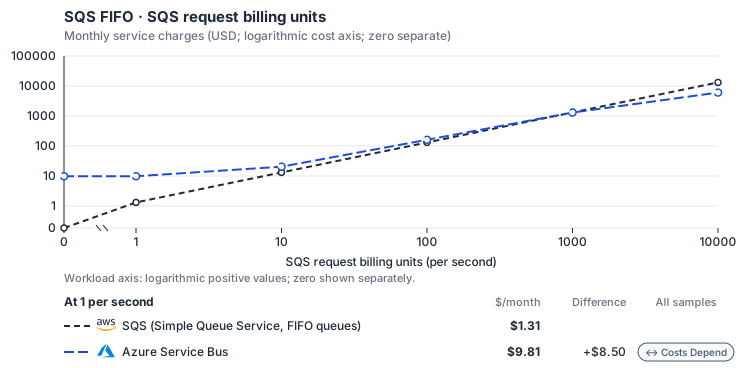
- 1-KiB messages, unbatched send/receive/delete; actual batch and delivery assumptions stay visible. Other native meters and workload assumptions retain their explicitly displayed default quantities. Workload translation and capacity assumptions are not benchmark measurements.
- Native monthly usage priced at the cited provider list prices; listed target allowances apply where present, excluding invoice credits, taxes and negotiated discounts. Rates as of 2026-10-22: us-east-1 → East US, USD/month.
- Source prices are reference charges, not an invoice. Target lines cover selected service usage/configuration only; adapter hosting and Tensor9 fees are excluded.
- Samples of explicit prices are not performance measurements or capacity qualification. No interpolation or break-even guarantee is implied.
- Variant assumptions show the first axis sample; any axis-dependent configuration is described by this curve’s workload note.
- Rates are cited provider list prices, editable for discounts, commitments or another region. Workload translation and capacity coefficients remain editable planning assumptions, not benchmark measurements or a commercial quote.
- Default-zero rates are explicit assumptions, not evidence that the deployed service or resource is free.
- Provisioned-unit minimums use an editable approximate allocation floor. Modeled target service cost is max(usage/allocation, minimum), with billable network, durable staging and dependent sinks added separately; actual RU/TU sizing, scaling increments and throughput remain unqualified.
- Durable staging is priced once: provisioned targets include adapter state in their selected allocation; native targets add a separate staging allocation when required. Adapter hosting is a separate allocation and must exclude resources already priced as staging, workers or target capacity.
- A declared adapter mapping and cost model do not establish implementation availability or service equivalence.
- This is a declared directed mapping; a planning estimate does not establish deployment or request-serving support.
- Authored planning assumptions, not measured adapter capacity. Origin rates are cited first-tier list prices, before free allowances and discounts.
- A cost scenario does not establish backend availability, protocol fidelity or production readiness. Registry serving status remains independent.
- Storage follows resident original messages, not every monthly message. Broker delivery bytes include redeliveries.
- FIFO estimates do not qualify dedup support, group throughput or single-group latency; backend limitations remain applicable.
- Azure Service Bus Standard bills a namespace base charge that includes 13 million operations a month, then graduated per-operation prices: USD 0.80 per million to 100 million, 0.50 to 2,500 million and 0.20 beyond. An operation is any API call (send, receive, complete) per 64 KB of message; the family’s managed operations count calls, not 64 KB units. Standard has no storage charge (queue size quota up to 5 GB is included). More than 1,000 brokered connections bill USD 0.03 per connection-month, which this profile does not model.
- AWS Price List API, AWSQueueService offer: https://pricing.us-east-1.amazonaws.com/offers/v1.0/aws/AWSQueueService/current/us-east-1/index.json
- Azure Retail Prices API: https://prices.azure.com/api/retail/prices
- Additional network transfer, backups, KMS, one-time migration and operational labor unless an explicit meter includes them.
- Destination application execution and separately billed downstream services; supply those allocations separately.
- Taxes, discounts, credits and free-tier allowances not explicitly listed by this model.
- Unmodeled dependent services, task execution and operations outside the selected workload family.
plan-41a96e9bd678520a179bd0f5bb232496011160b0 / 2026-10-22.planning.2. Curve: workload-1.
Sources: AWS Price List API, AWSQueueService offer, Azure Retail Prices API.
SQS FIFO → Azure Service Bus: Authored native-usage planning example. Native monthly usage priced at the cited provider list prices; listed target allowances apply where present, excluding invoice credits, taxes and negotiated discounts.
Scenario source region: us-east-1. Scenario target region: East US. Currency: USD.
- Additional network transfer, backups, KMS, one-time migration and operational labor unless an explicit meter includes them.
- Destination application execution and separately billed downstream services; supply those allocations separately.
- Taxes, discounts, credits and free-tier allowances not explicitly listed by this model.
- Unmodeled dependent services, task execution and operations outside the selected workload family.
- Translated reads: 0 operations.
- Translated writes: 0 operations.
- Translated resident physical data: 0 GiB-month.
- Native provider operations: 0 operations.
- Published payload: 0 GiB.
- Delivered payload: 0 GiB.
- Allocated execution CPU: 0 vCPU-hour.
- Allocated execution RAM: 0 GiB-hour.
- Independent resource allocation: 0 resource-hour.
- Independent inventory: 0 resource-month.
- Input tokens: 0 tokens.
- Output tokens: 0 tokens.
- Billable network: 0 GiB.
- Dependent object sink retained data: 0 GiB-month.
- Dependent object sink writes: 0 writes.
- Rates are cited provider list prices, editable for discounts, commitments or another region. Workload translation and capacity coefficients remain editable planning assumptions, not benchmark measurements or a commercial quote.
- Default-zero rates are explicit assumptions, not evidence that the deployed service or resource is free.
- Provisioned-unit minimums use an editable approximate allocation floor. Modeled target service cost is max(usage/allocation, minimum), with billable network, durable staging and dependent sinks added separately; actual RU/TU sizing, scaling increments and throughput remain unqualified.
- Durable staging is priced once: provisioned targets include adapter state in their selected allocation; native targets add a separate staging allocation when required. Adapter hosting is a separate allocation and must exclude resources already priced as staging, workers or target capacity.
- A declared adapter mapping and cost model do not establish implementation availability or service equivalence.
- This is a declared directed mapping; a planning estimate does not establish deployment or request-serving support.
- Authored planning assumptions, not measured adapter capacity. Origin rates are cited first-tier list prices, before free allowances and discounts.
- A cost scenario does not establish backend availability, protocol fidelity or production readiness. Registry serving status remains independent.
- Storage follows resident original messages, not every monthly message. Broker delivery bytes include redeliveries.
- FIFO estimates do not qualify dedup support, group throughput or single-group latency; backend limitations remain applicable.
- Azure Service Bus Standard bills a namespace base charge that includes 13 million operations a month, then graduated per-operation prices: USD 0.80 per million to 100 million, 0.50 to 2,500 million and 0.20 beyond. An operation is any API call (send, receive, complete) per 64 KB of message; the family’s managed operations count calls, not 64 KB units. Standard has no storage charge (queue size quota up to 5 GB is included). More than 1,000 brokered connections bill USD 0.03 per connection-month, which this profile does not model.
plan-41a96e9bd678520a179bd0f5bb232496011160b0 / 2026-10-22.planning.2. Scenario: planning-example.
Sources: AWS Price List API, AWSQueueService offer, Azure Retail Prices API.
Via Azure Cosmos DB (queue)
How it works
Tensor9 adds an adapter, a proxy process, to your application pod and setsAWS_ENDPOINT_URL_SQS to its local address. Your application keeps its SQS SDK and its SendMessage and ReceiveMessage calls. The adapter performs them in Cosmos DB and returns SQS responses, error codes and MD5 checksums.
Each queue is a Cosmos DB container with one document per message. Sending, receiving, deleting, delays, visibility, dead-letter delivery and message counts all work on those documents. FIFO queues add ordering by message group and duplicate detection, described below.


The application keeps its SQS SDK. The adapter stores and reads messages in Azure Cosmos DB.
Architecture
The adapter keeps all queue state in Cosmos DB, including which receiver has each message, so adapter instances can restart or scale out without losing it. It signs in through your AKS Workload Identity, with no static secret. Microsoft operates Cosmos DB’s durability, backups and high availability; Tensor9 operates the adapter. When the stack is deployed, Tensor9 creates one serverless Cosmos DB account and one database per appliance, and one container per declared queue, named after the queue. Each message document holds the body, attributes, receive count and visibility time. FIFO queues order messages byMessageGroupId, with one message in flight per group, as described in the FIFO section. Retention uses Cosmos DB’s own per-item time to live (TTL), so Cosmos DB deletes expired messages itself.


Each queue is one Cosmos DB container and each message a document; a FIFO queue keeps strict order within each group, with one message in flight per group.
Receiving messages
A receive takes the oldest visible message in one conditional write, hides it from other receivers and adds one to its receive count. If another receiver takes it first, the adapter moves on to the next message, so each message goes to one receiver at a time. When the visibility timeout passes, it can be delivered again. FIFO queues take the next message in each message group and allow one message in flight per group. A message can be delivered again after its visibility timeout passes.ApproximateReceiveCount is the actual number of receives, not an estimate, and the MD5 checksums of the body and attributes are recomputed, so your SDK’s checks pass. FIFO rejects per-message DelaySeconds, including zero; omit the parameter. SendMessageBatch writes each entry separately and reports a result for each entry.


A receive delivers the oldest visible message to exactly one consumer; if another consumer takes it first, the receive tries the next one. ApproximateReceiveCount is the actual receive count.
Receipt handles & visibility
Your consumer uses the receipt handle to delete a message or change its visibility. Here the handle refers to receive state stored in Cosmos DB, not to anything in the adapter’s memory, so a current handle works the same before and after a restart:DeleteMessage and ChangeMessageVisibility keep working.
A stale handle, for a message already deleted or received again under a newer handle, is accepted and has no effect, both on delete (as on SQS) and on a visibility change. The consumer cannot tell from the response that it no longer has the message. A handle from another queue, or one that cannot be read, is rejected with ReceiptHandleIsInvalid.
ChangeMessageVisibility updates the stored visibility time with no lock-duration maximum, and zero makes the message available again immediately. Retention can expire a message while it is in flight; extending visibility does not extend its lifetime. A visibility timeout does not stop a worker that is still processing an earlier receive.


Receipt handles still work after an adapter restart. Visibility is stored in Cosmos DB and has no lock-duration limit.
FIFO ordering & dedup
FIFO queues order messages byMessageGroupId and detect duplicate sends. Standard queues have neither feature.
Cosmos DB gives each message its position in its group before the message is queued, so concurrent senders share one order without relying on their clocks. Each FIFO send returns that position as SequenceNumber. Sequence numbers increase but can have gaps; a gap does not hold up the group.
A receive takes the next message of a group only if no message in that group is in flight. This holds across concurrent receivers, including when a slow send arrives late. Different groups can be processed at the same time with no coordination between consumers. When a visibility timeout passes, delivery resumes from the same message in its group.
Within the 5-minute deduplication window, a repeated send is suppressed and returns the original MessageId and SequenceNumber, even after a crash during the send. The key is an explicit MessageDeduplicationId, or a hash of the body when content-based deduplication is enabled. A FIFO send with neither returns InvalidParameterValue. Standard queues reject MessageDeduplicationId because they do not support deduplication.
- Sending does not hold up receiving. Assigning sequence positions does not block receivers, so producers and consumers proceed independently.


Order within a group is strict send order, with exactly one message in flight per group. Duplicate sends are suppressed and return the original MessageId and SequenceNumber. This section applies to FIFO queues only.
Dead-letter queues
A message received more thanmaxReceiveCount times is moved to the declared dead-letter queue. The copy reaches the DLQ before the message is removed from the source, and if the adapter crashes during the move, a retry finishes it. That retry can put a duplicate in the DLQ, so consumers of the DLQ must handle at-least-once delivery.
The adapter moves a message that exceeded its receive limit to the DLQ before delivering another message from its group. In the FIFO DLQ the moved message keeps its group and order, and its receive count starts again at 0. If a message expires under retention instead, it is removed and the next message in its group becomes available.


The adapter finishes interrupted dead-letter moves. Delivery to the DLQ is at least once, so a crash can cause a duplicate.
Limitations
Where SQS and Cosmos DB differ- Approximate counts behave differently: they can lag by about 5 seconds. The adapter caches counts briefly, so recent sends, deletes and expirations may not show at once. Use Azure monitoring to watch counts after deployment.
- Dead-letter delivery behaves differently: it can produce duplicates. A move interrupted by an adapter crash is finished without losing the message, but the DLQ can receive it more than once.
- Each appliance supports about 499 queues. All of an appliance’s queues share one serverless Cosmos DB account, which allows about 500 containers, one per queue. Beyond that, the build stops with a clear error instead of creating some of the queues. The account is serverless by design, which suits fleets of mostly idle queues.
- Geo-replication is not supported. The account is in a single region, the appliance’s region, with no geo-replica.
- FIFO visibility behaves differently: clock differences can shorten it. The one-message-per-group check does not use clocks, but visibility does. Clock differences between consumers can cause early redelivery, while still allowing only one message in flight per group.
- Expiry behaves differently: Cosmos DB removes expired messages in the background. Per-item TTL is enforced by Cosmos DB’s background cleanup, and a message can expire while a consumer is processing it. Removing an expired first message lets the next message in its group proceed.
- Per-message delay is not supported. FIFO queues reject a supplied
DelaySeconds, including zero. Omit it from individual messages. - You must manage the Cosmos DB account, database and containers in Terraform. Separate logical queue management from container provisioning: with Max adaptation, queue API calls manage logical queues on the provisioned containers, listings, tags and supported defaults, including retention. Terraform owns the account, database and containers; deleting a logical queue does not delete its container. Nonzero queue-level delay and new dead-letter routes are rejected.
Other considerations
- Moving from AWS. The Cosmos DB account, database and queue containers start empty, and messages in SQS are not migrated. Drain each group before cutover so no group switches partway through.
- Who operates what. Tensor9 creates the account, database and one container per declared queue from your queue declarations, and runs the adapter next to your application. Microsoft operates Cosmos DB’s durability, backups and high availability. You operate the Azure subscription, cluster patching and monitoring.
- What to monitor. Use Azure monitoring to track Cosmos DB request units and latency.
- Retention uses whole seconds. Each message’s TTL is set to its remaining retention in whole seconds, at least one second, so Cosmos DB never deletes a message before its retention ends. The adapter runs no cleanup of its own.
Example monthly charges
This Tensor9 BYOC scenario estimates service charges for the named origin and target services. Adapter hosting and commercial Tensor9 fees need separate allocations. How Tensor9 estimates costs explains the method and what the estimates include.SQS FIFO · SQS request billing units
Feature: SQS FIFO. Estimated monthly service charges by SQS request billing units. Adapter hosting and Tensor9 fees are excluded. Source: us-east-1; target: East US; currency: USD.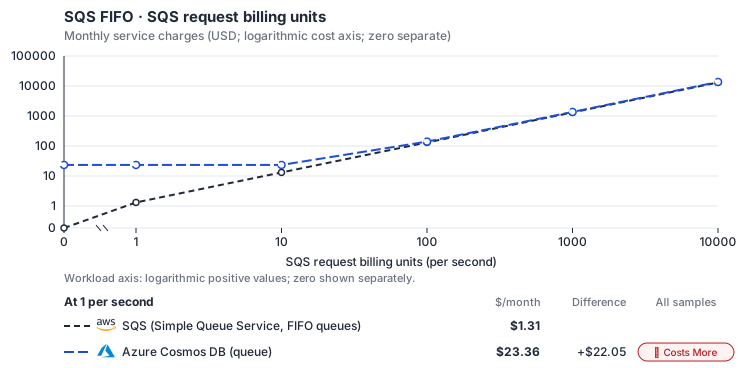
- 1-KiB messages, unbatched send/receive/delete; actual batch and delivery assumptions stay visible. Other native meters and workload assumptions retain their explicitly displayed default quantities. Workload translation and capacity assumptions are not benchmark measurements.
- Native monthly usage priced at the cited provider list prices; listed target allowances apply where present, excluding invoice credits, taxes and negotiated discounts. Rates as of 2026-10-22: us-east-1 → East US, USD/month.
- Source prices are reference charges, not an invoice. Target lines cover selected service usage/configuration only; adapter hosting and Tensor9 fees are excluded.
- Samples of explicit prices are not performance measurements or capacity qualification. No interpolation or break-even guarantee is implied.
- Variant assumptions show the first axis sample; any axis-dependent configuration is described by this curve’s workload note.
- Rates are cited provider list prices, editable for discounts, commitments or another region. Workload translation and capacity coefficients remain editable planning assumptions, not benchmark measurements or a commercial quote.
- Default-zero rates are explicit assumptions, not evidence that the deployed service or resource is free.
- Provisioned-unit minimums use an editable approximate allocation floor. Modeled target service cost is max(usage/allocation, minimum), with billable network, durable staging and dependent sinks added separately; actual RU/TU sizing, scaling increments and throughput remain unqualified.
- Durable staging is priced once: provisioned targets include adapter state in their selected allocation; native targets add a separate staging allocation when required. Adapter hosting is a separate allocation and must exclude resources already priced as staging, workers or target capacity.
- A declared adapter mapping and cost model do not establish implementation availability or service equivalence.
- This is a declared directed mapping; a planning estimate does not establish deployment or request-serving support.
- Authored planning assumptions, not measured adapter capacity. Origin rates are cited first-tier list prices, before free allowances and discounts.
- A cost scenario does not establish backend availability, protocol fidelity or production readiness. Registry serving status remains independent.
- Storage follows resident original messages, not every monthly message. Broker delivery bytes include redeliveries.
- FIFO estimates do not qualify dedup support, group throughput or single-group latency; backend limitations remain applicable.
- Azure Cosmos DB provisioned throughput bills 100-RU/s blocks per hour and stored GB-months; operations within the provisioned RU/s have no separate charge. Blocks are sized from the family’s reads at 1 RU and writes at 5.5 RU (1 KB items, no extra indexing) at full utilization after the planning peak factor, with the 400 RU/s smallest manual allocation as the floor (USD 23.36/month). Larger messages, indexing and query-based receives raise the RU charge; autoscale (USD 0.012 per 100 RU/s-hour) and serverless (USD 0.25 per million RUs) are not selected.
- AWS Price List API, AWSQueueService offer: https://pricing.us-east-1.amazonaws.com/offers/v1.0/aws/AWSQueueService/current/us-east-1/index.json
- Azure Retail Prices API: https://prices.azure.com/api/retail/prices
- Additional network transfer, backups, KMS, one-time migration and operational labor unless an explicit meter includes them.
- Destination application execution and separately billed downstream services; supply those allocations separately.
- Taxes, discounts, credits and free-tier allowances not explicitly listed by this model.
- Unmodeled dependent services, task execution and operations outside the selected workload family.
plan-4f4f008a52eb766d518aa4f34d3302fdb02b1a67 / 2026-10-22.planning.2. Curve: workload-1.
Sources: AWS Price List API, AWSQueueService offer, Azure Retail Prices API.
SQS FIFO → Azure Cosmos DB (queue): Authored native-usage planning example. Native monthly usage priced at the cited provider list prices; listed target allowances apply where present, excluding invoice credits, taxes and negotiated discounts.
Scenario source region: us-east-1. Scenario target region: East US. Currency: USD.
- Additional network transfer, backups, KMS, one-time migration and operational labor unless an explicit meter includes them.
- Destination application execution and separately billed downstream services; supply those allocations separately.
- Taxes, discounts, credits and free-tier allowances not explicitly listed by this model.
- Unmodeled dependent services, task execution and operations outside the selected workload family.
- Translated reads: 0 operations.
- Translated writes: 0 operations.
- Translated resident physical data: 0 GiB-month.
- Native provider operations: 0 operations.
- Published payload: 0 GiB.
- Delivered payload: 0 GiB.
- Allocated execution CPU: 0 vCPU-hour.
- Allocated execution RAM: 0 GiB-hour.
- Independent resource allocation: 0 resource-hour.
- Independent inventory: 0 resource-month.
- Input tokens: 0 tokens.
- Output tokens: 0 tokens.
- Billable network: 0 GiB.
- Dependent object sink retained data: 0 GiB-month.
- Dependent object sink writes: 0 writes.
- Rates are cited provider list prices, editable for discounts, commitments or another region. Workload translation and capacity coefficients remain editable planning assumptions, not benchmark measurements or a commercial quote.
- Default-zero rates are explicit assumptions, not evidence that the deployed service or resource is free.
- Provisioned-unit minimums use an editable approximate allocation floor. Modeled target service cost is max(usage/allocation, minimum), with billable network, durable staging and dependent sinks added separately; actual RU/TU sizing, scaling increments and throughput remain unqualified.
- Durable staging is priced once: provisioned targets include adapter state in their selected allocation; native targets add a separate staging allocation when required. Adapter hosting is a separate allocation and must exclude resources already priced as staging, workers or target capacity.
- A declared adapter mapping and cost model do not establish implementation availability or service equivalence.
- This is a declared directed mapping; a planning estimate does not establish deployment or request-serving support.
- Authored planning assumptions, not measured adapter capacity. Origin rates are cited first-tier list prices, before free allowances and discounts.
- A cost scenario does not establish backend availability, protocol fidelity or production readiness. Registry serving status remains independent.
- Storage follows resident original messages, not every monthly message. Broker delivery bytes include redeliveries.
- FIFO estimates do not qualify dedup support, group throughput or single-group latency; backend limitations remain applicable.
- Azure Cosmos DB provisioned throughput bills 100-RU/s blocks per hour and stored GB-months; operations within the provisioned RU/s have no separate charge. Blocks are sized from the family’s reads at 1 RU and writes at 5.5 RU (1 KB items, no extra indexing) at full utilization after the planning peak factor, with the 400 RU/s smallest manual allocation as the floor (USD 23.36/month). Larger messages, indexing and query-based receives raise the RU charge; autoscale (USD 0.012 per 100 RU/s-hour) and serverless (USD 0.25 per million RUs) are not selected.
plan-4f4f008a52eb766d518aa4f34d3302fdb02b1a67 / 2026-10-22.planning.2. Scenario: planning-example.
Sources: AWS Price List API, AWSQueueService offer, Azure Retail Prices API.
Via PostgreSQL Flexible Server
PostgreSQL hosting
Microsoft operates PostgreSQL Flexible Server, including zone-redundant HA and point-in-time recovery backups. The adapter uses short-lived Microsoft Entra tokens as database passwords. Queue data stays outside the customer’s Kubernetes cluster and survives its rebuild. One server and database hold all queues for the deployment, sharing capacity and maintenance; the default server size is fixed because SQS supplies no source instance size. Tensor9 operates the queue schema and adapter. Queues start empty; existing SQS messages are not migrated. Drain each message group before cutover to preserve order.Queue behavior
Queues use the same PostgreSQL tables, receive steps, stored receipt handles and single-transaction dead-letter moves described in PostgreSQL queue behavior. Receipt handles survive adapter restarts; stale receipt handles return an error. Retention still removes messages in flight. All queues share database capacity, so a busy queue can affect others. The documented Standard-queue benchmark does not establish this host’s capacity or FIFO throughput. Duplicate sends are suppressed for five minutes; consumers must still handle redelivery.Example monthly charges
This Tensor9 BYOC scenario estimates service charges for the named origin and target services. Adapter hosting and commercial Tensor9 fees need separate allocations. How Tensor9 estimates costs explains the method and what the estimates include.SQS FIFO · SQS request billing units
Feature: SQS FIFO. Estimated monthly service charges by SQS request billing units. Adapter hosting and Tensor9 fees are excluded. Source: us-east-1; target: eastus; currency: USD.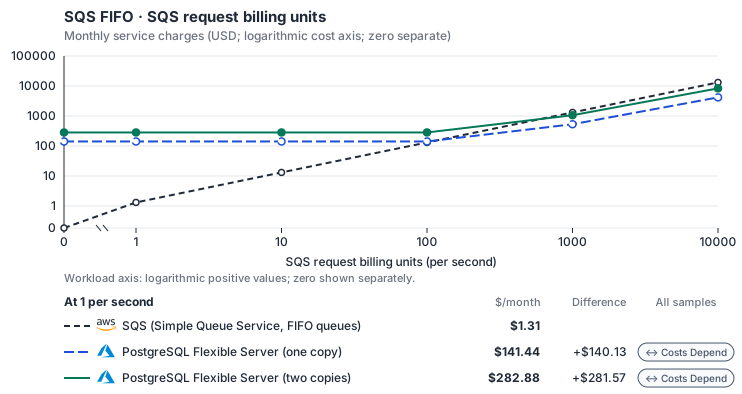
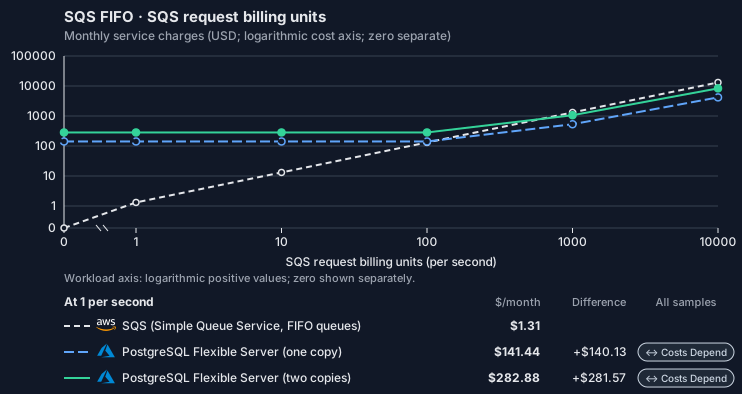
- 1-KiB messages, unbatched send/receive/delete; actual batch and delivery assumptions stay visible. Other native meters and workload assumptions retain their explicitly displayed default quantities. Workload translation and capacity assumptions are not benchmark measurements.
- Native monthly usage priced at the cited provider list prices; listed target allowances apply where present, excluding invoice credits, taxes and negotiated discounts. Rates as of 2026-10-22: us-east-1 → eastus, USD/month.
- Source prices are reference charges, not an invoice. Target lines cover selected service usage/configuration only; adapter hosting and Tensor9 fees are excluded.
- Samples of explicit prices are not performance measurements or capacity qualification. No interpolation or break-even guarantee is implied.
- Variant assumptions show the first axis sample; any axis-dependent configuration is described by this curve’s workload note.
- Rates are cited provider list prices, editable for discounts, commitments or another region. Workload translation and capacity coefficients remain editable planning assumptions, not benchmark measurements or a commercial quote.
- Default-zero rates are explicit assumptions, not evidence that the deployed service or resource is free.
- Provisioned-unit minimums use an editable approximate allocation floor. Modeled target service cost is max(usage/allocation, minimum), with billable network, durable staging and dependent sinks added separately; actual RU/TU sizing, scaling increments and throughput remain unqualified.
- Durable staging is priced once: provisioned targets include adapter state in their selected allocation; native targets add a separate staging allocation when required. Adapter hosting is a separate allocation and must exclude resources already priced as staging, workers or target capacity.
- A declared adapter mapping and cost model do not establish implementation availability or service equivalence.
- This is a declared directed mapping; a planning estimate does not establish deployment or request-serving support.
- Authored planning assumptions, not measured adapter capacity. Origin rates are cited first-tier list prices, before free allowances and discounts.
- A cost scenario does not establish backend availability, protocol fidelity or production readiness. Registry serving status remains independent.
- Storage follows resident original messages, not every monthly message. Broker delivery bytes include redeliveries.
- FIFO estimates do not qualify dedup support, group throughput or single-group latency; backend limitations remain applicable.
- Azure Database for PostgreSQL Flexible Server bills vCores with a fixed memory ratio per series; the vCPU and memory rates decompose the General Purpose and Memory Optimized v5 prices. High availability bills the standby’s compute and storage as a second copy. The minimum is the smallest Burstable server, which does not support high availability; the smallest General Purpose server (2 vCores) costs USD 133.62 per month. Additional IOPS, backup storage and reserved capacity are not selected.
- Row-store throughput (capacityOpsPerVcpuSecond, default 1500) is measured-by-tensor9 as a lower bound: the DynamoDB adapter on Cloud SQL db-custom-2-7680 (2 vCPU, PostgreSQL 16, us-west1) served 2,974 ops/s of YCSB-A at 16 threads without recorded saturation (src/main/kotlin/t9/prime/equiv/generated/eval/CloudsqlPostgresqlYcsbAT16GoYcsbV1_0_0.kt). Published CPU-bound pgbench reaches 3,101 read-write transactions and 20,289 point reads per vCPU-second (AWS z1d.2xlarge, PostgreSQL 14.5), so actual capacity is likely higher. Reads and writes share one coefficient: at the same adapter version, read-only YCSB-C was not faster than 50%-update YCSB-A.
- Log-broker throughput (capacityStreamMiBPerVcpuSecond 20 at 0.5 utilization, 4 GiB RAM per vCPU) is provider-documented by Google Managed Service for Apache Kafka sizing (https://docs.cloud.google.com/managed-service-for-apache-kafka/docs/plan-cluster-size): write-equivalent bytes are replicated writes plus a quarter of reads. Producer batches below 10 KB lower per-CPU throughput; that penalty is not modeled.
- Disk utilization 0.8 is provider-documented headroom below Cloud SQL automatic storage increase, which triggers near 91-95% full (https://docs.cloud.google.com/sql/docs/postgres/instance-settings). The 20 GiB reserve exceeds PostgreSQL’s 1 GB default max_wal_size; the remainder of that reserve is unmeasured.
- CPU tiers double from 2 vCPUs to the target’s largest node at 4 GiB per vCPU; each target’s documented largest node bounds CPU, RAM, RAM per vCPU and disk, and the durable staging database uses Cloud SQL Enterprise (96 vCPU, 6.5 GiB per vCPU, 624 GiB, 64 TiB). Targets billed per capacity unit or throughput unit are sized by their backend instead.
- No public evidence: peak/mean work (2) and the RAM working-set fraction (0.1). Proposed measurements: the p99 one-minute rate over the monthly mean from customer CloudWatch metrics; the buffer hit ratio while stepping RAM under a fixed YCSB-B load.
- Node bounds: E96ds_v5 has 96 vCores and 672 GiB (https://learn.microsoft.com/en-us/azure/postgresql/compute-storage/concepts-compute); Premium SSD storage holds up to 32,767 GiB (https://learn.microsoft.com/en-us/azure/postgresql/compute-storage/concepts-storage).
- Stored GiB already includes the origin family’s physical footprint assumptions; no second storage amplification is applied.
- The operations/vCPU coefficient supplies the compute requirement alongside explicit resource-hour minima.
- Copies and allocation fractions change cost only; they do not increase modeled primary capacity.
- AWS Price List API, AWSQueueService offer: https://pricing.us-east-1.amazonaws.com/offers/v1.0/aws/AWSQueueService/current/us-east-1/index.json
- Azure Retail Prices API: https://prices.azure.com/api/retail/prices
- Additional network transfer, backups, KMS, one-time migration and operational labor unless an explicit meter includes them.
- Destination application execution and separately billed downstream services; supply those allocations separately.
- Taxes, discounts, credits and free-tier allowances not explicitly listed by this model.
- Unmodeled dependent services, task execution and operations outside the selected workload family.
plan-d6e6756733e57b05fe1084c81427de33e78217f0 / 2026-10-22.planning.2. Curve: workload-1.
Sources: AWS Price List API, AWSQueueService offer, Azure Retail Prices API.
SQS FIFO → PostgreSQL Flexible Server: Authored native-usage planning example. Native monthly usage priced at the cited provider list prices; listed target allowances apply where present, excluding invoice credits, taxes and negotiated discounts.
Scenario source region: us-east-1. Scenario target region: eastus. Currency: USD.
- Additional network transfer, backups, KMS, one-time migration and operational labor unless an explicit meter includes them.
- Destination application execution and separately billed downstream services; supply those allocations separately.
- Taxes, discounts, credits and free-tier allowances not explicitly listed by this model.
- Unmodeled dependent services, task execution and operations outside the selected workload family.
- Translated reads: 0 operations.
- Translated writes: 0 operations.
- Translated resident physical data: 0 GiB-month.
- Native provider operations: 0 operations.
- Published payload: 0 GiB.
- Delivered payload: 0 GiB.
- Allocated execution CPU: 0 vCPU-hour.
- Allocated execution RAM: 0 GiB-hour.
- Independent resource allocation: 0 resource-hour.
- Independent inventory: 0 resource-month.
- Input tokens: 0 tokens.
- Output tokens: 0 tokens.
- Billable network: 0 GiB.
- Dependent object sink retained data: 0 GiB-month.
- Dependent object sink writes: 0 writes.
- Rates are cited provider list prices, editable for discounts, commitments or another region. Workload translation and capacity coefficients remain editable planning assumptions, not benchmark measurements or a commercial quote.
- Default-zero rates are explicit assumptions, not evidence that the deployed service or resource is free.
- Provisioned-unit minimums use an editable approximate allocation floor. Modeled target service cost is max(usage/allocation, minimum), with billable network, durable staging and dependent sinks added separately; actual RU/TU sizing, scaling increments and throughput remain unqualified.
- Durable staging is priced once: provisioned targets include adapter state in their selected allocation; native targets add a separate staging allocation when required. Adapter hosting is a separate allocation and must exclude resources already priced as staging, workers or target capacity.
- A declared adapter mapping and cost model do not establish implementation availability or service equivalence.
- This is a declared directed mapping; a planning estimate does not establish deployment or request-serving support.
- Authored planning assumptions, not measured adapter capacity. Origin rates are cited first-tier list prices, before free allowances and discounts.
- A cost scenario does not establish backend availability, protocol fidelity or production readiness. Registry serving status remains independent.
- Storage follows resident original messages, not every monthly message. Broker delivery bytes include redeliveries.
- FIFO estimates do not qualify dedup support, group throughput or single-group latency; backend limitations remain applicable.
- Azure Database for PostgreSQL Flexible Server bills vCores with a fixed memory ratio per series; the vCPU and memory rates decompose the General Purpose and Memory Optimized v5 prices. High availability bills the standby’s compute and storage as a second copy. The minimum is the smallest Burstable server, which does not support high availability; the smallest General Purpose server (2 vCores) costs USD 133.62 per month. Additional IOPS, backup storage and reserved capacity are not selected.
- Row-store throughput (capacityOpsPerVcpuSecond, default 1500) is measured-by-tensor9 as a lower bound: the DynamoDB adapter on Cloud SQL db-custom-2-7680 (2 vCPU, PostgreSQL 16, us-west1) served 2,974 ops/s of YCSB-A at 16 threads without recorded saturation (src/main/kotlin/t9/prime/equiv/generated/eval/CloudsqlPostgresqlYcsbAT16GoYcsbV1_0_0.kt). Published CPU-bound pgbench reaches 3,101 read-write transactions and 20,289 point reads per vCPU-second (AWS z1d.2xlarge, PostgreSQL 14.5), so actual capacity is likely higher. Reads and writes share one coefficient: at the same adapter version, read-only YCSB-C was not faster than 50%-update YCSB-A.
- Log-broker throughput (capacityStreamMiBPerVcpuSecond 20 at 0.5 utilization, 4 GiB RAM per vCPU) is provider-documented by Google Managed Service for Apache Kafka sizing (https://docs.cloud.google.com/managed-service-for-apache-kafka/docs/plan-cluster-size): write-equivalent bytes are replicated writes plus a quarter of reads. Producer batches below 10 KB lower per-CPU throughput; that penalty is not modeled.
- Disk utilization 0.8 is provider-documented headroom below Cloud SQL automatic storage increase, which triggers near 91-95% full (https://docs.cloud.google.com/sql/docs/postgres/instance-settings). The 20 GiB reserve exceeds PostgreSQL’s 1 GB default max_wal_size; the remainder of that reserve is unmeasured.
- CPU tiers double from 2 vCPUs to the target’s largest node at 4 GiB per vCPU; each target’s documented largest node bounds CPU, RAM, RAM per vCPU and disk, and the durable staging database uses Cloud SQL Enterprise (96 vCPU, 6.5 GiB per vCPU, 624 GiB, 64 TiB). Targets billed per capacity unit or throughput unit are sized by their backend instead.
- No public evidence: peak/mean work (2) and the RAM working-set fraction (0.1). Proposed measurements: the p99 one-minute rate over the monthly mean from customer CloudWatch metrics; the buffer hit ratio while stepping RAM under a fixed YCSB-B load.
- Node bounds: E96ds_v5 has 96 vCores and 672 GiB (https://learn.microsoft.com/en-us/azure/postgresql/compute-storage/concepts-compute); Premium SSD storage holds up to 32,767 GiB (https://learn.microsoft.com/en-us/azure/postgresql/compute-storage/concepts-storage).
- Stored GiB already includes the origin family’s physical footprint assumptions; no second storage amplification is applied.
- The operations/vCPU coefficient supplies the compute requirement alongside explicit resource-hour minima.
- Copies and allocation fractions change cost only; they do not increase modeled primary capacity.
plan-d6e6756733e57b05fe1084c81427de33e78217f0 / 2026-10-22.planning.2. Scenario: planning-example.
Sources: AWS Price List API, AWSQueueService offer, Azure Retail Prices API.
Costs
Estimated monthly service charges for each backend with a published cost model, at one sampled workload from that model’s cost curve. Adapter hosting and Tensor9 fees are excluded. How Tensor9 estimates costs explains the method, what the estimates include and how to read their qualifications.Service level agreements
Listed terms cover requests sent through this service adapter. They do not cover direct connections to the target service or replace the cloud provider’s own SLA. Each origin-to-target pair has its own terms or an explicit pending status. See the SLA tables, measurement rules, and scaling conditions.SQS to Cosmos DB
Why these latency targets differ
The shared Standard/FIFO point-operation target is 20 ms, with 200 ms for a batch of up to ten sends. Cosmos FIFO uses a per-group sequence counter, a durable deduplication marker and an in-flight ownership slot. Their conditional reads/writes are adapter coordination; the clock cannot exclude them merely because they use Cosmos DB. The shared target preserves room for that work instead of advertising the cost of a simple native queue forwarder. Ready-message pickup and delay after the requested wait remain at 500 ms. Discovery, candidate inspection, conditional claims and polling can dominate this path even for a tiny message. The target is not an end-to-end promise for clearing a backlog, and Standard and FIFO observations must remain separate.Adapter and scope
Receive timing
Two phases ofReceiveMessage have separate measurements:
- Ready-message pickup: time from a message becoming available to a waiting receiver until the adapter sends the response. Only separately measured time spent waiting for the backend service is excluded.
- Delay after the requested wait: extra adapter time after the requested wait for a message has ended.
Message guarantees
A send can return success only after the message state has been durably saved. A deduplication marker alone must not produce success for a message that was never committed. The adapter must use the same record of accepted messages when returning success, checking for duplicates, and recovering from a crash. Standard queues can redeliver messages. FIFO preserves the profile’s per-group ordering and supported deduplication behavior; it does not promise global order across groups or exactly-once effects in your application. A consumer can perform a business action and fail before deleting the message, so application-side idempotency still matters. The adapter follows its documented rules for visibility, expiration, message deletion, and movement to a dead-letter queue. Successfully completed changes must survive the process failures covered by the agreement. An expired receipt handle produces the result documented for that adapter; different backends need not return the same error. Approximate queue counts help with troubleshooting but are not guaranteed to show the exact current queue depth.Useful throughput
Count completed API calls separately from message work. A valid emptyReceiveMessage completes an API call but delivers no message. One successful send, nonempty receive and delete form a message lifecycle involving at least three API calls. Redelivery and internal retries must not inflate the count of distinct messages processed.
Measure Standard and FIFO separately. FIFO group distribution, time between receive and delete, visibility timeout, delayed messages and dead-letter traffic change the scaling limit. A large number of consumers cannot make a single serialized group behave like many independent groups.
These standard service levels do not reserve a fixed message rate or specify a maximum throughput. Tensor9 and the customer must agree on limits for the actual workload and production deployment, including how quickly traffic can grow and how large a burst can be. Autoscaling is intended to maintain the stated latency and endpoint reachability within those limits. It cannot remove ordering requirements or backend-service limits.
Operation terms
The named operations retain their documented behavior with supported request options. The 1 KiB limits apply to the latency targets.DeleteMessageBatch, ChangeMessageVisibilityBatch, queue management, tagging and approximate-count reads have no numerical SLA under these standard terms. A capability in the service profile does not automatically receive another operation’s SLA.
The pickup service level differs from the Cloud SQL service level. These targets apply to their respective receive paths; they are not comparative benchmark results or a recommendation to choose one backend.
Scaling on Cosmos DB
Partition distribution, conditional message claims, deduplication and FIFO group serialization affect useful throughput. Native request-unit consumption and throttling need to be considered alongside adapter scheduling, repeated scans and retry amplification. Additional replicas can process independent work. They do not remove contention around the same message claim or FIFO group, and they do not grant additional native serverless capacity. Track completed message lifecycles, native calls per lifecycle and repeated failed claims separately. Once a message expires, the queue must treat it as expired even if the cloud provider has not yet removed its stored data. Do not count expired messages as available work merely because they still appear in a storage view. Time the adapter takes to find an available message, including waits between queue checks, also counts toward adapter latency. It is not automatically excluded as cloud-provider time.Example: two receivers see the same candidate
Two receivers discover a message. The adapter must use a conditional update to assign the message to a receiver under the documented queue rules. It must not give both receivers conflicting ownership just to meet a latency target. Record the claim outcomes and native conditional responses, along with local retries and scheduling. A later redelivery after visibility expires can be legitimate. It is different from simultaneous ownership caused by a broken claim. Inspect receipt timing and the selected queue semantics before calling either event data loss or a duplicate-delivery defect.Example: restart during a dead-letter transition
A message is copied to the dead-letter queue, then the process restarts before removing the source copy. Recovery must preserve the supported message semantics without adapter-induced loss. A valid redelivery is not the same as a missing accepted message. Preserve source and destination observations and identifiers before changing either queue. Do not delete both copies to make the counts agree, and do not replay a send solely to generate an Explain report. If Cosmos DB also reports throttling, investigate serverless/partition pressure and the adapter’s call/retry pattern. Backend throttling does not excuse an incorrect recovery algorithm or excessive local retries.Evidence for support
Record Standard versus FIFO, group distribution, message and attribute sizes, conditional-claim outcomes, wait/visibility settings, dead-letter configuration and the affected time window. Include native request IDs, request-unit/throttling observations and available adapter timing. Keep sensitive bodies and receipt handles out of shared reports. You can contact support before you know what caused the problem.SQS (Simple Queue Service, FIFO queues) to PostgreSQL Flexible Server
What this adapter does
Forazure::1.0.0::postgresql::flexible, The SQL queue uses row locking and SKIP LOCKED; FIFO adds head-of-group selection and deduplication state. The current long-poll loop can sleep between polls. Queue configuration is cached and durable queue state remains in PostgreSQL. A ReceiveMessage response budget is not a delivery-time promise: messages may not yet exist, may be delayed, or may be blocked by a FIFO group head. The short-poll row deliberately removes that ambiguity. Requested long-poll waits need their own measurement treatment in the agreement.
How the latency targets were chosen
Small message send and settlement: +10 ms monthly p99 (adapter-added).ChangeMessageVisibility, DeleteMessage, SendMessage. Native forwarding needs bounded translation; SQL adds queue state; Cosmos FIFO requires multiple durable coordination steps and cannot honestly inherit a 1 ms forwarding budget.
Bounded short-poll receive: +10 ms monthly p99 (adapter-added). ReceiveMessage. Receive scans/selects candidates, claims visibility and creates receipt handles. FIFO head selection and Cosmos slot CAS cost more than a simple send.
Bounded message batches: +100 ms monthly p99 (adapter-added). DeleteMessageBatch, SendMessageBatch. A conservative upper budget for up to ten point paths plus aggregation. It does not assume the implementation parallelizes all target or metadata work.
Queue configuration and discovery: +20 ms monthly p99 (adapter-added). GetQueueAttributes, GetQueueUrl. Queue identity, attributes, tags and counts can use the adapter’s durable catalog; this is not excluded as target message work.
Your signed agreement sets the terms for your deployment. A target does not add an operation or option that the compatibility tables mark unavailable.
What counts toward latency
For a request-response row, measure from the agreed ingress boundary to dispatch of the complete response. A row that explicitly names a first response chunk ends at that chunk; its number does not cover the rest of the stream. A long-poll row names the intentional wait and when adapter delay starts. Include parsing, authorization, admission, translation, serialization, adapter-owned storage and coordination, retries and response handling. Subtract only separately measured target-workload waits and external network segments allowed by the measurement rules. The adapter’s own response handling and dispatch remain covered. A database used for adapter metadata is still adapter work, even if a cloud provider hosts it. For concurrent calls, exclude the union of permitted wait intervals, not the sum of overlapping spans. Calculate each request’s adapter duration first, then the monthly p99. Do not subtract one service’s p99 from another’s. Known adapter timeouts are over-budget samples; failed or incomplete requests cannot disappear to improve the percentile. Missing measurements do not become zero latency. An SDK call span alone does not prove how much of its duration can be excluded.Endpoint reachability and request failures
The endpoint-reachability target measures adapter health checks. Correctly forwarding a target quota or permission error is different from producing that error because the adapter sent the wrong request. Adapter-caused failures remain Tensor9’s responsibility even when the target is healthy. Correctness and data-integrity requirements apply to every supported request. Endpoint reachability does not measure request correctness or grant an allowance for incorrect results.Scaling and target-service capacity
Scale send, receive and settle capacity together, and track in-flight messages, pollers, candidate scans and FIFO group skew. Adding replicas helps independent groups but cannot parallelize the ordered head of one group. The agreement caps active pollers, groups inspected per receive, message bytes, retry amplification and batch entries. Tensor9 scales the fabric within those limits; the customer supplies sufficient broker capacity, Cosmos RU/s or PostgreSQL connections and I/O. Tell Tensor9 the expected steady rate, bursts, concurrency, payload sizes and operation mix. Tensor9 sizes and scales the adapter for the agreed load; you choose and monitor the target service’s capacity with Tensor9’s help. A latency budget is not a requests-per-second rating. Larger requests and higher rates need explicit terms, not silent inheritance of a small-request SLA.Data and behavior guarantees
Acceptance must not be returned before the documented message persistence point. Settlement must apply to the intended message/receipt; FIFO order and deduplication apply only where this directed profile supports them. Duplicate delivery can be legitimate under at-least-once delivery. Dead-letter transitions must not silently discard an accepted message. Durability of the target broker/database remains its own commitment, while broken adapter receipt, marker or coordination logic remains Tensor9’s responsibility.Example and diagnosis
Fororder-events, send a 2 KiB message, receive up to ten messages with WaitTimeSeconds=0, then settle each receipt. For a FIFO queue, distribute independent customers across groups instead of expecting one group to scale with replicas. If native message writes are fast but Cosmos FIFO sends slow down, inspect counter/dedup contention: those coordination waits still count against Tensor9’s fabric budget.
Use tensor9 explain and the documented explain headers to understand the selected adapter and its behavior. Correlate available request diagnostics with the target provider’s latency, throttling and capacity metrics. An explain report helps diagnose a request; it is not by itself a qualified SLA timing measurement. Share the operation, request shape, timestamps and request identifiers with support, with credentials and customer payloads removed.
SQS (Simple Queue Service, FIFO queues) to Azure Service Bus
What this adapter does
Forazure::1.0.0::servicebus, Service Bus messages and locks implement queue delivery; FIFO uses sessions. Lock renewal, receipt mapping and settlement remain adapter responsibilities, while native broker delivery uses the target service. A ReceiveMessage response budget is not a delivery-time promise: messages may not yet exist, may be delayed, or may be blocked by a FIFO group head. The short-poll row deliberately removes that ambiguity. Requested long-poll waits need their own measurement treatment in the agreement.
How the latency targets were chosen
Small message send and settlement: +1 ms monthly p99 (adapter-added).ChangeMessageVisibility, DeleteMessage, SendMessage. Native forwarding needs bounded translation; SQL adds queue state; Cosmos FIFO requires multiple durable coordination steps and cannot honestly inherit a 1 ms forwarding budget.
Bounded short-poll receive: +3 ms monthly p99 (adapter-added). ReceiveMessage. Receive scans/selects candidates, claims visibility and creates receipt handles. FIFO head selection and Cosmos slot CAS cost more than a simple send.
Bounded message batches: +10 ms monthly p99 (adapter-added). SendMessageBatch. A conservative upper budget for up to ten point paths plus aggregation. It does not assume the implementation parallelizes all target or metadata work.
Queue configuration and discovery: +20 ms monthly p99 (adapter-added). DeleteQueue, ListQueueTags, ListQueues, PurgeQueue, SetQueueAttributes, TagQueue, UntagQueue. Queue identity, attributes, tags and counts can use the adapter’s durable catalog; this is not excluded as target message work.
Your signed agreement sets the terms for your deployment. A target does not add an operation or option that the compatibility tables mark unavailable.
What counts toward latency
For a request-response row, measure from the agreed ingress boundary to dispatch of the complete response. A row that explicitly names a first response chunk ends at that chunk; its number does not cover the rest of the stream. A long-poll row names the intentional wait and when adapter delay starts. Include parsing, authorization, admission, translation, serialization, adapter-owned storage and coordination, retries and response handling. Subtract only separately measured target-workload waits and external network segments allowed by the measurement rules. The adapter’s own response handling and dispatch remain covered. A database used for adapter metadata is still adapter work, even if a cloud provider hosts it. For concurrent calls, exclude the union of permitted wait intervals, not the sum of overlapping spans. Calculate each request’s adapter duration first, then the monthly p99. Do not subtract one service’s p99 from another’s. Known adapter timeouts are over-budget samples; failed or incomplete requests cannot disappear to improve the percentile. Missing measurements do not become zero latency. An SDK call span alone does not prove how much of its duration can be excluded.Endpoint reachability and request failures
The endpoint-reachability target measures adapter health checks. Correctly forwarding a target quota or permission error is different from producing that error because the adapter sent the wrong request. Adapter-caused failures remain Tensor9’s responsibility even when the target is healthy. Correctness and data-integrity requirements apply to every supported request. Endpoint reachability does not measure request correctness or grant an allowance for incorrect results.Scaling and target-service capacity
Scale send, receive and settle capacity together, and track in-flight messages, pollers, candidate scans and FIFO group skew. Adding replicas helps independent groups but cannot parallelize the ordered head of one group. The agreement caps active pollers, groups inspected per receive, message bytes, retry amplification and batch entries. Tensor9 scales the fabric within those limits; the customer supplies sufficient broker capacity, Cosmos RU/s or PostgreSQL connections and I/O. Tell Tensor9 the expected steady rate, bursts, concurrency, payload sizes and operation mix. Tensor9 sizes and scales the adapter for the agreed load; you choose and monitor the target service’s capacity with Tensor9’s help. A latency budget is not a requests-per-second rating. Larger requests and higher rates need explicit terms, not silent inheritance of a small-request SLA.Data and behavior guarantees
Acceptance must not be returned before the documented message persistence point. Settlement must apply to the intended message/receipt; FIFO order and deduplication apply only where this directed profile supports them. Duplicate delivery can be legitimate under at-least-once delivery. Dead-letter transitions must not silently discard an accepted message. Durability of the target broker/database remains its own commitment, while broken adapter receipt, marker or coordination logic remains Tensor9’s responsibility.Example and diagnosis
Fororder-events, send a 2 KiB message, receive up to ten messages with WaitTimeSeconds=0, then settle each receipt. For a FIFO queue, distribute independent customers across groups instead of expecting one group to scale with replicas. If native message writes are fast but Cosmos FIFO sends slow down, inspect counter/dedup contention: those coordination waits still count against Tensor9’s fabric budget.
Use tensor9 explain and the documented explain headers to understand the selected adapter and its behavior. Correlate available request diagnostics with the target provider’s latency, throttling and capacity metrics. An explain report helps diagnose a request; it is not by itself a qualified SLA timing measurement. Share the operation, request shape, timestamps and request identifiers with support, with credentials and customer payloads removed.
SQS (Simple Queue Service, FIFO queues) to Cloud SQL for PostgreSQL
SLA status: Not applicable FIFO request-processing service levels have not been qualified for this mapping. Standard-queue measurements do not establish FIFO latency, throughput or availability.SQS (Simple Queue Service, FIFO queues) to PostgreSQL
SLA status: Not applicable FIFO request-processing service levels have not been qualified for this mapping. Standard-queue measurements do not establish FIFO latency, throughput or availability.SQS (Simple Queue Service, FIFO queues) to Scaleway Managed Database for PostgreSQL
What this adapter does
Forscaleway::1.0.0::rdb::postgresql, The SQL queue uses row locking and SKIP LOCKED; FIFO adds head-of-group selection and deduplication state. The current long-poll loop can sleep between polls. Queue configuration is cached and durable queue state remains in PostgreSQL. A ReceiveMessage response budget is not a delivery-time promise: messages may not yet exist, may be delayed, or may be blocked by a FIFO group head. The short-poll row deliberately removes that ambiguity. Requested long-poll waits need their own measurement treatment in the agreement.
How the latency targets were chosen
Small message send and settlement: +10 ms monthly p99 (adapter-added).ChangeMessageVisibility, DeleteMessage, SendMessage. Native forwarding needs bounded translation; SQL adds queue state; Cosmos FIFO requires multiple durable coordination steps and cannot honestly inherit a 1 ms forwarding budget.
Bounded short-poll receive: +10 ms monthly p99 (adapter-added). ReceiveMessage. Receive scans/selects candidates, claims visibility and creates receipt handles. FIFO head selection and Cosmos slot CAS cost more than a simple send.
Bounded message batches: +100 ms monthly p99 (adapter-added). DeleteMessageBatch, SendMessageBatch. A conservative upper budget for up to ten point paths plus aggregation. It does not assume the implementation parallelizes all target or metadata work.
Queue configuration and discovery: +20 ms monthly p99 (adapter-added). GetQueueAttributes, GetQueueUrl. Queue identity, attributes, tags and counts can use the adapter’s durable catalog; this is not excluded as target message work.
Your signed agreement sets the terms for your deployment. A target does not add an operation or option that the compatibility tables mark unavailable.
What counts toward latency
For a request-response row, measure from the agreed ingress boundary to dispatch of the complete response. A row that explicitly names a first response chunk ends at that chunk; its number does not cover the rest of the stream. A long-poll row names the intentional wait and when adapter delay starts. Include parsing, authorization, admission, translation, serialization, adapter-owned storage and coordination, retries and response handling. Subtract only separately measured target-workload waits and external network segments allowed by the measurement rules. The adapter’s own response handling and dispatch remain covered. A database used for adapter metadata is still adapter work, even if a cloud provider hosts it. For concurrent calls, exclude the union of permitted wait intervals, not the sum of overlapping spans. Calculate each request’s adapter duration first, then the monthly p99. Do not subtract one service’s p99 from another’s. Known adapter timeouts are over-budget samples; failed or incomplete requests cannot disappear to improve the percentile. Missing measurements do not become zero latency. An SDK call span alone does not prove how much of its duration can be excluded.Endpoint reachability and request failures
The endpoint-reachability target measures adapter health checks. Correctly forwarding a target quota or permission error is different from producing that error because the adapter sent the wrong request. Adapter-caused failures remain Tensor9’s responsibility even when the target is healthy. Correctness and data-integrity requirements apply to every supported request. Endpoint reachability does not measure request correctness or grant an allowance for incorrect results.Scaling and target-service capacity
Scale send, receive and settle capacity together, and track in-flight messages, pollers, candidate scans and FIFO group skew. Adding replicas helps independent groups but cannot parallelize the ordered head of one group. The agreement caps active pollers, groups inspected per receive, message bytes, retry amplification and batch entries. Tensor9 scales the fabric within those limits; the customer supplies sufficient broker capacity, Cosmos RU/s or PostgreSQL connections and I/O. Tell Tensor9 the expected steady rate, bursts, concurrency, payload sizes and operation mix. Tensor9 sizes and scales the adapter for the agreed load; you choose and monitor the target service’s capacity with Tensor9’s help. A latency budget is not a requests-per-second rating. Larger requests and higher rates need explicit terms, not silent inheritance of a small-request SLA.Data and behavior guarantees
Acceptance must not be returned before the documented message persistence point. Settlement must apply to the intended message/receipt; FIFO order and deduplication apply only where this directed profile supports them. Duplicate delivery can be legitimate under at-least-once delivery. Dead-letter transitions must not silently discard an accepted message. Durability of the target broker/database remains its own commitment, while broken adapter receipt, marker or coordination logic remains Tensor9’s responsibility.Example and diagnosis
Fororder-events, send a 2 KiB message, receive up to ten messages with WaitTimeSeconds=0, then settle each receipt. For a FIFO queue, distribute independent customers across groups instead of expecting one group to scale with replicas. If native message writes are fast but Cosmos FIFO sends slow down, inspect counter/dedup contention: those coordination waits still count against Tensor9’s fabric budget.
Use tensor9 explain and the documented explain headers to understand the selected adapter and its behavior. Correlate available request diagnostics with the target provider’s latency, throttling and capacity metrics. An explain report helps diagnose a request; it is not by itself a qualified SLA timing measurement. Share the operation, request shape, timestamps and request identifiers with support, with credentials and customer payloads removed.