

- Coverage by target cloud
- How the backends compare
- On Google Cloud
- On Azure
- On OCI
- On Private Kubernetes
- Costs
- Service level agreements
- Debug this service
Coverage by target cloud
How the backends compare
Each row compares a capability of EC2 with its adaptation on each backend. A dash means this row is not stated for that backend.Max adaptation
Infrastructure-only adaptation
On Google Cloud
How it works
Your Terraformaws_instance compiles to a Compute Engine VM. The VM boots the Compute Engine image that matches your AMI’s operating system, on the nearest machine type, and your user data runs once at first boot. Your processes run directly on the VM; Tensor9 adds nothing to the compute path.
The VM runs as a Google service account created from the instance’s IAM role, not as Compute Engine’s default service account. A VM that your Terraform creates does not get the EC2 instance metadata service; the metadata section below explains what that means and which VMs do get it.


Your instance becomes a Compute Engine VM, with nothing between your workload and the VM.
Images and machine types
Adata aws_ami lookup for Ubuntu 22.04 or 24.04 LTS on x86 resolves to the matching Compute Engine image family (Ubuntu 22.04 becomes ubuntu-os-cloud/ubuntu-2204-lts). The image is kept at the version resolved at deployment, so a newer “latest” image does not rebuild the VM. Compute Engine also maps Ubuntu 22.04 and 24.04 Arm images to Arm VM sizes. Standard Ubuntu 20.04 is refused; the build does not silently substitute paid Ubuntu Pro.
A custom AMI has no Compute Engine equivalent. The build continues with a warning that names the AMI, and the VM’s boot image becomes a Terraform variable (t9_gcp_boot_image_…) with no default. You must set it to a Compute Engine image you have converted yourself.
- Machine types follow the instance’s class. General purpose maps to
n2, compute optimized toc2, burstable toe2and GPU tog2, sized to at least the instance’s vCPUs and memory. Memory- and storage-optimized types have no matching family, so they get the lowest-cost type that fits and the build warns that the class changed. - The root volume uses a native persistent disk. Class and capacity may change to provision requested settings, with a build warning. Root delete_on_termination=false retains the disk.
- Google operates the hardware. Google runs the hypervisor, host and availability; you operate the guest software.
Instance metadata and identity
VMs your Terraform creates. Nothing answers EC2 metadata requests at169.254.169.254. Google’s own metadata server answers there as on any Compute Engine VM, for /computeMetadata/v1/ paths with the Metadata-Flavor: Google header. The VM’s Google permissions come from its service account, which is created from the instance’s IAM role.
VMs launched at runtime. With maximum adaptation, a VM that the EC2 management API launches with an instance profile gets a small relay in the guest, when the deployment enables it. The relay sends EC2 requests, including the IMDSv2 token request (PUT /latest/api/token) and reads that include X-aws-ec2-metadata-token, to the appliance. The appliance answers with the same details DescribeInstances returns for that instance, and with credentials for its instance profile. A VM it cannot match to exactly one instance gets HTTP 403. Requests for Google’s paths, or with the Google header, are forwarded to Google unchanged.
Launch templates and Auto Scaling fleets
An Auto Scaling group and its launch template or launch configuration compile to agoogle_compute_instance_template and a regional managed instance group. Each member gets the same image, machine type, disk and service account as a standalone VM.
desired_capacity becomes the group’s target size (min_size when it is unset): the requested number of instances. Running and ready capacity depend on allocation and startup. A CPU target-tracking policy adds a regional autoscaler that uses min_size and max_size as its bounds; without a policy the group holds its target size.
In-stack target_group_arns references and aws_autoscaling_attachment registrations join the managed instance group to the translated network load balancer’s native backend service. Duplicate registration adds that managed group only once. Literal target-group ARNs, missing target groups and groups without a supported native GCP backend service produce named build warnings; those registrations receive no load-balanced traffic. Each listener must use the registered target port, and all referenced target groups must have identical members. This membership does not add application autohealing: the group’s health check is not an automatic repair policy, so a running but unhealthy VM is not replaced.
Limitations
Compute is native. These are the differences from EC2 to check against your workload: Where it differs from EC2- The EC2 instance metadata service is not supported on VMs your Terraform creates. Code that reads its instance ID, region or role credentials from
169.254.169.254gets no EC2 answer there. Only VMs launched at runtime through the EC2 management API get the metadata relay. - The signed instance identity document is not supported. Its signature cannot be reproduced, so a workload that verifies it does not work.
- Relay credentials work only with the adapter. On a VM with the relay, the credentials work with the adapter endpoints given to the guest (the
AWS_ENDPOINT_URL_…variables), not with AWS endpoints reached directly. - Discovery behaves differently: it lists only instances the management API launched. With maximum adaptation, Describe calls to the adapter’s EC2 endpoint return the instances that API launched, with the supported filters and pagination. They do not list the instance your stack creates, and no EC2 endpoint is configured inside that instance, so it cannot describe itself through EC2 calls. Unrelated cloud accounts are outside the endpoint’s scope.
- You must give the instance’s IAM role a literal name. The VM runs as a Google service account created from that role. A role named with
name_prefixor a computed name stops the build, rather than leaving the VM on Compute Engine’s default account. - You must supply the image for a custom AMI. The VM’s boot image is a variable with no default, and planning fails until you set it to a converted Compute Engine image.
- Machine types behave differently: performance follows the Compute Engine type. The type is the nearest match, not identical hardware. Older Intel generations trail EC2 on single-core speed; the performance tab has the published comparison.
- Security groups use the target’s own firewall. Supported rules from groups in the stack are applied to the VM through Compute Engine firewall rules, with default-deny ingress and egress. A named platform rule permits the traffic needed for boot, metadata, DNS and management, and the build reports that exception. Unknown groups and rules whose ports cannot be read are reported and grant no additional traffic. Review the reported differences before cutover.
- A per-instance public IP is not supported. An instance that requests one (
associate_public_ip_address) stops the deployment with an error, because this target does not create a per-instance public IP. - Disk performance follows the selected disk and VM. Provisioned settings select a compatible native disk class and capacity; the build reports capacity increases or shortfalls. The gp3 free baseline is not treated as a paid request. Per-VM limits still apply; configured IOPS and throughput are not a measured guarantee.
- Attached data disks are created empty. An inline
ebs_block_device, or an in-stackaws_ebs_volumeattached to an ordinary instance, becomes Compute Engine persistent disks. Existing data is never copied. Snapshots, external volumes and multi-attach are not supported. Data disks on an instance usingcountorfor_each, or in a launch template, stop the build. A computeddelete_on_terminationalso stops the build. Data disks are separate stack resources: they survive VM replacement but are deleted with the stack. This differs from AWS inline delete_on_termination behavior; the build reports it. - You must check Auto Scaling groups on their own page. A launch template or launch configuration defines each member, and the group maps to a regional managed instance group. Launch-template data disks remain unsupported; GCP and Azure fleets also refuse explicit root IOPS or throughput. Scaling, health-check and rolling-update limits are listed on the Auto Scaling page.
Other considerations
Google operates the hardware, and Tensor9 runs nothing in the VM’s compute path.- Before going live. Confirm the VM boots and your user data completes. If your code reads EC2 instance metadata, give it another source for its instance ID and region, and check that its Google service account has the permissions it needs.
- When the VM is replaced. Changing the AMI, subnet, key pair, availability zone, CPU options, placement or tenancy, root-volume encryption, or user data with
user_data_replace_on_changereplaces the VM. Compute Engine’s own rules can replace it in other cases, so review image, machine type and network changes before applying them. - Moving from AWS. The VM starts from a fresh image. Data on the instance’s EBS volumes is not copied, so move it separately before cutover.
Runtime lifecycle and instance metadata
The EC2 management API is offered at maximum adaptation on Google Cloud and Azure only. There, a supported lifecycle request records the instance state you asked for; a background process then creates or changes the VM and its related resources in the target cloud. A successful request can return a pending state while the machine is still being created, so use the describe operations to check when it is ready. RunInstances, termination and tagging act on the instances this API launched. Attribute updates and launch shapes stay within the supported request fields and backend settings. Describe requests list those instances; they do not list VMs compiled from your stack or give access to unrelated cloud accounts. EC2 instance metadata is not available inside a VM compiled from your stack: 169.254.169.254 answers with the target cloud’s own metadata service. On Google Cloud, a VM launched through the management API with an instance profile installs a relay at first boot that answers EC2 metadata paths, including role credentials, for that VM.Example monthly charges
This Tensor9 BYOC scenario estimates service charges for the named origin and target services. Adapter hosting and commercial Tensor9 fees need separate allocations. How Tensor9 estimates costs explains the method and what the estimates include.On-demand virtual machines · m6i.large → n2-standard-2
Feature: On-demand virtual machines. Source configuration: m6i.large · 2 vCPU / 8 GiB. Mapped target: n2-standard-2 · 2 vCPU / 8 GiB. Compute only for the named Linux on-demand instances, each running 730 hours per month. Estimated monthly service charges by Number of running instances. Adapter hosting and Tensor9 fees are excluded. Source: us-east-1; target: us-central1; currency: USD.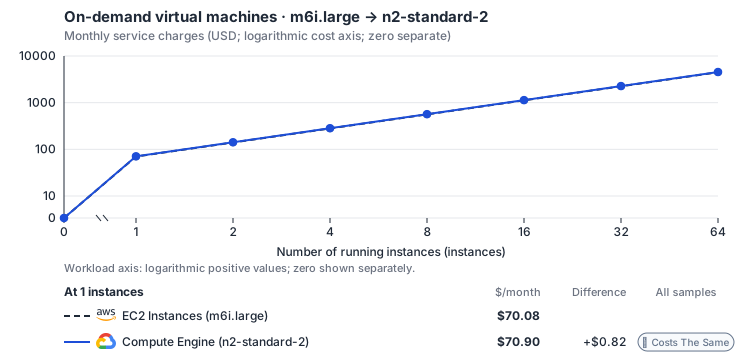
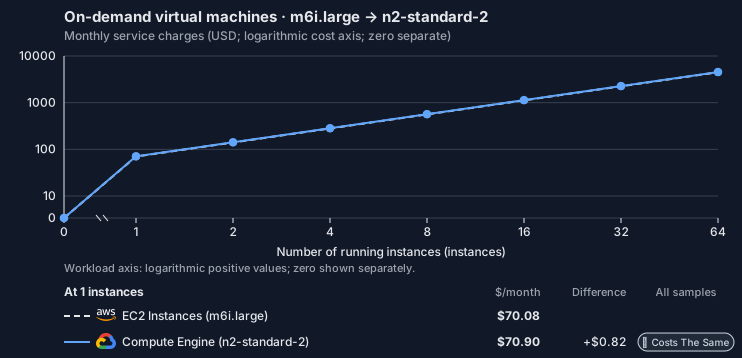
Curve assumptions
- Compute only for the named Linux on-demand instances, each running 730 hours per month. m6i.large (us-east-1) → n2-standard-2 (us-central1). Storage, network, licenses, discounts, adapter hosting and Tensor9 fees are excluded. Resource matching does not establish equal measured performance.
- Named Linux on-demand instances at cited list prices; source us-east-1, target us-central1. Rates as of 2026-10-22: us-east-1 → us-central1, USD/month.
- Source prices are reference charges, not an invoice. Target lines cover selected service usage/configuration only; adapter hosting and Tensor9 fees are excluded.
- Samples of explicit prices are not performance measurements or capacity qualification. No interpolation or break-even guarantee is implied.
- Variant assumptions show the first axis sample; any axis-dependent configuration is described by this curve’s workload note.
- m6i.large: m6i.large, Linux, shared tenancy, on-demand, us-east-1: Amazon EC2 price list (AWS Price List API) (https://pricing.us-east-1.amazonaws.com/offers/v1.0/aws/AmazonEC2/current/us-east-1/index.csv, read 2026-10-22). The named m6i.large (2 vCPU, 8 GiB) is USD 0.096 per instance-hour.
- n2-standard-2: n2-standard-2, Linux, on-demand, us-central1: Compute Engine general-purpose machine pricing (https://cloud.google.com/products/compute/pricing/general-purpose, read 2026-10-22). The listed n2-standard-2 (2 vCPU, 8 GiB) is USD 0.097118 per instance-hour, reproduced by 2 x 0.031611 + 8 x 0.004237; price this whole configuration.
- The compiler preserves the declared resource and architecture fit; equal workload performance has not been measured.
- AWS Price List API, AmazonEC2 offer (CSV): https://pricing.us-east-1.amazonaws.com/offers/v1.0/aws/AmazonEC2/current/us-east-1/index.csv
- AWS Price List API, AWSDataTransfer offer: https://pricing.us-east-1.amazonaws.com/offers/v1.0/aws/AWSDataTransfer/current/us-east-1/index.json
- Compute Engine general-purpose machine pricing: https://cloud.google.com/products/compute/pricing/general-purpose
- Disk and image pricing: https://cloud.google.com/compute/disks-image-pricing
- Network pricing: https://cloud.google.com/vpc/network-pricing
- Attached disks, network transfer, operating-system and software licenses, GPUs, discounts, commitments, credits and tax.
- Adapter hosting and Tensor9 fees.
plan-bcccbdac70e36a2d5723c9a953ac234422fd2119 / 2026-10-22.planning.2. Curve: ec2-m6i-large-gcp-n2-standard-2.
Sources: AWS Price List API, AmazonEC2 offer (CSV), AWS Price List API, AWSDataTransfer offer, Compute Engine general-purpose machine pricing, Disk and image pricing, Network pricing.
On-demand virtual machines · m7i.large → n2-standard-2
Feature: On-demand virtual machines. Source configuration: m7i.large · 2 vCPU / 8 GiB. Mapped target: n2-standard-2 · 2 vCPU / 8 GiB. Compute only for the named Linux on-demand instances, each running 730 hours per month. Estimated monthly service charges by Number of running instances. Adapter hosting and Tensor9 fees are excluded. Source: us-east-1; target: us-central1; currency: USD.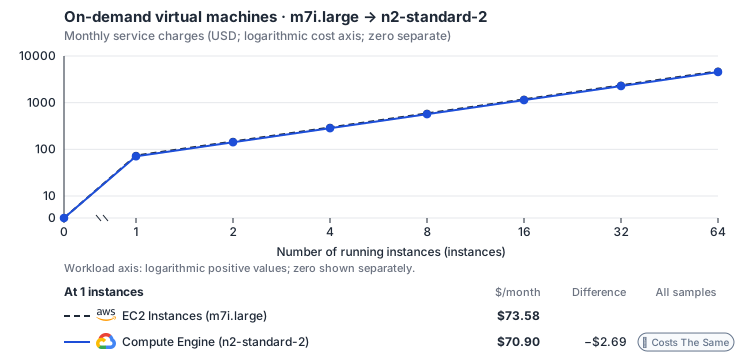
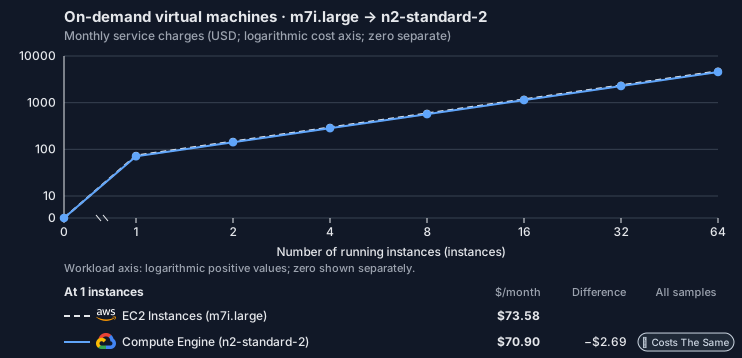
Curve assumptions
- Compute only for the named Linux on-demand instances, each running 730 hours per month. m7i.large (us-east-1) → n2-standard-2 (us-central1). Storage, network, licenses, discounts, adapter hosting and Tensor9 fees are excluded. Resource matching does not establish equal measured performance.
- Named Linux on-demand instances at cited list prices; source us-east-1, target us-central1. Rates as of 2026-10-22: us-east-1 → us-central1, USD/month.
- Source prices are reference charges, not an invoice. Target lines cover selected service usage/configuration only; adapter hosting and Tensor9 fees are excluded.
- Samples of explicit prices are not performance measurements or capacity qualification. No interpolation or break-even guarantee is implied.
- Variant assumptions show the first axis sample; any axis-dependent configuration is described by this curve’s workload note.
- m7i.large: EC2 Linux on-demand BoxUsage:m7i.large (2 vCPU, 8 GiB), us-east-1: AWS Price List API, AmazonEC2 offer (CSV) (https://pricing.us-east-1.amazonaws.com/offers/v1.0/aws/AmazonEC2/current/us-east-1/index.csv, read 2026-10-22). USD 0.1008 per instance-hour; matches the default 2 vCPU / 8 GiB blueprint.
- n2-standard-2: n2-standard-2, Linux, on-demand, us-central1: Compute Engine general-purpose machine pricing (https://cloud.google.com/products/compute/pricing/general-purpose, read 2026-10-22). The listed n2-standard-2 (2 vCPU, 8 GiB) is USD 0.097118 per instance-hour, reproduced by 2 x 0.031611 + 8 x 0.004237; price this whole configuration.
- The compiler preserves the declared resource and architecture fit; equal workload performance has not been measured.
- AWS Price List API, AmazonEC2 offer (CSV): https://pricing.us-east-1.amazonaws.com/offers/v1.0/aws/AmazonEC2/current/us-east-1/index.csv
- AWS Price List API, AWSDataTransfer offer: https://pricing.us-east-1.amazonaws.com/offers/v1.0/aws/AWSDataTransfer/current/us-east-1/index.json
- Compute Engine general-purpose machine pricing: https://cloud.google.com/products/compute/pricing/general-purpose
- Disk and image pricing: https://cloud.google.com/compute/disks-image-pricing
- Network pricing: https://cloud.google.com/vpc/network-pricing
- Attached disks, network transfer, operating-system and software licenses, GPUs, discounts, commitments, credits and tax.
- Adapter hosting and Tensor9 fees.
plan-bcccbdac70e36a2d5723c9a953ac234422fd2119 / 2026-10-22.planning.2. Curve: ec2-m7i-large-gcp-n2-standard-2.
Sources: AWS Price List API, AmazonEC2 offer (CSV), AWS Price List API, AWSDataTransfer offer, Compute Engine general-purpose machine pricing, Disk and image pricing, Network pricing.
Compare the published named instance mappings; a free-form EC2 cost calculator is not offered.
On Azure
How it works
Your Terraformaws_instance compiles to an Azure Linux Virtual Machine. The VM boots the Azure Marketplace image that matches your AMI’s operating system, at the nearest VM size, and your user data runs once at first boot. Your processes run directly on the VM; Tensor9 adds nothing to the compute path.
Azure’s own Instance Metadata Service answers inside the VM as usual. The EC2 instance metadata service is not available. The IAM role’s projected user-assigned identity grants Azure permissions, not AWS credentials. Check code that reads EC2 metadata or the AWS SDK credential chain.


Your instance becomes an Azure Linux VM, with nothing between your workload and the VM.
Images and VM sizes
Adata aws_ami lookup for Ubuntu 20.04, 22.04 or 24.04 LTS on x86 or Arm resolves to the matching Canonical image in the Azure Marketplace (a source_image_reference from the Canonical publisher). The image is kept at the version resolved at deployment, so a newer “latest” image does not rebuild the VM. The selected size must support the requested architecture; Arm images use the matching Canonical Arm SKU.
A custom AMI has no Azure equivalent. The build continues with a warning that names the AMI, and the VM’s source_image_id becomes a Terraform variable (t9_azure_boot_image_…) with no default. You must set it to an Azure image you have converted yourself.
- VM sizes follow the instance’s class. General purpose and burstable map to the
D-series, compute optimized toF, memory optimized toEand GPU to the A100NCandNDsizes, with at least the instance’s vCPUs and memory. Storage-optimized types have no matching family, so they get the lowest-cost size that fits and the build warns that the class changed. - The root volume becomes an Azure managed OS disk. Tier and capacity follow the translated settings and native limits. Root retention with delete_on_termination=false cannot be reproduced and is reported.
- Microsoft operates the hardware. Azure runs the hypervisor, host and availability; you operate the guest software.
Launch templates and Auto Scaling fleets
An Auto Scaling group and its launch template or launch configuration compile to an Azure Virtual Machine Scale Set. Azure keeps the VM definition inside the scale set, so there is no separate template resource. Each member uses the mapped image, size and root disk. Launch-template data disks and explicit fleet root IOPS or throughput remain unsupported; standalone data-disk support does not extend to the scale set.desired_capacity sets the scale set’s instance count, which is the desired size: running and ready capacity depend on allocation and startup. min_size, max_size and scaling policies do not create an Azure autoscale setting, so the scale set stays at that count and the build warns. The group’s health check and target_group_arns are not applied either, and the build warns about each.
Limitations
Compute is native. These are the differences from EC2 to check against your workload: Where it differs from EC2- The EC2 instance metadata service is not supported. Nothing answers EC2 metadata requests (IMDSv1 or IMDSv2) at
169.254.169.254inside the VM, so code that reads its instance ID, region or role credentials from instance metadata gets no answer. Azure’s own Instance Metadata Service (/metadata/…) at that address works as usual. - The IAM role grants native Azure permissions. The VM binds the user-assigned identity projected from its role, but receives no AWS credentials or EC2 metadata endpoint. A role named with
name_prefixor a computed name is not supported. - Discovery behaves differently: it lists only instances the management API launched. With maximum adaptation, Describe calls to the adapter’s EC2 endpoint return the instances that API launched, with the supported filters and pagination. They do not list the VM your stack creates, and no EC2 endpoint is configured inside that VM, so it cannot describe itself through EC2 calls. Unrelated cloud accounts are outside the endpoint’s scope.
- You must supply the image for a custom AMI. The VM’s
source_image_idis a variable with no default, and planning fails until you set it to a converted Azure image. - Burstable instances behave differently: there are no CPU credits. A T-series instance maps to a general-purpose
D-series size, not to a credit-based Azure size. - VM sizes behave differently: performance follows the Azure size. The size is the nearest match, not identical hardware. The performance tab has the published comparison.
- Security groups use the target’s own firewall. Supported rules from groups in the stack are applied to the VM through an Azure network security group, with default-deny ingress and egress. A named platform rule permits the traffic needed for boot, metadata, DNS and management, and the build reports that exception. Unknown groups and rules whose ports cannot be read are reported and grant no additional traffic. Review the reported differences before cutover.
- A per-instance public IP is not supported. An instance that requests one (
associate_public_ip_address) stops the deployment with an error, because this target does not create a per-instance public IP. - Disk performance follows the selected tier and VM. Provisioned settings select a native disk tier and capacity. The build reports increases or shortfalls, and the VM’s own disk limits still apply. Configured IOPS and throughput are not a measured guarantee.
- Attached data disks are created empty. An inline
ebs_block_device, or an in-stackaws_ebs_volumeattached to an ordinary instance, becomes Azure managed data disks. Existing data is never copied. Snapshots, external volumes and multi-attach are not supported. Data disks on an instance usingcountorfor_each, or in a launch template, stop the build. A computeddelete_on_terminationalso stops the build. Data disks are separate stack resources: they survive VM replacement but are deleted with the stack. This differs from AWS inline delete_on_termination behavior; the build reports it. - You must check Auto Scaling groups on their own page. A launch template or launch configuration defines each member, and the group maps to a Virtual Machine Scale Set. Launch-template data disks remain unsupported; GCP and Azure fleets also refuse explicit root IOPS or throughput. Scaling, health-check and rolling-update limits are listed on the Auto Scaling page.
Other considerations
Microsoft operates the hardware, and Tensor9 runs nothing in the VM’s compute path.- Before going live. Confirm the VM boots and your user data completes. If your code reads EC2 instance metadata or uses the instance’s IAM role, give it another source for its instance details and credentials.
- When the VM is replaced. Changing the image, subnet, key pair, availability zone, CPU options, placement or tenancy, root-volume encryption, or user data with
user_data_replace_on_changereplaces the VM. Azure’s own rules can replace it in other cases, so review image, size and network changes before applying them. - Moving from AWS. The VM starts from a fresh image. Data on the instance’s EBS volumes is not copied, so move it separately before cutover.
Runtime management on Azure
The EC2 lifecycle and metadata model also applies to Azure VMs. Supported runtime requests reconcile onto Azure resources; acceptance precedes readiness. EC2 instance metadata is not served in the guest. The operation rows above bound supported launch and attribute changes.Example monthly charges
This Tensor9 BYOC scenario estimates service charges for the named origin and target services. Adapter hosting and commercial Tensor9 fees need separate allocations. How Tensor9 estimates costs explains the method and what the estimates include. No curated instance comparison is available for this source and target configuration yet. Compare the published named instance mappings; a free-form EC2 cost calculator is not offered.On OCI
How it works
Your Terraformaws_instance compiles to an OCI Compute instance (oci_core_instance). It boots the Canonical Ubuntu image that matches your AMI’s operating system, on the nearest OCI shape, and your user data runs once at first boot. Your processes run directly on the instance; Tensor9 adds nothing to the compute path.
OCI’s own Instance Metadata Service answers inside the instance as usual. The EC2 instance metadata service is not available, so plan another source for the workload’s instance details and credentials.


Your instance becomes an OCI Compute instance, with nothing between your workload and the VM.
Images and shapes
Adata aws_ami lookup for Ubuntu 20.04, 22.04 or 24.04 LTS on x86 resolves, through a data oci_core_images lookup, to the matching Canonical Ubuntu image. The image is kept at the version resolved at deployment, so a newer “latest” image does not rebuild the instance. Arm Ubuntu uses a matching Arm shape. A custom or opaque AMI requires t9_oci_boot_image_…, with no default: supply a native OCI custom-image OCID compatible with that shape. Tensor9 does not convert the source AMI.
- Shapes are sized from the instance. An x86 instance maps to a
VM.Standard.E5.Flexshape with enough OCPUs and memory for its vCPUs and RAM; a GPU instance maps to aVM.GPU.A10shape. On x86 shapes, 1 OCPU provides 2 vCPUs. - The root volume becomes an OCI boot volume. Capacity and VPUs/GB follow translated settings and native limits; increases are reported. Root delete_on_termination=false preserves the boot volume.
- Oracle operates the hardware. OCI runs the hypervisor, host and availability domain; you operate the guest software.
Launch templates and Auto Scaling fleets
Auto Scaling groups and their launch templates are not translated to OCI instance pools by this mapping. Support for a standalone OCI instance does not establish fleet provisioning or autoscaling support. If your workload needs a fleet, define and operate the OCI instance configuration, pool and scaling policy separately, or use a target with a supported fleet mapping. Check image inputs, identity, disks and network policy for every member before sending traffic.Limitations
Compute is native. These are the differences from EC2 to check against your workload: Where it differs from EC2- The EC2 instance metadata service is not supported. Nothing answers EC2 metadata requests (IMDSv1 or IMDSv2) at
169.254.169.254inside the instance, so code that reads its instance ID, region or role credentials from instance metadata gets no answer. OCI’s own Instance Metadata Service (/opc/…) at that address works as usual. - IAM roles use OCI instance principals. An EC2-trusted role’s dynamic group is narrowed to the declaring migrated instances when their IDs can be resolved in the same module. Generated, cross-module or mixed-trust cases retain a broader rule with a warning. OCI policy propagation can lag first boot. No AWS credentials are delivered.
- The EC2 management API is not supported on this target.
RunInstances,DescribeInstancesand the other EC2 lifecycle and describe calls are not answered, and no EC2 endpoint is configured inside the instance. Launch and inspect the instance through its infrastructure configuration and the cloud’s own tools. - You must supply the native image for a custom AMI. Stock Ubuntu has x86 and Arm mappings. Other images require an OCI image OCID supplied by your own pipeline; the build performs no image conversion.
- Availability zones are not mapped. The instance is placed in the first availability domain of the compartment, whatever zone the AWS instance named.
- Burstable instances behave differently: there are no CPU credits. A T-series instance gets a regular
VM.Standard.E5.Flexshape sized to its vCPUs and memory. - Shapes behave differently: performance follows the OCI shape. The shape is the nearest match, not identical hardware. The performance tab has the published comparison.
- Security groups use the target’s own firewall. Supported rules from groups in the stack are applied to the instance through an OCI network security group, with default-deny ingress and egress. A named platform rule permits the traffic needed for boot, metadata, DNS and management, and the build reports that exception. Unknown groups and rules whose ports cannot be read are reported and grant no additional traffic. Review the reported differences before cutover.
- A per-instance public IP is not supported. An instance that requests one (
associate_public_ip_address) stops the deployment with an error, because this target does not create a per-instance public IP. - Disk performance follows OCI’s capacity and performance settings. The mapping selects native capacity and VPUs/GB for provisioned settings and reports increases or shortfalls. Native minimum capacity can raise size and cost, with a build warning. VM limits and attachment requirements still apply; this is not a measured performance guarantee.
- Attached data disks are created empty. An inline
ebs_block_device, or an in-stackaws_ebs_volumeattached to an ordinary instance, becomes OCI block volumes. Existing data is never copied. Snapshots, external volumes and multi-attach are not supported. Data disks on an instance usingcountorfor_each, or in a launch template, stop the build. A computeddelete_on_terminationalso stops the build. Data disks are separate stack resources: they survive VM replacement but are deleted with the stack. This differs from AWS inline delete_on_termination behavior; the build reports it. - Auto Scaling groups are not supported on this target. This mapping creates standalone VMs but does not translate the group’s launch template, replica count or scaling policy to an OCI instance pool. Define and operate the native fleet separately, or use a target with a supported fleet mapping.
Other considerations
Oracle operates the hardware, and Tensor9 runs nothing in the instance’s compute path.- Before going live. Confirm the instance boots and your user data completes. If your code reads EC2 instance metadata, give it another source for its instance details and credentials. Review any warning that a dynamic group could not be narrowed, and account for OCI policy propagation during startup.
- When the instance is replaced. Changing the image, subnet, SSH key pair, availability zone, CPU options, placement or tenancy, root-volume encryption, or user data with
user_data_replace_on_changereplaces the instance. OCI’s own rules can replace it in other cases. - Moving from AWS. The instance starts from a fresh image. Data on the instance’s EBS volumes is not copied, so move it separately before cutover.
Runtime management on OCI
The EC2 management API is not offered on OCI: RunInstances, DescribeInstances and the other EC2 lifecycle calls are not answered for OCI instances, and EC2 instance metadata is not available in the guest. Manage and inspect the instances through their infrastructure configuration and OCI’s own tools.Example monthly charges
This Tensor9 BYOC scenario estimates service charges for the named origin and target services. Adapter hosting and commercial Tensor9 fees need separate allocations. How Tensor9 estimates costs explains the method and what the estimates include. No curated instance comparison is available for this source and target configuration yet. Compare the published named instance mappings; a free-form EC2 cost calculator is not offered.On Private Kubernetes
How it works
Your Terraformaws_instance compiles to a KubeVirt VirtualMachine that runs under KVM on the Kubernetes cluster you operate. The VM boots the Ubuntu image that matches your AMI’s operating system, gets the instance’s vCPUs and memory, and runs your user data once at first boot. Your processes run directly in the VM; Tensor9 adds nothing to the compute path.
You run the cluster and its nodes, so the VM’s availability, live migration and rescheduling on node drain are the cluster’s, and its performance follows the node it runs on. The VM is managed through its infrastructure configuration and native cluster controls, not through EC2 runtime calls.


Your instance becomes a KubeVirt VirtualMachine under KVM on the cluster you operate.
Images, sizing and disks
Adata aws_ami lookup for Ubuntu 20.04, 22.04 or 24.04 LTS, on x86 or Arm, resolves to the matching Ubuntu container disk (for example quay.io/containerdisks/ubuntu:22.04), a bootable cloud image with cloud-init. A custom or opaque AMI requires t9_kube_boot_image_…, with no default: supply a pullable containerDisk image containing the converted disk under /disk/. Tensor9 does not convert it.
The VM’s vCPUs and memory are read straight from the instance type rather than from a size table. The boot disk is an ephemeral, copy-on-write copy of the image, sized by the image. An instance whose root_block_device sets a size or type stops the build. IOPS and throughput settings cannot be provisioned independently and are reported; the StorageClass, CSI driver and node determine performance.
- You must install KubeVirt and the Containerized Data Importer (CDI). The VM depends on both. The build stops when the deployment has no KubeVirt-capable cluster.
- You operate the hypervisor. The VM runs under KVM on your nodes, not on a cloud provider’s hosts; you operate the guest software.
Launch templates and Auto Scaling fleets
Auto Scaling groups and their launch templates are not translated to KubeVirt VirtualMachinePools by this mapping. Support for a standalone VirtualMachine does not establish a managed fleet or horizontal autoscaler. If your workload needs a fleet, define and operate the VirtualMachinePool, its replica configuration and any autoscaler separately, or use a target with a supported fleet mapping. Check node capacity, storage and enforced network policy for every member.Limitations
Compute runs natively on your cluster. These are the differences from EC2 to check against your workload: Where it differs from EC2- You must operate the cluster. Availability, live migration and rescheduling on node drain come from your Kubernetes cluster, not a cloud provider’s single-instance SLA, and performance follows the node the VM lands on.
- The EC2 instance metadata service is not supported. Nothing answers EC2 metadata requests (IMDSv1 or IMDSv2) at
169.254.169.254inside the VM, so code that reads its instance ID, region or role credentials from instance metadata gets no answer. No other metadata service answers at that address. - The instance’s IAM role is not attached to the VM. The VM gets no Kubernetes ServiceAccount and no AWS credentials from this mapping. A role named with
name_prefixor a computed name stops the build. - EC2 discovery is not supported. No EC2 endpoint is configured inside the VM, so Describe calls about the calling VM and its attached resources are not answered, and nothing lists a managed account or fleet. EC2 lifecycle calls such as
RunInstancesdo not manage this VM. - A public IP is not supported. The VM has an address on the cluster network only. An instance that requests a public IP (
associate_public_ip_address), or sets it orvpc_security_group_idsto a computed value, stops the build. - Security groups use the target’s own firewall. Supported rules from groups in the stack are applied to the VM through Kubernetes NetworkPolicy, with default-deny ingress and egress. A named platform rule permits the traffic needed for boot, metadata, DNS and management, and the build reports that exception. Unknown groups and rules whose ports cannot be read are reported and grant no additional traffic. Your cluster’s CNI must enforce the generated NetworkPolicies.
- Root size and type cannot be set separately. The boot disk is an ephemeral overlay. Pinned size or type stops the build; provisioned IOPS and throughput are reported as unsupported target settings. Data-disk performance follows the StorageClass and CSI driver. The ephemeral root disk cannot honor delete_on_termination=false; the build reports it.
- You must supply the native disk image for a custom AMI. The required input is a containerDisk image your cluster can pull. No image conversion or data copy is performed.
- Attached data disks are created empty. An inline
ebs_block_device, or an in-stackaws_ebs_volumeattached to an ordinary instance, becomes CDI DataVolumes. Existing data is never copied. Snapshots, external volumes and multi-attach are not supported. Data disks on an instance usingcountorfor_each, or in a launch template, stop the build. A computeddelete_on_terminationalso stops the build. An inline disk with delete_on_termination=true belongs to the VM. Other data disks are separate stack resources: they survive VM replacement but are deleted with the stack. - Auto Scaling groups are not supported on this target. This mapping creates standalone VMs but does not translate the group’s launch template, replica count or scaling policy to a VirtualMachinePool. Define and operate the native fleet separately, or use a target with a supported fleet mapping.
Other considerations
You operate the cluster and nodes, and Tensor9 runs nothing in the VM’s compute path.- Before going live. Install KubeVirt and CDI, then confirm the VM boots and your user data completes. Keep durable data off the boot disk. If your code reads EC2 instance metadata or uses the instance’s IAM role, give it another source for its instance details and credentials.
- When the VM is replaced. Changing the image, subnet, key pair, availability zone, CPU options, placement or tenancy, root-volume encryption, or user data with
user_data_replace_on_changereplaces the VM. Review image, size and network changes before applying them. - Moving from AWS. The VM starts from a fresh image. Data on the instance’s EBS volumes is not copied, so move it separately before cutover.
Infrastructure and local discovery
KubeVirt maps VM infrastructure on the existing cluster, not managed lifecycle or discovery through the EC2 runtime API. EC2 instance metadata and EC2 describe calls are not answered for the VM. Use the native cluster and infrastructure configuration to manage and inspect the VM.Example monthly charges
This Tensor9 BYOC scenario estimates service charges for the named origin and target services. Adapter hosting and commercial Tensor9 fees need separate allocations. How Tensor9 estimates costs explains the method and what the estimates include. No curated instance comparison is available for this source and target configuration yet. Compare the published named instance mappings; a free-form EC2 cost calculator is not offered.Costs
Estimated monthly service charges for each backend with a published cost model, at one sampled workload from that model’s cost curve. Adapter hosting and Tensor9 fees are excluded. How Tensor9 estimates costs explains the method, what the estimates include and how to read their qualifications.
Difference means backend minus origin; a positive difference means the backend costs more. Workloads and target configurations differ by model, so compare each row’s difference at its stated workload rather than charges across rows.
Cost curves across workload sizes, with every assumption and exclusion: EC2 Control Plane costs, EC2 Instances costs.
Service level agreements
Listed terms cover requests sent through this service adapter. They do not cover direct connections to the target service or replace the cloud provider’s own SLA. Each origin-to-target pair has its own terms or an explicit pending status. See the SLA tables, measurement rules, and scaling conditions.EC2 Instances to Virtual Machines
SLA status: Pending Operation-specific service levels for this adapter have not yet been defined. This adapter does not inherit another target service’s latency budget. Your signed agreement sets the applicable terms.EC2 Instances to Compute Engine
SLA status: Pending Operation-specific service levels for this adapter have not yet been defined. This adapter does not inherit another target service’s latency budget. Your signed agreement sets the applicable terms.EC2 Instances to KubeVirt VM
SLA status: Pending Operation-specific service levels for this adapter have not yet been defined. This adapter does not inherit another target service’s latency budget. Your signed agreement sets the applicable terms.EC2 Instances to Compute Instance
SLA status: Pending Operation-specific service levels for this adapter have not yet been defined. This adapter does not inherit another target service’s latency budget. Your signed agreement sets the applicable terms.EC2 Instances to Scaleway Instance
Adapter-added latency. A + prefix marks time added by the adapter, not the total time your application waits. Total request time includes adapter processing, backend service time and network time. The backend provider’s SLA applies independently. Only separately measured target-service wait may be subtracted, and only when your agreement permits it; internal metadata, coordination and retry processing still count. For one request, 12 ms of adapter processing plus 90 ms waiting for the backend means at least 102 ms total. This example does not add monthly p99 values.
What Tensor9 covers. These service levels cover the adapter between the origin API and target API. They do not replace the target provider’s SLA.
How latency is counted. Adapter work, including metadata and coordination, counts. Only separately measured permitted target waits are excluded.
Which terms apply. Your signed agreement names the covered operations, workload limits, remedies, and final service levels for your deployment.
What this adapter does
Local metadata and self-discovery are synthesized from the resolved deployment without a cloud round trip. Fleet reads and lifecycle mutations use the control-plane record/reconcile path for scaleway::1.0.0::instance. Native VM or disk creation time is reported as readiness, not hidden inside the adapter processing estimate.How the latency targets were chosen
Instance and volume lifecycle admission: +20 ms monthly p99 (adapter-added).AttachVolume, CreateVolume, RebootInstances, RunInstances, StartInstances, StopInstances, TerminateInstances. Validation, durable desired-state commit and reconciliation scheduling.
Your signed agreement sets the terms for your deployment. A target does not add an operation or option that the compatibility tables mark unavailable.
What counts toward latency
For a request-response row, measure from the agreed ingress boundary to dispatch of the complete response. A row that explicitly names a first response chunk ends at that chunk; its number does not cover the rest of the stream. A long-poll row names the intentional wait and when adapter delay starts. Include parsing, authorization, admission, translation, serialization, adapter-owned storage and coordination, retries and response handling. Subtract only separately measured target-workload waits and external network segments allowed by the measurement rules. The adapter’s own response handling and dispatch remain covered. A database used for adapter metadata is still adapter work, even if a cloud provider hosts it. For concurrent calls, exclude the union of permitted wait intervals, not the sum of overlapping spans. Calculate each request’s adapter duration first, then the monthly p99. Do not subtract one service’s p99 from another’s. Known adapter timeouts are over-budget samples; failed or incomplete requests cannot disappear to improve the percentile. Missing measurements do not become zero latency. An SDK call span alone does not prove how much of its duration can be excluded.Endpoint reachability and request failures
The endpoint-reachability target measures adapter health checks. Correctly forwarding a target quota or permission error is different from producing that error because the adapter sent the wrong request. Adapter-caused failures remain Tensor9’s responsibility even when the target is healthy. Correctness and data-integrity requirements apply to every supported request. Endpoint reachability does not measure request correctness or grant an allowance for incorrect results.Scaling and target-service capacity
Self-discovery scales per host and should remain independent of fleet size. Fleet lists are bounded pages; lifecycle writes serialize per resource identity while unrelated instances and volumes reconcile concurrently. Qualification fixes filter count, returned resources, tag count and mutation fan-out. Tell Tensor9 the expected steady rate, bursts, concurrency, payload sizes and operation mix. Tensor9 sizes and scales the adapter for the agreed load; you choose and monitor the target service’s capacity with Tensor9’s help. A latency budget is not a requests-per-second rating. Larger requests and higher rates need explicit terms, not silent inheritance of a small-request SLA.Data and behavior guarantees
IMDS and describe responses identify the same instance, network and attached resources. Lifecycle success means desired state is durably recorded, IDs are stable, foreign resources are not exposed, and unsupported mutation forms fail before partial target changes.Example and diagnosis
DescribeInstances for the calling VM is a local identity read. RunInstances records one bounded launch request and returns an adapter identity; the target VM becoming ready is a separate state transition. A later DescribeInstances must report that same identity and observed readiness. Usetensor9 explain and the documented explain headers to understand the selected adapter and its behavior. Correlate available request diagnostics with the target provider’s latency, throttling and capacity metrics. An explain report helps diagnose a request; it is not by itself a qualified SLA timing measurement. Share the operation, request shape, timestamps and request identifiers with support, with credentials and customer payloads removed.