

- Coverage by target cloud
- How the backends compare
- On Google Cloud
- On Azure
- Costs
- Service level agreements
- Debug this service
Coverage by target cloud
How the backends compare
Each row compares a capability of EC2 Auto Scaling with its adaptation on each backend. A dash means this row is not stated for that backend.Infrastructure-only adaptation
On Google Cloud
How it works
On AWS oneaws_autoscaling_group holds both the fleet and, through its launch template, the settings for each instance. On Google Cloud the same fleet becomes three resources: a google_compute_instance_template with the settings for each VM, a regional managed instance group (google_compute_region_instance_group_manager) that runs the VMs, and, when the group has a CPU target-tracking policy, a google_compute_region_autoscaler that resizes the group.
desired_capacity becomes the MIG’s target_size. If you set only min_size and max_size, the MIG starts at min_size. That is the number of VMs the MIG asks for; how many are running and ready depends on capacity, startup and health. The MIG is regional, so Google Cloud spreads its VMs across the zones of the region.


Your Auto Scaling group becomes three Google Cloud resources: an instance template, a regional MIG and, for a CPU policy, an autoscaler.
The instance template
The launch settings, whether they come from a launch template, a launch configuration or a mixed-instances policy, become onegoogle_compute_instance_template. It sets the machine type mapped from your instance type, the boot image, the boot disk size and type, the subnet, your tags as labels, and your user data in the instance metadata. When the instances have an IAM role, the template runs them as a service account. Each VM uses the supported fleet blueprint settings. GCP binds supported security groups natively, but launch-template data volumes and explicit root IOPS or throughput remain unsupported.
Instance templates are immutable. A change to the launch settings creates a new template, and the MIG switches to that version. The MIG is created without an explicit update_policy, so how and when existing VMs move to the new template follows Google Cloud’s default update policy for the MIG.


Your launch settings become one instance template, and the MIG creates every VM from a version of it.
The regional autoscaler
Scaling is a separategoogle_compute_region_autoscaler that targets the MIG. It is created only when the group has a target-tracking policy on average CPU utilization (ASGAverageCPUUtilization). min_size and max_size become min_replicas and max_replicas, and your CPU target becomes the autoscaler’s CPU utilization target. How often Google Cloud evaluates the metric, and how quickly it scales out and in, follow Google’s autoscaler rather than AWS’s. With min_size equal to max_size, the group stays at that size.
A group with only size bounds, or with a policy this mapping does not translate, gets no autoscaler and runs at its desired size. The policy’s target_value must be a literal number; if it is computed, the build stops with an error naming the group.


The autoscaler is a separate resource: it holds the size bounds and the CPU target, and resizes the MIG.
Placement and health checks
Google Cloud subnets span every zone of a region, and a regional MIG uses one subnet. The VMs therefore join the first subnet invpc_zone_identifier, and Google Cloud spreads them across the region’s zones.
The MIG recreates a VM that stops or is deleted outside the group. No health check or autohealing policy is attached, though: the group’s health_check_type and grace period are not kept, so a VM that keeps running but fails an application or load balancer health check is not replaced.
Limitations
Where Auto Scaling groups differ- Health-check replacement is not supported. The MIG has no health check or autohealing policy, so a VM that is running but unhealthy stays in the group.
- Scaling policies other than CPU target tracking are not supported. A target-tracking policy on
ASGAverageCPUUtilizationbecomes the autoscaler’s CPU utilization target. Step and simple policies, and policies on other metrics, are not translated, and the group runs at its desired size. - Scheduled actions, lifecycle hooks and warm pools are not supported. Scheduled actions, lifecycle hooks and notifications are removed with the group, and warm pools have no MIG equivalent. The AWS
StartInstanceRefreshAPI is not supported either. - Spot and mixed instance types are not supported. Every VM uses the one machine type mapped from the launch settings, with standard provisioning. A mixed-instances policy’s instance types and on-demand/Spot split are not reproduced.
- Explicit boot-volume IOPS or throughput is not supported. If the launch settings set IOPS or throughput on the root volume, the build stops with an error, because a Compute Engine persistent boot disk cannot set them separately.
- Launch-template data disks are not supported. A launch template or launch configuration with non-root data volumes stops the build. Standalone-instance data-disk support does not extend to fleet replicas. Compiled replicas receive no EC2 metadata endpoint or AWS role credentials.
- Changing the size through the AWS API at runtime is not supported.
SetDesiredCapacityand runtime scaling-policy changes are outside this mapping. Change size and bounds in your infrastructure code. Unsupported settings can be reported during the build; unsupported SDK requests return an error. - Groups that provide ECS or EKS capacity are not converted. A group used by an ECS capacity provider, or whose user data joins its instances to ECS or EKS, does not become a MIG; it is handled as part of the ECS or EKS mapping.
Other considerations
- Instances are replaced, not repaired. The MIG recreates VMs rather than repairing them, so keep state that must survive on attached persistent disks or in object storage, not on the boot disk.
- Google Cloud decides when to scale. The build creates the MIG, its bounds and its CPU target. The autoscaler decides when to add or remove a VM, using Google Cloud’s metrics and timing; Tensor9 does not resize the group at runtime.
- Costs depend on the running instances. VM charges follow the VMs actually running, including temporary replacement capacity, plus storage, networking and other target cloud charges. Desired-capacity bounds are not an enforced spending cap.
Fleet lifecycle and runtime management
A launch template or launch configuration describes each fleet member. The Auto Scaling group sets the desired, minimum and maximum counts, and scaling and health policies decide when members change. The fleet mapping creates the target cloud’s instance template, group and autoscaler, rather than treating the template as a standalone VM. Maximum adaptation supports DescribeAutoScalingGroups, DescribeAutoScalingInstances and DeleteAutoScalingGroup on the groups the adapter manages. Change desired capacity and scaling policies through the owning service’s lifecycle configuration or infrastructure as code. When a higher-level service such as EKS owns the node pool itself, that service stays responsible for the pool: the Auto Scaling adapter reads and changes the Auto Scaling group without adding a second controller for the same node pool. The describe calls report the adapter’s managed groups and members. InService and Pending say whether a member’s configuration has converged. HealthStatus is reported as Healthy; it does not report native probe results or show that the application is healthy. Check the owning service and the backend’s health checks before relying on a member to take traffic. DeleteAutoScalingGroup records a deletion request. A group with nonzero desired capacity or members requires ForceDelete=true, and the instances are removed asynchronously through its owner. Rolling replacement, application health and zone distribution still depend on the selected backend.Example monthly charges
This Tensor9 BYOC scenario estimates service charges for the named origin and target services. Adapter hosting and commercial Tensor9 fees need separate allocations. How Tensor9 estimates costs explains the method and what the estimates include.Autoscaling fleet allocation (EC2 Auto Scaling) · Allocated fleet instance-hours per month
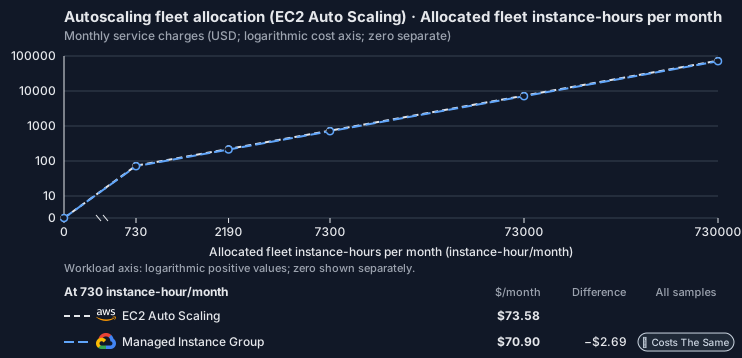
Feature: Autoscaling fleet allocation (EC2 Auto Scaling). Estimated monthly service charges by Allocated fleet instance-hours per month. Adapter hosting and Tensor9 fees are excluded. Source: us-east-1; target: us-central1; currency: USD.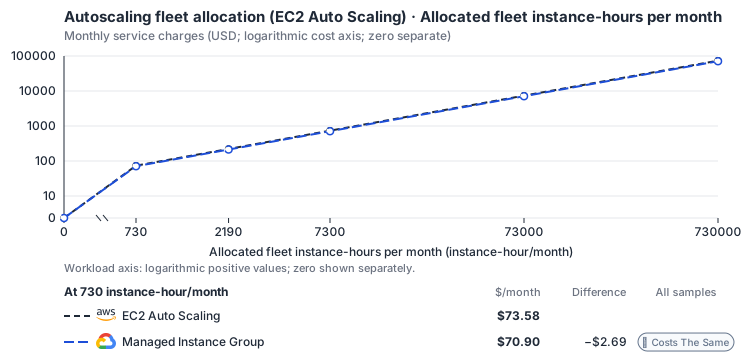
Curve assumptions
- Only this native meter varies; all other source usage and translation assumptions retain the displayed defaults. Other native meters and workload assumptions retain their explicitly displayed default quantities. Workload translation and capacity assumptions are not benchmark measurements.
- Native monthly usage priced at the cited provider list prices; listed target allowances apply where present, excluding invoice credits, taxes and negotiated discounts. Rates as of 2026-10-22: us-east-1 → us-central1, USD/month.
- Source prices are reference charges, not an invoice. Target lines cover selected service usage/configuration only; adapter hosting and Tensor9 fees are excluded.
- Samples of explicit prices are not performance measurements or capacity qualification. No interpolation or break-even guarantee is implied.
- Variant assumptions show the first axis sample; any axis-dependent configuration is described by this curve’s workload note.
- Rates are cited provider list prices, editable for discounts, commitments or another region. Workload translation and capacity coefficients remain editable planning assumptions, not benchmark measurements or a commercial quote.
- Default-zero rates are explicit assumptions, not evidence that the deployed service or resource is free.
- Provisioned-unit minimums use an editable approximate allocation floor. Modeled target service cost is max(usage/allocation, minimum), with billable network, durable staging and dependent sinks added separately; actual RU/TU sizing, scaling increments and throughput remain unqualified.
- Durable staging is priced once: provisioned targets include adapter state in their selected allocation; native targets add a separate staging allocation when required. Adapter hosting is a separate allocation and must exclude resources already priced as staging, workers or target capacity.
- A declared adapter mapping and cost model do not establish implementation availability or service equivalence.
- This is a declared directed mapping; a planning estimate does not establish deployment or request-serving support.
- Origin unit prices are cited provider list prices; capacity coefficients and translation assumptions are editable authored planning guesses, not measured capacity or a provider quote.
- Management requests do not reveal resource allocation or workload traffic. Provisioned resources and traffic are independent inputs.
- This native fleet resource comparison is separate from the Auto Scaling runtime discovery adapter and its supported operations.
- Instance-hours are priced exactly once as CPU and RAM allocation; management requests add no assumed fleet instances.
- Fleet orchestration is not billed separately: member instance CPU and memory hours bill at the instance rates. Management API counts never create VM-hours. Google: N2 predefined vCPU and memory (E2 lists 0.02181159 and 0.00292353); pd-balanced disk; Premium Tier egress.
- AWS Price List API, AmazonEC2 offer (CSV): https://pricing.us-east-1.amazonaws.com/offers/v1.0/aws/AmazonEC2/current/us-east-1/index.csv
- Amazon EC2 Auto Scaling pricing: https://aws.amazon.com/ec2/autoscaling/pricing/
- Compute Engine general-purpose machine pricing: https://cloud.google.com/products/compute/pricing/general-purpose
- Disk and image pricing: https://cloud.google.com/compute/disks-image-pricing
- Network pricing: https://cloud.google.com/vpc/network-pricing
- Instance disks, traffic, licenses, load balancers, spare replacement instances and metric collection.
- Taxes, discounts, credits and free-tier allowances not explicitly listed by this model.
- Unmodeled dependent services, task execution and operations outside the selected workload family.
plan-b9670e638465fc9e05fb9206b711b51ee8d7611e / 2026-10-22.planning.2. Curve: workload-1.
Sources: AWS Price List API, AmazonEC2 offer (CSV), Amazon EC2 Auto Scaling pricing, Compute Engine general-purpose machine pricing, Disk and image pricing, Network pricing.
Autoscaling fleet allocation (EC2 Auto Scaling) → Managed Instance Group: Authored native-usage planning example. Native monthly usage priced at the cited provider list prices; listed target allowances apply where present, excluding invoice credits, taxes and negotiated discounts.
Scenario source region: us-east-1. Scenario target region: us-central1. Currency: USD.
Unestimated components: Adapter hosting, Tensor9 fees. A modeled adapted total and savings require these costs.
Cost scope: Modeled target native service and explicitly modeled state allocation; hosting and Tensor9 fees only when supplied.
Excluded costs and workload features:
- Instance disks, traffic, licenses, load balancers, spare replacement instances and metric collection.
- Taxes, discounts, credits and free-tier allowances not explicitly listed by this model.
- Unmodeled dependent services, task execution and operations outside the selected workload family.
- Translated reads: 0 operations.
- Translated writes: 0 operations.
- Translated resident physical data: 0 GiB-month.
- Native provider operations: 1,000,000 operations.
- Published payload: 0 GiB.
- Delivered payload: 0 GiB.
- Allocated execution CPU: 4,380 vCPU-hour.
- Allocated execution RAM: 17,520 GiB-hour.
- Independent resource allocation: 0 resource-hour.
- Independent inventory: 0 resource-month.
- Input tokens: 0 tokens.
- Output tokens: 0 tokens.
- Billable network: 0 GiB.
- Dependent object sink retained data: 0 GiB-month.
- Dependent object sink writes: 0 writes.
- Rates are cited provider list prices, editable for discounts, commitments or another region. Workload translation and capacity coefficients remain editable planning assumptions, not benchmark measurements or a commercial quote.
- Default-zero rates are explicit assumptions, not evidence that the deployed service or resource is free.
- Provisioned-unit minimums use an editable approximate allocation floor. Modeled target service cost is max(usage/allocation, minimum), with billable network, durable staging and dependent sinks added separately; actual RU/TU sizing, scaling increments and throughput remain unqualified.
- Durable staging is priced once: provisioned targets include adapter state in their selected allocation; native targets add a separate staging allocation when required. Adapter hosting is a separate allocation and must exclude resources already priced as staging, workers or target capacity.
- A declared adapter mapping and cost model do not establish implementation availability or service equivalence.
- This is a declared directed mapping; a planning estimate does not establish deployment or request-serving support.
- Origin unit prices are cited provider list prices; capacity coefficients and translation assumptions are editable authored planning guesses, not measured capacity or a provider quote.
- Management requests do not reveal resource allocation or workload traffic. Provisioned resources and traffic are independent inputs.
- This native fleet resource comparison is separate from the Auto Scaling runtime discovery adapter and its supported operations.
- Instance-hours are priced exactly once as CPU and RAM allocation; management requests add no assumed fleet instances.
- Fleet orchestration is not billed separately: member instance CPU and memory hours bill at the instance rates. Management API counts never create VM-hours. Google: N2 predefined vCPU and memory (E2 lists 0.02181159 and 0.00292353); pd-balanced disk; Premium Tier egress.
plan-b9670e638465fc9e05fb9206b711b51ee8d7611e / 2026-10-22.planning.2. Scenario: planning-example.
Sources: AWS Price List API, AmazonEC2 offer (CSV), Amazon EC2 Auto Scaling pricing, Compute Engine general-purpose machine pricing, Disk and image pricing, Network pricing.
On Azure
How it works
On Azure the Auto Scaling group becomes one Linux Virtual Machine Scale Set (azurerm_linux_virtual_machine_scale_set). Azure has no separate template resource: the VM size, boot image, OS disk, network interface and user data are fields of the scale set itself.
desired_capacity becomes the scale set’s instances count. If you set only min_size and max_size, the scale set starts at min_size. That is the number of instances Azure is asked for; how many are running and ready depends on allocation, startup and health. The scale set does not scale automatically, is not spread across availability zones and has no automatic instance repair. The sections below explain each of these.


Your Auto Scaling group becomes one scale set that holds the VM settings and runs the requested number of instances.
The VM configuration
The launch settings, from a launch template, a launch configuration or a mixed-instances policy, become the scale set’s VM model: the VM size mapped from your instance type, the boot image, the OS disk size and type, the network interface and your user data. If the launch settings do not set a volume type, the OS disk usesStandardSSD_LRS, because a scale set requires one. Each instance is a full Azure VM, set up the supported Azure fleet settings. Supported security groups bind natively; launch-template data volumes and explicit root IOPS or throughput remain unsupported.
Because the model is part of the scale set, the settings and the fleet are one resource. After the first deployment, changes to the boot image or to the user data are not applied to the scale set. The scale set is created without a rolling_upgrade_policy, in Azure’s default manual upgrade mode, so other model changes reach existing instances only when they are upgraded or reimaged.


Your launch settings become the VM model inside the scale set, and every instance starts from it.
Scaling
No Azure autoscale setting (azurerm_monitor_autoscale_setting) is created, so the scale set runs at its instances count and does not scale on its own. Azure autoscale expresses target tracking as a scale-out rule above one CPU threshold and a scale-in rule below another. A single AWS CPU target does not determine both thresholds, and choosing them for you could make the fleet oscillate, so a CPU target-tracking policy is reported as a build warning instead of being translated.
A group with min_size and max_size but no scaling policy also runs at a fixed count, with a warning: size bounds alone do not create an autoscale setting.
Placement and health checks
The scale set uses one subnet. Ifvpc_zone_identifier lists several subnets, every instance joins the first one and the build reports a warning. The scale set is created without availability zones, so it is not zone-redundant even when the Auto Scaling group spanned several zones.
No automatic instance repair policy is set, so an instance that is running but failing a health check is not replaced. The build warns about this whether or not the group set health_check_type, because on AWS the default still replaces instances that fail EC2 status checks. Load balancer target groups are not kept either: the scale set has no backend pool, so its instances receive no load-balanced traffic, and the build warns.
Limitations
Where Auto Scaling groups differ- Automatic scaling is not supported. No autoscale setting is created. The scale set runs at the desired count, and a CPU target-tracking policy or a size range is reported as a build warning.
- Zone redundancy is not supported. The scale set has no availability zones and uses only the first subnet in
vpc_zone_identifier, so a multi-AZ group is not zone-redundant on Azure. - Health-check replacement is not supported. No automatic instance repair policy is set, so an unhealthy instance that keeps running is not replaced.
- Load balancer target groups are not supported.
target_group_arnsand target group attachments are not kept. The scale set has no backend pool, so its instances receive no load-balanced traffic. - Image and user-data changes behave differently: they are ignored after the first deployment. Later changes to the boot image or user data are not applied to the scale set. Other model changes reach existing instances only when they are upgraded, because the scale set uses manual upgrade mode.
- Scheduled actions, lifecycle hooks and warm pools are not supported. Scheduled actions, lifecycle hooks and notifications are removed with the group, and warm pools have no scale set equivalent. The AWS
StartInstanceRefreshAPI is not supported either. - Spot and mixed instance types are not supported. Every instance uses one VM size at regular priority. A mixed-instances policy’s instance types and on-demand/Spot split are not reproduced.
- Explicit boot-volume IOPS or throughput is not supported. If the launch settings set IOPS or throughput on the root volume, the build stops with an error, because a scale set’s managed OS disk cannot set them separately.
- Launch-template data disks are not supported. A launch template or launch configuration with non-root data volumes stops the build. Standalone-instance data-disk support does not extend to fleet replicas. Compiled replicas receive no EC2 metadata endpoint or AWS role credentials.
- Changing the size through the AWS API at runtime is not supported.
SetDesiredCapacityand runtime scaling-policy changes are outside this mapping. Change size and bounds in your infrastructure code. Unsupported settings can be reported during the build; unsupported SDK requests return an error. - Groups that provide ECS or EKS capacity are not converted. A group used by an ECS capacity provider, or whose user data joins its instances to ECS or EKS, does not become a scale set; it is handled as part of the ECS or EKS mapping.
Other considerations
- Read the build warnings. They list what was not kept for each group: its scaling policy or size range, health checks, extra subnets and target groups.
- Instances are replaced, not repaired. Instances can be reimaged or replaced, so keep state that must survive on attached managed disks or in a storage account, not on the OS disk.
- Costs depend on the running instances. VM charges follow the instances actually running, including temporary replacement capacity, plus storage, networking and other target cloud charges. Desired-capacity bounds are not an enforced spending cap.
Fleet management scope
The fleet runs as an Azure Virtual Machine Scale Set with the autoscale setting’s sizing controls. See fleet lifecycle and runtime management for logical group discovery/deletion and higher-level ownership. Desired-capacity and policy changes use infrastructure-as-code or the owning service; native readiness, placement and replacement follow this backend’s controls above.Example monthly charges
This Tensor9 BYOC scenario estimates service charges for the named origin and target services. Adapter hosting and commercial Tensor9 fees need separate allocations. How Tensor9 estimates costs explains the method and what the estimates include.Autoscaling fleet allocation (EC2 Auto Scaling) · Allocated fleet instance-hours per month
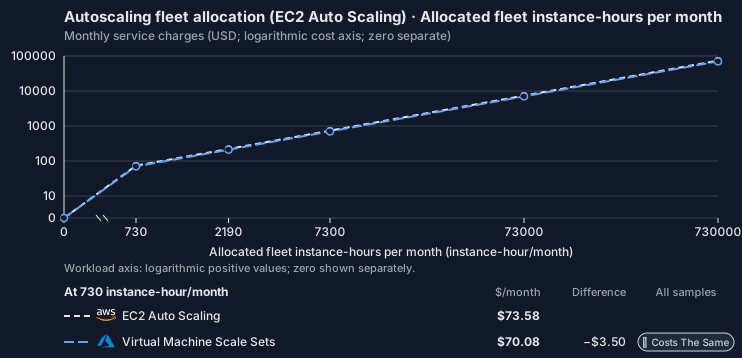
Feature: Autoscaling fleet allocation (EC2 Auto Scaling). Estimated monthly service charges by Allocated fleet instance-hours per month. Adapter hosting and Tensor9 fees are excluded. Source: us-east-1; target: eastus; currency: USD.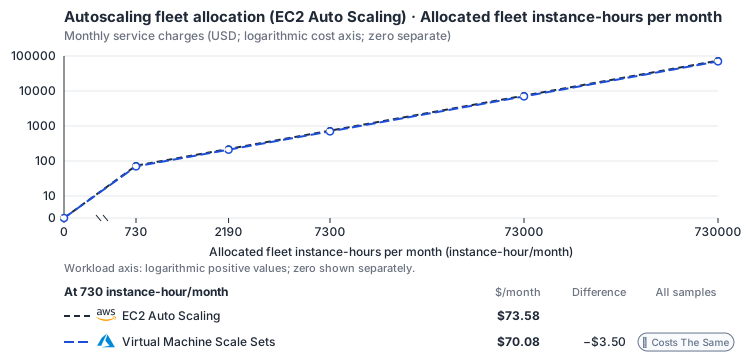
Curve assumptions
- Only this native meter varies; all other source usage and translation assumptions retain the displayed defaults. Other native meters and workload assumptions retain their explicitly displayed default quantities. Workload translation and capacity assumptions are not benchmark measurements.
- Native monthly usage priced at the cited provider list prices; listed target allowances apply where present, excluding invoice credits, taxes and negotiated discounts. Rates as of 2026-10-22: us-east-1 → eastus, USD/month.
- Source prices are reference charges, not an invoice. Target lines cover selected service usage/configuration only; adapter hosting and Tensor9 fees are excluded.
- Samples of explicit prices are not performance measurements or capacity qualification. No interpolation or break-even guarantee is implied.
- Variant assumptions show the first axis sample; any axis-dependent configuration is described by this curve’s workload note.
- Rates are cited provider list prices, editable for discounts, commitments or another region. Workload translation and capacity coefficients remain editable planning assumptions, not benchmark measurements or a commercial quote.
- Default-zero rates are explicit assumptions, not evidence that the deployed service or resource is free.
- Provisioned-unit minimums use an editable approximate allocation floor. Modeled target service cost is max(usage/allocation, minimum), with billable network, durable staging and dependent sinks added separately; actual RU/TU sizing, scaling increments and throughput remain unqualified.
- Durable staging is priced once: provisioned targets include adapter state in their selected allocation; native targets add a separate staging allocation when required. Adapter hosting is a separate allocation and must exclude resources already priced as staging, workers or target capacity.
- A declared adapter mapping and cost model do not establish implementation availability or service equivalence.
- This is a declared directed mapping; a planning estimate does not establish deployment or request-serving support.
- Origin unit prices are cited provider list prices; capacity coefficients and translation assumptions are editable authored planning guesses, not measured capacity or a provider quote.
- Management requests do not reveal resource allocation or workload traffic. Provisioned resources and traffic are independent inputs.
- This native fleet resource comparison is separate from the Auto Scaling runtime discovery adapter and its supported operations.
- Instance-hours are priced exactly once as CPU and RAM allocation; management requests add no assumed fleet instances.
- Fleet orchestration is not billed separately: member instance CPU and memory hours bill at the instance rates. Management API counts never create VM-hours. Azure: Dsv5 decomposed against Esv5; Premium SSD v2 disk; internet egress.
- AWS Price List API, AmazonEC2 offer (CSV): https://pricing.us-east-1.amazonaws.com/offers/v1.0/aws/AmazonEC2/current/us-east-1/index.csv
- Amazon EC2 Auto Scaling pricing: https://aws.amazon.com/ec2/autoscaling/pricing/
- Azure Retail Prices API: https://prices.azure.com/api/retail/prices
- Instance disks, traffic, licenses, load balancers, spare replacement instances and metric collection.
- Taxes, discounts, credits and free-tier allowances not explicitly listed by this model.
- Unmodeled dependent services, task execution and operations outside the selected workload family.
plan-82812da0f423869e63eda34be31dc83ce60055ad / 2026-10-22.planning.2. Curve: workload-1.
Sources: AWS Price List API, AmazonEC2 offer (CSV), Amazon EC2 Auto Scaling pricing, Azure Retail Prices API.
Autoscaling fleet allocation (EC2 Auto Scaling) → Virtual Machine Scale Sets: Authored native-usage planning example. Native monthly usage priced at the cited provider list prices; listed target allowances apply where present, excluding invoice credits, taxes and negotiated discounts.
Scenario source region: us-east-1. Scenario target region: eastus. Currency: USD.
Unestimated components: Adapter hosting, Tensor9 fees. A modeled adapted total and savings require these costs.
Cost scope: Modeled target native service and explicitly modeled state allocation; hosting and Tensor9 fees only when supplied.
Excluded costs and workload features:
- Instance disks, traffic, licenses, load balancers, spare replacement instances and metric collection.
- Taxes, discounts, credits and free-tier allowances not explicitly listed by this model.
- Unmodeled dependent services, task execution and operations outside the selected workload family.
- Translated reads: 0 operations.
- Translated writes: 0 operations.
- Translated resident physical data: 0 GiB-month.
- Native provider operations: 1,000,000 operations.
- Published payload: 0 GiB.
- Delivered payload: 0 GiB.
- Allocated execution CPU: 4,380 vCPU-hour.
- Allocated execution RAM: 17,520 GiB-hour.
- Independent resource allocation: 0 resource-hour.
- Independent inventory: 0 resource-month.
- Input tokens: 0 tokens.
- Output tokens: 0 tokens.
- Billable network: 0 GiB.
- Dependent object sink retained data: 0 GiB-month.
- Dependent object sink writes: 0 writes.
- Rates are cited provider list prices, editable for discounts, commitments or another region. Workload translation and capacity coefficients remain editable planning assumptions, not benchmark measurements or a commercial quote.
- Default-zero rates are explicit assumptions, not evidence that the deployed service or resource is free.
- Provisioned-unit minimums use an editable approximate allocation floor. Modeled target service cost is max(usage/allocation, minimum), with billable network, durable staging and dependent sinks added separately; actual RU/TU sizing, scaling increments and throughput remain unqualified.
- Durable staging is priced once: provisioned targets include adapter state in their selected allocation; native targets add a separate staging allocation when required. Adapter hosting is a separate allocation and must exclude resources already priced as staging, workers or target capacity.
- A declared adapter mapping and cost model do not establish implementation availability or service equivalence.
- This is a declared directed mapping; a planning estimate does not establish deployment or request-serving support.
- Origin unit prices are cited provider list prices; capacity coefficients and translation assumptions are editable authored planning guesses, not measured capacity or a provider quote.
- Management requests do not reveal resource allocation or workload traffic. Provisioned resources and traffic are independent inputs.
- This native fleet resource comparison is separate from the Auto Scaling runtime discovery adapter and its supported operations.
- Instance-hours are priced exactly once as CPU and RAM allocation; management requests add no assumed fleet instances.
- Fleet orchestration is not billed separately: member instance CPU and memory hours bill at the instance rates. Management API counts never create VM-hours. Azure: Dsv5 decomposed against Esv5; Premium SSD v2 disk; internet egress.
plan-82812da0f423869e63eda34be31dc83ce60055ad / 2026-10-22.planning.2. Scenario: planning-example.
Sources: AWS Price List API, AmazonEC2 offer (CSV), Amazon EC2 Auto Scaling pricing, Azure Retail Prices API.
Costs
Estimated monthly service charges for each backend with a published cost model, at one sampled workload from that model’s cost curve. Adapter hosting and Tensor9 fees are excluded. How Tensor9 estimates costs explains the method, what the estimates include and how to read their qualifications.
Difference means backend minus origin; a positive difference means the backend costs more. Workloads and target configurations differ by model, so compare each row’s difference at its stated workload rather than charges across rows.
Cost curves across workload sizes, with every assumption and exclusion: EC2 Auto Scaling costs.
Service level agreements
Listed terms cover requests sent through this service adapter. They do not cover direct connections to the target service or replace the cloud provider’s own SLA. Each origin-to-target pair has its own terms or an explicit pending status. See the SLA tables, measurement rules, and scaling conditions.EC2 Auto Scaling to Virtual Machine Scale Sets
Adapter-added latency. A + prefix marks time added by the adapter, not the total time your application waits. Total request time includes adapter processing, backend service time and network time. The backend provider’s SLA applies independently. Only separately measured target-service wait may be subtracted, and only when your agreement permits it; internal metadata, coordination and retry processing still count. For one request, 12 ms of adapter processing plus 90 ms waiting for the backend means at least 102 ms total. This example does not add monthly p99 values.
What Tensor9 covers. These service levels cover the adapter between the origin API and target API. They do not replace the target provider’s SLA.
How latency is counted. Adapter work, including metadata and coordination, counts. Only separately measured permitted target waits are excluded.
Which terms apply. Your signed agreement names the covered operations, workload limits, remedies, and final service levels for your deployment.
What this adapter does
The adapter validates fleet bounds and scaling policy, records desired capacity and reconciles native fleet resources on azure::1.0.0::vmss. Instance boot and provider autoscaler convergence are readiness behavior, while policy translation, durable admission, status collection and response conversion are adapter work.How the latency targets were chosen
Fleet configuration and identity reads: +5 ms monthly p99 (adapter-added).DescribeAutoScalingGroups, DescribeLaunchConfigurations. Bounded desired and observed status lookup.
Fleet and scaling-policy mutation: +20 ms monthly p99 (adapter-added). CreateAutoScalingGroup, PutScalingPolicy, SetDesiredCapacity, UpdateAutoScalingGroup. Validation, durable generation commit and reconciliation scheduling.
Your signed agreement sets the terms for your deployment. A target does not add an operation or option that the compatibility tables mark unavailable.
What counts toward latency
For a request-response row, measure from the agreed ingress boundary to dispatch of the complete response. A row that explicitly names a first response chunk ends at that chunk; its number does not cover the rest of the stream. A long-poll row names the intentional wait and when adapter delay starts. Include parsing, authorization, admission, translation, serialization, adapter-owned storage and coordination, retries and response handling. Subtract only separately measured target-workload waits and external network segments allowed by the measurement rules. The adapter’s own response handling and dispatch remain covered. A database used for adapter metadata is still adapter work, even if a cloud provider hosts it. For concurrent calls, exclude the union of permitted wait intervals, not the sum of overlapping spans. Calculate each request’s adapter duration first, then the monthly p99. Do not subtract one service’s p99 from another’s. Known adapter timeouts are over-budget samples; failed or incomplete requests cannot disappear to improve the percentile. Missing measurements do not become zero latency. An SDK call span alone does not prove how much of its duration can be excluded.Endpoint reachability and request failures
The endpoint-reachability target measures adapter health checks. Correctly forwarding a target quota or permission error is different from producing that error because the adapter sent the wrong request. Adapter-caused failures remain Tensor9’s responsibility even when the target is healthy. Correctness and data-integrity requirements apply to every supported request. Endpoint reachability does not measure request correctness or grant an allowance for incorrect results.Scaling and target-service capacity
Control traffic scales by fleet, not by instance count alone. Reconciliation for one fleet is generation ordered; independent fleets proceed concurrently. Qualification fixes fleet size, zone count, policy count, tag/template size and concurrent scaling events, including a burst that changes desired capacity repeatedly. Tell Tensor9 the expected steady rate, bursts, concurrency, payload sizes and operation mix. Tensor9 sizes and scales the adapter for the agreed load; you choose and monitor the target service’s capacity with Tensor9’s help. A latency budget is not a requests-per-second rating. Larger requests and higher rates need explicit terms, not silent inheritance of a small-request SLA.Data and behavior guarantees
Minimum, maximum and desired capacity remain ordered and bounded. A successful mutation is durable, stale reconciliation cannot overwrite a newer generation, and target policy translation cannot silently change the metric or threshold. Replacement and drain preserve the declared availability policy.Example and diagnosis
SetDesiredCapacity from 10 to 20 records generation N+1 within the mutation target. Creating ten instances is provider/fleet convergence, reported separately. Describe-style status must retain the requested generation and cannot claim capacity 20 until observed instances satisfy readiness. Usetensor9 explain and the documented explain headers to understand the selected adapter and its behavior. Correlate available request diagnostics with the target provider’s latency, throttling and capacity metrics. An explain report helps diagnose a request; it is not by itself a qualified SLA timing measurement. Share the operation, request shape, timestamps and request identifiers with support, with credentials and customer payloads removed.
EC2 Auto Scaling to Managed Instance Group
Adapter-added latency. A + prefix marks time added by the adapter, not the total time your application waits. Total request time includes adapter processing, backend service time and network time. The backend provider’s SLA applies independently. Only separately measured target-service wait may be subtracted, and only when your agreement permits it; internal metadata, coordination and retry processing still count. For one request, 12 ms of adapter processing plus 90 ms waiting for the backend means at least 102 ms total. This example does not add monthly p99 values.
What Tensor9 covers. These service levels cover the adapter between the origin API and target API. They do not replace the target provider’s SLA.
How latency is counted. Adapter work, including metadata and coordination, counts. Only separately measured permitted target waits are excluded.
Which terms apply. Your signed agreement names the covered operations, workload limits, remedies, and final service levels for your deployment.
What this adapter does
The adapter validates fleet bounds and scaling policy, records desired capacity and reconciles native fleet resources on google::1.0.0::compute::instance-group-manager. Instance boot and provider autoscaler convergence are readiness behavior, while policy translation, durable admission, status collection and response conversion are adapter work.How the latency targets were chosen
Fleet configuration and identity reads: +5 ms monthly p99 (adapter-added).DescribeAutoScalingGroups, DescribeAutoScalingInstances, DescribeLaunchConfigurations. Bounded desired and observed status lookup.
Fleet and scaling-policy mutation: +20 ms monthly p99 (adapter-added). CreateAutoScalingGroup, PutScalingPolicy, SetDesiredCapacity, UpdateAutoScalingGroup. Validation, durable generation commit and reconciliation scheduling.
Your signed agreement sets the terms for your deployment. A target does not add an operation or option that the compatibility tables mark unavailable.
What counts toward latency
For a request-response row, measure from the agreed ingress boundary to dispatch of the complete response. A row that explicitly names a first response chunk ends at that chunk; its number does not cover the rest of the stream. A long-poll row names the intentional wait and when adapter delay starts. Include parsing, authorization, admission, translation, serialization, adapter-owned storage and coordination, retries and response handling. Subtract only separately measured target-workload waits and external network segments allowed by the measurement rules. The adapter’s own response handling and dispatch remain covered. A database used for adapter metadata is still adapter work, even if a cloud provider hosts it. For concurrent calls, exclude the union of permitted wait intervals, not the sum of overlapping spans. Calculate each request’s adapter duration first, then the monthly p99. Do not subtract one service’s p99 from another’s. Known adapter timeouts are over-budget samples; failed or incomplete requests cannot disappear to improve the percentile. Missing measurements do not become zero latency. An SDK call span alone does not prove how much of its duration can be excluded.Endpoint reachability and request failures
The endpoint-reachability target measures adapter health checks. Correctly forwarding a target quota or permission error is different from producing that error because the adapter sent the wrong request. Adapter-caused failures remain Tensor9’s responsibility even when the target is healthy. Correctness and data-integrity requirements apply to every supported request. Endpoint reachability does not measure request correctness or grant an allowance for incorrect results.Scaling and target-service capacity
Control traffic scales by fleet, not by instance count alone. Reconciliation for one fleet is generation ordered; independent fleets proceed concurrently. Qualification fixes fleet size, zone count, policy count, tag/template size and concurrent scaling events, including a burst that changes desired capacity repeatedly. Tell Tensor9 the expected steady rate, bursts, concurrency, payload sizes and operation mix. Tensor9 sizes and scales the adapter for the agreed load; you choose and monitor the target service’s capacity with Tensor9’s help. A latency budget is not a requests-per-second rating. Larger requests and higher rates need explicit terms, not silent inheritance of a small-request SLA.Data and behavior guarantees
Minimum, maximum and desired capacity remain ordered and bounded. A successful mutation is durable, stale reconciliation cannot overwrite a newer generation, and target policy translation cannot silently change the metric or threshold. Replacement and drain preserve the declared availability policy.Example and diagnosis
SetDesiredCapacity from 10 to 20 records generation N+1 within the mutation target. Creating ten instances is provider/fleet convergence, reported separately. Describe-style status must retain the requested generation and cannot claim capacity 20 until observed instances satisfy readiness. Usetensor9 explain and the documented explain headers to understand the selected adapter and its behavior. Correlate available request diagnostics with the target provider’s latency, throttling and capacity metrics. An explain report helps diagnose a request; it is not by itself a qualified SLA timing measurement. Share the operation, request shape, timestamps and request identifiers with support, with credentials and customer payloads removed.