

- Coverage by target cloud
- How the backends compare
- On Google Cloud, Azure, OCI, and Private Kubernetes
- On Azure
- Debug this service
Coverage by target cloud
How the backends compare
Each row compares a capability of EKS IRSA with its adaptation on each backend. A dash means this row is not stated for that backend.Max adaptation
Infrastructure-only adaptation
On Google Cloud, Azure, OCI, and Private Kubernetes
Via Cedar
AWS credential exchange
The AWS SDK sends the pod’s Kubernetes service account token to STS AssumeRoleWithWebIdentity. The adapter verifies the token’s issuer, audience and service-account subject, checks the requested role’s trust policy, and issues a temporary AWS role session. The AWS API and the session format are the ones the application’s SDK already expects.Permissions and native resource access
The AssumeRoleWithWebIdentity response supplies a temporary AWS role session. With enforcement enabled, the adapters that receive AWS API requests check them against the role’s supported IAM permissions using Cedar, the policy engine underpinning the adapter’s authorization decisions. The adapter handles the AWS credential exchange; Cedar evaluates the supported permissions. Native cloud APIs use separate provider credentials and grants, and Kubernetes RBAC governs access to the cluster API. Each appliance has its own identities and policies. Appliances do not share policies or distribute policy updates to one another. Policy changes are eventually consistent within that appliance. New grants may not be usable immediately, and revoked permissions may remain effective until the change propagates. Verify the dependent operation before relying on a policy change; a successful update alone does not show that it has taken effect.Deployment and renewal
Deploy the identity services in the customer’s environment, and configure the cluster’s token issuer, the token audience and the role trust together. Check that a denied exchange and a denied resource action fail, as well as that allowed calls succeed. Long-running pods must renew credentials. After an association or policy change, existing sessions and later exchanges can have different outcomes.Example monthly charges
This Tensor9 BYOC scenario estimates service charges for the named origin and target services. Adapter hosting and commercial Tensor9 fees need separate allocations. How Tensor9 estimates costs explains the method and what the estimates include.Kubernetes workload identity exchange · Identity exchanges per second
Feature: Kubernetes workload identity exchange. Estimated monthly service charges by Identity exchanges per second. Adapter hosting and Tensor9 fees are excluded. Source: us-east-1; target: us-central1; currency: USD.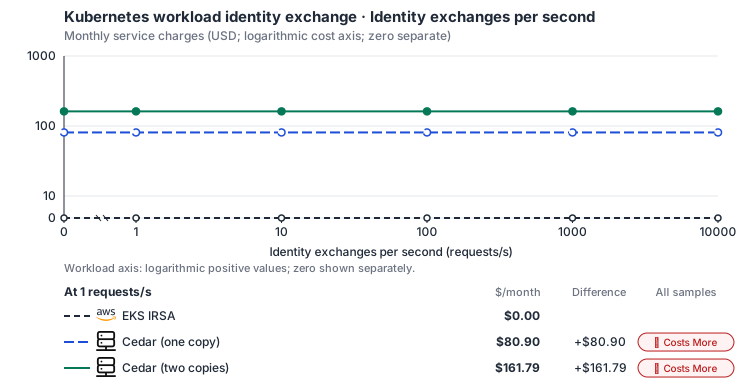
Estimated allocation, not benchmark calibrated: sized at 2 vCPU, 8 GiB memory and 100 GiB SSD at every sample.
Curve assumptions
- Only this native meter varies; all other source usage and translation assumptions retain the displayed defaults. Other native meters and workload assumptions retain their explicitly displayed default quantities. Workload translation and capacity assumptions are not benchmark measurements.
- Native monthly usage priced at the cited provider list prices; listed target allowances apply where present, excluding invoice credits, taxes and negotiated discounts. Rates as of 2026-10-22: us-east-1 → us-central1, USD/month.
- Source prices are reference charges, not an invoice. Target lines cover selected service usage/configuration only; adapter hosting and Tensor9 fees are excluded.
- Samples of explicit prices are not performance measurements or capacity qualification. No interpolation or break-even guarantee is implied.
- Variant assumptions show the first axis sample; any axis-dependent configuration is described by this curve’s workload note.
- Rates are cited provider list prices, editable for discounts, commitments or another region. Workload translation and capacity coefficients remain editable planning assumptions, not benchmark measurements or a commercial quote.
- Default-zero rates are explicit assumptions, not evidence that the deployed service or resource is free.
- Provisioned-unit minimums use an editable approximate allocation floor. Modeled target service cost is max(usage/allocation, minimum), with billable network, durable staging and dependent sinks added separately; actual RU/TU sizing, scaling increments and throughput remain unqualified.
- Durable staging is priced once: provisioned targets include adapter state in their selected allocation; native targets add a separate staging allocation when required. Adapter hosting is a separate allocation and must exclude resources already priced as staging, workers or target capacity.
- A declared adapter mapping and cost model do not establish implementation availability or service equivalence.
- This is a declared directed mapping; a planning estimate does not establish deployment or request-serving support.
- Origin unit prices are cited provider list prices; capacity coefficients and translation assumptions are editable authored planning guesses, not measured capacity or a provider quote.
- IRSA exchanges are served through STS; Pod Identity spans EKS association and EKS Auth exchange surfaces. This model does not invent a standalone IRSA endpoint.
- Identity exchanges do not imply additional application replicas, cluster nodes or database capacity.
- Self-hosted target: Cedar (Apache-2.0, https://github.com/cedar-policy/cedar/blob/main/LICENSE). Selected CPU, RAM and physical disk allocation grow with workload; no per-operation price is assumed. No vendor charge: the target runs on the customer’s Kubernetes nodes, so CPU, RAM and disk bill at the Kubernetes node reference rates, Compute Engine N2 in us-central1 (USD 0.031611/vCPU-hour, 0.004237/GiB-hour) with pd-balanced disk (0.10/GiB-month) and Premium Tier egress. The cost-optimized E2 series lists 0.02181159/vCPU-hour and 0.00292353/GiB-hour; AWS m6i/r6i and Azure D2s v5/E2s v5 both decompose to 0.033/vCPU-hour and 0.00375/GiB-hour. Requested CPU and RAM are billed; node bin-packing waste, system reservations and the cluster control-plane fee are not.
- Row-store throughput (capacityOpsPerVcpuSecond, default 1500) is measured-by-tensor9 as a lower bound: the DynamoDB adapter on Cloud SQL db-custom-2-7680 (2 vCPU, PostgreSQL 16, us-west1) served 2,974 ops/s of YCSB-A at 16 threads without recorded saturation (src/main/kotlin/t9/prime/equiv/generated/eval/CloudsqlPostgresqlYcsbAT16GoYcsbV1_0_0.kt). Published CPU-bound pgbench reaches 3,101 read-write transactions and 20,289 point reads per vCPU-second (AWS z1d.2xlarge, PostgreSQL 14.5), so actual capacity is likely higher. Reads and writes share one coefficient: at the same adapter version, read-only YCSB-C was not faster than 50%-update YCSB-A.
- Log-broker throughput (capacityStreamMiBPerVcpuSecond 20 at 0.5 utilization, 4 GiB RAM per vCPU) is provider-documented by Google Managed Service for Apache Kafka sizing (https://docs.cloud.google.com/managed-service-for-apache-kafka/docs/plan-cluster-size): write-equivalent bytes are replicated writes plus a quarter of reads. Producer batches below 10 KB lower per-CPU throughput; that penalty is not modeled.
- Disk utilization 0.8 is provider-documented headroom below Cloud SQL automatic storage increase, which triggers near 91-95% full (https://docs.cloud.google.com/sql/docs/postgres/instance-settings). The 20 GiB reserve exceeds PostgreSQL’s 1 GB default max_wal_size; the remainder of that reserve is unmeasured.
- CPU tiers double from 2 vCPUs to the target’s largest node at 4 GiB per vCPU; each target’s documented largest node bounds CPU, RAM, RAM per vCPU and disk, and the durable staging database uses Cloud SQL Enterprise (96 vCPU, 6.5 GiB per vCPU, 624 GiB, 64 TiB). Targets billed per capacity unit or throughput unit are sized by their backend instead.
- No public evidence: peak/mean work (2) and the RAM working-set fraction (0.1). Proposed measurements: the p99 one-minute rate over the monthly mean from customer CloudWatch metrics; the buffer hit ratio while stepping RAM under a fixed YCSB-B load.
- Node bounds: Cloud SQL Enterprise allows 1-96 vCPUs at 0.9-6.5 GB per vCPU and up to 64 TB with a dedicated vCPU (https://docs.cloud.google.com/sql/docs/postgres/instance-settings).
- Stored GiB already includes the origin family’s physical footprint assumptions; no second storage amplification is applied.
- The operations/vCPU coefficient supplies the compute requirement alongside explicit resource-hour minima.
- Copies and allocation fractions change cost only; they do not increase modeled primary capacity.
- AWS IAM User Guide: What is IAM: https://docs.aws.amazon.com/IAM/latest/UserGuide/introduction.html
- Compute Engine general-purpose machine pricing: https://cloud.google.com/products/compute/pricing/general-purpose
- Disk and image pricing: https://cloud.google.com/compute/disks-image-pricing
- Network pricing: https://cloud.google.com/vpc/network-pricing
- Shared cluster, application workloads, node-local agents, audit storage, network and separately allocated adapter hosting.
- Taxes, discounts, credits and free-tier allowances not explicitly listed by this model.
- Unmodeled dependent services, task execution and operations outside the selected workload family.
plan-e68a734be918df8fb488645278c1705d7e7db346 / 2026-10-22.planning.2. Curve: workload-1.
Sources: AWS IAM User Guide: What is IAM, Compute Engine general-purpose machine pricing, Disk and image pricing, Network pricing.
Kubernetes workload identity exchange → Cedar: Authored native-usage planning example. Native monthly usage priced at the cited provider list prices; listed target allowances apply where present, excluding invoice credits, taxes and negotiated discounts.
Scenario source region: us-east-1. Scenario target region: us-central1. Currency: USD.
Estimated allocation, not benchmark calibrated: sized at 2 vCPU, 8 GiB memory and 100 GiB SSD for this scenario.
Unestimated components: Adapter hosting, Tensor9 fees. A modeled adapted total and savings require these costs.
Cost scope: Modeled target native service and explicitly modeled state allocation; hosting and Tensor9 fees only when supplied.
Excluded costs and workload features:
- Shared cluster, application workloads, node-local agents, audit storage, network and separately allocated adapter hosting.
- Taxes, discounts, credits and free-tier allowances not explicitly listed by this model.
- Unmodeled dependent services, task execution and operations outside the selected workload family.
- Translated reads: 0 operations.
- Translated writes: 0 operations.
- Translated resident physical data: 0 GiB-month.
- Native provider operations: 1,000,000 operations.
- Published payload: 0 GiB.
- Delivered payload: 0 GiB.
- Allocated execution CPU: 0 vCPU-hour.
- Allocated execution RAM: 0 GiB-hour.
- Independent resource allocation: 0 resource-hour.
- Independent inventory: 0 resource-month.
- Input tokens: 0 tokens.
- Output tokens: 0 tokens.
- Billable network: 0 GiB.
- Dependent object sink retained data: 0 GiB-month.
- Dependent object sink writes: 0 writes.
- Rates are cited provider list prices, editable for discounts, commitments or another region. Workload translation and capacity coefficients remain editable planning assumptions, not benchmark measurements or a commercial quote.
- Default-zero rates are explicit assumptions, not evidence that the deployed service or resource is free.
- Provisioned-unit minimums use an editable approximate allocation floor. Modeled target service cost is max(usage/allocation, minimum), with billable network, durable staging and dependent sinks added separately; actual RU/TU sizing, scaling increments and throughput remain unqualified.
- Durable staging is priced once: provisioned targets include adapter state in their selected allocation; native targets add a separate staging allocation when required. Adapter hosting is a separate allocation and must exclude resources already priced as staging, workers or target capacity.
- A declared adapter mapping and cost model do not establish implementation availability or service equivalence.
- This is a declared directed mapping; a planning estimate does not establish deployment or request-serving support.
- Origin unit prices are cited provider list prices; capacity coefficients and translation assumptions are editable authored planning guesses, not measured capacity or a provider quote.
- IRSA exchanges are served through STS; Pod Identity spans EKS association and EKS Auth exchange surfaces. This model does not invent a standalone IRSA endpoint.
- Identity exchanges do not imply additional application replicas, cluster nodes or database capacity.
- Self-hosted target: Cedar (Apache-2.0, https://github.com/cedar-policy/cedar/blob/main/LICENSE). Selected CPU, RAM and physical disk allocation grow with workload; no per-operation price is assumed. No vendor charge: the target runs on the customer’s Kubernetes nodes, so CPU, RAM and disk bill at the Kubernetes node reference rates, Compute Engine N2 in us-central1 (USD 0.031611/vCPU-hour, 0.004237/GiB-hour) with pd-balanced disk (0.10/GiB-month) and Premium Tier egress. The cost-optimized E2 series lists 0.02181159/vCPU-hour and 0.00292353/GiB-hour; AWS m6i/r6i and Azure D2s v5/E2s v5 both decompose to 0.033/vCPU-hour and 0.00375/GiB-hour. Requested CPU and RAM are billed; node bin-packing waste, system reservations and the cluster control-plane fee are not.
- Row-store throughput (capacityOpsPerVcpuSecond, default 1500) is measured-by-tensor9 as a lower bound: the DynamoDB adapter on Cloud SQL db-custom-2-7680 (2 vCPU, PostgreSQL 16, us-west1) served 2,974 ops/s of YCSB-A at 16 threads without recorded saturation (src/main/kotlin/t9/prime/equiv/generated/eval/CloudsqlPostgresqlYcsbAT16GoYcsbV1_0_0.kt). Published CPU-bound pgbench reaches 3,101 read-write transactions and 20,289 point reads per vCPU-second (AWS z1d.2xlarge, PostgreSQL 14.5), so actual capacity is likely higher. Reads and writes share one coefficient: at the same adapter version, read-only YCSB-C was not faster than 50%-update YCSB-A.
- Log-broker throughput (capacityStreamMiBPerVcpuSecond 20 at 0.5 utilization, 4 GiB RAM per vCPU) is provider-documented by Google Managed Service for Apache Kafka sizing (https://docs.cloud.google.com/managed-service-for-apache-kafka/docs/plan-cluster-size): write-equivalent bytes are replicated writes plus a quarter of reads. Producer batches below 10 KB lower per-CPU throughput; that penalty is not modeled.
- Disk utilization 0.8 is provider-documented headroom below Cloud SQL automatic storage increase, which triggers near 91-95% full (https://docs.cloud.google.com/sql/docs/postgres/instance-settings). The 20 GiB reserve exceeds PostgreSQL’s 1 GB default max_wal_size; the remainder of that reserve is unmeasured.
- CPU tiers double from 2 vCPUs to the target’s largest node at 4 GiB per vCPU; each target’s documented largest node bounds CPU, RAM, RAM per vCPU and disk, and the durable staging database uses Cloud SQL Enterprise (96 vCPU, 6.5 GiB per vCPU, 624 GiB, 64 TiB). Targets billed per capacity unit or throughput unit are sized by their backend instead.
- No public evidence: peak/mean work (2) and the RAM working-set fraction (0.1). Proposed measurements: the p99 one-minute rate over the monthly mean from customer CloudWatch metrics; the buffer hit ratio while stepping RAM under a fixed YCSB-B load.
- Node bounds: Cloud SQL Enterprise allows 1-96 vCPUs at 0.9-6.5 GB per vCPU and up to 64 TB with a dedicated vCPU (https://docs.cloud.google.com/sql/docs/postgres/instance-settings).
- Stored GiB already includes the origin family’s physical footprint assumptions; no second storage amplification is applied.
- The operations/vCPU coefficient supplies the compute requirement alongside explicit resource-hour minima.
- Copies and allocation fractions change cost only; they do not increase modeled primary capacity.
plan-e68a734be918df8fb488645278c1705d7e7db346 / 2026-10-22.planning.2. Scenario: planning-example.
Sources: AWS IAM User Guide: What is IAM, Compute Engine general-purpose machine pricing, Disk and image pricing, Network pricing.
On Azure
Via IAM
AWS credentials and native Azure access
With maximum adaptation, an unchanged AWS SDK calls STS AssumeRoleWithWebIdentity. The selected IAM/STS adapter checks the Kubernetes token’s issuer, audience and subject, and the role trust, before issuing an AWS role session. Native Azure access is a separate exchange: Azure workload identity federation accepts the pod’s Kubernetes service account token and issues a managed-identity token for Azure services. That token does not replace the AWS access-key session. Configure the target cloud identity for native resource access, and the configured role for the AWS API calls the application makes. Scope each grant to the intended service account and resources. Test a denied role assumption as well as an allowed one, and check token renewal: a successful first exchange does not show that a long-running pod can refresh its credentials.Native Azure identity
IAM Roles for Service Accounts (IRSA) lets an EKS pod exchange its Kubernetes service-account token with AWS Security Token Service (STS) for temporary IAM role credentials. On Azure, the pod uses OpenID Connect (OIDC) federation to sign in as a user-assigned managed identity. A federated identity credential records the AKS cluster’s issuer, the service account and the token audience. The diagram shows native Azure access. An unchanged AWS SDK instead uses Tensor9’s AWS-compatible STS endpoint for an AWS role session, described in “AWS credentials and native Azure access”; an Azure managed-identity token is not an AWS access key. Neither path needs a client secret: the generated Terraform contains none, and the pod signs in with its service-account token.

What Tensor9 creates
Each IRSA grant creates three Azure resources:- A user-assigned managed identity that identifies the workload.
- A role that defines its permissions: a built-in Azure role, or a custom role with the translated actions.
- A role assignment that grants those permissions to the identity within the deployment’s resource group.
Choosing built-in or custom roles
Tensor9 translates each AWS IAM policy statement into an Azure role. The default, hybrid mode uses a built-in role only when its actions match the translated statement exactly; otherwise it creates a custom role. It never picks a built-in role that grants extra actions. Prefer-built-in picks the smallest built-in role that covers the statement, even if that role grants more. Review those extra permissions before using it. Prefer-custom always creates a role with exactly the translated actions. Azure allows about five thousand custom role definitions per tenant, so count roles used by other deployments in the same tenant.Identities and trust that do not transfer
Some AWS identities and trust relationships have no native Azure counterpart in this mapping:- IAM Users and Groups are not supported. This mapping creates workload identities, not directory objects for people or groups; an IAM User or Group stops the build with an identity-type-not-supported issue. Tensor9’s AWS IAM adapter handles IAM objects separately.
- Role assignments go directly to the workload identity. Permissions are never granted through group membership, where a membership change could give access to more identities.
- AWS service trust is not an Azure grant. Trust that lets EC2, Lambda or EKS assume a role describes a relationship with an AWS service. It stays part of the AWS credential path; native Azure permissions come from Azure role assignments.
Limitations
Where Azure workload identity and IRSA differ- Permissions behave differently: they map per statement, not per resource and condition. AWS IAM uses hundreds of service-specific condition keys on individual resources. Azure RBAC assigns roles over a scope hierarchy with fewer conditions. Review any policy that depends on conditions Azure lacks; a successful sign-in does not mean equivalent access.
- Custom roles count against a tenant-wide limit. Each custom role counts toward the tenant limit of about five thousand role definitions. Include roles used by other appliances and applications when you plan.
- You must keep each identity to 20 federated credentials. Azure allows 20 federated credentials per managed identity, and the build stops if an identity needs more. If many service accounts share one identity, split them across more identities.
- Subscription-wide permissions are not supported. Every assignment is scoped to the resource group. Workloads that need subscription-level access need it configured separately.
Other considerations
- Service accounts stay the same. Pods keep their service accounts. Tensor9 changes the workload-identity labels and the identity used for native Azure access in the Kubernetes manifests. Unchanged AWS SDK calls also need the STS endpoint and role trust described in “AWS credentials and native Azure access”.
- Enable the cluster’s OIDC issuer. A federated credential names the AKS cluster’s issuer URL, so workload identity works only when the cluster has its OIDC issuer enabled. The appliance template checks this when the stack is applied. With the issuer off, credentials are created but the first token exchange fails.
- Review role permissions before deployment. The plan contains built-in role names or custom definitions with explicit actions. Compare them with the AWS policy and confirm they grant what you intend.
- Names stay the same across builds. Identities, role definitions and federated credentials are named from the stack’s stored identity, not from Terraform addresses. The same stack builds to the same names every time, so a re-plan does not propose replacing an identity that assignments already use.
Example monthly charges
This Tensor9 BYOC scenario estimates service charges for the named origin and target services. Adapter hosting and commercial Tensor9 fees need separate allocations. How Tensor9 estimates costs explains the method and what the estimates include. Native or deployment mapping. This mapping provisions native target-cloud permissions. Application authorization uses the target cloud’s identity system; requests do not pass through an IAM service adapter. The IAM-to-Cedar adapter has separate service levels. Cost estimates describe the selected service resources; operation coverage remains separate.Kubernetes workload identity exchange · Identity exchanges per second
Feature: Kubernetes workload identity exchange. Estimated monthly service charges by Identity exchanges per second. Adapter hosting and Tensor9 fees are excluded. Source: us-east-1; target: global; currency: USD.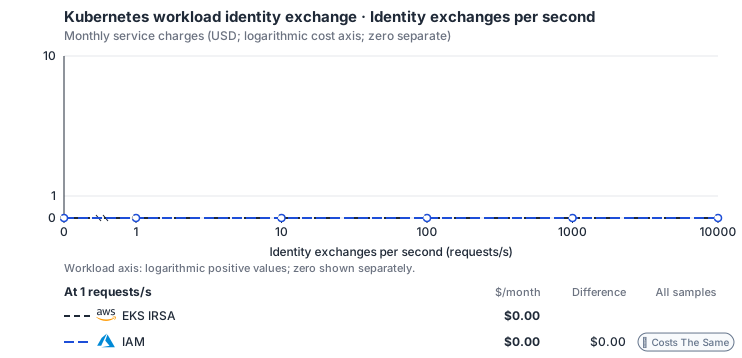
Curve assumptions
- Only this native meter varies; all other source usage and translation assumptions retain the displayed defaults. Other native meters and workload assumptions retain their explicitly displayed default quantities. Workload translation and capacity assumptions are not benchmark measurements.
- Native monthly usage priced at the cited provider list prices; listed target allowances apply where present, excluding invoice credits, taxes and negotiated discounts. Rates as of 2026-10-22: us-east-1 → global, USD/month.
- Source prices are reference charges, not an invoice. Target lines cover selected service usage/configuration only; adapter hosting and Tensor9 fees are excluded.
- Samples of explicit prices are not performance measurements or capacity qualification. No interpolation or break-even guarantee is implied.
- Variant assumptions show the first axis sample; any axis-dependent configuration is described by this curve’s workload note.
- Rates are cited provider list prices, editable for discounts, commitments or another region. Workload translation and capacity coefficients remain editable planning assumptions, not benchmark measurements or a commercial quote.
- Default-zero rates are explicit assumptions, not evidence that the deployed service or resource is free.
- Provisioned-unit minimums use an editable approximate allocation floor. Modeled target service cost is max(usage/allocation, minimum), with billable network, durable staging and dependent sinks added separately; actual RU/TU sizing, scaling increments and throughput remain unqualified.
- Durable staging is priced once: provisioned targets include adapter state in their selected allocation; native targets add a separate staging allocation when required. Adapter hosting is a separate allocation and must exclude resources already priced as staging, workers or target capacity.
- A declared adapter mapping and cost model do not establish implementation availability or service equivalence.
- This is a declared directed mapping; a planning estimate does not establish deployment or request-serving support.
- Native/deployment comparison scope: This mapping provisions native target-cloud permissions. Application authorization uses the target cloud’s identity system; requests do not pass through an IAM service adapter. The IAM-to-Cedar adapter has separate service levels.
- Origin unit prices are cited provider list prices; capacity coefficients and translation assumptions are editable authored planning guesses, not measured capacity or a provider quote.
- IRSA exchanges are served through STS; Pod Identity spans EKS association and EKS Auth exchange surfaces. This model does not invent a standalone IRSA endpoint.
- Identity exchanges do not imply additional application replicas, cluster nodes or database capacity.
- Identity and access management APIs are free. Durable adapter state and hosting remain independent costs.
- AWS IAM User Guide: What is IAM: https://docs.aws.amazon.com/IAM/latest/UserGuide/introduction.html
- What is Azure role-based access control (Azure RBAC)?: https://learn.microsoft.com/en-us/azure/role-based-access-control/overview
- Shared cluster, application workloads, node-local agents, audit storage, network and separately allocated adapter hosting.
- Taxes, discounts, credits and free-tier allowances not explicitly listed by this model.
- Unmodeled dependent services, task execution and operations outside the selected workload family.
plan-4e839fd000a3ca25e2dd45ad113474001e00852f / 2026-10-22.planning.2. Curve: workload-1.
Sources: AWS IAM User Guide: What is IAM, What is Azure role-based access control (Azure RBAC)?.
Kubernetes workload identity exchange → IAM: Authored native-usage planning example. Native monthly usage priced at the cited provider list prices; listed target allowances apply where present, excluding invoice credits, taxes and negotiated discounts.
Scenario source region: us-east-1. Scenario target region: global. Currency: USD.
Unestimated components: Adapter hosting, Tensor9 fees. A modeled adapted total and savings require these costs.
Cost scope: Modeled target native service and explicitly modeled state allocation; hosting and Tensor9 fees only when supplied.
Excluded costs and workload features:
- Shared cluster, application workloads, node-local agents, audit storage, network and separately allocated adapter hosting.
- Taxes, discounts, credits and free-tier allowances not explicitly listed by this model.
- Unmodeled dependent services, task execution and operations outside the selected workload family.
- Translated reads: 0 operations.
- Translated writes: 0 operations.
- Translated resident physical data: 0 GiB-month.
- Native provider operations: 1,000,000 operations.
- Published payload: 0 GiB.
- Delivered payload: 0 GiB.
- Allocated execution CPU: 0 vCPU-hour.
- Allocated execution RAM: 0 GiB-hour.
- Independent resource allocation: 0 resource-hour.
- Independent inventory: 0 resource-month.
- Input tokens: 0 tokens.
- Output tokens: 0 tokens.
- Billable network: 0 GiB.
- Dependent object sink retained data: 0 GiB-month.
- Dependent object sink writes: 0 writes.
- Rates are cited provider list prices, editable for discounts, commitments or another region. Workload translation and capacity coefficients remain editable planning assumptions, not benchmark measurements or a commercial quote.
- Default-zero rates are explicit assumptions, not evidence that the deployed service or resource is free.
- Provisioned-unit minimums use an editable approximate allocation floor. Modeled target service cost is max(usage/allocation, minimum), with billable network, durable staging and dependent sinks added separately; actual RU/TU sizing, scaling increments and throughput remain unqualified.
- Durable staging is priced once: provisioned targets include adapter state in their selected allocation; native targets add a separate staging allocation when required. Adapter hosting is a separate allocation and must exclude resources already priced as staging, workers or target capacity.
- A declared adapter mapping and cost model do not establish implementation availability or service equivalence.
- This is a declared directed mapping; a planning estimate does not establish deployment or request-serving support.
- Native/deployment comparison scope: This mapping provisions native target-cloud permissions. Application authorization uses the target cloud’s identity system; requests do not pass through an IAM service adapter. The IAM-to-Cedar adapter has separate service levels.
- Origin unit prices are cited provider list prices; capacity coefficients and translation assumptions are editable authored planning guesses, not measured capacity or a provider quote.
- IRSA exchanges are served through STS; Pod Identity spans EKS association and EKS Auth exchange surfaces. This model does not invent a standalone IRSA endpoint.
- Identity exchanges do not imply additional application replicas, cluster nodes or database capacity.
- Identity and access management APIs are free. Durable adapter state and hosting remain independent costs.
plan-4e839fd000a3ca25e2dd45ad113474001e00852f / 2026-10-22.planning.2. Scenario: planning-example.
Sources: AWS IAM User Guide: What is IAM, What is Azure role-based access control (Azure RBAC)?.