

- Coverage by target cloud
- How the backends compare
- On Google Cloud
- On Azure
- On OCI
- On Private Kubernetes
- Provisioned concurrency
- Recursive loop detection
- Costs
- Service level agreements
- Lambda Function to AKS function Deployments
- Lambda Function to Azure Container Apps
- Lambda Function to Azure Functions (Flex Consumption)
- Lambda Function to Azure Functions (Premium)
- Lambda Function to Cloud Run
- Lambda Function to Knative Service
- Lambda Function to Kubernetes Cluster
- Lambda Function to OCI Functions
- Lambda Function to OKE function Deployments
- Debug this service
Coverage by target cloud
How the backends compare
Each row compares a capability of Lambda with its adaptation on each backend. A dash means this row is not stated for that backend.Max adaptation
Infrastructure-only adaptation
On Google Cloud
How it works
Your application keeps calling Lambda through the AWS SDK. At deployment, each function packaged as a container image becomes a container image in the customer’s own registry, started with the configured Lambda-compatible entrypoint. The AWS runtime client runs your handler, and a small HTTP wrapper passes eachInvoke request to it. Replies use Lambda’s own format, including function errors. Only synchronous request/response invokes are supported.
A function packaged as a zip archive is not deployed on this option. References to it still resolve, but nothing runs for it, so package the function as a container image. When one function calls another, a Tensor9 adapter on the caller’s side finds the target by function name. It authenticates with Google identity tokens issued for the target service, so no AWS keys are involved.


Each function runs as its own Cloud Run service; Google limits each instance to one request at a time.
Scaling, timeouts and concurrency
Google runs the scaling. With no requests the service scales to zero, and CPU is throttled outside requests. It scales back up as requests arrive. Google enforces one request per instance, so each instance handles one active HTTP request at a time, as each Lambda execution environment does. Your configured timeout becomes the Cloud Run request deadline. When it expires, the caller gets HTTP 504, but the container is not stopped and your code can keep running. That code can still be running when the instance receives its next request. The configured ephemeral storage becomes an in-memory/tmp of the same size.
Reserved concurrency becomes the revision’s maximum instance count. Cloud Run can briefly exceed that maximum, and more than one revision can serve requests at once, so it is not a strict limit across all instances.
Limitations
Where Lambda and Cloud Run differ- CPU behaves differently: it rounds up to a Cloud Run size. A function configured below one vCPU gets a full vCPU on Cloud Run’s second-generation environment. Memory below the platform minimum is raised to that minimum.
- Timeouts do not stop your handler. Cloud Run can return HTTP 504 while your code keeps running. If your workload needs execution to stop at the deadline, you must cancel the work in the handler or stop the process yourself.
- Reserved concurrency is not an exact limit. Cloud Run can briefly exceed the revision’s maximum instances, and several revisions may serve traffic. One request per instance does not cap the total number of requests in flight.
- Calls to functions outside the stack are not supported. One function can call another only within the same deployed stack. A call to a function the build cannot see returns a clear error instead of reaching the wrong service.
- Asynchronous invokes are not supported. Synchronous invoke only: an asynchronous (
Event) invoke returns a clear error. Layers, event source mappings, aliases and function URLs stop the build with an error naming them, rather than being dropped.
Other considerations
- Who operates what. Google operates Cloud Run’s scaling and availability. Tensor9 operates the path an invoke takes to the service. You grant invoke permissions yourself, and the services run as the project’s default compute service account.
- Moving from AWS. Each function is built when the stack is deployed and ships as its container image. There is no data to move at cutover.
- Warm instances keep state. A warm instance reuses process memory and
/tmpacross requests. Code still running after a timeout can overlap the next request. - Cold starts and cost. With no traffic the service scales to zero, so idle instances cost no compute; running instances are billed by the service’s configured billing mode. The next invoke after idle may wait for a container to start. Registry storage, networking and other resources are still billed.
- Function addresses are set at deployment. Cloud Run assigns each service a hostname that cannot be predicted from the function name, so calls between functions are wired up when the stack is applied. If a target function moves, the next apply picks up its new address.
- What to monitor. Throughput and latency are Cloud Run’s own; watch them in your monitoring.
- Keep durable state elsewhere. Function storage is temporary. Save data through the services your handler calls so it survives instance replacement.
Function lifecycle and invocation
Maximum adaptation separates function lifecycle from invocation. A supported lifecycle request records the function you asked for, and a background process deploys it to the selected hosting service; creation can return Pending before deployment finishes. The address the hosting service reports then becomes the invoke route. A function must be Active before callers rely on that route. Invoke is still a request to the deployed handler through the Lambda adapter. A function being ready, an HTTP request being delivered and the handler succeeding are separate outcomes. Lifecycle support does not add asynchronous event delivery, event sources, aliases or other features this backend’s operation table excludes. Published performance results describe the recorded invoke workload, not function creation or code-update latency.Example monthly charges
This Tensor9 BYOC scenario estimates service charges for the named origin and target services. Adapter hosting and commercial Tensor9 fees need separate allocations. How Tensor9 estimates costs explains the method and what the estimates include.Lambda function execution · Billed execution GB-seconds per month
Feature: Lambda function execution. Estimated monthly service charges by Billed execution GB-seconds per month. Adapter hosting and Tensor9 fees are excluded. Source: us-east-1; target: us-central1; currency: USD.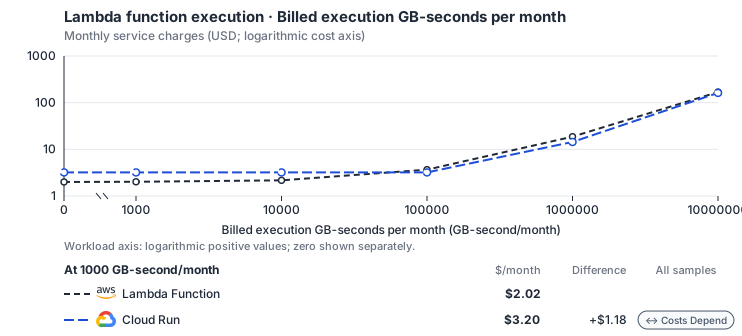
- Only this native meter varies; all other source usage and translation assumptions retain the displayed defaults. Other native meters and workload assumptions retain their explicitly displayed default quantities. Workload translation and capacity assumptions are not benchmark measurements.
- Native monthly usage priced at the cited provider list prices; listed target allowances apply where present, excluding invoice credits, taxes and negotiated discounts. Rates as of 2026-10-22: us-east-1 → us-central1, USD/month.
- Source prices are reference charges, not an invoice. Target lines cover selected service usage/configuration only; adapter hosting and Tensor9 fees are excluded.
- Samples of explicit prices are not performance measurements or capacity qualification. No interpolation or break-even guarantee is implied.
- Variant assumptions show the first axis sample; any axis-dependent configuration is described by this curve’s workload note.
- Rates are cited provider list prices, editable for discounts, commitments or another region. Workload translation and capacity coefficients remain editable planning assumptions, not benchmark measurements or a commercial quote.
- Default-zero rates are explicit assumptions, not evidence that the deployed service or resource is free.
- Provisioned-unit minimums use an editable approximate allocation floor. Modeled target service cost is max(usage/allocation, minimum), with billable network, durable staging and dependent sinks added separately; actual RU/TU sizing, scaling increments and throughput remain unqualified.
- Durable staging is priced once: provisioned targets include adapter state in their selected allocation; native targets add a separate staging allocation when required. Adapter hosting is a separate allocation and must exclude resources already priced as staging, workers or target capacity.
- A declared adapter mapping and cost model do not establish implementation availability or service equivalence.
- This is a declared directed mapping; a planning estimate does not establish deployment or request-serving support.
- Origin unit prices are cited provider list prices; capacity coefficients and translation assumptions are editable authored planning guesses, not measured capacity or a provider quote.
- Execution seconds are billed GB-seconds / selected origin memory; target CPU follows Lambda’s memory-proportional vCPU share, and CPU and RAM-hours scale with the duration multiplier.
- Invocation count and execution duration are independent inputs. The duration curve holds invocation count fixed.
- Google Cloud Run services with request-based billing bill active CPU and memory time (rounded up to 100 ms) and requests, after a monthly free tier per billing account. Idle minimum instances bill USD 0.0000025 per vCPU-second; instance-based billing (USD 0.000018 per vCPU-second and 0.000002 per GiB-second, no request fee) is not selected. Concurrency sharing is not inferred.
- AWS Price List API, AWSLambda offer: https://pricing.us-east-1.amazonaws.com/offers/v1.0/aws/AWSLambda/current/us-east-1/index.json
- Cloud Run pricing: https://cloud.google.com/run/pricing
- Provisioned concurrency, request/response streaming, ephemeral storage premiums, logs, function networking and event-source service charges.
- Self-managed or Premium backends need their provisioned idle floor separately; execution resource-hours alone do not establish scale-to-zero.
- Taxes, discounts, credits and free-tier allowances not explicitly listed by this model.
- Unmodeled dependent services, task execution and operations outside the selected workload family.
plan-9d04bec46767ff3a74f7d316fb8aa2df7bf73b7d / 2026-10-22.planning.2. Curve: workload-1.
Sources: AWS Price List API, AWSLambda offer, Cloud Run pricing.
Lambda function execution → Cloud Run: Authored native-usage planning example. Native monthly usage priced at the cited provider list prices; listed target allowances apply where present, excluding invoice credits, taxes and negotiated discounts.
Scenario source region: us-east-1. Scenario target region: us-central1. Currency: USD.
- Provisioned concurrency, request/response streaming, ephemeral storage premiums, logs, function networking and event-source service charges.
- Self-managed or Premium backends need their provisioned idle floor separately; execution resource-hours alone do not establish scale-to-zero.
- Taxes, discounts, credits and free-tier allowances not explicitly listed by this model.
- Unmodeled dependent services, task execution and operations outside the selected workload family.
- Translated reads: 0 operations.
- Translated writes: 0 operations.
- Translated resident physical data: 0 GiB-month.
- Native provider operations: 10,000,000 operations.
- Published payload: 0 GiB.
- Delivered payload: 0 GiB.
- Allocated execution CPU: 80.4 vCPU-hour.
- Allocated execution RAM: 138.9 GiB-hour.
- Independent resource allocation: 0 resource-hour.
- Independent inventory: 0 resource-month.
- Input tokens: 0 tokens.
- Output tokens: 0 tokens.
- Billable network: 0 GiB.
- Dependent object sink retained data: 0 GiB-month.
- Dependent object sink writes: 0 writes.
- Rates are cited provider list prices, editable for discounts, commitments or another region. Workload translation and capacity coefficients remain editable planning assumptions, not benchmark measurements or a commercial quote.
- Default-zero rates are explicit assumptions, not evidence that the deployed service or resource is free.
- Provisioned-unit minimums use an editable approximate allocation floor. Modeled target service cost is max(usage/allocation, minimum), with billable network, durable staging and dependent sinks added separately; actual RU/TU sizing, scaling increments and throughput remain unqualified.
- Durable staging is priced once: provisioned targets include adapter state in their selected allocation; native targets add a separate staging allocation when required. Adapter hosting is a separate allocation and must exclude resources already priced as staging, workers or target capacity.
- A declared adapter mapping and cost model do not establish implementation availability or service equivalence.
- This is a declared directed mapping; a planning estimate does not establish deployment or request-serving support.
- Origin unit prices are cited provider list prices; capacity coefficients and translation assumptions are editable authored planning guesses, not measured capacity or a provider quote.
- Execution seconds are billed GB-seconds / selected origin memory; target CPU follows Lambda’s memory-proportional vCPU share, and CPU and RAM-hours scale with the duration multiplier.
- Invocation count and execution duration are independent inputs. The duration curve holds invocation count fixed.
- Google Cloud Run services with request-based billing bill active CPU and memory time (rounded up to 100 ms) and requests, after a monthly free tier per billing account. Idle minimum instances bill USD 0.0000025 per vCPU-second; instance-based billing (USD 0.000018 per vCPU-second and 0.000002 per GiB-second, no request fee) is not selected. Concurrency sharing is not inferred.
plan-9d04bec46767ff3a74f7d316fb8aa2df7bf73b7d / 2026-10-22.planning.2. Scenario: planning-example.
Sources: AWS Price List API, AWSLambda offer, Cloud Run pricing.
On Azure
Via AKS function Deployments
How it works
Your functions keep their Lambda handlers, and callers keep using the LambdaInvoke API for synchronous requests. Each function runs as an always-on Kubernetes Deployment on AKS, behind a Service that is reachable inside the cluster.
A Lambda Invoke wrapper in the function’s container accepts each Invoke request and passes the event to the runtime interface client, which runs your handler. The runtime interface client alone does not make an arbitrary container answer the Invoke API; the wrapper is required.
Packaging and deployment
Only container-image functions run on this option. A zip-packaged function is accepted and then fails, so package each function as a container image with the configured Lambda-compatible entrypoint and Invoke wrapper. Publish the image to a registry the cluster can pull from, and set the function’s environment values. Supported lifecycle calls record the desired function configuration and update the Kubernetes resources that host it. Wait for the function to become ready before routing callers: a deployment that is still pending cannot be invoked.Networking and identity
You configure the Azure virtual network, cluster access and node capacity. Callers must be able to reach the function’s Service, and the function needs network access to its dependencies. Azure workload identity can give the function access to selected Azure services. The node or kubelet identity that pulls images is a different identity. An AWS SDK call that goes through another service adapter is authorized by that adapter; native Azure access is configured separately.Limitations
- Lambda’s per-invocation sandbox is not supported. Each function runs in always-on pods of a Deployment, not in a sandbox per invocation.
- Reserved concurrency is not supported. A Deployment’s replica count is not a Lambda reserved-concurrency limit; nothing caps concurrent invocations per function.
- Scaling behaves differently: functions stay running. The Deployment does not scale with requests and does not scale to zero when idle.
- The timeout behaves differently: it is not a process deadline. Kubernetes does not stop a handler that runs past the configured timeout.
- The configured /tmp size is not supported. The function writes to the container’s own filesystem, which does not reproduce Lambda’s /tmp quota.
- Asynchronous and streamed invocations are not supported.
Eventinvocations andInvokeWithResponseStreamare not available; only synchronousInvokeworks. - Event sources, layers, aliases, versions and function URLs are not supported. These integrations are outside this deployment option.
Other considerations
What to watch. Plan node upgrades and capacity, and collect function logs. Check handler errors as well as successful HTTP calls: a handler failure comes back in theInvoke response with the X-Amz-Function-Error header.
Example monthly charges
This Tensor9 BYOC scenario estimates service charges for the named origin and target services. Adapter hosting and commercial Tensor9 fees need separate allocations. How Tensor9 estimates costs explains the method and what the estimates include.Lambda function execution · Billed execution GB-seconds per month
Feature: Lambda function execution. Estimated monthly service charges by Billed execution GB-seconds per month. Adapter hosting and Tensor9 fees are excluded. Source: us-east-1; target: eastus; currency: USD.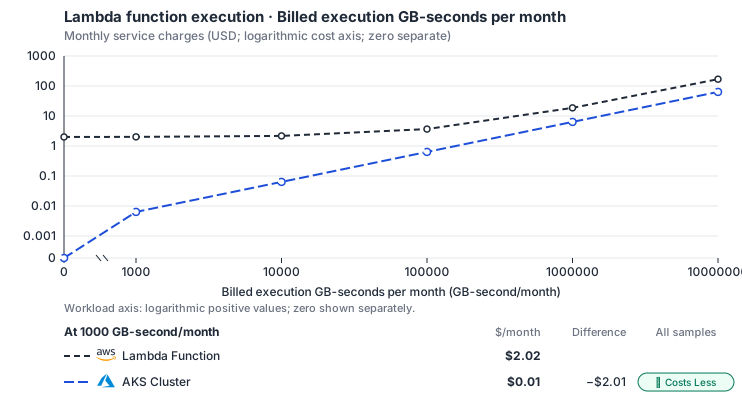
- Only this native meter varies; all other source usage and translation assumptions retain the displayed defaults. Other native meters and workload assumptions retain their explicitly displayed default quantities. Workload translation and capacity assumptions are not benchmark measurements.
- Native monthly usage priced at the cited provider list prices; listed target allowances apply where present, excluding invoice credits, taxes and negotiated discounts. Rates as of 2026-10-22: us-east-1 → eastus, USD/month.
- Source prices are reference charges, not an invoice. Target lines cover selected service usage/configuration only; adapter hosting and Tensor9 fees are excluded.
- Samples of explicit prices are not performance measurements or capacity qualification. No interpolation or break-even guarantee is implied.
- Variant assumptions show the first axis sample; any axis-dependent configuration is described by this curve’s workload note.
- Rates are cited provider list prices, editable for discounts, commitments or another region. Workload translation and capacity coefficients remain editable planning assumptions, not benchmark measurements or a commercial quote.
- Default-zero rates are explicit assumptions, not evidence that the deployed service or resource is free.
- Provisioned-unit minimums use an editable approximate allocation floor. Modeled target service cost is max(usage/allocation, minimum), with billable network, durable staging and dependent sinks added separately; actual RU/TU sizing, scaling increments and throughput remain unqualified.
- Durable staging is priced once: provisioned targets include adapter state in their selected allocation; native targets add a separate staging allocation when required. Adapter hosting is a separate allocation and must exclude resources already priced as staging, workers or target capacity.
- A declared adapter mapping and cost model do not establish implementation availability or service equivalence.
- This is a declared directed mapping; a planning estimate does not establish deployment or request-serving support.
- Origin unit prices are cited provider list prices; capacity coefficients and translation assumptions are editable authored planning guesses, not measured capacity or a provider quote.
- Execution seconds are billed GB-seconds / selected origin memory; target CPU follows Lambda’s memory-proportional vCPU share, and CPU and RAM-hours scale with the duration multiplier.
- Invocation count and execution duration are independent inputs. The duration curve holds invocation count fixed.
- Cluster control-plane hours bill at the listed management fee and worker CPU/RAM at the provider’s VM decomposition; allocate a shared cluster once across adapters. The compiler emits the AKS Free tier unless the origin uses Karpenter, when Node Auto-Provisioning requires sku_tier Standard (USD 0.10/cluster-hour); edit the control-plane rate for that case. Azure: Dsv5 decomposed against Esv5; Premium SSD v2 disk; internet egress.
- AWS Price List API, AWSLambda offer: https://pricing.us-east-1.amazonaws.com/offers/v1.0/aws/AWSLambda/current/us-east-1/index.json
- Azure Retail Prices API: https://prices.azure.com/api/retail/prices
- Provisioned concurrency, request/response streaming, ephemeral storage premiums, logs, function networking and event-source service charges.
- Self-managed or Premium backends need their provisioned idle floor separately; execution resource-hours alone do not establish scale-to-zero.
- Taxes, discounts, credits and free-tier allowances not explicitly listed by this model.
- Unmodeled dependent services, task execution and operations outside the selected workload family.
plan-9d73a063ca41aca007829fa24fe1f69ef5f1e5d3 / 2026-10-22.planning.2. Curve: workload-1.
Sources: AWS Price List API, AWSLambda offer, Azure Retail Prices API.
Lambda function execution → AKS function Deployments: Authored native-usage planning example. Native monthly usage priced at the cited provider list prices; listed target allowances apply where present, excluding invoice credits, taxes and negotiated discounts.
Scenario source region: us-east-1. Scenario target region: eastus. Currency: USD.
- Provisioned concurrency, request/response streaming, ephemeral storage premiums, logs, function networking and event-source service charges.
- Self-managed or Premium backends need their provisioned idle floor separately; execution resource-hours alone do not establish scale-to-zero.
- Taxes, discounts, credits and free-tier allowances not explicitly listed by this model.
- Unmodeled dependent services, task execution and operations outside the selected workload family.
- Translated reads: 0 operations.
- Translated writes: 0 operations.
- Translated resident physical data: 0 GiB-month.
- Native provider operations: 10,000,000 operations.
- Published payload: 0 GiB.
- Delivered payload: 0 GiB.
- Allocated execution CPU: 80.4 vCPU-hour.
- Allocated execution RAM: 138.9 GiB-hour.
- Independent resource allocation: 0 resource-hour.
- Independent inventory: 0 resource-month.
- Input tokens: 0 tokens.
- Output tokens: 0 tokens.
- Billable network: 0 GiB.
- Dependent object sink retained data: 0 GiB-month.
- Dependent object sink writes: 0 writes.
- Rates are cited provider list prices, editable for discounts, commitments or another region. Workload translation and capacity coefficients remain editable planning assumptions, not benchmark measurements or a commercial quote.
- Default-zero rates are explicit assumptions, not evidence that the deployed service or resource is free.
- Provisioned-unit minimums use an editable approximate allocation floor. Modeled target service cost is max(usage/allocation, minimum), with billable network, durable staging and dependent sinks added separately; actual RU/TU sizing, scaling increments and throughput remain unqualified.
- Durable staging is priced once: provisioned targets include adapter state in their selected allocation; native targets add a separate staging allocation when required. Adapter hosting is a separate allocation and must exclude resources already priced as staging, workers or target capacity.
- A declared adapter mapping and cost model do not establish implementation availability or service equivalence.
- This is a declared directed mapping; a planning estimate does not establish deployment or request-serving support.
- Origin unit prices are cited provider list prices; capacity coefficients and translation assumptions are editable authored planning guesses, not measured capacity or a provider quote.
- Execution seconds are billed GB-seconds / selected origin memory; target CPU follows Lambda’s memory-proportional vCPU share, and CPU and RAM-hours scale with the duration multiplier.
- Invocation count and execution duration are independent inputs. The duration curve holds invocation count fixed.
- Cluster control-plane hours bill at the listed management fee and worker CPU/RAM at the provider’s VM decomposition; allocate a shared cluster once across adapters. The compiler emits the AKS Free tier unless the origin uses Karpenter, when Node Auto-Provisioning requires sku_tier Standard (USD 0.10/cluster-hour); edit the control-plane rate for that case. Azure: Dsv5 decomposed against Esv5; Premium SSD v2 disk; internet egress.
plan-9d73a063ca41aca007829fa24fe1f69ef5f1e5d3 / 2026-10-22.planning.2. Scenario: planning-example.
Sources: AWS Price List API, AWSLambda offer, Azure Retail Prices API.
Via Azure Container Apps
How it works
Your application keeps calling Lambda through the AWS SDK. At deployment, each function packaged as a container image runs unchanged on Azure Container Apps, a managed container platform, not Azure Functions. A function packaged as a zip archive stops the build with the reason, so package it as a container image. The adapter handles synchronousInvoke calls and returns the supported Lambda response fields, including function errors. Only synchronous request/response invokes are supported.
Cloud Run and OCI Functions give each instance one request at a time; Container Apps does not. So the Tensor9 adapter receives all traffic on the app’s ingress port and gives each invoke to a free worker that handles one request at a time. It never runs two invokes on one worker. Container Apps still runs the scaling, adding and removing replicas with load. Outbound calls from the function use an Azure managed identity, so they need no AWS keys.


Container Apps does not limit instances to one request, so the Tensor9 adapter gives each worker one invoke at a time.
Concurrency and bursts
By default each replica runs one worker, so it takes one invoke at a time. The Container Apps ingress does not know how many requests a replica is already handling. When many invokes arrive together, some are turned away and retried. You can avoid those retries by running several workers in each replica behind a router that tracks how busy each worker is. Workers in the same replica then share the container’s/tmp and host resources. This option needs your confirmation that the handler tolerates that sharing.
Scaling and request handling are separate. Container Apps adjusts the number of replicas within the configured minimum and maximum, down to zero when the minimum allows it. Independently, the adapter keeps each worker to one invoke, however many replicas are running.
Limitations
Where Lambda and Azure Container Apps differ- One invoke per worker behaves differently: the adapter enforces it, not the platform. On Cloud Run and OCI Functions the platform limits each instance to one request. On Container Apps the Tensor9 adapter does it.
- Bursts of traffic can cause retries. With one invoke per replica, some simultaneous invokes are turned away and retried. A router that tracks busy workers avoids this, but its workers share
/tmpand host resources. - Lambda’s execution deadline is not enforced. Container Apps has no per-request deadline. Your configured timeout is kept, but it only limits how long the caller waits for a response. The handler can keep running after the caller times out.
- Asynchronous invokes are not supported. Synchronous invoke only: an asynchronous (
Event) invoke returns a clear error. Layers, event source mappings, aliases and function URLs stop the build with an error naming them, rather than being dropped.
Other considerations
- Who operates what. Microsoft operates Container Apps scaling and availability. Tensor9 operates the path an invoke takes to the function. The function code stays yours.
- Moving from AWS. Each function is built when the stack is deployed and ships as its container image. There is no data to move at cutover.
- Cold starts and cost. When the configured minimum lets the app scale to zero, the first invoke after idle waits for a container to start, and billing follows use. The Premium plan instead keeps instances always ready.
- No keys to manage. Outbound calls use an Azure managed identity, so Azure rotates the credentials and no AWS key sits on the invoke path.
- What to monitor. Throughput and latency are Container Apps’ own; watch them in your monitoring.
- Keep durable state elsewhere. Function storage is temporary. Save data through the services your handler calls so it survives instance replacement.
Function lifecycle on Container Apps
Container App readiness establishes an invocation route, not a successful handler result. Per-worker admission, replica scaling and response-wait backstops remain distinct controls. See function lifecycle and invocation for Pending/Active state, supported lifecycle operations and invocation outcomes.Example monthly charges
This Tensor9 BYOC scenario estimates service charges for the named origin and target services. Adapter hosting and commercial Tensor9 fees need separate allocations. How Tensor9 estimates costs explains the method and what the estimates include.Lambda function execution · Billed execution GB-seconds per month
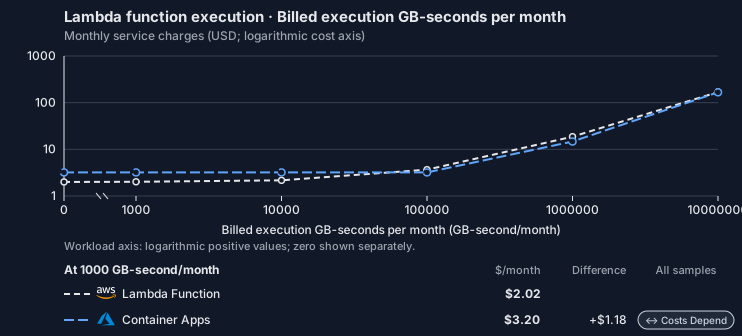
Feature: Lambda function execution. Estimated monthly service charges by Billed execution GB-seconds per month. Adapter hosting and Tensor9 fees are excluded. Source: us-east-1; target: East US; currency: USD.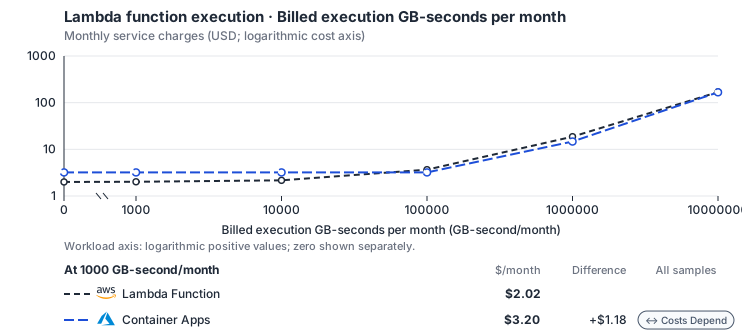
- Only this native meter varies; all other source usage and translation assumptions retain the displayed defaults. Other native meters and workload assumptions retain their explicitly displayed default quantities. Workload translation and capacity assumptions are not benchmark measurements.
- Native monthly usage priced at the cited provider list prices; listed target allowances apply where present, excluding invoice credits, taxes and negotiated discounts. Rates as of 2026-10-22: us-east-1 → East US, USD/month.
- Source prices are reference charges, not an invoice. Target lines cover selected service usage/configuration only; adapter hosting and Tensor9 fees are excluded.
- Samples of explicit prices are not performance measurements or capacity qualification. No interpolation or break-even guarantee is implied.
- Variant assumptions show the first axis sample; any axis-dependent configuration is described by this curve’s workload note.
- Rates are cited provider list prices, editable for discounts, commitments or another region. Workload translation and capacity coefficients remain editable planning assumptions, not benchmark measurements or a commercial quote.
- Default-zero rates are explicit assumptions, not evidence that the deployed service or resource is free.
- Provisioned-unit minimums use an editable approximate allocation floor. Modeled target service cost is max(usage/allocation, minimum), with billable network, durable staging and dependent sinks added separately; actual RU/TU sizing, scaling increments and throughput remain unqualified.
- Durable staging is priced once: provisioned targets include adapter state in their selected allocation; native targets add a separate staging allocation when required. Adapter hosting is a separate allocation and must exclude resources already priced as staging, workers or target capacity.
- A declared adapter mapping and cost model do not establish implementation availability or service equivalence.
- This is a declared directed mapping; a planning estimate does not establish deployment or request-serving support.
- Origin unit prices are cited provider list prices; capacity coefficients and translation assumptions are editable authored planning guesses, not measured capacity or a provider quote.
- Execution seconds are billed GB-seconds / selected origin memory; target CPU follows Lambda’s memory-proportional vCPU share, and CPU and RAM-hours scale with the duration multiplier.
- Invocation count and execution duration are independent inputs. The duration curve holds invocation count fixed.
- Azure Container Apps (Consumption plan) bills active vCPU-seconds, GiB-seconds and requests after a monthly free grant per subscription. Idle minimum replicas bill USD 0.000003 per vCPU-second and are not inferred; TCP apps bill per connection.
- AWS Price List API, AWSLambda offer: https://pricing.us-east-1.amazonaws.com/offers/v1.0/aws/AWSLambda/current/us-east-1/index.json
- Azure Retail Prices API: https://prices.azure.com/api/retail/prices
- Azure Container Apps pricing: https://azure.microsoft.com/en-us/pricing/details/container-apps/
- Provisioned concurrency, request/response streaming, ephemeral storage premiums, logs, function networking and event-source service charges.
- Self-managed or Premium backends need their provisioned idle floor separately; execution resource-hours alone do not establish scale-to-zero.
- Taxes, discounts, credits and free-tier allowances not explicitly listed by this model.
- Unmodeled dependent services, task execution and operations outside the selected workload family.
plan-18784886d9472a4de5d83c55f6d3c7a66412e30b / 2026-10-22.planning.2. Curve: workload-1.
Sources: AWS Price List API, AWSLambda offer, Azure Retail Prices API, Azure Container Apps pricing.
Lambda function execution → Azure Container Apps: Authored native-usage planning example. Native monthly usage priced at the cited provider list prices; listed target allowances apply where present, excluding invoice credits, taxes and negotiated discounts.
Scenario source region: us-east-1. Scenario target region: East US. Currency: USD.
- Provisioned concurrency, request/response streaming, ephemeral storage premiums, logs, function networking and event-source service charges.
- Self-managed or Premium backends need their provisioned idle floor separately; execution resource-hours alone do not establish scale-to-zero.
- Taxes, discounts, credits and free-tier allowances not explicitly listed by this model.
- Unmodeled dependent services, task execution and operations outside the selected workload family.
- Translated reads: 0 operations.
- Translated writes: 0 operations.
- Translated resident physical data: 0 GiB-month.
- Native provider operations: 10,000,000 operations.
- Published payload: 0 GiB.
- Delivered payload: 0 GiB.
- Allocated execution CPU: 80.4 vCPU-hour.
- Allocated execution RAM: 138.9 GiB-hour.
- Independent resource allocation: 0 resource-hour.
- Independent inventory: 0 resource-month.
- Input tokens: 0 tokens.
- Output tokens: 0 tokens.
- Billable network: 0 GiB.
- Dependent object sink retained data: 0 GiB-month.
- Dependent object sink writes: 0 writes.
- Rates are cited provider list prices, editable for discounts, commitments or another region. Workload translation and capacity coefficients remain editable planning assumptions, not benchmark measurements or a commercial quote.
- Default-zero rates are explicit assumptions, not evidence that the deployed service or resource is free.
- Provisioned-unit minimums use an editable approximate allocation floor. Modeled target service cost is max(usage/allocation, minimum), with billable network, durable staging and dependent sinks added separately; actual RU/TU sizing, scaling increments and throughput remain unqualified.
- Durable staging is priced once: provisioned targets include adapter state in their selected allocation; native targets add a separate staging allocation when required. Adapter hosting is a separate allocation and must exclude resources already priced as staging, workers or target capacity.
- A declared adapter mapping and cost model do not establish implementation availability or service equivalence.
- This is a declared directed mapping; a planning estimate does not establish deployment or request-serving support.
- Origin unit prices are cited provider list prices; capacity coefficients and translation assumptions are editable authored planning guesses, not measured capacity or a provider quote.
- Execution seconds are billed GB-seconds / selected origin memory; target CPU follows Lambda’s memory-proportional vCPU share, and CPU and RAM-hours scale with the duration multiplier.
- Invocation count and execution duration are independent inputs. The duration curve holds invocation count fixed.
- Azure Container Apps (Consumption plan) bills active vCPU-seconds, GiB-seconds and requests after a monthly free grant per subscription. Idle minimum replicas bill USD 0.000003 per vCPU-second and are not inferred; TCP apps bill per connection.
plan-18784886d9472a4de5d83c55f6d3c7a66412e30b / 2026-10-22.planning.2. Scenario: planning-example.
Sources: AWS Price List API, AWSLambda offer, Azure Retail Prices API, Azure Container Apps pricing.
Via Azure Functions (Flex Consumption)
How it works
Your application keeps calling Lambda through the AWS SDK. At deployment, each function is built into a code package that holds your handler, the AWS-provided runtime client, the Tensor9 adapter and its routing component. Flex Consumption runs code packages only, so a function packaged as a container image is placed on a container option (Container Apps or the Premium plan) instead of stopping the build. When an invoke arrives, the adapter turns Azure’s HTTP trigger call into a normal Lambda runtime call and returns the supported Lambda response fields, including function errors. Only synchronous request/response invokes are supported. Tensor9 sets the function app’s per-instance HTTP concurrency to one, so Azure gives each concurrent invoke its own instance, with its own memory and/tmp.


Each function ships as one code package: your handler, the AWS runtime client and the Tensor9 routing component.
Scaling and sizes
Each function scales on its own, up to a thousand instances, and down to zero when idle. An instance has about 4 GB of memory, shared between your handler and the runtime, and about 0.8 GB of/tmp. A function that needs more memory or /tmp is placed on a container option.
The routing component is part of the code package, so updating it means rebuilding and redeploying the package. By comparison, Container Apps runs the adapter as a separate process, and the Premium plan keeps instances warm to reduce cold-start latency.
Limitations
Where Lambda and the Flex Consumption plan differ- Container images are not supported on this plan. Flex Consumption runs code packages only. A function packaged as a container image is placed on a container option (Container Apps or the Premium plan) instead.
- Memory and /tmp behave differently: both are capped lower. An instance has about 0.8 GB of
/tmpand about 4 GB of memory shared with the runtime. A function that needs more is placed on a container option. - The routing component updates only on redeploy. It ships inside the code package, so an update means rebuilding and redeploying the package. There is no separate process to update on its own.
- Asynchronous invokes are not supported. Synchronous invoke only: an asynchronous (
Event) invoke returns a clear error. Layers, event source mappings, aliases and function URLs stop the build with an error naming them, rather than being dropped.
Other considerations
- Who operates what. Microsoft operates Flex Consumption scaling and availability. Tensor9 operates the path an invoke takes to the function. The function code stays yours.
- Moving from AWS. Each function is built when the stack is deployed and ships as its code package. There is no data to move at cutover.
- Each concurrent invoke gets its own instance. Concurrent calls never share memory or
/tmp, so in-process state is not shared between them. - Cold starts and cost. The plan scales to zero when idle, so billing follows use, and the first invoke after idle waits for an instance to start.
- Calls between functions stay in the stack. The packaged routing component finds a target function by name among the functions in the deployed stack. A call to a function outside the stack returns a clear error rather than reaching AWS.
- What to monitor. Throughput and latency are the plan’s own; watch them in your monitoring.
- Keep durable state elsewhere. Function storage is temporary. Save data through the services your handler calls so it survives instance replacement.
Function lifecycle on Flex Consumption
A ready Azure Functions deployment supplies the invocation route. Code packaging, instance-size limits and synchronous-only delivery remain unchanged by lifecycle adaptation. See function lifecycle and invocation for Pending/Active state, supported lifecycle operations and invocation outcomes.Example monthly charges
This Tensor9 BYOC scenario estimates service charges for the named origin and target services. Adapter hosting and commercial Tensor9 fees need separate allocations. How Tensor9 estimates costs explains the method and what the estimates include.Lambda function execution · Billed execution GB-seconds per month
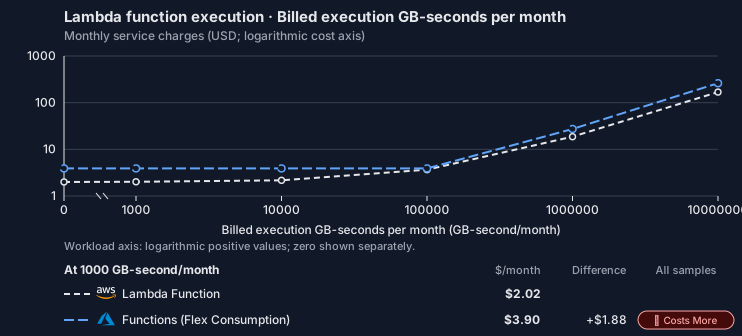
Feature: Lambda function execution. Estimated monthly service charges by Billed execution GB-seconds per month. Adapter hosting and Tensor9 fees are excluded. Source: us-east-1; target: East US; currency: USD.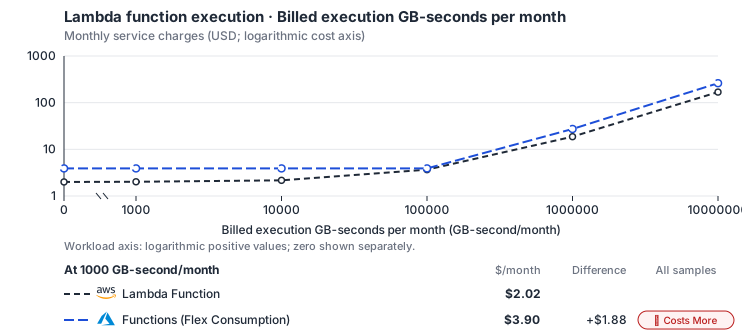
- Only this native meter varies; all other source usage and translation assumptions retain the displayed defaults. Other native meters and workload assumptions retain their explicitly displayed default quantities. Workload translation and capacity assumptions are not benchmark measurements.
- Native monthly usage priced at the cited provider list prices; listed target allowances apply where present, excluding invoice credits, taxes and negotiated discounts. Rates as of 2026-10-22: us-east-1 → East US, USD/month.
- Source prices are reference charges, not an invoice. Target lines cover selected service usage/configuration only; adapter hosting and Tensor9 fees are excluded.
- Samples of explicit prices are not performance measurements or capacity qualification. No interpolation or break-even guarantee is implied.
- Variant assumptions show the first axis sample; any axis-dependent configuration is described by this curve’s workload note.
- Rates are cited provider list prices, editable for discounts, commitments or another region. Workload translation and capacity coefficients remain editable planning assumptions, not benchmark measurements or a commercial quote.
- Default-zero rates are explicit assumptions, not evidence that the deployed service or resource is free.
- Provisioned-unit minimums use an editable approximate allocation floor. Modeled target service cost is max(usage/allocation, minimum), with billable network, durable staging and dependent sinks added separately; actual RU/TU sizing, scaling increments and throughput remain unqualified.
- Durable staging is priced once: provisioned targets include adapter state in their selected allocation; native targets add a separate staging allocation when required. Adapter hosting is a separate allocation and must exclude resources already priced as staging, workers or target capacity.
- A declared adapter mapping and cost model do not establish implementation availability or service equivalence.
- This is a declared directed mapping; a planning estimate does not establish deployment or request-serving support.
- Origin unit prices are cited provider list prices; capacity coefficients and translation assumptions are editable authored planning guesses, not measured capacity or a provider quote.
- Execution seconds are billed GB-seconds / selected origin memory; target CPU follows Lambda’s memory-proportional vCPU share, and CPU and RAM-hours scale with the duration multiplier.
- Invocation count and execution duration are independent inputs. The duration curve holds invocation count fixed.
- Azure Functions Flex Consumption bills the provisioned instance memory (512, 2,048 or 4,096 MB) while instances execute, plus executions, after a monthly free grant per subscription; there is no separate CPU charge. Only memory GiB-hours are billed, so the family’s selected target memory stands in for the instance size. Always-ready instances (USD 0.000004 per GB-second idle) are not selected.
- AWS Price List API, AWSLambda offer: https://pricing.us-east-1.amazonaws.com/offers/v1.0/aws/AWSLambda/current/us-east-1/index.json
- Azure Retail Prices API: https://prices.azure.com/api/retail/prices
- Provisioned concurrency, request/response streaming, ephemeral storage premiums, logs, function networking and event-source service charges.
- Self-managed or Premium backends need their provisioned idle floor separately; execution resource-hours alone do not establish scale-to-zero.
- Taxes, discounts, credits and free-tier allowances not explicitly listed by this model.
- Unmodeled dependent services, task execution and operations outside the selected workload family.
plan-606c390b831b0582ffcc26ba50422236ac661177 / 2026-10-22.planning.2. Curve: workload-1.
Sources: AWS Price List API, AWSLambda offer, Azure Retail Prices API.
Lambda function execution → Azure Functions (Flex Consumption): Authored native-usage planning example. Native monthly usage priced at the cited provider list prices; listed target allowances apply where present, excluding invoice credits, taxes and negotiated discounts.
Scenario source region: us-east-1. Scenario target region: East US. Currency: USD.
- Provisioned concurrency, request/response streaming, ephemeral storage premiums, logs, function networking and event-source service charges.
- Self-managed or Premium backends need their provisioned idle floor separately; execution resource-hours alone do not establish scale-to-zero.
- Taxes, discounts, credits and free-tier allowances not explicitly listed by this model.
- Unmodeled dependent services, task execution and operations outside the selected workload family.
- Translated reads: 0 operations.
- Translated writes: 0 operations.
- Translated resident physical data: 0 GiB-month.
- Native provider operations: 10,000,000 operations.
- Published payload: 0 GiB.
- Delivered payload: 0 GiB.
- Allocated execution CPU: 80.4 vCPU-hour.
- Allocated execution RAM: 138.9 GiB-hour.
- Independent resource allocation: 0 resource-hour.
- Independent inventory: 0 resource-month.
- Input tokens: 0 tokens.
- Output tokens: 0 tokens.
- Billable network: 0 GiB.
- Dependent object sink retained data: 0 GiB-month.
- Dependent object sink writes: 0 writes.
- Rates are cited provider list prices, editable for discounts, commitments or another region. Workload translation and capacity coefficients remain editable planning assumptions, not benchmark measurements or a commercial quote.
- Default-zero rates are explicit assumptions, not evidence that the deployed service or resource is free.
- Provisioned-unit minimums use an editable approximate allocation floor. Modeled target service cost is max(usage/allocation, minimum), with billable network, durable staging and dependent sinks added separately; actual RU/TU sizing, scaling increments and throughput remain unqualified.
- Durable staging is priced once: provisioned targets include adapter state in their selected allocation; native targets add a separate staging allocation when required. Adapter hosting is a separate allocation and must exclude resources already priced as staging, workers or target capacity.
- A declared adapter mapping and cost model do not establish implementation availability or service equivalence.
- This is a declared directed mapping; a planning estimate does not establish deployment or request-serving support.
- Origin unit prices are cited provider list prices; capacity coefficients and translation assumptions are editable authored planning guesses, not measured capacity or a provider quote.
- Execution seconds are billed GB-seconds / selected origin memory; target CPU follows Lambda’s memory-proportional vCPU share, and CPU and RAM-hours scale with the duration multiplier.
- Invocation count and execution duration are independent inputs. The duration curve holds invocation count fixed.
- Azure Functions Flex Consumption bills the provisioned instance memory (512, 2,048 or 4,096 MB) while instances execute, plus executions, after a monthly free grant per subscription; there is no separate CPU charge. Only memory GiB-hours are billed, so the family’s selected target memory stands in for the instance size. Always-ready instances (USD 0.000004 per GB-second idle) are not selected.
plan-606c390b831b0582ffcc26ba50422236ac661177 / 2026-10-22.planning.2. Scenario: planning-example.
Sources: AWS Price List API, AWSLambda offer, Azure Retail Prices API.
Via Azure Functions (Premium)
How it works
Your application keeps calling Lambda through the AWS SDK. At deployment, each function is prepared for the Premium plan, which runs the built container image directly or a code package. When an invoke arrives, the adapter turns Azure’s call into a normal Lambda runtime call and returns the supported Lambda response fields, including function errors. The Tensor9 routing component ships inside the deployed image or package, next to your handler. Only synchronous request/response invokes are supported. Premium keeps prewarmed instances ready, like Lambda’s provisioned concurrency. They reduce the latency of the first request, and they are billed all the time, including when idle.

Each function runs on the Premium plan, which keeps instances warm and runs a container image or a code package.
Scaling and isolation
Each concurrent invoke runs on its own instance, with its own memory and several gigabytes of/tmp, more than the code-only Flex Consumption plan offers. In-process state is not shared between concurrent calls.
HTTP scaling stops at 20 to 100 instances, depending on the plan size, compared with a thousand on Flex Consumption. Premium suits functions that need low cold-start latency. Flex Consumption supports more concurrent instances and bills by use.
Limitations
Where Lambda and the Premium plan differ- Billing behaves differently: warm instances are billed all the time. The always-ready instances are billed whether or not they serve traffic, so Premium costs more than the options that scale to zero (Flex Consumption, Container Apps).
- Scaling stops lower than on Flex Consumption. HTTP scaling reaches 20 to 100 instances, depending on the plan size, well below Flex Consumption’s thousand.
- The routing layer updates only on redeploy. It ships inside the deployed artifact (a single container or code package, not a separately deployed service), so an update means rebuilding and redeploying.
- Asynchronous invokes are not supported. Synchronous invoke only: an asynchronous (
Event) invoke returns a clear error. Layers, event source mappings, aliases and function URLs stop the build with an error naming them, rather than being dropped.
Other considerations
- Who operates what. Microsoft operates Premium plan scaling and availability. Tensor9 operates the path an invoke takes to the function. The function code stays yours.
- Moving from AWS. Each function is built when the stack is deployed and ships as its container image or code package. There is no data to move at cutover.
- Choosing between Premium and Flex Consumption. Premium keeps instances warm for low first-request latency. Flex Consumption allows more instances. A function that needs a container image or a large
/tmp, which Flex would place elsewhere, runs here as it is. - What to monitor. Throughput and latency are the plan’s own; watch them in your monitoring.
- Keep durable state elsewhere. Function storage is temporary. Save data through the services your handler calls so it survives instance replacement.
Function lifecycle on Premium
The Premium deployment must become ready before invocation; its warm capacity and bundled routing-layer update lifecycle retain the costs and redeployment requirements above. See function lifecycle and invocation for Pending/Active state, supported lifecycle operations and invocation outcomes.Example monthly charges
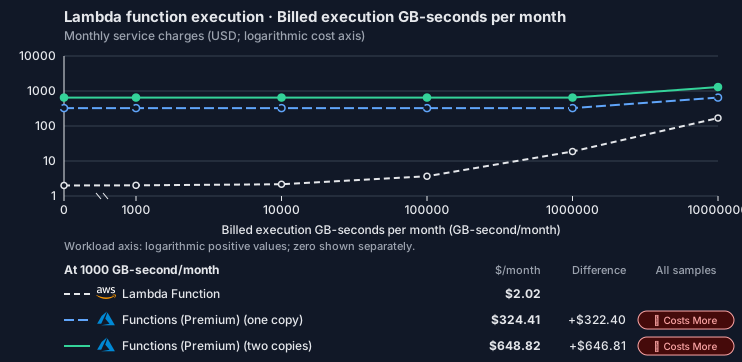
This Tensor9 BYOC scenario estimates service charges for the named origin and target services. Adapter hosting and commercial Tensor9 fees need separate allocations. How Tensor9 estimates costs explains the method and what the estimates include.Lambda function execution · Billed execution GB-seconds per month
Feature: Lambda function execution. Estimated monthly service charges by Billed execution GB-seconds per month. Adapter hosting and Tensor9 fees are excluded. Source: us-east-1; target: East US; currency: USD.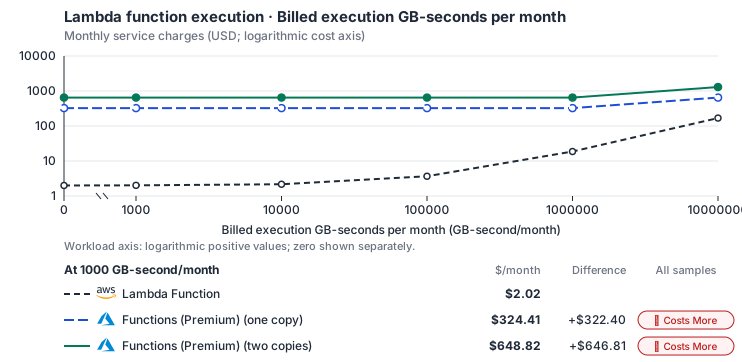
- Only this native meter varies; all other source usage and translation assumptions retain the displayed defaults. Other native meters and workload assumptions retain their explicitly displayed default quantities. Workload translation and capacity assumptions are not benchmark measurements.
- Native monthly usage priced at the cited provider list prices; listed target allowances apply where present, excluding invoice credits, taxes and negotiated discounts. Rates as of 2026-10-22: us-east-1 → East US, USD/month.
- Source prices are reference charges, not an invoice. Target lines cover selected service usage/configuration only; adapter hosting and Tensor9 fees are excluded.
- Samples of explicit prices are not performance measurements or capacity qualification. No interpolation or break-even guarantee is implied.
- Variant assumptions show the first axis sample; any axis-dependent configuration is described by this curve’s workload note.
- Rates are cited provider list prices, editable for discounts, commitments or another region. Workload translation and capacity coefficients remain editable planning assumptions, not benchmark measurements or a commercial quote.
- Default-zero rates are explicit assumptions, not evidence that the deployed service or resource is free.
- Provisioned-unit minimums use an editable approximate allocation floor. Modeled target service cost is max(usage/allocation, minimum), with billable network, durable staging and dependent sinks added separately; actual RU/TU sizing, scaling increments and throughput remain unqualified.
- Durable staging is priced once: provisioned targets include adapter state in their selected allocation; native targets add a separate staging allocation when required. Adapter hosting is a separate allocation and must exclude resources already priced as staging, workers or target capacity.
- A declared adapter mapping and cost model do not establish implementation availability or service equivalence.
- This is a declared directed mapping; a planning estimate does not establish deployment or request-serving support.
- Origin unit prices are cited provider list prices; capacity coefficients and translation assumptions are editable authored planning guesses, not measured capacity or a provider quote.
- Execution seconds are billed GB-seconds / selected origin memory; target CPU follows Lambda’s memory-proportional vCPU share, and CPU and RAM-hours scale with the duration multiplier.
- Invocation count and execution duration are independent inputs. The duration curve holds invocation count fixed.
- Azure Functions Premium bills allocated vCPU and memory per second for every instance, with at least one instance always allocated, and no execution charge. Plans come in EP1 (1 vCPU, 3.5 GB, USD 157.72/month), EP2 (2 vCPU, 7 GB) and EP3 (4 vCPU, 14 GB); the model bills the selected CPU and RAM without rounding to an EP size. Instance disk (250 GB) is included; the function app’s storage account bills separately at Azure Storage rates.
- Row-store throughput (capacityOpsPerVcpuSecond, default 1500) is measured-by-tensor9 as a lower bound: the DynamoDB adapter on Cloud SQL db-custom-2-7680 (2 vCPU, PostgreSQL 16, us-west1) served 2,974 ops/s of YCSB-A at 16 threads without recorded saturation (src/main/kotlin/t9/prime/equiv/generated/eval/CloudsqlPostgresqlYcsbAT16GoYcsbV1_0_0.kt). Published CPU-bound pgbench reaches 3,101 read-write transactions and 20,289 point reads per vCPU-second (AWS z1d.2xlarge, PostgreSQL 14.5), so actual capacity is likely higher. Reads and writes share one coefficient: at the same adapter version, read-only YCSB-C was not faster than 50%-update YCSB-A.
- Log-broker throughput (capacityStreamMiBPerVcpuSecond 20 at 0.5 utilization, 4 GiB RAM per vCPU) is provider-documented by Google Managed Service for Apache Kafka sizing (https://docs.cloud.google.com/managed-service-for-apache-kafka/docs/plan-cluster-size): write-equivalent bytes are replicated writes plus a quarter of reads. Producer batches below 10 KB lower per-CPU throughput; that penalty is not modeled.
- Disk utilization 0.8 is provider-documented headroom below Cloud SQL automatic storage increase, which triggers near 91-95% full (https://docs.cloud.google.com/sql/docs/postgres/instance-settings). The 20 GiB reserve exceeds PostgreSQL’s 1 GB default max_wal_size; the remainder of that reserve is unmeasured.
- CPU tiers double from 2 vCPUs to the target’s largest node at 4 GiB per vCPU; each target’s documented largest node bounds CPU, RAM, RAM per vCPU and disk, and the durable staging database uses Cloud SQL Enterprise (96 vCPU, 6.5 GiB per vCPU, 624 GiB, 64 TiB). Targets billed per capacity unit or throughput unit are sized by their backend instead.
- No public evidence: peak/mean work (2) and the RAM working-set fraction (0.1). Proposed measurements: the p99 one-minute rate over the monthly mean from customer CloudWatch metrics; the buffer hit ratio while stepping RAM under a fixed YCSB-B load.
- Node bounds: Cloud SQL Enterprise allows 1-96 vCPUs at 0.9-6.5 GB per vCPU and up to 64 TB with a dedicated vCPU (https://docs.cloud.google.com/sql/docs/postgres/instance-settings).
- Stored GiB already includes the origin family’s physical footprint assumptions; no second storage amplification is applied.
- The workload family already selected resource-hours; the throughput coefficient is not applied again.
- Copies and allocation fractions change cost only; they do not increase modeled primary capacity.
- AWS Price List API, AWSLambda offer: https://pricing.us-east-1.amazonaws.com/offers/v1.0/aws/AWSLambda/current/us-east-1/index.json
- Azure Retail Prices API: https://prices.azure.com/api/retail/prices
- Provisioned concurrency, request/response streaming, ephemeral storage premiums, logs, function networking and event-source service charges.
- Self-managed or Premium backends need their provisioned idle floor separately; execution resource-hours alone do not establish scale-to-zero.
- Taxes, discounts, credits and free-tier allowances not explicitly listed by this model.
- Unmodeled dependent services, task execution and operations outside the selected workload family.
plan-7a1e608fdadecb2610ce214e1529ccbaaefb9bfe / 2026-10-22.planning.2. Curve: workload-1.
Sources: AWS Price List API, AWSLambda offer, Azure Retail Prices API.
Lambda function execution → Azure Functions (Premium): Authored native-usage planning example. Native monthly usage priced at the cited provider list prices; listed target allowances apply where present, excluding invoice credits, taxes and negotiated discounts.
Scenario source region: us-east-1. Scenario target region: East US. Currency: USD.
- Provisioned concurrency, request/response streaming, ephemeral storage premiums, logs, function networking and event-source service charges.
- Self-managed or Premium backends need their provisioned idle floor separately; execution resource-hours alone do not establish scale-to-zero.
- Taxes, discounts, credits and free-tier allowances not explicitly listed by this model.
- Unmodeled dependent services, task execution and operations outside the selected workload family.
- Translated reads: 0 operations.
- Translated writes: 0 operations.
- Translated resident physical data: 0 GiB-month.
- Native provider operations: 10,000,000 operations.
- Published payload: 0 GiB.
- Delivered payload: 0 GiB.
- Allocated execution CPU: 80.4 vCPU-hour.
- Allocated execution RAM: 138.9 GiB-hour.
- Independent resource allocation: 0 resource-hour.
- Independent inventory: 0 resource-month.
- Input tokens: 0 tokens.
- Output tokens: 0 tokens.
- Billable network: 0 GiB.
- Dependent object sink retained data: 0 GiB-month.
- Dependent object sink writes: 0 writes.
- Rates are cited provider list prices, editable for discounts, commitments or another region. Workload translation and capacity coefficients remain editable planning assumptions, not benchmark measurements or a commercial quote.
- Default-zero rates are explicit assumptions, not evidence that the deployed service or resource is free.
- Provisioned-unit minimums use an editable approximate allocation floor. Modeled target service cost is max(usage/allocation, minimum), with billable network, durable staging and dependent sinks added separately; actual RU/TU sizing, scaling increments and throughput remain unqualified.
- Durable staging is priced once: provisioned targets include adapter state in their selected allocation; native targets add a separate staging allocation when required. Adapter hosting is a separate allocation and must exclude resources already priced as staging, workers or target capacity.
- A declared adapter mapping and cost model do not establish implementation availability or service equivalence.
- This is a declared directed mapping; a planning estimate does not establish deployment or request-serving support.
- Origin unit prices are cited provider list prices; capacity coefficients and translation assumptions are editable authored planning guesses, not measured capacity or a provider quote.
- Execution seconds are billed GB-seconds / selected origin memory; target CPU follows Lambda’s memory-proportional vCPU share, and CPU and RAM-hours scale with the duration multiplier.
- Invocation count and execution duration are independent inputs. The duration curve holds invocation count fixed.
- Azure Functions Premium bills allocated vCPU and memory per second for every instance, with at least one instance always allocated, and no execution charge. Plans come in EP1 (1 vCPU, 3.5 GB, USD 157.72/month), EP2 (2 vCPU, 7 GB) and EP3 (4 vCPU, 14 GB); the model bills the selected CPU and RAM without rounding to an EP size. Instance disk (250 GB) is included; the function app’s storage account bills separately at Azure Storage rates.
- Row-store throughput (capacityOpsPerVcpuSecond, default 1500) is measured-by-tensor9 as a lower bound: the DynamoDB adapter on Cloud SQL db-custom-2-7680 (2 vCPU, PostgreSQL 16, us-west1) served 2,974 ops/s of YCSB-A at 16 threads without recorded saturation (src/main/kotlin/t9/prime/equiv/generated/eval/CloudsqlPostgresqlYcsbAT16GoYcsbV1_0_0.kt). Published CPU-bound pgbench reaches 3,101 read-write transactions and 20,289 point reads per vCPU-second (AWS z1d.2xlarge, PostgreSQL 14.5), so actual capacity is likely higher. Reads and writes share one coefficient: at the same adapter version, read-only YCSB-C was not faster than 50%-update YCSB-A.
- Log-broker throughput (capacityStreamMiBPerVcpuSecond 20 at 0.5 utilization, 4 GiB RAM per vCPU) is provider-documented by Google Managed Service for Apache Kafka sizing (https://docs.cloud.google.com/managed-service-for-apache-kafka/docs/plan-cluster-size): write-equivalent bytes are replicated writes plus a quarter of reads. Producer batches below 10 KB lower per-CPU throughput; that penalty is not modeled.
- Disk utilization 0.8 is provider-documented headroom below Cloud SQL automatic storage increase, which triggers near 91-95% full (https://docs.cloud.google.com/sql/docs/postgres/instance-settings). The 20 GiB reserve exceeds PostgreSQL’s 1 GB default max_wal_size; the remainder of that reserve is unmeasured.
- CPU tiers double from 2 vCPUs to the target’s largest node at 4 GiB per vCPU; each target’s documented largest node bounds CPU, RAM, RAM per vCPU and disk, and the durable staging database uses Cloud SQL Enterprise (96 vCPU, 6.5 GiB per vCPU, 624 GiB, 64 TiB). Targets billed per capacity unit or throughput unit are sized by their backend instead.
- No public evidence: peak/mean work (2) and the RAM working-set fraction (0.1). Proposed measurements: the p99 one-minute rate over the monthly mean from customer CloudWatch metrics; the buffer hit ratio while stepping RAM under a fixed YCSB-B load.
- Node bounds: Cloud SQL Enterprise allows 1-96 vCPUs at 0.9-6.5 GB per vCPU and up to 64 TB with a dedicated vCPU (https://docs.cloud.google.com/sql/docs/postgres/instance-settings).
- Stored GiB already includes the origin family’s physical footprint assumptions; no second storage amplification is applied.
- The workload family already selected resource-hours; the throughput coefficient is not applied again.
- Copies and allocation fractions change cost only; they do not increase modeled primary capacity.
plan-7a1e608fdadecb2610ce214e1529ccbaaefb9bfe / 2026-10-22.planning.2. Scenario: planning-example.
Sources: AWS Price List API, AWSLambda offer, Azure Retail Prices API.
On OCI
Via OKE function Deployments
How it works
Your functions keep their Lambda handlers, and callers keep using the LambdaInvoke API for synchronous requests. Each function runs as an always-on Kubernetes Deployment on OKE, behind a Service that is reachable inside the cluster.
A Lambda Invoke wrapper in the function’s container accepts each Invoke request and passes the event to the runtime interface client, which runs your handler. The runtime interface client alone does not make an arbitrary container answer the Invoke API; the wrapper is required.
Packaging and deployment
Only container-image functions run on this option. A zip-packaged function is accepted and then fails, so package each function as a container image with the configured Lambda-compatible entrypoint and Invoke wrapper. Publish the image to a registry the cluster can pull from, and set the function’s environment values. Supported lifecycle calls record the desired function configuration and update the Kubernetes resources that host it. Wait for the function to become ready before routing callers: a deployment that is still pending cannot be invoked.Networking and identity
You configure the OCI VCN, cluster access and node capacity. Callers must be able to reach the function’s Service, and the function needs network access to its dependencies. Configure the supported OCI workload identity, or another approved credential, for native OCI requests. Image-pull credentials and the cluster control-plane identity are separate from the function’s runtime permissions. An AWS SDK call that goes through another service adapter is authorized by that adapter; native OCI access is configured separately.Limitations
- Lambda’s per-invocation sandbox is not supported. Each function runs in always-on pods of a Deployment, not in a sandbox per invocation.
- Reserved concurrency is not supported. A Deployment’s replica count is not a Lambda reserved-concurrency limit; nothing caps concurrent invocations per function.
- Scaling behaves differently: functions stay running. The Deployment does not scale with requests and does not scale to zero when idle.
- The timeout behaves differently: it is not a process deadline. Kubernetes does not stop a handler that runs past the configured timeout.
- The configured /tmp size is not supported. The function writes to the container’s own filesystem, which does not reproduce Lambda’s /tmp quota.
- Asynchronous and streamed invocations are not supported.
Eventinvocations andInvokeWithResponseStreamare not available; only synchronousInvokeworks. - Event sources, layers, aliases, versions and function URLs are not supported. These integrations are outside this deployment option.
Other considerations
What to watch. Plan node upgrades and capacity, and collect function logs. Check handler errors as well as successful HTTP calls: a handler failure comes back in theInvoke response with the X-Amz-Function-Error header.
Example monthly charges
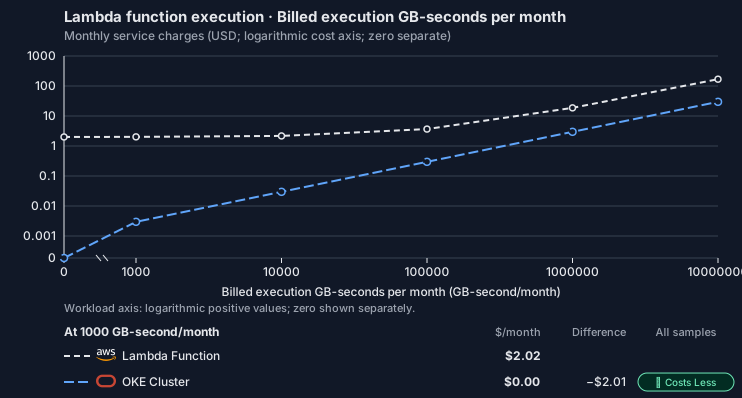
This Tensor9 BYOC scenario estimates service charges for the named origin and target services. Adapter hosting and commercial Tensor9 fees need separate allocations. How Tensor9 estimates costs explains the method and what the estimates include.Lambda function execution · Billed execution GB-seconds per month
Feature: Lambda function execution. Estimated monthly service charges by Billed execution GB-seconds per month. Adapter hosting and Tensor9 fees are excluded. Source: us-east-1; target: us-ashburn-1; currency: USD.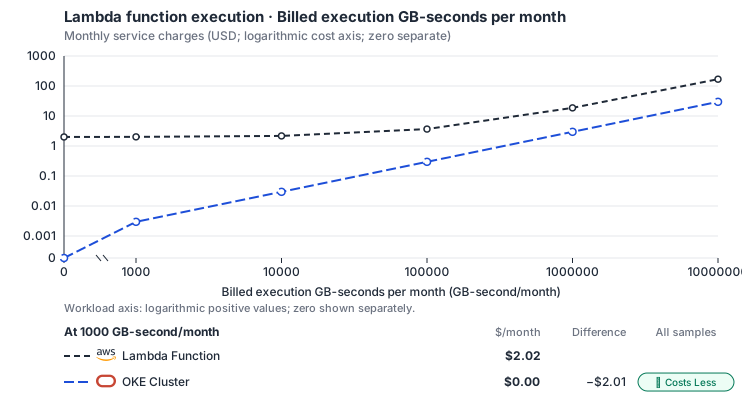
- Only this native meter varies; all other source usage and translation assumptions retain the displayed defaults. Other native meters and workload assumptions retain their explicitly displayed default quantities. Workload translation and capacity assumptions are not benchmark measurements.
- Native monthly usage priced at the cited provider list prices; listed target allowances apply where present, excluding invoice credits, taxes and negotiated discounts. Rates as of 2026-10-22: us-east-1 → us-ashburn-1, USD/month.
- Source prices are reference charges, not an invoice. Target lines cover selected service usage/configuration only; adapter hosting and Tensor9 fees are excluded.
- Samples of explicit prices are not performance measurements or capacity qualification. No interpolation or break-even guarantee is implied.
- Variant assumptions show the first axis sample; any axis-dependent configuration is described by this curve’s workload note.
- Rates are cited provider list prices, editable for discounts, commitments or another region. Workload translation and capacity coefficients remain editable planning assumptions, not benchmark measurements or a commercial quote.
- Default-zero rates are explicit assumptions, not evidence that the deployed service or resource is free.
- Provisioned-unit minimums use an editable approximate allocation floor. Modeled target service cost is max(usage/allocation, minimum), with billable network, durable staging and dependent sinks added separately; actual RU/TU sizing, scaling increments and throughput remain unqualified.
- Durable staging is priced once: provisioned targets include adapter state in their selected allocation; native targets add a separate staging allocation when required. Adapter hosting is a separate allocation and must exclude resources already priced as staging, workers or target capacity.
- A declared adapter mapping and cost model do not establish implementation availability or service equivalence.
- This is a declared directed mapping; a planning estimate does not establish deployment or request-serving support.
- Origin unit prices are cited provider list prices; capacity coefficients and translation assumptions are editable authored planning guesses, not measured capacity or a provider quote.
- Execution seconds are billed GB-seconds / selected origin memory; target CPU follows Lambda’s memory-proportional vCPU share, and CPU and RAM-hours scale with the duration multiplier.
- Invocation count and execution duration are independent inputs. The duration curve holds invocation count fixed.
- Cluster control-plane hours bill at the listed management fee and worker CPU/RAM at the provider’s VM decomposition; allocate a shared cluster once across adapters. The compiler emits type ENHANCED_CLUSTER (the EKS standard tier’s equivalent); a Basic cluster is free. OCI: E5 flexible shape (the shape this repo emits); Balanced block volume; first 10 TB of egress free.
- AWS Price List API, AWSLambda offer: https://pricing.us-east-1.amazonaws.com/offers/v1.0/aws/AWSLambda/current/us-east-1/index.json
- OCI price list API: https://apexapps.oracle.com/pls/apex/cetools/api/v1/products/
- Provisioned concurrency, request/response streaming, ephemeral storage premiums, logs, function networking and event-source service charges.
- Self-managed or Premium backends need their provisioned idle floor separately; execution resource-hours alone do not establish scale-to-zero.
- Taxes, discounts, credits and free-tier allowances not explicitly listed by this model.
- Unmodeled dependent services, task execution and operations outside the selected workload family.
plan-547ac01dce732c6a239f582fc198ec24d71ded9b / 2026-10-22.planning.2. Curve: workload-1.
Sources: AWS Price List API, AWSLambda offer, OCI price list API.
Lambda function execution → OKE function Deployments: Authored native-usage planning example. Native monthly usage priced at the cited provider list prices; listed target allowances apply where present, excluding invoice credits, taxes and negotiated discounts.
Scenario source region: us-east-1. Scenario target region: us-ashburn-1. Currency: USD.
- Provisioned concurrency, request/response streaming, ephemeral storage premiums, logs, function networking and event-source service charges.
- Self-managed or Premium backends need their provisioned idle floor separately; execution resource-hours alone do not establish scale-to-zero.
- Taxes, discounts, credits and free-tier allowances not explicitly listed by this model.
- Unmodeled dependent services, task execution and operations outside the selected workload family.
- Translated reads: 0 operations.
- Translated writes: 0 operations.
- Translated resident physical data: 0 GiB-month.
- Native provider operations: 10,000,000 operations.
- Published payload: 0 GiB.
- Delivered payload: 0 GiB.
- Allocated execution CPU: 80.4 vCPU-hour.
- Allocated execution RAM: 138.9 GiB-hour.
- Independent resource allocation: 0 resource-hour.
- Independent inventory: 0 resource-month.
- Input tokens: 0 tokens.
- Output tokens: 0 tokens.
- Billable network: 0 GiB.
- Dependent object sink retained data: 0 GiB-month.
- Dependent object sink writes: 0 writes.
- Rates are cited provider list prices, editable for discounts, commitments or another region. Workload translation and capacity coefficients remain editable planning assumptions, not benchmark measurements or a commercial quote.
- Default-zero rates are explicit assumptions, not evidence that the deployed service or resource is free.
- Provisioned-unit minimums use an editable approximate allocation floor. Modeled target service cost is max(usage/allocation, minimum), with billable network, durable staging and dependent sinks added separately; actual RU/TU sizing, scaling increments and throughput remain unqualified.
- Durable staging is priced once: provisioned targets include adapter state in their selected allocation; native targets add a separate staging allocation when required. Adapter hosting is a separate allocation and must exclude resources already priced as staging, workers or target capacity.
- A declared adapter mapping and cost model do not establish implementation availability or service equivalence.
- This is a declared directed mapping; a planning estimate does not establish deployment or request-serving support.
- Origin unit prices are cited provider list prices; capacity coefficients and translation assumptions are editable authored planning guesses, not measured capacity or a provider quote.
- Execution seconds are billed GB-seconds / selected origin memory; target CPU follows Lambda’s memory-proportional vCPU share, and CPU and RAM-hours scale with the duration multiplier.
- Invocation count and execution duration are independent inputs. The duration curve holds invocation count fixed.
- Cluster control-plane hours bill at the listed management fee and worker CPU/RAM at the provider’s VM decomposition; allocate a shared cluster once across adapters. The compiler emits type ENHANCED_CLUSTER (the EKS standard tier’s equivalent); a Basic cluster is free. OCI: E5 flexible shape (the shape this repo emits); Balanced block volume; first 10 TB of egress free.
plan-547ac01dce732c6a239f582fc198ec24d71ded9b / 2026-10-22.planning.2. Scenario: planning-example.
Sources: AWS Price List API, AWSLambda offer, OCI price list API.
Via OCI Functions
How it works
Your application keeps calling Lambda through the AWS SDK. At deployment, each function becomes an application and function on OCI Functions. Your Lambda handler is unchanged; only the image packaging differs, adding a small supervisor that speaks OCI Functions’ invocation format. A function packaged as a zip archive stops the build with the reason, so package it as a container image. The adapter handles synchronousInvoke calls and returns the supported Lambda response fields, including function errors. Only synchronous request/response invokes are supported.
When one function calls another, the adapter looks up the target by name in OCI Functions on every call, so a redeployed function is found on the next call without any stored address. Calls are signed with the appliance’s own OCI identity (resource principal or API key), so they need no AWS keys.


Each function becomes an OCI Functions application and function; Oracle gives each container one request at a time.
Scaling, isolation and sizes
Oracle runs the whole invocation lifecycle. It reuses warm containers, starts more for concurrent requests and scales to zero when idle. Each container handles one request at a time, so no request shares process memory with another. That matches Lambda’s default isolation and Cloud Run’s; on Container Apps the Tensor9 adapter enforces it instead. OCI Functions has firmer limits than the other clouds. Your configured timeout applies up to OCI’s 300-second maximum, and memory rounds up to an OCI size. A function configured above those limits is rejected at build time with a clear error, rather than running with less.Limitations
Where Lambda and OCI Functions differ- Timeouts over 300 seconds are not supported. The configured timeout applies up to OCI’s 300-second maximum, and memory rounds up to an OCI size. A function above those limits is rejected at build time with a clear error.
- Lambda’s /tmp size limit is not enforced.
/tmpis the container’s own filesystem. Lambda’s configured ephemeral-storage size is not applied. - Reserved concurrency is not supported. OCI Functions scales per request on its own, so a configured reserved concurrency is not applied.
- Asynchronous invokes are not supported. Synchronous invoke only: an asynchronous (
Event) invoke returns a clear error. Layers, event source mappings, aliases and function URLs stop the build with an error naming them, rather than being dropped.
Other considerations
- Who operates what. Oracle operates OCI Functions scaling and availability. Tensor9 operates the path an invoke takes to the function. The function code stays yours.
- Moving from AWS. Each function is built when the stack is deployed and ships as its container image. There is no data to move at cutover.
- No shared in-process state. Concurrent calls run in separate containers, so a handler that relied on sharing in-process state between concurrent calls does not get it here.
- Cold starts and cost. Functions scale to zero when idle, so billing follows use, and a call that arrives with no warm container waits for one to start.
- What to monitor. Throughput and latency are OCI Functions’ own; watch them in your monitoring.
- Keep durable state elsewhere. Function storage is temporary. Save data through the services your handler calls so it survives instance replacement.
Function lifecycle on OCI Functions
OCI function creation and activation precede invocation on the observed function route. The invocation measurements above do not measure creation or update time; OCI execution and packaging limits remain as documented. See function lifecycle and invocation for Pending/Active state, supported lifecycle operations and invocation outcomes.Example monthly charges
This Tensor9 BYOC scenario estimates service charges for the named origin and target services. Adapter hosting and commercial Tensor9 fees need separate allocations. How Tensor9 estimates costs explains the method and what the estimates include.Lambda function execution · Billed execution GB-seconds per month
Feature: Lambda function execution. Estimated monthly service charges by Billed execution GB-seconds per month. Adapter hosting and Tensor9 fees are excluded. Source: us-east-1; target: us-ashburn-1 (OCI global price list); currency: USD.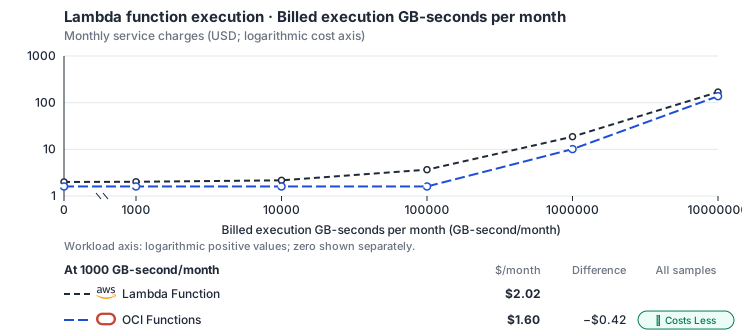
- Only this native meter varies; all other source usage and translation assumptions retain the displayed defaults. Other native meters and workload assumptions retain their explicitly displayed default quantities. Workload translation and capacity assumptions are not benchmark measurements.
- Native monthly usage priced at the cited provider list prices; listed target allowances apply where present, excluding invoice credits, taxes and negotiated discounts. Rates as of 2026-10-22: us-east-1 → us-ashburn-1 (OCI global price list), USD/month.
- Source prices are reference charges, not an invoice. Target lines cover selected service usage/configuration only; adapter hosting and Tensor9 fees are excluded.
- Samples of explicit prices are not performance measurements or capacity qualification. No interpolation or break-even guarantee is implied.
- Variant assumptions show the first axis sample; any axis-dependent configuration is described by this curve’s workload note.
- Rates are cited provider list prices, editable for discounts, commitments or another region. Workload translation and capacity coefficients remain editable planning assumptions, not benchmark measurements or a commercial quote.
- Default-zero rates are explicit assumptions, not evidence that the deployed service or resource is free.
- Provisioned-unit minimums use an editable approximate allocation floor. Modeled target service cost is max(usage/allocation, minimum), with billable network, durable staging and dependent sinks added separately; actual RU/TU sizing, scaling increments and throughput remain unqualified.
- Durable staging is priced once: provisioned targets include adapter state in their selected allocation; native targets add a separate staging allocation when required. Adapter hosting is a separate allocation and must exclude resources already priced as staging, workers or target capacity.
- A declared adapter mapping and cost model do not establish implementation availability or service equivalence.
- This is a declared directed mapping; a planning estimate does not establish deployment or request-serving support.
- Origin unit prices are cited provider list prices; capacity coefficients and translation assumptions are editable authored planning guesses, not measured capacity or a provider quote.
- Execution seconds are billed GB-seconds / selected origin memory; target CPU follows Lambda’s memory-proportional vCPU share, and CPU and RAM-hours scale with the duration multiplier.
- Invocation count and execution duration are independent inputs. The duration curve holds invocation count fixed.
- OCI Functions bills configured memory GB-seconds and invocations after a monthly free tier; there is no separate CPU charge, so memory GiB-hours are the billed execution unit.
- AWS Price List API, AWSLambda offer: https://pricing.us-east-1.amazonaws.com/offers/v1.0/aws/AWSLambda/current/us-east-1/index.json
- OCI price list API: https://apexapps.oracle.com/pls/apex/cetools/api/v1/products/
- Provisioned concurrency, request/response streaming, ephemeral storage premiums, logs, function networking and event-source service charges.
- Self-managed or Premium backends need their provisioned idle floor separately; execution resource-hours alone do not establish scale-to-zero.
- Taxes, discounts, credits and free-tier allowances not explicitly listed by this model.
- Unmodeled dependent services, task execution and operations outside the selected workload family.
plan-69be9ded38a3d521964960b7b1a3ba4a63c49cd8 / 2026-10-22.planning.2. Curve: workload-1.
Sources: AWS Price List API, AWSLambda offer, OCI price list API.
Lambda function execution → OCI Functions: Authored native-usage planning example. Native monthly usage priced at the cited provider list prices; listed target allowances apply where present, excluding invoice credits, taxes and negotiated discounts.
Scenario source region: us-east-1. Scenario target region: us-ashburn-1 (OCI global price list). Currency: USD.
- Provisioned concurrency, request/response streaming, ephemeral storage premiums, logs, function networking and event-source service charges.
- Self-managed or Premium backends need their provisioned idle floor separately; execution resource-hours alone do not establish scale-to-zero.
- Taxes, discounts, credits and free-tier allowances not explicitly listed by this model.
- Unmodeled dependent services, task execution and operations outside the selected workload family.
- Translated reads: 0 operations.
- Translated writes: 0 operations.
- Translated resident physical data: 0 GiB-month.
- Native provider operations: 10,000,000 operations.
- Published payload: 0 GiB.
- Delivered payload: 0 GiB.
- Allocated execution CPU: 80.4 vCPU-hour.
- Allocated execution RAM: 138.9 GiB-hour.
- Independent resource allocation: 0 resource-hour.
- Independent inventory: 0 resource-month.
- Input tokens: 0 tokens.
- Output tokens: 0 tokens.
- Billable network: 0 GiB.
- Dependent object sink retained data: 0 GiB-month.
- Dependent object sink writes: 0 writes.
- Rates are cited provider list prices, editable for discounts, commitments or another region. Workload translation and capacity coefficients remain editable planning assumptions, not benchmark measurements or a commercial quote.
- Default-zero rates are explicit assumptions, not evidence that the deployed service or resource is free.
- Provisioned-unit minimums use an editable approximate allocation floor. Modeled target service cost is max(usage/allocation, minimum), with billable network, durable staging and dependent sinks added separately; actual RU/TU sizing, scaling increments and throughput remain unqualified.
- Durable staging is priced once: provisioned targets include adapter state in their selected allocation; native targets add a separate staging allocation when required. Adapter hosting is a separate allocation and must exclude resources already priced as staging, workers or target capacity.
- A declared adapter mapping and cost model do not establish implementation availability or service equivalence.
- This is a declared directed mapping; a planning estimate does not establish deployment or request-serving support.
- Origin unit prices are cited provider list prices; capacity coefficients and translation assumptions are editable authored planning guesses, not measured capacity or a provider quote.
- Execution seconds are billed GB-seconds / selected origin memory; target CPU follows Lambda’s memory-proportional vCPU share, and CPU and RAM-hours scale with the duration multiplier.
- Invocation count and execution duration are independent inputs. The duration curve holds invocation count fixed.
- OCI Functions bills configured memory GB-seconds and invocations after a monthly free tier; there is no separate CPU charge, so memory GiB-hours are the billed execution unit.
plan-69be9ded38a3d521964960b7b1a3ba4a63c49cd8 / 2026-10-22.planning.2. Scenario: planning-example.
Sources: AWS Price List API, AWSLambda offer, OCI price list API.
On Private Kubernetes
Via Kubernetes Cluster
How it works
Your application keeps calling Lambda through the AWS SDK. At deployment, each function packaged as a container image becomes a container image in the customer’s own registry. Your handler code is unchanged; the packaging adds the component that receivesInvoke requests in front of the runtime. A function packaged as a zip archive is not supported on this option. The release does not build an image from a zip archive here and stops with the reason, so package the function as a container image.
The service adapter supports only the synchronous Invoke API. It forwards each call to the function and returns the supported Lambda response fields, whether the handler returns normally or throws a function error. It builds the function’s in-cluster address from the function name, with no lookup table.


Each function runs as its own always-on Deployment, and the adapter forwards each synchronous invoke to it.
Scaling and concurrency
Each function runs as an always-on Kubernetes Deployment with one warm replica. It keeps running when idle, so requests never wait for a container to start, but the replica uses cluster capacity all the time. There is no scale-to-zero. Scaling uses the target cluster’s own autoscaling. Concurrent invokes run in the same pod, so your handler must handle concurrent execution. Kubernetes does not enforce Lambda’s request timeout, reserved concurrency or configured/tmp size.
Limitations
Where Lambda and an always-on Deployment differ- Lambda’s execution deadline is not enforced. Kubernetes does not stop a handler at the configured Lambda timeout. The connection timeout limits how long the caller waits for a response; the handler can keep running after that wait ends.
- Lambda’s /tmp size limit is not enforced.
/tmpis the container’s own filesystem. Lambda’s configured ephemeral-storage size is not applied. - Reserved concurrency is not supported. The always-on replica accepts every invoke it receives; nothing limits requests one by one, so a configured reserved concurrency has no effect.
- Asynchronous invokes are not supported. Synchronous invoke only: an asynchronous (
Event) invoke returns a clear error. Layers, event source mappings, aliases and function URLs stop the build with an error naming them, rather than being dropped.
Other considerations
- Who operates what. Tensor9 runs each function as a cluster workload and operates the path an invoke takes to it. The nodes and capacity it runs on belong to the customer. The function code stays yours.
- Moving from AWS. Each function is built when the stack is deployed and ships as its container image. There is no data to move at cutover.
- Cost follows the running pod. You are billed for a pod that runs continuously, sized by the cluster’s autoscaling, rather than per invoke.
- Calls between functions. Because addresses come from function names, a redeployed function in the same stack is reached without a new apply. A call to a function outside the stack returns a clear error rather than reaching AWS.
- What to monitor. Invoke latency and throughput are your cluster’s own; watch them in your monitoring.
- Keep durable state elsewhere. Function storage is temporary. Save data through the services your handler calls so it survives instance replacement.
Function lifecycle on Kubernetes
The function reconciles to an always-on Deployment on your cluster. Readiness does not establish a handler result or restore the absent execution deadline, reserved concurrency or sized /tmp cap. See function lifecycle and invocation for Pending/Active state, supported lifecycle operations and invocation outcomes.Example monthly charges
This Tensor9 BYOC scenario estimates service charges for the named origin and target services. Adapter hosting and commercial Tensor9 fees need separate allocations. How Tensor9 estimates costs explains the method and what the estimates include.Lambda function execution · Billed execution GB-seconds per month
Feature: Lambda function execution. Estimated monthly service charges by Billed execution GB-seconds per month. Adapter hosting and Tensor9 fees are excluded. Source: us-east-1; target: us-central1; currency: USD.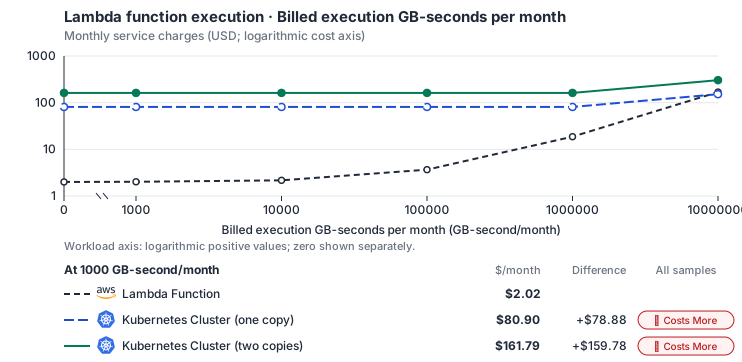
- Only this native meter varies; all other source usage and translation assumptions retain the displayed defaults. Other native meters and workload assumptions retain their explicitly displayed default quantities. Workload translation and capacity assumptions are not benchmark measurements.
- Native monthly usage priced at the cited provider list prices; listed target allowances apply where present, excluding invoice credits, taxes and negotiated discounts. Rates as of 2026-10-22: us-east-1 → us-central1, USD/month.
- Source prices are reference charges, not an invoice. Target lines cover selected service usage/configuration only; adapter hosting and Tensor9 fees are excluded.
- Samples of explicit prices are not performance measurements or capacity qualification. No interpolation or break-even guarantee is implied.
- Variant assumptions show the first axis sample; any axis-dependent configuration is described by this curve’s workload note.
- Rates are cited provider list prices, editable for discounts, commitments or another region. Workload translation and capacity coefficients remain editable planning assumptions, not benchmark measurements or a commercial quote.
- Default-zero rates are explicit assumptions, not evidence that the deployed service or resource is free.
- Provisioned-unit minimums use an editable approximate allocation floor. Modeled target service cost is max(usage/allocation, minimum), with billable network, durable staging and dependent sinks added separately; actual RU/TU sizing, scaling increments and throughput remain unqualified.
- Durable staging is priced once: provisioned targets include adapter state in their selected allocation; native targets add a separate staging allocation when required. Adapter hosting is a separate allocation and must exclude resources already priced as staging, workers or target capacity.
- A declared adapter mapping and cost model do not establish implementation availability or service equivalence.
- This is a declared directed mapping; a planning estimate does not establish deployment or request-serving support.
- Origin unit prices are cited provider list prices; capacity coefficients and translation assumptions are editable authored planning guesses, not measured capacity or a provider quote.
- Execution seconds are billed GB-seconds / selected origin memory; target CPU follows Lambda’s memory-proportional vCPU share, and CPU and RAM-hours scale with the duration multiplier.
- Invocation count and execution duration are independent inputs. The duration curve holds invocation count fixed.
- Self-hosted target: Kubernetes (Apache-2.0, https://github.com/kubernetes/kubernetes/blob/master/LICENSE); the host cloud’s managed control plane is a separate per-cluster-hour allocation. Selected CPU, RAM and physical disk allocation grow with workload; no per-operation price is assumed. No vendor charge: the target runs on the customer’s Kubernetes nodes, so CPU, RAM and disk bill at the Kubernetes node reference rates, Compute Engine N2 in us-central1 (USD 0.031611/vCPU-hour, 0.004237/GiB-hour) with pd-balanced disk (0.10/GiB-month) and Premium Tier egress. The cost-optimized E2 series lists 0.02181159/vCPU-hour and 0.00292353/GiB-hour; AWS m6i/r6i and Azure D2s v5/E2s v5 both decompose to 0.033/vCPU-hour and 0.00375/GiB-hour. Requested CPU and RAM are billed; node bin-packing waste, system reservations and the cluster control-plane fee are not.
- Row-store throughput (capacityOpsPerVcpuSecond, default 1500) is measured-by-tensor9 as a lower bound: the DynamoDB adapter on Cloud SQL db-custom-2-7680 (2 vCPU, PostgreSQL 16, us-west1) served 2,974 ops/s of YCSB-A at 16 threads without recorded saturation (src/main/kotlin/t9/prime/equiv/generated/eval/CloudsqlPostgresqlYcsbAT16GoYcsbV1_0_0.kt). Published CPU-bound pgbench reaches 3,101 read-write transactions and 20,289 point reads per vCPU-second (AWS z1d.2xlarge, PostgreSQL 14.5), so actual capacity is likely higher. Reads and writes share one coefficient: at the same adapter version, read-only YCSB-C was not faster than 50%-update YCSB-A.
- Log-broker throughput (capacityStreamMiBPerVcpuSecond 20 at 0.5 utilization, 4 GiB RAM per vCPU) is provider-documented by Google Managed Service for Apache Kafka sizing (https://docs.cloud.google.com/managed-service-for-apache-kafka/docs/plan-cluster-size): write-equivalent bytes are replicated writes plus a quarter of reads. Producer batches below 10 KB lower per-CPU throughput; that penalty is not modeled.
- Disk utilization 0.8 is provider-documented headroom below Cloud SQL automatic storage increase, which triggers near 91-95% full (https://docs.cloud.google.com/sql/docs/postgres/instance-settings). The 20 GiB reserve exceeds PostgreSQL’s 1 GB default max_wal_size; the remainder of that reserve is unmeasured.
- CPU tiers double from 2 vCPUs to the target’s largest node at 4 GiB per vCPU; each target’s documented largest node bounds CPU, RAM, RAM per vCPU and disk, and the durable staging database uses Cloud SQL Enterprise (96 vCPU, 6.5 GiB per vCPU, 624 GiB, 64 TiB). Targets billed per capacity unit or throughput unit are sized by their backend instead.
- No public evidence: peak/mean work (2) and the RAM working-set fraction (0.1). Proposed measurements: the p99 one-minute rate over the monthly mean from customer CloudWatch metrics; the buffer hit ratio while stepping RAM under a fixed YCSB-B load.
- Node bounds: Planning worker node of 32 vCPUs and 128 GiB, not a provider maximum; the cluster adds nodes up to a 1,000-node planning bound. Requested CPU and RAM bill linearly, so the node size changes only rounding.
- Stored GiB already includes the origin family’s physical footprint assumptions; no second storage amplification is applied.
- The workload family already selected resource-hours; the throughput coefficient is not applied again.
- Copies and allocation fractions change cost only; they do not increase modeled primary capacity.
- AWS Price List API, AWSLambda offer: https://pricing.us-east-1.amazonaws.com/offers/v1.0/aws/AWSLambda/current/us-east-1/index.json
- Compute Engine general-purpose machine pricing: https://cloud.google.com/products/compute/pricing/general-purpose
- Disk and image pricing: https://cloud.google.com/compute/disks-image-pricing
- Network pricing: https://cloud.google.com/vpc/network-pricing
- Provisioned concurrency, request/response streaming, ephemeral storage premiums, logs, function networking and event-source service charges.
- Self-managed or Premium backends need their provisioned idle floor separately; execution resource-hours alone do not establish scale-to-zero.
- Taxes, discounts, credits and free-tier allowances not explicitly listed by this model.
- Unmodeled dependent services, task execution and operations outside the selected workload family.
plan-4ca7d416735f5e72009398967eee802fcd9a6157 / 2026-10-22.planning.2. Curve: workload-1.
Sources: AWS Price List API, AWSLambda offer, Compute Engine general-purpose machine pricing, Disk and image pricing, Network pricing.
Lambda function execution → Kubernetes Cluster: Authored native-usage planning example. Native monthly usage priced at the cited provider list prices; listed target allowances apply where present, excluding invoice credits, taxes and negotiated discounts.
Scenario source region: us-east-1. Scenario target region: us-central1. Currency: USD.
- Provisioned concurrency, request/response streaming, ephemeral storage premiums, logs, function networking and event-source service charges.
- Self-managed or Premium backends need their provisioned idle floor separately; execution resource-hours alone do not establish scale-to-zero.
- Taxes, discounts, credits and free-tier allowances not explicitly listed by this model.
- Unmodeled dependent services, task execution and operations outside the selected workload family.
- Translated reads: 0 operations.
- Translated writes: 0 operations.
- Translated resident physical data: 0 GiB-month.
- Native provider operations: 10,000,000 operations.
- Published payload: 0 GiB.
- Delivered payload: 0 GiB.
- Allocated execution CPU: 80.4 vCPU-hour.
- Allocated execution RAM: 138.9 GiB-hour.
- Independent resource allocation: 0 resource-hour.
- Independent inventory: 0 resource-month.
- Input tokens: 0 tokens.
- Output tokens: 0 tokens.
- Billable network: 0 GiB.
- Dependent object sink retained data: 0 GiB-month.
- Dependent object sink writes: 0 writes.
- Rates are cited provider list prices, editable for discounts, commitments or another region. Workload translation and capacity coefficients remain editable planning assumptions, not benchmark measurements or a commercial quote.
- Default-zero rates are explicit assumptions, not evidence that the deployed service or resource is free.
- Provisioned-unit minimums use an editable approximate allocation floor. Modeled target service cost is max(usage/allocation, minimum), with billable network, durable staging and dependent sinks added separately; actual RU/TU sizing, scaling increments and throughput remain unqualified.
- Durable staging is priced once: provisioned targets include adapter state in their selected allocation; native targets add a separate staging allocation when required. Adapter hosting is a separate allocation and must exclude resources already priced as staging, workers or target capacity.
- A declared adapter mapping and cost model do not establish implementation availability or service equivalence.
- This is a declared directed mapping; a planning estimate does not establish deployment or request-serving support.
- Origin unit prices are cited provider list prices; capacity coefficients and translation assumptions are editable authored planning guesses, not measured capacity or a provider quote.
- Execution seconds are billed GB-seconds / selected origin memory; target CPU follows Lambda’s memory-proportional vCPU share, and CPU and RAM-hours scale with the duration multiplier.
- Invocation count and execution duration are independent inputs. The duration curve holds invocation count fixed.
- Self-hosted target: Kubernetes (Apache-2.0, https://github.com/kubernetes/kubernetes/blob/master/LICENSE); the host cloud’s managed control plane is a separate per-cluster-hour allocation. Selected CPU, RAM and physical disk allocation grow with workload; no per-operation price is assumed. No vendor charge: the target runs on the customer’s Kubernetes nodes, so CPU, RAM and disk bill at the Kubernetes node reference rates, Compute Engine N2 in us-central1 (USD 0.031611/vCPU-hour, 0.004237/GiB-hour) with pd-balanced disk (0.10/GiB-month) and Premium Tier egress. The cost-optimized E2 series lists 0.02181159/vCPU-hour and 0.00292353/GiB-hour; AWS m6i/r6i and Azure D2s v5/E2s v5 both decompose to 0.033/vCPU-hour and 0.00375/GiB-hour. Requested CPU and RAM are billed; node bin-packing waste, system reservations and the cluster control-plane fee are not.
- Row-store throughput (capacityOpsPerVcpuSecond, default 1500) is measured-by-tensor9 as a lower bound: the DynamoDB adapter on Cloud SQL db-custom-2-7680 (2 vCPU, PostgreSQL 16, us-west1) served 2,974 ops/s of YCSB-A at 16 threads without recorded saturation (src/main/kotlin/t9/prime/equiv/generated/eval/CloudsqlPostgresqlYcsbAT16GoYcsbV1_0_0.kt). Published CPU-bound pgbench reaches 3,101 read-write transactions and 20,289 point reads per vCPU-second (AWS z1d.2xlarge, PostgreSQL 14.5), so actual capacity is likely higher. Reads and writes share one coefficient: at the same adapter version, read-only YCSB-C was not faster than 50%-update YCSB-A.
- Log-broker throughput (capacityStreamMiBPerVcpuSecond 20 at 0.5 utilization, 4 GiB RAM per vCPU) is provider-documented by Google Managed Service for Apache Kafka sizing (https://docs.cloud.google.com/managed-service-for-apache-kafka/docs/plan-cluster-size): write-equivalent bytes are replicated writes plus a quarter of reads. Producer batches below 10 KB lower per-CPU throughput; that penalty is not modeled.
- Disk utilization 0.8 is provider-documented headroom below Cloud SQL automatic storage increase, which triggers near 91-95% full (https://docs.cloud.google.com/sql/docs/postgres/instance-settings). The 20 GiB reserve exceeds PostgreSQL’s 1 GB default max_wal_size; the remainder of that reserve is unmeasured.
- CPU tiers double from 2 vCPUs to the target’s largest node at 4 GiB per vCPU; each target’s documented largest node bounds CPU, RAM, RAM per vCPU and disk, and the durable staging database uses Cloud SQL Enterprise (96 vCPU, 6.5 GiB per vCPU, 624 GiB, 64 TiB). Targets billed per capacity unit or throughput unit are sized by their backend instead.
- No public evidence: peak/mean work (2) and the RAM working-set fraction (0.1). Proposed measurements: the p99 one-minute rate over the monthly mean from customer CloudWatch metrics; the buffer hit ratio while stepping RAM under a fixed YCSB-B load.
- Node bounds: Planning worker node of 32 vCPUs and 128 GiB, not a provider maximum; the cluster adds nodes up to a 1,000-node planning bound. Requested CPU and RAM bill linearly, so the node size changes only rounding.
- Stored GiB already includes the origin family’s physical footprint assumptions; no second storage amplification is applied.
- The workload family already selected resource-hours; the throughput coefficient is not applied again.
- Copies and allocation fractions change cost only; they do not increase modeled primary capacity.
plan-4ca7d416735f5e72009398967eee802fcd9a6157 / 2026-10-22.planning.2. Scenario: planning-example.
Sources: AWS Price List API, AWSLambda offer, Compute Engine general-purpose machine pricing, Disk and image pricing, Network pricing.
Via Knative Service
How it works
Your application keeps calling Lambda through the AWS SDK. At deployment, each function packaged as a container image becomes a container image in the customer’s own registry, started with the configured Lambda-compatible entrypoint. The AWS runtime client runs your handler, and a small HTTP wrapper passes each request to it. The adapter supports only the synchronousInvoke API: it forwards each call to the function and returns the supported Lambda response fields, including function errors.
A function packaged as a zip archive is not supported on this option. The release does not build an image from a zip archive here and stops with the reason, so package the function as a container image.


Each function runs as a Knative Service inside the cluster, scaling with requests and blocked from the internet.
Scaling and network access
Knative scales each function with its request load. By default it keeps one replica warm to avoid cold starts and allows at most ten replicas; there is always a fixed maximum. Tensor9 sets these replica limits, not a cloud provider. If a function has scaled down, Knative holds the incoming invoke while a new pod starts, so the call is delayed rather than dropped. A network policy on every function pod allows incoming traffic only from Knative and from the pod’s own namespace, and blocks all internet access. A function therefore cannot call AWS directly. The adapter reaches another function at an in-cluster address built from its name. Knative’s default request timeout limits how long the caller waits for a response. It does not enforce Lambda’s configured execution time, and a timed-out response does not mean the handler has stopped.Limitations
Where Lambda and a Knative Service differ- Timeouts behave differently: Knative’s default request timeout applies. It limits how long the caller waits for a response, not Lambda’s configured execution time. The handler can keep running after the response times out; the timeout does not stop it.
- Reserved concurrency does not change the replica limit. Scaling stays between the warm minimum and the fixed maximum. Your reserved-concurrency setting does not move that maximum.
- Lambda’s /tmp size limit is not enforced.
/tmpis the container’s own filesystem. Lambda’s configured ephemeral-storage size is not applied. - Asynchronous invokes are not supported. Synchronous invoke only: an asynchronous (
Event) invoke returns a clear error. Layers, event source mappings, aliases and function URLs stop the build with an error naming them, rather than being dropped.
Other considerations
- Who operates what. Tensor9 runs each function as a Knative Service and operates the path an invoke takes to it. The nodes and capacity it runs on belong to the customer. The function code stays yours.
- Moving from AWS. Each function is built when the stack is deployed and ships as its container image. There is no data to move at cutover.
- Plan capacity for the replica limits. Tensor9 sets the minimum and maximum replica counts (one and ten by default). Check that the maximum covers your peak traffic, and budget for the one replica that keeps running while idle.
- What to monitor. Invoke latency and throughput are your cluster’s own; watch them in your monitoring.
- Keep durable state elsewhere. Function storage is temporary. Save data through the services your handler calls so it survives instance replacement.
Function lifecycle on Knative
The function reconciles to a Knative revision and invokes through its cluster-local route. Revision readiness, the activator’s response deadline and handler completion are separate; warm and maximum replicas retain the limits above. See function lifecycle and invocation for Pending/Active state, supported lifecycle operations and invocation outcomes.Example monthly charges
This Tensor9 BYOC scenario estimates service charges for the named origin and target services. Adapter hosting and commercial Tensor9 fees need separate allocations. How Tensor9 estimates costs explains the method and what the estimates include.Lambda function execution · Billed execution GB-seconds per month
Feature: Lambda function execution. Estimated monthly service charges by Billed execution GB-seconds per month. Adapter hosting and Tensor9 fees are excluded. Source: us-east-1; target: us-central1; currency: USD.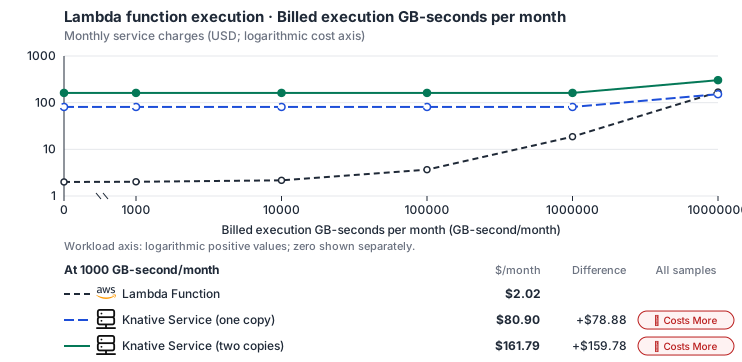
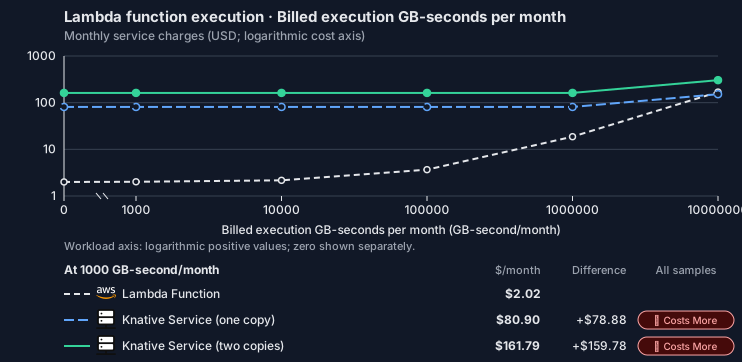
- Only this native meter varies; all other source usage and translation assumptions retain the displayed defaults. Other native meters and workload assumptions retain their explicitly displayed default quantities. Workload translation and capacity assumptions are not benchmark measurements.
- Native monthly usage priced at the cited provider list prices; listed target allowances apply where present, excluding invoice credits, taxes and negotiated discounts. Rates as of 2026-10-22: us-east-1 → us-central1, USD/month.
- Source prices are reference charges, not an invoice. Target lines cover selected service usage/configuration only; adapter hosting and Tensor9 fees are excluded.
- Samples of explicit prices are not performance measurements or capacity qualification. No interpolation or break-even guarantee is implied.
- Variant assumptions show the first axis sample; any axis-dependent configuration is described by this curve’s workload note.
- Rates are cited provider list prices, editable for discounts, commitments or another region. Workload translation and capacity coefficients remain editable planning assumptions, not benchmark measurements or a commercial quote.
- Default-zero rates are explicit assumptions, not evidence that the deployed service or resource is free.
- Provisioned-unit minimums use an editable approximate allocation floor. Modeled target service cost is max(usage/allocation, minimum), with billable network, durable staging and dependent sinks added separately; actual RU/TU sizing, scaling increments and throughput remain unqualified.
- Durable staging is priced once: provisioned targets include adapter state in their selected allocation; native targets add a separate staging allocation when required. Adapter hosting is a separate allocation and must exclude resources already priced as staging, workers or target capacity.
- A declared adapter mapping and cost model do not establish implementation availability or service equivalence.
- This is a declared directed mapping; a planning estimate does not establish deployment or request-serving support.
- Origin unit prices are cited provider list prices; capacity coefficients and translation assumptions are editable authored planning guesses, not measured capacity or a provider quote.
- Execution seconds are billed GB-seconds / selected origin memory; target CPU follows Lambda’s memory-proportional vCPU share, and CPU and RAM-hours scale with the duration multiplier.
- Invocation count and execution duration are independent inputs. The duration curve holds invocation count fixed.
- Self-hosted target: Knative Serving (Apache-2.0, https://github.com/knative/serving/blob/main/LICENSE). Selected CPU, RAM and physical disk allocation grow with workload; no per-operation price is assumed. No vendor charge: the target runs on the customer’s Kubernetes nodes, so CPU, RAM and disk bill at the Kubernetes node reference rates, Compute Engine N2 in us-central1 (USD 0.031611/vCPU-hour, 0.004237/GiB-hour) with pd-balanced disk (0.10/GiB-month) and Premium Tier egress. The cost-optimized E2 series lists 0.02181159/vCPU-hour and 0.00292353/GiB-hour; AWS m6i/r6i and Azure D2s v5/E2s v5 both decompose to 0.033/vCPU-hour and 0.00375/GiB-hour. Requested CPU and RAM are billed; node bin-packing waste, system reservations and the cluster control-plane fee are not.
- Row-store throughput (capacityOpsPerVcpuSecond, default 1500) is measured-by-tensor9 as a lower bound: the DynamoDB adapter on Cloud SQL db-custom-2-7680 (2 vCPU, PostgreSQL 16, us-west1) served 2,974 ops/s of YCSB-A at 16 threads without recorded saturation (src/main/kotlin/t9/prime/equiv/generated/eval/CloudsqlPostgresqlYcsbAT16GoYcsbV1_0_0.kt). Published CPU-bound pgbench reaches 3,101 read-write transactions and 20,289 point reads per vCPU-second (AWS z1d.2xlarge, PostgreSQL 14.5), so actual capacity is likely higher. Reads and writes share one coefficient: at the same adapter version, read-only YCSB-C was not faster than 50%-update YCSB-A.
- Log-broker throughput (capacityStreamMiBPerVcpuSecond 20 at 0.5 utilization, 4 GiB RAM per vCPU) is provider-documented by Google Managed Service for Apache Kafka sizing (https://docs.cloud.google.com/managed-service-for-apache-kafka/docs/plan-cluster-size): write-equivalent bytes are replicated writes plus a quarter of reads. Producer batches below 10 KB lower per-CPU throughput; that penalty is not modeled.
- Disk utilization 0.8 is provider-documented headroom below Cloud SQL automatic storage increase, which triggers near 91-95% full (https://docs.cloud.google.com/sql/docs/postgres/instance-settings). The 20 GiB reserve exceeds PostgreSQL’s 1 GB default max_wal_size; the remainder of that reserve is unmeasured.
- CPU tiers double from 2 vCPUs to the target’s largest node at 4 GiB per vCPU; each target’s documented largest node bounds CPU, RAM, RAM per vCPU and disk, and the durable staging database uses Cloud SQL Enterprise (96 vCPU, 6.5 GiB per vCPU, 624 GiB, 64 TiB). Targets billed per capacity unit or throughput unit are sized by their backend instead.
- No public evidence: peak/mean work (2) and the RAM working-set fraction (0.1). Proposed measurements: the p99 one-minute rate over the monthly mean from customer CloudWatch metrics; the buffer hit ratio while stepping RAM under a fixed YCSB-B load.
- Node bounds: Cloud SQL Enterprise allows 1-96 vCPUs at 0.9-6.5 GB per vCPU and up to 64 TB with a dedicated vCPU (https://docs.cloud.google.com/sql/docs/postgres/instance-settings).
- Stored GiB already includes the origin family’s physical footprint assumptions; no second storage amplification is applied.
- The workload family already selected resource-hours; the throughput coefficient is not applied again.
- Copies and allocation fractions change cost only; they do not increase modeled primary capacity.
- AWS Price List API, AWSLambda offer: https://pricing.us-east-1.amazonaws.com/offers/v1.0/aws/AWSLambda/current/us-east-1/index.json
- Compute Engine general-purpose machine pricing: https://cloud.google.com/products/compute/pricing/general-purpose
- Disk and image pricing: https://cloud.google.com/compute/disks-image-pricing
- Network pricing: https://cloud.google.com/vpc/network-pricing
- Provisioned concurrency, request/response streaming, ephemeral storage premiums, logs, function networking and event-source service charges.
- Self-managed or Premium backends need their provisioned idle floor separately; execution resource-hours alone do not establish scale-to-zero.
- Taxes, discounts, credits and free-tier allowances not explicitly listed by this model.
- Unmodeled dependent services, task execution and operations outside the selected workload family.
plan-862fa044707b19e43919c2565b77c04c1dc5217b / 2026-10-22.planning.2. Curve: workload-1.
Sources: AWS Price List API, AWSLambda offer, Compute Engine general-purpose machine pricing, Disk and image pricing, Network pricing.
Lambda function execution → Knative Service: Authored native-usage planning example. Native monthly usage priced at the cited provider list prices; listed target allowances apply where present, excluding invoice credits, taxes and negotiated discounts.
Scenario source region: us-east-1. Scenario target region: us-central1. Currency: USD.
- Provisioned concurrency, request/response streaming, ephemeral storage premiums, logs, function networking and event-source service charges.
- Self-managed or Premium backends need their provisioned idle floor separately; execution resource-hours alone do not establish scale-to-zero.
- Taxes, discounts, credits and free-tier allowances not explicitly listed by this model.
- Unmodeled dependent services, task execution and operations outside the selected workload family.
- Translated reads: 0 operations.
- Translated writes: 0 operations.
- Translated resident physical data: 0 GiB-month.
- Native provider operations: 10,000,000 operations.
- Published payload: 0 GiB.
- Delivered payload: 0 GiB.
- Allocated execution CPU: 80.4 vCPU-hour.
- Allocated execution RAM: 138.9 GiB-hour.
- Independent resource allocation: 0 resource-hour.
- Independent inventory: 0 resource-month.
- Input tokens: 0 tokens.
- Output tokens: 0 tokens.
- Billable network: 0 GiB.
- Dependent object sink retained data: 0 GiB-month.
- Dependent object sink writes: 0 writes.
- Rates are cited provider list prices, editable for discounts, commitments or another region. Workload translation and capacity coefficients remain editable planning assumptions, not benchmark measurements or a commercial quote.
- Default-zero rates are explicit assumptions, not evidence that the deployed service or resource is free.
- Provisioned-unit minimums use an editable approximate allocation floor. Modeled target service cost is max(usage/allocation, minimum), with billable network, durable staging and dependent sinks added separately; actual RU/TU sizing, scaling increments and throughput remain unqualified.
- Durable staging is priced once: provisioned targets include adapter state in their selected allocation; native targets add a separate staging allocation when required. Adapter hosting is a separate allocation and must exclude resources already priced as staging, workers or target capacity.
- A declared adapter mapping and cost model do not establish implementation availability or service equivalence.
- This is a declared directed mapping; a planning estimate does not establish deployment or request-serving support.
- Origin unit prices are cited provider list prices; capacity coefficients and translation assumptions are editable authored planning guesses, not measured capacity or a provider quote.
- Execution seconds are billed GB-seconds / selected origin memory; target CPU follows Lambda’s memory-proportional vCPU share, and CPU and RAM-hours scale with the duration multiplier.
- Invocation count and execution duration are independent inputs. The duration curve holds invocation count fixed.
- Self-hosted target: Knative Serving (Apache-2.0, https://github.com/knative/serving/blob/main/LICENSE). Selected CPU, RAM and physical disk allocation grow with workload; no per-operation price is assumed. No vendor charge: the target runs on the customer’s Kubernetes nodes, so CPU, RAM and disk bill at the Kubernetes node reference rates, Compute Engine N2 in us-central1 (USD 0.031611/vCPU-hour, 0.004237/GiB-hour) with pd-balanced disk (0.10/GiB-month) and Premium Tier egress. The cost-optimized E2 series lists 0.02181159/vCPU-hour and 0.00292353/GiB-hour; AWS m6i/r6i and Azure D2s v5/E2s v5 both decompose to 0.033/vCPU-hour and 0.00375/GiB-hour. Requested CPU and RAM are billed; node bin-packing waste, system reservations and the cluster control-plane fee are not.
- Row-store throughput (capacityOpsPerVcpuSecond, default 1500) is measured-by-tensor9 as a lower bound: the DynamoDB adapter on Cloud SQL db-custom-2-7680 (2 vCPU, PostgreSQL 16, us-west1) served 2,974 ops/s of YCSB-A at 16 threads without recorded saturation (src/main/kotlin/t9/prime/equiv/generated/eval/CloudsqlPostgresqlYcsbAT16GoYcsbV1_0_0.kt). Published CPU-bound pgbench reaches 3,101 read-write transactions and 20,289 point reads per vCPU-second (AWS z1d.2xlarge, PostgreSQL 14.5), so actual capacity is likely higher. Reads and writes share one coefficient: at the same adapter version, read-only YCSB-C was not faster than 50%-update YCSB-A.
- Log-broker throughput (capacityStreamMiBPerVcpuSecond 20 at 0.5 utilization, 4 GiB RAM per vCPU) is provider-documented by Google Managed Service for Apache Kafka sizing (https://docs.cloud.google.com/managed-service-for-apache-kafka/docs/plan-cluster-size): write-equivalent bytes are replicated writes plus a quarter of reads. Producer batches below 10 KB lower per-CPU throughput; that penalty is not modeled.
- Disk utilization 0.8 is provider-documented headroom below Cloud SQL automatic storage increase, which triggers near 91-95% full (https://docs.cloud.google.com/sql/docs/postgres/instance-settings). The 20 GiB reserve exceeds PostgreSQL’s 1 GB default max_wal_size; the remainder of that reserve is unmeasured.
- CPU tiers double from 2 vCPUs to the target’s largest node at 4 GiB per vCPU; each target’s documented largest node bounds CPU, RAM, RAM per vCPU and disk, and the durable staging database uses Cloud SQL Enterprise (96 vCPU, 6.5 GiB per vCPU, 624 GiB, 64 TiB). Targets billed per capacity unit or throughput unit are sized by their backend instead.
- No public evidence: peak/mean work (2) and the RAM working-set fraction (0.1). Proposed measurements: the p99 one-minute rate over the monthly mean from customer CloudWatch metrics; the buffer hit ratio while stepping RAM under a fixed YCSB-B load.
- Node bounds: Cloud SQL Enterprise allows 1-96 vCPUs at 0.9-6.5 GB per vCPU and up to 64 TB with a dedicated vCPU (https://docs.cloud.google.com/sql/docs/postgres/instance-settings).
- Stored GiB already includes the origin family’s physical footprint assumptions; no second storage amplification is applied.
- The workload family already selected resource-hours; the throughput coefficient is not applied again.
- Copies and allocation fractions change cost only; they do not increase modeled primary capacity.
plan-862fa044707b19e43919c2565b77c04c1dc5217b / 2026-10-22.planning.2. Scenario: planning-example.
Sources: AWS Price List API, AWSLambda offer, Compute Engine general-purpose machine pricing, Disk and image pricing, Network pricing.
Provisioned concurrency
Anaws_lambda_provisioned_concurrency_config keeps a number of a function’s execution environments initialized ahead of its invokes. On Azure, with the function on Azure Container Apps, the configured count becomes the Container App’s minimum replica count; the Azure section below describes what that keeps warm and when the build stops instead. With the function on any other Azure target, the build stops with an error naming the configuration. On Google Cloud, OCI and Kubernetes the configuration is accepted and not applied, so the function keeps its target’s default scaling. A configuration whose qualifier names an aws_lambda_alias stops the build on every target, because aliases are not compiled.
On Azure
How the warm count works on Azure Container Apps
Lambda keeps the configured number of execution environments initialized, each serving one invoke at a time. On Azure Container Apps the function runs as one Container App that serves one invoke per replica, so the configured count becomes the app’s minimum replica count. Container Apps keeps that many replicas running whether or not invokes arrive, so up to that many concurrent invokes start without waiting for a replica to be scheduled or its image to be pulled; invokes beyond them wait for the app to scale out. The function’s own initialization runs on each replica’s first invoke rather than ahead of it; after that the replica stays warm, because the app never scales below its minimum. Above the warm count, the function scales up to its reserved concurrency when one is set. Without one, the maximum is Container Apps’ default of ten replicas, raised to the warm count when the count is higher, because Container Apps refuses a minimum above the maximum.Limitations
- One revision serves every invoke. Provisioned concurrency for a published version becomes warm replicas for the whole function, and configurations for several published versions of one function add up. A configuration whose qualifier names an
aws_lambda_aliasstops the build, as it does on every target, because aliases are not compiled. - The build stops rather than deploying a different warm count when the count is above the function’s reserved concurrency or above 1,000 replicas, when it is not a literal number, or when the configuration is created with
countorfor_each. - The configuration must name its function by reference, such as
aws_lambda_function.processor.function_name, to a function in the same stack that runs on Azure Container Apps. Otherwise the build stops with an error naming the configuration. - The warm count is a target. Container Apps can briefly run a different number of replicas during platform maintenance.
- Runtime calls have no Azure effect. Set the count in the deployment; an application that calls PutProvisionedConcurrencyConfig at runtime does not change the Container App.
Recursive loop detection
Anaws_lambda_function_recursion_config turns Lambda’s recursive loop detection on (Terminate, the AWS default) or off (Allow). No target cloud detects a recursive loop, so a function runs without that detection on every target, including a function that declares no recursion config. On Azure, with the function on Azure Container Apps, Allow deploys as written and Terminate stops the build with an error naming the setting; with the function on any other Azure target, the build stops. On Google Cloud, OCI and Kubernetes the configuration is accepted and not applied, whichever value it sets.
On Azure
Recursive loop detection on Azure Container Apps
Lambda stops a function that invokes itself in a loop through the services it tracks, SQS, SNS and S3 among them, unless the function’s recursion config is set toAllow. Azure Container Apps has no such detection, and the Tensor9 invoke path has none. A function set to Allow therefore runs on Azure exactly as configured. A function set to Terminate stops the build with an error naming the setting, because deploying it would remove the guard the configuration asks for.
Limitations
- No loop detection on Azure. A function deployed with
Allow, or with no recursion config at all, runs without it; on AWS a function with no recursion config is stopped in a loop by default. Terminatestops the build. To deploy the function without loop detection, setrecursive_looptoAllowor remove the configuration.- The value must be a literal
AlloworTerminate, on a configuration created withoutcountorfor_eachthat names its function by reference to a function in the same stack running on Azure Container Apps. Otherwise the build stops with an error naming the configuration. - Runtime calls have no Azure effect. An application that calls PutFunctionRecursionConfig at runtime does not change how the function runs.
Costs
Estimated monthly service charges for each backend with a published cost model, at one sampled workload from that model’s cost curve. Adapter hosting and Tensor9 fees are excluded. How Tensor9 estimates costs explains the method, what the estimates include and how to read their qualifications.Service level agreements
Listed terms cover requests sent through this service adapter. They do not cover direct connections to the target service or replace the cloud provider’s own SLA. Each origin-to-target pair has its own terms or an explicit pending status. See the SLA tables, measurement rules, and scaling conditions.Lambda Function to AKS function Deployments
What this adapter does
Invoke handling authenticates, resolves the deployed function, frames the event and transports it to azure::1.0.0::aks::cluster. Function queueing and execution are separate spans; request parsing, authorization, route selection, streaming, cancellation and AWS response/error conversion remain adapter work. Event-source mapping authoring is included only where the directed profile covers it.How the latency targets were chosen
Unary function invocation translation: +5 ms monthly p99 (adapter-added).Invoke. Authorization, route lookup, transport framing and response conversion.
Your signed agreement sets the terms for your deployment. A target does not add an operation or option that the compatibility tables mark unavailable.
What counts toward latency
For a request-response row, measure from the agreed ingress boundary to dispatch of the complete response. A row that explicitly names a first response chunk ends at that chunk; its number does not cover the rest of the stream. A long-poll row names the intentional wait and when adapter delay starts. Include parsing, authorization, admission, translation, serialization, adapter-owned storage and coordination, retries and response handling. Subtract only separately measured target-workload waits and external network segments allowed by the measurement rules. The adapter’s own response handling and dispatch remain covered. A database used for adapter metadata is still adapter work, even if a cloud provider hosts it. For concurrent calls, exclude the union of permitted wait intervals, not the sum of overlapping spans. Calculate each request’s adapter duration first, then the monthly p99. Do not subtract one service’s p99 from another’s. Known adapter timeouts are over-budget samples; failed or incomplete requests cannot disappear to improve the percentile. Missing measurements do not become zero latency. An SDK call span alone does not prove how much of its duration can be excluded.Endpoint reachability and request failures
The endpoint-reachability target measures adapter health checks. Correctly forwarding a target quota or permission error is different from producing that error because the adapter sent the wrong request. Adapter-caused failures remain Tensor9’s responsibility even when the target is healthy. Correctness and data-integrity requirements apply to every supported request. Endpoint reachability does not measure request correctness or grant an allowance for incorrect results.Scaling and target-service capacity
Unary invokes scale across independent functions and replicas; streaming calls additionally consume bounded connections and in-flight bytes. Qualification fixes payload/response sizes, cold/warm target state, function distribution and concurrency. Mapping mutations serialize per mapping identity without blocking unrelated invokes. Tell Tensor9 the expected steady rate, bursts, concurrency, payload sizes and operation mix. Tensor9 sizes and scales the adapter for the agreed load; you choose and monitor the target service’s capacity with Tensor9’s help. A latency budget is not a requests-per-second rating. Larger requests and higher rates need explicit terms, not silent inheritance of a small-request SLA.Data and behavior guarantees
The adapter invokes the selected function/version with the caller and integration authority the profile specifies. Payload and status are preserved, streaming order is stable, retries do not duplicate an acknowledged synchronous result, and unsupported event-source mappings fail explicitly.Example and diagnosis
A 32 KiB Invoke request is admitted and routed to one deployed function. The function’s own runtime is excluded only by its observed span; adapter request decoding, target transport and result conversion remain covered. A response-path conversion failure counts against the adapter even if the function succeeded. Usetensor9 explain and the documented explain headers to understand the selected adapter and its behavior. Correlate available request diagnostics with the target provider’s latency, throttling and capacity metrics. An explain report helps diagnose a request; it is not by itself a qualified SLA timing measurement. Share the operation, request shape, timestamps and request identifiers with support, with credentials and customer payloads removed.
Lambda Function to Azure Container Apps
What this adapter does
Invoke handling authenticates, resolves the deployed function, frames the event and transports it to azure::1.0.0::container-apps. Function queueing and execution are separate spans; request parsing, authorization, route selection, streaming, cancellation and AWS response/error conversion remain adapter work. Event-source mapping authoring is included only where the directed profile covers it.How the latency targets were chosen
Unary function invocation translation: +5 ms monthly p99 (adapter-added).Invoke. Authorization, route lookup, transport framing and response conversion.
Your signed agreement sets the terms for your deployment. A target does not add an operation or option that the compatibility tables mark unavailable.
What counts toward latency
For a request-response row, measure from the agreed ingress boundary to dispatch of the complete response. A row that explicitly names a first response chunk ends at that chunk; its number does not cover the rest of the stream. A long-poll row names the intentional wait and when adapter delay starts. Include parsing, authorization, admission, translation, serialization, adapter-owned storage and coordination, retries and response handling. Subtract only separately measured target-workload waits and external network segments allowed by the measurement rules. The adapter’s own response handling and dispatch remain covered. A database used for adapter metadata is still adapter work, even if a cloud provider hosts it. For concurrent calls, exclude the union of permitted wait intervals, not the sum of overlapping spans. Calculate each request’s adapter duration first, then the monthly p99. Do not subtract one service’s p99 from another’s. Known adapter timeouts are over-budget samples; failed or incomplete requests cannot disappear to improve the percentile. Missing measurements do not become zero latency. An SDK call span alone does not prove how much of its duration can be excluded.Endpoint reachability and request failures
The endpoint-reachability target measures adapter health checks. Correctly forwarding a target quota or permission error is different from producing that error because the adapter sent the wrong request. Adapter-caused failures remain Tensor9’s responsibility even when the target is healthy. Correctness and data-integrity requirements apply to every supported request. Endpoint reachability does not measure request correctness or grant an allowance for incorrect results.Scaling and target-service capacity
Unary invokes scale across independent functions and replicas; streaming calls additionally consume bounded connections and in-flight bytes. Qualification fixes payload/response sizes, cold/warm target state, function distribution and concurrency. Mapping mutations serialize per mapping identity without blocking unrelated invokes. Tell Tensor9 the expected steady rate, bursts, concurrency, payload sizes and operation mix. Tensor9 sizes and scales the adapter for the agreed load; you choose and monitor the target service’s capacity with Tensor9’s help. A latency budget is not a requests-per-second rating. Larger requests and higher rates need explicit terms, not silent inheritance of a small-request SLA.Data and behavior guarantees
The adapter invokes the selected function/version with the caller and integration authority the profile specifies. Payload and status are preserved, streaming order is stable, retries do not duplicate an acknowledged synchronous result, and unsupported event-source mappings fail explicitly.Example and diagnosis
A 32 KiB Invoke request is admitted and routed to one deployed function. The function’s own runtime is excluded only by its observed span; adapter request decoding, target transport and result conversion remain covered. A response-path conversion failure counts against the adapter even if the function succeeded. Usetensor9 explain and the documented explain headers to understand the selected adapter and its behavior. Correlate available request diagnostics with the target provider’s latency, throttling and capacity metrics. An explain report helps diagnose a request; it is not by itself a qualified SLA timing measurement. Share the operation, request shape, timestamps and request identifiers with support, with credentials and customer payloads removed.
Lambda Function to Azure Functions (Flex Consumption)
What this adapter does
Invoke handling authenticates, resolves the deployed function, frames the event and transports it to azure::1.0.0::functions::flex-consumption. Function queueing and execution are separate spans; request parsing, authorization, route selection, streaming, cancellation and AWS response/error conversion remain adapter work. Event-source mapping authoring is included only where the directed profile covers it.How the latency targets were chosen
Unary function invocation translation: +5 ms monthly p99 (adapter-added).Invoke. Authorization, route lookup, transport framing and response conversion.
Your signed agreement sets the terms for your deployment. A target does not add an operation or option that the compatibility tables mark unavailable.
What counts toward latency
For a request-response row, measure from the agreed ingress boundary to dispatch of the complete response. A row that explicitly names a first response chunk ends at that chunk; its number does not cover the rest of the stream. A long-poll row names the intentional wait and when adapter delay starts. Include parsing, authorization, admission, translation, serialization, adapter-owned storage and coordination, retries and response handling. Subtract only separately measured target-workload waits and external network segments allowed by the measurement rules. The adapter’s own response handling and dispatch remain covered. A database used for adapter metadata is still adapter work, even if a cloud provider hosts it. For concurrent calls, exclude the union of permitted wait intervals, not the sum of overlapping spans. Calculate each request’s adapter duration first, then the monthly p99. Do not subtract one service’s p99 from another’s. Known adapter timeouts are over-budget samples; failed or incomplete requests cannot disappear to improve the percentile. Missing measurements do not become zero latency. An SDK call span alone does not prove how much of its duration can be excluded.Endpoint reachability and request failures
The endpoint-reachability target measures adapter health checks. Correctly forwarding a target quota or permission error is different from producing that error because the adapter sent the wrong request. Adapter-caused failures remain Tensor9’s responsibility even when the target is healthy. Correctness and data-integrity requirements apply to every supported request. Endpoint reachability does not measure request correctness or grant an allowance for incorrect results.Scaling and target-service capacity
Unary invokes scale across independent functions and replicas; streaming calls additionally consume bounded connections and in-flight bytes. Qualification fixes payload/response sizes, cold/warm target state, function distribution and concurrency. Mapping mutations serialize per mapping identity without blocking unrelated invokes. Tell Tensor9 the expected steady rate, bursts, concurrency, payload sizes and operation mix. Tensor9 sizes and scales the adapter for the agreed load; you choose and monitor the target service’s capacity with Tensor9’s help. A latency budget is not a requests-per-second rating. Larger requests and higher rates need explicit terms, not silent inheritance of a small-request SLA.Data and behavior guarantees
The adapter invokes the selected function/version with the caller and integration authority the profile specifies. Payload and status are preserved, streaming order is stable, retries do not duplicate an acknowledged synchronous result, and unsupported event-source mappings fail explicitly.Example and diagnosis
A 32 KiB Invoke request is admitted and routed to one deployed function. The function’s own runtime is excluded only by its observed span; adapter request decoding, target transport and result conversion remain covered. A response-path conversion failure counts against the adapter even if the function succeeded. Usetensor9 explain and the documented explain headers to understand the selected adapter and its behavior. Correlate available request diagnostics with the target provider’s latency, throttling and capacity metrics. An explain report helps diagnose a request; it is not by itself a qualified SLA timing measurement. Share the operation, request shape, timestamps and request identifiers with support, with credentials and customer payloads removed.
Lambda Function to Azure Functions (Premium)
What this adapter does
Invoke handling authenticates, resolves the deployed function, frames the event and transports it to azure::1.0.0::functions::premium. Function queueing and execution are separate spans; request parsing, authorization, route selection, streaming, cancellation and AWS response/error conversion remain adapter work. Event-source mapping authoring is included only where the directed profile covers it.How the latency targets were chosen
Unary function invocation translation: +5 ms monthly p99 (adapter-added).Invoke. Authorization, route lookup, transport framing and response conversion.
Your signed agreement sets the terms for your deployment. A target does not add an operation or option that the compatibility tables mark unavailable.
What counts toward latency
For a request-response row, measure from the agreed ingress boundary to dispatch of the complete response. A row that explicitly names a first response chunk ends at that chunk; its number does not cover the rest of the stream. A long-poll row names the intentional wait and when adapter delay starts. Include parsing, authorization, admission, translation, serialization, adapter-owned storage and coordination, retries and response handling. Subtract only separately measured target-workload waits and external network segments allowed by the measurement rules. The adapter’s own response handling and dispatch remain covered. A database used for adapter metadata is still adapter work, even if a cloud provider hosts it. For concurrent calls, exclude the union of permitted wait intervals, not the sum of overlapping spans. Calculate each request’s adapter duration first, then the monthly p99. Do not subtract one service’s p99 from another’s. Known adapter timeouts are over-budget samples; failed or incomplete requests cannot disappear to improve the percentile. Missing measurements do not become zero latency. An SDK call span alone does not prove how much of its duration can be excluded.Endpoint reachability and request failures
The endpoint-reachability target measures adapter health checks. Correctly forwarding a target quota or permission error is different from producing that error because the adapter sent the wrong request. Adapter-caused failures remain Tensor9’s responsibility even when the target is healthy. Correctness and data-integrity requirements apply to every supported request. Endpoint reachability does not measure request correctness or grant an allowance for incorrect results.Scaling and target-service capacity
Unary invokes scale across independent functions and replicas; streaming calls additionally consume bounded connections and in-flight bytes. Qualification fixes payload/response sizes, cold/warm target state, function distribution and concurrency. Mapping mutations serialize per mapping identity without blocking unrelated invokes. Tell Tensor9 the expected steady rate, bursts, concurrency, payload sizes and operation mix. Tensor9 sizes and scales the adapter for the agreed load; you choose and monitor the target service’s capacity with Tensor9’s help. A latency budget is not a requests-per-second rating. Larger requests and higher rates need explicit terms, not silent inheritance of a small-request SLA.Data and behavior guarantees
The adapter invokes the selected function/version with the caller and integration authority the profile specifies. Payload and status are preserved, streaming order is stable, retries do not duplicate an acknowledged synchronous result, and unsupported event-source mappings fail explicitly.Example and diagnosis
A 32 KiB Invoke request is admitted and routed to one deployed function. The function’s own runtime is excluded only by its observed span; adapter request decoding, target transport and result conversion remain covered. A response-path conversion failure counts against the adapter even if the function succeeded. Usetensor9 explain and the documented explain headers to understand the selected adapter and its behavior. Correlate available request diagnostics with the target provider’s latency, throttling and capacity metrics. An explain report helps diagnose a request; it is not by itself a qualified SLA timing measurement. Share the operation, request shape, timestamps and request identifiers with support, with credentials and customer payloads removed.
Lambda Function to Cloud Run
What this adapter does
Invoke handling authenticates, resolves the deployed function, frames the event and transports it to google::1.0.0::cloud-run. Function queueing and execution are separate spans; request parsing, authorization, route selection, streaming, cancellation and AWS response/error conversion remain adapter work. Event-source mapping authoring is included only where the directed profile covers it.How the latency targets were chosen
Unary function invocation translation: +5 ms monthly p99 (adapter-added).Invoke. Authorization, route lookup, transport framing and response conversion.
Your signed agreement sets the terms for your deployment. A target does not add an operation or option that the compatibility tables mark unavailable.
What counts toward latency
For a request-response row, measure from the agreed ingress boundary to dispatch of the complete response. A row that explicitly names a first response chunk ends at that chunk; its number does not cover the rest of the stream. A long-poll row names the intentional wait and when adapter delay starts. Include parsing, authorization, admission, translation, serialization, adapter-owned storage and coordination, retries and response handling. Subtract only separately measured target-workload waits and external network segments allowed by the measurement rules. The adapter’s own response handling and dispatch remain covered. A database used for adapter metadata is still adapter work, even if a cloud provider hosts it. For concurrent calls, exclude the union of permitted wait intervals, not the sum of overlapping spans. Calculate each request’s adapter duration first, then the monthly p99. Do not subtract one service’s p99 from another’s. Known adapter timeouts are over-budget samples; failed or incomplete requests cannot disappear to improve the percentile. Missing measurements do not become zero latency. An SDK call span alone does not prove how much of its duration can be excluded.Endpoint reachability and request failures
The endpoint-reachability target measures adapter health checks. Correctly forwarding a target quota or permission error is different from producing that error because the adapter sent the wrong request. Adapter-caused failures remain Tensor9’s responsibility even when the target is healthy. Correctness and data-integrity requirements apply to every supported request. Endpoint reachability does not measure request correctness or grant an allowance for incorrect results.Scaling and target-service capacity
Unary invokes scale across independent functions and replicas; streaming calls additionally consume bounded connections and in-flight bytes. Qualification fixes payload/response sizes, cold/warm target state, function distribution and concurrency. Mapping mutations serialize per mapping identity without blocking unrelated invokes. Tell Tensor9 the expected steady rate, bursts, concurrency, payload sizes and operation mix. Tensor9 sizes and scales the adapter for the agreed load; you choose and monitor the target service’s capacity with Tensor9’s help. A latency budget is not a requests-per-second rating. Larger requests and higher rates need explicit terms, not silent inheritance of a small-request SLA.Data and behavior guarantees
The adapter invokes the selected function/version with the caller and integration authority the profile specifies. Payload and status are preserved, streaming order is stable, retries do not duplicate an acknowledged synchronous result, and unsupported event-source mappings fail explicitly.Example and diagnosis
A 32 KiB Invoke request is admitted and routed to one deployed function. The function’s own runtime is excluded only by its observed span; adapter request decoding, target transport and result conversion remain covered. A response-path conversion failure counts against the adapter even if the function succeeded. Usetensor9 explain and the documented explain headers to understand the selected adapter and its behavior. Correlate available request diagnostics with the target provider’s latency, throttling and capacity metrics. An explain report helps diagnose a request; it is not by itself a qualified SLA timing measurement. Share the operation, request shape, timestamps and request identifiers with support, with credentials and customer payloads removed.
Lambda Function to Knative Service
What this adapter does
Invoke handling authenticates, resolves the deployed function, frames the event and transports it to knative::1.0.0::service. Function queueing and execution are separate spans; request parsing, authorization, route selection, streaming, cancellation and AWS response/error conversion remain adapter work. Event-source mapping authoring is included only where the directed profile covers it.How the latency targets were chosen
Unary function invocation translation: +5 ms monthly p99 (adapter-added).Invoke. Authorization, route lookup, transport framing and response conversion.
Your signed agreement sets the terms for your deployment. A target does not add an operation or option that the compatibility tables mark unavailable.
What counts toward latency
For a request-response row, measure from the agreed ingress boundary to dispatch of the complete response. A row that explicitly names a first response chunk ends at that chunk; its number does not cover the rest of the stream. A long-poll row names the intentional wait and when adapter delay starts. Include parsing, authorization, admission, translation, serialization, adapter-owned storage and coordination, retries and response handling. Subtract only separately measured target-workload waits and external network segments allowed by the measurement rules. The adapter’s own response handling and dispatch remain covered. A database used for adapter metadata is still adapter work, even if a cloud provider hosts it. For concurrent calls, exclude the union of permitted wait intervals, not the sum of overlapping spans. Calculate each request’s adapter duration first, then the monthly p99. Do not subtract one service’s p99 from another’s. Known adapter timeouts are over-budget samples; failed or incomplete requests cannot disappear to improve the percentile. Missing measurements do not become zero latency. An SDK call span alone does not prove how much of its duration can be excluded.Endpoint reachability and request failures
The endpoint-reachability target measures adapter health checks. Correctly forwarding a target quota or permission error is different from producing that error because the adapter sent the wrong request. Adapter-caused failures remain Tensor9’s responsibility even when the target is healthy. Correctness and data-integrity requirements apply to every supported request. Endpoint reachability does not measure request correctness or grant an allowance for incorrect results.Scaling and target-service capacity
Unary invokes scale across independent functions and replicas; streaming calls additionally consume bounded connections and in-flight bytes. Qualification fixes payload/response sizes, cold/warm target state, function distribution and concurrency. Mapping mutations serialize per mapping identity without blocking unrelated invokes. Tell Tensor9 the expected steady rate, bursts, concurrency, payload sizes and operation mix. Tensor9 sizes and scales the adapter for the agreed load; you choose and monitor the target service’s capacity with Tensor9’s help. A latency budget is not a requests-per-second rating. Larger requests and higher rates need explicit terms, not silent inheritance of a small-request SLA.Data and behavior guarantees
The adapter invokes the selected function/version with the caller and integration authority the profile specifies. Payload and status are preserved, streaming order is stable, retries do not duplicate an acknowledged synchronous result, and unsupported event-source mappings fail explicitly.Example and diagnosis
A 32 KiB Invoke request is admitted and routed to one deployed function. The function’s own runtime is excluded only by its observed span; adapter request decoding, target transport and result conversion remain covered. A response-path conversion failure counts against the adapter even if the function succeeded. Usetensor9 explain and the documented explain headers to understand the selected adapter and its behavior. Correlate available request diagnostics with the target provider’s latency, throttling and capacity metrics. An explain report helps diagnose a request; it is not by itself a qualified SLA timing measurement. Share the operation, request shape, timestamps and request identifiers with support, with credentials and customer payloads removed.
Lambda Function to Kubernetes Cluster
What this adapter does
Invoke handling authenticates, resolves the deployed function, frames the event and transports it to kubernetes::1.0.0::cluster. Function queueing and execution are separate spans; request parsing, authorization, route selection, streaming, cancellation and AWS response/error conversion remain adapter work. Event-source mapping authoring is included only where the directed profile covers it.How the latency targets were chosen
Unary function invocation translation: +5 ms monthly p99 (adapter-added).Invoke. Authorization, route lookup, transport framing and response conversion.
Your signed agreement sets the terms for your deployment. A target does not add an operation or option that the compatibility tables mark unavailable.
What counts toward latency
For a request-response row, measure from the agreed ingress boundary to dispatch of the complete response. A row that explicitly names a first response chunk ends at that chunk; its number does not cover the rest of the stream. A long-poll row names the intentional wait and when adapter delay starts. Include parsing, authorization, admission, translation, serialization, adapter-owned storage and coordination, retries and response handling. Subtract only separately measured target-workload waits and external network segments allowed by the measurement rules. The adapter’s own response handling and dispatch remain covered. A database used for adapter metadata is still adapter work, even if a cloud provider hosts it. For concurrent calls, exclude the union of permitted wait intervals, not the sum of overlapping spans. Calculate each request’s adapter duration first, then the monthly p99. Do not subtract one service’s p99 from another’s. Known adapter timeouts are over-budget samples; failed or incomplete requests cannot disappear to improve the percentile. Missing measurements do not become zero latency. An SDK call span alone does not prove how much of its duration can be excluded.Endpoint reachability and request failures
The endpoint-reachability target measures adapter health checks. Correctly forwarding a target quota or permission error is different from producing that error because the adapter sent the wrong request. Adapter-caused failures remain Tensor9’s responsibility even when the target is healthy. Correctness and data-integrity requirements apply to every supported request. Endpoint reachability does not measure request correctness or grant an allowance for incorrect results.Scaling and target-service capacity
Unary invokes scale across independent functions and replicas; streaming calls additionally consume bounded connections and in-flight bytes. Qualification fixes payload/response sizes, cold/warm target state, function distribution and concurrency. Mapping mutations serialize per mapping identity without blocking unrelated invokes. Tell Tensor9 the expected steady rate, bursts, concurrency, payload sizes and operation mix. Tensor9 sizes and scales the adapter for the agreed load; you choose and monitor the target service’s capacity with Tensor9’s help. A latency budget is not a requests-per-second rating. Larger requests and higher rates need explicit terms, not silent inheritance of a small-request SLA.Data and behavior guarantees
The adapter invokes the selected function/version with the caller and integration authority the profile specifies. Payload and status are preserved, streaming order is stable, retries do not duplicate an acknowledged synchronous result, and unsupported event-source mappings fail explicitly.Example and diagnosis
A 32 KiB Invoke request is admitted and routed to one deployed function. The function’s own runtime is excluded only by its observed span; adapter request decoding, target transport and result conversion remain covered. A response-path conversion failure counts against the adapter even if the function succeeded. Usetensor9 explain and the documented explain headers to understand the selected adapter and its behavior. Correlate available request diagnostics with the target provider’s latency, throttling and capacity metrics. An explain report helps diagnose a request; it is not by itself a qualified SLA timing measurement. Share the operation, request shape, timestamps and request identifiers with support, with credentials and customer payloads removed.
Lambda Function to OCI Functions
What this adapter does
Invoke handling authenticates, resolves the deployed function, frames the event and transports it to oci::1.0.0::functions. Function queueing and execution are separate spans; request parsing, authorization, route selection, streaming, cancellation and AWS response/error conversion remain adapter work. Event-source mapping authoring is included only where the directed profile covers it.How the latency targets were chosen
Unary function invocation translation: +5 ms monthly p99 (adapter-added).Invoke. Authorization, route lookup, transport framing and response conversion.
Your signed agreement sets the terms for your deployment. A target does not add an operation or option that the compatibility tables mark unavailable.
What counts toward latency
For a request-response row, measure from the agreed ingress boundary to dispatch of the complete response. A row that explicitly names a first response chunk ends at that chunk; its number does not cover the rest of the stream. A long-poll row names the intentional wait and when adapter delay starts. Include parsing, authorization, admission, translation, serialization, adapter-owned storage and coordination, retries and response handling. Subtract only separately measured target-workload waits and external network segments allowed by the measurement rules. The adapter’s own response handling and dispatch remain covered. A database used for adapter metadata is still adapter work, even if a cloud provider hosts it. For concurrent calls, exclude the union of permitted wait intervals, not the sum of overlapping spans. Calculate each request’s adapter duration first, then the monthly p99. Do not subtract one service’s p99 from another’s. Known adapter timeouts are over-budget samples; failed or incomplete requests cannot disappear to improve the percentile. Missing measurements do not become zero latency. An SDK call span alone does not prove how much of its duration can be excluded.Endpoint reachability and request failures
The endpoint-reachability target measures adapter health checks. Correctly forwarding a target quota or permission error is different from producing that error because the adapter sent the wrong request. Adapter-caused failures remain Tensor9’s responsibility even when the target is healthy. Correctness and data-integrity requirements apply to every supported request. Endpoint reachability does not measure request correctness or grant an allowance for incorrect results.Scaling and target-service capacity
Unary invokes scale across independent functions and replicas; streaming calls additionally consume bounded connections and in-flight bytes. Qualification fixes payload/response sizes, cold/warm target state, function distribution and concurrency. Mapping mutations serialize per mapping identity without blocking unrelated invokes. Tell Tensor9 the expected steady rate, bursts, concurrency, payload sizes and operation mix. Tensor9 sizes and scales the adapter for the agreed load; you choose and monitor the target service’s capacity with Tensor9’s help. A latency budget is not a requests-per-second rating. Larger requests and higher rates need explicit terms, not silent inheritance of a small-request SLA.Data and behavior guarantees
The adapter invokes the selected function/version with the caller and integration authority the profile specifies. Payload and status are preserved, streaming order is stable, retries do not duplicate an acknowledged synchronous result, and unsupported event-source mappings fail explicitly.Example and diagnosis
A 32 KiB Invoke request is admitted and routed to one deployed function. The function’s own runtime is excluded only by its observed span; adapter request decoding, target transport and result conversion remain covered. A response-path conversion failure counts against the adapter even if the function succeeded. Usetensor9 explain and the documented explain headers to understand the selected adapter and its behavior. Correlate available request diagnostics with the target provider’s latency, throttling and capacity metrics. An explain report helps diagnose a request; it is not by itself a qualified SLA timing measurement. Share the operation, request shape, timestamps and request identifiers with support, with credentials and customer payloads removed.
Lambda Function to OKE function Deployments
What this adapter does
Invoke handling authenticates, resolves the deployed function, frames the event and transports it to oci::1.0.0::oke::cluster. Function queueing and execution are separate spans; request parsing, authorization, route selection, streaming, cancellation and AWS response/error conversion remain adapter work. Event-source mapping authoring is included only where the directed profile covers it.How the latency targets were chosen
Unary function invocation translation: +5 ms monthly p99 (adapter-added).Invoke. Authorization, route lookup, transport framing and response conversion.
Your signed agreement sets the terms for your deployment. A target does not add an operation or option that the compatibility tables mark unavailable.
What counts toward latency
For a request-response row, measure from the agreed ingress boundary to dispatch of the complete response. A row that explicitly names a first response chunk ends at that chunk; its number does not cover the rest of the stream. A long-poll row names the intentional wait and when adapter delay starts. Include parsing, authorization, admission, translation, serialization, adapter-owned storage and coordination, retries and response handling. Subtract only separately measured target-workload waits and external network segments allowed by the measurement rules. The adapter’s own response handling and dispatch remain covered. A database used for adapter metadata is still adapter work, even if a cloud provider hosts it. For concurrent calls, exclude the union of permitted wait intervals, not the sum of overlapping spans. Calculate each request’s adapter duration first, then the monthly p99. Do not subtract one service’s p99 from another’s. Known adapter timeouts are over-budget samples; failed or incomplete requests cannot disappear to improve the percentile. Missing measurements do not become zero latency. An SDK call span alone does not prove how much of its duration can be excluded.Endpoint reachability and request failures
The endpoint-reachability target measures adapter health checks. Correctly forwarding a target quota or permission error is different from producing that error because the adapter sent the wrong request. Adapter-caused failures remain Tensor9’s responsibility even when the target is healthy. Correctness and data-integrity requirements apply to every supported request. Endpoint reachability does not measure request correctness or grant an allowance for incorrect results.Scaling and target-service capacity
Unary invokes scale across independent functions and replicas; streaming calls additionally consume bounded connections and in-flight bytes. Qualification fixes payload/response sizes, cold/warm target state, function distribution and concurrency. Mapping mutations serialize per mapping identity without blocking unrelated invokes. Tell Tensor9 the expected steady rate, bursts, concurrency, payload sizes and operation mix. Tensor9 sizes and scales the adapter for the agreed load; you choose and monitor the target service’s capacity with Tensor9’s help. A latency budget is not a requests-per-second rating. Larger requests and higher rates need explicit terms, not silent inheritance of a small-request SLA.Data and behavior guarantees
The adapter invokes the selected function/version with the caller and integration authority the profile specifies. Payload and status are preserved, streaming order is stable, retries do not duplicate an acknowledged synchronous result, and unsupported event-source mappings fail explicitly.Example and diagnosis
A 32 KiB Invoke request is admitted and routed to one deployed function. The function’s own runtime is excluded only by its observed span; adapter request decoding, target transport and result conversion remain covered. A response-path conversion failure counts against the adapter even if the function succeeded. Usetensor9 explain and the documented explain headers to understand the selected adapter and its behavior. Correlate available request diagnostics with the target provider’s latency, throttling and capacity metrics. An explain report helps diagnose a request; it is not by itself a qualified SLA timing measurement. Share the operation, request shape, timestamps and request identifiers with support, with credentials and customer payloads removed.