

- Coverage by target cloud
- How the backends compare
- On Google Cloud
- On Azure
- On OCI
- On Private Kubernetes
- Costs
- Service level agreements
- Debug this service
Coverage by target cloud
How the backends compare
Each row compares a capability of EKS with its adaptation on each backend. A dash means this row is not stated for that backend.Max adaptation
Infrastructure-only adaptation
On Google Cloud
How it works
Your Deployments, Services and other Kubernetes objects keep working, because GKE serves the same Kubernetes API as EKS. At build time, Tensor9 turns your EKS cluster definition into a regional GKE Standard cluster. Google operates the control plane: the API server, controllers, upgrades, availability and scaling. A regional control plane spans several zones, as EKS does. GKE has two modes. In Autopilot, Google also runs the nodes; in Standard, you keep node pools and machine types. Tensor9 uses Standard, so each EKS node group becomes a node pool you size. EKS lets you choose an exact Kubernetes minor version. GKE keeps the control plane on a release channel (STABLE) instead, so you get a supported version near the one you asked for, and the build reports which version was chosen.

Tensor9 creates a regional GKE Standard cluster that Google operates.
Add-ons and your manifests
Tensor9 creates the cluster, its node pools, Workload Identity and VPC-native networking. The core EKS add-ons (the VPC CNI, CoreDNS, kube-proxy and the EBS CSI driver) are replaced by GKE’s own built-in components. A non-core EKS add-on with no GKE equivalent is dropped, and the build reports it. GKE also offers optional managed features, such as the GKE Gateway controller, Config Connector, Managed Service for Prometheus, Backup for GKE, the Filestore CSI driver and node auto-provisioning. Tensor9 does not turn these on. Standard Kubernetes objects need no change. Review the AWS-specific parts of your manifests and Helm values (identity annotations, storage classes, ingress controllers and add-ons) and adapt them to GKE.Nodes and scaling
Each EKS node group becomes one GKE node pool. The instance type maps to a Google machine type of the same hardware class: general-purpose (m5) becomes n2 or e2, compute-optimized (c5) becomes c2, Graviton (Arm) becomes t2a, and a GPU node becomes g2 with an NVIDIA L4. When nothing more specific fits, the default is e2-medium. A compute-optimized group never lands on a general-purpose machine. Your node-group scaling settings become the GKE cluster autoscaler, with minimum and maximum node counts across the region. If a GPU node group maps to a different accelerator, for example a T4 becoming an L4, the build warns you.Identity and permissions (IRSA → GKE Workload Identity)
On EKS, IRSA (IAM Roles for Service Accounts) gives a pod an IAM role to run as, and the role’s policies decide what it may do. Both are kept, as two separate parts. Who the pod is. Identity calls such asaws sts get-caller-identity and iam:GetRole are answered inside the appliance, from the identity given to the pod. They return your own role and account (the same account the instance metadata returns) without contacting AWS. On GKE, the pod’s Kubernetes service account is also linked to a Google service account through GKE Workload Identity (the iam.gke.io/gcp-service-account annotation). At startup the appliance checks that the pod really runs as that Google service account. If the check fails, the appliance does not answer identity calls for that pod, rather than return a role it cannot prove.
What the pod may do. Tensor9 converts the supported rules of your AWS IAM policies at build time. The appliance checks each AWS request from the pod (role, action and resource) against them, and an explicit deny wins over an allow. Policy updates are verified before the appliance uses them. Native Google Cloud permissions are granted separately to the Google service account; they do not replace the AWS policy or supply its AWS role session. The STS or EKS Auth adapter you select supplies AWS credentials for supported AWS API calls.


Your pod keeps its AWS role and AWS policy; Google Cloud permissions are granted separately.
Limitations
The workload, the managed control plane, node pools, VPC-native pod networking (alias IPs, with your pod and service secondary ranges) and workload identity are all kept. The differences below are reported when you build; none is dropped without notice. Where EKS and GKE differ- Fargate is not supported. GKE Standard has no Fargate equivalent. Pods that Fargate would run are scheduled onto node pools, and a cluster that uses only Fargate stops the build with an error.
- The Kubernetes version behaves differently: GKE picks it from a release channel. You get a supported version near the minor version you asked for, not the exact one. The build reports the version chosen.
- A private control-plane endpoint is not supported. The GKE control plane has a public endpoint, and the build reports this.
- The EKS cluster endpoint, ARN and auth token are not supported. References to them are pointed at GKE’s own endpoint and certificate authority. If a reference cannot be repointed, the build stops with an error.
- Very large GPUs are not supported. A node group that asks for an A100- or H100-class accelerator has no matching GKE machine type, so the build stops with an error instead of using a smaller GPU.
Other considerations
- Before going live. Adapt the identity annotations, storage classes and controllers in your manifests to GKE, then re-apply them to the new cluster.
- Who runs what. Google runs the control plane: upgrades, API server availability and scaling. You set node-pool sizes, capacity and cost on Google Cloud.
- Persistent data. A PersistentVolume binds to GKE’s persistent disk or Filestore CSI driver, but the data behind it is not copied. Migrate or re-create it separately, or the new cluster starts without it.
- Cost. A regional GKE Standard cluster has an hourly management fee, and you are billed for the node pools you size. Set the autoscaler limits for the load you expect.
Runtime cluster management and credentials
With maximum adaptation, the EKS management API handles supported cluster lifecycle requests at runtime on managed Kubernetes backends. A self-managed backend keeps using the existing cluster named in its backend-specific configuration. The adapter saves accepted cluster, node-group, add-on and pod-identity-association requests, and a background process applies the matching configuration to the target’s Kubernetes service. Creation and deletion are asynchronous: a returned cluster record does not mean its endpoint is ready, and describe calls report what the backend actually shows. Kubernetes workload requests and AWS credential exchanges are separate from cluster management. The target cloud’s own workload identity grants access to that cloud. An unchanged AWS SDK instead needs the selected STS or EKS Auth adapter to get an AWS session for the configured IAM role. Creating a cloud identity alone does not do that exchange. Check the cluster’s token issuer, the service-account binding and the role trust together, then test the application’s real API calls.Example monthly charges
This Tensor9 BYOC scenario estimates service charges for the named origin and target services. Adapter hosting and commercial Tensor9 fees need separate allocations. How Tensor9 estimates costs explains the method and what the estimates include.Managed Kubernetes and discovery (EKS) · Worker CPU-hours per month
Feature: Managed Kubernetes and discovery (EKS). Estimated monthly service charges by Worker CPU-hours per month. Adapter hosting and Tensor9 fees are excluded. Source: us-east-1; target: us-central1; currency: USD.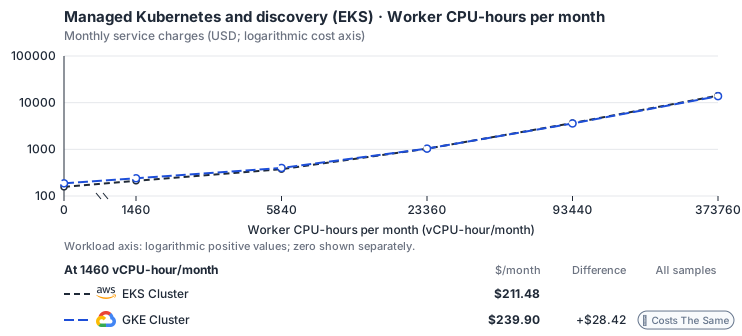
Curve assumptions
- Only this native meter varies; all other source usage and translation assumptions retain the displayed defaults. Other native meters and workload assumptions retain their explicitly displayed default quantities. Workload translation and capacity assumptions are not benchmark measurements.
- Native monthly usage priced at the cited provider list prices; listed target allowances apply where present, excluding invoice credits, taxes and negotiated discounts. Rates as of 2026-10-22: us-east-1 → us-central1, USD/month.
- Source prices are reference charges, not an invoice. Target lines cover selected service usage/configuration only; adapter hosting and Tensor9 fees are excluded.
- Samples of explicit prices are not performance measurements or capacity qualification. No interpolation or break-even guarantee is implied.
- Variant assumptions show the first axis sample; any axis-dependent configuration is described by this curve’s workload note.
- Rates are cited provider list prices, editable for discounts, commitments or another region. Workload translation and capacity coefficients remain editable planning assumptions, not benchmark measurements or a commercial quote.
- Default-zero rates are explicit assumptions, not evidence that the deployed service or resource is free.
- Provisioned-unit minimums use an editable approximate allocation floor. Modeled target service cost is max(usage/allocation, minimum), with billable network, durable staging and dependent sinks added separately; actual RU/TU sizing, scaling increments and throughput remain unqualified.
- Durable staging is priced once: provisioned targets include adapter state in their selected allocation; native targets add a separate staging allocation when required. Adapter hosting is a separate allocation and must exclude resources already priced as staging, workers or target capacity.
- A declared adapter mapping and cost model do not establish implementation availability or service equivalence.
- This is a declared directed mapping; a planning estimate does not establish deployment or request-serving support.
- Origin unit prices are cited provider list prices; capacity coefficients and translation assumptions are editable authored planning guesses, not measured capacity or a provider quote.
- Management requests do not reveal resource allocation or workload traffic. Provisioned resources and traffic are independent inputs.
- The discovery adapter does not itself own or provision the cluster. Allocate existing cluster capacity once across adapters.
- Cluster control-plane hours bill at the listed management fee and worker CPU/RAM at the provider’s VM decomposition; allocate a shared cluster once across adapters. The GKE free tier credits USD 74.40 a month per billing account, equivalent to one zonal or Autopilot cluster; it does not apply to regional clusters and is not applied here. Google: N2 predefined vCPU and memory (E2 lists 0.02181159 and 0.00292353); pd-balanced disk; Premium Tier egress.
- AWS Price List API, AmazonEKS offer: https://pricing.us-east-1.amazonaws.com/offers/v1.0/aws/AmazonEKS/current/us-east-1/index.json
- AWS Price List API, AmazonEC2 offer (CSV): https://pricing.us-east-1.amazonaws.com/offers/v1.0/aws/AmazonEC2/current/us-east-1/index.csv
- Amazon EKS pricing: https://aws.amazon.com/eks/pricing/
- Compute Engine general-purpose machine pricing: https://cloud.google.com/products/compute/pricing/general-purpose
- Disk and image pricing: https://cloud.google.com/compute/disks-image-pricing
- Network pricing: https://cloud.google.com/vpc/network-pricing
- Google Kubernetes Engine pricing: https://cloud.google.com/kubernetes-engine/pricing
- Worker disks, GPUs, ingress, network traffic, extended support and observability.
- Taxes, discounts, credits and free-tier allowances not explicitly listed by this model.
- Unmodeled dependent services, task execution and operations outside the selected workload family.
plan-b27aee57c58705505372fd0eb653bbf06b3c15f6 / 2026-10-22.planning.2. Curve: workload-1.
Sources: AWS Price List API, AmazonEKS offer, AWS Price List API, AmazonEC2 offer (CSV), Amazon EKS pricing, Compute Engine general-purpose machine pricing, Disk and image pricing, Network pricing, Google Kubernetes Engine pricing.
Managed Kubernetes and discovery (EKS) · Cluster-hours per month
Feature: Managed Kubernetes and discovery (EKS). Estimated monthly service charges by Cluster-hours per month. Adapter hosting and Tensor9 fees are excluded. Source: us-east-1; target: us-central1; currency: USD.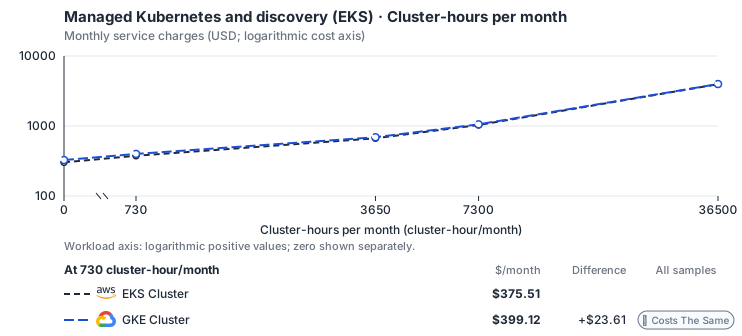
Curve assumptions
- Only this native meter varies; all other source usage and translation assumptions retain the displayed defaults. Other native meters and workload assumptions retain their explicitly displayed default quantities. Workload translation and capacity assumptions are not benchmark measurements.
- Native monthly usage priced at the cited provider list prices; listed target allowances apply where present, excluding invoice credits, taxes and negotiated discounts. Rates as of 2026-10-22: us-east-1 → us-central1, USD/month.
- Source prices are reference charges, not an invoice. Target lines cover selected service usage/configuration only; adapter hosting and Tensor9 fees are excluded.
- Samples of explicit prices are not performance measurements or capacity qualification. No interpolation or break-even guarantee is implied.
- Variant assumptions show the first axis sample; any axis-dependent configuration is described by this curve’s workload note.
- Rates are cited provider list prices, editable for discounts, commitments or another region. Workload translation and capacity coefficients remain editable planning assumptions, not benchmark measurements or a commercial quote.
- Default-zero rates are explicit assumptions, not evidence that the deployed service or resource is free.
- Provisioned-unit minimums use an editable approximate allocation floor. Modeled target service cost is max(usage/allocation, minimum), with billable network, durable staging and dependent sinks added separately; actual RU/TU sizing, scaling increments and throughput remain unqualified.
- Durable staging is priced once: provisioned targets include adapter state in their selected allocation; native targets add a separate staging allocation when required. Adapter hosting is a separate allocation and must exclude resources already priced as staging, workers or target capacity.
- A declared adapter mapping and cost model do not establish implementation availability or service equivalence.
- This is a declared directed mapping; a planning estimate does not establish deployment or request-serving support.
- Origin unit prices are cited provider list prices; capacity coefficients and translation assumptions are editable authored planning guesses, not measured capacity or a provider quote.
- Management requests do not reveal resource allocation or workload traffic. Provisioned resources and traffic are independent inputs.
- The discovery adapter does not itself own or provision the cluster. Allocate existing cluster capacity once across adapters.
- Cluster control-plane hours bill at the listed management fee and worker CPU/RAM at the provider’s VM decomposition; allocate a shared cluster once across adapters. The GKE free tier credits USD 74.40 a month per billing account, equivalent to one zonal or Autopilot cluster; it does not apply to regional clusters and is not applied here. Google: N2 predefined vCPU and memory (E2 lists 0.02181159 and 0.00292353); pd-balanced disk; Premium Tier egress.
- AWS Price List API, AmazonEKS offer: https://pricing.us-east-1.amazonaws.com/offers/v1.0/aws/AmazonEKS/current/us-east-1/index.json
- AWS Price List API, AmazonEC2 offer (CSV): https://pricing.us-east-1.amazonaws.com/offers/v1.0/aws/AmazonEC2/current/us-east-1/index.csv
- Amazon EKS pricing: https://aws.amazon.com/eks/pricing/
- Compute Engine general-purpose machine pricing: https://cloud.google.com/products/compute/pricing/general-purpose
- Disk and image pricing: https://cloud.google.com/compute/disks-image-pricing
- Network pricing: https://cloud.google.com/vpc/network-pricing
- Google Kubernetes Engine pricing: https://cloud.google.com/kubernetes-engine/pricing
- Worker disks, GPUs, ingress, network traffic, extended support and observability.
- Taxes, discounts, credits and free-tier allowances not explicitly listed by this model.
- Unmodeled dependent services, task execution and operations outside the selected workload family.
plan-b27aee57c58705505372fd0eb653bbf06b3c15f6 / 2026-10-22.planning.2. Curve: workload-2.
Sources: AWS Price List API, AmazonEKS offer, AWS Price List API, AmazonEC2 offer (CSV), Amazon EKS pricing, Compute Engine general-purpose machine pricing, Disk and image pricing, Network pricing, Google Kubernetes Engine pricing.
Managed Kubernetes and discovery (EKS) → GKE Cluster: Authored native-usage planning example. Native monthly usage priced at the cited provider list prices; listed target allowances apply where present, excluding invoice credits, taxes and negotiated discounts.
Scenario source region: us-east-1. Scenario target region: us-central1. Currency: USD.
Unestimated components: Adapter hosting, Tensor9 fees. A modeled adapted total and savings require these costs.
Cost scope: Modeled target native service and explicitly modeled state allocation; hosting and Tensor9 fees only when supplied.
Excluded costs and workload features:
- Worker disks, GPUs, ingress, network traffic, extended support and observability.
- Taxes, discounts, credits and free-tier allowances not explicitly listed by this model.
- Unmodeled dependent services, task execution and operations outside the selected workload family.
- Translated reads: 0 operations.
- Translated writes: 0 operations.
- Translated resident physical data: 0 GiB-month.
- Native provider operations: 1,000,000 operations.
- Published payload: 0 GiB.
- Delivered payload: 0 GiB.
- Allocated execution CPU: 6,716 vCPU-hour.
- Allocated execution RAM: 26,864 GiB-hour.
- Independent resource allocation: 730 resource-hour.
- Independent inventory: 0 resource-month.
- Input tokens: 0 tokens.
- Output tokens: 0 tokens.
- Billable network: 0 GiB.
- Dependent object sink retained data: 0 GiB-month.
- Dependent object sink writes: 0 writes.
- Rates are cited provider list prices, editable for discounts, commitments or another region. Workload translation and capacity coefficients remain editable planning assumptions, not benchmark measurements or a commercial quote.
- Default-zero rates are explicit assumptions, not evidence that the deployed service or resource is free.
- Provisioned-unit minimums use an editable approximate allocation floor. Modeled target service cost is max(usage/allocation, minimum), with billable network, durable staging and dependent sinks added separately; actual RU/TU sizing, scaling increments and throughput remain unqualified.
- Durable staging is priced once: provisioned targets include adapter state in their selected allocation; native targets add a separate staging allocation when required. Adapter hosting is a separate allocation and must exclude resources already priced as staging, workers or target capacity.
- A declared adapter mapping and cost model do not establish implementation availability or service equivalence.
- This is a declared directed mapping; a planning estimate does not establish deployment or request-serving support.
- Origin unit prices are cited provider list prices; capacity coefficients and translation assumptions are editable authored planning guesses, not measured capacity or a provider quote.
- Management requests do not reveal resource allocation or workload traffic. Provisioned resources and traffic are independent inputs.
- The discovery adapter does not itself own or provision the cluster. Allocate existing cluster capacity once across adapters.
- Cluster control-plane hours bill at the listed management fee and worker CPU/RAM at the provider’s VM decomposition; allocate a shared cluster once across adapters. The GKE free tier credits USD 74.40 a month per billing account, equivalent to one zonal or Autopilot cluster; it does not apply to regional clusters and is not applied here. Google: N2 predefined vCPU and memory (E2 lists 0.02181159 and 0.00292353); pd-balanced disk; Premium Tier egress.
plan-b27aee57c58705505372fd0eb653bbf06b3c15f6 / 2026-10-22.planning.2. Scenario: planning-example.
Sources: AWS Price List API, AmazonEKS offer, AWS Price List API, AmazonEC2 offer (CSV), Amazon EKS pricing, Compute Engine general-purpose machine pricing, Disk and image pricing, Network pricing, Google Kubernetes Engine pricing.
On Azure
How it works
Your Deployments, Services and other Kubernetes objects keep working, because AKS serves the same Kubernetes API as EKS. At build time, Tensor9 turns your EKS cluster definition into an AKS cluster. Microsoft operates the control plane, including upgrades, availability and API server scaling. The cluster uses a system-assigned managed identity in Microsoft Entra ID to reach Azure resources. AKS manages upgrades and keeps the cluster on a supported version. Instead of the exact minor version EKS lets you choose, the cluster uses AKS’s recommended default near the version you asked for, and the build reports which version was chosen. AKS also requires a system node pool, which runs the cluster’s own pods; the next sections explain how your node groups fill it.

Tensor9 creates an AKS cluster that Microsoft operates, with a managed identity in Microsoft Entra ID.
Add-ons and your manifests
Tensor9 creates the cluster, its node pools, Azure Workload Identity and pod networking. The core EKS add-ons (the VPC CNI, CoreDNS, kube-proxy and the EBS CSI driver) are replaced by AKS’s own built-in components. A non-core EKS add-on with no AKS equivalent is dropped, and the build reports it. AKS also offers optional add-ons and extensions, such as KEDA, Dapr, GitOps with Flux, Azure Policy, Container Insights, the Key Vault Secrets Store CSI driver, application routing (managed NGINX ingress) and virtual nodes on Azure Container Instances. Tensor9 does not turn these on. Standard Kubernetes objects need no change. Review the AWS-specific parts of your manifests and Helm values (identity annotations, storage classes, ingress controllers and add-ons) and adapt them to AKS.Nodes and scaling
Your first EKS node group becomes the AKS system node pool, and each further group becomes its own node pool. If you declare no node groups, or every group usescount or for_each, Tensor9 adds a small system pool of one Standard_D2s_v5 node, and the build warns you. Each instance type maps to an Azure VM size of the same hardware class, with Standard_D2s_v5 as the default when nothing more specific fits.
Your node-group scaling settings become the AKS cluster autoscaler. AKS virtual nodes are a different model and do not replace EKS Fargate; see Limitations.
Identity and permissions (IRSA → Microsoft Entra Workload ID)
On EKS, IRSA (IAM Roles for Service Accounts) gives a pod an IAM role to run as, and the role’s policies decide what it may do. Both are kept, as two separate parts. Who the pod is. Identity calls such asaws sts get-caller-identity and iam:GetRole are answered inside the appliance, from the identity given to the pod. They return your own role and account (the same account the instance metadata returns) without contacting AWS. On AKS, the pod is also linked to Azure through Microsoft Entra Workload ID. The cluster’s OIDC issuer is turned on, and each workload’s Kubernetes service account is federated to a user-assigned managed identity by a federated identity credential. The azure.workload.identity annotations mark the pod. The pod exchanges its service account token for Entra tokens, with no long-lived secret.
What the pod may do. Tensor9 converts the supported rules of your AWS IAM policies at build time. The appliance checks each AWS request from the pod (role, action and resource) against them, and an explicit deny wins over an allow. Policy updates are verified before the appliance uses them. Native Azure permissions are granted separately to the managed identity; they do not replace the AWS policy or supply its AWS role session. The STS or EKS Auth adapter you select supplies AWS credentials for supported AWS API calls.


Your pod keeps its AWS role and AWS policy; Azure permissions are granted separately.
Limitations
The workload, the managed control plane, node pools, pod networking and per-workload identity are all kept. The differences below are reported when you build; none is dropped without notice. Where EKS and AKS differ- Fargate is not supported. AKS has no Fargate equivalent; its virtual nodes are a different model. Pods that Fargate would run are scheduled onto node pools, and a cluster that uses only Fargate stops the build with an error.
- The Kubernetes version behaves differently: AKS uses its recommended default. You get a supported version near the minor version you asked for, not the exact one. The build reports the version chosen.
- A private control-plane endpoint is not supported. The AKS control plane has a public endpoint, and the build reports this.
- The EKS cluster endpoint, ARN and auth token are not supported. References to them are pointed at the AKS endpoint and certificate authority. If a reference cannot be repointed, the build stops with an error.
- Very large GPUs are not supported. An accelerator with no matching Azure VM size stops the build with an error instead of moving to a smaller machine.
Other considerations
- Before going live. Adapt the identity annotations, storage classes and controllers in your manifests to AKS, then re-apply them. Each migrated pod gets the Azure workload identity annotations instead of an IRSA role annotation.
- Who runs what. Microsoft runs the control plane. You size the node pools, including the required system pool.
- Cost. The AKS control plane is free on the base tier; the Uptime SLA tier costs extra. You are billed for the node pools you run, including the system pool. Set the autoscaler limits for the load you expect.
Management and credentials on AKS
Supported cluster, node-group, add-on and association changes reconcile onto AKS asynchronously. Entra Workload ID grants access only through separately configured Azure permissions; AWS SDK calls need the selected AWS credential exchange. See cluster management and credential separation for the common model and its managed-backend restriction.Example monthly charges
This Tensor9 BYOC scenario estimates service charges for the named origin and target services. Adapter hosting and commercial Tensor9 fees need separate allocations. How Tensor9 estimates costs explains the method and what the estimates include.Managed Kubernetes and discovery (EKS) · Worker CPU-hours per month
Feature: Managed Kubernetes and discovery (EKS). Estimated monthly service charges by Worker CPU-hours per month. Adapter hosting and Tensor9 fees are excluded. Source: us-east-1; target: eastus; currency: USD.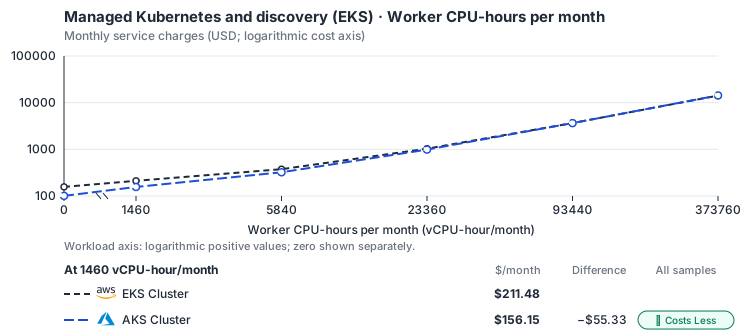
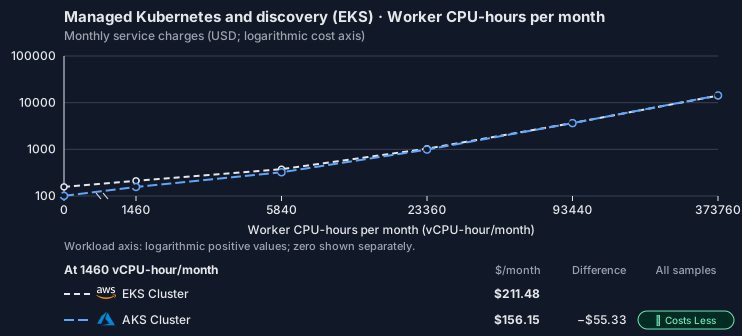
Curve assumptions
- Only this native meter varies; all other source usage and translation assumptions retain the displayed defaults. Other native meters and workload assumptions retain their explicitly displayed default quantities. Workload translation and capacity assumptions are not benchmark measurements.
- Native monthly usage priced at the cited provider list prices; listed target allowances apply where present, excluding invoice credits, taxes and negotiated discounts. Rates as of 2026-10-22: us-east-1 → eastus, USD/month.
- Source prices are reference charges, not an invoice. Target lines cover selected service usage/configuration only; adapter hosting and Tensor9 fees are excluded.
- Samples of explicit prices are not performance measurements or capacity qualification. No interpolation or break-even guarantee is implied.
- Variant assumptions show the first axis sample; any axis-dependent configuration is described by this curve’s workload note.
- Rates are cited provider list prices, editable for discounts, commitments or another region. Workload translation and capacity coefficients remain editable planning assumptions, not benchmark measurements or a commercial quote.
- Default-zero rates are explicit assumptions, not evidence that the deployed service or resource is free.
- Provisioned-unit minimums use an editable approximate allocation floor. Modeled target service cost is max(usage/allocation, minimum), with billable network, durable staging and dependent sinks added separately; actual RU/TU sizing, scaling increments and throughput remain unqualified.
- Durable staging is priced once: provisioned targets include adapter state in their selected allocation; native targets add a separate staging allocation when required. Adapter hosting is a separate allocation and must exclude resources already priced as staging, workers or target capacity.
- A declared adapter mapping and cost model do not establish implementation availability or service equivalence.
- This is a declared directed mapping; a planning estimate does not establish deployment or request-serving support.
- Origin unit prices are cited provider list prices; capacity coefficients and translation assumptions are editable authored planning guesses, not measured capacity or a provider quote.
- Management requests do not reveal resource allocation or workload traffic. Provisioned resources and traffic are independent inputs.
- The discovery adapter does not itself own or provision the cluster. Allocate existing cluster capacity once across adapters.
- Cluster control-plane hours bill at the listed management fee and worker CPU/RAM at the provider’s VM decomposition; allocate a shared cluster once across adapters. The compiler emits the AKS Free tier unless the origin uses Karpenter, when Node Auto-Provisioning requires sku_tier Standard (USD 0.10/cluster-hour); edit the control-plane rate for that case. Azure: Dsv5 decomposed against Esv5; Premium SSD v2 disk; internet egress.
- AWS Price List API, AmazonEKS offer: https://pricing.us-east-1.amazonaws.com/offers/v1.0/aws/AmazonEKS/current/us-east-1/index.json
- AWS Price List API, AmazonEC2 offer (CSV): https://pricing.us-east-1.amazonaws.com/offers/v1.0/aws/AmazonEC2/current/us-east-1/index.csv
- Amazon EKS pricing: https://aws.amazon.com/eks/pricing/
- Azure Retail Prices API: https://prices.azure.com/api/retail/prices
- Worker disks, GPUs, ingress, network traffic, extended support and observability.
- Taxes, discounts, credits and free-tier allowances not explicitly listed by this model.
- Unmodeled dependent services, task execution and operations outside the selected workload family.
plan-6a931ee23628cbfccc0fa64e705381b4de4a686b / 2026-10-22.planning.2. Curve: workload-1.
Sources: AWS Price List API, AmazonEKS offer, AWS Price List API, AmazonEC2 offer (CSV), Amazon EKS pricing, Azure Retail Prices API.
Managed Kubernetes and discovery (EKS) · Cluster-hours per month
Feature: Managed Kubernetes and discovery (EKS). Estimated monthly service charges by Cluster-hours per month. Adapter hosting and Tensor9 fees are excluded. Source: us-east-1; target: eastus; currency: USD.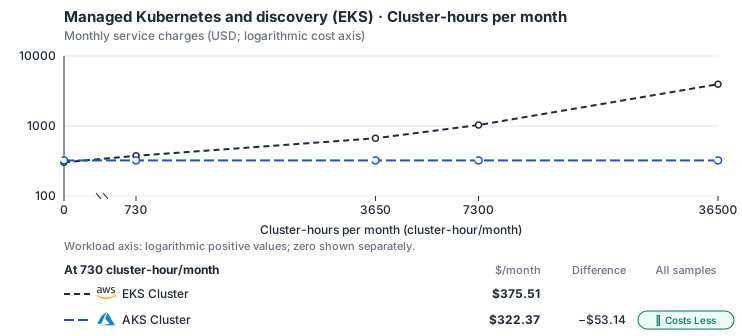
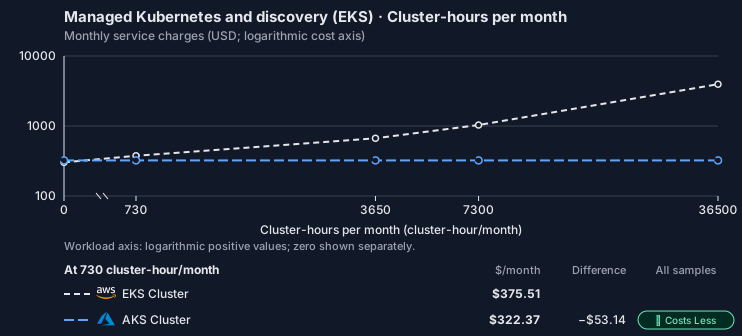
Curve assumptions
- Only this native meter varies; all other source usage and translation assumptions retain the displayed defaults. Other native meters and workload assumptions retain their explicitly displayed default quantities. Workload translation and capacity assumptions are not benchmark measurements.
- Native monthly usage priced at the cited provider list prices; listed target allowances apply where present, excluding invoice credits, taxes and negotiated discounts. Rates as of 2026-10-22: us-east-1 → eastus, USD/month.
- Source prices are reference charges, not an invoice. Target lines cover selected service usage/configuration only; adapter hosting and Tensor9 fees are excluded.
- Samples of explicit prices are not performance measurements or capacity qualification. No interpolation or break-even guarantee is implied.
- Variant assumptions show the first axis sample; any axis-dependent configuration is described by this curve’s workload note.
- Rates are cited provider list prices, editable for discounts, commitments or another region. Workload translation and capacity coefficients remain editable planning assumptions, not benchmark measurements or a commercial quote.
- Default-zero rates are explicit assumptions, not evidence that the deployed service or resource is free.
- Provisioned-unit minimums use an editable approximate allocation floor. Modeled target service cost is max(usage/allocation, minimum), with billable network, durable staging and dependent sinks added separately; actual RU/TU sizing, scaling increments and throughput remain unqualified.
- Durable staging is priced once: provisioned targets include adapter state in their selected allocation; native targets add a separate staging allocation when required. Adapter hosting is a separate allocation and must exclude resources already priced as staging, workers or target capacity.
- A declared adapter mapping and cost model do not establish implementation availability or service equivalence.
- This is a declared directed mapping; a planning estimate does not establish deployment or request-serving support.
- Origin unit prices are cited provider list prices; capacity coefficients and translation assumptions are editable authored planning guesses, not measured capacity or a provider quote.
- Management requests do not reveal resource allocation or workload traffic. Provisioned resources and traffic are independent inputs.
- The discovery adapter does not itself own or provision the cluster. Allocate existing cluster capacity once across adapters.
- Cluster control-plane hours bill at the listed management fee and worker CPU/RAM at the provider’s VM decomposition; allocate a shared cluster once across adapters. The compiler emits the AKS Free tier unless the origin uses Karpenter, when Node Auto-Provisioning requires sku_tier Standard (USD 0.10/cluster-hour); edit the control-plane rate for that case. Azure: Dsv5 decomposed against Esv5; Premium SSD v2 disk; internet egress.
- AWS Price List API, AmazonEKS offer: https://pricing.us-east-1.amazonaws.com/offers/v1.0/aws/AmazonEKS/current/us-east-1/index.json
- AWS Price List API, AmazonEC2 offer (CSV): https://pricing.us-east-1.amazonaws.com/offers/v1.0/aws/AmazonEC2/current/us-east-1/index.csv
- Amazon EKS pricing: https://aws.amazon.com/eks/pricing/
- Azure Retail Prices API: https://prices.azure.com/api/retail/prices
- Worker disks, GPUs, ingress, network traffic, extended support and observability.
- Taxes, discounts, credits and free-tier allowances not explicitly listed by this model.
- Unmodeled dependent services, task execution and operations outside the selected workload family.
plan-6a931ee23628cbfccc0fa64e705381b4de4a686b / 2026-10-22.planning.2. Curve: workload-2.
Sources: AWS Price List API, AmazonEKS offer, AWS Price List API, AmazonEC2 offer (CSV), Amazon EKS pricing, Azure Retail Prices API.
Managed Kubernetes and discovery (EKS) → AKS Cluster: Authored native-usage planning example. Native monthly usage priced at the cited provider list prices; listed target allowances apply where present, excluding invoice credits, taxes and negotiated discounts.
Scenario source region: us-east-1. Scenario target region: eastus. Currency: USD.
Unestimated components: Adapter hosting, Tensor9 fees. A modeled adapted total and savings require these costs.
Cost scope: Modeled target native service and explicitly modeled state allocation; hosting and Tensor9 fees only when supplied.
Excluded costs and workload features:
- Worker disks, GPUs, ingress, network traffic, extended support and observability.
- Taxes, discounts, credits and free-tier allowances not explicitly listed by this model.
- Unmodeled dependent services, task execution and operations outside the selected workload family.
- Translated reads: 0 operations.
- Translated writes: 0 operations.
- Translated resident physical data: 0 GiB-month.
- Native provider operations: 1,000,000 operations.
- Published payload: 0 GiB.
- Delivered payload: 0 GiB.
- Allocated execution CPU: 6,716 vCPU-hour.
- Allocated execution RAM: 26,864 GiB-hour.
- Independent resource allocation: 730 resource-hour.
- Independent inventory: 0 resource-month.
- Input tokens: 0 tokens.
- Output tokens: 0 tokens.
- Billable network: 0 GiB.
- Dependent object sink retained data: 0 GiB-month.
- Dependent object sink writes: 0 writes.
- Rates are cited provider list prices, editable for discounts, commitments or another region. Workload translation and capacity coefficients remain editable planning assumptions, not benchmark measurements or a commercial quote.
- Default-zero rates are explicit assumptions, not evidence that the deployed service or resource is free.
- Provisioned-unit minimums use an editable approximate allocation floor. Modeled target service cost is max(usage/allocation, minimum), with billable network, durable staging and dependent sinks added separately; actual RU/TU sizing, scaling increments and throughput remain unqualified.
- Durable staging is priced once: provisioned targets include adapter state in their selected allocation; native targets add a separate staging allocation when required. Adapter hosting is a separate allocation and must exclude resources already priced as staging, workers or target capacity.
- A declared adapter mapping and cost model do not establish implementation availability or service equivalence.
- This is a declared directed mapping; a planning estimate does not establish deployment or request-serving support.
- Origin unit prices are cited provider list prices; capacity coefficients and translation assumptions are editable authored planning guesses, not measured capacity or a provider quote.
- Management requests do not reveal resource allocation or workload traffic. Provisioned resources and traffic are independent inputs.
- The discovery adapter does not itself own or provision the cluster. Allocate existing cluster capacity once across adapters.
- Cluster control-plane hours bill at the listed management fee and worker CPU/RAM at the provider’s VM decomposition; allocate a shared cluster once across adapters. The compiler emits the AKS Free tier unless the origin uses Karpenter, when Node Auto-Provisioning requires sku_tier Standard (USD 0.10/cluster-hour); edit the control-plane rate for that case. Azure: Dsv5 decomposed against Esv5; Premium SSD v2 disk; internet egress.
plan-6a931ee23628cbfccc0fa64e705381b4de4a686b / 2026-10-22.planning.2. Scenario: planning-example.
Sources: AWS Price List API, AmazonEKS offer, AWS Price List API, AmazonEC2 offer (CSV), Amazon EKS pricing, Azure Retail Prices API.
On OCI
How it works
Your Deployments, Services and other Kubernetes objects keep working, because OKE serves the same Kubernetes API as EKS. At build time, Tensor9 turns your EKS cluster definition into an enhanced OKE cluster , OKE’s fuller tier, which includes the cluster autoscaler, workload identity and higher node limits. Oracle operates the control plane. Its API endpoint is private, so the cluster is reached over your own VCN rather than a public address. OKE can run nodes as managed node pools, as virtual nodes that Oracle runs for you, or as self-managed nodes. Tensor9 uses managed node pools, so the sizing you chose is kept. EKS lets you choose an exact minor version; OKE uses a supported patch of that minor version, chosen when the plan is made and reported by the build.

Tensor9 creates an enhanced OKE cluster that Oracle operates, reached through a private endpoint.
Add-ons and your manifests
Tensor9 creates the enhanced cluster, its managed node pools on flexible shapes, the OCI workload identity binding and VCN-native pod networking. Your core EKS add-ons are replaced by OKE’s own built-in components. A non-core EKS add-on with no OKE equivalent is dropped, and the build reports it. The enhanced tier includes cluster add-ons that Oracle operates and keeps up to date, the cluster autoscaler among them, along with OKE Workload Identity. Standard Kubernetes objects need no change. Review the AWS-specific parts of your manifests and Helm values (identity annotations, storage classes, ingress controllers and add-ons) and adapt them to OKE.Nodes and scaling
Each EKS node group becomes one OKE node pool on an OCI flexible shape, which takes your OCPU and memory sizing directly instead of rounding to a fixed instance size. Pod networking is VCN-native: pods get IP addresses from your VCN, as they get VPC addresses on EKS. The node pool is created at your desired size. The cluster autoscaler’s minimum and maximum have no setting on an OKE node pool, so they are dropped and the build reports it (see Limitations).Identity and permissions (IRSA → OCI workload identity)
On EKS, IRSA (IAM Roles for Service Accounts) gives a pod an IAM role to run as, and the role’s policies decide what it may do. Both are kept, as two separate parts. Who the pod is. Identity calls such asaws sts get-caller-identity and iam:GetRole are answered inside the appliance, from the identity given to the pod. They return your own role and account (the same account the instance metadata returns) without contacting AWS. On OKE, the pod is also linked to OCI through OCI workload identity : OCI IAM policies select the workload by cluster, namespace and service account.
What the pod may do. Tensor9 converts the supported rules of your AWS IAM policies at build time. The appliance checks each AWS request from the pod (role, action and resource) against them, and an explicit deny wins over an allow. Policy updates are verified before the appliance uses them. Native OCI permissions are granted separately to the workload; they do not replace the AWS policy or supply its AWS role session. The STS or EKS Auth adapter you select supplies AWS credentials for supported AWS API calls.


Your pod keeps its AWS role and AWS policy; OCI permissions are granted separately.
Limitations
The workload, the managed control plane, node pools on flexible shapes, VCN-native pod networking and a private endpoint are all kept. The differences below are reported when you build; none is dropped without notice. Where EKS and OKE differ- Fargate is not supported. OKE has no Fargate equivalent. Pods that Fargate would run are scheduled onto node pools, and a cluster that uses only Fargate stops the build with an error.
- The Kubernetes version behaves differently: OKE uses a supported patch. You get a supported patch of the minor version you asked for, chosen when the plan is made. The build reports the version chosen.
- Cluster autoscaler limits are not supported. The node pool is created at your desired size; the autoscaler minimum and maximum have no OKE node-pool setting, so they are dropped and reported.
- The EKS cluster endpoint, ARN and auth token are not supported. References to them are pointed at the OKE endpoint and certificate authority. If a reference cannot be repointed, the build stops with an error.
- Very large GPUs are not supported. An accelerator with no matching OCI shape stops the build with an error instead of moving to a smaller shape.
Other considerations
- Before going live. Review OCI identity policies, storage classes and VCN networking alongside your Kubernetes manifests, then re-apply them to the new cluster.
- Cluster administration. The API endpoint is private, so administering the cluster needs access from inside the VCN, such as a bastion or private access. If your EKS cluster had a public endpoint, the build warns you.
- Scaling limits. Set node scaling limits on OCI after cutover, because the autoscaler minimum and maximum are not kept.
- Cost. OKE’s enhanced tier has a per-cluster charge, and you are billed for the managed node pools you size by OCPU and memory, instead of an EKS control-plane fee plus fixed instance types.
Management and credentials on OKE
Supported cluster and node-pool changes reconcile onto OKE asynchronously. OCI workload identity and its native grants remain separate from STS or EKS Auth role sessions used for AWS adapter calls. See cluster management and credential separation for the common model and its managed-backend restriction.Example monthly charges
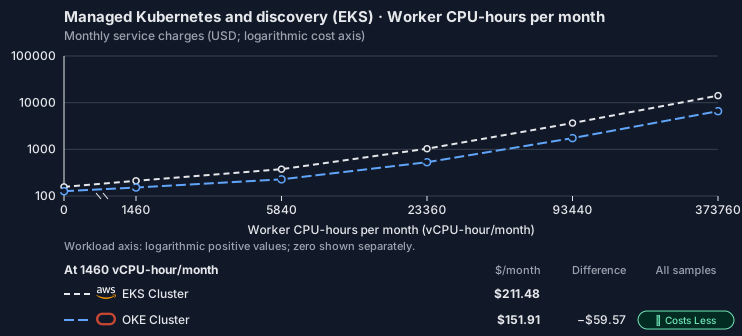
This Tensor9 BYOC scenario estimates service charges for the named origin and target services. Adapter hosting and commercial Tensor9 fees need separate allocations. How Tensor9 estimates costs explains the method and what the estimates include.Managed Kubernetes and discovery (EKS) · Worker CPU-hours per month
Feature: Managed Kubernetes and discovery (EKS). Estimated monthly service charges by Worker CPU-hours per month. Adapter hosting and Tensor9 fees are excluded. Source: us-east-1; target: us-ashburn-1; currency: USD.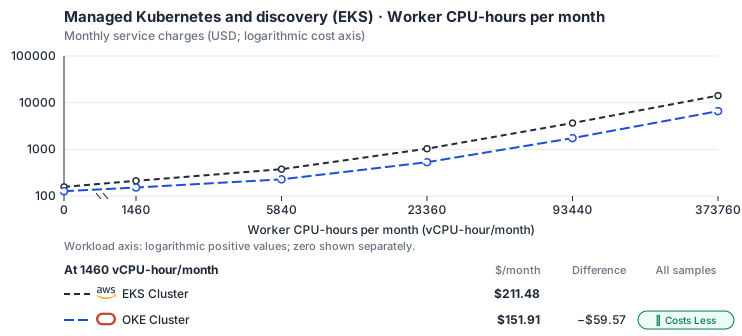
Curve assumptions
- Only this native meter varies; all other source usage and translation assumptions retain the displayed defaults. Other native meters and workload assumptions retain their explicitly displayed default quantities. Workload translation and capacity assumptions are not benchmark measurements.
- Native monthly usage priced at the cited provider list prices; listed target allowances apply where present, excluding invoice credits, taxes and negotiated discounts. Rates as of 2026-10-22: us-east-1 → us-ashburn-1, USD/month.
- Source prices are reference charges, not an invoice. Target lines cover selected service usage/configuration only; adapter hosting and Tensor9 fees are excluded.
- Samples of explicit prices are not performance measurements or capacity qualification. No interpolation or break-even guarantee is implied.
- Variant assumptions show the first axis sample; any axis-dependent configuration is described by this curve’s workload note.
- Rates are cited provider list prices, editable for discounts, commitments or another region. Workload translation and capacity coefficients remain editable planning assumptions, not benchmark measurements or a commercial quote.
- Default-zero rates are explicit assumptions, not evidence that the deployed service or resource is free.
- Provisioned-unit minimums use an editable approximate allocation floor. Modeled target service cost is max(usage/allocation, minimum), with billable network, durable staging and dependent sinks added separately; actual RU/TU sizing, scaling increments and throughput remain unqualified.
- Durable staging is priced once: provisioned targets include adapter state in their selected allocation; native targets add a separate staging allocation when required. Adapter hosting is a separate allocation and must exclude resources already priced as staging, workers or target capacity.
- A declared adapter mapping and cost model do not establish implementation availability or service equivalence.
- This is a declared directed mapping; a planning estimate does not establish deployment or request-serving support.
- Origin unit prices are cited provider list prices; capacity coefficients and translation assumptions are editable authored planning guesses, not measured capacity or a provider quote.
- Management requests do not reveal resource allocation or workload traffic. Provisioned resources and traffic are independent inputs.
- The discovery adapter does not itself own or provision the cluster. Allocate existing cluster capacity once across adapters.
- Cluster control-plane hours bill at the listed management fee and worker CPU/RAM at the provider’s VM decomposition; allocate a shared cluster once across adapters. The compiler emits type ENHANCED_CLUSTER (the EKS standard tier’s equivalent); a Basic cluster is free. OCI: E5 flexible shape (the shape this repo emits); Balanced block volume; first 10 TB of egress free.
- AWS Price List API, AmazonEKS offer: https://pricing.us-east-1.amazonaws.com/offers/v1.0/aws/AmazonEKS/current/us-east-1/index.json
- AWS Price List API, AmazonEC2 offer (CSV): https://pricing.us-east-1.amazonaws.com/offers/v1.0/aws/AmazonEC2/current/us-east-1/index.csv
- Amazon EKS pricing: https://aws.amazon.com/eks/pricing/
- OCI price list API: https://apexapps.oracle.com/pls/apex/cetools/api/v1/products/
- Worker disks, GPUs, ingress, network traffic, extended support and observability.
- Taxes, discounts, credits and free-tier allowances not explicitly listed by this model.
- Unmodeled dependent services, task execution and operations outside the selected workload family.
plan-00d4314e21f00831443da77b5e630dfa0a1c813c / 2026-10-22.planning.2. Curve: workload-1.
Sources: AWS Price List API, AmazonEKS offer, AWS Price List API, AmazonEC2 offer (CSV), Amazon EKS pricing, OCI price list API.
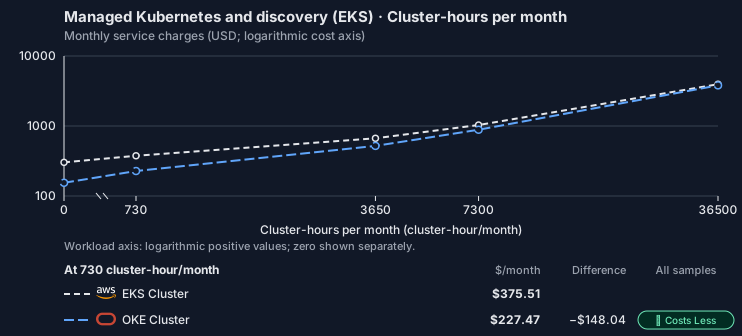
Managed Kubernetes and discovery (EKS) · Cluster-hours per month
Feature: Managed Kubernetes and discovery (EKS). Estimated monthly service charges by Cluster-hours per month. Adapter hosting and Tensor9 fees are excluded. Source: us-east-1; target: us-ashburn-1; currency: USD.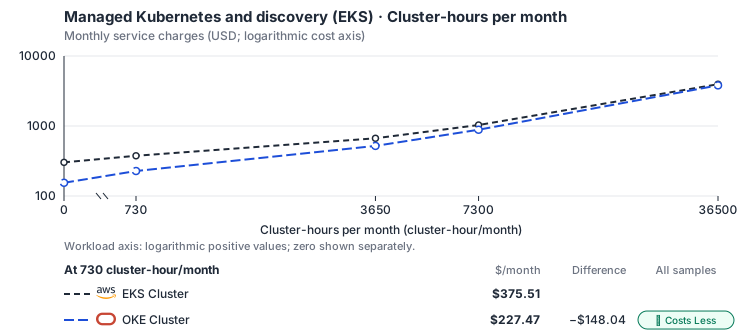
Curve assumptions
- Only this native meter varies; all other source usage and translation assumptions retain the displayed defaults. Other native meters and workload assumptions retain their explicitly displayed default quantities. Workload translation and capacity assumptions are not benchmark measurements.
- Native monthly usage priced at the cited provider list prices; listed target allowances apply where present, excluding invoice credits, taxes and negotiated discounts. Rates as of 2026-10-22: us-east-1 → us-ashburn-1, USD/month.
- Source prices are reference charges, not an invoice. Target lines cover selected service usage/configuration only; adapter hosting and Tensor9 fees are excluded.
- Samples of explicit prices are not performance measurements or capacity qualification. No interpolation or break-even guarantee is implied.
- Variant assumptions show the first axis sample; any axis-dependent configuration is described by this curve’s workload note.
- Rates are cited provider list prices, editable for discounts, commitments or another region. Workload translation and capacity coefficients remain editable planning assumptions, not benchmark measurements or a commercial quote.
- Default-zero rates are explicit assumptions, not evidence that the deployed service or resource is free.
- Provisioned-unit minimums use an editable approximate allocation floor. Modeled target service cost is max(usage/allocation, minimum), with billable network, durable staging and dependent sinks added separately; actual RU/TU sizing, scaling increments and throughput remain unqualified.
- Durable staging is priced once: provisioned targets include adapter state in their selected allocation; native targets add a separate staging allocation when required. Adapter hosting is a separate allocation and must exclude resources already priced as staging, workers or target capacity.
- A declared adapter mapping and cost model do not establish implementation availability or service equivalence.
- This is a declared directed mapping; a planning estimate does not establish deployment or request-serving support.
- Origin unit prices are cited provider list prices; capacity coefficients and translation assumptions are editable authored planning guesses, not measured capacity or a provider quote.
- Management requests do not reveal resource allocation or workload traffic. Provisioned resources and traffic are independent inputs.
- The discovery adapter does not itself own or provision the cluster. Allocate existing cluster capacity once across adapters.
- Cluster control-plane hours bill at the listed management fee and worker CPU/RAM at the provider’s VM decomposition; allocate a shared cluster once across adapters. The compiler emits type ENHANCED_CLUSTER (the EKS standard tier’s equivalent); a Basic cluster is free. OCI: E5 flexible shape (the shape this repo emits); Balanced block volume; first 10 TB of egress free.
- AWS Price List API, AmazonEKS offer: https://pricing.us-east-1.amazonaws.com/offers/v1.0/aws/AmazonEKS/current/us-east-1/index.json
- AWS Price List API, AmazonEC2 offer (CSV): https://pricing.us-east-1.amazonaws.com/offers/v1.0/aws/AmazonEC2/current/us-east-1/index.csv
- Amazon EKS pricing: https://aws.amazon.com/eks/pricing/
- OCI price list API: https://apexapps.oracle.com/pls/apex/cetools/api/v1/products/
- Worker disks, GPUs, ingress, network traffic, extended support and observability.
- Taxes, discounts, credits and free-tier allowances not explicitly listed by this model.
- Unmodeled dependent services, task execution and operations outside the selected workload family.
plan-00d4314e21f00831443da77b5e630dfa0a1c813c / 2026-10-22.planning.2. Curve: workload-2.
Sources: AWS Price List API, AmazonEKS offer, AWS Price List API, AmazonEC2 offer (CSV), Amazon EKS pricing, OCI price list API.
Managed Kubernetes and discovery (EKS) → OKE Cluster: Authored native-usage planning example. Native monthly usage priced at the cited provider list prices; listed target allowances apply where present, excluding invoice credits, taxes and negotiated discounts.
Scenario source region: us-east-1. Scenario target region: us-ashburn-1. Currency: USD.
Unestimated components: Adapter hosting, Tensor9 fees. A modeled adapted total and savings require these costs.
Cost scope: Modeled target native service and explicitly modeled state allocation; hosting and Tensor9 fees only when supplied.
Excluded costs and workload features:
- Worker disks, GPUs, ingress, network traffic, extended support and observability.
- Taxes, discounts, credits and free-tier allowances not explicitly listed by this model.
- Unmodeled dependent services, task execution and operations outside the selected workload family.
- Translated reads: 0 operations.
- Translated writes: 0 operations.
- Translated resident physical data: 0 GiB-month.
- Native provider operations: 1,000,000 operations.
- Published payload: 0 GiB.
- Delivered payload: 0 GiB.
- Allocated execution CPU: 6,716 vCPU-hour.
- Allocated execution RAM: 26,864 GiB-hour.
- Independent resource allocation: 730 resource-hour.
- Independent inventory: 0 resource-month.
- Input tokens: 0 tokens.
- Output tokens: 0 tokens.
- Billable network: 0 GiB.
- Dependent object sink retained data: 0 GiB-month.
- Dependent object sink writes: 0 writes.
- Rates are cited provider list prices, editable for discounts, commitments or another region. Workload translation and capacity coefficients remain editable planning assumptions, not benchmark measurements or a commercial quote.
- Default-zero rates are explicit assumptions, not evidence that the deployed service or resource is free.
- Provisioned-unit minimums use an editable approximate allocation floor. Modeled target service cost is max(usage/allocation, minimum), with billable network, durable staging and dependent sinks added separately; actual RU/TU sizing, scaling increments and throughput remain unqualified.
- Durable staging is priced once: provisioned targets include adapter state in their selected allocation; native targets add a separate staging allocation when required. Adapter hosting is a separate allocation and must exclude resources already priced as staging, workers or target capacity.
- A declared adapter mapping and cost model do not establish implementation availability or service equivalence.
- This is a declared directed mapping; a planning estimate does not establish deployment or request-serving support.
- Origin unit prices are cited provider list prices; capacity coefficients and translation assumptions are editable authored planning guesses, not measured capacity or a provider quote.
- Management requests do not reveal resource allocation or workload traffic. Provisioned resources and traffic are independent inputs.
- The discovery adapter does not itself own or provision the cluster. Allocate existing cluster capacity once across adapters.
- Cluster control-plane hours bill at the listed management fee and worker CPU/RAM at the provider’s VM decomposition; allocate a shared cluster once across adapters. The compiler emits type ENHANCED_CLUSTER (the EKS standard tier’s equivalent); a Basic cluster is free. OCI: E5 flexible shape (the shape this repo emits); Balanced block volume; first 10 TB of egress free.
plan-00d4314e21f00831443da77b5e630dfa0a1c813c / 2026-10-22.planning.2. Scenario: planning-example.
Sources: AWS Price List API, AmazonEKS offer, AWS Price List API, AmazonEC2 offer (CSV), Amazon EKS pricing, OCI price list API.
On Private Kubernetes
How it works
Your workloads run on a Kubernetes cluster that already exists in the deployment environment, such as one built with kubeadm, k3s or kops. Tensor9 points your EKS cluster at that cluster’s endpoint and credentials. It creates no control plane and no node pools. Whoever operates that cluster runs the API server, keeps the control plane available, upgrades Kubernetes, and adds and replaces nodes. They also install and run the ingress controller, autoscaler, monitoring, secrets driver and backup service. Tensor9 deploys your workloads without adding those. The cluster’s existing API server, scheduler, controller manager, networking (CNI), DNS and storage (CSI) stay as they are.

Your EKS cluster is pointed at a Kubernetes cluster that already exists; nothing is created.
Workloads and nodes
Deploy your workloads through the existing cluster’s Kubernetes API. Match API versions, identity annotations, storage classes and installed controllers to that cluster; AWS-specific integrations may need different manifests or Helm values. There is no mapping from EKS instance types to machine types and no cloud autoscaler set up for you. The cluster’s operator decides how nodes are added, sized and retired, and runs an autoscaler (cluster-autoscaler, Karpenter or none) if they want one. Tensor9 schedules your workloads onto the capacity that is already there.Cluster access and AWS credentials
Kubernetes API access. Service accounts and RBAC control what workloads may do in the existing cluster’s API. They do not supply AWS credentials. AWS credentials. With IRSA (IAM Roles for Service Accounts), the AWS SDK sends the pod’s service account token to the selected STS adapter throughAssumeRoleWithWebIdentity, and gets back an AWS role session for calls that Tensor9 handles. With EKS Pod Identity, the selected EKS Auth adapter’s AssumeRoleForPodIdentity does the same. You must configure the cluster’s token issuer, the service account binding and the IAM role trust for the exchange you use.
AWS permissions. The appliance checks the role’s AWS policies for each API call its service adapters handle. An explicit deny wins over an allow.
Other clouds. Calls to real services on another cloud need credentials or federation that cloud authorizes. This mapping does not set up a native cloud identity; configure that access through the cluster’s identity integration or mounted credentials.


AWS calls use the selected credential adapter and your role’s policy; Kubernetes RBAC and other clouds authorize their own APIs.
Limitations
Workloads use the existing cluster’s Kubernetes API. This mapping creates no control plane and no nodes. Where EKS and an existing cluster differ- A managed control plane and node pools are not created. Tensor9 uses the existing cluster’s endpoint and credentials. Whoever operates that cluster runs its control plane and nodes.
- Native cloud identity bindings are not created. AWS role sessions come from the selected STS or EKS Auth adapter. You must set up credentials or federation separately for real services on other clouds.
- Fargate is not supported. The cluster’s own nodes run every pod; there is no serverless node capacity.
- Machine-type mapping and a cloud autoscaler are not set up. Node sizing, scaling and replacement belong to the cluster’s operator.
Other considerations
- Before going live. Supply the existing cluster’s endpoint, certificate authority, client certificate or token, and namespace. Then re-apply your adapted manifests; the move is placing workloads on existing capacity, not building a cluster.
- Who runs what. Control-plane availability, version upgrades, node lifecycle and any platform services (ingress, autoscaler, monitoring, backup) stay with the cluster’s operator. A managed target would have run them.
- Test each credential path. Check Kubernetes RBAC for cluster access, the STS or EKS Auth exchange for AWS calls, and separately authorized credentials or federation for any other cloud.
- Cost. There is no managed control-plane charge, but the cluster’s capacity, availability and upkeep run on infrastructure the operator owns and staffs.
Management and credentials on an existing cluster
This backend uses your existing cluster; it does not provision a managed Kubernetes service. Cluster RBAC and selected AWS role sessions are separate. External cloud access still requires credentials or federation authorized by that provider. See cluster management and credential separation for the common model and its managed-backend restriction.Example monthly charges
This Tensor9 BYOC scenario estimates service charges for the named origin and target services. Adapter hosting and commercial Tensor9 fees need separate allocations. How Tensor9 estimates costs explains the method and what the estimates include. Native or deployment mapping. Applications use the target cluster’s Kubernetes API directly. This mapping does not expose an EKS management adapter endpoint. Kubernetes API availability and pod scheduling are not measured as service-adapter request latency. Cost estimates describe the selected service resources; operation coverage remains separate.Managed Kubernetes and discovery (EKS) · Worker CPU-hours per month
Feature: Managed Kubernetes and discovery (EKS). Estimated monthly service charges by Worker CPU-hours per month. Adapter hosting and Tensor9 fees are excluded. Source: us-east-1; target: us-central1; currency: USD.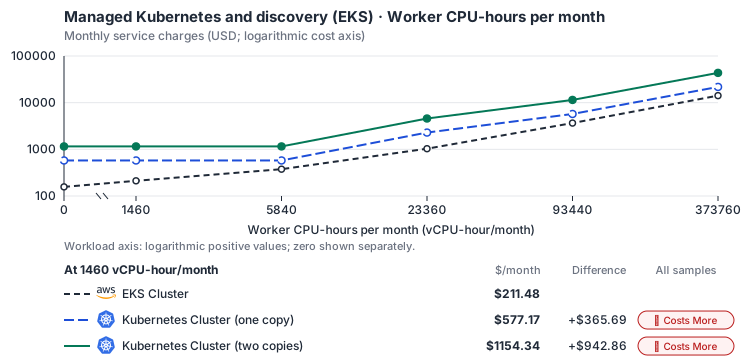
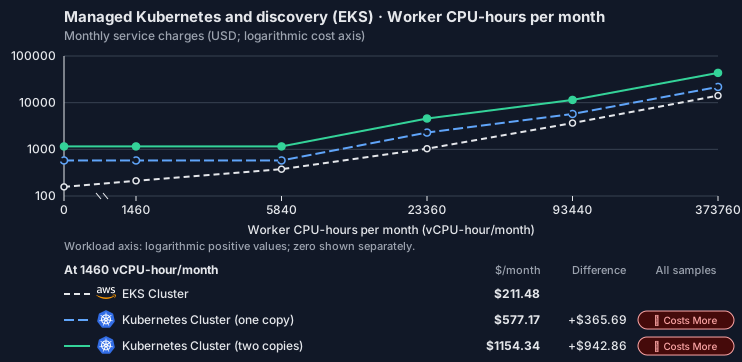
Estimated allocation, not benchmark calibrated: sized from 16 vCPU, 64 GiB memory and 100 GiB SSD at 0 vCPU-hour/month to 19 nodes of 32 vCPU, 128 GiB memory and 100 GiB SSD each at 373,760 vCPU-hour/month.
Curve assumptions
- Only this native meter varies; all other source usage and translation assumptions retain the displayed defaults. Other native meters and workload assumptions retain their explicitly displayed default quantities. Workload translation and capacity assumptions are not benchmark measurements.
- Native monthly usage priced at the cited provider list prices; listed target allowances apply where present, excluding invoice credits, taxes and negotiated discounts. Rates as of 2026-10-22: us-east-1 → us-central1, USD/month.
- Source prices are reference charges, not an invoice. Target lines cover selected service usage/configuration only; adapter hosting and Tensor9 fees are excluded.
- Samples of explicit prices are not performance measurements or capacity qualification. No interpolation or break-even guarantee is implied.
- Variant assumptions show the first axis sample; any axis-dependent configuration is described by this curve’s workload note.
- Rates are cited provider list prices, editable for discounts, commitments or another region. Workload translation and capacity coefficients remain editable planning assumptions, not benchmark measurements or a commercial quote.
- Default-zero rates are explicit assumptions, not evidence that the deployed service or resource is free.
- Provisioned-unit minimums use an editable approximate allocation floor. Modeled target service cost is max(usage/allocation, minimum), with billable network, durable staging and dependent sinks added separately; actual RU/TU sizing, scaling increments and throughput remain unqualified.
- Durable staging is priced once: provisioned targets include adapter state in their selected allocation; native targets add a separate staging allocation when required. Adapter hosting is a separate allocation and must exclude resources already priced as staging, workers or target capacity.
- A declared adapter mapping and cost model do not establish implementation availability or service equivalence.
- This is a declared directed mapping; a planning estimate does not establish deployment or request-serving support.
- Native/deployment comparison scope: Applications use the target cluster’s Kubernetes API directly. This mapping does not expose an EKS management adapter endpoint. Kubernetes API availability and pod scheduling are not measured as service-adapter request latency.
- Origin unit prices are cited provider list prices; capacity coefficients and translation assumptions are editable authored planning guesses, not measured capacity or a provider quote.
- Management requests do not reveal resource allocation or workload traffic. Provisioned resources and traffic are independent inputs.
- The discovery adapter does not itself own or provision the cluster. Allocate existing cluster capacity once across adapters.
- Self-hosted target: Kubernetes (Apache-2.0, https://github.com/kubernetes/kubernetes/blob/master/LICENSE); the host cloud’s managed control plane is a separate per-cluster-hour allocation. Selected CPU, RAM and physical disk allocation grow with workload; no per-operation price is assumed. No vendor charge: the target runs on the customer’s Kubernetes nodes, so CPU, RAM and disk bill at the Kubernetes node reference rates, Compute Engine N2 in us-central1 (USD 0.031611/vCPU-hour, 0.004237/GiB-hour) with pd-balanced disk (0.10/GiB-month) and Premium Tier egress. The cost-optimized E2 series lists 0.02181159/vCPU-hour and 0.00292353/GiB-hour; AWS m6i/r6i and Azure D2s v5/E2s v5 both decompose to 0.033/vCPU-hour and 0.00375/GiB-hour. Requested CPU and RAM are billed; node bin-packing waste, system reservations and the cluster control-plane fee are not.
- Row-store throughput (capacityOpsPerVcpuSecond, default 1500) is measured-by-tensor9 as a lower bound: the DynamoDB adapter on Cloud SQL db-custom-2-7680 (2 vCPU, PostgreSQL 16, us-west1) served 2,974 ops/s of YCSB-A at 16 threads without recorded saturation (src/main/kotlin/t9/prime/equiv/generated/eval/CloudsqlPostgresqlYcsbAT16GoYcsbV1_0_0.kt). Published CPU-bound pgbench reaches 3,101 read-write transactions and 20,289 point reads per vCPU-second (AWS z1d.2xlarge, PostgreSQL 14.5), so actual capacity is likely higher. Reads and writes share one coefficient: at the same adapter version, read-only YCSB-C was not faster than 50%-update YCSB-A.
- Log-broker throughput (capacityStreamMiBPerVcpuSecond 20 at 0.5 utilization, 4 GiB RAM per vCPU) is provider-documented by Google Managed Service for Apache Kafka sizing (https://docs.cloud.google.com/managed-service-for-apache-kafka/docs/plan-cluster-size): write-equivalent bytes are replicated writes plus a quarter of reads. Producer batches below 10 KB lower per-CPU throughput; that penalty is not modeled.
- Disk utilization 0.8 is provider-documented headroom below Cloud SQL automatic storage increase, which triggers near 91-95% full (https://docs.cloud.google.com/sql/docs/postgres/instance-settings). The 20 GiB reserve exceeds PostgreSQL’s 1 GB default max_wal_size; the remainder of that reserve is unmeasured.
- CPU tiers double from 2 vCPUs to the target’s largest node at 4 GiB per vCPU; each target’s documented largest node bounds CPU, RAM, RAM per vCPU and disk, and the durable staging database uses Cloud SQL Enterprise (96 vCPU, 6.5 GiB per vCPU, 624 GiB, 64 TiB). Targets billed per capacity unit or throughput unit are sized by their backend instead.
- No public evidence: peak/mean work (2) and the RAM working-set fraction (0.1). Proposed measurements: the p99 one-minute rate over the monthly mean from customer CloudWatch metrics; the buffer hit ratio while stepping RAM under a fixed YCSB-B load.
- Node bounds: Planning worker node of 32 vCPUs and 128 GiB, not a provider maximum; the cluster adds nodes up to a 1,000-node planning bound. Requested CPU and RAM bill linearly, so the node size changes only rounding.
- Stored GiB already includes the origin family’s physical footprint assumptions; no second storage amplification is applied.
- The workload family already selected resource-hours; the throughput coefficient is not applied again.
- Copies and allocation fractions change cost only; they do not increase modeled primary capacity.
- AWS Price List API, AmazonEKS offer: https://pricing.us-east-1.amazonaws.com/offers/v1.0/aws/AmazonEKS/current/us-east-1/index.json
- AWS Price List API, AmazonEC2 offer (CSV): https://pricing.us-east-1.amazonaws.com/offers/v1.0/aws/AmazonEC2/current/us-east-1/index.csv
- Amazon EKS pricing: https://aws.amazon.com/eks/pricing/
- Compute Engine general-purpose machine pricing: https://cloud.google.com/products/compute/pricing/general-purpose
- Disk and image pricing: https://cloud.google.com/compute/disks-image-pricing
- Network pricing: https://cloud.google.com/vpc/network-pricing
- Worker disks, GPUs, ingress, network traffic, extended support and observability.
- Taxes, discounts, credits and free-tier allowances not explicitly listed by this model.
- Unmodeled dependent services, task execution and operations outside the selected workload family.
plan-ce2b3cb77636f0d9f4da7786e5bf9ce9779b8216 / 2026-10-22.planning.2. Curve: workload-1.
Sources: AWS Price List API, AmazonEKS offer, AWS Price List API, AmazonEC2 offer (CSV), Amazon EKS pricing, Compute Engine general-purpose machine pricing, Disk and image pricing, Network pricing.
Managed Kubernetes and discovery (EKS) · Cluster-hours per month
Feature: Managed Kubernetes and discovery (EKS). Estimated monthly service charges by Cluster-hours per month. Adapter hosting and Tensor9 fees are excluded. Source: us-east-1; target: us-central1; currency: USD.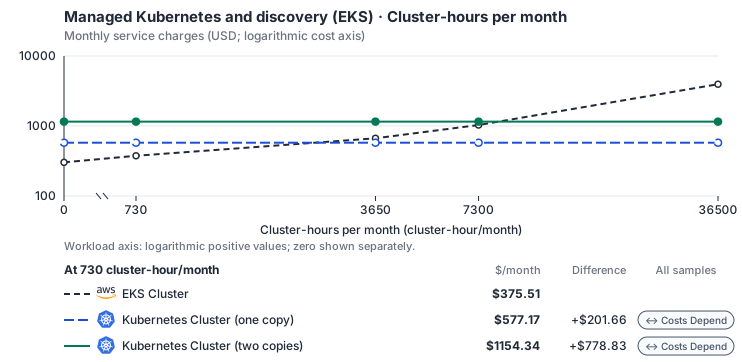
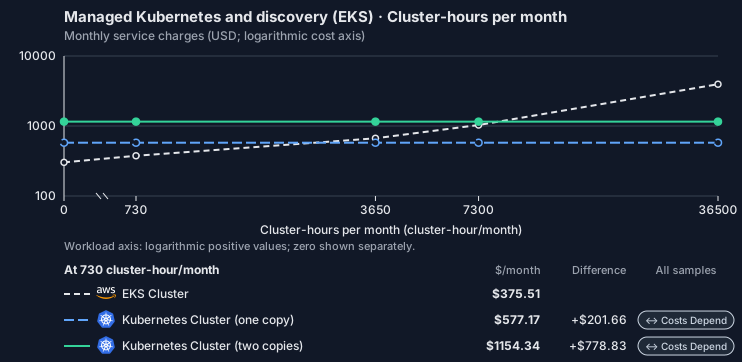
Estimated allocation, not benchmark calibrated: sized at 16 vCPU, 64 GiB memory and 100 GiB SSD at every sample.
Curve assumptions
- Only this native meter varies; all other source usage and translation assumptions retain the displayed defaults. Other native meters and workload assumptions retain their explicitly displayed default quantities. Workload translation and capacity assumptions are not benchmark measurements.
- Native monthly usage priced at the cited provider list prices; listed target allowances apply where present, excluding invoice credits, taxes and negotiated discounts. Rates as of 2026-10-22: us-east-1 → us-central1, USD/month.
- Source prices are reference charges, not an invoice. Target lines cover selected service usage/configuration only; adapter hosting and Tensor9 fees are excluded.
- Samples of explicit prices are not performance measurements or capacity qualification. No interpolation or break-even guarantee is implied.
- Variant assumptions show the first axis sample; any axis-dependent configuration is described by this curve’s workload note.
- Rates are cited provider list prices, editable for discounts, commitments or another region. Workload translation and capacity coefficients remain editable planning assumptions, not benchmark measurements or a commercial quote.
- Default-zero rates are explicit assumptions, not evidence that the deployed service or resource is free.
- Provisioned-unit minimums use an editable approximate allocation floor. Modeled target service cost is max(usage/allocation, minimum), with billable network, durable staging and dependent sinks added separately; actual RU/TU sizing, scaling increments and throughput remain unqualified.
- Durable staging is priced once: provisioned targets include adapter state in their selected allocation; native targets add a separate staging allocation when required. Adapter hosting is a separate allocation and must exclude resources already priced as staging, workers or target capacity.
- A declared adapter mapping and cost model do not establish implementation availability or service equivalence.
- This is a declared directed mapping; a planning estimate does not establish deployment or request-serving support.
- Native/deployment comparison scope: Applications use the target cluster’s Kubernetes API directly. This mapping does not expose an EKS management adapter endpoint. Kubernetes API availability and pod scheduling are not measured as service-adapter request latency.
- Origin unit prices are cited provider list prices; capacity coefficients and translation assumptions are editable authored planning guesses, not measured capacity or a provider quote.
- Management requests do not reveal resource allocation or workload traffic. Provisioned resources and traffic are independent inputs.
- The discovery adapter does not itself own or provision the cluster. Allocate existing cluster capacity once across adapters.
- Self-hosted target: Kubernetes (Apache-2.0, https://github.com/kubernetes/kubernetes/blob/master/LICENSE); the host cloud’s managed control plane is a separate per-cluster-hour allocation. Selected CPU, RAM and physical disk allocation grow with workload; no per-operation price is assumed. No vendor charge: the target runs on the customer’s Kubernetes nodes, so CPU, RAM and disk bill at the Kubernetes node reference rates, Compute Engine N2 in us-central1 (USD 0.031611/vCPU-hour, 0.004237/GiB-hour) with pd-balanced disk (0.10/GiB-month) and Premium Tier egress. The cost-optimized E2 series lists 0.02181159/vCPU-hour and 0.00292353/GiB-hour; AWS m6i/r6i and Azure D2s v5/E2s v5 both decompose to 0.033/vCPU-hour and 0.00375/GiB-hour. Requested CPU and RAM are billed; node bin-packing waste, system reservations and the cluster control-plane fee are not.
- Row-store throughput (capacityOpsPerVcpuSecond, default 1500) is measured-by-tensor9 as a lower bound: the DynamoDB adapter on Cloud SQL db-custom-2-7680 (2 vCPU, PostgreSQL 16, us-west1) served 2,974 ops/s of YCSB-A at 16 threads without recorded saturation (src/main/kotlin/t9/prime/equiv/generated/eval/CloudsqlPostgresqlYcsbAT16GoYcsbV1_0_0.kt). Published CPU-bound pgbench reaches 3,101 read-write transactions and 20,289 point reads per vCPU-second (AWS z1d.2xlarge, PostgreSQL 14.5), so actual capacity is likely higher. Reads and writes share one coefficient: at the same adapter version, read-only YCSB-C was not faster than 50%-update YCSB-A.
- Log-broker throughput (capacityStreamMiBPerVcpuSecond 20 at 0.5 utilization, 4 GiB RAM per vCPU) is provider-documented by Google Managed Service for Apache Kafka sizing (https://docs.cloud.google.com/managed-service-for-apache-kafka/docs/plan-cluster-size): write-equivalent bytes are replicated writes plus a quarter of reads. Producer batches below 10 KB lower per-CPU throughput; that penalty is not modeled.
- Disk utilization 0.8 is provider-documented headroom below Cloud SQL automatic storage increase, which triggers near 91-95% full (https://docs.cloud.google.com/sql/docs/postgres/instance-settings). The 20 GiB reserve exceeds PostgreSQL’s 1 GB default max_wal_size; the remainder of that reserve is unmeasured.
- CPU tiers double from 2 vCPUs to the target’s largest node at 4 GiB per vCPU; each target’s documented largest node bounds CPU, RAM, RAM per vCPU and disk, and the durable staging database uses Cloud SQL Enterprise (96 vCPU, 6.5 GiB per vCPU, 624 GiB, 64 TiB). Targets billed per capacity unit or throughput unit are sized by their backend instead.
- No public evidence: peak/mean work (2) and the RAM working-set fraction (0.1). Proposed measurements: the p99 one-minute rate over the monthly mean from customer CloudWatch metrics; the buffer hit ratio while stepping RAM under a fixed YCSB-B load.
- Node bounds: Planning worker node of 32 vCPUs and 128 GiB, not a provider maximum; the cluster adds nodes up to a 1,000-node planning bound. Requested CPU and RAM bill linearly, so the node size changes only rounding.
- Stored GiB already includes the origin family’s physical footprint assumptions; no second storage amplification is applied.
- The workload family already selected resource-hours; the throughput coefficient is not applied again.
- Copies and allocation fractions change cost only; they do not increase modeled primary capacity.
- AWS Price List API, AmazonEKS offer: https://pricing.us-east-1.amazonaws.com/offers/v1.0/aws/AmazonEKS/current/us-east-1/index.json
- AWS Price List API, AmazonEC2 offer (CSV): https://pricing.us-east-1.amazonaws.com/offers/v1.0/aws/AmazonEC2/current/us-east-1/index.csv
- Amazon EKS pricing: https://aws.amazon.com/eks/pricing/
- Compute Engine general-purpose machine pricing: https://cloud.google.com/products/compute/pricing/general-purpose
- Disk and image pricing: https://cloud.google.com/compute/disks-image-pricing
- Network pricing: https://cloud.google.com/vpc/network-pricing
- Worker disks, GPUs, ingress, network traffic, extended support and observability.
- Taxes, discounts, credits and free-tier allowances not explicitly listed by this model.
- Unmodeled dependent services, task execution and operations outside the selected workload family.
plan-ce2b3cb77636f0d9f4da7786e5bf9ce9779b8216 / 2026-10-22.planning.2. Curve: workload-2.
Sources: AWS Price List API, AmazonEKS offer, AWS Price List API, AmazonEC2 offer (CSV), Amazon EKS pricing, Compute Engine general-purpose machine pricing, Disk and image pricing, Network pricing.
Managed Kubernetes and discovery (EKS) → Kubernetes Cluster: Authored native-usage planning example. Native monthly usage priced at the cited provider list prices; listed target allowances apply where present, excluding invoice credits, taxes and negotiated discounts.
Scenario source region: us-east-1. Scenario target region: us-central1. Currency: USD.
Estimated allocation, not benchmark calibrated: sized at 16 vCPU, 64 GiB memory and 100 GiB SSD for this scenario.
Unestimated components: Adapter hosting, Tensor9 fees. A modeled adapted total and savings require these costs.
Cost scope: Modeled target native service and explicitly modeled state allocation; hosting and Tensor9 fees only when supplied.
Excluded costs and workload features:
- Worker disks, GPUs, ingress, network traffic, extended support and observability.
- Taxes, discounts, credits and free-tier allowances not explicitly listed by this model.
- Unmodeled dependent services, task execution and operations outside the selected workload family.
- Translated reads: 0 operations.
- Translated writes: 0 operations.
- Translated resident physical data: 0 GiB-month.
- Native provider operations: 1,000,000 operations.
- Published payload: 0 GiB.
- Delivered payload: 0 GiB.
- Allocated execution CPU: 6,716 vCPU-hour.
- Allocated execution RAM: 26,864 GiB-hour.
- Independent resource allocation: 730 resource-hour.
- Independent inventory: 0 resource-month.
- Input tokens: 0 tokens.
- Output tokens: 0 tokens.
- Billable network: 0 GiB.
- Dependent object sink retained data: 0 GiB-month.
- Dependent object sink writes: 0 writes.
- Rates are cited provider list prices, editable for discounts, commitments or another region. Workload translation and capacity coefficients remain editable planning assumptions, not benchmark measurements or a commercial quote.
- Default-zero rates are explicit assumptions, not evidence that the deployed service or resource is free.
- Provisioned-unit minimums use an editable approximate allocation floor. Modeled target service cost is max(usage/allocation, minimum), with billable network, durable staging and dependent sinks added separately; actual RU/TU sizing, scaling increments and throughput remain unqualified.
- Durable staging is priced once: provisioned targets include adapter state in their selected allocation; native targets add a separate staging allocation when required. Adapter hosting is a separate allocation and must exclude resources already priced as staging, workers or target capacity.
- A declared adapter mapping and cost model do not establish implementation availability or service equivalence.
- This is a declared directed mapping; a planning estimate does not establish deployment or request-serving support.
- Native/deployment comparison scope: Applications use the target cluster’s Kubernetes API directly. This mapping does not expose an EKS management adapter endpoint. Kubernetes API availability and pod scheduling are not measured as service-adapter request latency.
- Origin unit prices are cited provider list prices; capacity coefficients and translation assumptions are editable authored planning guesses, not measured capacity or a provider quote.
- Management requests do not reveal resource allocation or workload traffic. Provisioned resources and traffic are independent inputs.
- The discovery adapter does not itself own or provision the cluster. Allocate existing cluster capacity once across adapters.
- Self-hosted target: Kubernetes (Apache-2.0, https://github.com/kubernetes/kubernetes/blob/master/LICENSE); the host cloud’s managed control plane is a separate per-cluster-hour allocation. Selected CPU, RAM and physical disk allocation grow with workload; no per-operation price is assumed. No vendor charge: the target runs on the customer’s Kubernetes nodes, so CPU, RAM and disk bill at the Kubernetes node reference rates, Compute Engine N2 in us-central1 (USD 0.031611/vCPU-hour, 0.004237/GiB-hour) with pd-balanced disk (0.10/GiB-month) and Premium Tier egress. The cost-optimized E2 series lists 0.02181159/vCPU-hour and 0.00292353/GiB-hour; AWS m6i/r6i and Azure D2s v5/E2s v5 both decompose to 0.033/vCPU-hour and 0.00375/GiB-hour. Requested CPU and RAM are billed; node bin-packing waste, system reservations and the cluster control-plane fee are not.
- Row-store throughput (capacityOpsPerVcpuSecond, default 1500) is measured-by-tensor9 as a lower bound: the DynamoDB adapter on Cloud SQL db-custom-2-7680 (2 vCPU, PostgreSQL 16, us-west1) served 2,974 ops/s of YCSB-A at 16 threads without recorded saturation (src/main/kotlin/t9/prime/equiv/generated/eval/CloudsqlPostgresqlYcsbAT16GoYcsbV1_0_0.kt). Published CPU-bound pgbench reaches 3,101 read-write transactions and 20,289 point reads per vCPU-second (AWS z1d.2xlarge, PostgreSQL 14.5), so actual capacity is likely higher. Reads and writes share one coefficient: at the same adapter version, read-only YCSB-C was not faster than 50%-update YCSB-A.
- Log-broker throughput (capacityStreamMiBPerVcpuSecond 20 at 0.5 utilization, 4 GiB RAM per vCPU) is provider-documented by Google Managed Service for Apache Kafka sizing (https://docs.cloud.google.com/managed-service-for-apache-kafka/docs/plan-cluster-size): write-equivalent bytes are replicated writes plus a quarter of reads. Producer batches below 10 KB lower per-CPU throughput; that penalty is not modeled.
- Disk utilization 0.8 is provider-documented headroom below Cloud SQL automatic storage increase, which triggers near 91-95% full (https://docs.cloud.google.com/sql/docs/postgres/instance-settings). The 20 GiB reserve exceeds PostgreSQL’s 1 GB default max_wal_size; the remainder of that reserve is unmeasured.
- CPU tiers double from 2 vCPUs to the target’s largest node at 4 GiB per vCPU; each target’s documented largest node bounds CPU, RAM, RAM per vCPU and disk, and the durable staging database uses Cloud SQL Enterprise (96 vCPU, 6.5 GiB per vCPU, 624 GiB, 64 TiB). Targets billed per capacity unit or throughput unit are sized by their backend instead.
- No public evidence: peak/mean work (2) and the RAM working-set fraction (0.1). Proposed measurements: the p99 one-minute rate over the monthly mean from customer CloudWatch metrics; the buffer hit ratio while stepping RAM under a fixed YCSB-B load.
- Node bounds: Planning worker node of 32 vCPUs and 128 GiB, not a provider maximum; the cluster adds nodes up to a 1,000-node planning bound. Requested CPU and RAM bill linearly, so the node size changes only rounding.
- Stored GiB already includes the origin family’s physical footprint assumptions; no second storage amplification is applied.
- The workload family already selected resource-hours; the throughput coefficient is not applied again.
- Copies and allocation fractions change cost only; they do not increase modeled primary capacity.
plan-ce2b3cb77636f0d9f4da7786e5bf9ce9779b8216 / 2026-10-22.planning.2. Scenario: planning-example.
Sources: AWS Price List API, AmazonEKS offer, AWS Price List API, AmazonEC2 offer (CSV), Amazon EKS pricing, Compute Engine general-purpose machine pricing, Disk and image pricing, Network pricing.
Costs
Estimated monthly service charges for each backend with a published cost model, at one sampled workload from that model’s cost curve. Adapter hosting and Tensor9 fees are excluded. How Tensor9 estimates costs explains the method, what the estimates include and how to read their qualifications.
Difference means backend minus origin; a positive difference means the backend costs more. Workloads and target configurations differ by model, so compare each row’s difference at its stated workload rather than charges across rows.
Cost curves across workload sizes, with every assumption and exclusion: EKS Cluster costs.
Service level agreements
Listed terms cover requests sent through this service adapter. They do not cover direct connections to the target service or replace the cloud provider’s own SLA. Each origin-to-target pair has its own terms or an explicit pending status. See the SLA tables, measurement rules, and scaling conditions.EKS Cluster to AKS Cluster
Adapter-added latency. A + prefix marks time added by the adapter, not the total time your application waits. Total request time includes adapter processing, backend service time and network time. The backend provider’s SLA applies independently. Only separately measured target-service wait may be subtracted, and only when your agreement permits it; internal metadata, coordination and retry processing still count. For one request, 12 ms of adapter processing plus 90 ms waiting for the backend means at least 102 ms total. This example does not add monthly p99 values.
What Tensor9 covers. These service levels cover the adapter between the origin API and target API. They do not replace the target provider’s SLA.
How latency is counted. Adapter work, including metadata and coordination, counts. Only separately measured permitted target waits are excluded.
Which terms apply. Your signed agreement names the covered operations, workload limits, remedies, and final service levels for your deployment.
What this adapter does
Cluster, workload and identity calls validate AWS-shaped intent, record the desired resource and reconcile native objects on azure::1.0.0::aks::cluster. In-cluster Kubernetes traffic and application packet flow are not proxied by this control-plane estimate. Provider provisioning and image pull time are readiness phases; adapter validation, durable admission and status conversion remain covered.How the latency targets were chosen
Cluster, workload and identity reads: +8 ms monthly p99 (adapter-added).DescribeCluster, ListClusters. Indexed state read and AWS response mapping.
Cluster and workload desired-state admission: +20 ms monthly p99 (adapter-added). CreateCluster, CreateNodegroup, DeleteCluster, DeleteNodegroup. Validation, durable generation commit and reconciliation scheduling.
Your signed agreement sets the terms for your deployment. A target does not add an operation or option that the compatibility tables mark unavailable.
What counts toward latency
For a request-response row, measure from the agreed ingress boundary to dispatch of the complete response. A row that explicitly names a first response chunk ends at that chunk; its number does not cover the rest of the stream. A long-poll row names the intentional wait and when adapter delay starts. Include parsing, authorization, admission, translation, serialization, adapter-owned storage and coordination, retries and response handling. Subtract only separately measured target-workload waits and external network segments allowed by the measurement rules. The adapter’s own response handling and dispatch remain covered. A database used for adapter metadata is still adapter work, even if a cloud provider hosts it. For concurrent calls, exclude the union of permitted wait intervals, not the sum of overlapping spans. Calculate each request’s adapter duration first, then the monthly p99. Do not subtract one service’s p99 from another’s. Known adapter timeouts are over-budget samples; failed or incomplete requests cannot disappear to improve the percentile. Missing measurements do not become zero latency. An SDK call span alone does not prove how much of its duration can be excluded.Endpoint reachability and request failures
The endpoint-reachability target measures adapter health checks. Correctly forwarding a target quota or permission error is different from producing that error because the adapter sent the wrong request. Adapter-caused failures remain Tensor9’s responsibility even when the target is healthy. Correctness and data-integrity requirements apply to every supported request. Endpoint reachability does not measure request correctness or grant an allowance for incorrect results.Scaling and target-service capacity
Independent clusters, services, tasks and identity associations reconcile concurrently. Mutations for one object serialize by generation, list calls are bounded pages, and status polling must not starve writes. Qualification fixes object count, manifest size, container count, tag count and concurrent reconcilers. Tell Tensor9 the expected steady rate, bursts, concurrency, payload sizes and operation mix. Tensor9 sizes and scales the adapter for the agreed load; you choose and monitor the target service’s capacity with Tensor9’s help. A latency budget is not a requests-per-second rating. Larger requests and higher rates need explicit terms, not silent inheritance of a small-request SLA.Data and behavior guarantees
Accepted desired state is durable and generation ordered. Workload identity binds only the intended service account/role, secrets are not emitted into public fields, and observed status never claims readiness before the target reports it. Unsupported scheduling or networking modes fail before partial creation.Example and diagnosis
CreateCluster records a bounded cluster specification and returns its stable identity. Native provisioning may continue after the adapter response. DescribeCluster is a bounded read of desired plus observed state and must not report ACTIVE until the target control plane is actually ready. Usetensor9 explain and the documented explain headers to understand the selected adapter and its behavior. Correlate available request diagnostics with the target provider’s latency, throttling and capacity metrics. An explain report helps diagnose a request; it is not by itself a qualified SLA timing measurement. Share the operation, request shape, timestamps and request identifiers with support, with credentials and customer payloads removed.
EKS Cluster to GKE Cluster
Adapter-added latency. A + prefix marks time added by the adapter, not the total time your application waits. Total request time includes adapter processing, backend service time and network time. The backend provider’s SLA applies independently. Only separately measured target-service wait may be subtracted, and only when your agreement permits it; internal metadata, coordination and retry processing still count. For one request, 12 ms of adapter processing plus 90 ms waiting for the backend means at least 102 ms total. This example does not add monthly p99 values.
What Tensor9 covers. These service levels cover the adapter between the origin API and target API. They do not replace the target provider’s SLA.
How latency is counted. Adapter work, including metadata and coordination, counts. Only separately measured permitted target waits are excluded.
Which terms apply. Your signed agreement names the covered operations, workload limits, remedies, and final service levels for your deployment.
What this adapter does
Cluster, workload and identity calls validate AWS-shaped intent, record the desired resource and reconcile native objects on google::1.0.0::gke::cluster. In-cluster Kubernetes traffic and application packet flow are not proxied by this control-plane estimate. Provider provisioning and image pull time are readiness phases; adapter validation, durable admission and status conversion remain covered.How the latency targets were chosen
Cluster, workload and identity reads: +8 ms monthly p99 (adapter-added).DescribeCluster, DescribeNodegroup, ListClusters, ListNodegroups. Indexed state read and AWS response mapping.
Cluster and workload desired-state admission: +20 ms monthly p99 (adapter-added). CreateCluster, DeleteCluster, UpdateClusterVersion. Validation, durable generation commit and reconciliation scheduling.
Your signed agreement sets the terms for your deployment. A target does not add an operation or option that the compatibility tables mark unavailable.
What counts toward latency
For a request-response row, measure from the agreed ingress boundary to dispatch of the complete response. A row that explicitly names a first response chunk ends at that chunk; its number does not cover the rest of the stream. A long-poll row names the intentional wait and when adapter delay starts. Include parsing, authorization, admission, translation, serialization, adapter-owned storage and coordination, retries and response handling. Subtract only separately measured target-workload waits and external network segments allowed by the measurement rules. The adapter’s own response handling and dispatch remain covered. A database used for adapter metadata is still adapter work, even if a cloud provider hosts it. For concurrent calls, exclude the union of permitted wait intervals, not the sum of overlapping spans. Calculate each request’s adapter duration first, then the monthly p99. Do not subtract one service’s p99 from another’s. Known adapter timeouts are over-budget samples; failed or incomplete requests cannot disappear to improve the percentile. Missing measurements do not become zero latency. An SDK call span alone does not prove how much of its duration can be excluded.Endpoint reachability and request failures
The endpoint-reachability target measures adapter health checks. Correctly forwarding a target quota or permission error is different from producing that error because the adapter sent the wrong request. Adapter-caused failures remain Tensor9’s responsibility even when the target is healthy. Correctness and data-integrity requirements apply to every supported request. Endpoint reachability does not measure request correctness or grant an allowance for incorrect results.Scaling and target-service capacity
Independent clusters, services, tasks and identity associations reconcile concurrently. Mutations for one object serialize by generation, list calls are bounded pages, and status polling must not starve writes. Qualification fixes object count, manifest size, container count, tag count and concurrent reconcilers. Tell Tensor9 the expected steady rate, bursts, concurrency, payload sizes and operation mix. Tensor9 sizes and scales the adapter for the agreed load; you choose and monitor the target service’s capacity with Tensor9’s help. A latency budget is not a requests-per-second rating. Larger requests and higher rates need explicit terms, not silent inheritance of a small-request SLA.Data and behavior guarantees
Accepted desired state is durable and generation ordered. Workload identity binds only the intended service account/role, secrets are not emitted into public fields, and observed status never claims readiness before the target reports it. Unsupported scheduling or networking modes fail before partial creation.Example and diagnosis
CreateCluster records a bounded cluster specification and returns its stable identity. Native provisioning may continue after the adapter response. DescribeCluster is a bounded read of desired plus observed state and must not report ACTIVE until the target control plane is actually ready. Usetensor9 explain and the documented explain headers to understand the selected adapter and its behavior. Correlate available request diagnostics with the target provider’s latency, throttling and capacity metrics. An explain report helps diagnose a request; it is not by itself a qualified SLA timing measurement. Share the operation, request shape, timestamps and request identifiers with support, with credentials and customer payloads removed.
EKS Cluster to Kubernetes Cluster
SLA status: Not applicable Applications use the target cluster’s Kubernetes API directly. This mapping does not expose an EKS management adapter endpoint. Kubernetes API availability and pod scheduling are not measured as service-adapter request latency.EKS Cluster to OKE Cluster
Adapter-added latency. A + prefix marks time added by the adapter, not the total time your application waits. Total request time includes adapter processing, backend service time and network time. The backend provider’s SLA applies independently. Only separately measured target-service wait may be subtracted, and only when your agreement permits it; internal metadata, coordination and retry processing still count. For one request, 12 ms of adapter processing plus 90 ms waiting for the backend means at least 102 ms total. This example does not add monthly p99 values.
What Tensor9 covers. These service levels cover the adapter between the origin API and target API. They do not replace the target provider’s SLA.
How latency is counted. Adapter work, including metadata and coordination, counts. Only separately measured permitted target waits are excluded.
Which terms apply. Your signed agreement names the covered operations, workload limits, remedies, and final service levels for your deployment.
What this adapter does
Cluster, workload and identity calls validate AWS-shaped intent, record the desired resource and reconcile native objects on oci::1.0.0::oke::cluster. In-cluster Kubernetes traffic and application packet flow are not proxied by this control-plane estimate. Provider provisioning and image pull time are readiness phases; adapter validation, durable admission and status conversion remain covered.How the latency targets were chosen
Cluster, workload and identity reads: +8 ms monthly p99 (adapter-added).DescribeCluster, ListClusters. Indexed state read and AWS response mapping.
Cluster and workload desired-state admission: +20 ms monthly p99 (adapter-added). CreateCluster, CreateNodegroup, DeleteCluster, DeleteNodegroup, UpdateNodegroupConfig. Validation, durable generation commit and reconciliation scheduling.
Your signed agreement sets the terms for your deployment. A target does not add an operation or option that the compatibility tables mark unavailable.
What counts toward latency
For a request-response row, measure from the agreed ingress boundary to dispatch of the complete response. A row that explicitly names a first response chunk ends at that chunk; its number does not cover the rest of the stream. A long-poll row names the intentional wait and when adapter delay starts. Include parsing, authorization, admission, translation, serialization, adapter-owned storage and coordination, retries and response handling. Subtract only separately measured target-workload waits and external network segments allowed by the measurement rules. The adapter’s own response handling and dispatch remain covered. A database used for adapter metadata is still adapter work, even if a cloud provider hosts it. For concurrent calls, exclude the union of permitted wait intervals, not the sum of overlapping spans. Calculate each request’s adapter duration first, then the monthly p99. Do not subtract one service’s p99 from another’s. Known adapter timeouts are over-budget samples; failed or incomplete requests cannot disappear to improve the percentile. Missing measurements do not become zero latency. An SDK call span alone does not prove how much of its duration can be excluded.Endpoint reachability and request failures
The endpoint-reachability target measures adapter health checks. Correctly forwarding a target quota or permission error is different from producing that error because the adapter sent the wrong request. Adapter-caused failures remain Tensor9’s responsibility even when the target is healthy. Correctness and data-integrity requirements apply to every supported request. Endpoint reachability does not measure request correctness or grant an allowance for incorrect results.Scaling and target-service capacity
Independent clusters, services, tasks and identity associations reconcile concurrently. Mutations for one object serialize by generation, list calls are bounded pages, and status polling must not starve writes. Qualification fixes object count, manifest size, container count, tag count and concurrent reconcilers. Tell Tensor9 the expected steady rate, bursts, concurrency, payload sizes and operation mix. Tensor9 sizes and scales the adapter for the agreed load; you choose and monitor the target service’s capacity with Tensor9’s help. A latency budget is not a requests-per-second rating. Larger requests and higher rates need explicit terms, not silent inheritance of a small-request SLA.Data and behavior guarantees
Accepted desired state is durable and generation ordered. Workload identity binds only the intended service account/role, secrets are not emitted into public fields, and observed status never claims readiness before the target reports it. Unsupported scheduling or networking modes fail before partial creation.Example and diagnosis
CreateCluster records a bounded cluster specification and returns its stable identity. Native provisioning may continue after the adapter response. DescribeCluster is a bounded read of desired plus observed state and must not report ACTIVE until the target control plane is actually ready. Usetensor9 explain and the documented explain headers to understand the selected adapter and its behavior. Correlate available request diagnostics with the target provider’s latency, throttling and capacity metrics. An explain report helps diagnose a request; it is not by itself a qualified SLA timing measurement. Share the operation, request shape, timestamps and request identifiers with support, with credentials and customer payloads removed.