

What is an appliance?
Each appliance is a complete, isolated system that runs in a customer’s environment. Unlike traditional cloud deployments where all customers share common infrastructure, each Tensor9 appliance is:- Customer-hosted: The appliance runs entirely within the customer’s cloud account or private infrastructure - their “environment”
- Isolated: Each customer’s appliance is completely separated from other customers’ appliances
- Self-contained: All application data and components stay within the appliance and never leave the customer’s environment
- Abstracted: Customers interact with the appliance as a cohesive unit, not individual infrastructure components
- Mirrored: The appliance mirrors your origin stack configuration, adapted to the customer’s specific form factor
All application data stays in the customer’s environment and never leaves their infrastructure. This provides complete data sovereignty and meets strict compliance requirements.
Environment vs appliance
It’s important to understand the distinction:- Environment: The customer’s infrastructure - their cloud account (AWS, Azure, GCP), Kubernetes cluster, or data center. This is what the customer owns and controls.
- Appliance: The Tensor9-provided system that runs within that environment. This is what you (the vendor) deploy into the customer’s infrastructure.
- App: The software that runs on the appliance. This is what gets installed.
Today, Tensor9 appliances come bundled with your app pre-installed. In the future, customers will be able to provision empty appliances and choose which apps to install - similar to an app store model. The appliance abstraction is designed to support both models.
Why appliances?
Appliances solve a critical challenge for software vendors: how to deliver modern, cloud-native applications to customers who require data sovereignty, regulatory compliance, or disconnected environments. With Tensor9 appliances, you can:- Meet compliance requirements: Deploy into regulated industries (healthcare, finance, government) that mandate data residency
- Support multi-cloud: Deliver your application consistently across AWS, Google Cloud, Azure, Digital Ocean, or private Kubernetes
- Maintain control: Observe and operate customer appliances remotely through secure, audited channels
- Scale efficiently: Avoid the engineering overhead of maintaining multiple product versions for different customer environments
Appliance types
Tensor9 supports two types of appliances: customer appliances and test appliances.Customer appliances
Customer appliances are production environments that run your application for end customers. These appliances are:- Owned and controlled by the customer
- Managed through your control plane with appropriate customer approval workflows
- Long-lived and follow a defined lifecycle (Setup → Live → Retiring → Retired)
- Configured with customer-specific form factors, regions, and security requirements
Lifecycle
Every customer appliance progresses through four lifecycle states:Test appliances
Test appliances are automatically managed environments used for testing and development. These appliances allow you to:- Quickly spin up a temporary environment to test new releases
- Validate deployments before rolling out to production customer appliances
- Experiment with different form factors and configurations
Appliance architecture
Each appliance consists of several key components: a controller, a runtime environment, and artifact storage.Controller
The controller is Tensor9-provided software that runs inside the appliance and acts as the bridge between your control plane and the customer’s infrastructure. The controller:- Receives deployment instructions from your control plane
- Executes infrastructure-as-code deployments (Terraform, Kubernetes, etc.)
- Collects telemetry (logs, metrics, traces) and forwards it to your control plane
- Handles operations commands securely with proper authentication and audit logging
Runtime environment
The runtime environment is where your application code actually runs. This includes:- Compute resources (containers, virtual machines, serverless functions)
- Data stores (databases, caches, object storage)
- Networking (load balancers, service meshes, DNS)
- Any managed services specified by the form factor
Artifact storage
Each appliance includes dedicated storage for:- Container images and other deployment artifacts
- Infrastructure-as-code state files
- Configuration and secrets specific to this appliance
- Backup and disaster recovery data
Connectivity modes
Appliances support different connectivity modes to accommodate various customer requirements:Even connected appliances never open ingress ports to allow inbound requests from your control plane. The communication direction is always outbound from an appliance to your control plane. This means you don’t have to ask your customers to open ingress ports, which is often a logistically challenging requirement.
Creating a customer appliance
Customer appliances are created through a self-service signup flow. As a vendor, you generate a signup link and send it to your customer:Example: Generating a signup link
Customer signup flow
When a customer appliance is created, Tensor9 orchestrates the following process:1
Generate signup link
You generate a signup link using the
tensor9 app signup-link command and send it to your customer. The customer uses this link to sign up and create their appliance through the Tensor9 portal.2
Customer provisions appliance
Through the signup portal, your customer selects:
- The form factor (cloud provider, connectivity, managed services)
- The cloud region where the appliance will run
- Any specific configuration options
3
Provision infrastructure
The setup script provisions the foundational infrastructure for the appliance in the customer’s environment, including:
- A dedicated VPC or namespace (depending on the form factor)
- Networking components (load balancers, DNS, routing)
- Storage for runtime artifacts and configuration
- The Tensor9 controller that manages the appliance
4
Establish connectivity
The appliance establishes a secure, outbound-only connection to your control plane. This connection:
- Uses mutual TLS authentication (see Connection Security)
- Allows your control plane to send deployment instructions
- Enables telemetry to flow from the appliance to your observability sink
- Provides the foundation for operations endpoints

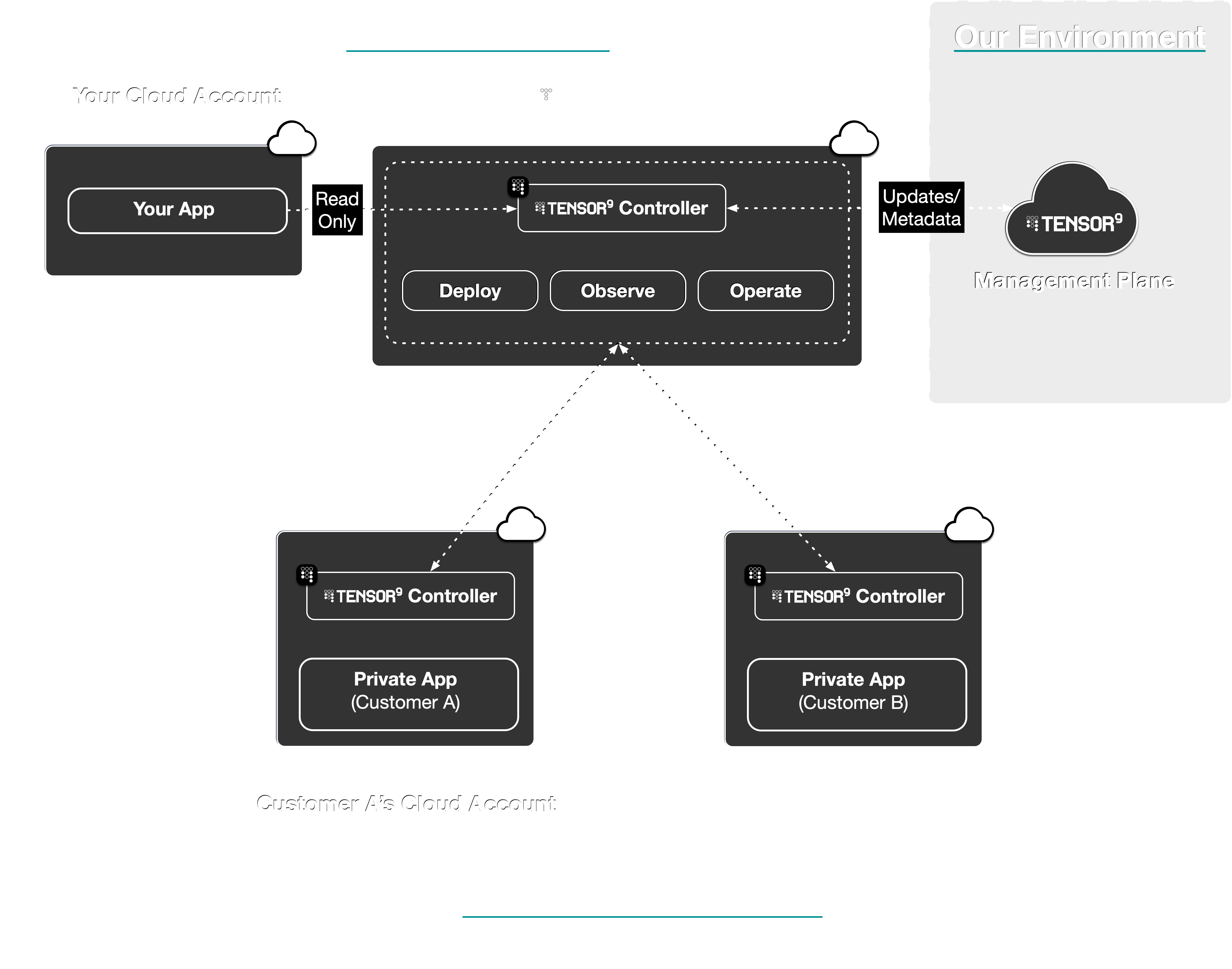
Monitoring appliance setup and status
You can view the status of all your appliances using thetensor9 report command or the Vendor Portal. The Vendor Portal shows your appliances on the main dashboard with real-time health status.
Creating test appliances
Test appliances can be created directly using the CLI:Example: Creating a test appliance
Retiring test appliances
When you no longer need a test appliance, you can retire it:Appliances and installs
An appliance is the system, while an install is a specific app running on that appliance. The relationship is:- One appliance hosts exactly one install (current limitation)
- One install belongs to exactly one appliance
- Each install represents a specific app deployed onto a specific appliance
Multi-app support (multiple installs per appliance) is planned for a future release. When available, a single appliance will be able to host multiple apps, similar to how a single device can run multiple applications.
Appliances and form factors
The form factor defines the characteristics of the customer’s environment where the appliance will be deployed. When you create an appliance, you specify its form factor, which determines:- Cloud provider: AWS, Google Cloud, Azure, Digital Ocean, or private Kubernetes
- Connectivity: Connected or disconnected
- Managed services: Which managed services are available (e.g., AWS RDS, Google Cloud SQL)
- Security requirements: FIPS compliance, CMMC compliance, etc.
- Compute requirements: Minimum CPU, memory, storage
Security and isolation
Appliances are designed with security and isolation as core principles:Network isolation
- The appliance’s Tensor9 controller runs in a dedicated VPC, Kubernetes namespace, or set of virtual machines (depending on the appliance’s environment)
- The software defined network mirrors the origin stack’s network topology as closely as possible
- Appliances communicate with your control plane through secure, authenticated channels
Data isolation
- All application data remains within the appliance (and thus within the customer’s control)
- Telemetry sent to your control plane is limited to logs, metrics, and traces - no customer business data
- Secrets and credentials are stored encrypted and scoped to the specific appliance
Access control
- All operations commands require customer approval (configurable by the customer)
- Every action is logged and auditable
- Your control plane and each appliance authenticate each other with mutual TLS (see Connection Security)
- Temporary access (e.g., JIT IAM roles) is granted only with explicit customer approval
Observability
Once your appliance is live and your app is deployed, you can observe its state, performance, and usage through telemetry synchronized back to your control plane. Tensor9 automatically configures the appliance to forward:- Logs: Application logs from containers, VMs, and serverless functions
- Metrics: System metrics (CPU, memory, disk) and custom application metrics
- Traces: Distributed traces for request flow analysis
Operations
Your control plane provides operational endpoints that allow you to perform day-2 operations on appliances:- Remote shell access: Execute commands inside the appliance for debugging
- Configuration management: Update secrets, environment variables, and configuration
- Service restarts: Restart services or trigger state changes
- Database migrations: Run one-off scripts or database migrations
Best practices
Naming conventions
Naming conventions
Use clear, descriptive names for appliances that include:
- Customer identifier
- Environment type (production, staging, etc.)
- Optional region or purpose
acme-corp-productionbigco-stagingmegacorp-emea-compliance
Testing before production
Testing before production
Always create and test releases in test appliances before deploying to customer appliances:
- Create a test appliance for your target form factor
- Deploy and validate your release in the test appliance
- Once validated, deploy the same release to customer appliances
Monitoring appliance health
Monitoring appliance health
Regularly monitor the health of your appliances using
tensor9 report or the Vendor Portal dashboard. Pay attention to:- Status: Ensure appliances are “Live” and not stuck in “Setup” or “Starting up”
- Deployment: Check that releases show “Deployed” status
- Hardware: Monitor uptime and capacity machines
- Blocking Issues: Address any blocking issues in prepped releases before deployment
Next steps
Now that you understand appliances, explore these related topics:- Deployments: Learn how to deploy to appliances
- Observability: Monitor your appliances
- Operations: Operate your appliances remotely